
VC7020 - Vacuum Cleaner Duronic - Free user manual and instructions
Find the device manual for free VC7020 Duronic in PDF.


| Product type | Upright Vacuum Cleaner |
| Model | VC7020 |
| Brand | Duronic |
| Dimensions (L x W x H) | 30 x 25 x 115 cm |
| Weight | 5.2 kg |
| Power supply | 220-240V ~ 50/60Hz |
| Power consumption | 1200 W |
| Suction power | 300 Air Watts |
| Dust capacity | 2.0 L |
| Filtration system | HEPA H13 |
| Noise level | 72 dB(A) |
| Cord length | 6 m |
| Operating radius | 8 m |
| Main brush type | Motorized roller brush |
| Attachments included | Crevice tool, dusting brush, upholstery tool |
| Adjustable suction | Yes, electronic slider |
| Dust bag indicator | No (bagless) |
| Filter cleaning | Washable HEPA filter |
| Maintenance interval | Empty dust container after each use; clean filter monthly |
| Safety features | Overheat protection, automatic shut-off |
| Spare parts availability | Filters, brush roller, belts available online |
| Warranty | 2 years |
Frequently Asked Questions - VC7020 Duronic
User questions about VC7020 Duronic
0 question about this device. Answer the ones you know or ask your own.
Ask a new question about this device
Download the instructions for your Vacuum Cleaner in PDF format for free! Find your manual VC7020 - Duronic and take your electronic device back in hand. On this page are published all the documents necessary for the use of your device. VC7020 by Duronic.
USER MANUAL VC7020 Duronic
natural_image
Cutaway view of a black and red compact vacuum cleaner with visible internal components (no text or symbols)VC7020 Vacuum Cleaner

duronic.com

duronic

@duronicmedia

Duronic

@duronicmedia
DURONIC
Contents
Features and Specifications 4
Safety Instructions 5
Assembling the vacuum cleaner 7
How to use 7
Using the Attachments 8
Cleaning and Maintenance 9
Emptying the dust container 9
Cleaning the filters 11
Warranty 12
Features and Specifications
| Model Power Voltage Rating Unit Size Unit | Weight | |||
| VC7020 7 | 00W 220 | -240V, 50/60Hz | ||
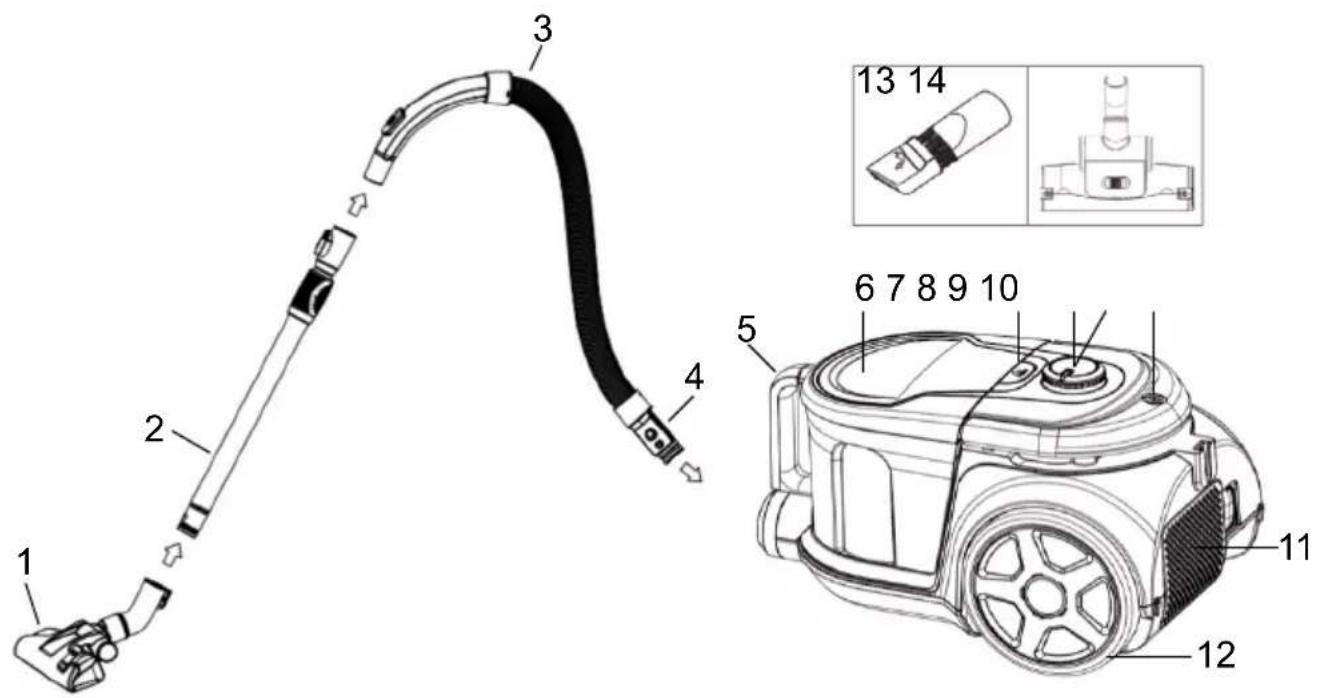
- Floor brush
- Telescopic tube
- Flexi hose
- Hose connector
- Dust container handle
- Dust container
-
Dust container release button
-
Speed/power control dial
- Power button
- 2-in-1 Handle & Cable rewind button
- 2nd HEPA Air filter
- Back wheels
- 2-in-1 tool
- Turbo brush
DURONIC
Safety Instructions
This appliance is for indoor/household use only. Do not use outdoors.
This appliance is not intended for use by persons (including children) with reduced physical, sensory or mental capabilities, or lack of experience and knowledge, unless they have been given supervision or instruction concerning use of the appliance by a person responsible for their safety.
Children should be closely supervised at all times to ensure that they do not play with the appliance.
Do not operate this appliance if the power cable or plug is damaged. If either is damaged return it to Duronic for service or repair by professional technician.
Please ensure the mains power supply is 220-240V / 50Hz
Never try to replace the parts and repair the unit by yourself.
Do not use this vacuum cleaner outside or on wet surfaces.
Do not use any attachments or parts that are not manufacturer approved.
Always carry the vacuum with the carry handle. Do not carry by the hose or the power cable.
Do not unplug the vacuum by pulling on the power cable. To unplug, simply grip the plug and pull.
Do not handle the plug or vacuum cleaner with wet hands.
Do not immerse any part of the vacuum cleaner into water or any other liquids.
Always ensure there are no blocked or obstructed openings that restrict air flow.
Keep hair, loose clothing, fingers and all body parts away from air vents and openings.
Do not obstruct the air vents/filters.
DURONIC
Do not use the vacuum cleaner without air filters in place.
Do not pick up hard or sharp objects such as glass, nails, screws, coins etc.
Take extra care when vacuuming on stairs.
Do not use the vacuum to pick up flammable or combustible materials (lighter fluid, gasoline etc.) or use in the presence of explosive liquids of vapour.
Do not use in an enclosed space filled with vapours given off of oil-based paints, paint thinner, moth proofing, flammable dust or any other explosive or toxic vapours.
Do not vacuum burning material and ashes
Always unplug the vacuum cleaner before connecting or disconnecting the hose.
Do not allow the plug to whip when rewinding it.
Store your vacuum indoors in a cool, dry place.
Do not use the vacuum to clean your pets or any other animal.
If the dust cup gets damaged, change immediately before the next use.
If the HEPA filter/s get damaged in any way, please ensure these are replaced before the next use.
If any abnormal noise, smell, smoke or any other failure or breakage is found during the operation, you should turn off the switch and unplug the vacuum from the mains socket. Then contact Duronic directly to enquire about repair - do not repair it by yourself.
The VC7020 is a bagless vacuum cleaner which has two HEPA filters and one sponge filter. These filters are crucial to the vacuum's performance so we recommend that the user ensures they are cleaned at least once a month. This will ensure that the vacuum performs at an optimal level of suction and cleaning power. For more guidance on cleaning and maintenance, please see page 8.
DURONIC
Assembling the Vacuum Cleaner
natural_image
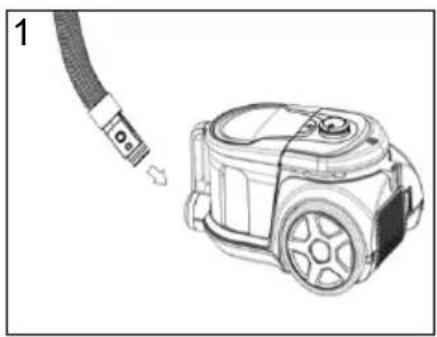
Diagram of a vacuum cleaner connected to a cable, shown with a close-up view (no text or symbols present)Insert the hose connector in front of the vacuum cleaner into the inlet hole, then turn it to the right (clockwise) to lock it in place.
If you ever need to disassemble the vacuum, you can turn the hose connection back to the left and pull it out.
natural_image
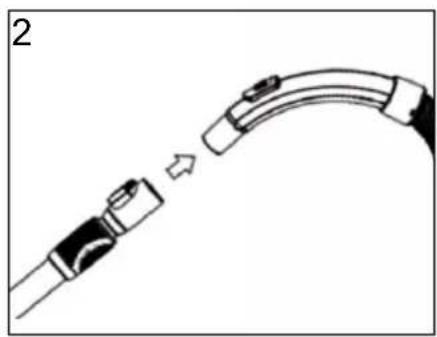
Diagram of a medical or laboratory device with a curved arm and connector, showing a directional arrow (no text or symbols)Attach the telescopic tube to the flexi hose.
If you ever need to disassemble the vacuum, you can pull these apart to separate them.
natural_image
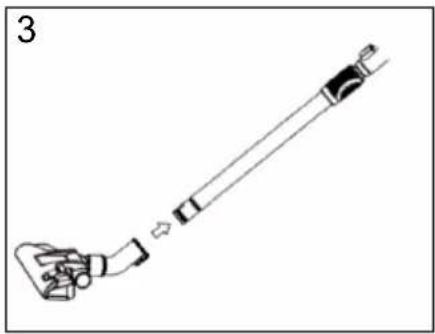
Diagram of a mechanical device with a lever and handle, showing a step-like assembly (no text or symbols)Insert the telescopic tube into the opening on the floor brush (or turbo brush if preferred).
Rotate the brush to fasten it on securely.
How to Use
natural_image
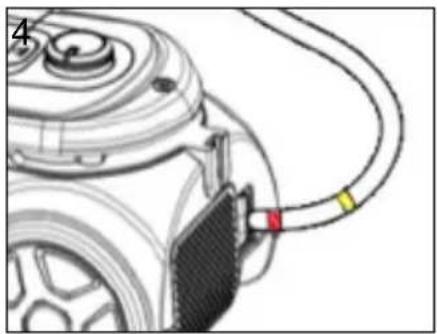
Diagram of a car battery connected to a cable with a red connector (no text or symbols visible)Pull the power cable out of the vacuum, ensuring that you stop when you see the yellow mark.
Make sure that the red mark is not visible; if it is, this means you have pulled the cable out too far.
Attach the telescopic tube to the flexi hose.
If you ever need to disassemble the vacuum, you can pull these apart to separate them.
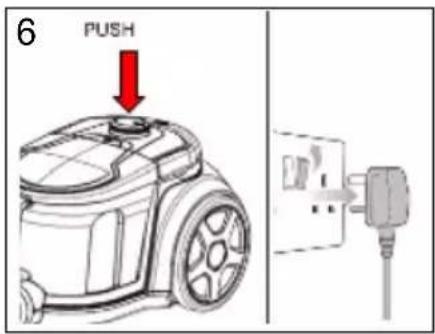
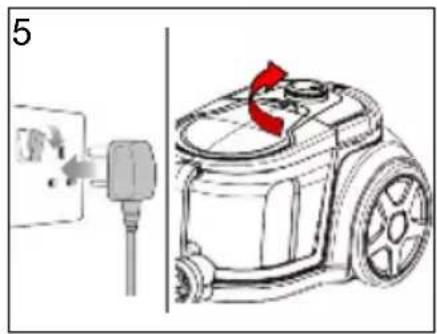
When you finish vacuuming, turn off the power and unplug from the mains socket. Push down the rewind handle/ button to wind the cable back into the machine.
Use your other hand to guide the cable to ensure it doesn't whip back and cause injury.
Using the Attachments
2-in-1 Tool
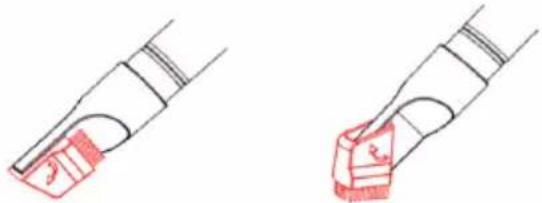
This nozzle attachment is used for reaching all the difficult places that the larger brush cannot.
The flat end is a crevice tool which is perfect for reaching small crevices and hard-to-reach areas such as corners or down the back of furniture.
The brush end is perfect for cleaning upholstery, curtains and delicate areas such as bookshelves, keyboards and window ledges.
natural_image
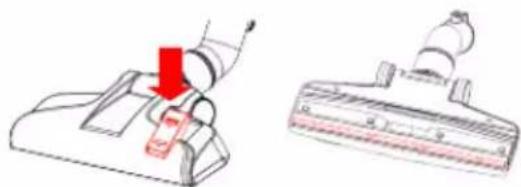
Two hand-drawn diagrams showing a mechanical component with red highlighted areas, no text or symbols present.Floor Brush
The floor brush can be used on both carpet and hard floor surfaces.
For hard flooring:
Use your foot to press the pedal on the top of the brush to let the bristles out.
For carpets:
Use your foot to press the pedal again to retract the bristles.
natural_image
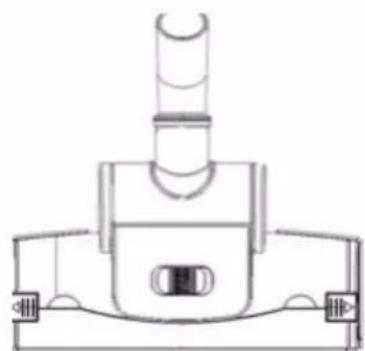
Diagram showing a vacuum cleaner with a red arrow indicating motion, alongside its close-up view (no text or symbols)Turbo Brush
The turbo brush can be used on both carpet and hard floor surfaces.
It provides a deeper clean for carpeted floors.
natural_image
Technical line drawing of a mechanical component with no visible text or symbolsCleaning and Maintenance
It is important to look after your vacuum cleaner to prolong its working life and to keep it working optimally. We recommend that if the vacuum is used regularly, that the sponge filter is cleaned at least once a month to ensure optimal performance and prolong the longevity of the device.
Emptying and cleaning the dust container
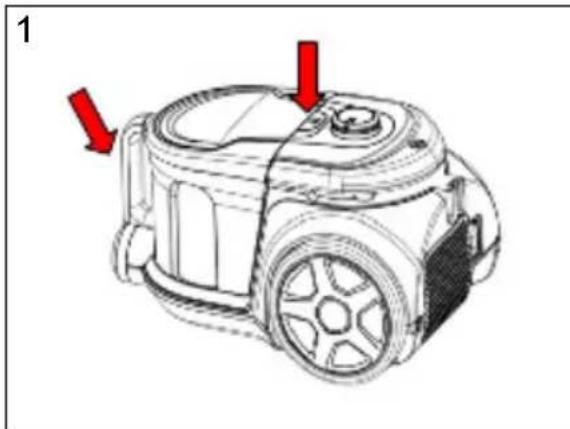
It is important to empty the dust container regularly, particularly when the dust inside reaches the MAX indicator on the container.
natural_image
Line drawing of a vacuum cleaner with red arrows indicating parts (no text or symbols)Hold the dust container with one hand and push the release button with the other hand.
natural_image
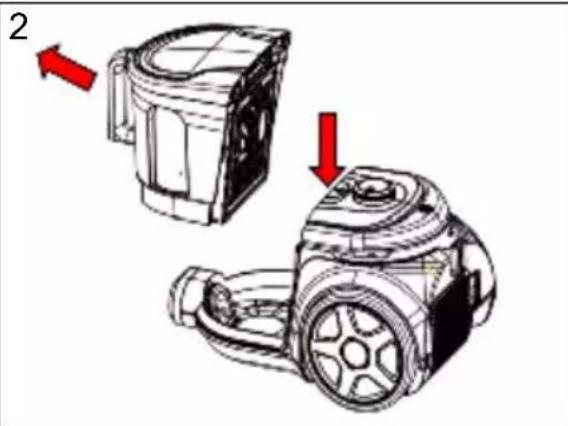
Technical illustration of a mechanical device with two views and red arrows indicating direction (no text or symbols)Take the dust container out of the machine.
natural_image
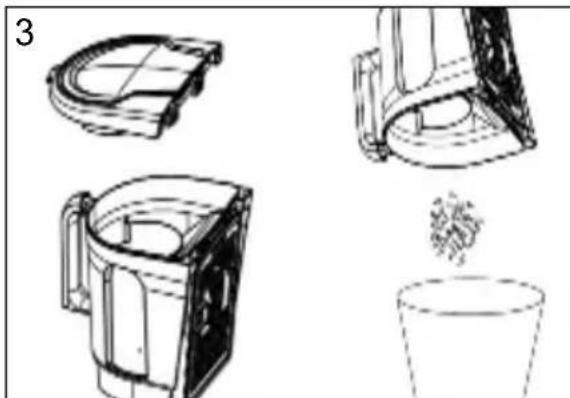
Technical line drawings of mechanical components including a fan, housing, and cup (no text or symbols)Take the dust container to the rubbish bin and hold the container over it.
Push the release button to open and remove the bottom of the dust container.
Tip the dust container upside down to empty the contents directly into the bin.
natural_image
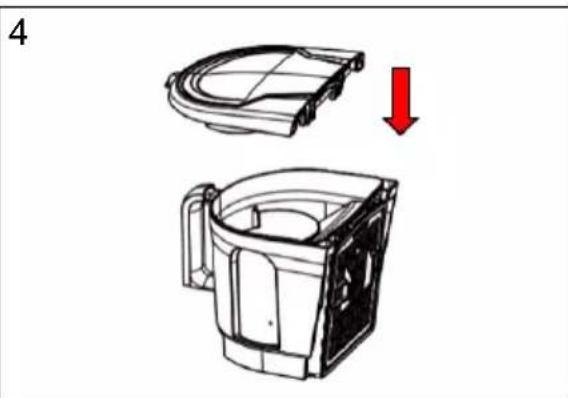
Technical illustration of a mechanical component with a red arrow indicating a downward motion (no text or symbols present)Close the dust container by securing the lid back on top of the cup.
Put the dust container back onto the vacuum and click back into place.
Cleaning the HEPA filters
Cleaning the 1st HEPA Filter
Carefully remove any obvious deposits of dust and hair on the filter and wash in warm water.
Leave to air-dry naturally. When completely dry
throughout, replace back into the vacuum cleaner and close the back cover.
Cleaning the 2nd HEPA and Sponge Filters
natural_image
Diagram of a plug inserted into an electrical outlet, showing internal components and wiring (no text or symbols)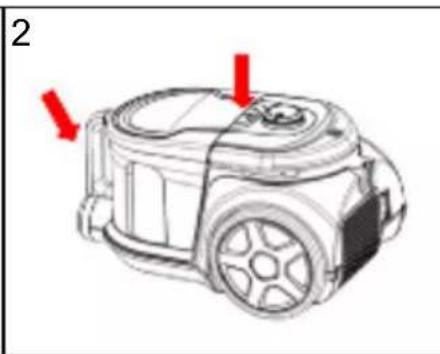
natural_image
Line drawing of a vacuum cleaner with red arrows indicating parts (no text or symbols)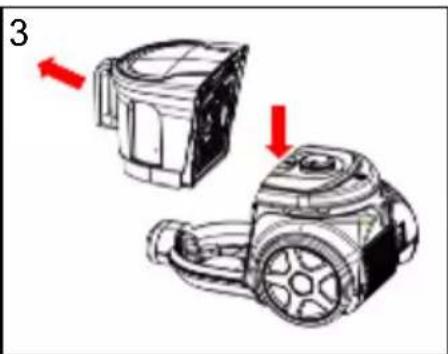
natural_image
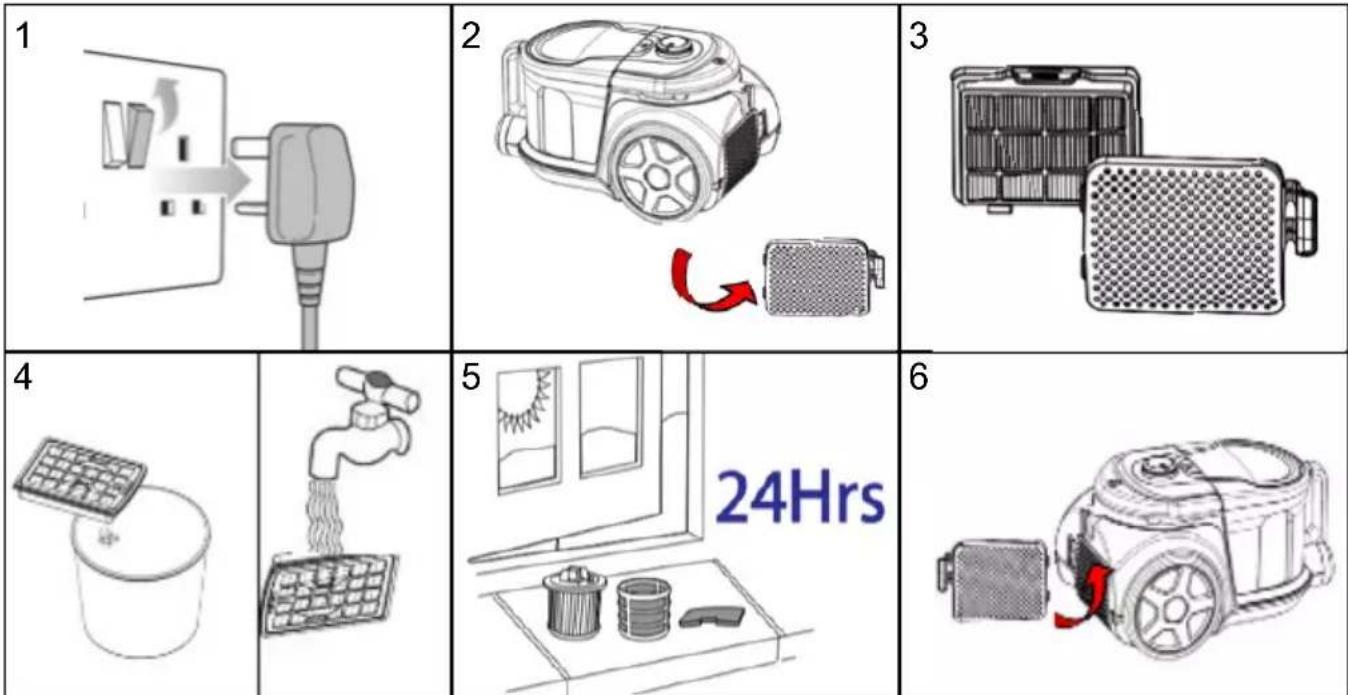
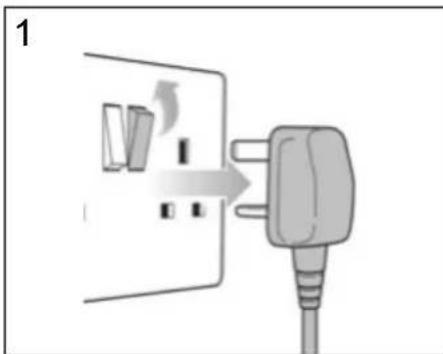
Technical illustration of a mechanical device with two views, one showing a side view and the other a top view (no text or symbols present)Ensure that the vacuum is unplugged from the mains electric socket before undergoing any cleaning.
Hold the dust container with one hand and push the release button with the other hand.
Take the dust container out of the machine.
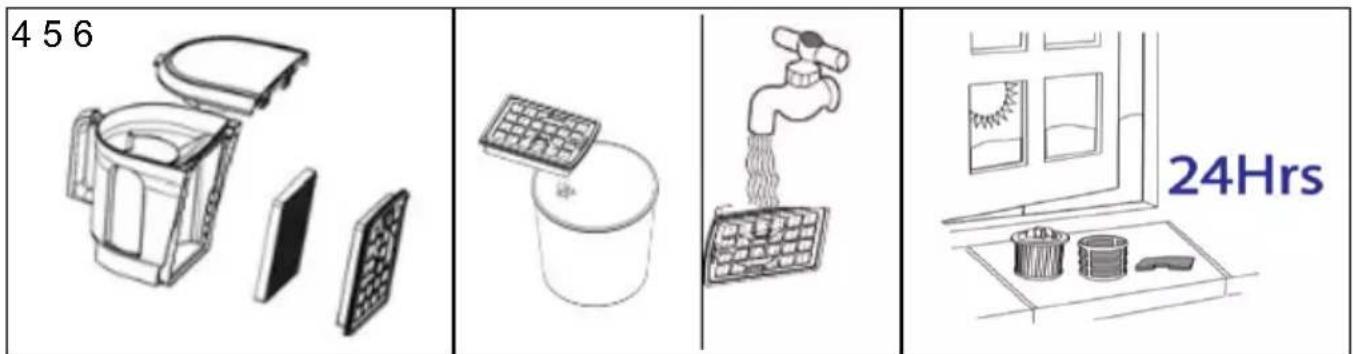
Remove the filter casing and separate the sponge filter from the HEPA filter.
Carefully remove any obvious deposits of dust and hair on the filters and wash both in warm water.
Leave to air-dry naturally. When completely dry throughout, replace back into the vacuum cleaner and close the back cover.
Please note:
- The VC7020 vacuum has two HEPA filters; one on the underside of the dust container jug, the other on the base of the vacuum. If the vacuum is used lightly/less often, these filters should be cleaned properly at least twice a year. If, however, the vacuum is in frequent/heavy use, we recommend the filters are cleaned monthly.
- If a filter becomes too dirty or clogged it can reduce the suction level of the vacuum.
- Do not ever put a wet filter back into the vacuum; always ensure the filters are completely dry before inserting them back into the vacuum. Putting a wet filter into the vacuum will result in suction loss and can damage the motor.
- Do not wash the filters in a washing machine or put them in a tumble dryer. They are to be washed by hand and air dried only.
- Do not use hot water or detergents of any kind. Wash only in water.
• Always ensure that the filters are fixed back into place properly before using the vacuum. Do not use the vacuum without any filters inside.
Replacement filters are available for purchase separately directly from Duronic.
DURONIC
Warranty
1 Year Guarantee from Shine-Mart Ltd, Trademark owners of Duronic Products. NOTE: THESE STATEMENTS DO NOT AFFECT YOUR STATUTORY RIGHTS AS A CONSUMER
This product has been manufactured under the strictest or quality control procedures, and using the highest quality of materials, to ensure excellent performance and reliability. It will give very good and long lasting service, provided it is properly used and maintained. The product is guaranteed for 1 years from the date of original purchase. If any defect arises due to a faulty materials or poor workmanship, the faulty product must be returned to the original place of purchase. Refund or replacement is at the discretion of that company. Duronic Products are offered with a 1 year guarantee under the following conditions:
- The product must be returned to the retailer with original proof of purchase.
- The product must be installed and used in accordance with the instructions contained in this operating manual.
- It must be used only for domestic purposes.
- It does not cover wear and tear, malicious damage, misuse, neglect, inexpert repairs or consumable parts.
- Shine-Mart Ltd has no responsibilities for accidental or consequential loss or damage.
- Shine-Mart Ltd are not liable to carry out any type of servicing work, under the guarantee
- Valid in the UK only
Imported by Shine-Mart Ltd, RM3 8SB

Information on waste Disposal for Consumers of Electrical & Electronic Equipment.
This mark on a product and/or accompanying documents indicates that when it is to be disposed of, it must be treated as Waste Electrical & Electronic Equipment. (WEEE).
Any WEEE marked products must not be mixed with general household waste, but kept separate for the treatment, recovery and recycling of the materials used. For proper treatment, recovery and recycling; please take all WEEE marked waste to your Local Authority Civic waste site, where it will be accepted free of charge.
If customers dispose of Waste Electrical & Electronic Equipment correctly, they will be helping to save valuable resources and preventing any potential negative effects upon human health and the environment, of any hazardous materials that the waste may contain.
DURONIC
- Contents
- Features and Specifications
- DURONIC
- Safety Instructions
- Assembling the Vacuum Cleaner
- How to Use
- Using the Attachments
- 2-in-1 Tool
- Floor Brush
- For hard flooring:
- For carpets:
- Turbo Brush
- Cleaning and Maintenance
- Emptying and cleaning the dust container
- Cleaning the HEPA filters
- Cleaning the 1st HEPA Filter
- Cleaning the 2nd HEPA and Sponge Filters
- Please note:
- Warranty
Brand : Duronic
Model : VC7020
Category : Vacuum Cleaner