
DS-3T0310HP-E - Network switch Hikvision - Free user manual and instructions
Find the device manual for free DS-3T0310HP-E Hikvision in PDF.


| Product Type | Network Switch |
| Model | DS-3T0310HP-E |
| Brand | Hikvision |
| Number of Ports | 10 |
| PoE Ports | 8 (PoE+) |
| Uplink Ports | 2 (Gigabit Ethernet) |
| PoE Budget | 120W |
| Switching Capacity | 20 Gbps |
| Forwarding Rate | 14.88 Mpps |
| MAC Address Table | 4K entries |
| Jumbo Frame Support | 16K bytes |
| Network Standards | IEEE 802.3, 802.3u, 802.3ab, 802.3x, 802.3af/at |
| Dimensions (W x D x H) | 330 x 230 x 44 mm |
| Weight | 2.1 kg |
| Power Supply | AC 100-240V, 50/60Hz |
| Power Consumption | Max 150W (including PoE) |
| Operating Temperature | 0°C to 40°C |
| Storage Temperature | -40°C to 70°C |
| Humidity | 5% to 95% (non-condensing) |
| Mounting | Desktop or rackmount (brackets included) |
| LED Indicators | Power, Link/Activity, PoE status per port |
| Protection | Surge protection for PoE ports |
| Cooling | Fanless |
Frequently Asked Questions - DS-3T0310HP-E Hikvision
User questions about DS-3T0310HP-E Hikvision
0 question about this device. Answer the ones you know or ask your own.
Ask a new question about this device
Download the instructions for your Network switch in PDF format for free! Find your manual DS-3T0310HP-E - Hikvision and take your electronic device back in hand. On this page are published all the documents necessary for the use of your device. DS-3T0310HP-E by Hikvision.
USER MANUAL DS-3T0310HP-E Hikvision
100M or Gigabit Hi-PoE Switch
Quick Start Guide

See Far, Go Further
Legal Information
©2019 Hangzhou Hikvision Digital Technology Co., Ltd. All rights reserved.
About this Manual
The Manual includes instructions for using and managing the Product. Pictures, charts, images and all other information hereinafter are for description and explanation only. The information contained in the Manual is subject to change, without notice, due to firmware updates or other reasons. Please find the latest version of this Manual at the Hikvision website (https://www.hikvision.com/).
Please use this Manual with the guidance and assistance of professionals trained in supporting the Product.
Trademarks
HIKVISION and other Hikvision's trademarks and logos are the properties of Hikvision in various jurisdictions.
Other trademarks and logos mentioned are the properties of their respective owners.
Disclaimer
TO THE MAXIMUM EXTENT PERMITTED BY APPLICABLE LAW, THIS MANUAL AND THE PRODUCT DESCRIBED, WITH ITS HARDWARE, SOFTWARE AND FIRMWARE, ARE PROVIDED "AS IS" AND "WITH ALL FAULTS AND ERRORS". HIKVISION MAKES NO WARRANTIES, EXPRESS OR IMPLIED, INCLUDING WITHOUT LIMITATION, MERCHANTABILITY, SATISFACTORY QUALITY, OR FITNESS FOR A PARTICULAR PURPOSE. THE USE OF THE PRODUCT BY YOU IS AT YOUR OWN RISK. IN NO EVENT WILL HIKVISION BE LIABLE TO YOU FOR ANY SPECIAL, CONSEQUENTIAL, INCIDENTAL, OR INDIRECT DAMAGES, INCLUDING, AMONG OTHERS, DAMAGES FOR LOSS OF BUSINESS PROFITS, BUSINESS INTERRUPTION, OR LOSS OF DATA, CORRUPTION OF SYSTEMS, OR LOSS OF DOCUMENTATION, WHETHER BASED ON BREACH OF CONTRACT, TORT (INCLUDING NEGLIGENCE), PRODUCT LIABILITY, OR OTHERWISE, IN CONNECTION WITH THE USE OF THE PRODUCT, EVEN IF HIKVISION HAS BEEN ADVISED OF THE POSSIBILITY OF SUCH DAMAGES OR LOSS.
YOU ACKNOWLEDGE THAT THE NATURE OF INTERNET PROVIDES FOR INHERENT SECURITY RISKS, AND HIKVISION SHALL NOT TAKE ANY RESPONSIBILITIES FOR ABNORMAL OPERATION, PRIVACY LEAKAGE OR OTHER DAMAGES RESULTING FROM CYBER-ATTACK, HACKER ATTACK, VIRUS INSPECTION, OR OTHER INTERNET SECURITY RISKS; HOWEVER, HIKVISION WILL PROVIDE TIMELY TECHNICAL SUPPORT IF REQUIRED.
YOU AGREE TO USE THIS PRODUCT IN COMPLIANCE WITH ALL APPLICABLE LAWS, AND YOU ARE SOLELY RESPONSIBLE FOR ENSURING THAT YOUR USE CONFORMS TO THE APPLICABLE LAW. ESPECIALLY, YOU ARE RESPONSIBLE, FOR USING THIS PRODUCT IN A MANNER THAT DOES NOT INFRINGE ON THE RIGHTS OF THIRD PARTIES, INCLUDING WITHOUT LIMITATION, RIGHTS OF
PUBLICITY, INTELLECTUAL PROPERTY RIGHTS, OR DATA PROTECTION AND OTHER PRIVACY RIGHTS. YOU SHALL NOT USE THIS PRODUCT FOR ANY PROHIBITED END-USES, INCLUDING THE DEVELOPMENT OR PRODUCTION OF WEAPONS OF MASS DESTRUCTION, THE DEVELOPMENT OR PRODUCTION OF CHEMICAL OR BIOLOGICAL WEAPONS, ANY ACTIVITIES IN THE CONTEXT RELATED TO ANY NUCLEAR EXPLOSIVE OR UNSAFE NUCLEAR FUEL-CYCLE, OR IN SUPPORT OF HUMAN RIGHTS ABUSES.
IN THE EVENT OF ANY CONFLICTS BETWEEN THIS MANUAL AND THE APPLICABLE LAW, THE LATER PREVAILS.
Regulatory Information
FCC Information
Please take at that changes or not expressification approved by the party responsible for compliance could void the user's authority to operate the equipment.
FCC compliance: This equipment has been tested and found to comply with the limits for a Class A digital device, pursuant to part 15 of the FCC Rules. These limits are designed to provide reasonable protection against harmful interference when the equipment is operated in a commercial environment. This equipment generates, uses, and can radiate radio frequency energy and, if not installed and used in accordance with the instruction manual, may cause harmful interference to radio communications. Of this equipment in a residential area is likely to cause harmful interference in which case the user will be required to correct the interference at his own expense.
FCC Conditions
This device complies with part 15 of the FCC Rules. Operation subject to the following two conditions:
- This device may not cause harmful interference.
- This device must accept any interference received, including interference that may cause undesired operation.
EU Conformity Statement

This product and - if applicable - the supplied accessories too are marked with "CE" and comply therefore with the applicable harmonized European standards listed under the EMC Directive 2014/30/EU, the RoHS 2014/ve 65/EU.

natural_image
Symbol of a trash bin crossed with a diagonal line and a horizontal bar below (no text or labels)2012/19/EU (WEEE Products) marked with this symbol cannot be disposed of as unsorted municipal waste in the European Union. For proper recycling, return this product to your local supplier upon the purchase of equivalent new equipment, or dispose of it at designated collection points. For more information http://www.recyclethis.info.

2006/66/EC (bThis productive) contains a battery that cannot be disposed of as unsorted municipal waste in the European Union. See the product documentation for specific battery information. battery is marked with this symbol, which may include lettering to indicate cadmium (Cd), lead (Pb), or mercury (Hg). For proper recycling, return the battery to your supplier or to a designated collectionpoint. For more information see: http://www.recyclethis.info
Industry Canada ICES-003 Compliance
This device meets the CAN ICES-3 (A)/NMB-3(A) standards requirements.
Preface
Applicable Models
This manual is applicable to DS-3T03XXHP series and DS-3T05XXHP series switches.
Symbol Conventions
The symbols that may be found in this document are defined as follows.
| Symbol Description | ||
 | Danger | Indicates a hazardous situation which, if not avoided, will or could result in death or serious injury. |
 | Caution | Indicates a potentially hazardous situation which, if not avoided, could result in equipment damage, data loss, performance degradation, or unexpected results. |
 | Note | Provides additional information to emphasize or supplement important points of the main text. |
Safety Instruction

Caution
- During the installation and utilization of the device, please strictly conform to electrical safety rules in different nations and regions.
- Use the power adapter delivered with the device only.
- The device can be directly or modified to connect with IT power distribution system.
- Please install the device in accordance with the installation method in the manual.
- Do not place any naked flame sources, such as lit candles, on the device.
- Do not place any objects containing water or liquids on the device. Prevent the device from water dropping or splashing.
- The device must be installed in machine room or machine cabinet only, and only maintenance staff or qualified person can access to the device.
- Do not touch the cover area of the device that may be overheated.

Danger
- Please fix the device in a stable position. Otherwise, serious personal injury or casualties may happen if the device is dumped.
- The supporting accessories can only be used together with the device. Using them with other device may cause instability and injury.
- The device must be firmly fixed on the DIN rail or wall to prevent injury.
- Place the device out of reach of kids.
- The power socket or power plug is used to disconnect power. Do not cover the power socket or power plug so that it can be easily moved.
- The device has multiple power supplies. To avoid electric shock, please disconnect all power supplies during maintenance.
- This is a class A product and may cause radio interference in which case the user may be required to take adequate measures.
- If the product does not work properly, please contact your dealer or the nearest service center. Never attempt to disassemble the product yourself. (We shall not assume any responsibility for problems caused by unauthorized repair or maintenance.)
1 Introduction
1.1 Product Introduction
DS-3T03XXHP series and DS-3T05XXHP series switches are layer 2 Hi-PoE switches, providing advanced PoE power supply technology and wider temperature (-30 to 65 °C, that is, -22 to 149 °F) design on the basis of high-performance access to ensure stable data upload. The switches support Hi-PoE, long range, port isolation, and PoE watchdog function.
1.2 Packing List
| DS-3T03XXHP Series DS-3T05XXHP Series | |
| Switch × 1 × 1 | |
| Power Adapter × 1 × 1 | |
| AC Power Cord × 1 × 1 | |
| Wall Mount Ear × 2 × 2 | |
| DIN Rail Mount Clip × 2 × 2 | |
| Screw × 6 × 6 | |
| Quick Start Guide × 1 × 1 |
1.3 Appearance
Different models of devices may have different appearances. The following pictures are only for illustration.
Front Panel
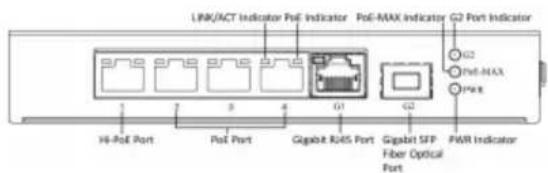
Figure 1-1 DS-3T0306HP-E
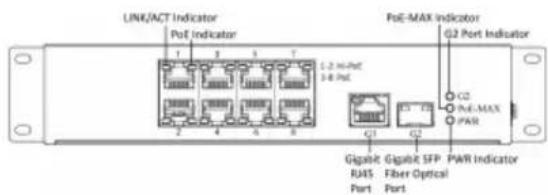
Figure 1-2 DS-3T0310HP-E
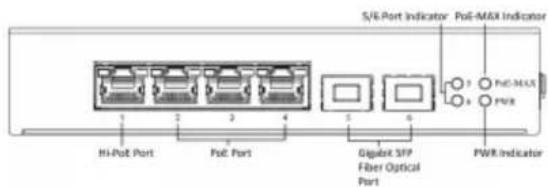
Figure 1-3 DS-3T0506HP-E
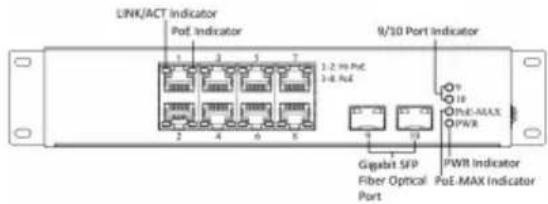
Figure 1-4 DS-3T0510HP-E
Rear Panel
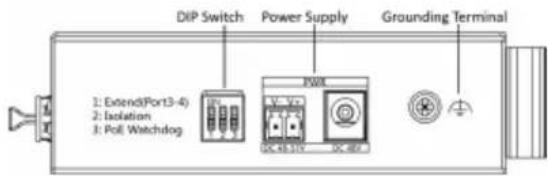
Figure 1-5 DS-3TXX06HP-E Series
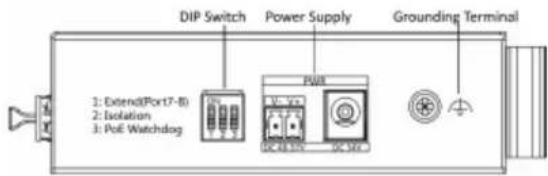
Figure 1-6 DS-3TXX10HP-E Series
Port/Indicator Description
| Indicator/Port Description | |
| PoE-MAX Indicator | Solid /Flashing: The output power of the switch will reach the upper limit. The power supply may be abnormal if more devices are connected.Unlit: The switch provides power supply to PD normally. |
| PWR Indicator | Solid: The switch is powered on normally.Unlit: No power supply connected or power supply is abnormal. |
| LINK/ACT Indicator | Solid: The port is connected.Flashing: The port is transmitting data.Unlit: The port is disconnected or connection is abnormal. |
| PoE Indicator | Solid: The switch provides power supply to PD normally.Unlit: The switch is disconnected to PD, or provides power supply to PD abnormally. |
| G2/5/6/9/10 Port Indicator | Solid: The gigabit SFP fiber optical port is connected.Flashing: The gigabit SFP fiber optical port is transmitting data.Unlit: No gigabit SFP fiber optical port connected or connection is abnormal. |
| Hi-PoE Port | Used for other Hi-PoE PTZ cameras connection. In the temperature from 0 to 40 °C (32 to 104 °F), the max. power of DS-3TXX06HP series is 60 W, and the max. power of DS-3TXX10HP series is 90 W. |
| PoE Port | Used for other PD devices connection via network cables. |
| Gigabit RJ45 Port Used | d for devices connection via network cables. |
| Gigabit SFP Fiber Optical Port | Used for other devices connection via optical fiber when plugged into with an optical module. |
| Grounding Terminal | Used for connecting to the grounding cable to protect the switch from lightning. |
| Power Supply | Use the attached power cord to connect the switch to socket. |
| DIP Switch | Support 3 modes:Extend: Port 3 and 4 of DS-3TXX06HP-E series and port 7 and 8 of DS-3TXX10HP-E series support network transmission of up to 300 metres.Isolation: Data transmission of each port is isolated from each other to improve network security.PoE Watchdog: Auto-detect and restart cameras that do not respond. |
2 Installation
Please select the appropriate installation method according to the actual needs.
Before You Start
- Keep the room well-ventilated.
- Keep at least 10 cm distance around the device for heat dissipation.
2.1 Wall-Mounted Installation
Before You Start
Use a screwdriver to remove the DIN rail-mounted unit.
Steps
- Fix the wall mount ears to the device with self-prepared M4 screws.
- Use self-prepared M4 screws to fix the device onto the wall.
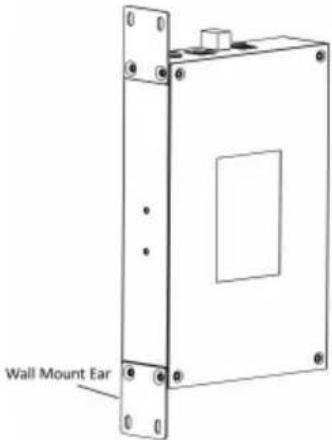
Figure 2-1 Wall-Mounted Installation
2.2 Rail-Mounted Installation
Steps
-
Fix the clip to the device.
-
Insert the end of DIN rail-mounted unit into the notch under the clip.
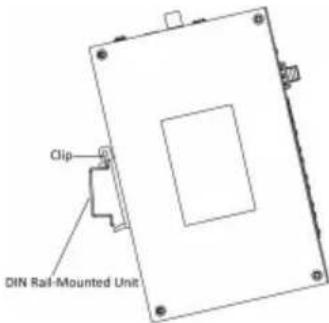
Figure 2-2 Rail Mounted Installation
- Press the DIN rail-mounted unit in quickly.
3 Grounding
3.1 Connecting the Grounding Cable
Grounding is used to quickly release overvoltage and overcurrent induced by lightening for switch, and to protect personal safety. Select the appropriate grounding method according to your needs.
3.1.1 With Grounding Bar
If a grounding bar is available at the installation site, follow the steps below.
Steps
-
Connect one end of the grounding cable to the binding post on the grounding bar.
-
Connect the other end of the grounding cable to the grounding terminal of the device and fix the screw.
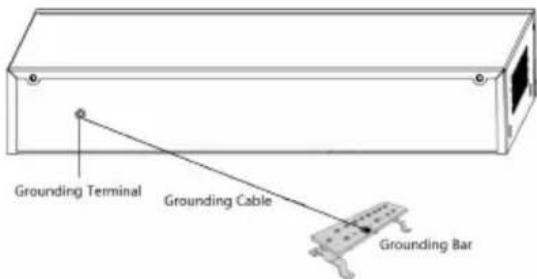
Figure 3-1 Grounding with Grounding Bar
3.1.2 Without Grounding Bar
If there is no grounding bar but the earth is nearby and the grounding body is allowed to be buried, follow the steps below.
Steps
-
Bury an angle steel or steel pipe (≥ 0.5 m) into the mud land.
-
Weld one end of the grounding cable to the angle steel or steel pipe and embalm the welding point via electroplating or coating.
-
Connect the other end of the grounding cable to the grounding terminal.
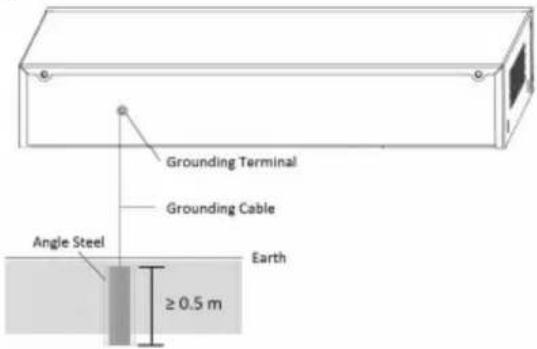
Figure 3-2 Grounding with Angle Steel
3.2 Connecting RJ45 Port
Use a network cable to connect the device to the RJ45 port of a peer device such as network camera, NVR, switch, etc.
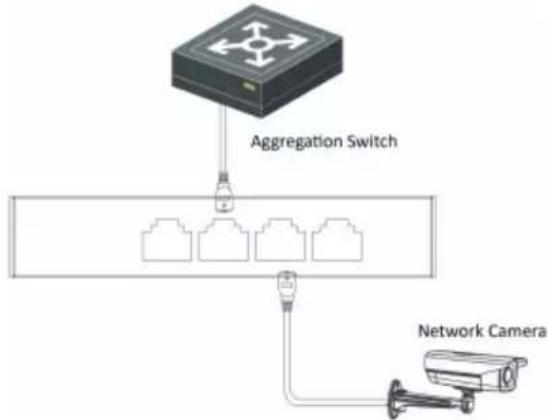
flowchart
graph TD
    A["Router"] -->|Aggregation Switch| B["Network Camera"]
    B --> C["Three Ethernet ports"]
    C --> D["Three Ethernet ports"]
    D --> E["Three Ethernet ports"]
Figure 3-3 RJ45 Port Connection
3.3 Connecting SFP Optical Module
Connecting SFP optical module is supported when the device has a fiber optic port or a combo.
When connected to a network cable, the combo is a RJ45 port. When plugged into with an optical module and connected to an optical fiber, the combo functions as a fiber optic port.
When connected to both the network cable and optical fiber at the same time, the port works as a fiber optic port.
Steps

Caution
- Single-Mode optical module needs to be paired.
- Do not bend fiber optic (curvature radius ≥ 10 cm) overly.
-
Do not look directly at fiber optic connector because the laser is harmful to eyes.
-
Connect the two paired SFP optical modules with an optical fiber.
-
Hold the SFP optical module from one side, and smoothly plug it into the device along with the SFP port slot until the optical module and the device are closely attached.
- After powering on the device, check the status of LINK/ACT indicator. If the indicator is lit, the link is connected. If the indicator is unlit, the link is disconnected. Check the line, and make sure peer devices have been started.
4 Powering on the Device
Please use the attached power cord in package to power on the device.
Before powering your switch, make sure that:
- The operating power supply is compliant with rated input standard.
- Port cables and grounding cables are correctly connected.
- If there is outdoor cabling, connect a lightning rod and lightening arrester to the cable.

Caution
PoE power supply line and strong wire cannot be wired together, otherwise PD equipment or switch ports will be burnt.
- 100M or Gigabit Hi-PoE Switch
- Legal Information
- About this Manual
- Trademarks
- Disclaimer
- Regulatory Information
- FCC Information
- FCC Conditions
- EU Conformity Statement
- Industry Canada ICES-003 Compliance
- Preface
- Applicable Models
- Symbol Conventions
- Safety Instruction
- Caution
- Danger
- Introduction
- Product Introduction
- Packing List
- Appearance
- Front Panel
- Installation
- Before You Start
- Wall-Mounted Installation
- Steps
- Rail-Mounted Installation
- Grounding
- Connecting the Grounding Cable
- With Grounding Bar
- Without Grounding Bar
- Connecting RJ45 Port
- Connecting SFP Optical Module
- Powering on the Device
Brand : Hikvision
Model : DS-3T0310HP-E
Category : Network switch