EO Mini Pro 3 - Battery charger Hive - Free user manual and instructions
Find the device manual for free EO Mini Pro 3 Hive in PDF.


| Product Type | Battery Charger |
| Model | EO Mini Pro 3 |
| Brand | Hive |
| Dimensions (approx.) | 180 x 90 x 50 mm |
| Weight | 0.6 kg |
| Input Voltage | 100-240 V AC, 50/60 Hz |
| Output Voltage | 12 V / 24 V |
| Output Current | 3 A (max) |
| Charging Modes | Automatic, Trickle, Maintenance |
| Battery Compatibility | Lead-acid, AGM, Gel, Li-ion |
| Protection Features | Overcharge, Short Circuit, Reverse Polarity, Overheat |
| Indicators | LED status: Power, Charging, Full, Error |
| Cable Length | 1.5 m (power), 0.9 m (battery clamp) |
| Operating Temperature | -20°C to 40°C |
| Certifications | CE, RoHS |
| Housing Material | Flame-resistant ABS plastic |
| Water Resistance | IP20 (indoor use only) |
| Display | LCD (voltage/current/fault codes) |
| Memory Function | Saves last mode selection |
| Warranty | 2 years |
| Package Contents | Charger unit, clamps, manual |
| Cleaning Instructions | Wipe with dry cloth; do not use solvents |
| Spare Parts Availability | Contact Hive or authorized dealers |
Frequently Asked Questions - EO Mini Pro 3 Hive
User questions about EO Mini Pro 3 Hive
0 question about this device. Answer the ones you know or ask your own.
Ask a new question about this device
Download the instructions for your Battery charger in PDF format for free! Find your manual EO Mini Pro 3 - Hive and take your electronic device back in hand. On this page are published all the documents necessary for the use of your device. EO Mini Pro 3 by Hive.
USER MANUAL EO Mini Pro 3 Hive
natural_image
Black HIVE smartphone with circular control knob and 'Built by eo' button, against orange background (no text or symbols on device body)
HIVE
Welcome to Hive EV Charging
Hive EV Charging is the simple, effective way to charge your electric vehicle (EV).
You can stay on top of your charging costs with the Hive app's smart functionality – including off-peak scheduling and real-time charging insights.
This guide tells you everything you need to know to get set up and start charging.

HIVE
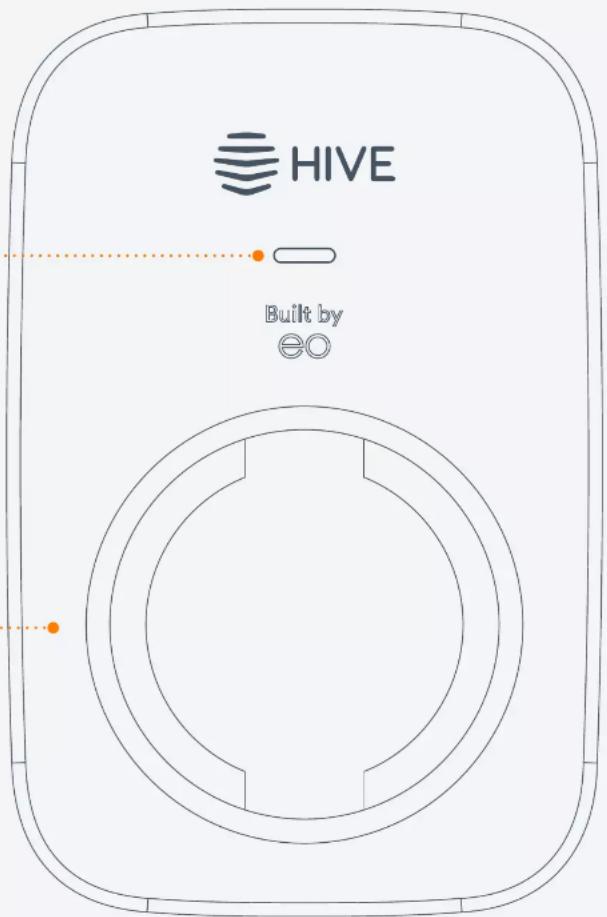
Untethered charger
LED indicator light
Charging cable port
Important
Your EO Mini Pro 3 should only be installed by a qualified electrician with the relevant training.
Go to hivehome.com/guides/ev-charging for detailed installation instructions.
Contents
Getting started 6
Onboarding your charger 7
Getting to know your charger 8
Charger settings 9
Schedules 10
LED lights 11
Troubleshooting 12
Getting started
Installing your charger:
Your EO Mini Pro 3 EV charger should only be professionally installed by a fully qualified and accredited installer.
Download the Hive app:
Use Hive's award-winning app to make the most of your EO Mini Pro 3. Make use of smart charge features that let you optimise your charger:
- Download the Hive app to your phone or tablet
a. Apple App Store
b. Google Play
- Log in, or click 'Create account' if you don't already have one
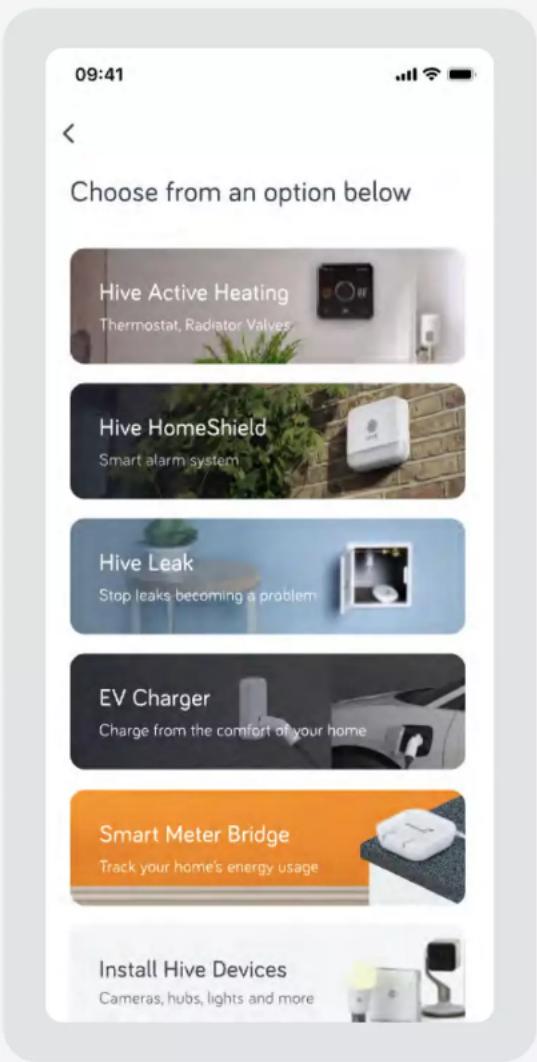
- On the Home screen, tap 'Add' then follow the instructions to add your EV charger
Onboarding your charger
You can easily set up your EO Mini Pro 3 in the Hive app. Just follow the prompts onscreen and before you know it, you'll be a few taps away from charging your car at home.
To get started, you'll need:
- Your Charger ID – found on the device label or in your quick-start guide
- Your Charger PIN – this will be in an email from Hive sent after your device is installed
Important: If you haven't got your Charger PIN yet, visit hivehome.com/contact-us or call us on 0333 202 1054.
Getting to know your charger
Sleek and understated, the EO Mini Pro 3 is one of the most compact chargers on the market. And it's kitted out with the latest smart functionality to make charging simple.
Randomised delay
In compliance with The Electric Vehicles (Smart Charge Points) Regulations 2021, there will be a random delay of up to 10 minutes before a scheduled charge will start. Charging sessions initiated outside of schedules will not be subject to this randomised delay.
Using the charger without the app
Your EO Mini Pro 3 charger is configured to use GSM mobile signal to connect to the Hive app. However, if you live in an area with poor GSM mobile signal, your engineer can set up the charger to operate in 'plug and charge' mode. That way you can charge your EV without having to use the Hive app.
Accessing the charger portal locally
If your engineer has configured your charger to work in ‘plug and charge’ mode (also referred to as ‘dumb’ mode), or if Hive’s support team need you to access your charger locally, you can find the local access details on the customer details label (attached to the Quick Start Guide in the box your charger came in).
Note: Only to be used if charger is being used in 'dumb' mode.

HIVE
HIVE EV CHARGER - CUSTOMER DETAILS

WIFI HOTSPOT LOGIN:
SSID: HECXXXXX
PWD: password21
WEB PORTAL LOGIN:
URL: 10.10.10.1
UN: EV
PWD: password23
SERIAL NO: EO-1234567890123456
CHARGER ID: HECXXXXX
Charger settings
Configure your charger, your way
Your EO Mini Pro 3 works best with the Hive app. You can set it up how you want on the 'Settings' menu, accessible through the cog icon in the top right of the charger control screen.
Charger
See your charger details, update your charger's name and enable / disable secure charging.
Schedule
Check or update your EO Mini Pro 3's schedule settings. You can configure how and when your charger works.
Tariff
Link your charging schedule to your energy tariff. If you've got a dedicated EV tariff, you can enjoy cheaper overnight charging.
My vehicle
View or update your EV details. This helps accurately calculate the range added on each charge.
Notifications
Configure what notifications you want to receive from your EO Mini Pro 3.
<
Settings
Charger
Schedule
Tariff
My vehicle
Notifications

Help
Schedules
Optimise your charging to meet your needs
A range of schedule configuration options are available on your EO Mini Pro 3, all easy to set up and change.
Eco
Link your charging schedule to your energy tariff. If you've got a dedicated EV tariff, you can enjoy even cheaper overnight charging.
Custom
Set your own charging schedule - perfect if you want direct control over when you want your charge sessions to happen.
No schedule
Simply plug in and charge. With no defined schedule, you can charge as-and-when needed.
My vehicle
View or update your EV details. This helps accurately calculate the range added on each charge.
Note: If you have enabled secure charging via your charger on the 'Settings' page, you'll receive a notification that you need to approve when plugging in your vehicle so you can start your charge session.

Schedule

Eco
Charging schedule will be set between 12am and 8am to help the environment. You can override the schedule at anytime.

Custom
Choose when you would like to start and stop charging. You can override this at anytime.

No schedule
Charging will start every time you plug in and continues until your vehicle stops receiving charge.
LED lights
The EO Mini Pro 3 has an LED light on the front of the device which will indicate a range of device states.
During device switch on:
| LED colour State Notes | ||
| Not illuminated Power off No power is available | ||
| LED solid white Initialising Initialising | ||
| LED pulses blue Ready | The unit has started up successfully and is ready to charge* |
*Once the LED pulses blue, it may take up to a further 10 minutes for your charger to connect to the Hive platform, allowing you to control your charger from the Hive app
During normal operation:
| LED colour State Notes | ||
| LED pulses blue Ready Ready to charge | ||
| LED pulses green Cable is inserted | EO Mini Pro 3 is communicating with the vehicle and trying to start a charging session | |
| LED solid green Charging | A charging session has started successfully | |
| LED pulses blue Cable is removed Ready to charge | ||
| LED solid yellow Paused | The EO Mini Pro 3 has been put on pause | |
| LED pulses red Fault condition A fault has occurred |
Troubleshooting and further support
Your EO Mini Pro 3 is designed to give you many years of efficient and safe charging. You can easily resolve most issues by following the troubleshooting instructions in the app.
Get help online
hivehome.com/contact-us
Got a question?
You could find the answer in our community.
community.hivehome.com
Call us
Our dedicated EV team are on hand to support you with your EO Mini Pro 3.
To reach them please call:
0333 202 1054
Centrica Hive Limited declares that the radio equipment types HIVE-EV-01 & HIVE-EV-02 complies with: EU Directive 2014/53/EU & UK SI 2017 No. 1206. Full declaration text available at: hivehome.com/compliance Frequency: 2400 - 2483.5 MHz Max Radiated Power: < 20dBm Frequency: 633 - 1910 MHz Max Radiated Power: < 21dBm
To avoid environmental and health problems due to hazardous substances in electrical and electronic goods, appliances marked with a crossed out wheeled bin should not be placed into your household rubbish bin. Instead, when they are unable to be re-used, they should be recycled. Your local authority will be able to advise you on the location of the nearest recycling centre that is authorised to accept this type of waste. Please recycle responsibly.
natural_image
Simple line drawing of a trash bin with crossed lines indicating no waste or discharge (no text or symbols)© 2023 Centrica Hive Limited (trading as Hive) Registered in England (No.5782908) SL4 5GD, UK. Bord Gáis Energy. Registered in Ireland (No. 463078) DO2 HH27, Ireland. All rights reserved. IG70003650517V1

natural_image
Orange background with white abstract wavy lines and the word 'HIVE' below (no additional text or symbols)- Welcome to Hive EV Charging
- Untethered charger
- Important
- Contents
- Getting started
- Installing your charger:
- Download the Hive app:
- Onboarding your charger
- To get started, you'll need:
- Getting to know your charger
- Randomised delay
- Using the charger without the app
- Accessing the charger portal locally
- Charger settings
- Configure your charger, your way
- Charger
- Schedule
- Tariff
- My vehicle
- Notifications
- Schedules
- Optimise your charging to meet your needs
- Eco
- Custom
- No schedule
- LED lights
- Troubleshooting and further support
Brand : Hive
Model : EO Mini Pro 3
Category : Battery charger