
Pet Friendly Motion Sensor - Smart Home Hive - Free user manual and instructions
Find the device manual for free Pet Friendly Motion Sensor Hive in PDF.


| Product Type | Pet-Friendly Motion Sensor |
| Brand | Hive |
| Model | Pet Friendly Motion Sensor |
| Category | Smart Home |
| Dimensions (approx.) | 5.0 x 5.0 x 3.0 cm |
| Weight (approx.) | 50 g |
| Power Supply | 2 x AAA batteries (not included) |
| Battery Life (approx.) | Up to 2 years |
| Wireless Protocol | Zigbee |
| Detection Range | Up to 12 meters |
| Detection Angle | 120 degrees |
| Pet Immunity | Yes (up to 25 kg pets) |
| Smart Home Integration | Compatible with Hive Hub |
| Installation | Wall mount or tabletop |
| Operating Temperature | 0°C to 40°C |
| Humidity Tolerance | Up to 85% non-condensing |
| Maintenance | Clean lens with soft dry cloth; replace batteries as needed |
| Safety Features | Low battery notification; tamper-resistant design |
| Spare Parts | Batteries are user-replaceable |
| Repairability | Contact Hive support for service |
Frequently Asked Questions - Pet Friendly Motion Sensor Hive
User questions about Pet Friendly Motion Sensor Hive
0 question about this device. Answer the ones you know or ask your own.
Ask a new question about this device
Download the instructions for your Smart Home in PDF format for free! Find your manual Pet Friendly Motion Sensor - Hive and take your electronic device back in hand. On this page are published all the documents necessary for the use of your device. Pet Friendly Motion Sensor by Hive.
USER MANUAL Pet Friendly Motion Sensor Hive
natural_image
Front view of a white remote control device with a circular button and two dots (no text or symbols visible)Welcome to Hive
Your Hive Motion Sensor detects motion in your home, and sends you an alert. This guide tells you everything you need to know.
If you're new to Hive products, please see the user guide provided with your Hive Hub to set up your Hive account.
Getting started:
1 Add your sensor
You can do this using your Hive app or the online dashboard.
Using the Hive app:
- Open the Hive app on your smartphone or tablet. You may be asked to log-in.
- Tap the Menu button and then Install devices, then follow the on-screen instructions.
Using the online dashboard:
- Log in to your Hive account at hivehome.com
- Under Settings select Install devices, then follow the on-screen instructions.
When prompted, pull the tab from the sensor case to start the pairing process.
The LED light on the front will begin to flash amber while it searches to find your hub.
Once your sensor appears on the screen, you can name it and press Save to complete setup.
2 Choose a location
Find a place that has a good view of the area you want to monitor, as long as it's near enough to your Hive Hub or signal booster to stay connected.
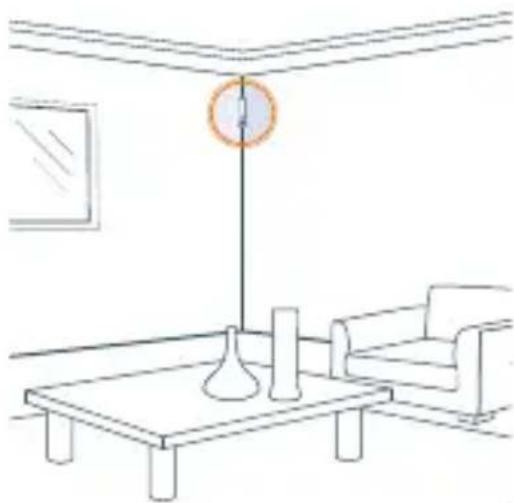
- Aim for around 2-3m from the floor as any higher may leave blind spots below.
• Alternatively, you can rest the sensor on its side on a table or shelf, then you may not need to fix it to the surface.
- Your sensor can detect motion up to 5m away and has a 94° field of view when vertical.
The following might trigger a false motion alert:
- Direct sunlight hitting your sensor.
• Having a window in view (movement outside a window).
• Having a heat source in view (such as a hot air blower, a draughty window or an air conditioning outlet). - Lots of post coming through a letterbox in view.
Remember: Pets can trigger your motion sensor. If you don't want this to happen try placing the sensor where pets won't be seen.

Fix it in place (optional)
If you'd like to check the signal before fixing your sensor in place, you can do this in the app or online dashboard under Manage devices.
When fixing the sensor in place, ensure there is enough space above to slide open the case for future battery replacement.
Using the adhesive strips:
- Peel strips from the backing paper and stick to either the back or the angled sides of the sensor depending on where you're attaching it.
- Wipe the area on the surface where the adhesive strips will be attached and make sure it's dry.
- Remove the backing from the adhesive strips so that you can firmly place the sensor on the surface.
natural_image
Line drawing of a minimalist living room with a coffee table, armchair, and ceiling lamp (no text or symbols)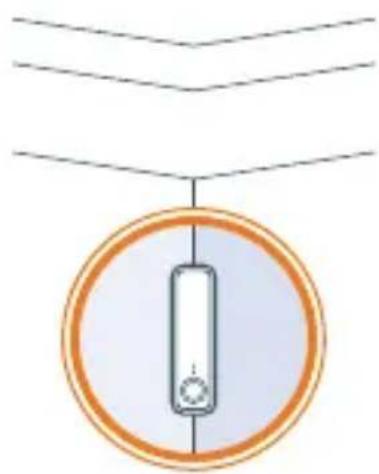
natural_image
Simple diagram of a hanging object with a central vertical bar and circular base, no text or symbols present.Remember: Removing the provided adhesive strips from wallpaper or paint can leave marks on the wall.
Usage
Your Hive Motion Sensor is designed for indoor use only.
Battery
When your Hive Motion Sensor battery needs replacing we recommend replacing with 1 new
DURACELL CR123A lithium battery. Caution: Keep battery away from children. If swallowed, consult a physician at once. Battery can explode or leak if heated, disassembled, shorted, recharged, exposed to fire or high temperature or inserted incorrectly. Keep in original package until ready to use. Do not carry batteries loose in your pockets or purse.
Maintenance
Remove the battery from your Hive Motion Sensor before cleaning and keep it away from water and other liquids at all times.
Can we help?
You can view our handy how-to-use videos along with hints and tips at hivehome.com/support
If for any reason you need to return your Hive Motion Sensor, simply return your box and its contents to the retailer. Any return is subject to the retailer's refund policy so please don't forget to check the retailer's refund policy too.
Centrica Connected Home Limited declares that the radio equipment type MOT003 complies with Directive 2014/53/EU. Full declaration text available at: hivehome.com/compliance
Max. radiated power: <10 dBm.
Frequency: 2405 - 2480 MHz

natural_image
Hive logo with white wave-like design on blue background (no text or symbols)To avoid environmental and health problems due to hazardous substances in electrical and electronic goods, appliances marked with a crossed out wheeled bin should
not be placed into your household rubbish bin. Instead, when they are unable to be re-used, they should be recycled. Your local authority will be able to advise you on the location of the nearest recycling centre that is authorised to accept this type of waste. Please recycle responsibly.

natural_image
Symbol of a trash bin crossed with two crossed lines, no text or numbers present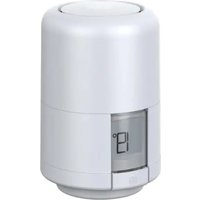

Brand : Hive
Model : Pet Friendly Motion Sensor
Category : Smart Home