POE500 - Network card / adapter Cudy - Free user manual and instructions
Find the device manual for free POE500 Cudy in PDF.


| Product Type | Power over Ethernet (PoE) Injector |
| Model | Cudy POE500 |
| Input Voltage | 100-240 V AC, 50-60 Hz |
| Output Voltage | 48 V DC |
| Output Power | Up to 15.4 W (802.3af) or 30 W (802.3at) |
| PoE Standard | IEEE 802.3af/at (PoE/PoE+) |
| Data Rate | 10/100/1000 Mbps (Gigabit) |
| Ethernet Ports | 1 x RJ-45 Data In, 1 x RJ-45 Data+Power Out |
| Dimensions | Approx. 80 x 50 x 35 mm (3.15 x 1.97 x 1.38 in) |
| Weight | Approx. 120 g (0.26 lb) |
| Operating Temperature | 0°C to 40°C (32°F to 104°F) |
| Storage Temperature | -20°C to 70°C (-4°F to 158°F) |
| LED Indicators | Power On, PoE Active |
| Safety Features | Over-current protection, short-circuit protection |
| Mounting | Desktop or wall-mountable (screws not included) |
| Included Accessories | Power cord, user manual |
| Spare Parts Availability | No user-serviceable parts; contact retailer for replacements |
| Repairability | Not repairable by user; seek professional service if defective |
| Maintenance | Keep dry; wipe with soft dry cloth; avoid liquid cleaning |
| Compliance | FCC, CE, RoHS |
Frequently Asked Questions - POE500 Cudy
User questions about POE500 Cudy
0 question about this device. Answer the ones you know or ask your own.
Ask a new question about this device
Download the instructions for your Network card / adapter in PDF format for free! Find your manual POE500 - Cudy and take your electronic device back in hand. On this page are published all the documents necessary for the use of your device. POE500 by Cudy.
USER MANUAL POE500 Cudy
1 Hardware Connection
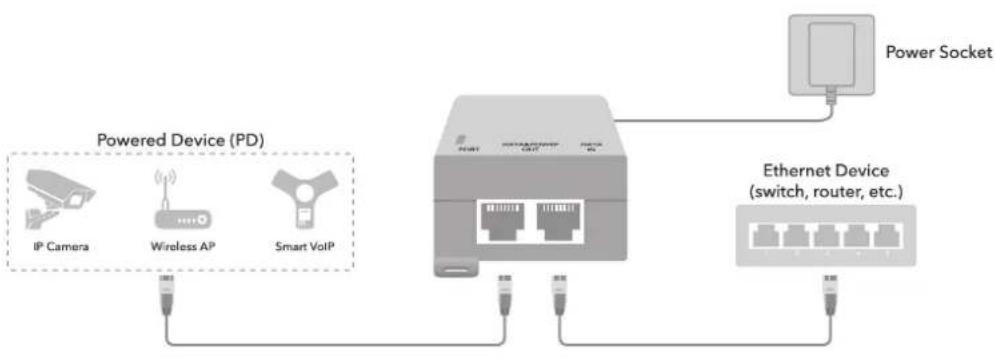
flowchart
graph LR
    A["IP Camera"] --> B["Wireless AP"]
    B --> C["Smart VoIP"]
    D["Power Socket"] --> E["Ethernet Device (switch, router, etc.)"]
    E --> F["Switch"]
    E --> G["Router"]
    style A fill:#f9f,stroke:#333
    style B fill:#ccf,stroke:#333
    style C fill:#cfc,stroke:#333
    style D fill:#fcc,stroke:#333
    style E fill:#cff,stroke:#333
    style F fill:#ffc,stroke:#333
    style G fill:#fcc,stroke:#333
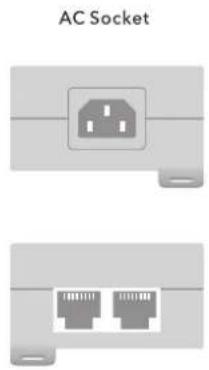
2 Physical Appearance
natural_image
Two labeled diagrammatic views of an AC socket showing a socket and two Ethernet ports (no text or symbols beyond label)3 Specifications
| Model | POE100 / POE500 |
| Power | AC 100-240 V |
| Ethernet | POE150: 10/100/1000M |
| POE500: 10/100/1000M/2.5Gbps | |
| Network protocol | IEEE802.3 (10Base-T) |
| IEEE802.3u (100Base-TX) | |
| IEEE802.3ab (1000Base-TX) | |
| IEEE802.3bz (2.5GBase-T) | |
| IEEE802.3x (Flow control) | |
| PoE protocol | IEEE802.3af (15.4 W) |
| IEEE802.3at (25.4 W) |
| Industry Standard | EMI: FCC Part 15 CISPR (EN55032) class A |
| EMS: EN61000-4-2 (ESD)- EN61000-4-4 (EFT) | |
| Shock: IEC 60068-2-27 | |
| Free Fall: IEC 60068-2-32 | |
| Vibration: IEC 60068-2-6 | |
| Network Medium | 10Base-T : Cat3、4、5 or above UTP(≤100m) |
| 100Base-TX : Cat5 or above UTP(≤100m) | |
| 1000Base-TX : Cat5 or above UTP(≤100m) | |
| Working Temperature | 0~40°C |
| Storage Temperature | -40~80°C |
4 LED and Interface Explanation
| PORT | Green | PoE injector got 100-240V power input |
| Red | The terminal equipment connected to DATA&POWEP OUT port is powered | |
| AC Socket | Connect with AC cable | |
| DATA IN | Connect to the Ethernet device with cable to transmit data. | |
| DATA OUT | Connect to the PD device with UTP cable to supply power. | |

Quick Installation Guide
Model: POE100/POE500
CE Mark Warning
This is a class B product. In a domestic environment, this product may cause radio interference, in which case the user may be required to take adequate measures.
EU declaration of conformity
Cudy hereby declares that the device is in compliance with the essential requirements and other relevant provisions of directives 2014/30/EU, 2014/35/EU, 2009/125/EC and 2011/65/EU. The original EU declaration of conformity may be found at http://www.cudy.com/
For support and warranty, please visit: http://www.cudy.com/. Specifications are subject to change without notice. Cudy is a registered trademark of Shenzhen Cudy Technologies Co., Ltd. Other brands and product names are trademarks or registered trademarks of their respective holders. Copyright ©2021 Shenzhen Cudy Technology Co., Ltd. All rights reserved. EU Address: Otto esser 2c, 65451 Kelsterbach, Germany
Email: support@cudy.com

Brand : Cudy
Model : POE500
Category : Network card / adapter