
SLBCAM11 - Camera SereneLife - Free user manual and instructions
Find the device manual for free SLBCAM11 SereneLife in PDF.


| Product Type | Baby Monitor System (Camera + Monitor) |
| Brand | SereneLife |
| Model | SLBCAM11 |
| Display | 2.0-inch Color Digital LCD |
| Camera Resolution | 640 x 480 pixels (0.3 MP CMOS) |
| Wireless Range | Up to 850 ft (260 m) in open field |
| Frequency | 2.4 GHz |
| Night Vision | Yes, infrared LEDs (auto on in low light) |
| Two-Way Intercom | Yes |
| Temperature Sensor | Built-in, displays on monitor |
| Lullabies | 8 pre-installed melodies |
| VOX (Sound Activation) | Yes, adjustable sensitivity |
| Monitor Battery | Rechargeable Li-Po 3.7V 540mAh |
| Power Supply | 5V USB power adapter (2 included) |
| Camera Dimensions (LxWxH) | 2.6 x 1.0 x 4.2 inches |
| Monitor Dimensions (LxWxH) | 2.4 x 0.7 x 4.7 inches |
| Camera Viewing Angle | 45° rotation |
| Anti-Flicker | 50Hz / 60Hz selectable |
| Temperature Scale | Celsius or Fahrenheit |
| Languages | English, French, Spanish, Portuguese, Italian, German |
| Cleaning | Use soft cloth, avoid abrasives and aerosols |
| Safety Precautions | Install by adult, keep cables and camera at least 1m from child |
| Package Contents | Camera, Monitor, 2 USB power adapters |
Frequently Asked Questions - SLBCAM11 SereneLife
User questions about SLBCAM11 SereneLife
0 question about this device. Answer the ones you know or ask your own.
Ask a new question about this device
Download the instructions for your Camera in PDF format for free! Find your manual SLBCAM11 - SereneLife and take your electronic device back in hand. On this page are published all the documents necessary for the use of your device. SLBCAM11 by SereneLife.
USER MANUAL SLBCAM11 SereneLife
natural_image
White and green mobile phone with a screen displaying the brand name 'Sweset Life' (no additional text or symbols visible)SLBCAM10.5
natural_image
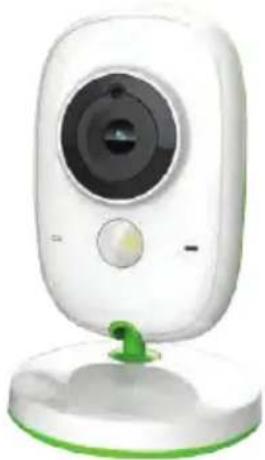
White remote camera with green base and control panel (no visible text or symbols)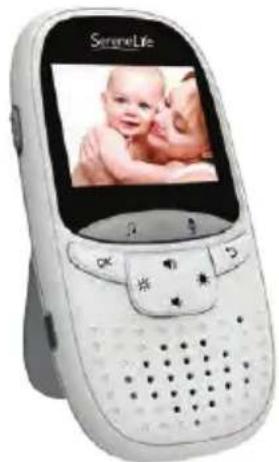
natural_image
White SereneLife mobile phone with a screen displaying a baby photo (no visible text or symbols on device body)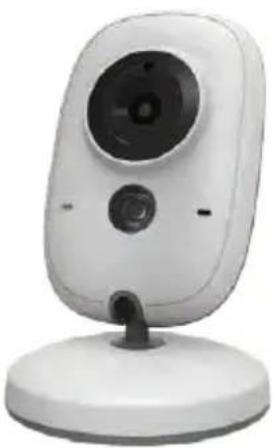
natural_image
White remote control camera with a circular lens and stand (no visible text or symbols)SLBCAM11






*☆☆☆☆☆☆☆☆☆☆☆☆☆☆☆☆☆☆☆☆☆☆☆☆☆☆☆☆☆☆☆☆☆☆☆☆☆☆☆☆☆☆☆☆☆☆☆☆☆☆☆☆☆☆☆☆☆☆☆☆☆☆☆☆☆☆☆☆☆☆☆☆☆☆☆☆☆☆☆☆☆☆☆☆☆☆☆☆☆☆☆☆☆☆☆☆☆☆☆☆
★□☆☆☆☆☆☆☆☆☆☆☆☆☆☆☆☆☆☆☆☆☆☆☆☆☆☆☆☆☆☆☆☆☆☆☆☆☆☆☆☆☆☆☆☆☆☆☆☆☆☆☆☆☆☆☆☆☆☆☆☆☆☆☆☆☆☆☆☆☆☆☆☆☆☆☆☆☆☆☆☆☆☆☆☆☆☆☆☆☆☆☆☆☆☆☆☆☆☆☆☆
with Digital LCD Screen
USER MANUAL
OPERATING MODE
The sober design of our product easily integrates with all interiors and allows you to keep a watchful eye on your babies. Communication between transmitter and receiver through radio waves at a max distance of 260 m (distance in open field). The digital connection provides transmission without interference. The camera is equipped with infrared LEDs that automatically switch on in case of insufficient light conditions. Choose from eight integrated melodies to activate a lullaby on the transmitter. The two-way intercom allows you to talk and soothe your baby. You can check the temperature in your baby's room at any time thanks to the built-in transmitter thermometer. The monitor has a portable battery, so you can always keep it on hand.
Before using this product, carefully read the precautions for use and charge completely the monitor battery.
PRECAUTIONS FOR USE
This baby monitor satisfies all needs and complies with the rules related to this type of product. When used according to the instructions described in this manual, the product is safe.
Read carefully this manual with special attention to the following points:
- The installation must be made by an adult.
- This product is not a toy. Do not allow children play with it.
- This baby monitor does not replace adult supervision.
-
Do not place the camera or cables inside the bed or at the child's reach. Leave at least 1 meter distance.
-
Keep cables out of children's reach.
- Do not use the baby monitor near water or near a source of heat.
- Use exclusively the adapters supplied with the product.
- Do not touch the connectors with sharp or metal objects.
- Do not attempt to open the casings.
PACKAGE CONTENT
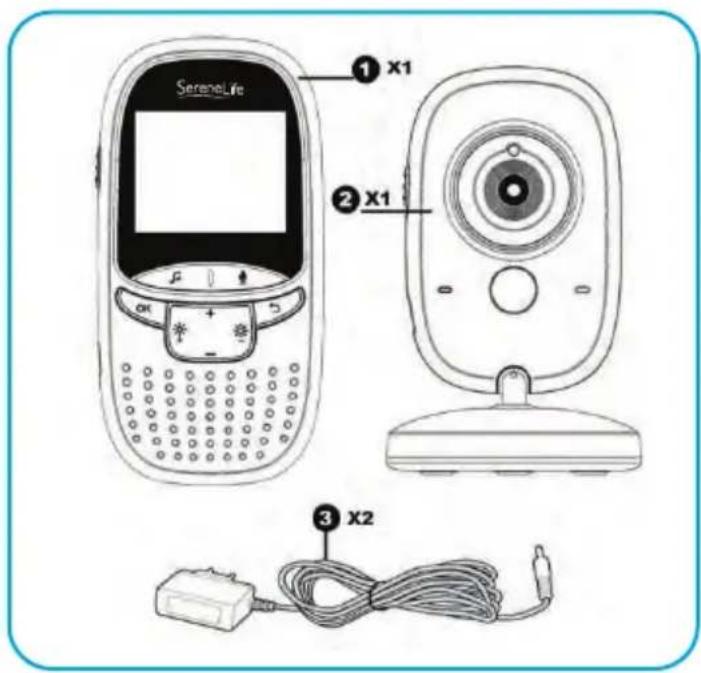
- Monitor X1
- Camera X1
- Power adapter X2
DESCRIPTION
Monitor view
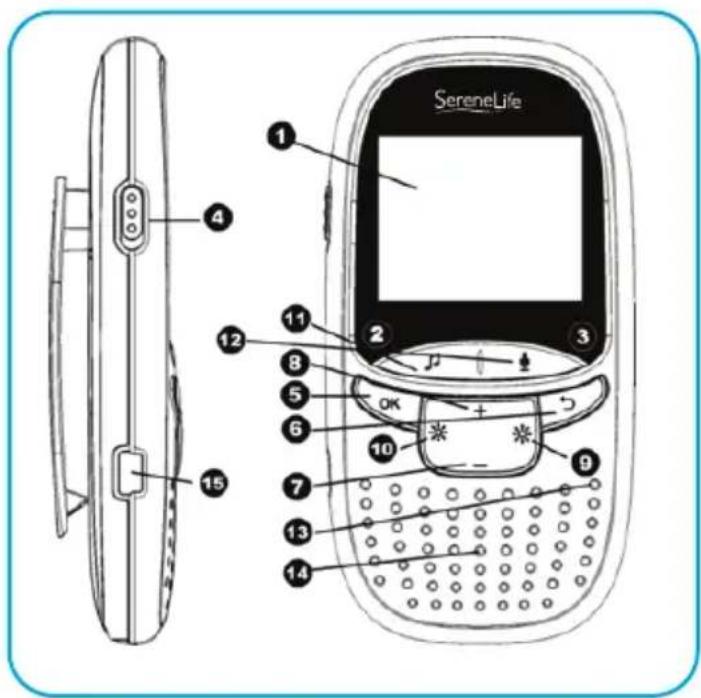
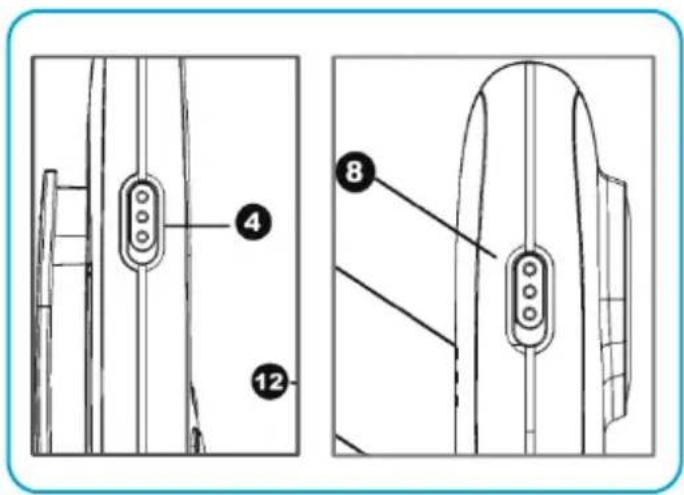
- LCD display
- LED for in Charging
- LED power indicator
- Key Power On/Off
- Key menu/OK
- Key Return - undo.
- Key volume –
- Key volume +
- Key brightness +
- Key brightness –
- Key Music
- Key intercom
- Microphone
- Loudspeaker
- Power Connector
CAMERA VIEW
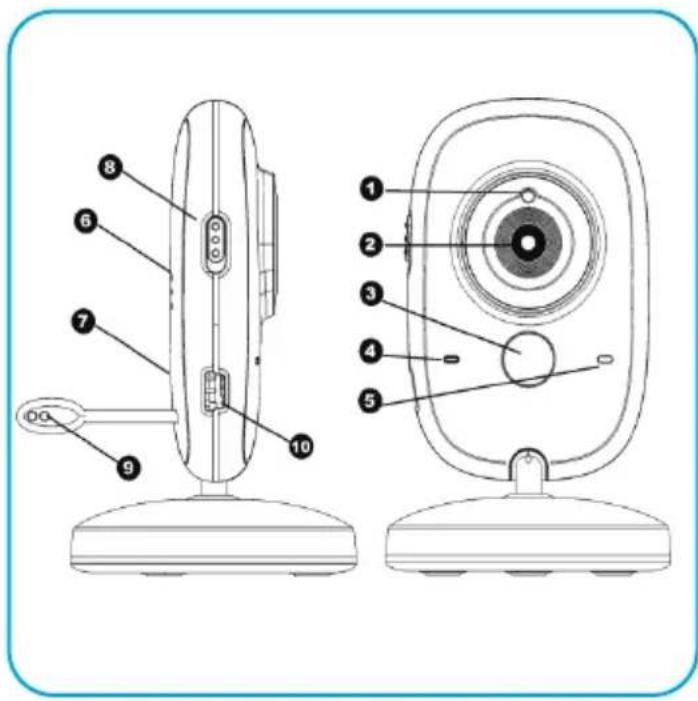
- Light sensor
- Camera lens
- Infrared LED
- Power LED
- Microphone
- Loudspeaker
- Paring key
- Key power on/off
- Temperature sensor
- Power connector
Before installing the camera, test the device to make sure that position is suitable. Check the correct signal reception. If necessary, move the camera to improve reception.
natural_image
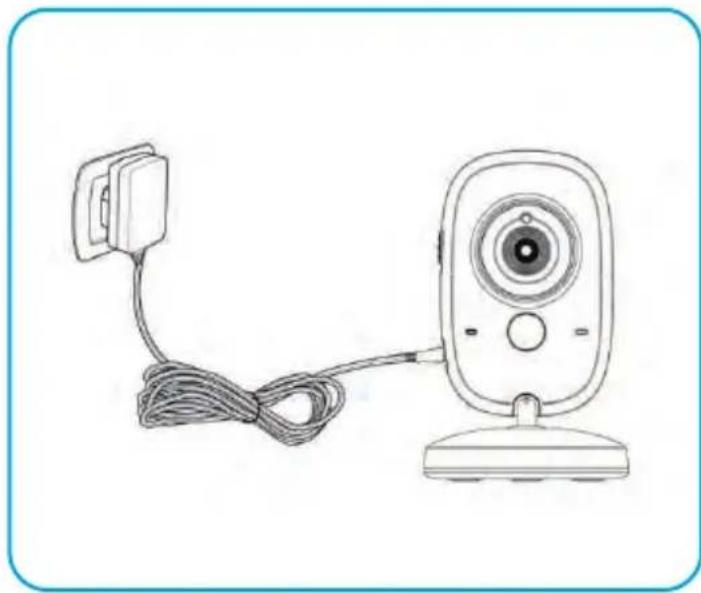
Line drawing of a remote control camera with cable and power cord (no text or symbols)Connect the camera power to the transformer supplied.
The blue LED turns on to indicate that it is running.
PACKAGE CONTENT
natural_image
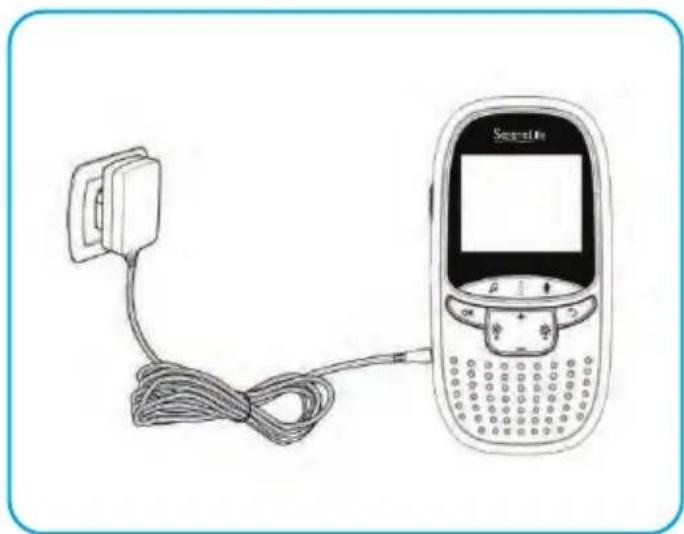
Line drawing of a mobile phone connected to a cable, showing its screen and keypad (no text or symbols present)Connect the monitor power. The display turns on for a few seconds to indicate battery charge level. We recommend that you completely recharge the battery before first use.
Push the power key up to turn the monitor and camera on
MAIN SCREEN
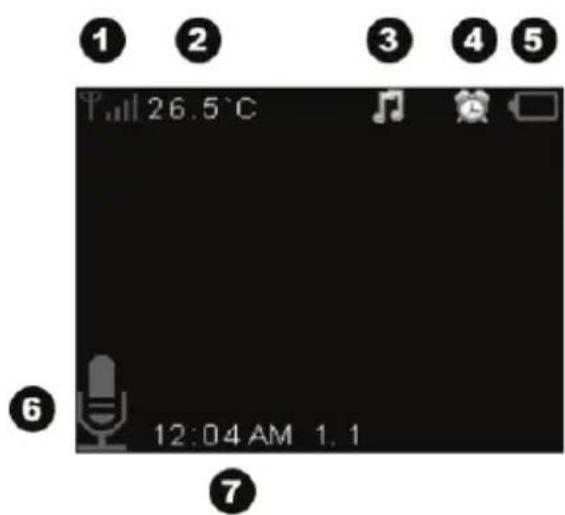
- Signal level
- Temperature measured in child's room
- Playhead of a melody in progress
- Alarm activated
- Level of battery charge
- Activated intercom function
- Date and time
MAIN MENU
To access, press « menu ». This menu contains 6 icons:
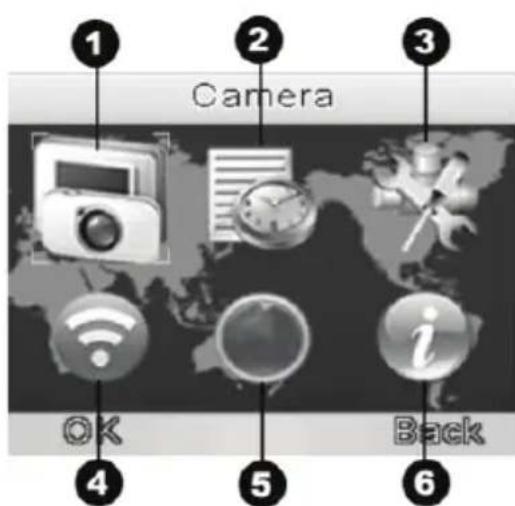
1 Camera
2 Alarm
3 Setting
4 VOX setting
5 Languages
6 Information
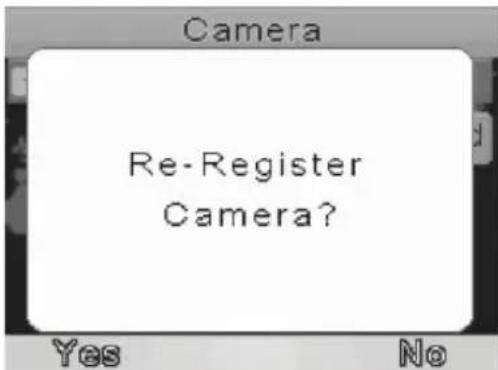
The display and the camera are paired at the factory. You don't need to repeat this procedure unless they both loose connection. In this case, do as follows.
- Press the key "menu" to enter the main menu.
- Select the icon "camera."
- Press "OK" to enter the menu.
-
Press "OK" again to start recording.
A message appears asking if you want to re-register the camera. Press "YES". -
You now have 10 seconds to press the paring key of the camera.
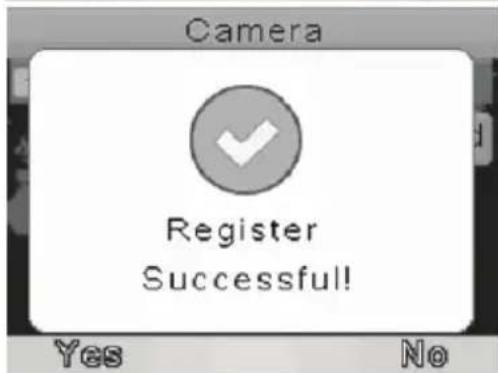
• A message confirms the successful completion of the operation.
MUSIC PLAYING
Press the music key to activate a lullaby on the camera, Press this key again to stop the melody.
INTERCOM FUNCTION
Press the PTT Key to activate the intercom function. The icon displayed indicates that the microphone is active. Keep this key pressed until you have finished speaking. Do not release too quickly not to interrupt the conversation.
VOLUME
When the camera is operating, you can press Volume + key on monitor to increase and press Volume – key to decrease the audio volume from the camera.
ALARM
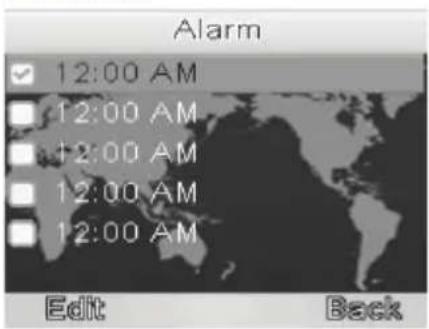
This option allows setting one or more alarms.
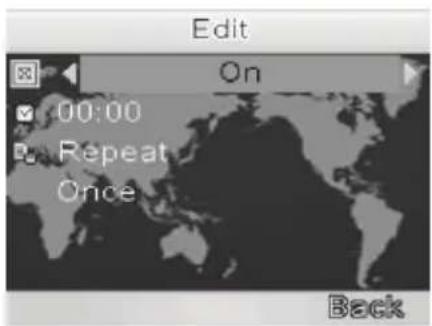
Choose the alarm that you wish to change and press « change ».
• To activate the alarm, press the key "Up"
• To change the line, press the key "right"
• To change time, press "Up/Down"
- Press to switch to minutes "Left/Right"
- When settings are finished, press « Done ».
ADVANCED PARAMETERS
- Date and Time: Allows setting of date and time of your product.
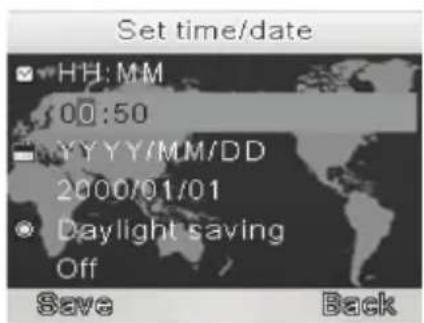
• To change the line, press the key "right"
• To change time, press "Up/Down"
- Press to switch to minutes "Left/Right"
- To activate summer time, select the line with the key "right"
and press "Down
- When settings are finished, press « Done ».
• Temperature scale: Celsius or Fahrenheit degrees. - Anti-flickering: the flickering is due to artificial lighting. In Europe, use 50Hz.
- Display backlight: to set screen lighting and length of activity
VOX
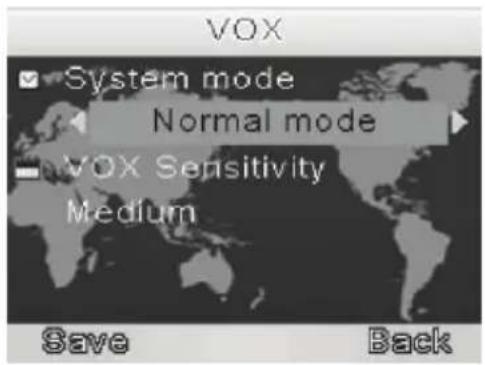
- System mode: Allows the activation of the VOX mode. The VOX mode automatically puts the display in sleep mode to save battery. It reactivates automatically, when it detects noise in the baby's room.
- VOX sensitivity: to set the VOX mode sensitivity. The more sensible it is, the more the display will turn on at the slightest noise.
LANGUAGES
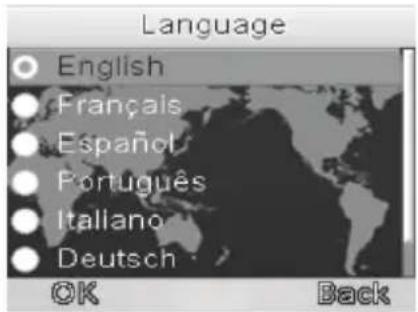
Choosing a menu language:
English/French/Spanish/Portugues/Italian/Deutsch
CLEANING AND MAINTENANCE
- Do not clean with abrasive or corrosive substances.
- Use a slightly moistened soft cloth.
- Do not spray with aerosol as this will damage the interior of the product.
- Avoid direct contact with camera lens.
• Fully charge the battery before first use. - Recharge the battery at least once every 3 months.
- Do not install the product with a flat battery.
- Recharge far from humidity.
- Do not expose to rain.
- Never open the casing to prevent the risk of electric shock

This product can expose you to a chemical or group of chemicals, which may include "Nickel Carbonate" which is known in the state of California to cause cancer, birth defects, or other reproductive harm. For more info, go to https://www.p65warnings.ca.gov/.
SLBCAM10.5 - SLBCAM11
Wireless Video & Camera Baby Monitor System With Digital LCD Screen
Features:
• Professional Home Baby Video Monitor
- Long Lasting, Heavy Duty Baby Monitor System
• Wireless & Portable Baby Monitoring
- Convenient, Reliable, Secure
• Built-in Microphones & Speakers
- Two-Way Communication Enabled
- Extended Wireless Range, 2.4 GHz Video Transmission
- 2.0" -inch Color Digital LCD Display Screen
- User-Friendly Control Interface
• Night Vision Illumination
• Baby Monitor Features Built-in Rechargeable Battery
- Compact Monitor System with Sound Activation
- Simple Setup & Hassle-Free Operation
- Adjustable Camera Viewing Angle, 45^ Degree Rotation
• Built-in Thermometer for Room Temperature Monitoring
• Used for Monitoring Your Child in Any Room of the House
- Button-Activated Musical Melodies & Lullabies for Soothing Comfort
What's in the Box:
- Camera
- Baby Monitor
• (2) USB Wall Power Adapters
Questions? Issues?
We are here to help!
Phone: (1) 718-535-1800
Email: support@pyleusa.com
Technical Specs:
- Wireless Operation Range: Up to 850' ft.
• Image Processor: 0.3 MP, Color CMOS - Camera Resolution: 640 x 480 Pixels
• Built-in Rechargeable Battery: 3.7V, Li-Po 540mah
• Power: 110V (5V Power Adapter) - Camera Dimensions (L x W x H): 2.6" x 1.0" x 4.2" -inches
- Monitor Dimensions (L x W x H): 2.4" x 0.7" x 4.7" -inches
SereneLife
- OPERATING MODE
- PRECAUTIONS FOR USE
- PACKAGE CONTENT
- DESCRIPTION
- Monitor view
- CAMERA VIEW
- MAIN SCREEN
- MAIN MENU
- MUSIC PLAYING
- INTERCOM FUNCTION
- VOLUME
- ALARM
- Choose the alarm that you wish to change and press « change ».
- ADVANCED PARAMETERS
- VOX
- LANGUAGES
- Choosing a menu language:
- CLEANING AND MAINTENANCE
- SLBCAM10.5 - SLBCAM11
- Wireless Video & Camera Baby Monitor System With Digital LCD Screen
- Features:
- What's in the Box:
- Technical Specs:
- SereneLife
Brand : SereneLife
Model : SLBCAM11
Category : Camera