
IPCAMOD45 - Camera SereneLife - Free user manual and instructions
Find the device manual for free IPCAMOD45 SereneLife in PDF.


| Product Type | Indoor/Outdoor IP Security Camera |
| Model | IPCAMOD45 |
| Brand | SereneLife |
| Video Resolution | 1080p Full HD (1920 x 1080) |
| Field of View | 90° wide angle |
| Night Vision | IR LEDs up to 30 ft (10 m) |
| Audio | Two-way audio with built-in microphone and speaker |
| Motion Detection | Yes, with push notifications |
| Connectivity | Wi-Fi 802.11 b/g/n (2.4 GHz) |
| Power Supply | DC 5V / 1A via micro USB (adapter included) |
| Dimensions (LxWxH) | 2.8 x 2.8 x 3.9 in (7.1 x 7.1 x 10 cm) |
| Weight | 7.1 oz (200 g) |
| Mounting | Tabletop or wall mount (mounting kit included) |
| Weather Resistance | Indoor use only (not weatherproof) |
| Storage | MicroSD card up to 128 GB (not included) |
| Cloud Storage | Optional (subscription required) |
| App Compatibility | iOS and Android (SereneLife Smart app) |
| Maintenance & Cleaning | Clean lens with a soft, dry cloth. Do not use liquids or abrasives. |
| Safety Warnings | Keep away from water and extreme temperatures. Use only included adapter. |
| Spare Parts & Repairability | No user-serviceable parts. Contact SereneLife support for repairs. |
Frequently Asked Questions - IPCAMOD45 SereneLife
User questions about IPCAMOD45 SereneLife
0 question about this device. Answer the ones you know or ask your own.
Ask a new question about this device
Download the instructions for your Camera in PDF format for free! Find your manual IPCAMOD45 - SereneLife and take your electronic device back in hand. On this page are published all the documents necessary for the use of your device. IPCAMOD45 by SereneLife.
USER MANUAL IPCAMOD45 SereneLife
IPCAMOD45

IPCAMOD47
TABLE OF CONTENTS:
PRODUCT STRUCTURE DIAGRAM 1
SETUP AN ACCOUNT USERNAME 2
ADD CAMERA TO APP 3
CONNECT TO YOUR NETWORK 4
WEB ACCESS 5
PASSWORDS 5
MOBILE APP LAYOUT 5
CAMERA VIEW PAGE 7
CAMERA RECORDINGS 8
DEVICE SETTINGS 9
RECORDING YOUR CAMERA 10
MOTION DETECTION
AND NOTIFICATION SETTINGS EXPLAINED 11
HOW TO IMPROVE PLAYBACK PERFORMANCE 12
Don't forget to register your camera with us online to get a free 1 year manufacturer's warranty!
Just go to www.SereneLifeHome.com
'SereneViewer' APP Installation
A. Scan 'SereneViewer' APP QR code or search to download the app.

iOS Andriod

Setup an Account Username

Click "Sign Up"

Create your camera username - 6 characters min - Do not use email address
Note:
This user name will be used to access all of your cameras from the app or PC.
Create an account password - Click "Sign Up"
Note: This will be used to log in to all of the cameras on your account and can be separate from the camera password

Add Camera to APP
- Enter 'Device List' and click '+' icon at the top of left corner. Then scan the device ID QR code.
![graph LR A["Hand icon: Hand icon"] --> B["QR code with checkmark"] B --> C["Wi-Fi interface: Wi-Fi symbol, Wi-Fi icon, WiFi symbol"]](/content/2026/05/1083238/images/b836dcffac0b3d3aa33677cbfbfffd725f306169a687bb93ab5f73fd7c9ed39e.jpg)
Connect to Your Network
Choose method 1 or 2 for setup
Method 1: Wired Setup
-Connect power, Ethernet cable as above.
- Wait 50 seconds for ( 2 ) indicator on the camera to flash green
-After scanning QR code - select the "Ethernet Connection" option
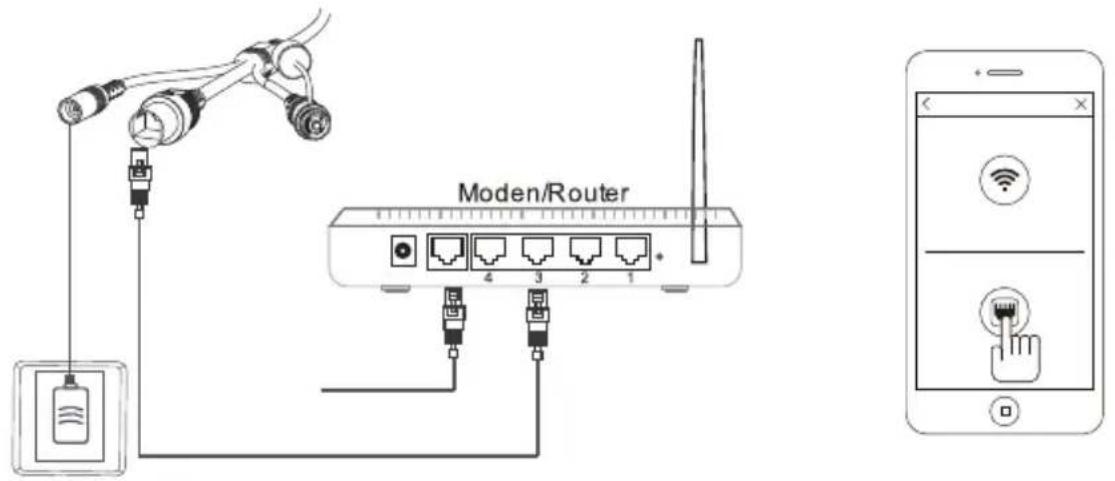
Method 2: Wi-Fi Connection
• Make sure you are in the same room as your wireless router and plug camera into power.
QR Code Method:
- Wait 1-2 min for camera boot up, scanning QR Code, watch for the WiFi indicator on the front of the camera to flash red and green alternating. Click the Wi-Fi connection icon, operate it under the APP instructions.

Web Access:
After setting up your camera on the mobile phone - you can use your account username and password to access the cameras from any device with an internet browser
Log on to the website:
http://cloud.serenelifehome.com/
Passwords
Should you happen to forget a camera's individual password you can reset it by performing a hardware reset. Just use a pin to press and hold the reset switch for 12 - 15 seconds. The camera will reboot and run through pan and tilt.
If you forget your account password you will need to register a new account and pair the cameras again.
Accounts are never associated with an email address for password recovery
Mobile App Layout
The main screen is your device list. You will see a thumbnail preview for all cameras added to your account.
Use this menu to
- Switch between different cameras
- Add new devices
• Access and change app global settings

App Settings
You can change your user admin and guest password and check the app software version.
Alarm Messages
Shows which cameras have detected motion.
Camera View Page
This page give you access to all camera specific actions and settings
- Hold the phone vertically or horizontally to switch between full screen mode
- Swipe left and right on the video to reposition the camera
- Spread two fingers apart to zoom in
Sound
Activate to hear your cameras surroundings
Microphone
Activate to talk through your camera's speaker.
Snap Photo
Saves a photo to your phone's local memory

Image Settings
Set color, contrast, image res and more.
Local Video
Records the live video direct to phone memory. This feature only works while app is open. See "SD recording" for background recording options.
View the Video Records
and alarm messages Click the icon to view the video recording and alarm message.
Camera Recordings
Enter into the interface of "information and video viewing" can see the alarm information and video of storage device (Micro SD or cloud box), users can quickly search the information and video by choose the time or category.
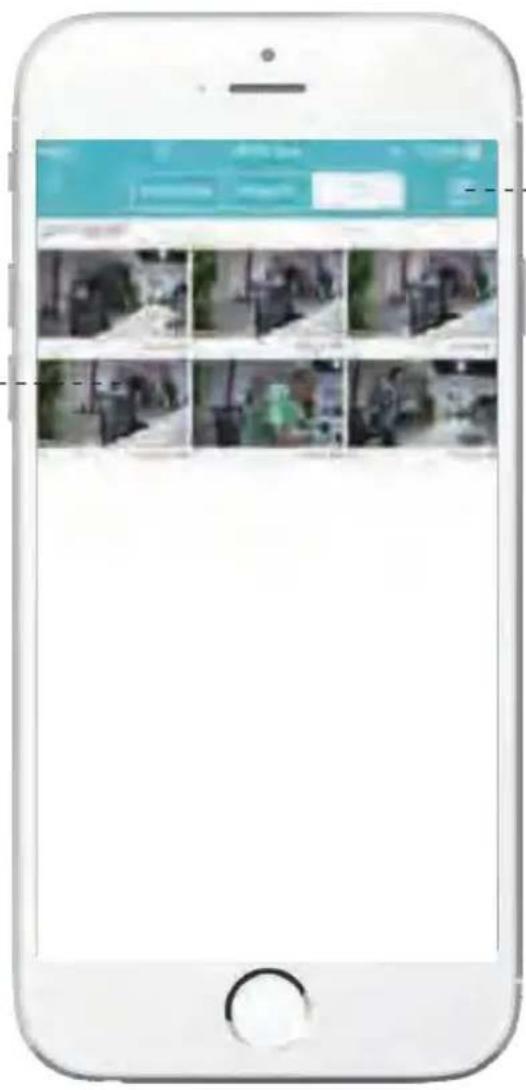
Local
Shows photos and videos recorded to the phone memory
Calendar Icon
Skip to a specific date and time..
Records
Shows photos and videos stored on the SD memory card. Drag the screen down to load.
Device Settings
This screen allows you to check and set camera specific settings. If you see the red dot icon - a firmware update is available. Install available firmware updates to ensure the camera features are working as intended.

Recording Your Camera
You can choose 3 options for storing recordings for your camera
1. Local Storage
This is the most simple method - just point and shoot. This only works while The phone app is open and running and will take up memory on your phone.
2. SD Storage
Install an SD card and open up a world of possibilities!
Choose between scheduled recording, motion detection triggered recording or just let it run! The oldest videos will be overwritten to make room for the newest. You can download and save the videos from the mobile or website.
3. CloudBox Storage
Sometimes SD storage just doesn't cut it. With a limit of 32g and the fact that the videos are stored directly in the camera - many people prefer the peace of mind the CloudBox can bring. Purchase the cloud box and back up 2TB of video storage from any device on a single network and check the videos from the same login. Find the CloudBox for sale on Amazon now!
Search "SereneLife CloudBox"
Motion Detection and Notification Settings Explained
You can set notification settings separately for any camera in your account. To access the notification settings, select your camera, and go to the settings tap - then scroll down to "motion detection"
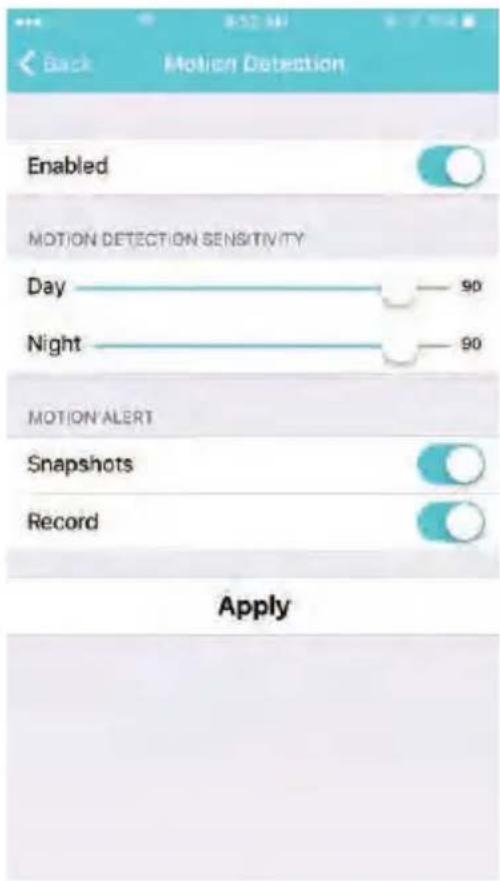
Slide the slider to enable motion detection
You can then choose what actions you would like to occur when your camera detections motion. Recordwill record video to the SD card while the camera detects motion.
You can also turn push notifications on and off by selecting "turn alert on" or "turn alert off".
If you are finding your camera is alerting you needlessly or failing to alert you if someone is moving, you can adjust the sensitivity for motion detection for the camera.
Go to "settings" > "Motion Sensitivity" and adjust the sliders for day and night separately
How to Improve Playback Performance
Choppy video?
Try the following to ease up the demands for data on your camera...
Decrease the Video Stream Quality
You can drop the resolution setting for the camera to make it easier on your home network's bandwidth.
Just open up the setting here and adjust until you get the desired performance level.

Plug your camera into a wired data connection
Do some tests before throwing in the towel for using the camera wirelessly
But the facts remain - wires are still quicker...
How to evaluate your home wireless network
Evaluate your wireless network
Cameras having trouble with wireless? You may want to consider upgrading your wireless network.
Lets do a basic evaluation of your home wireless network.
First, we recommend comparing your network speed with your wireless speed.
-
Run a speedtest from a laptop of desktop connected to your router with a wired connection. http://www.speedtest.net/
-
Compare this value to your wireless network apps like "Speed Test" to see if you have enough available data in the area you would like to set the camera.
-
Test your network range
• What is your download speed in the same room as your wireless router?
- What is the download speed in the location you are trying to install the camera?
• Is there a significant drop?
What to upgrade?
- If your wired connection is too slow to reach the bandwidth requirements of the camera you may need to consider upgrading your internet service.
- If you have a significant drop in data when testing a wireless connection in the same room as your router, you may want to consider upgrading to a router that can provide higher data transmission speeds
- If you see a significant drop in data when testing in the area you want to install your camera you can either look for an upgraded router that will offer additional range or you can expand your router range with a signal booster.
How to check and install firmware updates
Firmware updates ensure our new features will work 100% for your camera. It is a good idea to install them when you see they are available.
It is recommended that you install updates while on a wired connection to your router.
This will ensure loss of bandwidth is not an issue during updates
To check and install firmware updates
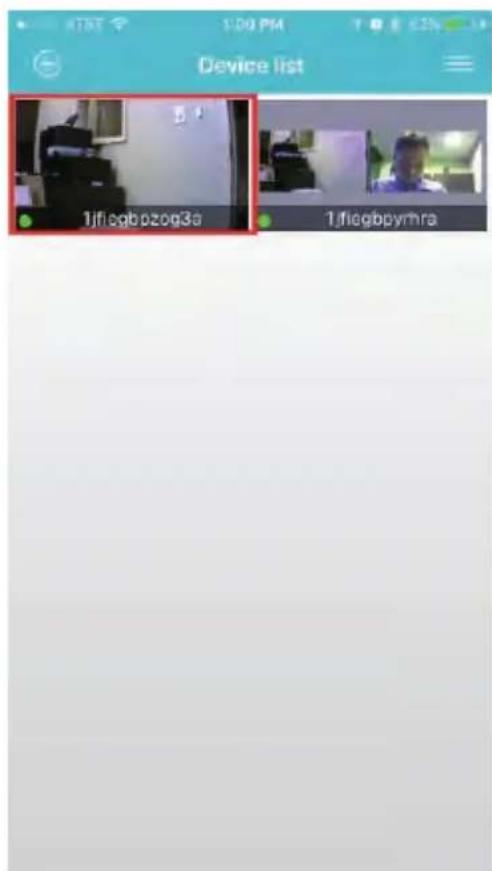
- Tap the device preview image
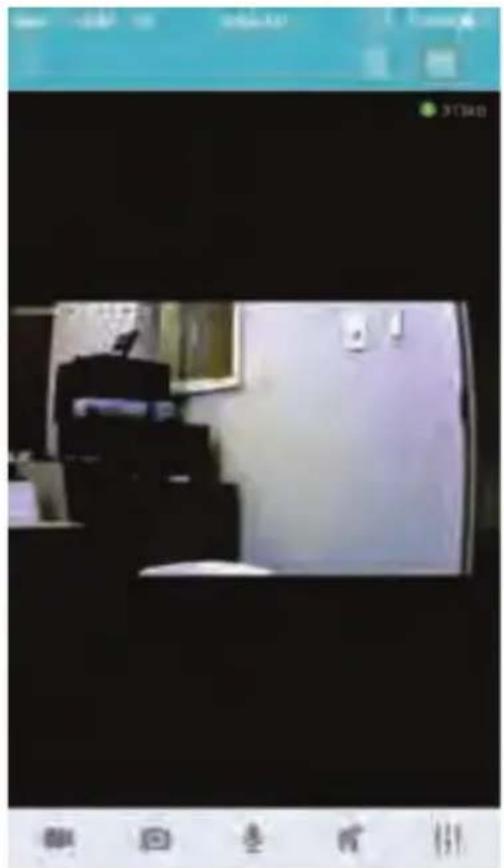
- Look for red dot indicating firmware update available - then enter settings

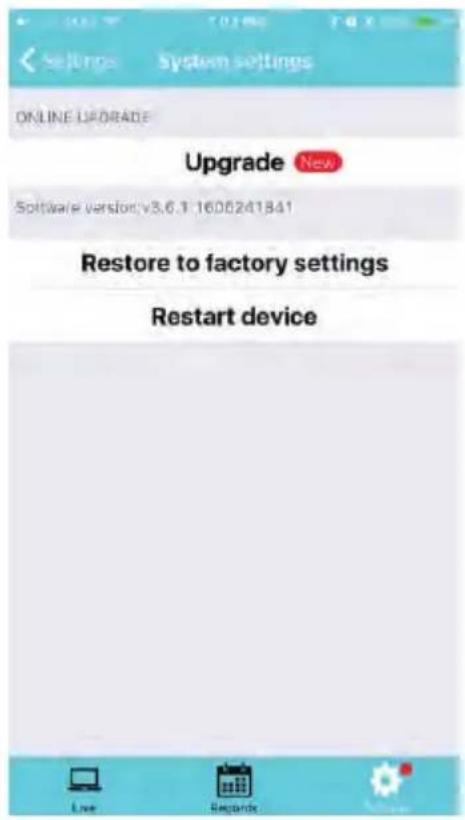
- Scroll down to "System Settings" 4. Select Upgrade - then confirm

- Now wait for the upgrade to proceed
• It can take 5 - 10 minutes
- Do not quit the app or modify the camera hardware
- Once complete - the app will tell you to restart the camera
• However it should automatically restart itself
- Wait 2-3 minutes for the camera to restart before checking the camera feed or settings
- Check if any additional updates are available
- Sometimes there will be multiple updates available in a row. Repeat the process until no new updates are available
Desktop access link: http://cloud.serenelifehome.com/
Other issues? Check our FAQ resources and contact support online!
www.SereneLifeHome.com
Compatible Products:
You can add any number of SereneLife cameras to your account with us to monitor multiple locations!

Troubleshooting Can't connect to WiFi
- Connect the ethernet cable and check connection is working
- Go to "camera settings" > "network" Check the WiFi status is enabled and "List" displays your home network - doublecheck the password.
- In the Ethernet tab - disable the ethernet connection to force the camera to look for available WiFi network
Still having trouble?
- Try deleting the camera entry from your account
- Hardware rest the camera
- Add the camera as a new device
SD Card is not recognized by the camera
- Check the card is class 10 - 32g or less
- Insert the card while the camera is powered down then power up
- Try reformatting the card using your computer using "FAT32"
• Test multiple SD cards
App is crashing - a feature is not working
- Check for app updates
- Check for camera firmware updates
- Contact support with app version, mobile device model and OS version so we can update the app and fix the issue
IPCAMOD45
IP Security Camera
Outdoor Surveillance Security Cloud Camera with Internal SD Card Slot, Works with Alexa, Night Vision & IP66 Grade Waterproof Design
Features:
- Compatible with Amazon Alexa Echo
• Outdoor Surveillance Security Cloud Camera
• Waterproof, Supports WiFi with Two-Way Audio - Easy Installation, Plug, and Play
• View the Video Anytime and Anywhere; Support Multiple Platforms, Terminals, and Networks
• Clear and Smooth Video, Intelligent Transmission
• Bank-Level Security Control and Ensure Privacy
• Online Firmware Upgrade, Update Function and Experience Synchronously -
Smart H.264 Video Compression Algorithm, with Lower Video Bit Rates and Saving More Space when Recording
-
Support Android/iOS System Mobile Device, Remote Real-Time Monitoring
• Infrared Lamp; Remote Viewing Day or Night - Infrared Night Vision Lighting (IR Distance: 1.18" -inches), 24 Hours a Day and Night Monitoring, IR-CUT Switch
- Motion Detection, Linkage Snapshot/Video Recording, Real-Time App Push Notifications
• Support 2.4G WiFi (IEEE802.11b/g/n) - Cloud Storage (Paid Subscription), Micro SD Card Storage, Cloud Box, Internal SD Card Slot, Easy to Install Audio Input and Output
• Built-in Speaker and Microphone, Supported Two-Way Audio, with Telecommunication Level of Signal Processing
• IP66 Grade Waterproof and Dustproof Design
The 'SereneViewer' App:
- Managed IP Camera Access - 1 Login Gives Access to Mobile and Desktop Monitor & Survey While Away
• Wireless Video Recording Control - Remote PTZ (Pan/Tilt/Zoom) Controls
- Ability to Monitor the Location via Smartphone
- Button-Activated Schedule, Stop & Start
• Real-Time App Push Notification Alerts
• Available for Android & Apple iOS - Free to Download
What's in the Box:
- Smart IP Wi-Fi Cam
- Quick Start Guide
• Network Ethernet Cable, 3.6' ft. - Mounting Hardware
- Power Adapter
Technical Specs:
• Image sensor: 1/2.9"color CMOS sensor
- Lens: f: 3.6mm, 2MP
• Visual Angle: H: 89.6°; V: 51°; D: 103°
• Audio Compression: AAC
• Video Compression: Smart H.264
• Lighting Frequency: 50Hz, 60Hz
• Image Frame Rate: Max 30fps
• Preinstalled 128GB SD Micro Memory
- Imaging Sensor: 1/2.9"color CMOS sensor
• Audio Compression: AAC
• Lighting Frequency: Max 30fps
• Display Resolution: 1920*1080
- Adjustable Lens: Zoom Lens Focal Length: 0.11" x 0.47"-inches
• LED Instructions: Network Signal Indicator
- IP Level: IP66
• Video Storage: Micro SD Card (Max 128GB, Cloud Box and Cloud Storage
• Work Temperature: -20° to 55° C ( -2° F to 131° F)
• Work Humidity: 10% to 80% (no condensation)
• Storage Temperature: -20°C to 60° (-2°F to 140°F)
• Storage Humidity: 0% to 90% (no condensation)
• Image Adjustment: Brightness, Contrast, Saturation, Sharpness Adjustable
- White Balance, (BLC), Automatically
- Default Display Resolution: 1920 x 1080 Pixels, Max 30 FPS
• Res. Selectable: 1080p, Auto, Standard, Smooth
• Video Format: Smart H.264,
- Night Vision Capture Distance: 2 Infrared Lights, 2 White Lights (40MIL, 850nM)
- IR distance: 1.18" -inches
• 2 Channel Audio Input/Output
- Ethernet Interface: 10/100 Mbps, RJ-45
- Operating System Support: Android, IOS, Windows, Mac.
- Wireless Support: 2.4G WIFI (IEEE802.11b/g/n),
- External 3DB Antenna
- Protocol Support: TCP/IP, UDP/IP, HTTP, DHCP, RTMP, MUTP
• Wireless Security: WEP, WPA, WPA2 Encryption
• Data Transfer Rate: Up to 54Mbps
• Certificate: RoHS, CE, FCC, NCC
• Power Consumption: 15 Watt (Max.)
• Power Supply: DC 12V/2.0A - Dimensions (L x W x H): 6.3" x 7.6" x 4.7" - inches
IPCAMOD47
WiFi IP Security Camera
Outdoor PTZ & 4x Optical Zoom Home Surveillance Camera, Two-Way Audio and Supports WiFi Connection, Works with Alexa for Home/Office, etc.
Features:
• Outdoor PTZ Camera
- Compatible with Amazon Alexa Echo
• 4 Times Optical Zoom Home Surveillance Camera
- Managed IP Camera Access - 1 Login Gives Access to Mobile and Desktop
- Two-Way Audio and Supports WiFi Connection
• Easy Installation, Plug, and Play
• View the Video Anytime and Anywhere; Support Multiple Platforms, Terminals, and Networks
• Clear and Smooth Video, Intelligent Transmission
• Bank-Level Security Control and Ensure Privacy
• Online Firmware Upgrade, Update Function and Experience Synchronously
- Smart H.264 Video Compression Algorithm, with Lower Video Bit Rates and Saving More Space when Recording
• Support Android/iOS System Mobile Device, Remote Real-Time Monitoring
• Support Pan & Tilt (H:355°& V:90°),
- With Preset Function, PTZ can be Cruised and Monitored
- Motion Detection, Linkage Snapshot/Video Recording, Real-Time App Push Notifications
- Infrared Night Vision Lighting (IR distance: 1.18" -inches), 24 Hours a Day and Night
• Monitoring, IR-CUT Switch
• 2.4G WiFi (IEEE802.11b/g/n)
• Voice Dialogue, Built-in MIC and 2W High Power Horn
• Support Max 128G SD Card
- Cloud Storage, Micro SD Card Storage, and Cloud Box and Internal SD Card Slot
- Easy to Install, Support QR Code Login
- 4-Fold Optical Zoom, Intelligent Adjustment of Focal Length Change (Optional)
Package Contents:
- IP WiFi Cam
- Quick Start Guide
• Camera Monitoring Software
- Ethernet Network Cable, 5'
- Power Adapter
- Mounting Hardware
- Antenna
Technical Specs:
• Preinstalled 128GB SD Micro Memory
- Imaging Sensor: 1/2.9"color CMOS sensor
• Audio Compression: AAC
• Video Compression: Smart H264
• Lighting Frequency: Max 30fps
• Display Resolution: 1920 x 1080
- Adjustable Lens: Zoom Lens Focal Length: 0.11" x 0.47" -inches
• LED Instructions: Network Signal Indicator
- IP Level: IP66
• Video Storage: Micro SD Card (Max 128GB), Cloud Box and Cloud Storage
• Work Temperature: -20° to 55°C (-2°F to 131°F)
• Work Humidity: 10% to 80% (no condensation)
• Storage Temperature: -20°C to 60° (-2°F to 140°F)
• Storage Humidity: 0% to 90% (no condensation)
• Image Adjustment: Brightness, Contrast, Saturation, Sharpness Adjustable
• White balance, (BLC), Automatically
- Default Display Resolution: 1920 x 1080 Pixels, Max 30FPS
• Res. Selectable: 1080p, Auto, Standard, Smooth
• Video Format: Smart H.264,
- Night Vision Capture Distance: 6 Infrared Lights, 2 White Lights (850nM), IR distance: 1.18" -inches
• 2-Channel Audio Input / Output
- Ethernet Interface: 10/100 Mbps, RJ-45
- Operating System Support: Android, IOS, Windows, Mac.
- Wireless Support: 2.4G WIFI (IEEE802.11b/g/n),
• External 3DB Antenna
- Protocol Support: TCP/IP, UDP/IP, HTTP, DHCP, RTMP, MUTP
• Wireless Security: WEP, WPA, WPA2 Encryption
• Data Transfer Rate: Up to 54Mbps
• Certificate: RoHS, CE, FCC, NCC
• Power Consumption: 15 Watt (Max.)
• Power Supply: DC 12V/2.0A
- Dimensions (L x W x H): 0.6" x 0.76" x 0.47" -inches
Questions? Issues?
We are here to help!
Phone: (1) 718-535-1800
Email: support@pyleusa.com
SereneLife


- TABLE OF CONTENTS
- SERENEVIEWER' APP INSTALLATION
- NOTE
- ADD CAMERA TO APP
- CONNECT TO YOUR NETWORK
- CHOOSE METHOD 1 OR 2 FOR SETUP
- METHOD 1: WIRED SETUP
- METHOD 2: WI-FI CONNECTION
- QR CODE METHOD
- WEB ACCESS
- LOG ON TO THE WEBSITE
- PASSWORDS
- MOBILE APP LAYOUT
- USE THIS MENU TO
- APP SETTINGS
- ALARM MESSAGES
- CAMERA VIEW PAGE
- SOUND
- MICROPHONE
- SNAP PHOTO
- IMAGE SETTINGS
- LOCAL VIDEO
- VIEW THE VIDEO RECORDS
- CAMERA RECORDINGS
- LOCAL
- CALENDAR ICON
- RECORDS
- DEVICE SETTINGS
- RECORDING YOUR CAMERA
- LOCAL STORAGE
- SD STORAGE
- CLOUDBOX STORAGE
- MOTION DETECTION AND NOTIFICATION SETTINGS EXPLAINED
- HOW TO IMPROVE PLAYBACK PERFORMANCE
- CHOPPY VIDEO
- DECREASE THE VIDEO STREAM QUALITY
- WHAT TO UPGRADE
- HOW TO CHECK AND INSTALL FIRMWARE UPDATES
- TO CHECK AND INSTALL FIRMWARE UPDATES
- COMPATIBLE PRODUCTS
- TROUBLESHOOTING CAN'T CONNECT TO WIFI
- STILL HAVING TROUBLE
- SD CARD IS NOT RECOGNIZED BY THE CAMERA
- APP IS CRASHING - A FEATURE IS NOT WORKING
- IPCAMOD45
- IP SECURITY CAMERA
- FEATURES
- THE 'SERENEVIEWER' APP
- WHAT'S IN THE BOX
- TECHNICAL SPECS
- IPCAMOD47
- WIFI IP SECURITY CAMERA
- PACKAGE CONTENTS
- SERENELIFE
Brand : SereneLife
Model : IPCAMOD45
Category : Camera