SW4:1 - Uncategorized Simplified MFG - Free user manual and instructions
Find the device manual for free SW4:1 Simplified MFG in PDF.


| Brand | Simplified MFG |
| Model | SW4:1 |
| Product Type | Multi-purpose tool |
| Dimensions (approx.) | 20 x 15 x 10 cm |
| Weight (approx.) | 1.2 kg |
| Power Supply | Battery-operated (4 x AA, not included) |
| Material | Plastic and metal components |
| Color | Black with red accents |
| Display | LED indicator |
| Operating Temperature | 0°C to 40°C |
| Main Functions | Measurement, cutting, and assembly aid |
| Safety Features | Overload protection, automatic shut-off |
| Maintenance | Wipe with dry cloth; do not use solvents |
| Cleaning | Remove batteries before cleaning |
| Spare Parts Availability | Contact manufacturer for replacement parts |
| Repairability | User-replaceable battery compartment |
| Warranty | 1 year limited warranty |
| Manual Languages | English (14 pages) |
Frequently Asked Questions - SW4:1 Simplified MFG
User questions about SW4:1 Simplified MFG
0 question about this device. Answer the ones you know or ask your own.
Ask a new question about this device
Download the instructions for your Uncategorized in PDF format for free! Find your manual SW4:1 - Simplified MFG and take your electronic device back in hand. On this page are published all the documents necessary for the use of your device. SW4:1 by Simplified MFG.
USER MANUAL SW4:1 Simplified MFG
Thank you for purchasing this device
The Simplified MFG SW4:1 is designed to provide years of reliable service. At Simplified MFG, we want the experience with this device to be the best possible and are committed to helping achieve that experience.
Surge protection device recommended
This product contains sensitive electrical components that may be damaged by electrical spikes, surges, electric shock, lightning strikes, etc. Use of surge protection such as the HDSURGE and other systems is highly recommended to protect and extend the life of your equipment.
I. Introduction
The SW4:1 a high-performance HDMI 4x1 switch that supports HDTV formats up to 4Kx2K@60Hz and all HDMI 3D TV formats. It can extract HDMI stream audio to separate digital and analog audio output. This product supports HDCP repeater/CEC/ARC functions. Select any of the inputs by front panel button or IR Remote, the corresponding indicator LED on the front panel will be illuminated.
II. Features
- Compliant with HDMI 2.0a, DVI 1.0 standards
• HDCP 2.2 and HDCP 1.4 compliant
• Video formats up to 4Kx2K@60 and all HDMI 3D video formats
• Supports PCM, Dolby TrueHD, DTS-HD Master Audio up to 7.1CH
• Digital and analog audio output
• Supports smart EDID management (Auto/2CH/5.1CH/7.1CH selectable)
- Supports input port auto switching or manual switching mode
• Audio Return Channel (ARC) support
III. Package
- 1 x HDMI 4x1 Switch
- 1 x 5V/1A Power Adapter
• 1 x 38KHz IR Rx cable
• 1 x Optical converter (for SPDIF audio output) - 1 x IR Remote
- 1 x Operation Manual
IV. Specifications
Frequency Bandwidth 18Gbps
Input Ports 4 HDMI Female ports, 1 IR Receive port and 1 RS232 port
Output port 1 HDMI Female port and 1 L/R & Optical port
HDMI Audio Output PCM2.1/5.1/7.1CH, Dolby5.1, DTS5.1, Dolby-TrueHD, DTS-HD
ESD Protection Human Body Model: ± 8kV (air-gap discharge)
$$ \pm 4 \mathrm{kV} (\text { c o n t a c t d i s c h a r g e }) $$
Dimensions (mm) 180 (D) x 85 (W) x 11.6 (H)
Weight (g) 300
Power Consumption Max 2.5W
Operating Temperature 0^ C \~ 40^ C / 32^ F \~ 104^ F
Storage Temperature -20^ 60^ / -4^ 140^
V. Switch Operation controls and Functions
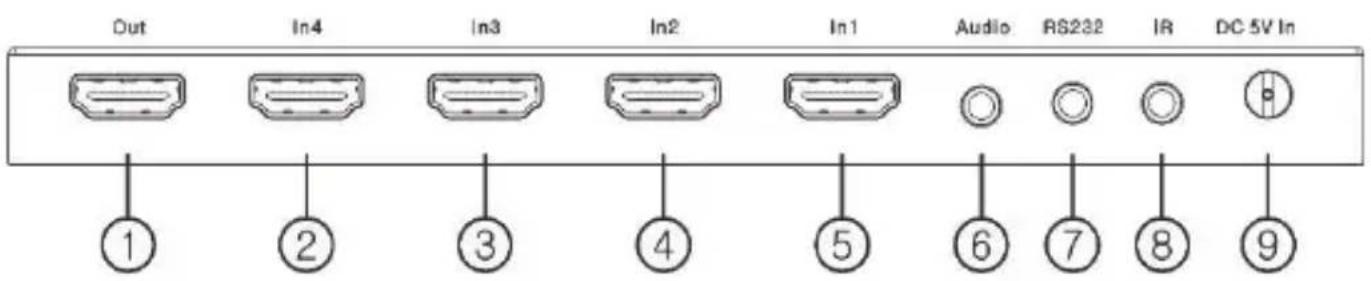
Front Panel:
① Input indicator LED, corresponding port LED will be illuminated when its port is selected.
② Auto or manual select button:
Press this button >2 seconds to select auto switching or manual switching mode.
Under manual switching mode, short pressing this button to select input port.
③ EDID status LED (Auto means the EDID of the display is being utilized).
④ EDID select button (Press this button to select EDID mode Auto/2.1CH/5.1CH/7.1CH)
⑤ ARC status LED (this LED will be illuminated if ARC is enabled successfully)
⑥ ARC function on/off button
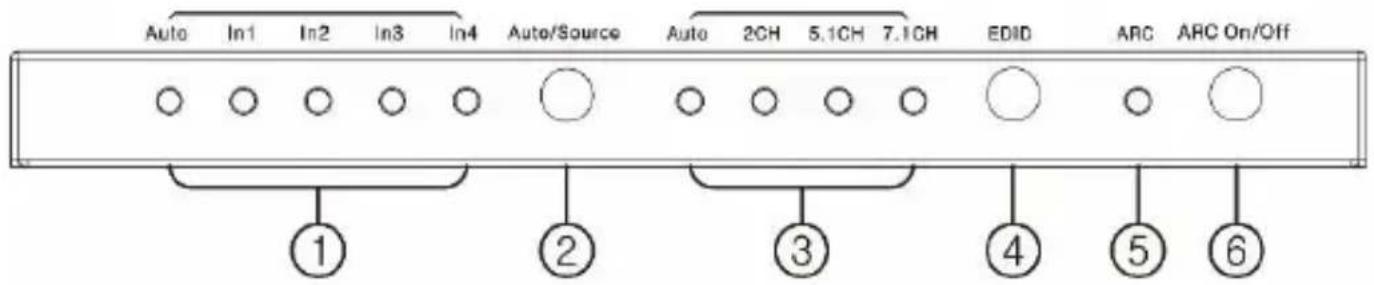
Rear Panel:
① HDMI output port, connect to display via HDMI cable
②③④⑤ HDMI input ports, connect with HDMI source via HDMI cable
⑥ Audio output (including L/R analog and optical audio out)
⑦ RS232 port ⑧ IR receiver port ⑨ DC 5V input port
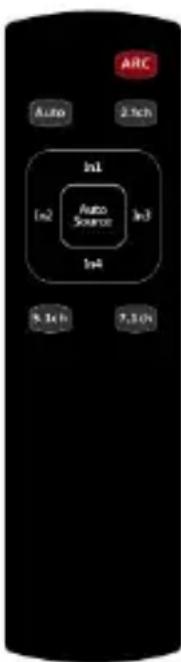
VI. IR Remote
ARC: Press this button to enable or disable ARC function. ARC LED on front panel will be illuminated if ARC function is enabled successfully.
Auto/2.1ch/5.1ch/7.1ch: Press these buttons to select different EDID setting and corresponding LED on front panel will be illuminated.
Auto Source: Press this button to select auto switching or manual switching mode.
In1/In2/In3/In4: Under manual switching mode, press this button to select input.
VII. Application Example
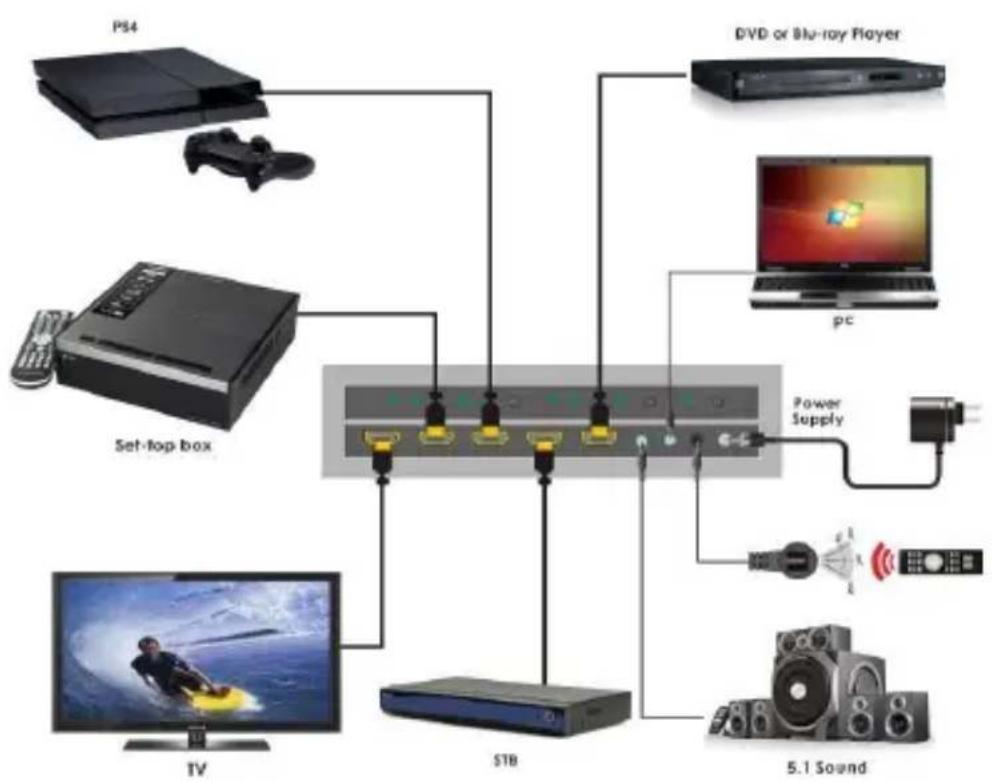
flowchart
graph TD
    A["PS4"] --> B["Set-top box"]
    C["DVD or Blu-ray Player"] --> B
    D["PC"] --> E["Power Supply"]
    F["TV"] --> G["STB"]
    H["5.1 Sound"] --> I["Switch"]
    J["Radio"] --> K["Power Supply"]
Warranty
Should you feel your product does not function adequately due to defects in materials or workmanship, we (referred to as "the warrantor") will, for the length of the period indicated below (starting from the original date of purchase) either: a) Repair the product with new or refurbished parts. or b) Replace it with a new or refurbished product.
All Simplified MFG products are covered by a 3 year PARTS and LABOR warranty. During this period, there will be no charge for unit repair, replacement of unit components or replacement of product if necessary. The decision to repair or replace will be made by the warrantor. The purchaser must mail-in the product during the warranty period. This limited warranty only covers the product purchased as new and is extended to the original purchaser only. It is non-transferable to subsequent owners, even during the warranty period. A purchase receipt or other proof of original purchase date is required for the limited warranty service.
-
This Limited Warranty ONLY COVERS failures due to defects in materials or workmanship and DOES NOT COVER normal wear and tear or cosmetic damage. The limited warranty also DOES NOT COVER damage that occurs in shipment or failures caused by products not supplied by the warrantor, failures resulting from accident, misuse, abuse, neglect, mishandling, misapplication, alteration, incorrect installation, set-up adjustment, implementation of/to consumer controls, improper maintenance, power line surge, lightening damage, modification, service by anyone other than a manufacturer-approved service center or factory authorized personnel, or damage attributable to acts of God.
-
There are no express warranties except as listed under "limited warranty coverage." The warrantor is not liable for incidental or consequential damage resulting from the use of this product or arising out of any breach of this
warranty. For example: damages for lost time, the cost of having a person/persons remove or re-install previously installed equipment, travel to and from service location, loss of or damage to media, images, data or other recorded/stored content. The items listed here are not exclusive, but are for illustration only. Parts and service not covered by this limited warranty are not the responsibility of the warrantor and should be considered the responsibility of the individual.
Simplified MFG Publication Disclaimer
The material contained in this document consists of information that is the sole property of Simplified MFG. This document is intended to provide information to allow interfacing to the relevant Simplified MFG equipment by third party products. Simplified MFG IS NOT RESPONSIBLE FOR MALFUNCTIONS AND/OR THE IN-OPERABILITY WHICH MAY BE CAUSED
BY THE APPLICATION OF THIS INFORMATION, WHETHER EXPECTED OR NOT. Simplified MFG reserves the right to change software, control codes and specifications without notice. Simplified MFG will not be liable for any use of this information or any changes it may make to those products. The use of this information constitutes an agreement by the user to these limitations and exclusions.
Contact
Sales and Tech Support
P 1-833-HDMI-411
E info@simplifiedmfg.com
The Ground Truth image displays a single, solid horizontal line, which is a stylistic or background element (like a ruled paper line or separator), not a placeholder for text. According to Rule 2, such stylistic/background lines must be ignored by the OCR result. The OCR content provided is "", which consists of no characters. This correctly represents the absence of any textual content in the GT and correctly ignores it as a fill-in-the-blank placeholder. Since the GT contains no underscores and the OCR outputted nothing for this line, this complies with the rule that stylistic lines must be ignored. Therefore, the OCR result is consistent with the Ground Truth.

12

How to extract audio from HDMI
- Audio Extraction with no conversion. AUDEX1 extracts the audio in the format sent up to 5.1

flowchart
graph LR
    A["DACT1"] -->|HDMI Cable or Extender Stereo or up to 5.1 Audio| B["AUDEX1 HDMI"]
    B -->|Optical or Stereo| C["Sound Bar"]

flowchart
graph LR
    A["Oscilloscope"] -->|HDMI Cable or Extender with any audio format| B["DAC1 HDMI"]
    B -->|Optical or Stereo| C["Sound Bar"]
    style A fill:#f9f,stroke:#333
    style B fill:#ccf,stroke:#333
    style C fill:#cfc,stroke:#333

flowchart
graph LR
    A["Audio Analyzer"] -->|HDMI| B["EX1L RX"]
    B -->|Category cable| C["EX1L RX"]
    C -->|HDMI| D["Image Display"]
    C -->|Optical or Stereo| E["Sound Bar"]

flowchart
graph LR
    A["Device with LCD panel"] -->|HDMI| B["EXeARC1 TX"]
    B --> C["Category cable full uncompressed audio returns from display"]
    C --> D["EXeARC1 RX"]
    D -->|HDMI| E["Video monitor with color-coded spectrum"]
- Several sources, no AVR audio extraction at display to soundbar via SW4:1
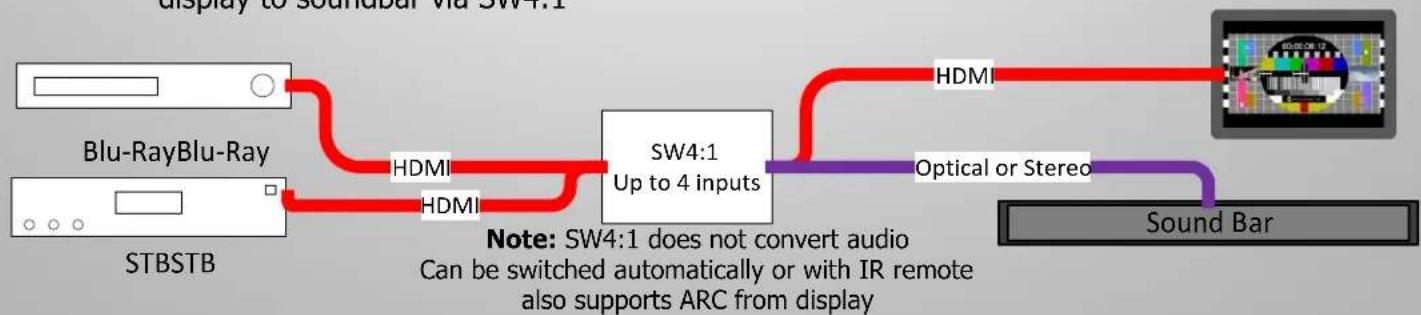
flowchart
graph LR
    A["STBSTB"] --> B["Blu-Ray Blu-Ray"]
    B --> C["SW4:1 Up to 4 inputs"]
    C --> D["HDMI"]
    C --> E["Optical or Stereo"]
    D --> F["Sound Bar"]
    E --> F
    style A fill:#f9f,stroke:#333
    style B fill:#ccf,stroke:#333
    style C fill:#cfc,stroke:#333
    style D fill:#fcc,stroke:#333
    style E fill:#cff,stroke:#333
    style F fill:#ffc,stroke:#333
Brand : Simplified MFG
Model : SW4:1
Category : Uncategorized