EX1L - Uncategorized Simplified MFG - Free user manual and instructions
Find the device manual for free EX1L Simplified MFG in PDF.


| Product Type | 18Gbps HDMI over HDBaseT Extender Set |
| Model | EX1L |
| Brand | Simplified MFG |
| Video Resolution | Up to 4K2K@60Hz 4:4:4, 1080p up to 150m |
| Maximum Distance (4K) | 120m (394 ft) via CAT6/6a |
| Maximum Distance (1080p) | 150m (492 ft) via CAT6/6a |
| HDMI Compliance | HDMI 2.0b, HDCP 2.2 / HDCP 1.4, DVI 1.0 |
| Video Bandwidth | 18 Gbps |
| HDR Support | HDR8/10/10+, Dolby Vision™, WCG, HLG |
| Audio Support | LPCM 2.0/5.1/7.1, Dolby Digital, DTS, etc. |
| Audio Extraction (TX) | 3.5mm stereo analog |
| Audio Extraction (RX) | Optical SPDIF + 3.5mm stereo analog |
| HDMI Loop Out (TX) | Yes |
| IR Control | Bi-directional, 12V IR kit included (blaster & receiver cables) |
| RS-232 Pass-Through | Yes, via Phoenix connectors on both units |
| Power over Cable (PoC) | Yes, power supply on either TX or RX only |
| Power Supply | DC 24V/1A (locking connector) |
| Power Consumption | 9.36 W |
| Enclosure | Metal, black |
| Dimensions (per unit) | 140mm (W) x 65mm (D) x 18mm (H) |
| Weight (TX) | 160 g |
| Weight (RX) | 155 g |
| Operating Temperature | 32 – 104°F (0 – 40°C) |
| Storage Temperature | -4 – 140°F (-20 – 60°C) |
| Relative Humidity | 20 – 90% RH (no condensation) |
| Warranty | 3 years parts and labor |
| Included Accessories | TX & RX units, 2x IR blaster (1.5m), 2x IR receiver (1.5m), 4 mounting ears, 2x 3-pin Phoenix connectors, 1x 24V/1A locking power adapter, user manual |
Frequently Asked Questions - EX1L Simplified MFG
User questions about EX1L Simplified MFG
0 question about this device. Answer the ones you know or ask your own.
Ask a new question about this device
Download the instructions for your Uncategorized in PDF format for free! Find your manual EX1L - Simplified MFG and take your electronic device back in hand. On this page are published all the documents necessary for the use of your device. EX1L by Simplified MFG.
USER MANUAL EX1L Simplified MFG
Thank you for purchasing this Device
The Simplified MFG EX1L was designed to provide years of reliable. At Simplified MFG we want your experience with this device to possible and are committed to helping achieve that experience. Please read and keep this manual for future reference.
Surge protection device recommended
This product contains sensitive electrical components that may be by electrical spikes, surges, electric shock, lighting strikes, etc. Us protection systems is highly recommended in order to protect and the life of your equipment.
Table of Contents
1 Introduction......1
2 Features....1
3 Package Contents....2
4 Specifications....2
5 Operation Controls and Functions......4
51 Transmitter Panel....4.
52 Receiver Panel....5.
53 IR Pin Definition....6...
54 IR System Diagram....7
6 Application Example......8
7 Warranty and Contact Information......9
**Please use 568b protocol when terminating the cable.
1 Introduction
This EX1L 18Gbps HDMI Extender can extend an HDR/Dolby Vision audio/video, RS-232, bi-directional IR, and the distance is up to and a 1080p signal up to 150m (492ft) between transmitter and single CAT cable. It supports resolution up to 4K2K@60Hz 4:4:4, and HDCP 2.2. Additional features include a HDMI loop out and embedder port on the TX, and audio de-embedding at the RX optical SPDIF and 3.5mm audio breakout on the RX device and by a single power supply on one end (can be powered from e 12V IR kit is supplied with the extender set as well.
2 Features
- HDMI 2.0, HDCP 2.2 / HDCP 1.4 and DVI 1.0 compliant
• Supports 18Gbps bandwidth
• 120m (394ft) distance at HDMI 2.0b 4K/UHD
• 150m (492ft) distance at 1080p
• HDR 8/10/10+ and Dolby Vision™ support - WCG (Wide Color Gamut) and HLG (Hybrid Log Gamma)
• 3.5mm Mini-jack stereo audio breakout on TX
• HDMI Loop Out on TX
• Optical SPDIF and 3.5mm Mini-jack stereo audio breakout
• 2-Way 12V IR (kit included) - Powers from a single end (either RX or TX)
3 Package Contents
| Qty | Item |
| 1 | 18Gbps HDMI over HDBaseT Extender (Trans |
| 1 | 18Gbps HDMI over HDBaseT Extender (Receiv |
| 2 | IR Blaster cable (1.5 meters) |
| 2 | 20~60KHz IR Receiver cable (1.5 meters) |
| 4 | Mounting Ears |
| 2 | 3-pin Phoenix connectors |
| 1 | 24V/1A Locking Power adapter |
| 1 | User Manual |
4 Specifications
| Technical | |
| HDMI Compliance | HDMI 2.0b |
| HDCP Compliance | HDCP 2.2 / HDCP 1.4 |
| Video Bandwidth | 18Gbps |
| Video Resolution | 4K2K 50/60Hz 4:4:4/4:2:2/4:2:04K2K 30Hz 4:4:41080p, 1080i, 720p, 720i, 480p, 480iAll HDMI 3D TV formatsAll PC resolutions including 1920 x 1200 |
| Color Space | RGB / YCbCr 4:4:4, YCbCr 4:2:2, YCbCr |
| Color Depth | 8/10/12-bit (1080P60Hz, 4K30Hz, 4K60Hz Y4:2:2/4:2:0)8-bit (4K60Hz 4:4:4 ) |
| HDMI Audio Format | LPCM 2.0/2.1/5.1/6.1/7.1, Dolby Digital,Dolby TrueHD, Dolby Digital Plus(DD+), DTES, DTS HD Master, DTS HD-HRA, DTS-X |
| L/R Audio Formats | PCM 2.0 |
| SPDIF Audio Format | LPCM 2.0, LPCM5.1, Dolbly Digital 2/5.1 |
| ESD Protection | Human body model — ±8kV (Air-gap disc & ±4kV (Contact discharge) |
| Connections | |||
| Transmitter | Inputs: 1x HDMI Type A [19-pin female]1x Service [Mini-USB, Update port]Outputs: 1x HDMI Type A [19-pin female]1 x Audio L/R stereo [3.5mm Mini-j1x HDBT Out [RJ45, 8-pin female]1x IR IN [3.5mm Stereo Mini-jack]1x IR Out [3.5mm Stereo Mini-jack]1x RS-232 [Phoenix jack] | ||
| Receiver | Inputs: 1x HDBT In [RJ45, 8-pin female]1x Service [Mini-USB, Update port]Outputs: 1x HDMI Type A [19-pin female]1x Audio out [3.5mm Stereo Mini-jac1 x Audio out [Optical SPDIF]Control: 1x IR IN [3.5mm Stereo Mini-jack]1x IR OUT [3.5mm Stereo Mini-jack]1x RS-232 [Phoenix jack] | ||
| Mechanical | |||
| Housing | Metal Enclosure | ||
| Color | Black | ||
| Dimensions | Transmitter / Receiver:140mm [W] x 65mm [D] x 18mm [H] | ||
| Weight | Transmitter: 160g, Receiver: 155g | ||
| Power Supply | Input: AC 100 - 240V 50/60HzOutput: DC 24V/1A (Locking connector) | ||
| Power Consumption | 9.36 W | ||
| Operating Temp | 32 - 104°F / 0 - 40°C | ||
| Storage Temperatu | -4 - 140°F / -20 - 60°C | ||
| Relative Humidity | 20 - 90% RH (no condensation) | ||
| Resolution / Distance | |||
| 4K2K | 394ft / 120M | ||
| 1080P | 492ft / 150M | ||
| Resolution/Cable Length. | 4K60 -Ft / Meters | 4K30 -Ft / Meter | 1080P60 -Ft / Meters |
| HDMI IN / OUT | 10ft / 3M | 30ft / 10M | 50ft / 15M |
| The use of "Premium High-Speed HDMI" cable is highly recon | |||
5 Operation Controls and Functions
5.1Transmitter Panel
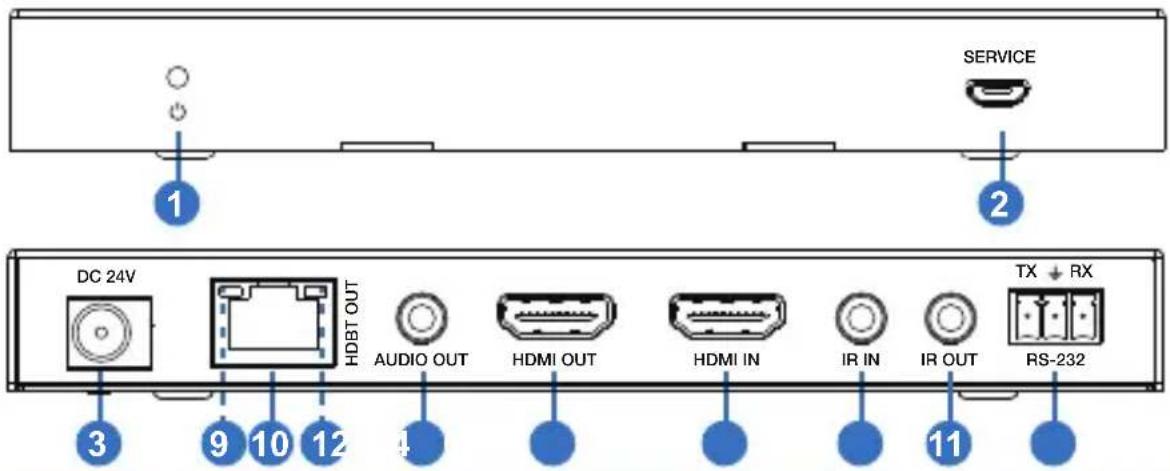
| No. | Name | Function Description |
| 1 | Power LED | Red LED will be illuminated when the transmitter has p |
| 2 | SERVICE port | Firmware update port. |
| 3 | DC 24V | DC 24V/1A power supply input port.Note that the extender supports PoC function, it means that eith transmitter or receiver is powered on by 24V/1A power supply, t other one doesn't need power supply. |
| 4 | HDBT OUT | RJ45 connector for connecting the HDBT In port of rec with a CAT6/6a cable. |
| 5 | Connection Signal Indicator LED (Green) | Illuminated: Transmitter and Receiver have a good connection status.Flashing: Transmitter and Receiver are in poor connec status.Dark: Transmitter and Receiver are not connected. |
| 6 | Data Signal Indicator LED (Orange) | Illuminated: HDMI signal with HDCP.Flashing: HDMI signal without HDCP.Dark: No HDMI signal. |
| 7 | AUDIO OUT | 3.5mm stereo connector for analog audio output. |
| 8 | HDMI OUT | HDMI loop output for display. |
| 9 | HDMI IN | HDMI source input port. |
| 10 | IR IN | IR input port for receiving IR from IR-RX or Control sys |
| 11 | IR OUT | IR output port for control of source device(s). Thi IR out signal is from the IR IN port of receiver. |
| RS-232 | 3-pin Phoenix connector for RS-232 command transmissiThe RS-232 command will pass-through from transmitter receiver or receiver to transmitter. |
5.2Receiver Panel
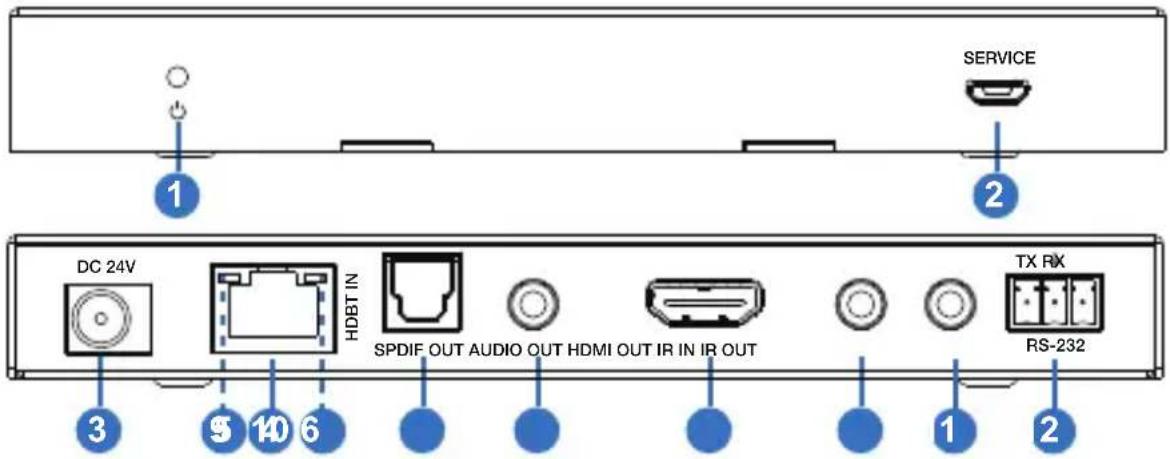
| No. | Name | Function Description |
| 1 | Power LED | Red LED will be on when the receiver is powered on. |
| 2 | SERVICE port | Firmware update port. |
| 3 | DC 24V | DC 24V/1A power supply input port.Note that the extender supports PoC function, it means that either transmitter or receiver is powered on by 24V/1A power supply, other one doesn't need power supply. |
| 4 | HDBT IN | RJ45 connector for connecting the HDBT OUT port of transmitter with a CAT6/6a cable. |
| 5 | Connection Signal LED (Green) | Illuminated: Transmitter and Receiver are in good connection status.Flashing: Transmitter and Receiver are in poor connection status.Dark: Transmitter and Receiver are not connected. |
| 6 | Data Signal LED (Orange) | Illuminated: HDMI signal with HDCP.Flashing: HDMI signal without HDCP.Dark: No HDMI signal. |
| 7 | SPDIF OUT | SPDIF connector for optical audio output. |
| 8 | AUDIO OUT | 3.5mm stereo connector for analog audio output. |
| IR IN | IR port input for receiving the signal of IR remo |
| IR OUT | IR port output for control of display device. This signal is from IR IN port of transmitter. |
| RS-232 | 3-pin pluggable connector for RS-232 command transmission. The RS-232 command will pass-through transmitter to receiver or receiver to transmitter. |
5.3IR Pin Definition
IR Receiver and Blaster pin's definition is as below:
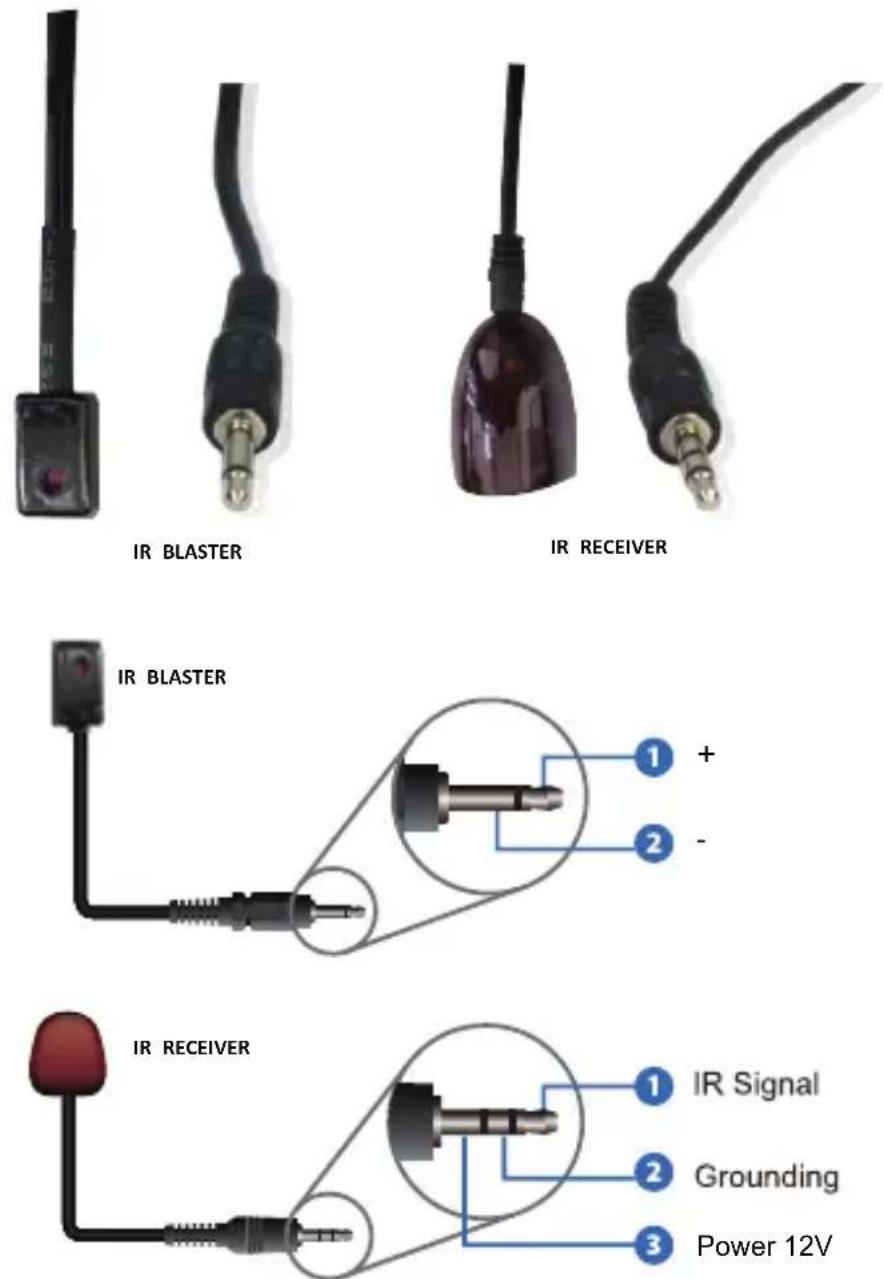
5.4 IBSystem Diagram
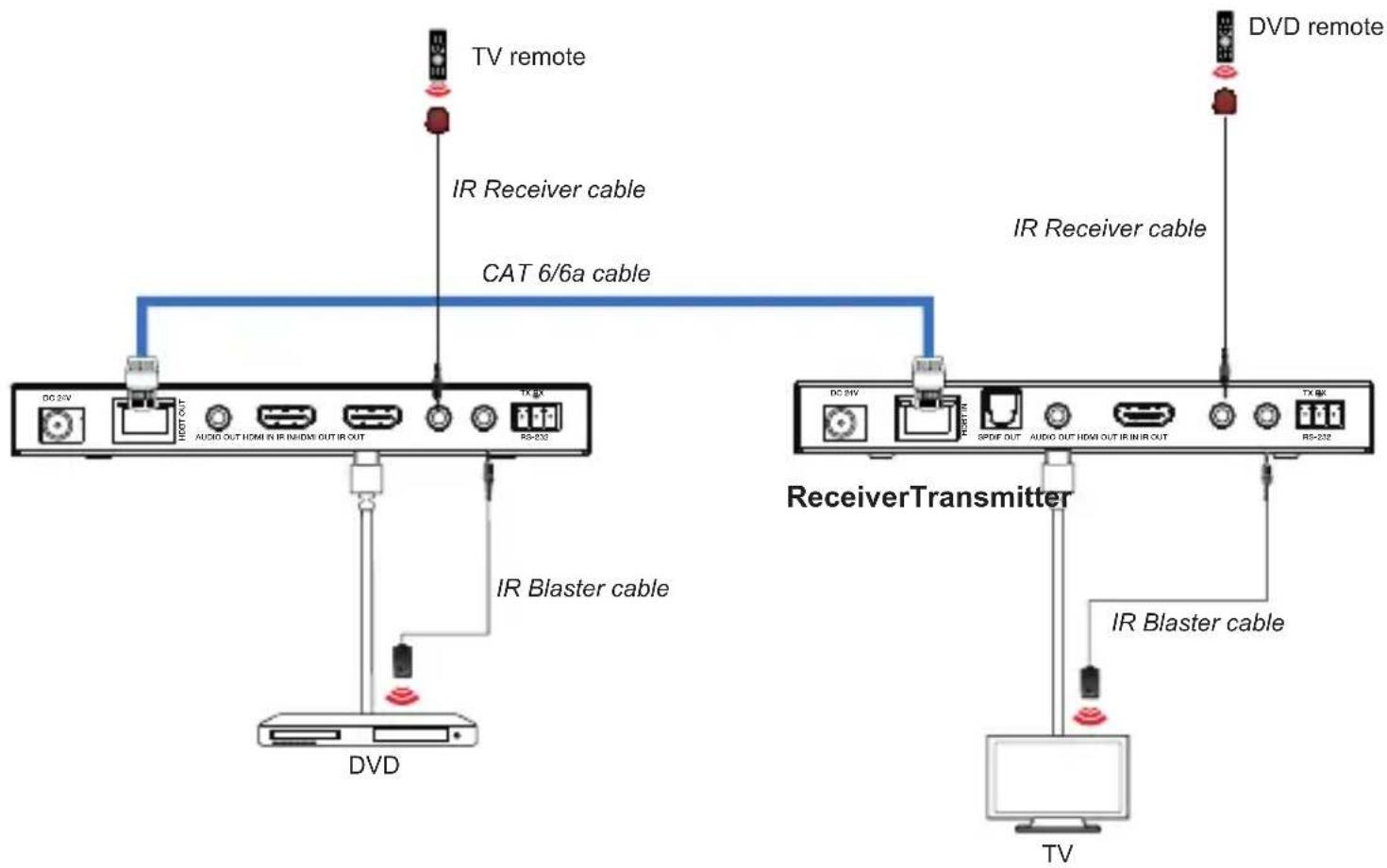
flowchart
graph TD
    TV1["TV remote"] -->|IR Receiver cable| TV2["TV remote"]
    TV2 -->|IR Blaster cable| TV3["TV"]
    TV3 -->|IR Blaster cable| TV4["TV"]
    TV4 -->|AR/AR/AR/AR/AR/AR/AR/AR/AR/AR/AR/AR/AR/AR/AR/AR/AR/AR/AR/AR/AR/AR/AR/AR/AR/AR/AR/AR/AR/AR/AR/AR/AR/AR/AR/AR/AR/AR/AR/AR/AR/AR/AR/AR/AR/AR/AR/AR/AR/AR/AR 6/6a cable
    TV2 -->|DC 26V| HDMI_OUT
    TV2 -->|TX 8X| HDMI_OUT
    TV3 -->|DC 26V| HDMI_OUT
    TV3 -->|TX 8X| HDMI_OUT
    TV4 -->|DC 26V| HDMI_OUT
    TV4 -->|TX 8X| HDMI_OUT
    TV4 -->|IR Blaster cable| DVD
    TV4 -->|IR Blaster cable| TV
Note that IR remote sends signal distance for 0\~5 meters/0\~8 meters, and plus-minus 45 degrees / vertical direction.
6 Application Example
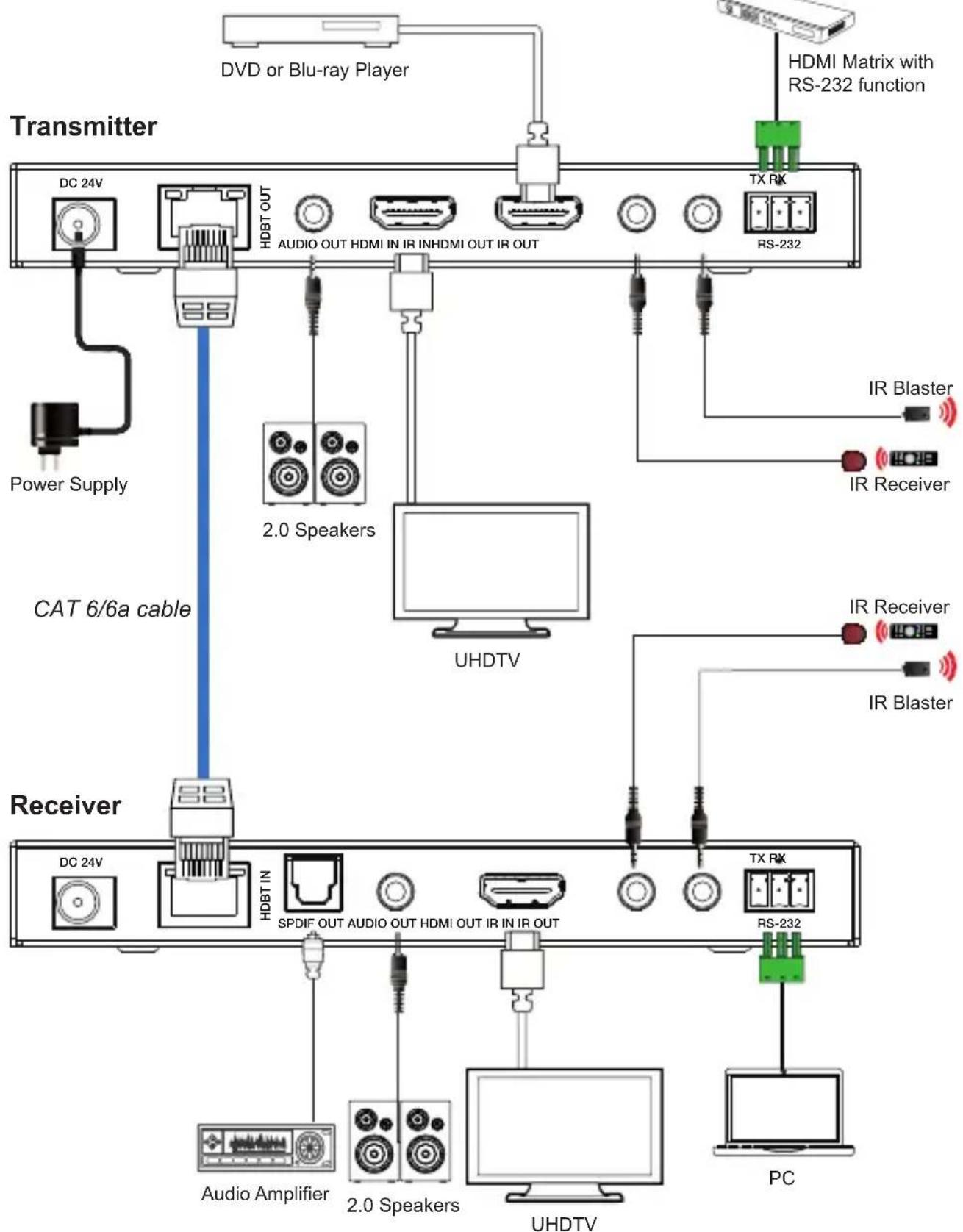
7 Warranty and Contact Information
Should you feel that this product does not function adequately defects in materials or workmanship, we (referred to as "the will, for the length of the period indicated below (starting from original date of the purchase) either a) repair the product with refurbished parts. Or b) Replace the product with new or refu product. All Simplified MFG products are covered by a 3-year and LABOR warranty. During this period there will be no char unit repair, replacement of unit components or replacement of product if deemed necessary. The decision to repair or replace by the warrantor. The purchaser must mail in the product due warranty period. This limited warranty only covers the product purchased as new and is extended to the original purchaser of non-transferrable to subsequent owners, even during the warranty period. A purchase receipt or other proof of purchase date is for the limited warranty service.
Sales and Tech Support
P. 833-HDMI-411 (833-436-4411)
E. info@simplifiedmfg.com

Simplified MFG • 550 W Baseline Rd Ste 102-121 • Mesa

How to extract audio from HDMI
- Audio Extraction with no conversion. AUDEX1 extracts the audio in the format sent up to 5.1

flowchart
graph LR
    A["Oscilloscope"] -->|HDMI Cable or Extender Stereo or up to 5.1 Audio| B["AUDEX1 HDMI"]
    B -->|Optical or Stereo| C["Sound Bar"]

flowchart
graph LR
    A["Audio Analyzer"] -->|HDMI Cable or Extender with any audio format| B["DAC1 HDMI"]
    B -->|Optical or Stereo| C["Sound Bar"]
    style A fill:#f9f,stroke:#333
    style B fill:#ccf,stroke:#333
    style C fill:#cfc,stroke:#333

flowchart
graph LR
    A["Audio Analyzer"] -->|HDMI| B["EX1L RX"]
    B -->|Category cable| C["EX1L RX"]
    C -->|HDMI| D["Image Display"]
    C -->|Optical or Stereo| E["Sound Bar"]

flowchart
graph LR
    A["Device with LCD panel"] -->|HDMI| B["EXeARC1 TX"]
    B --> C["Category cable full uncompressed audio returns from display"]
    C --> D["EXeARC1 RX"]
    D -->|HDMI| E["Video monitor with color-coded spectrum"]
- Several sources, no AVR audio extraction at display to soundbar via SW4:1
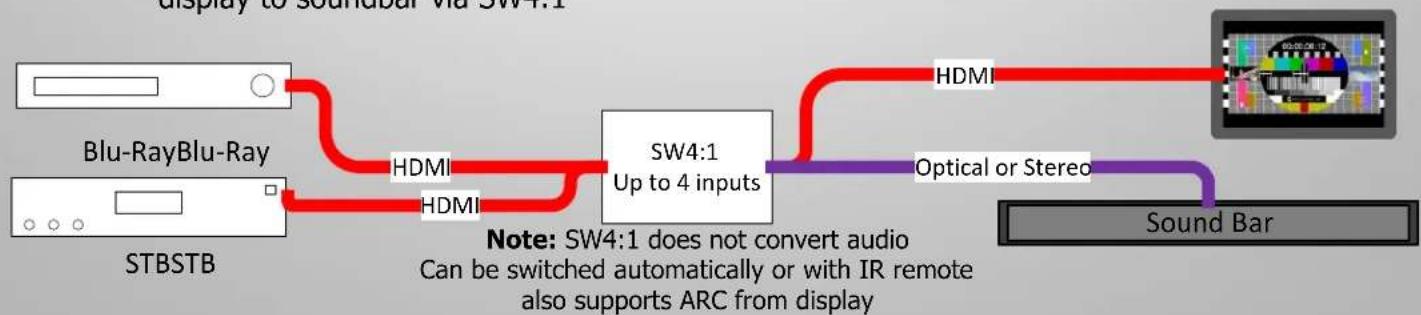
flowchart
graph LR
    A["STBSTB"] --> B["Blu-Ray Blu-Ray"]
    B --> C["HDMI"]
    C --> D["SW4:1 Up to 4 inputs"]
    D --> E["HDMI"]
    E --> F["Optical or Stereo"]
    F --> G["Sound Bar"]
    style A fill:#f9f,stroke:#333
    style B fill:#ccf,stroke:#333
    style C fill:#cfc,stroke:#333
    style D fill:#fcc,stroke:#333
    style E fill:#cff,stroke:#333
    style F fill:#ffc,stroke:#333
    style G fill:#cfc,stroke:#333
Brand : Simplified MFG
Model : EX1L
Category : Uncategorized