EXMICRO2i - Uncategorized Simplified MFG - Free user manual and instructions
Find the device manual for free EXMICRO2i Simplified MFG in PDF.


| Product Type | HDMI Extender (Transmitter & Receiver) |
| Brand | Simplified MFG |
| Model | EXMICRO2i |
| HDMI Compliance | HDMI 2.0b, HDCP 2.2 / 1.4, DVI 1.0 |
| Maximum Video Resolution | 4K2K@60Hz 4:4:4 (18Gbps) |
| HDR Support | HDR, HDR10+ |
| Maximum Distance (4K) | 164 ft (50 m) over Cat6/6a/7 |
| Maximum Distance (1080p) | 164 ft (50 m) over Cat6/6a/7 |
| Audio Support | LPCM 2.0/5.1/7.1, Dolby Digital, Dolby TrueHD, DTS-HD Master Audio, Dolby Atmos, DTS:X |
| IR Control | Two-way 12V IR (Blaster & Receiver included) |
| HDMI Loop Out | Yes, on transmitter |
| EDID Management | Override settings: copy display, 1080p 2ch, 4K 2ch, copy loop out |
| Power Supply | 12V/1A DC (single supply powers both units) |
| Power Consumption | 3.84 W (typical) |
| Transmitter Dimensions (W x D x H) | 3.5 x 2.625 x 0.75 in (90 x 68 x 15 mm) |
| Receiver Dimensions (W x D x H) | 3.5 x 2.625 x 0.75 in (90 x 68 x 15 mm) |
| Weight (Transmitter) | 160 g |
| Weight (Receiver) | 155 g |
| Housing Material | Metal Enclosure |
| Color | Black |
| Operating Temperature | 32 - 104°F (0 - 40°C) |
| Storage Temperature | -4 - 140°F (-20 - 60°C) |
| Relative Humidity | 20 - 90% RH (no condensation) |
| ESD Protection | ±8kV air-gap, ±4kV contact discharge |
| Warranty | 3 years parts and labor |
| Package Contents | 1x TX, 1x RX, 1x IR Blaster, 1x IR Receiver, 1x Power Supply, 4x Mounting Ears, User Manual |
Frequently Asked Questions - EXMICRO2i Simplified MFG
User questions about EXMICRO2i Simplified MFG
0 question about this device. Answer the ones you know or ask your own.
Ask a new question about this device
Download the instructions for your Uncategorized in PDF format for free! Find your manual EXMICRO2i - Simplified MFG and take your electronic device back in hand. On this page are published all the documents necessary for the use of your device. EXMICRO2i by Simplified MFG.
USER MANUAL EXMICRO2i Simplified MFG
Thank you for purchasing this product
The Simplified MFG EXMICRO2i is designed to provide years of reliable service. At Simplified MFG, we want the experience with this device to be the best possible and are committed to helping achieve that experience.
Surge protection device recommended
This product contains sensitive electrical components that may be damaged by electrical spikes, surges, electric shock, lighting strikes, etc. Use of surge protection systems is highly recommended to protect and extend the life of your equipment. A HDSURGE is highly recommended on cable and satellite boxes.
Table of Contents
- Introduction......2
- Features .... 3
- Package Contents .... 3
- Specifications.... 4
- Operation Controls and Functions.... 5
5.1 Transmitter Panel.... 5
5.2 Receiver Panel....6
5.3 IR Pin Definition....6 - Application Example ...... 7
- Warranty Information......8
- Contact Information...... 8
1. Introduction
The EXMICRO2i can extend an HDMI2.0b (18Gbps) high-definition audio and video signal and two-way IR up to 50 meters (164 feet) between transmitter and receiver over a single Cat5e/6/7 cable. The EXMICRO2i supports resolutions up to 4K2K@60Hz 4:4:4, up to 18Gbps, and HDCP 2.2/1.4. In addition, the EXMICRO2i extender is equipped with two-way IR which allows for source and display control, EDID override settings, a HDMI loop output.
The EXMICRO2i extender is one of if not the most efficient HDMI extenders available today. The current draw is typically less than 14 the normal current draw making this device more efficient and smaller.
2. Features
• HDMI 2.0b, HDCP 2.2 / HDCP 1.4 and DVI 1.0 compliant
- Supports input and output video resolution up to 4k2k@60Hz 4:4:4 up to 18Gbps
• Supports HDR/HDR+
• Distance up to 164ft/50m @ 4k or 1080p
- Compact size
- Two-way IR transmission HDMI loop output
• EDID override (copy display/ 1080p 2 ch./ 4K 2ch./ copy loop out
- Single power supply – can be powered from either the RX or TX
3. Package Contents
• 1× HDMI 18Gbps transmitter
• 1× HDMI 18Gbps receiver
• 1× IR Blaster (1.5m length)
- 1× 20\~60KHz IR Receiver (1.5m length)
- 1× 12V/1A Locking Power supply
- 4× Mounting Ears
- 1× User Manual
4. Specifications
| Technical | ||
| HDMI Compliance | HDMI 2.0b | |
| HDCP Compliance | HDCP 2.2 / HDCP 1.4 | |
| Video Bandwidth | 18Gbps | |
| HDR Formats | HDR/HDR10+ | |
| Video Resolution | Up to 4K60Hz 4:4:4 | |
| Color Space | RGB / YCbCr 4:4:4, YCbCr 4:2:2/4:2:0, YUV 4:4:4 | |
| Color Depth | 8/10/12-bit (1080P60Hz, 4K30Hz, 4K60Hz YCbCr 4:2:2/4:2:0) 8-bit (4K60Hz 4:4:4) | |
| HDMI Audio Formats | LPCM 2.0/2.1/5.1/6.1/7.1, Dolby Digital, Dolby TrueHD, Dolby Digital Plus (DD+), DTS-ES, DTS HD Master, DTS HD-HRA, DTS-X | |
| ESD Protection | Human body model — ±8kV (Air-gap discharge) &±4kV (Contact discharge) | |
| Connections | ||
| Transmitter | Inputs: 1x HDMI Type A [19-pin female]1 x IR in [3.5mm Stereo mini jack]1x SERVICE [Micro USB, Update port]Outputs: 1x HDMI Type A [19-pin female]1x IR out [3.5mm Stereo mini jack]1x CAT out [RJ45, 8-pin female] | |
| Receiver | Inputs: 1x IR in [3.5mm Stereo mini jack]1x CAT in [RJ45, 8-pin female]1x SERVICE [Micro USB, Update port]Outputs: 1x HDMI Type A [19-pin female]1 x IR out [3.5mm Stereo mini jack] | |
| Mechanical | ||
| Housing | Metal Enclosure | |
| Color | Black | |
| Dimensions | Transmitter / Receiver:90mm/3.5” [W] x 68mm/2.625” [D] x 15mm/.75” [H] | |
| Weight | Transmitter: 160g, Receiver: 155g | |
| Power Supply | Input: AC 100 - 240V 50/60HzOutput: DC 12V/1A | |
| Power Consumption | 3.84 W | |
| Op. Temperature | 32 - 104°F / 0 - 40°C | |
| Storage Temperature | -4 - 140°F / -20 - 60°C | |
| Relative Humidity | 20 - 90% RH (no condensation) | |
| Distance | 4K | 1080p |
| CAT5e | 147ft / 45M | 147ft / 45M |
| CAT6/6a/7 | 164ft / 50M | 164ft / 50M |
5. Operation Controls and Functions
5.1 Transmitter Panel
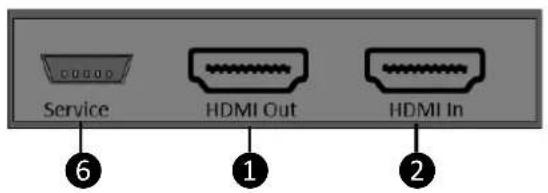
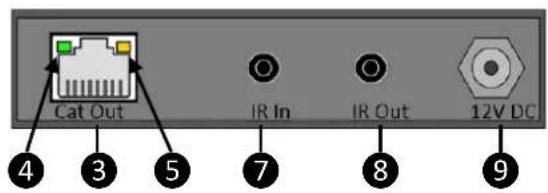
| Number | Name | Function description |
| 1 | HDMI Out | HDMI loop output port, connect to HDMI display device such as TV or Projector with an HDMI cable. |
| 2 | HDMI In | HDMI input port, connect to HDMI source device such as Media server or other 4K source |
| 3 | CAT Out | Connect to CAT IN port on the receiving end with a CAT6 cable. |
| 4 | Power LED (Green) | The LED will illuminate when the transmitter is powered on. |
| 5 | Data signal LED (Orange) | The LED will illuminate when the transmitter and the receiver have signal transmission (link) |
| 6 | SERVICE port | For firmware updated use. |
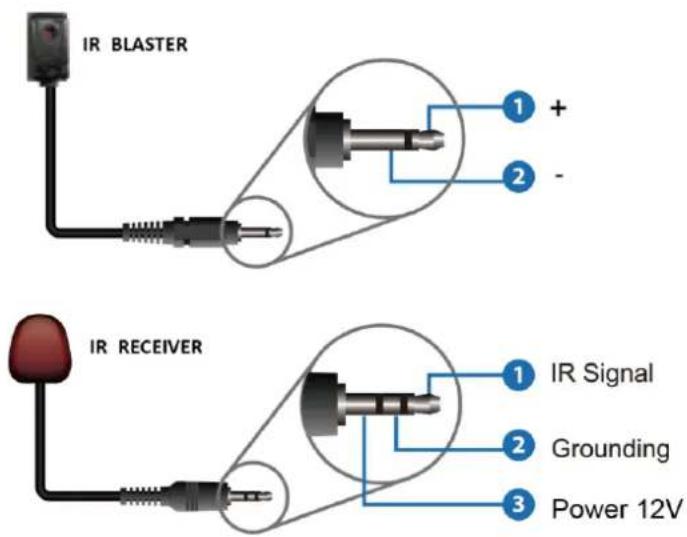
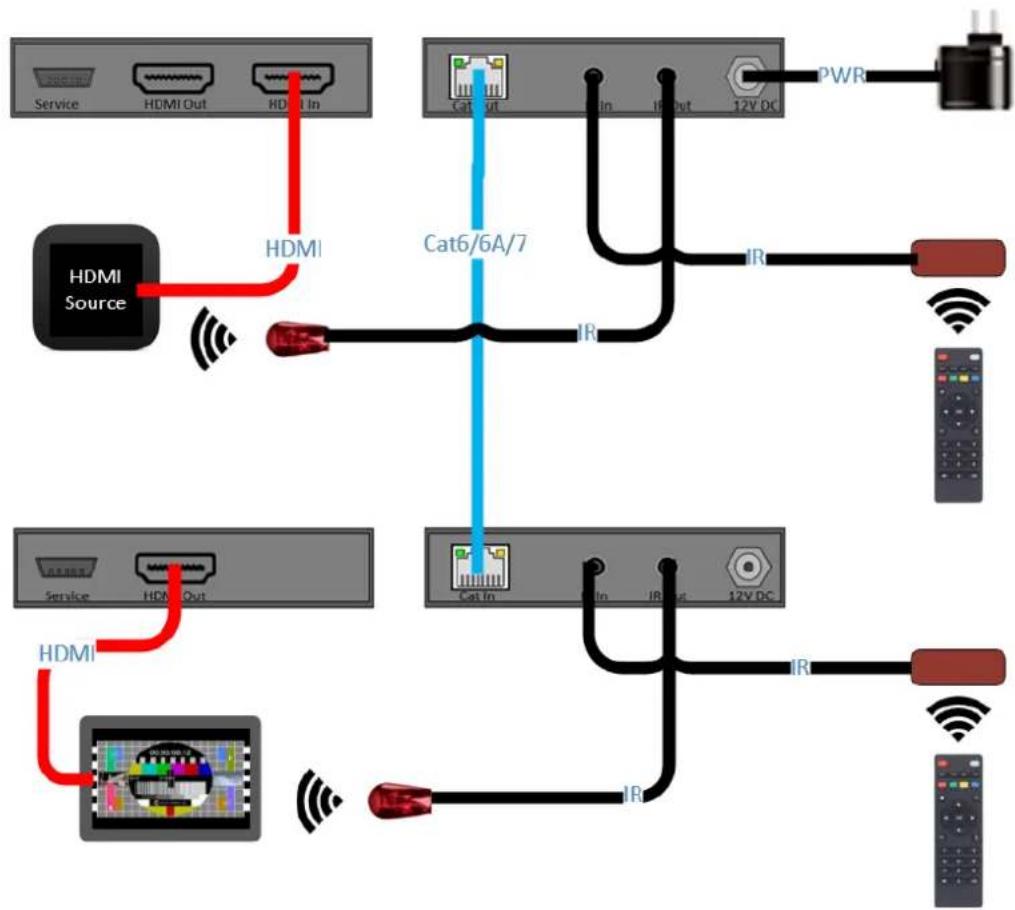
| 7 | IR In | Connect to IR receiver (included). The IR signal is then sent to the IR Out to the IR Blaster at the receiver. |
| 8 | IR Out | Connect to wideband IR Blaster (included). The IR signal is from the IR IN port of the receiver. |
| 9 | DC 12V | Plug DC 12V/1A power supply into the unit and connect the adapter to an AC outlet.(Note: The EXMICRO2 can be powered from either the RX or the TX by 12V/1A power adapter, only one supply is needed) |

natural_image
Simple gray rectangular shape with a small window icon in the bottom-right corner (no text or symbols)| [8KOW] | EDID information is copied from the display at the RX |
 | EDID is preset to 4K @ 60Hz. Stereo |
 | EDID is preset to 1080p Stereo |
 | EDID is copied from the HDMI out at the TX |
5.2 Receiver Panel
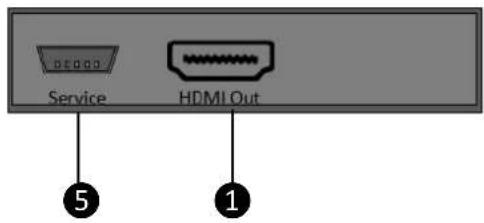
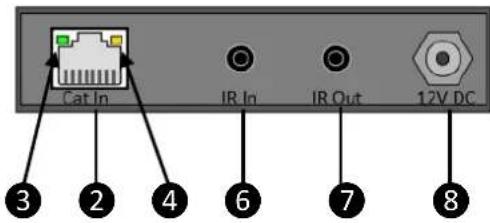
| Number | Name | Function description |
| 1 | HDMI Out | HDMI output port, connect to HDMI display device such as TV or Projector with an HDMI cable. |
| 2 | CAT In | Connect to CAT Out port on the transmitter end with a CAT6 cable. |
| 3 | Power LED (Green) | The LED will illuminate when the receiver is powered on. Power can come from power supply or via category cable |
| 4 | Data signalLED (Orange) | The LED will illuminate when the transmitter and the receiver have signal transmission (link). |
| 5 | SERVICE port | For firmware update use. |
| 6 | IR In | Connect to wideband IR Receiver. The IR signal will be transmitted to the IR Out port of the transmitter. |
| 7 | IR Out | The IR from the TX IR In will be transmitted through the IR blaster connected here. |
| 8 | DC 12V | Plug DC 12V/1A power supply into the unit and connect the adapter to an AC outlet.(Note: The EXMICRO2i can be powered from either the RX or the TX by 12V/1A power adapter, only one supply is needed) |
5.3 IR Pin Definition
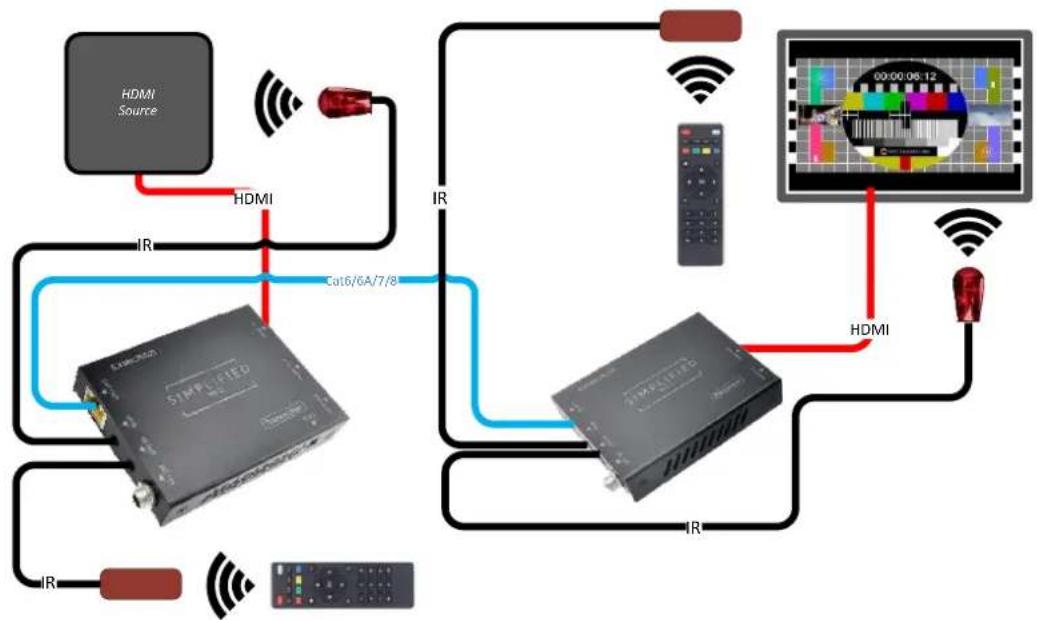
IR Use Example:
flowchart
graph TD
    A["HDMI Source"] -->|IR| B["SIMULIED"]
    B -->|IR| C["Video Camera"]
    C -->|HDMI| D["Television Display"]
    D -->|IR| B
    B -->|C016/6A/7/8| B
    B -->|IR| E["Radio System"]
    E -->|IR| B
    style A fill:#f9f,stroke:#333
    style B fill:#ccf,stroke:#333
    style C fill:#cfc,stroke:#333
    style D fill:#fcc,stroke:#333
    style E fill:#cff,stroke:#333
- Application Example
flowchart
graph TD
    A["Service"] -->|HDMI Out| B["HDMI In"]
    B -->|HDMI| C["Cat6/6A/7"]
    C -->|IR| D["PWR"]
    D --> E["12V DC"]
    C -->|IR| F["IR"]
    F --> G["Remote Control"]
    H["HDMI Source"] -->|HDMI| C
    I["Service"] -->|HDMI Out| J["Cat In"]
    J -->|IR| K["12V DC"]
    K -->|IR| L["Remote Control"]
    M["Remote Control"] --> N["12V DC"]
    style A fill:#f9f,stroke:#333
    style H fill:#f9f,stroke:#333
    style I fill:#f9f,stroke:#333
    style M fill:#f9f,stroke:#333
7. Warranty
Should you feel that this product does not function adequately due to defects in materials or workmanship, we (referred to as "the warrantor") will, for the length of the period indicated below (starting from the original date of the purchase) either a) repair the product with new or refurbished parts. Or b) Replace the product with new or refurbished product. All Simplified MFG products are covered by a 3-year PARTS and LABOR warranty. During this period there will be no charge for unit repair, replacement of unit components or replacement of the product if deemed necessary. The decision to repair or replace is made by the warrantor. The purchaser must mail in the product during the warranty period. This limited warranty only covers the product purchased as new and is extended to the original purchaser only. It is non-transferrable to subsequent owners, even during the warranty period. A purchase receipt or other proof of purchase date is required for the limited warranty service.
8. Contact Information
Sales and Tech Support
P. 833-HDMI-411 (833-436-4411)
E. info@simplifiedmfg.com

Simplified MFG • 550 W Baseline Rd Ste 102-121 • Mesa AZ 85210
© Copyright Simplified MFG 2021
SIMPLIFIED
MFG
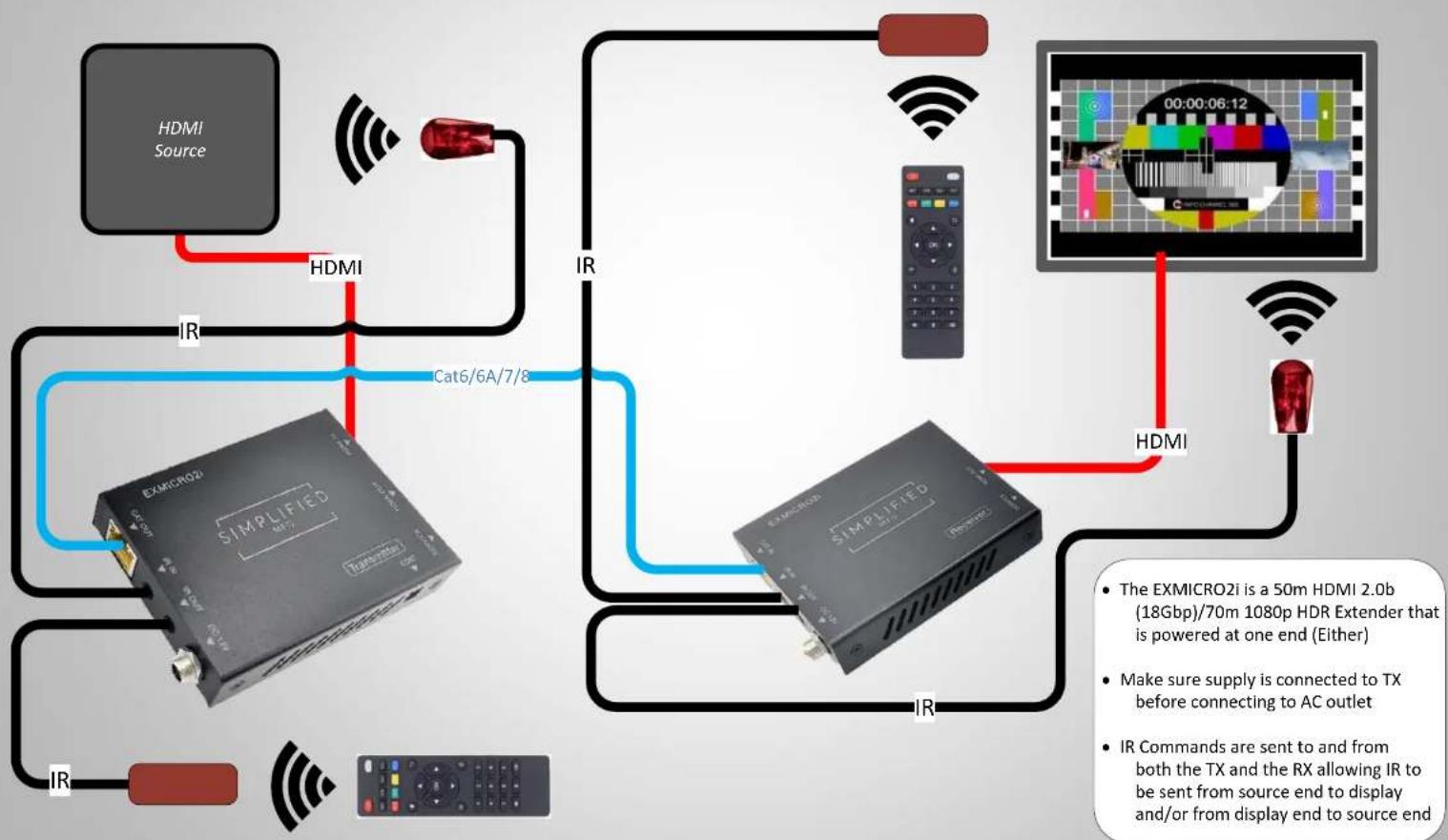
EXMICRO2i Quick Start Guide
flowchart
graph TD
    A["HDMI Source"] -->|IR| B["SIMPLIFIED"]
    B -->|Cat6/6A/7/8| C["IR"]
    C --> D["EXMICRO2i"]
    D -->|IR| E["Display End"]
    D -->|HDMI| F["Video Camera"]
    F -->|HDMI| G["Display End"]
    style A fill:#f9f,stroke:#333
    style B fill:#ccf,stroke:#333
    style C fill:#cfc,stroke:#333
    style D fill:#fcc,stroke:#333
    style E fill:#cff,stroke:#333
    style F fill:#ffc,stroke:#333
    style G fill:#fcc,stroke:#333
Simplified MFG • 550 W Baseline Road Ste 102-121 • Mesa, AZ 85210 • www.simplifiedmfg.com • 833-HDMI-411 (436-4411)

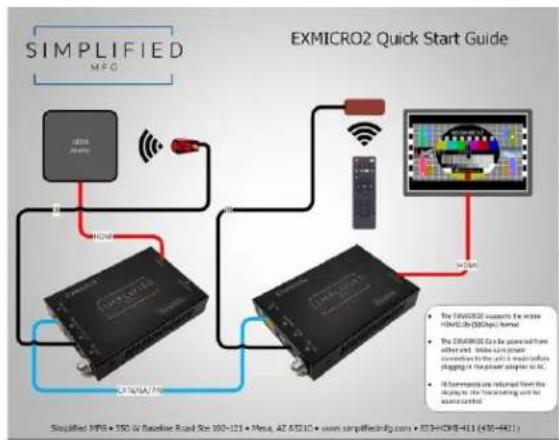
How to wire an EXMICRO2
flowchart
graph TD
    A["SIMPLIFIED MFG"] --> B["ExMICRO2"]
    B --> C["Exmicro2"]
    C --> D["Monitor"]
    D --> E["ExMICRO2"]
    E --> F["Display"]
    style A fill:#f9f,stroke:#333
    style B fill:#ccf,stroke:#333
    style C fill:#cfc,stroke:#333
    style D fill:#fcc,stroke:#333
    style E fill:#cff,stroke:#333
    style F fill:#ffc,stroke:#333
Wiring layout
How to use and trouble shoot Simplified MFG Extenders
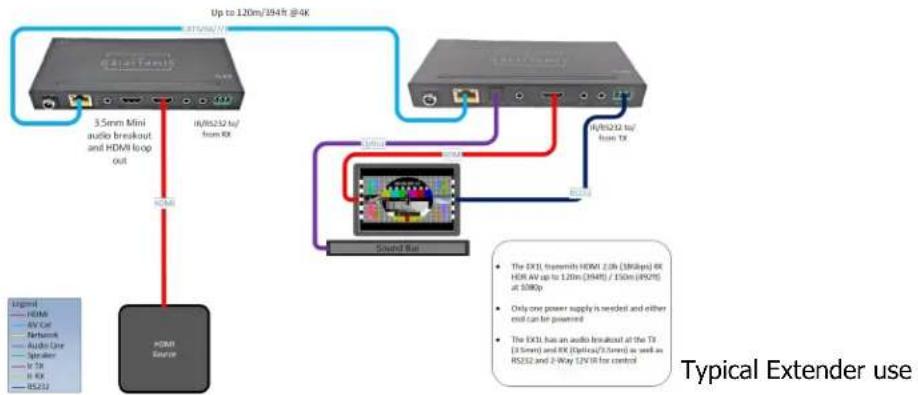
At the TX end:
Is everything connected (Cat, HDMI, Power etc)?
Is the HDMI cable in the HDMI input of the TX? We often use a loop out, make sure the input is not in this port.
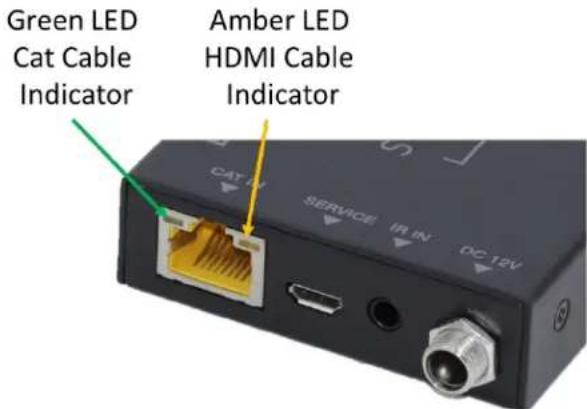
What are the lights where the Cat cable plugs into doing?
Is the Green Lit Solid?
Yes, good! Flashing or off the category cable is poor. This can be the termination (check the manual for wiring termination), poor wire, or interference from being run poorly
Is the Amber Lit Solid?
Yes good! Flashing slowly means no HDCP, off means no signal at HDMI port(s)
At the RX end:
Is the Green Lit Solid?
Yes, good! Flashing or off the category cable is poor. This can be the termination (check the manual for wiring termination), poor wire, or interference from being run poorly
Is the Amber Lit Solid?
Yes good! Flashing slowly means no HDCP, off means no signal at HDMI port(s)
Other Techniques:
Make the circuit simpler. Move the source near the display or the display near the source and see if it works with a short HDMI cable. You can use this to verify the HDMI cables work as well. Add components until the system fails.
Use a known working run of category cable across the floor and see if behavior changes.
It is often the case that the display's setting can cause odd/poor behavior. Consult the display's tech resources. Also, it is possible we have seen the issue and may have a tech paper on this.
Not a bad idea to keep the following on your service vehicle:
• Test source like an AppleTV or signal generator
• Known working HDMI cables
- Known working terminated Category cable
- SP12S splitter for clocking issues, etc.
EXMICRO2i
HDMI 2.0b (18Gbps) 50m Extender over Category cable
natural_image
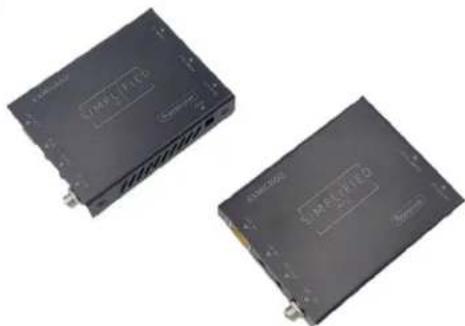
Two black industrial electronic devices with visible branding and mounting points (no readable text or symbols)The EXMICR2i is the latest in the EXMICRO family. It is a HDMI 2.0b (18Gbps) over category cable extender that supports HDR/HDR10+. Other features include single ended power (either end), 50m distance at 4K (70m at 1080p), Bi-Directional 12V IR, HDMI loop out and EDID management. Small, efficient, and powerful.
Features:
• HDMI 2.0b (18Gbps)
• HDR 8/10/10+ Support
• Single power supply (either end)
• EDID Management
• 2-Way 12V IR (kit included)
• HDMI Loop out at TX
• Supports HBR (High Bit Rate Audio)
• Supports all versions of Multi-Channel Audio
• 70m (230ft) @ 1080p/50m (165ft) @4K
• 3-Year Warranty
SIMPLIFIED
MFG
Specifications:
| Technical | |
| HDMI Compliance H | DMI 2.0b |
| HDCP Compliance H | DCP 2.2 and HDCP 1.4 |
| Video Bandwidth 18 | Gbps |
| Video Resolutions | up to 4K2K@50/60Hz YUV4:4:4), 4K2K@30Hz, 1080P@120Hz, and 1080P 3D@60Hz |
| Color Space RGB, YC | bCr 4:4:4, YCbCr 4:2:2 |
| Color Depth | 10-bit |
| HDMI Audio Formats (Pass-through) | LPCM 2/5.1/7.1CH, Dolby Digital, DTS 5.1, Dolby Digital+, Dolby TrueHD, DTS-HD Master Audio, Dolby Atmos, DTS:X |
| ESD Protection | Human body model — ±8kV (air-gap discharge) & ±4kV(contact discharge) |
| Connections | |
| Inputs | TX: 1x HDMI Type A [19-pin female]1x IR INPUT [3.5mm Stereo Mini-jack]1x Service [Mini-USB jackRX: 1x RJ451x IR INPUT [3.5mm Stereo Mini-jack]1x Service [Mini-USB jack] |
| Outputs | TX: 1x RJ451x IR OUTPUT [3.5mm Mono Mini-jack]1xHDMI Type A [19-pin female]RX: 1x HDMI Type A [19-pin female]1x IR OUTPUT [3.5mm Mono Mini-jack] |
| Mechanical | |
| Housing Metal Enclosure | |
| Color Black | |
| Dimensions | 90mm/3.5" [W] x 68mm/2.525" [D] x 15mm/.75" [H] |
| Weight 340g/ 6 oz. each device | |
| Power Supply | Input: AC100 - 240V 50/60HzOutput: DC 12V/1A (US/EU standards, CE/FCC/UL certified) |
| Power Consumption | 4W (Max) |
| Operating Temperature | 32 - 104°F / 0 - 40°C |
| Storage Temperature | -4 - 140°F / -20 - 60°C |
| Relative Humidity | 20 - 90% RH (no condensation) |
Troubleshooting an Extender
At TX end
Is everything connected (Cat, HDMI, Power etc)?
I the HDMI cable in the HDMI input of the TX?
What are the lights where the Cat cable plugs into doing?
Is the Green Solid? Yes, good! Flashing or off the category cable is poor
Is the Amber Solid? Yes good! Flashing means no HDCP, off means no signal at HDMI port(s)
At RX end
Is everything connected?
Is the Cat from the TX in the correct port (EX2ARC and EXKVM2 have Ethernet ports as well)
What are the lights where the cat plugs into doing?
Is the Green Solid? Yes, good! Flashing or off the category cable is poor
Is the Amber Solid? Yes good! Flashing means no HDCP, off means no signal at HDMI port
If everything is good here
Make sure you have the appropriate input used on the display (if eARC is used, has to be in the eARC port)
Make sure that the source is connected correctly and/or works. Maybe move source to display and check with HDMI cable
Once verified all good, if there are still issues it can be a setting in the display (eARC is often not defaulted to on) many displays have different capabilities on each input and some try to control the source and can make audio go away (see tech bulletin on this)
If this is eARC and you do not have audio, try the ARC function of the EXeARC1 and if it works, update the display and the AVR (if used) firmware. It is possible on some early displays and AVR's that the eARC may not be fully functional
- Thank you for purchasing this product
- Surge protection device recommended
- Table of Contents
- Introduction
- Features
- Package Contents
- Specifications
- Operation Controls and Functions
- Transmitter Panel
- Receiver Panel
- IR Pin Definition
- Warranty
- Contact Information
- SIMPLIFIED
- EXMICRO2i Quick Start Guide
- How to use and trouble shoot Simplified MFG Extenders
- At the TX end:
- Is the Green Lit Solid?
- Is the Amber Lit Solid?
- At the RX end:
- Other Techniques:
- EXMICRO2i
- Features:
- Troubleshooting an Extender
- At TX end
- At RX end
- If everything is good here
Brand : Simplified MFG
Model : EXMICRO2i
Category : Uncategorized