
CS-GM11B - Car kit CRUX - Free user manual and instructions
Find the device manual for free CS-GM11B CRUX in PDF.


| Product Type | Vehicle Integration Module (Car Kit) |
| Brand | CRUX |
| Model | CS-GM11B |
| Compatible Vehicles | Select General Motors models (2006-2013) |
| Product Dimensions | 4.5 x 2.5 x 1.0 inches (approx.) |
| Weight | 0.5 lbs (approx.) |
| Power Supply | 12V DC (vehicle electrical system) |
| Current Draw | < 500 mA |
| Operating Temperature | -20°C to 70°C (-4°F to 158°F) |
| Key Functions | Allows installation of aftermarket radio while retaining factory features (steering wheel controls, chimes, OnStar) |
| Installation Type | Plug-and-play with included wiring harness |
| Included Components | Module, wiring harness, installation guide |
| Warranty | 1 year limited warranty |
| Material | ABS plastic housing |
| Certifications | CE, RoHS |
| Maintenance | Keep dry and free from dust; no user-serviceable parts |
| Safety | Designed for professional installation; disconnect battery before installation |
| Repairability | Non-repairable; replace unit if defective |
Frequently Asked Questions - CS-GM11B CRUX
User questions about CS-GM11B CRUX
0 question about this device. Answer the ones you know or ask your own.
Ask a new question about this device
Download the instructions for your Car kit in PDF format for free! Find your manual CS-GM11B - CRUX and take your electronic device back in hand. On this page are published all the documents necessary for the use of your device. CS-GM11B by CRUX.
USER MANUAL CS-GM11B CRUX
- Retains factory features in select GM LAN 11 Bit vehicles while functioning with an aftermarket radio.
- Pre-programmed to retain factory Steering Wheel Controls.
- Supports Bose, non-Bose and Y-91 audio systems.
- Retains chime functions.
- Retains front and rear parking sensors.
- EIA color coded wiring for easy installation.
NOTES:
1. DOES NOT support ONSTAR.
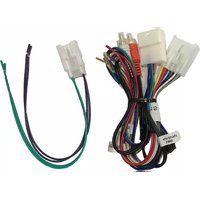
PARTS INCLUDED:
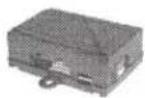
CS-GM11B Module

CS-GM11B Harness

SWC Cables
INSTALLATION DIAGRAM:

flowchart
graph TD
    A["TO FACTORY HARNESS"] --> B["16 & 14-Pin Connector Harness"]
    B --> C["16-Pin Black Connector"]
    C --> D["See page 2 for Audio connection options"]
    D --> E["3.5MM SWC CABLES (Option A or B)"]
    E --> F["Aftermarket RADIO SELECTOR (See Chart)"]
    F --> G["3.5MM SWC CABLES (Option A or B)"]
    G --> H["Use the proper 3.5MM to 4-Pin cable for your radio. Plug in the selected 3.5MM SWC cable to the 4-pin port on the module. See "DIP SWITCH SETTINGS" section."]
    H --> I["Option B: BLUE & YELLOW wire for JVC & KEYWOOD"]
    I --> J["Option A: Insulate with tape if not being used"]
    J --> K["Cap or insulate if not being used"]
    K --> L["Aftermarket RADIO SELECTOR (See Chart)"]
    L --> M["Aftermarket RADIO SELECTOR (See Chart)"]
    M --> N["Aftermarket RADIO SELECTOR (See Chart)"]
1/4
Rev.091517

DIP SWITCH SETTINGS:
SETTING THE AFTERMARKET RADIO BRAND
With the key in the off position, set the DIP switches to the corresponding radio listed below.
| RADIO BRAND: DIP: 1 2 3 | |||
| Dual, Fahrenheit, Jensen, Pioneer | OFF | ON | ON |
| Power Acoustik, Soundstream | OFF | ON | ON |
| Alpine | OFF | OFF | OFF |
| Clarion | ON | ON | OFF |
| Kenwood | ON | ON | ON |
| JVC | ON | OFF | ON |
| Sony, Boss | ON | OFF | OFF |

3.5MM SWC CABLE
Use the proper 3.5MM to 4-Pin SWC cable for the aftermarket radio you are using.
OPTION A is used for ALPINE, CLARION, (JVC and KENWOOD units will use the Blue/Yellow wire).
OPTION B is used for BOSS, DUAL, FAHRENHEIT, JENSEN, POWER ACOUSTIK, PIONEER, SONY and SOUNDSTREAM units.
NOTE: Cap or insulate the 3.5mm plug or Blue/Yellow wire if not being used.
BOSS Radio SWC Wiring Connection

SELECTING THE AUDIO SYSTEM:
If the vehicle is equipped with a Bose system, the CS-GM11B has a built-in Bose adaptor that allows the proper audio input gain from the aftermarket radio to the Bose amplifier. To use this feature, plug in the male 8-pin connector on the harness to the GRAY female 8-pin connector on the CS-GM11B module. The module is also labeled "Bose" and "Non Bose" to avoid confusion. (see picture below)
If the vehicle is NOT equipped with a Bose system, plug in the male 8-pin connector to the BLACK female 8-pin connector on the CS-GM11B module.

2/4
rev.091517

Crux Interfacing Solutions • 6860 Canby Ave., Suite 116, Reseda, CA 91335
phone:(818)609-9299·fax:(818)996-8188·www.cruxinterfacing.com
CHIME VOLUME ADJUSTMENT:
The CS-GM11B has a potentiometer to adjust the chime volume. It is set at half way by default. To adjust the volume, simply use a suitable screw driver and turn the potentiometer clockwise to increase the volume and counter-clockwise to decrease the volume.

STEERING WHEEL CONTROL BUTTON FUNCTIONS:
| SWC Button | SHORT PRESS | LONG PRESS |
| PIONEER | ||
| VOL + | Step Increment | Continuous VOL + |
| VOL - | Step Decrement | Continuous VOL - |
| Arrow Up ▲ | Preset Up | Seek Up |
| Arrow Down ▼ | Preset Down | End Call |
| Voice | Pick Up Call | Activate VR/Deactivate VR |
| SWC Button | SHORT PRESS | LONG PRESS |
| ALPINEVOL +VOL -Arrow Up ▲Arrow Down ▼Voice*NOTE: | Step IncrementStep DecrementSeek UpSeek DownPick Up CallTo Deactivate VR = Say “CANCEL” | Continuous VOL +Continuous VOL –NoneEnd CallActivate VR*/Deactivate VR*BT Mode Active:Voice = Toggle between 1stand 2ndCall |
| SWC Button | SHORT PRESS | LONG PRESS |
| CLARION | ||
| VOL + | Step Increment | Continuous VOL + |
| VOL - | Step Decrement | Continuous VOL - |
| Arrow Up ▲ | Preset Up | Seek Up |
| Arrow Down ▼ | Preset | End Call |
| Voice | Pick Up Call | Mute On/Off |
| SWC Button | SHORT PRESS | LONG PRESS |
| JVCVOL +VOL -Arrow Up ▲Arrow Down ▼VoiceNOTE: | Step IncrementStep DecrementSeek UpSeek DownPick Up CallTo Deactivate VR = Say “CANCEL” | Continuous VOL +Continuous VOL –M-Seek UpEnd CallActivate VR |
| KENWOODVOL +VOL -Arrow Up ▲Arrow Down ▼VoiceNOTE: | Step IncrementStep DecrementSeek UpSeek DownPick Up Call / Call History On/OffTo Deactivate VR = Say “CANCEL” | Continuous VOL +Continuous VOL -NoneEnd Call / Deactivate VRActivate VR |
VEHICLE APPLICATIONS:
CHEVROLET
2007-2010 Cobalt
2006-2011 HHR
2008-2012 Malibu
PONTIAC
2007-2010 G5
2009-2010 G6*
2006-2010 Solstice
SATURN
2007-2010 Aura
2007 lon
2007-2009 Sky
*NOTE: If the 2009 G6 has two knobs on the radio, please use part# CS-GM11C instead.
PRODUCT FEATURES:
- Retains factory features in select GM LAN 11 Bit vehicles while functioning with an aftermarket radio.
- Pre-programmed to retain factory Steering Wheel Controls.
- Supports Bose, non-Bose and Y-91 audio systems.
- Retains chime functions.
- Retains front and rear parking sensors.
- EIA color coded wiring for easy installation.
NOTE:
Does NOT retain OnStar.
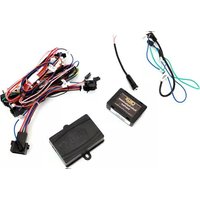
PARTS INCLUDED:

natural_image
Product lineup of automotive electrical connectors and cables, including a black box, multiple wires, a connector, and a curved cable (no text or symbols visible)SWRGM-51 MODULE GM-51A HARNESS GM-51B Harness SWC CABLES Antenna Adapter
INSTALLATION DIAGRAM:
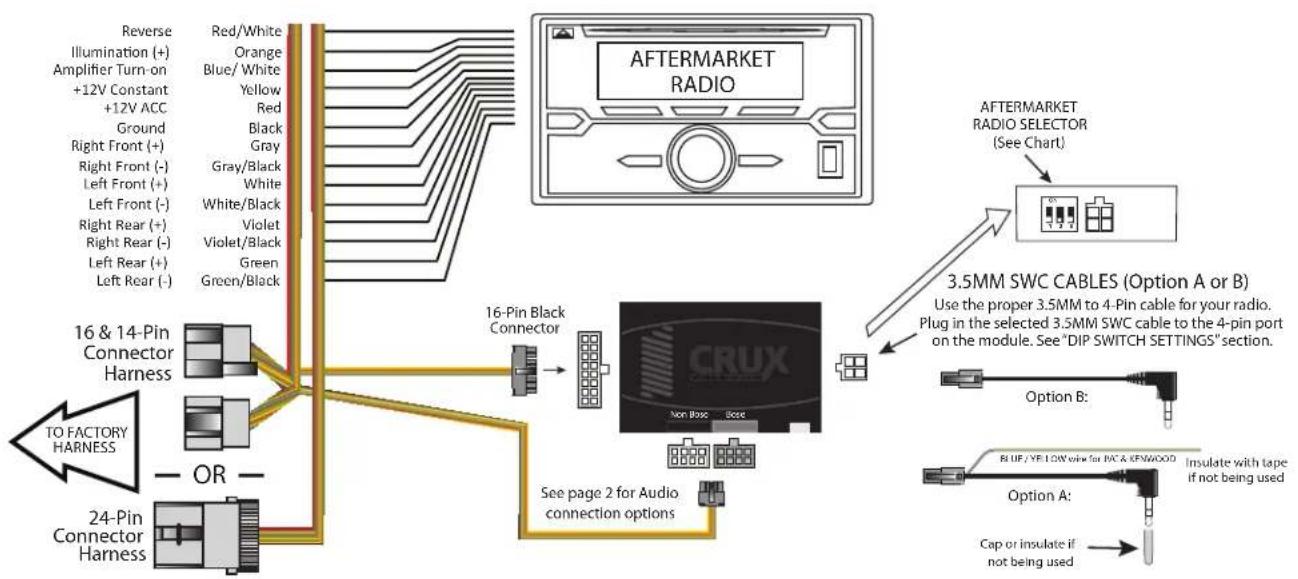
flowchart
graph TD
    A["16 & 14-Pin Connector Harness"] --> B["16-Pin Black Connector"]
    C["24-Pin Connector Harness"] --> B
    B --> D["CRUX"]
    D --> E["Aftermarket Radio Selector (See Chart)"]
    E --> F["3.5MM SWC CABLES (Option A or B)"]
    F --> G["Option B: Blue/ Yellow wire for IAC & KSWOOD"]
    F --> H["Option A: Insulate with tape if not being used"]
    B --> I["To Factory Harness"]
    B --> J["Reverse Illumination (+) to +12V Constant +12V ACC"]
    style A fill:#f9f,stroke:#333
    style C fill:#f9f,stroke:#333
    style B fill:#ccf,stroke:#333
    style D fill:#cff,stroke:#333
    style E fill:#ffc,stroke:#333
    style F fill:#cfc,stroke:#333
    style G fill:#fcc,stroke:#333
    style H fill:#fcc,stroke:#333
DIP SWITCH SETTINGS:
AFTERMARKET RADIO DIP SWITCH SETTINGS:
| RADIO BRAND: | DIP#: | 1 | 2 | 3 |
| Atoto, Dual, Fahrenheit, Jensen | OFF | ON | ON | |
| Pioneer, Power Acoustik, Soundstream | OFF | ON | ON | |
| Blaupunkt, Most off-brand Radio | OFF | ON | ON | |
| Alpine | OFF | OFF | OFF | |
| Clarion | ON | ON | OFF | |
| Kenwood | ON | ON | ON | |
| JVC | ON | OFF | ON | |
| Boss, Old Sony | ON | OFF | OFF | |
| New Sony | OFF | ON | OFF | |
SWC MODULE DIP SWITCH

NOTE: For Atoto, Blaupunkt, Dual, Farenheit, Power Acoustik, Soundstream, and most off-brand radios, check the aftermarket radio's manual to see if the SWC buttons need to be programmed.
4-PIN SWC CABLE
Use the proper 3.5MM to 4-Pin SWC cable for the aftermarket radio you are using.
OPTION A is used for ALPINE, CLARION, JVC, and KENWOOD units (Blue/Yellow wire is attached) OPTION B is used for ATOTO, BLAUPUNKT, BOSS, DUAL, FARENHEIT, JENSEN, POWER ACOUSTIK, PIONEER, SONY, SOUNDSTREAM and Most Off-Brand Radios.
NOTE: Cap or insulate the 3.5mm plug or Blue/Yellow wire if not being used.
For aftermarket radios that have wires for SWC connections, cut off the 3.5mm plug on the Crux SWC Cable and connect the SWC wires as follows:

natural_image
Pure electrical circuit lines without any symbolsRED to SWC Key 1 WHITE to SWC Key 2 SHIELD to SWC Ground
Note that there are some radios that only have SWC1 and SWC2, in this case "shield" does not need to be connected.
SELECTING THE AUDIO SYSTEM:
If the vehicle is equipped with an amplified audio system, the SWRGM-51 has a built-in audio level adaptor that outputs the proper audio level from the aftermarket radio to the factory amplifier. To use this feature, plug in the male 8-pin connector on the SWRGM-51 harness to the GRAY female 8-pin connector on the SWRGM-51 module. The module is also labeled "Bose" and "Non Bose" to avoid confusion. (see picture below)
If the vehicle is NOT equipped with a factory amplified system, plug in the male 8-pin connector to the BLACK female 8-pin on the SWRGM-51 module.

CHIME VOLUME ADJUSTMENT:
The SWRGM-51 has a potentiometer to adjust the chime volume. It is set at half way by default. To adjust the volume, simply use a suitable screw driver and turn the potentiometer clockwise to increase the volume and counter-clockwise to decrease the volume.

VEHICLE APPLICATIONS:
16 and 14 PIN CONNECTORS
CHEVROLET
| 2007-2010 | Cobalt |
| 2006-2011 | HHR |
| 2008-2012 | Malibu |
PONTIAC
| 2007-2010 | G5 |
| 2006-2010 | Solstice |
SATURN
| 2007-2010 | Aura |
| 2007 | Ion |
| 2007-2009 | Sky |
24 PIN CONNECTOR
CHEVROLET
| 2005-2006 | Cobalt |
| 2004-2007 | Malibu |
PONTIAC
| 2005-2009 | G6 |
CRUX INTERFACING SOLUTIONS

natural_image
Pure electrical circuit lines without any symbolsRADIO REPLACEMENT


natural_image
Circular black steering wheel with solar panel symbols on the front wheel, set against a yellow background (no text or labels)SWC RETENTION
Supports:
Bose, Non Bose
and Y-91 Audio Systems
CS-GM11B
For Select 2006 - 2012
GM LAN 11-Bit Vehicles
RADIO REPLACEMENT
INTERFACE
WITH SWC RETENTION
Applications
GM LAN
11 BIT
Supports Bose, Non-Bose and Y-91 Audio Systems
CHEVROLET
| 2007-2010 | Cobalt |
| 2006-2011 | HHR |
| 2008-2012 | Malibu |
PONTIAC
*NOTE: If the 2009 G6 has two knobs on the radio, please use part# CS-GM11C instead.
Supported Radios
Alpine Blaupunkt Boss Clarion Dual Fahrenheit JVC Jensen Kenwood Power Acoustik Pioneer Sony Soundstream
For the most updated vehicle applications visit cruxinterfacing.com

Crux Interfacing Solutions
www.cruxinterfacing.com

- NOTES:
- DOES NOT support ONSTAR.
- PARTS INCLUDED:
- INSTALLATION DIAGRAM:
- DIP SWITCH SETTINGS:
- SETTING THE AFTERMARKET RADIO BRAND
- 3.5MM SWC CABLE
- BOSS Radio SWC Wiring Connection
- SELECTING THE AUDIO SYSTEM:
- CHIME VOLUME ADJUSTMENT:
- VEHICLE APPLICATIONS:
- CHEVROLET
- PONTIAC
- SATURN
- PRODUCT FEATURES:
- NOTE:
- 4-PIN SWC CABLE
- and 14 PIN CONNECTORS
- PIN CONNECTOR
- CRUX INTERFACING SOLUTIONS
- Applications
- Supported Radios
Brand : CRUX
Model : CS-GM11B
Category : Car kit