
Toronto TRT1049 - Hi-Fi System BLAUPUNKT - Free user manual and instructions
Find the device manual for free Toronto TRT1049 BLAUPUNKT in PDF.


| Product Type | Hi-Fi System |
| Brand | Blaupunkt |
| Model | Toronto TRT1049 |
| Dimensions (W x H x D) | Approximately 200 x 300 x 150 mm |
| Weight | Approximately 3.5 kg |
| Power Supply | AC 100-240V, 50/60Hz |
| Power Consumption | 30 W (typical) |
| Audio Output Power | 2 x 15 W RMS |
| Supported Media | CD, MP3-CD, USB, FM radio |
| Connectivity | USB port, 3.5mm auxiliary input, headphone jack |
| Radio Bands | FM with RDS |
| Number of Speakers | 2 (stereo) |
| Display | LCD with blue backlight |
| Remote Control | Yes, included |
| CD Player Type | Slot-load or top-load (typical) |
| USB Playback | Supports MP3/WMA files |
| Preset Radio Stations | 20 presets |
| Sleep Timer | Yes |
| Alarm Clock | Yes, with snooze |
| Maintenance | Clean with a dry soft cloth; avoid liquids |
| Safety | Do not expose to water or excessive heat |
| Spare Parts & Repairability | Contact authorized service centers |
Frequently Asked Questions - Toronto TRT1049 BLAUPUNKT
User questions about Toronto TRT1049 BLAUPUNKT
0 question about this device. Answer the ones you know or ask your own.
Ask a new question about this device
Download the instructions for your Hi-Fi System in PDF format for free! Find your manual Toronto TRT1049 - BLAUPUNKT and take your electronic device back in hand. On this page are published all the documents necessary for the use of your device. Toronto TRT1049 by BLAUPUNKT.
USER MANUAL Toronto TRT1049 BLAUPUNKT

USER MANUAL
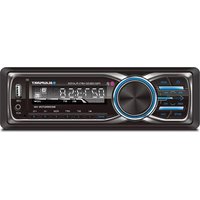
RECEIVER CONTROLS
- Power ON/OFF; Mute ON/OFF
- Mode (Radio/USB/SD/AUX-in/Bluetooth) and end calls
- Auto seek search tuning (AMS) Band button (AM1-AM2-FM1-FM2-FM3) and answer calls
- Select control 5./6. Track skip/ Search forward/ Backward, Browse radio stations
- Preset station 1-6 for radio and Play/Pause function for MP3/WMA
- AUX in port
- TF card slot
- USB port
- LCD display
Bluetooth pairing: Enable Bluetooth on your device. Pair to the using stereo
INSTRUCTION MANUAL
Please read the instructions manual carefully and familiarize yourself with your new stereo receiver before using it for the first time. Please keep this manual for future reference
FEATURES
The features AM/FM stereo with USB/SD and MMC ports and:
• Electronic P11 tuning control with 30 programmable stations
• MP3/WMA compatible
• Preamplifier line-out
• From audio AUX-in
- Last track memory (RADIO/3D/MMC and USB)
KEY FUNCTIONS
- POWER ON/OFF; MUTE ON/OFF
Press shortly to turn ON. Press for three seconds to turn the unit OFF. Push the mute button to mute all radio.
Push the mute button to mute all radio.
- MODE-FUNCTION SELECTOR
Press to cycle through different playback modes in the following sequence:
RADIO-USB-SD-AUX IN-BLUETOOTH
In the Bluetooth mode press to end calls.
- AUTO SEEK SEARCH TUNING (AMS)
In radio mode, press to seek radio stations automatically; press and hold to automatically save the station.
TO AUTOMATICALLY SAVE THE STATION RAND BUTTON
BAND BUTTON
In radio mode, press to cycle through different FM bands (AM1-AM2-FM1-
FM3). In Bluetooth mode, press to answer a call.
- SELECT CONTROL
Pressing down will also give you options to change BASS, TREBLE, BALANCE,
FADER, LOUD, and EQ settings.
5./6. ◀◀ ▶▶ BUTTON
In MP3/USB/SD/MMC mode, press to go to the desired track; in radio mode, press
to go to the desired station.
KEY FUNCTIONS
7.1/▶▶ BUTTON
In radio mode, press to go to preset station #1. In USB/SD/MMC mode, press to start music playback.
- AUX IN PORT
Connect your external device via USB (not included) to playback audio if an AUX port is not available.
9. TF CARD SLOT
Insert the TF/MMC card in the slot. Select TF with the mode selector. Audio will begin playback automatically.
Supports file formats: MP3/WMA
- USB PORT
Connect your external device via USB (not included) to playback if an AUX port is not available.
11. LCD DISPLAY
The LCD display will show relevant information about the current function that is being performed.
WARNING
Use the specified amperage fuse for each lead. Using a higher
amperage fuse may cause serious damage.
SPECIFICATIONS
AM/FM Tuner
AM: 530~1710 KHz FM: 87.5~107.9 MHz
Sensitivity
12 dB μV
I.F. Frequency
10.7 MHz
Frequency Response
40Hz
Stereo Separation S/N Ratio
20dB 50dB
GENERAL
Power Supply Voltage
12V DC, Negative Ground
Max Current Consumption
10A
Max Output Power
4x20W
NOTE: Specifications and the design are subject to possible modifications
without notice, due to improvement.
REMOTE CONTROL GUIDE

- Power
- Mode (switch for radio, USB, SD, AUX-in and Bluetooth)/ End calls
- Mute
- Band (AM1-AM2-FM1-FM2-FM3)/ Answer calls
- Volume +
- AMS
- Previous
- Select / Enter
- Next
- EQ Control
- Volume
- Clock Display
- Preset Station #1, Auto Memory Store and Play/Pause
- Preset Station #2 and Intro (INT)
- Preset Station #3 and Repeat (RPT)
- Preset Station #4 and Random (RDM)
- Preset Station #5, -10 (MP3/WMA) and
- Preset Station #6, +10 (MP3/WMA) and track skip
SETTING UP THE REMOTE CONTROL APP
Download the app
Scan the QR code with your Android device to
download and install the app.
- Press Mode on the device to go to BT mode.
- Go to the settings on your device
- Tap Bluetooth and search for devices
- Tap the device name "BPTNS1018"
- Open the app
- Tap "TRT1049" under paired devices

INSTALLATION
Remove the stereo carefully from the box, preserving the box for unit warranty and service.
PRECAUTIONS
- Choose the mounting location carefully, so that the unit will not interfere with the normal driving functions of the driver.
- Avoid installing the unit where it would be affected by high temperatures from direct sunlight or hot air. Also avoid where it could be affected by dust, dirt or excessive vibration.
- Use only the supplied mounting hardware for a safe and secure installation.
MOUNTING ANGLE ADJUSTMENT
Adjust the mounting angle as desired.
MOUNTING EXAMPLE
Dashboard Installation

Note: Keep the release key in a safe place, as you may need it in the future to remove the unit from the car.
WIRING DIAGRAM

MAINTENANCE
FUSE REPLACEMENT
If the fuse blows, check the power connection and replace the fuse. If the fuse blows again after replacement, there may be an internal malfunction. In this case, consult your nearest repair center.
Measures:
- Reorient or relocate the receiving antenna.
- Increase the distance between the equipment and receiver.
- Connect the equipment into an outlet on a circuit different from
that to which the receiver is connected.
- Consult the dealer or an experienced radio/TV technician for help.
Shaghal Ltd. 2231 Colby Ave, Los Angeles, California 90064
©2018 BLAUPUNKT. All Rights Reserved. This device complies with part 15 of the FCC Rules. Operation is subject to the following two conditions: (1) this device may not cause harmful interference, and (2) this device must accept any interference received, including interference that may cause undesired operation.
WARNING: Cancer and Reproductive Harm - www.P65Warning.ca.gov

- RECEIVER CONTROLS
- INSTRUCTION MANUAL
- FEATURES
- KEY FUNCTIONS
- BAND BUTTON
- BUTTON
- TF CARD SLOT
- LCD DISPLAY
- WARNING
- SPECIFICATIONS
- GENERAL
- REMOTE CONTROL GUIDE
- SETTING UP THE REMOTE CONTROL APP
- INSTALLATION
- PRECAUTIONS
- MOUNTING ANGLE ADJUSTMENT
- MOUNTING EXAMPLE
- WIRING DIAGRAM
- MAINTENANCE
- FUSE REPLACEMENT
Brand : BLAUPUNKT
Model : Toronto TRT1049
Category : Hi-Fi System