
PD-70AE - Hi-Fi System PIONEER - Free user manual and instructions
Find the device manual for free PD-70AE PIONEER in PDF.


| Product type | CD/SACD player and D/A converter |
| Brand | Pioneer |
| Model | PD-70AE |
| Power supply | AC 220-230 V, 50/60 Hz |
| Power consumption | 46 W (0.3 W standby) |
| Compatible disc formats | SACD (2-channel), CD, CD-R/RW, DVD±R/RW, DVD±R DL |
| Audio file formats | MP3, WMA, AAC, WAV, AIFF, FLAC, ALAC, DSD (DSF/DIFF) |
| Analog outputs | RCA (2.3 Vrms / 500 Ω) and XLR (4.5 Vrms / 150 Ω) |
| Digital inputs | Optical and coaxial (192 kHz/24-bit PCM) |
| Digital outputs | Optical and coaxial |
| Digital filters | SLOW, SHARP, SHORT (selectable) |
| DIRECT mode | Yes (disables audio processing) |
| Lock range setting | RANGE 1 to 6 |
| Playback features | Repeat, random, programmed (24 tracks) |
| AUTO STANDBY | Yes (20 minutes, adjustable) |
| Remote control | RC-960C (AAA batteries included) |
| Control jacks | Control IN/OUT (3.5 mm mono mini-jack) |
| Laser safety | Class 1 (IEC 60825-1:2007) |
| Operating temperature | +5 °C to +35 °C |
| Operating humidity | Less than 85% RH |
| Country of manufacture | Malaysia |
Frequently Asked Questions - PD-70AE PIONEER
User questions about PD-70AE PIONEER
0 question about this device. Answer the ones you know or ask your own.
Ask a new question about this device
Download the instructions for your Hi-Fi System in PDF format for free! Find your manual PD-70AE - PIONEER and take your electronic device back in hand. On this page are published all the documents necessary for the use of your device. PD-70AE by PIONEER.
USER MANUAL PD-70AE PIONEER
PD-70AE Instruction Manual


Pioneer
En Fr Es It De N Sv
Before Start
Safety Information 2
What's in the box 3
Part Names
Front Panel 4
Rear Panel 5
Remote Controller 6
Display 7
Install
Connections with an amplifier 8
Connecting the power cord, etc. 11
Playback
Playing discs 12
Using this unit as a D/A converter 14
Adjusting sound quality 15
Advanced Setup
Advanced Settings.... 16
Others
Troubleshooting 17
Other notes....18
General Specifications.... 19
> Before Start > Part Names > Install > Playback
Advanced Setup | Others
Safety Information
WARNING
TO PREVENT THE RISK OF ELECTRIC SHOCK, DO NOT REMOVE COVER (OR BACK). NO USER-SERVICEABLE PARTS INSIDE. REFER SERVICING TO QUALIFIED SERVICE PERSONNEL.
This equipment is not waterproof. To prevent a fire or shock hazard, do not place any container filled with liquid near this equipment (such as a vase or flower pot) or expose it to dripping, splashing, rain or moisture.
To prevent a fire hazard, do not place any naked flame sources (such as a lighted candle) on the equipment.
Do not use or store batteries in direct sunlight or other excessively hot place, such as inside a car or near a heater. This can cause batteries to leak, overheat, explode or catch fire. It can also reduce the life or performance of batteries.
Store small parts out of the reach of children and infants. If accidentally swallowed, contact a doctor immediately.
Slots and openings in the cabinet are provided for ventilation to ensure reliable operation of the product, and to protect it from overheating. To prevent fire hazard, the openings should never be blocked or covered with items (such as newspapers, tablecloths, curtains) or by operating the equipment on thick carpet or a bed.
Risk of explosion if battery is replaced by an incorrect type. Risk of explosion If disposal of a battery into fire or a hot oven, or mechanically crushing or cutting of a battery.
Precautions
If you install the apparatus in a built-in installation, such as a bookcase or rack, ensure that there is adequate ventilation.
Leave 20 cm (8") of free space at the top and sides and 10 cm (4") at the rear. The rear edge of the shelf or board above the apparatus shall be set 10 cm (4") away from the rear panel or wall, creating a flue-like gap for warm air to escape.
Operating Environment
Operating environment temperature and humidity: +5 °C to +35 °C (+41 °F to +95 °F); less than 85 %RH (cooling vents not blocked)
Do not install this unit in a poorly ventilated area, or in locations exposed to high humidity or direct sunlight (or strong artificial light).
Important Notice
The model number and serial number of this equipment are on the rear or bottom. Record these numbers on your enclosed warranty card and keep in a safe place for future reference.
CAUTION
The power switch button on this unit will not completely shut off all power from the AC outlet. Since the power cord serves as the main disconnect device for the unit, you will need to unplug it from the AC outlet to shut down all power. Therefore, make sure the unit has been installed so that the power cord can be easily unplugged from the AC outlet in case of an accident. To avoid fire hazard, the power cord should also be unplugged from the AC outlet when left unused for a long period of time (for example, when on vacation).
This product is for general household purposes. Any failure due to use for other than household purposes (such as long-term use for business purposes in a restaurant or use in a car or ship) and which requires repair will be charged for even during the warranty period.
Power-Cord Caution
Handle the power cord by the plug. Do not pull out the plug by tugging the cord and never touch the power cord when your hands are wet as this could cause a short circuit or electric shock. Do not place the unit, a piece of furniture, etc., on the power cord, or pinch the cord. Never make a knot in the cord or tie it with other cords. The power cords should be routed such that they are not likely to be stepped on. A damaged power cord can cause a fire or give you an electrical shock. Check the power cord once in a while. When you find it damaged, ask your nearest our authorized service center or your dealer for a replacement.
CAUTION
This product is a class 1 laser product classified under the Safety of laser products, IEC 60825-1:2007.
CLASS 1 LASER PRODUCT
Information for users on collection and disposal of old equipment and used batteries
(Symbol for equipment)
(Symbol examples) for batteries


These symbols on the products, packaging, and/or accompanying documents mean that used electrical and electronic products and batteries should not be mixed with general household waste.
For proper treatment, recovery and recycling of old products and used batteries, please take them to applicable collection points in accordance with your national legislation.
By disposing of these products and batteries correctly, you will help to save valuable resources and prevent any potential negative effects on human health and the environment which could otherwise arise from inappropriate waste handling.
For more information about collection and recycling of old products and batteries, please contact your local municipality, your waste disposal service or the point of sale where you purchased the items.
These symbols are only valid in the European Union. For countries outside the European Union:
If you wish to discard these items, please contact your local authorities or dealer and ask for the correct method of disposal.
WEEE
http://www.onkyo.com/manual/weee/weee.pdf
> Before Start > Part Names > Install > Playback
Advanced Setup | Others
What's in the box
1

natural_image
Front view of a computer monitor with buttons and ports (no visible text or labels)2
natural_image
Line drawing of a remote control with buttons and two cylindrical batteries (no text or symbols)3
natural_image
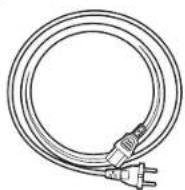
Simple line drawing of a coiled cable or wire with connectors (no text or symbols)4

- Main unit (1)
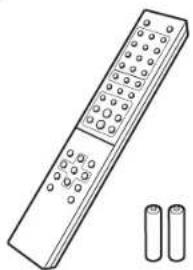
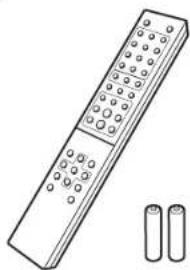
- Remote controller (RC-960C) (1), Batteries (AAA/R03) (2)
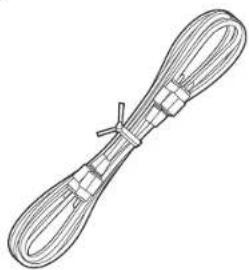
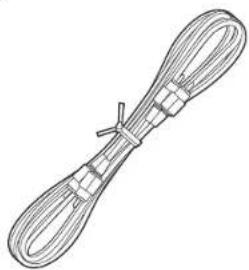
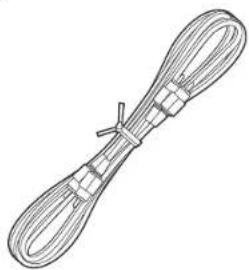
- Analog Audio Cable (For testing operation) (1)
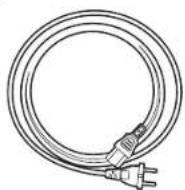
- Power Cord (1)
• Instruction Manual (This document) (1)

- The power cord must be connected only after all other cable connections are completed.
• We will not accept responsibility for damage arising from the connection of equipment manufactured by other companies. - Specifications and appearance are subject to change without prior notice.

The main power cannot be turned on or off with the remote controller. Use the ⏻/I STANDBY/ON button on the main unit.
Before Start > Part Names > Install > Playback
Advanced Setup | Others
Front Panel

- Ⓗ/STANDBY/ON button/indicator: Switch the main power of the unit on and off. When starting up the unit, the indicator in the center of the button lights blue.
- STANDBY indicator: Lights red when the unit is in standby mode.
- Disc tray: Place discs here. 8-cm discs can also be used.
- ▲ button: Open or close the disc tray.
- Play buttons:
|◀◀◀◀ : Return to the beginning of the track being played. Press again to move to the track before. Press and hold to rewind the track quickly.
▶/■: Play or pause play.
▶▶▶▶: When pressed during play, move to the next track. Press and hold to fast-forward through the track.
■: This button stops playback.
6. Remote control sensor
- The signal range of the remote controller is within about 23^ / 7m , at an angle of 30^ to either side.
- CD/SACD button/indicator: Switch between CD/SACD as the source. When playing a hybrid SACD, the layer being played switches if you press this during play. (→P18) The indicator lights blue when SACD is selected.
- DIRECT button/indicator: Switch the DIRECT mode ON and OFF. (→P15) The indicator lights blue when the DIRECT mode is ON.
- Display (→P7)
- SOURCE button: Switches the source to be played.
- SETUP button: Displays the SETUP menu. (→P16)
Before Start > Part Names > Install > Playback
Advanced Setup | Others
Rear Panel

- ANALOG OUT jack: Use an analog audio cable or an XLR cable to connect an integrated amplifier, for example.
- AC IN: Connect the supplied power cord.
- RCA ANALOG OUT switch: Set ON/OFF for output from the ANALOG OUT jack (RCA jack). When OFF is selected, power supply to the ANALOG OUT jack (RCA jack) is stopped, and the output of the signal is stopped.
Selecting OFF helps suppress effects of noise on the signal output from the ANALOG OUT jack (XLR jack). - DIGITAL IN OPTICAL/COAXIAL jack: Use a digital optical cable or digital coaxial cable to connect audio devices, for example.
- DIGITAL OUT OPTICAL/COAXIAL jack: Use a digital optical cable or digital coaxial cable to connect an integrated amplifier, for example.
- CONTROL IN/OUT jack: By connecting Pioneer brand amplifiers and audio devices, centralized control is possible, for example you can control the amplifiers and audio devices.
> Before Start > Part Names > Install > Playback
Advanced Setup | Others
Remote Controller

- ⏻ STANDBY/ON button: When the main power of the unit is on, this turns the unit on or into standby mode. The main power cannot be turned on or off with the remote controller.
- Numbered buttons: Use to directly input the track number of a music CD when selecting tracks. Also used to enter track numbers for program play.
- CLEAR button: Clear the content set for program play. (→P13)
- Source selector buttons: Switches the source to be played.
- DIRECT button: Switch the DIRECT mode on and off. (→P15)
- DIMMER button: You can adjust the brightness of the display in three steps. (Default Value: Level 3)
- REPEAT button: Set repeat play. (→P13)
- SHUFFLE button: Set shuffle play. (→P13)
- Play buttons:
◀◀: Return to the beginning of the track being played. Press again to move to the track before.
▶/■: Play or pause play.
▶▶: Move to the next track.
◀◀: Press and hold to fast-rewind through the track being played.
■: Stop playback.
▶▶: Press and hold to fast-forward through the track being played. - DIGITAL FILTER button: Select one of three types of DIGITAL FILTER. (→P15)
- Cursors, ENTER button: Select the item with the cursors and press ENTER to confirm.
- SETUP button: Displays the SETUP menu. (→P16)
- DISPLAY OFF button: Press to turn off the display of this unit. Press again to turn the display on.
- ▲ OPEN/CLOSE button: Open or close the disc tray.
- CD/SACD button: Switch between CD/SACD as the source. When playing a hybrid SACD, the layer being played switches if you press this during play. (→P18)
- DISPLAY button: Switch the information on the display.
• Depending on the source, the operation may not start.
17.PROGRAM button: Used for program play. (→P13)
-
LOCK RANGE button: Displays the LOCK RANGE ADJUST settings screen. (→P15)
-
RETURN button: Returns the display to the previous
state.
- DIGITAL OUT button: Switch the digital output ON and OFF. (→P16)

Match the polarity when inserting the batteries.
Before Start > Part Names > Install > Playback
Advanced Setup | Others
Display

- Lights during play of SACD and DSD.
- Message display: Displays information about tracks and menus.
- Lights when operations with the cursor buttons on the remote controller are possible.
- Displays the play status.
- Lights when the digital audio output setting is on. (→P16)
- Lights when showing such items as the remaining time for a track or the disc, or the total time of the disc.
- Lights in the following conditions.
: When all track repeat play is on
1: When one track repeat play is on
: When shuffle play is on
Before Start > Part Names > Install > Playback
Advanced Setup | Others
Connections with an amplifier


Integrated amplifier, AV receiver, etc.
Play the audio from discs played on this unit and from devices connected to this unit through speaker systems connected to integrated amplifiers or AV receivers. Connect to suit the input jacks on your amplifier.
Connecting with an analog audio cable
The signal is converted to analog in the D/A converter of this unit and then output to an integrated amplifier, for example. Connect the LINE IN jacks on an integrated amplifier to the ANALOG OUT jack (RCA jack) on this unit.
• Make sure the RCA ANALOG OUT switch is ON.
> Before Start > Part Names > Install > Playback
Advanced Setup | Others
Connecting with an XLR cable
The signal is converted to analog in the D/A converter of this unit and then output to an integrated amplifier, for example. Connect the XLR input jack on an integrated amplifier to the ANALOG OUT jack (XLR jack) on this unit.
- The second pin in the jack of this unit is designated the HOT (+) pin. Refer to the instruction manual of your amplifier to see if the second pin of the XLR jack on your amplifier supports HOT (+).


- When connecting via XLR cable and not connecting with an analog audio cable, you can listen to even clearer audio by setting the RCA ANALOG OUT switch to OFF.
- If the connected amplifier has an XLR input jack, it is recommended to connect using an XLR cable.
Connecting with a digital optical cable
The signal is converted to analog in the D/A converter of the integrated amplifier, for example. Connect the OPTICAL IN jack on an integrated amplifier to the DIGITAL OUT OPTICAL jack on this unit.
- The audio from SACD and DSD is not output from the DIGITAL OUT OPTICAL jack of this unit.

- The digital signals that can be output by this unit are linear PCM signals with a sampling frequency and quantization bit rate of 192 kHz/24 bit (operation may not be possible with all connected devices or environments).
Connecting with a digital coaxial cable
The signal is converted to analog in the D/A converter of the integrated amplifier, for example. Connect the COAXIAL IN jack on an integrated amplifier to the DIGITAL OUT COAXIAL jack on this unit.
- The audio from SACD and DSD is not output from the DIGITAL OUT COAXIAL jack of this unit.

- The digital signals that can be output by this unit are linear PCM signals with a sampling frequency and quantization bit rate of 192 kHz/24 bit (operation may not be possible with all connected devices or environments).
> Before Start > Part Names > Install > Playback
Advanced Setup | Others
The control jack
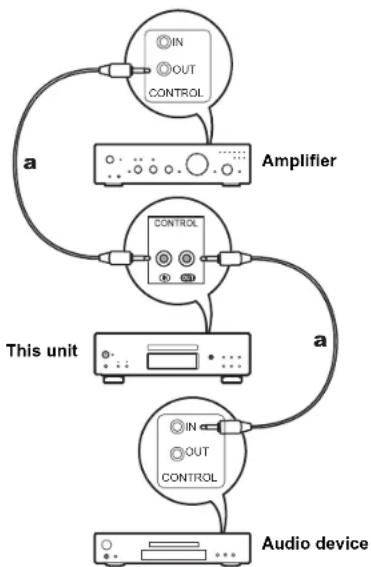
If you have multiple Pioneer brand devices, and if they have CONTROL IN/OUT jacks, you can centrally control them through the remote controller sensor on the amplifier, for example. By connecting with monaural miniplug cables (without resistors) as shown in the diagram, then even if this unit and other devices are put in locations where they cannot receive the remote controller signal, you can still use the remote controller to control this unit or other devices by pointing the remote controller at the remote controller sensor on the amplifier, for example.
- Also make sure to connect with the analog audio cable. Centralized control cannot work correctly with only the control jack connection.
- The remote controller sensor on this unit stops working if you connect a monaural miniplug cable (without resistor) to the CONTROL IN jack of this unit.
- The remote controller sensors on the other devices stop working if you connect a monaural miniplug cable (without resistor) to the CONTROL OUT jack of this unit.
- If a Pioneer brand network player and amplifier is connected by the CONTROL IN/OUT jack, you can perform basic operations on this unit, the network player, and amplifier on a smart phone app over a network.
(One example of connection)
flowchart
graph TD
    A["Audio device"] --> B["Amplifier"]
    B --> C["Control Unit"]
    C --> D["This unit"]
    D --> E["IN/OUT CONTROL"]
    style A fill:#f9f,stroke:#333
    style B fill:#ccf,stroke:#333
    style C fill:#cfc,stroke:#333
    style D fill:#fcc,stroke:#333
    style E fill:#cff,stroke:#333
a Monaural Miniplug Cables (without resistors)
Before Start > Part Names > Install > Playback
Advanced Setup | Others
Connecting the power cord, etc.


Power cord connection
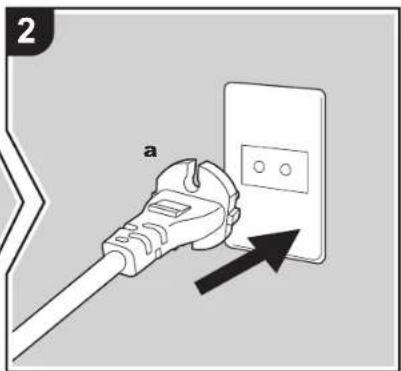
This model includes a removable power cord. The power cord must be connected only after all other connections are completed. Make sure you first connect the power cord to AC IN terminal of the unit and then connect to the outlet. Always disconnect the outlet side first when disconnecting the power cord.
Starting up
Press ⏻/1 STANDBY/ON on the main unit. - When starting up, press until the button goes in. When starting up the unit, the ⏻/1 STANDBY/ON indicator in the center of the button lights blue.

> Before Start > Part Names > Install > Play back
Advanced Setup | Others
Playing discs


Refer to (→P18) for discs you can play on this unit.
Playing music CDs
Perform the following procedure when the unit is on.
-
Press CD/SACD on the remote controller to set the source to CD/SACD.
-
Press ▲ on the main unit to open the disc tray, and after putting the disc on the tray, press ▲ again to close the tray.
-
Press ▶/■ (d) on the remote controller to start play.
-
Use play buttons (h) to stop play or choose tracks to play. You can also select by entering the track number with number buttons (a). When entering a 2-digit track number, press the +10 button as many times as the value of the second (tens) digit, then press the value of the first digit. If you press DISPLAY (e), you can switch the display to show the elapsed time or remaining time of the disc, etc.
• The content displayed depends on the disc.
Playing a disc with music files
Perform the following procedure when the unit is on.
-
Press CD/SACD on the remote controller to set the source to CD/SACD.
-
Press ▲ on the main unit to open the disc tray, and after putting the disc on the tray, press ▲ again to close the tray.
-
Press ▶/Ⅱ (d) on the remote controller to start play.
-
Use play buttons (h) to stop play or choose tracks to play. If you press DISPLAY (e), you can switch the display to show the elapsed time or remaining time of the disc, the file name of the track, or the track name, etc.
• The content displayed depends on the disc and file.
- Track name display is supported with MP3/WMA/FLAC/AAC (M4A only)/DSD (DSF only) format music files only.
- Characters that cannot be displayed by this unit appear as "*".

> Before Start > Part Names > Install > Play back
Advanced Setup | Others
Repeat play
- Repeatedly press REPEAT (c) during play to display or en the display.
ALL: Repeat play of all tracks.
: Repeat play of the being played track.
To cancel repeat play, press REPEAT (c) several times until the icons disappear.
Shuffle play
- Repeatedly press SHUFFLE (f) during play to display × on the display.
×: Play all tracks randomly.
To cancel shuffle play, press SHUFFLE (f) until the icon disappears.
Program play
You can select the order to play tracks on a music CD.
- Press PROGRAM (g) while stopped.
"P00" is displayed when nothing has been registered. Enter the track number you want to register with the number buttons (a). When entering a 2-digit track number, press the +10 button as many times as the value of the second (tens) digit, then press the value of the first digit. The number in "P00" increases each time you register a track. Up to 24 tracks can be registered.
- To play the registered program, press ▶/■ (d) on the remote controller.
- If you press CLEAR (b) while registering tracks, the tracks are cleared in order, starting from the one you registered last.
- If you press PROGRAM (g) while registering tracks, all the tracks you registered are cleared.
Specifications of files that can be played
| Sampling rates | Bitrates | Quantization bit | Types of discs that can be played | Extension | |||
| CD-R/CD-RW | DVD-R/DVD-RW | DVD+R/DVD+RW | |||||
| MP3 | 32/44.1/48 kHz | Between 8 kbps and 320 kbps and VBR. | - | √ | √ | √ | .mp3 |
| WMA | 32/44.1/48 kHz | Between 5 kbps and 192 kbps and VBR. | - | √ | √ | √ | .wma |
| AAC | 32/44.1/48/88.2/96 kHz | Between 8 kbps and 320 kbps and VBR. | - | ^* | √ | √ | .aac/.m4a |
| WAV | 32/44.1/48/88.2/96/176.4/192 kHz | - | 8/16/24 bit | ^* | √ | √ | .wav |
| AIFF | 32/44.1/48/88.2/96/176.4/192 kHz | - | 8/16/24 bit | ^* | √ | √ | .aif/.aiff |
| FLAC | 32/44.1/48/88.2/96/176.4/192 kHz | - | 8/16/24 bit | ^* | √ | √ | .flac |
| ALAC | 32/44.1/48/88.2/96/176.4/192 kHz | - | 8/16/24 bit | ^* | √ | √ | .m4a |
| DSD | 2.8/5.6 MHz | - | 1 bit | - | √ | √ | .dsf/.diff |
* When playing files exceeding 48 kHz, use files that have been recorded on a DVD disc.
Notes regarding all types of files
- Use CD/CD-R/CD-RW discs that conform to the ISO9660 level 1/level 2 CD-ROM file system standard and that are recorded using the system conforming to extended formatting (Joliet and Romeo). When using DVD discs, then along with the above, use discs recorded using the UDF file system.
- Folder structure is limited to eight levels and the maximum number of tracks is 3000. However, depending on the folder structure, not all folders and tracks may be recognized and played.
Notes regarding specific types of files
- Encode WMA files using applications certified by the Microsoft Corporation of the United States. Operation may not be correct if you use uncertified applications.
- This unit supports play of AAC files with the extension ".m4a" that have been encoded using iTunes. However, play not be possible if the file has been protected with DRM copy protect (copyright protection) or with some versions of iTunes used for encoding.
- WAV files include uncompressed PCM digital audio.
• AIFF files include uncompressed PCM digital audio.
Before Start > Part Names > Install > Play back
Advanced Setup | Others
Using this unit as a D/A converter


You can convert the digital audio from audio devices to analog, then output them from the ANALOG OUT jacks.
Connections
- Use either a digital optical cable or digital coaxial cable, depending on the jacks on the device to be connected, to connect audio devices.
Switching the source
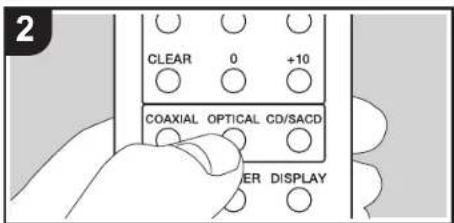
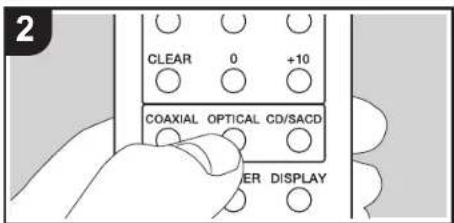
- When playing a device connected to the DIGITAL IN OPTICAL jack, press OPTICAL on the remote controller to change the source on this unit to "OPTICAL".

When playing a device connected to the DIGITAL IN COAXIAL jack, press COAXIAL on the remote controller to change the source on this unit to "COAXIAL".

- Start play on the player.
- The digital signals that can be input by this unit are linear PCM signals with a sampling frequency and quantization bit rate of 192 kHz/24 bit (operation may not be possible with all connected devices or environments).
a Digital Optical Cable, b Digital Coaxial Cable
> Before Start > Part Names > Install > Play back
Advanced Setup | Others
Adjusting sound quality
Reproduce the original sound faithfully (DIRECT mode)
Processing that affects sound quality is shut down so sound closer to the original is reproduced.
(Default Value): OFF
-
Press DIRECT (a).
-
The DIRECT indicator on the front of the main unit lights when the DIRECT mode is ON.
- When the DIRECT mode is ON, DIGITAL OUT is turned OFF.
- In the DIRECT mode, the display turns off automatically when playing CD and SACD.
DIGITAL FILTER
Select one of three types of DIGITAL FILTER.
- The setting changes each time you press DIGITAL FILTER (b).
"SLOW": Soft and fluid sound "SHARP" (Default Value): Sound with more structure and firmness
"SHORT": Sound that starts quick and seems to move forward - You can also press SETUP (d) to display the DIGITAL FILTER setting screen from the SETUP menu. In this case, select the setting value with ♦/♦ (c) on the remote controller.
Adjusting the lock range (LOCK RANGE ADJUST)
Sound quality is improved by narrowing the lock range to reduce incidental sounds. However, narrowing the lock range too much can cause interruptions to sound and noise. Adjust the lock range while listening to some audio. (Default Value): RANGE 4
-
Press LOCK RANGE (e).
-
Select the setting value with / (f) on the remote controller.
"RANGE 6" (broad) to "RANGE 1" (narrow)
• You can also press SETUP (d) to display the LOCK
RANGE ADJUST setting screen from the SETUP menu. - LOCK RANGE ADJUST has no effect on the audio of SACD and DSD.

Before Start > Part Names > Install > Playback
Advanced Setup | Other
Advanced Settings
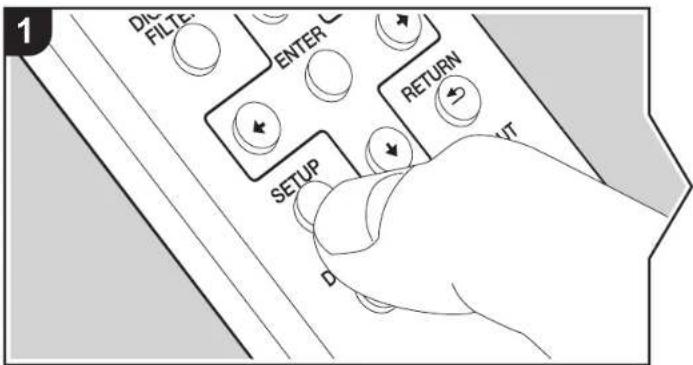
The unit allows you to configure advanced settings to provide you with an even better experience.
- Press SETUP on the remote controller.
AUTO STANDBY
- Select the content or the setting with the cursors on the remote controller and press ENTER to confirm your selection. To return to the previous screen, press RETURN.

flowchart
graph TD
    A["ENTER"] --> B["Return"]
    B --> C["Arrow Down"]
    C --> D["Arrow Up"]
    D --> E["Arrow Left"]
    E --> F["Arrow Right"]
    F --> G["Arrow Down"]
    G --> H["Arrow Up"]
    H --> I["Arrow Left"]
    I --> J["Arrow Right"]
- To exit the settings, press SETUP.
AUTO STANDBY
This setting places the unit on standby automatically after 20 minutes of inactivity without any audio input.
"ON" (Default Value): The unit will automatically enter standby mode.
"OFF": The unit will not automatically enter standby mode.
POWER ON PLAY
You can set it so that the disc automatically starts playing when this unit is turned on.
- By using an externally connected auto timer, you can use timer play when the power automatically switches on.
"ON": To play discs automatically
"OFF" (Default Value): When discs are not to be played
DIGITAL OUT
Make settings for digital audio output. When not connecting to the DIGITAL OUT OPTICAL/COAXIAL jack, you can listen to even clearer audio by setting this OFF.
"ON" (Default Value), "OFF"
DIGITAL FILTER
You can select the type of DIGITAL FILTER. (→P15)
LOCK RANGE ADJUST
Adjust the lock range. (→P15)
> Before Start > Part Names > Install > Playback
Advanced Setup | Others
Troubleshooting
Before starting the procedure
When operation is unstable, problems may be solved by simply turning the power on or to standby or disconnecting/connecting the power cord, rather than reviewing settings and operations. Try the simple measures on both the unit and the connected device. If the problem isn't fixed after referring to "Troubleshooting", resetting the unit to the status at the time of shipment may solve the problem.
Resetting the unit (this resets the unit settings to the default)
- With the power on and no disc inserted, while pressing and holding ■ on the main unit, press DIRECT.
- "CLEAR" is displayed, the unit switches to standby, and the settings are reset.
CLEAR
Power
Cannot turn on the unit
- Unplug the power cord from the wall outlet, wait 2 minutes or more, then plug it in again.
The unit turns off unexpectedly
- The unit automatically switches to standby when the "AUTO STANDBY" setting in the SETUP menu functions.
The STANDBY indicator on the main unit continues to flash red and operations are not possible
- Unplug the power cord from the wall outlet, wait 2 minutes or more, then plug it in again. The indicator will continue to flash, but press ⏻/I STANDBY/ON on the main unit to turn the main power ON. If this doesn't fix the issue, there may be a malfunction. Unplug the power cord from the wall outlet and contact the dealer or our customer support.
■ The display doesn't light
- It is possible that the display has been turned off by pressing DISPLAY OFF. Press DISPLAY OFF to turn the display on.
■ Cannot play discs
- Place the disc in the disc tray so the label is facing up.
- Play may not be possible if the disc is scratched or dirty
- Sound files that are protected by copyright cannot be played.
- The disc tray opens if you insert a disc that this unit does not support.
Audio
Sound is interrupted
- Narrowing the lock range too much with the LOCK RANGE ADJUST setting can cause interruptions to sound and also may cause noise. Sound interruptions caused by adjustments to the lock range are not covered by our guarantees of operation. Listen to some audio while adjusting the lock range.
There is no digital sound
- Set "DIGITAL OUT" in the SETUP menu to "ON". - Audio from SACD and DSD cannot be output digitally.
■ Remote Controller
- Make sure that the batteries are installed with the correct polarity.
• Install new batteries. Do not mix different types of batteries, or old and new batteries. - Make sure that this unit is not subjected to direct sunshine or inverter-type fluorescent lights. Relocate if necessary.
- If this unit is installed in a rack or cabinet with colored-glass doors or if the doors are closed, the remote controller may not work reliably.
■ D/A converter feature
• Make sure that the devices are properly connected.
- Play audio compatible with the input jacks on this unit. (→P14)
SACD
- Due to the differences in recording methods, there may be a difference in volume between SACD and CD.
> Before Start > Part Names > Install > Playback
Advanced Setup | Others
Other notes
■ Discs that can be played
| Discs that can be played |
| SACD (Super Audio CD)(2-channel area only) |
| CD |
| CD-R |
| CD-RW |
| DVD-R |
| DVD-R (DL) |
| DVD-RW |
| DVD+R |
| DVD+R (DL) |
| DVD+RW |
Precautions for Playback
- Compact discs (CDs) with the following logo on the label surface can be used.


- Note that some discs may not play back because of the disc characteristics, scratches, contamination or the recording state.
Playing hybrid SACD
Hybrid SACD consist of two layers; the SACD layer and the CD layer. Press CD/SACD to select the layer you want to listen to.
Playing DualDisks
"DualDisk" is a disc with video and audio conforming to the DVD standard on one side, and audio that can be played on a CD player on the other.
On the audio side that is not the DVD side, play may not
always be possible due to the fact that the disc does not conform to the physical specifications of standard CDs.
Operations during play
Direct search does not work while playing discs with music data.
Types of discs that cannot be played on this unit DVD Video, DVD Audio, CD-G, Video CD, DTS-CD
Notes on discs
- Be careful not to catch your hand or fingers when opening or closing the disc tray.
- Never use discs which have an unusual shape (such as hearts or octagons). These types of discs could jam and damage the unit.
- Some audio CDs with copy-control functionality do not comply with official CD standards. These are special discs and cannot be played with this unit.
- Do not use discs with residue from cellophane tape, rental discs with labels which are peeling off, or discs with decorative labels. This type of disc could get stuck in the unit, or could damage the unit.
- Do not leave a disc having a label printed with an inkjet printer in the unit for a long time. The disc could get stuck in the unit, or could damage the unit.
■ Precautions when moving the unit
When moving the unit, remove any discs in it and close the disc tray. Then press ⏻/I STANDBY/ON on the main unit, wait for 10 seconds after [OFF] disappears from the display, and then unplug the power cord. Moving the unit while a disc is still in it may cause damage.
Condensation
Drops of water can form inside this unit if it is taken from a cold place to a warm room or when a cold room is rapidly warmed by a heater. This is called condensation. This may not only cause the unit to malfunction, but it can also damage the disc or parts of the unit. We recommend removing discs from the unit if it is not to be used for a while. If there is a possibility that condensation has formed, unplug the power cord and allow the unit to stand for at least 3 hours at room temperature.
> Before Start > Part Names > Install > Playback
Advanced Setup | Others
General Specifications
■ Analog Audio Output
Rated Output Level and Impedance
• RCA OUT : 2.3 Vrms (1 kHz, 0 dB) / 500 Ω
• XLR OUT : 4.5 Vrms (1 kHz, 0 dB) / 150 Ω
Frequency Response
• CD: 2 Hz - 20 kHz,
SACD: 2 Hz - 50 kHz (-3 dB)
Signal to Noise Ratio
• CD: 116 dB or more (A-weighting), SACD: 116 dB or more (A-weighting)
THD+N
• CD: 0.002 % or less, SACD: 0.002 % or less
■ Digital Audio Input
Coaxial Digital Input
• RCA Jack, 0.5 Vp-p / 75 Ω
Optical Digital Input
• Optical Jack, -24 dBm or more / 660 nm
■ Digital Audio Output
Coaxial Digital Output
• RCA Jack, 0.5 Vp-p / 75 Ω
Optical Digital Output
• Optical Jack, -14 --21 dBm / 660 nm
■ Other
Control In
- ∅3.5 mini-jack (mono)
Control Out
- ∅3.5 mini-jack (mono)
General
Power Supply
• AC 220 - 230 V, 50/60 Hz
Power Consumption
46.0 W
• 0.3 W (In Standby)
AUTO STANDBY
• ON (20 min) / OFF
natural_image
Front view of a computer monitor with buttons and ports (no visible text or labels)2
natural_image
Line drawing of a remote control with two batteries (no text or symbols)3
natural_image
Simple line drawing of a coiled cable or wire with connectors (no text or symbols)4


Dimensions (L × H × P)
- 435 mm × 142 mm × 413 mm
Poids
• 18,5 kg
natural_image
Front view of a computer monitor with buttons and ports (no visible text or labels)2

natural_image
Line drawing of a remote control with two batteries (no text or symbols)3

natural_image
Simple line drawing of a coiled cable or wire with connectors (no text or symbols)4


• CD: 2 Hz - 20 kHz,
SACD: 2 Hz - 50 kHz (-3 dB)
Salida digital coaxial
• Conector RCA, 0,5 Vp-p / 75 Ω
natural_image
Front view of a computer monitor with buttons and ports (no visible text or labels)2

natural_image
Line drawing of a remote control with buttons and two cylindrical batteries (no text or symbols)3

natural_image
Simple line drawing of a coiled cable or wire with connectors (no text or symbols)4


• CD: 2 Hz - 20 kHz,
SACD: 2 Hz - 50 kHz (-3 dB)
natural_image
Front view of a computer monitor with buttons and ports (no visible text or labels)2

natural_image
Line drawing of a remote control with buttons and two cylindrical batteries (no text or symbols)3
natural_image
Illustration of a coiled cable or wire with connectors (no text or symbols)4


• CD: 2 Hz - 20 kHz,
SACD: 2 Hz - 50 kHz (-3 dB)
Signal-/Rauschabstand
KLASSE 1 LASERPRODUCT
natural_image
Front view of a computer monitor with buttons and ports (no visible text or labels)2

natural_image
Line drawing of a remote control with two batteries (no text or symbols)3

natural_image
Simple line drawing of a coiled cable or wire with connectors (no text or symbols)4

Verbinding netsnoer

• CD: 2 Hz - 20 kHz,
SACD: 2 Hz - 50 kHz (-3 dB)
• CD: 116 dB of meer (A-weging),
SACD: 116 dB of meer (A-weging)
THD+N
• CD: 0,002 % of minder,
SACD: 0,002 % of minder
■ Digitale audio-ingang
Coaxiale Digitale Ingang
• 46,0 W
• 0,3 W (In Stand-by)
AUTO STANDBY
• ON (20 min) / OFF
Afmetingen (B × D × H)
- 435 mm × 142 mm × 413 mm
Gewicht
• 18,5 kg
KLASS 1-LASERPRODUKT

The Ground Truth image displays a single, solid horizontal line. According to Rule 2 (UNDERSCORE & LINE RULES), this is a stylistic or background line, not a placeholder underscore. Therefore, the OCR result must ignore it and output nothing or only meaningful text. The provided OCR content is "____", which consists of four underscores. This is an incorrect interpretation of the line as a placeholder, violating the rule that stylistic lines must be ignored. The OCR has hallucinated underscores where none should exist based on the GT's visual context. Hence, the OCR result is inconsistent with the Ground Truth.


Pb
natural_image
Front view of a computer monitor with buttons and ports (no visible text or labels)2

natural_image
Line drawing of a remote control with two batteries (no text or symbols)3

natural_image
Simple line drawing of a coiled cable or wire with connectors (no text or symbols)4
- Huvudapparat (1)
- Fjärrkontroll (RC-960C) (1), Batterier (AAA/R03) (2)
- Analog Ljudkabel (För testoperation) (1)
- Nätkabel (1)
• Bruksanvisning (det här dokumentet) (1)


• CD: 2 Hz - 20 kHz,
SACD: 2 Hz - 50 kHz (-3 dB)
Signal-/brusforhallande
"Super Audio CD" is a registered trademark.
DSD and the Direct Stream Digital logo are trademarks of Sony Corporation.
Windows 7, Windows Media, and the Windows logo are trademarks or registered trademarks of Microsoft Corporation in the United States and/or other countries.
All other trademarks are the property of their respective owners. / Toutes les autres marques commerciales sont la propriété de leurs détenteurs respectifs. / El resto de marcas comerciales son propiedad de sus respectivos propietarios. / Tutti gli altri marchi di fabbrica sono di proprietà dei rispettivi proprietari. / Alle anderen Warenzeichen sind das Eigentum ihrer jeweiligen Eigentümer. / Alle andere handelsmerken zijn eigendom van de desbetreffende rechtnebbenden. / Alla andra varumärken tillhör deras respektive agare.
Important Notice Regarding Software
The software package installed in this product includes software imported to Okyo & Pioneer Corporation (hereafter, called "O&P Corporation" directly or indirectly by third party developers. Please be sure to read this notice regarding such software.
ソフトウェアに関する重要なお知らせ
This product includes the following software that is covered by GNU General Public License (thereafter, called "GPL") or by GNU License General Public License (thereafter, called "GPL"). DSP Comparison notifies you that, according to the attached GPL/LGPL, you have right to close, modify, and redistribute software source code for the listed software.
Version 2.1, February 1999
Copyright (C) 1891, 1989 Free Software Foundation, Inc. 38 Temple Place, Suite 320, Boston, MA 02111-1307 USA. Everyone is permitted to copy and distribute verbatim copies of this license document, but changing it is not allowed. (This is the first released version of the Lower GP). It also counts so the successor of the GNU Luxury Public License, version 2, hence the version number 2.1.)
Pre-avable
The license for most software are designed to take away your freedom to share and change it. By contrast, the GNU General Public Licensees are intended to guarantee your freedom to share and change free software to make sure the software is free for all its users. This license, the Lesser General Public License, applies to some socially designated software packages—typically libraries—of the Free Software Foundation and other authors who decide to use it. You will also have a license to use free public services and use the license or the license of the Public
Let us let us to change your own, and you want to collect a list of books with the reader's attention below. When we spread the software, we prefer to find out of your own. Our content is able to become an example that you have the freedom to distribute copies of free software (and change for this service if you wish); that you receive source code or can get it if you want it; that you can change the software and use persons of it in new free programs; and that you are informed that you can do these things. To protect your rights, we need to make restrictions that forced distributions to deny those rights or to ask you to surrender those rights.
These restrictions transact to contain responsibilities for you. You distribute copies of the library or Pyou modify it. For example, if you distribute copies of the library, whether grass or or a tree, you must give theregrants all the rights first, we gave you. You must make sure that they too receive or can get the source code. If you link other codes with the library, you must provide complete objects to the recipients, so that they can reink them with the library after meaning changed to the library and recoupling it. And you must show them these terms as they know their rights. We protect your rights with a two-step method. (1) we copyright the library and (2) we offer you this license, which gives you legal permission to copy, distribute another modify the library.
To protect each distributor we want to make it very clear that there is no warranty for the free library. Also, P.F. the library is modified by someone else and passed on the request should know that what they have a result of original version, so that the original authors' reputation will not be affected by problems that might be introduced by others. Finally, software passes pose a constant threat to the existence of any free program. We wish to make sure that a company has been able to use this book to create a new book from the library. We insert that any select license obtained for a version of the library must be consistent with the full freedom of use specified in this License. Most GNU software, including some libraries, is covered by the ordinary GNU General Public License. This license, the GNU Lesser General Public License, applies to certain designated libraries, and is quite distinguished from the ordinary General Public License. We now issue the course for clean libraries in order to permit linking
The following person is limited to the authority, whether statistically or using a shared library, the combination of the two is legally speaking a combined work, a derivative of the original library. The ordinary General Public License therefore permits such linking only if the entire combination gives its costs of freedom. The Lesser General Public License permits make taxes on order for lending other codes with the library. We call this license as "Lesser General Public License" and then to the author of the general public. If you have a copy of this license, this license software developers Less an advantage over competing non-free programs. These disadvantages are the reason we use the ordinary General Public License for many libraries. However, the Lesser license grows advantage in certain special circumstances. For example, so rare occasions, there may be a good mood that the license is not suitable for any other library, so that it becomes a default student. To treat this, often free programs must be allowed to use the library.
A more requested case is that a free library covers the same jobs as widely used non-free libraries. In this case, there is this to gain by limiting the free library to the software only, so we use the Lesser General Public License. In other cases, permission to use a particular library in non-free programs enables a greater number of people to use a range of resources for their own services. The library does not have a long time to use a single person to use the whole GNU operating system, as well as its variant, the GNU/MLin acquiring system. Although the Lesser General Public License is Loss protective of the users' freedom, it does ensure that the user of a program that is limited with the Library has the freedom and the retrieval to run that program using a modified version of the library. The dense issue and conditions for copying, distribution and modification follow: Pay some attention is the library's most important purpose. The first moment calls some land from the library, whereas the latter must be combined with the library in order to run.
TERMS AND CONDITIONS FOR COPYING, DISTRIBUTION AND MODIFICATION
Q. This License Agreement applies to any software library or other program which contains a notice placed by the copyright holder or other authorized party saying it may be distributed under the terms of this Lesser General Public License (also called "This License"). Each licensee is addressed as "yes."
A "Library" means a collection of software functions and/or data prepared as to be conveniently linked with application programs (which use some of these functions and data) to form executables. The "Library", below, refers to any such software library or work which has been distributed under these terms. A work based on the Library" means either the Library or any derivative work under copyright law that is to say, a work containing the Library or a portion of it, other verbalism or with modifications and/or translated straightening into any other language. The optional translation is included without limitation in the form modification." "Source code" for a work involving the Library's computer, book, and making modifications but. For a library, complete source code measures of the source code for all weeks & domains. Use any associated interface definition files, plus the examples used to create a compilation and installation of the Library.
Activities other than copying, distribution and modification are not covered by this License; they are outside its scope. The act of running a program using the Library is not restricted, and output from such a program is covered
only if its contents constitute a work based on the Library (independent) of the use of the Library in a tool for writing.
- You may copy and distribute verbal copies of the Library's complete source code as you receive it, in any medium, provided that you compromise and express timely publish an echcopy an appropriate copyright notice and disclaimer of warranty; keep misc at all the notices that refer to the License and to the sentence or any warranty; and distribute a copy of this License along with the Library.
You may charge a fee for the physical act of transferring a copy, and you may at your option offer warranty
- You may modify your copy or copies of the Library or any portion of it, thus forming a work based on the Library, and copy and distribute such modifications or work under the forms of Section 1 above, provided that you also meet all of these conditions.
8) The moated work must be a software theory. b) You must go on the modied to vary answers
6) You must cause a nice illness to comply preliminary notices stating that you changed the lives and the date of any change.
c) You must raise the whole of the work in be licensed at no charge to all third parties under the terms of this
License
d) If a facility in the modified Library refers to a function or a table of data to be supplied by an application program that uses the facility, other than its an argument passed when the facility is revised, then your must move a good faith effort to ensure that, in the event an application does not supply such function or table, the facility still operates, and therefore operating part of its service remains unchanged.
(For example, a function in a library to compute square roots has a purpose that it is entirely well-earned independent of the application. Therefore, Subsection 20 requires that any application-supplied function or labor used by the London must be optioned if the application does not supply it, the square co-ordination must all compute square roots (1) These requirements apply to the modified work as a whole. If applicable sections of that work are not derived from the Library, and none reasonably considered independent and separate worksin themselves, then this License, and its terms, on not apply to those sections when you disficult them as separate works. But then you disforce the same sections as part, of a whole which is not broken or the Library, the sum of these parts is given by the Library. The provisions for other items are either to the entire whole and thus to each and every part regardless of other words.)
Thus, it is not the intent of this section to claim rights or cause your rights to work written entirely by your rather the intent as to exercise the right to control the distribution of derivative or collective works based on the Library. In addition, a major aggregation of another work not based on the Library with the Library (or with a work based on the Library) on a volume of a storage or distribution medium does not bring the other work under the scope of this
- You may opt to apply the terms of the ordinary GNU General Public License instead of this License to a given copy of the Library. To do this, you must offer all the notices that refer to this License, so that they refer to the ordinary GNU General Public License, version 2, instead of to this License (if a longer version then version 2 of the ordinary GNU General Public License has appeared, then you can specify that version instead if you wish.) Do not make any other change in these notices.
Once this change is made in a given copy it is irreversible for that copy, so the ordinary GNU General Public License applied to all subsequent copies and detoxize works made from that copy. This option is useful when you wish to copy part of the code of the Library into a program that is not a library.
-
You may copy and distribute the library (or a portion or derivative of it, under Section 2) in object code or encapsulation form under the terms of Sections 1 and 2 above provided that you accompany it with the complete corresponding machine-readable source code, which must be distributed under the terms of Sections 1 and 2 above on a medium customarily used for software interchange. If distribution of object code is made by offering access to copy from a designated place, then offering equivalent access to copy the source code from the same place satisfies the requirement to distribute the source code, even through third parties are not compelled to copy the source along with the object code.
-
A program that contains no derivative of any portion of the Library, but is designed to work with the Library by being compiled or issued with it, is called a "work that uses the Library". Such a work, in solution, is not a derivative work at the Library and therefore kits outside the scope of this License.
However, linking a work that uses the Library with the library creates an exerciseable part in a narrative of the Library thousand blocks in parts of the library, rather than a work that uses the library. The exerciseable part is not only used to use the library and uses the library to use the library. This work is not only used to use the library uses multiple from a header file as part of the library. The object itself for the work may be a derivative work of the Library even though the source code is not, whether the author is especially responsible for the use of the library. It is also possible to use the library to use the library and uses the library to use the library and uses the library to use the library and uses the library to use the library to use the library to use the library to use the library to use the library to use the library to use the library to use the library to use the library to use the library to use the library to use the library to use the library to use the library to use the library to use the library to use the library to use the library to use the library to use the library to use the library to use the library to use the library to use the library to use the library to serve
- As an exception to the Sections above, you may also combine or link a "work that uses the Library" with the Library to produce a work containing portions of the Library, and distribute that work under terms of your choice, provided that the terms permit modification of the work for the customer's can use and increase engineering for debugging such modifications.
You must give prominent notice with each copy of the work that the Library is used in it and that the Library and its name are covered by this License. You must supply a copy of this License. If the work during execution displays copyright notices, you must include the copyright notice for the Library among them, as well as a reference directing the user to the copy of this License. Also, you must do one of these things:
a) Accompany the work with the complete corresponding machine-readable source code for the library including misuse changes were used in the case (which must be detailed under Section 1 and 2 above); and, if the work is an executable linked with the library, with the complete machine-readable "work that uses the Library" as object code and/or source code, so that the user can modify the library and then restruct to prepare a modified accurate containing the modified library. This definition that the user will change the controls of defaulters files in the library will not necessarily be able to respond to the springline to use the modified definitions;
b) Uses a suitable shared library mechanism for linking with the Library. A suitable mechanism is one that (1) uses at
run time a copy of the library already present on the user's computer system, rather than copying library functions into the executable, and (2) will operate properly with a modified version of the library. If the user installs one, as long as the modified version is interface-compatible with the version that the work was made
c) Accompany the work with a written offer, valid for at least three years, to give the same user the materials.
specified in Subsection 5a, shares, far a charge no more than the cost of performing this distribution.
d) If distribution of the work is made by offering access to copy from a designated place, offer equivalent access to copy the above specified materials from the same place.
at fairly that the user has heard received a copy of these make acts or that you have already sent this user's copy. For an accurate, the required form of the work that uses the Library must include any data and utility programs needed for reproducing the executable from it. However, as a special exception, the materials to be distributed need not include anything that is normally distributed in either source or binary form with the major components (promoter, kernel and union), of the networking system on which the executable nurse, unless that component itself accompanies the executable. It may tapengt that this requirement contradicts the license restrictions of other proprietary libraries that do not normally accompany the operating system. Such a contradiction means you cannot use both them and the Library together on an executable that you dish fans.
- You may place library facilities that are a work based on the Library side-by-side in a single library together with other library facilities not covered by this License, and distribute such a combined library, provided that the separate distribution of the work based on the Library and of the other library facilities is otherwise permitted, and provided that you do these two libraries.
8) Arzongans the combined lines with a range of the somewhat based on the Library combinations with any other
Library facilities. This must be distributed under the terms of the Sections above.
b) Draw prominent notice with the continued library of the fact that part of it is a work based on the Library, and consisting where to find the government's perception form of the same work.
- You may not copy, modify, sublicense, link with, or distribute the Library except as expressly provided under the License. Any attempt otherwise to copy, modify, sublicense, link with, or distribute the Library is void, and will
sulomisitally teminute your rights under the License. However, perise who have received copies, or rights, from
You understand a license will not have that licenses committed so long as such parties will act in its competence. You are not merely to agree this license, since you have not signed it. However, nothing else cramps you
100 are not required to do except, and ECOs, since you have no agree is therefore, from give the claims for them seem to modify or disclose the Library or its declaration works. These results are prohibited by law if you do
not accepted the License. Therefore, by modifying or distributing the Library (or any work based on the Library), you
indicate your acceptance of this License to do so, and all its terms and conditions for copying, distributing or
The following for the year of March 1st:
10. Exchute you make the Library for any work based on the Library, the expected successfully increases a loss from the original increase to any further, locally or publicly the Library subject to home home and
You are from the general law to copy, otherwise this will or modify the Library subject or these demands and conditions. You may not impose any further restrictions on the recipients' oath so of the rights granted herein. You are not responsible for enforcing compliance by that party with this License
B. It, as a consequence of a court judgment, or redemption of patent infringement or for any other reason (but limited to patent issues), conditions are imposed on you (whether by court order, agreement or otherwise that contract the conditions of this License, they do not secure you from the condition of this License. If you cannot distribute so as to satisfy further memory your obligations under this License and any other permanent obligations, then as a consequence you may not distribute the Library at all. For example, if a patent license would not permit royalty-free redistribution of the Library by all those who receive sources directly or indirectly through you, then the only way you could safely harm it and this License would be to reflect entirely from distribution of the Library.
They often in this section is the idealized or universal side under any particular communication, the absence of this section is intended to apply, and the section as a whole is intended to apply in other circumstances. It is not the purpose of this section to induce study to Africa and any patients or an property flight card, or to each facility of any such trial or transaction related to use purpose of protection for integrity of the two software clients system which is implemented by public license practices. Many people have made general service contributions in the order of their services limited through the system in relation to successful application of that system is up to the authorization or to seek itself or to serve as willing to obtain these services through any other system and a license care in impose that choice. This section is intended to make throughout your history is believed to be a consequence of the rest of this License.
12. If the distribution and/or use of the Library is restricted in certain countries either by patents or by copyright
the case, the right copyright name will possess the Llcary under this License may act as a spot geographical distribution limitation excluding those countries, so bad distribution is permitted only in any country so not thus excluded. In such case, the License incorporates the limitation and written in the body of this License.
15. The Free Software Foundation may publish revised and/or new versions of the Lessee General Public License from time to date. Such new versions will be similar in spirit to the present version, but may differ in detail to address new problems or procedures.
Each version is given a distinguishing version number. If the Library specifies a version number of this License which applies to it and "any later version", you have the option of following the terms and conditions either of that version or all any version published by the Free Software Foundation. If the Library contains specify a license version number, you may choose any version ever published by the Free Software Foundation.
14. If you wish to incorporate parts of the Library into other free programs whose distribution conditions are incompatible with these, write to the author to ask for permission. For software which is copyrighted by the Free Software Foundation we see to the Free Software Foundation we sometimes notice exceptions for this. Our decision will be guided by the two goals of presenting the free status of all derivatives of our free software and of promoting the sharing and reuse of software generally.
* NO WARRANTY
IS. BECAUSE THE LIBRARY IS LICENSED FREE OF CHARGE, THERE IS NO WARRANTY FOR THE LIBRARY. TO THE EXTENT PERMITTED BY APPLICABLE LAW EXCEPT WHEN OTHERWISE STATED IN WRITING THE COPYRIGHT HOLCE AND/OR OTHER PARTIES PROVIDE THE LIBRARY AS IS WITHOUT WARRANTY OF ANY KIND. EITHER EXPRESSED OR IMPLIED INCLUDING, BUT NOT LIMITED TO THE IMPLIED WARRANTIES OF MERCHANTABILITY AND FITNESS FOR A PARTICULAR PURPOSE. THE ENTIRE RISK AS TO THE QUALITY AND PUBLICANCE OF THE LIBRARY IS WITH YOU SHOULD THE LIBRARY PROVE DEFECTIVE, YOU ASSUME THE COST OF ALL NECESSARY SERVICING, REPAIR OR CORRECTION
11. IN NO EVENT UNLESS RECURSED BY APPLICABLE LAW OR AGREED TO IN WRITING WILL ANY COPYRIGHT HOLDER OR ANY OTHER PARTY WHO MAY MODIFY AND/OR REDISTRIBUTE THE LIBRARY AS PERMITTED ABOVE IS LIABLE TO YOU FOR DAMAGES, INCLUDING ANY GENERAL, SPECIAL, INCIDENTAL OR CONSEQUENTIAL DAMAGES ARISING OUT OF THE USE OR INABILITY TO USE THE LIBRARY (INCLUDING BUT NOT LIMITED TO LOSS OF DATA OR DATA BEING RENDERED INCURATE OR LOSSES SUSTAINED BY YOU OR THIRD PARTIES OR A FAILURE OF THE LIBRARY TO OPERATE WITH ANY OTHER SOFTWARE, EVEN IF SUCH HOLDER OR OTHER PARTY HAS BEEN ADVISED OF THE POSSIBILITY OF SUCH DAMAGES.
END OF TERMS AND CONDITIONS
How to Apply These Terms to Your New Libraries
If you develop a new library and you want to be of the opened possible time to the public, we recommend making it free software that everyone can redistribute and change. You can do so by permitting redistribution under these terms (or alternatively, under the terms of the ordinary Central Public Loans). To apply these terms, attach the following notices to the library. It is solved to attach them to the start or end source file to most effectively convey the exclusion of money, and each file should have at least the copyright line and a corner to where the full notice is found. The line to give the library's name and an idea of what it does?
Copyright IC: 0698 - name of author
This library is a free software, you can establish it standard modify it under the terms of the GNU Lesser General Public License as published by the Free Software Foundation, other version 2.4 of the License, or any option any inversion. The library is distributed in the hope that will be useful, but WITHOUT ANY WARRANTY, without even the implied warranty of MICHIGAN PUBLITY OR ITEMS OF A PUBLIC CULAR PURPOSE. See the GNU Lesser General Public License for some weeks. You should have received a copy of the GNU Lesser General Public License (89) and the license to you. If not, write to the Free Software Foundation, Inc., 69 Temple Place, Suite 330, Boston, MA 2111-1307 USA.
Also said information on how to contact your electrical and paper mail. You should also get your employer if you work as a programme or your school, if any, to sign a "copyright disclaimer" for the library, it necessary. Here is a sample; after the names:
Voyedyne, Inc., hereby disclaims all copyright interest in the library "Frost" (a library for downloading knows) written by
(1) 2006.1.1985
By Caco, President of Miss
That's all here is to be
GNU GENERAL PUBLIC LICENSE
Copyright, 1982. 1981 Free Software Foundation, Inc. 59 Temple Place - Scale 330, Boston, MA 0211-1907, USA. Everyone is permitted to copy and distribute verbal copies of this license document, but changing it is not allowed.
The licenses for most software are designed to take away your freedom to share and change it. By contrast, the GNU General Public License is intended to guarantee your freedom to share and change free software—to make sure the software is free for all its users. This General Public License applies to most of the Free Software Foundation's
software and to any other program, some solutions continue using it. Some other Free Software Foundation software is covered by the GNU Library General Public License Instead. You can apply it to your programs, ice. When we speak of free software, we are referring to freedom, not price. Our General Public Licenses are designed to make sure that you have the freedom to distribute copies of free software (and exchange for this service if you want, then you cannot choose rule or use, not it you want). That you can change the software or new prices of in any time
programs and that you know you can do these things
To protect your rights, we need to make nothing because I filed risks anyone to deny you these rights or to seek what in our view the rights. These restrictions translate in certain responsibilities for you if you do-bone imposed of the software, or if you modify it. For example, You do-bone copies of such a program, whether girls or for a fee, you must give the residents all the rights that you have. You must make sure that they too, receive or can get the source of this service. If you do-bone, you should not be able to use any other method of copyright for the software, and/or let you this issue which gives her legal permission to do-bone without merely the system. Also, by each author's protection and ours, we want to make certain that everyone understands that this is a warranty for the two software. If the software is modified by someone wise and if passed on, we want to respond to how that they have to be the original, but that any problems introduced by others did not reflect them
Finally, any free program is threatened constantly by software patents. We wish to avoid the danger that redistributions of a free program will individually obtain patent licenses, in effect making the program proposals. To prevent this, we have made false, but any patent must be licensed for everyone's free use or not licensed at all. This process becomes and conditions for copying, distribution and modification follow:
TERMS AND CONDITIONS FOR COPYING, DISTRIBUTION AND MODIFICATION
The Program is used to any program or other, but it contains a proof placed by the copyright holder saying it may be described under the terms of this General Public License. The "Program" below, refers to any such program or work and a "work based on the Program" means either the Program or any derivative work under copyright law; that is so a way to work consisting of the Program or a portion of it, either variation or modifications and/or entangled into another language. [Hersteller Instruction is included without limitations in the term "modification."] Each license is addressed as "you".
Activities other than copying, distribution and modification are not covered by the License; they are outside its scope. The act of running the Program is not re-used, and the output from the Program is covered only. If the contents construite a work based on the Program Independent of having been made by running the Program? Whether that is into depends on what the Program does.
- You may copy and distribute verbalm copies of the Program's source code as you receive it. In any medium, provided that you contradictory and approximately publish on each copy an appropriate copyright notice and disclaimer of warranty; keep intact at the notices that refer to the License and to the absence of any warranty; and give any other creditors of the Program a copy of this License along with the Program.
You may change a fee for the physical act of transferring a copy, and you may at your option offer warranty upholding at exchange for a fee.
- You may modify your copy or copies of the Program or any portion of it, thus forming a work based on the Program, and copy and distribute such modifications or work under the terms of Section 1 shows, provided that you also need all of these conditions
a) You must cause the modified lies to carry prominent notices asking that you changed the lives and the date of
By: You must cause any work that you distribute or publish, that in whole or in part contains or is derived from the Program or any part thereof, to be licensed as a whole at no charge to all third parties under the terms of this
of The modified program normally reads commands interactively when you, you must cause it, when started running for such interactive use in the most ordinary way. To print or display an announcement including an appropriate copyright notice and a notice that there is no warranty for sleep, saying that you provide a warranty; and thus your may receive to the program under these conditions, and telling the user how to view a copy of this License. Exception: If the Program itself is interactive but does not normally print such an announcement, your works based on the Program (is not required to print an announcement.)
These requirements apply to the modified works as a whole. It is identifiable series of that work are not derived from the Program, and can be reasonably conserved independent and separate works in themselves, than this License, and its terms, do not apply to these sectors when you distribute them as separate works. But when you distribute the same series as part of a whole which is a work based on the Program, the distribution of the oracle must be on the terms of the License, whose permissions for other licenses extend to the entire whole, and thus to each and every part regardless of who make it.
Thus, it is not the intent of this section to claim rights or contest your rights to work written entirely by you; rather, the intent is to exercise the right to control the distribution of derivative or collective works based on the Program. In addition, more aggregation of another work not based on the Program with the Program (or with a work based on the Program) on a volume of a storage or distribution medium does not bring the other work under the scope of this License.
- You may copy and distribute the Program (or a work based on 1, under Section 2) in closed code or executable form under the forms of Sections 1 and 2 above provided that you also do one of the following:
a) Accompany it will be completed responding to the research source code, which must be established under the terms of Section 1 and 2 above on a medium customerly used for software electrochange. b) Accompany it with a written offer, valid for at least three years, to give any third party, for a charge no more than your cost of physically performing source distribution, a complete machine-reseeable copy of the corresponding source code. In the distributed under the terms of Section 1 and 2 above on a medium customerly used for software electrochange,
(1) A company is with the information you received as to the offer to distribute corresponding source code. (This alternative is allowed only for noncommercial distribution and only if you received the program in object code or noncommercial form with such an offer, in accordance with Subscription to select.)
The source code for a work mission is the preferred form of the work for making mitochondrial or IT. For an exercisable work, complete source code means all the source code for all modules it contains, plus any associated interface distribution rules, plus the script used to control compilation and installation of the exercise. However, as a special exception, the source code distributed need not include anything that is normally distributed in either source or binary form, with the major components discovered, western and some of the operating systems on which the exercisable tools, such that component has accompanying the exercise. If distribution of exercisable or exact code is made by effect because toxicity from a safety chart shows, often offering wider access to only the source code from the same scope zones are divided into the source code, even through third parties are not fully represented.
-
You may not copy, modify, sublicense, or clarify the Program except as necessary produced under this License. Any other otherwise in copy, modify, sublicense or distribute the Program is and will automatically terminate your right under the License. However, parties who have received copies, or rights, from you under the License will not have their licenses terminated as long as such parties remain in full compliance.
-
You are not required to accept this License, while you have not signed it. However, nothing was granted your permission to modify or distribute the Program or in combination with these sections we prohibited by how if you do not accept this License. Therefore, by modifying or distributing the Program for any work based on the Program, you indicate your acceptance of this License to do so, and all its terms and conditions for copying, distributing or modifying the Program or works based on it.
Each time you undertake the Program for any work based on the Progress. The recipient substantially receives a license from the original License to copy, distribute or modify the Program subject to these same and conditions. You may not increase any further restrictions on the recipients' exercise of the rights granted herein. You are not responsible for engineering compliance by third parties to the License.
- It was a consequence as a court judgment or allegation of delphiimment or for any other reason (not limited to paramissaries, conditions are impeded on you/whether by court order, agreement or otherwise) that formed the condition of this License, they do not excuse you from the conditions of this License. If you cannot distribute so as to the extent of the case of the delphiimment, you may not have an effect on the delphiimment of the case of the delphiimment, and if you may not believe you may not distribute the Program at all. For example, if a patent license would not permit royalty tree redistribution of the Program by all these who receive copies directly or indirectly through you, than the only way one could satisfy it. And this License should be to retrain activity from distribution of the Program. If you may not have an effect on the delphiimment, you may not believe you may not believe the delphiimment of the section is intended to apply and the section as a whole is intended to apply in other circumstances. It is not the purpose of this section to induce you to infrine any patents or other property rights claims or to control validity of
any such claims this section has the sole purpose of procuring the integrity of the free software distribution system, which is implemented by public license practices. More people have made patents contributed to the wide range of software distributed through that system in reliance on consistent application of that system; it is up to the submission to decide if he is as willing to distribute software through any other system and a license cannot impose that choice. This section is intended to make through clearly believed to be a consequence of the rest of this License.
-
If the distribution and/or use of the Program is restricted in certain countries either by patients or by copyrighted enterprises, the original copyright holder who processes the Program under this License may add an equivalent geographical distribution limitation excluding these countries, so that distribution is permitted only in or among countries not thus excluded. In such case, this License incorporates the limitation as it written in the body of this License.
-
The Free Social Foundation may publish revised and/or new versions of the General Public License from time to time. Such new versions will be similar in spirit to the present version, but may differ in detail to address new problems or concerns.
Each version is given a distinguishing version number. If the Program specifies a version number of the Licensee which applies to it, and "any later version", you have the option of following the terms and conditions either of that version or of any later version published by the Free Software Foundation. If the Program does not specify a version number of its Licensee, you may choose any version set up to the Free Software Foundation.
- If you wish to incorporate parts of the Program into other free programs whose distribution conditions are different, write to the author to ask for permission. For software which is copyrighted by the Free Software Foundation, write to the Free Software Foundation; we sometimes make recommendations for this. Our decision will be guided by the two goals of preserving the free status of all derivatives of our free software and of promoting the sharing and retention of software generally.
NO WARRANTY
- BECOURSE THE PROGRAMS LICENSED FREE OF CHARGE, THERE IS NO WARRANTY FOR THE PROGRAM TO THE EXILANT PURMITTED BY APPLICABLE LAW, EXCEPT WHEN OTHERS WISLSTATED IN WRITING THE COPYRIGHT HOLDERS AND/OR OTHER PARTIES PROVIDE THE PROGRAM "AS IS" WITHOUT WARRANTY OF ANY KIND. OTHER EXPRESSSED OR IMPULD, INCLUDING, BUT NOT UMTED TO THE IMPLED WARRANTIES OF MERCHANTABILITY AND FITNESS FOR A PARTICULAR PURPOSE. THE ENTIRE RISK AS TO THE QUALITY AND PERFORMANCE OF THE PROGRAM IS WITH YOU SHOULD THE PROGRAM PROVE DEFECTIVE. YOU ASSUME THE COST OF ALL NECESSARY SERVICE, REPAIR OR CORRECTION.
12 IN NO EVENT UNLESS REQUIRED BY APPLICABLE TAX OR AGREED TO IN WITING WILL ANY COPYRIGHT HOLDER, OR ANY OTHER PARTY WHO MAY MODIFY AND/OR REDISTRIBUTE THE PROGRAM AS PERMITTED ABOVE, IS LIABLE TO YOU FOR DAMAGES, INCLUDING ANY GENERAL SPECIAL INCIDENTAL OR CONSEQUENTIAL DAMAGES ARISING OUT OF THE USE OR ABILITIES TO USE THE PROGRAM INCLUDING BUT NOT LIMITED TO LOSS OF DATA OR DATA BEING RENDERED INCORATE OR LOSSES SLASTEN BY YOU OR THIRD PARTIES OR A FAILURE OF THE PROGRAM TO OPERATE WITH ANY OTHER PROGRAMS, EVEN IF SUCH HOLDER OR OTHER PARTY HAS BEEN ADVISED OF THE POSSIBILITY OF SIXCH DAMMERS.
END OF TERMS AND CONDITIONS
How to Apply These Terms to Your New Programs
If you create new program, and you want it to be of the greatest possible use to the public; the best way to achieve this is to make it free software which everyone can't establish and change under these terms. To do so, attach the following markets to the program, it is safest to attach them to the start of each source file to most effectively convey the exclusion of warranty, and attach the should have almost the "copyright" line and a primer to where the full notice is found.
Copyright © your name of author
This program is free software, you can redistribute a landy body to the terms of the GNU General Public License as published by the Free Software Corporation; either version 2 of the License, or (at your option) any later version. This program is distributed in the hope that it will be useful but WITHOUT ANY WARRANTY without over the marked warranty of MERCHANTABILITY or FITNESS FOR PARTICULAR PURPOSE. See the GNU General Public License for the details. You should have received a right to the GNU General Closed License, unless along with the program if not, with the Free Software Foundation, Inc., 38 Smoke Place, Suite 330, Boston, VA 0211-1367, USA.
Also addinformation on how to publish you by electronic and power mail. The program is necessary, makes input a shell entire (using when a shell is an important mode:
Gromovision version 68. Copyright (C) your name of author Gromovision comes with ABSOLUTELY NO WARRANTY; for details type show W. This is free software, and you are welcome to redistribute it under certain questions have proved in deals.
The hypothetical commands show w and show c should show the appropriate parts of the General Public License. Of course, the commands you use may be called something other than show w and show c; they could even be mouse-trick or menu home-wholet out a your program. You should ask your employer if you need to a programme or your school. I say in a great copyright document for the program, if necessary. Free as a simple, after the name:
Voyodyne, Inc., hereby disclaims all copyright interest in the program "Gnomovision" which makes passes at
completes, will be by James Forder
Signature of To Comp, 1 April 1958
Ty Doen, President of Vice
This General Public License does not permit incorporating your program into proprietary programs. If your program is a submutative library, you may consider it more useful to permit taking proprietary applications with the library. If this is what you want to do, use the GNU Library General Public License instead of the License.
This product includes the following software that is directly or indirectly licensed to O&P Corporation by third-party developers. Please refer to the PDF. Use on the following website about the notice in response to requests from the copyright owners of each place of software.
http://www.cnisyc.com/man.ass/2017pc.pdf
You may obtain a complete machine-readable copy of the corresponding source code on a physical medium by
muration Customer Service
This offer is valid to any first party within three years after last shipment of the product. Costal physical distribution will be charged.
Anteros Building, Odyssey Business Park, West End Road, South Ruislip, Middlesex, HA4 6QQ United Kingdom Tel: +44(0)208 836 3612
6, Avenue de Marais F - 95816 Argenteuil Cedex FRANCE Tel: +33(0)969 368 050
Корпорация О энд Пи
© 2017 Onkyo & Pioneer Corporation. All rights reserved.
"Pioneer" is a trademark of Pioneer Corporation, and is used under license.



- PD-70AE Instruction Manual
- Before Start
- Part Names
- Install
- Playback
- Advanced Setup
- Others
- > Before Start > Part Names > Install > Playback
- Safety Information
- WARNING
- Precautions
- Operating Environment
- Important Notice
- CAUTION
- Power-Cord Caution
- Information for users on collection and disposal of old equipment and used batteries
- WEEE
- What's in the box
- Front Panel
- Rear Panel
- Remote Controller
- Display
- Connections with an amplifier
- Connecting with an analog audio cable
- Connecting with an XLR cable
- Connecting with a digital optical cable
- Connecting with a digital coaxial cable
- The control jack
- Connecting the power cord, etc.
- Power cord connection
- Starting up
- > Before Start > Part Names > Install > Play back
- Playing discs
- Playing music CDs
- Playing a disc with music files
- Repeat play
- Shuffle play
- Program play
- Notes regarding all types of files
- Notes regarding specific types of files
- Using this unit as a D/A converter
- Connections
- Switching the source
- Adjusting sound quality
- Reproduce the original sound faithfully (DIRECT mode)
- DIGITAL FILTER
- Adjusting the lock range (LOCK RANGE ADJUST)
- Advanced Settings
- AUTO STANDBY
- POWER ON PLAY
- DIGITAL OUT
- LOCK RANGE ADJUST
- Troubleshooting
- Before starting the procedure
- Resetting the unit (this resets the unit settings to the default)
- CLEAR
- Power
- Cannot turn on the unit
- The unit turns off unexpectedly
- The STANDBY indicator on the main unit continues to flash red and operations are not possible
- ■ The display doesn't light
- ■ Cannot play discs
- Audio
- Sound is interrupted
- There is no digital sound
- ■ Remote Controller
- ■ D/A converter feature
- SACD
- Other notes
- ■ Discs that can be played
- Precautions for Playback
- Playing hybrid SACD
- Playing DualDisks
- Operations during play
- Types of discs that cannot be played on this unit DVD Video, DVD Audio, CD-G, Video CD, DTS-CD
- Notes on discs
- ■ Precautions when moving the unit
- Condensation
- General Specifications
- ■ Analog Audio Output
- Rated Output Level and Impedance
- Frequency Response
- Signal to Noise Ratio
- THD+N
- ■ Digital Audio Input
- Coaxial Digital Input
- Optical Digital Input
- ■ Digital Audio Output
- Coaxial Digital Output
- Optical Digital Output
- ■ Other
- Control In
- Control Out
- General
- Power Supply
- Power Consumption
- Verbinding netsnoer
- ■ Digitale audio-ingang
- END OF TERMS AND CONDITIONS
- GNU GENERAL PUBLIC LICENSE
Brand : PIONEER
Model : PD-70AE
Category : Hi-Fi System