USER MANUAL CF4015 SOLAC
natural_image
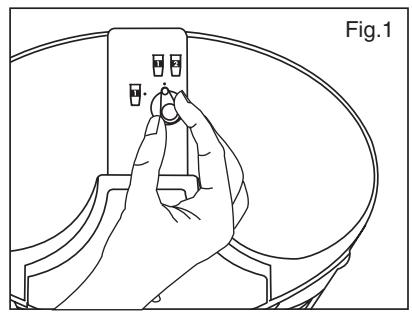
Line drawing of a hand pressing a button on a device component (no text or symbols)
natural_image
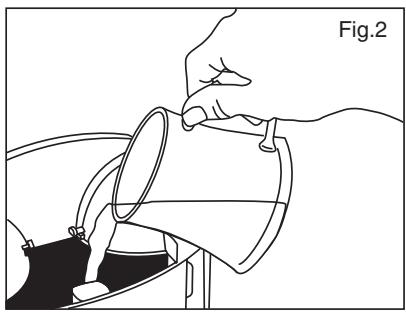
Line drawing of a hand pouring liquid into a container (no text or symbols)
natural_image
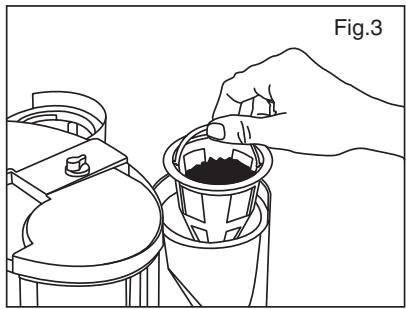
Line drawing of a hand pouring dark liquid into a container (no text or symbols)
natural_image
Illustration of a hand holding a cylindrical object with a curved arrow indicating rotation (no text or symbols)
- ESPAÑOL
Thank you for choosing this Solac product and for choosing our brand. With this coffee-maker you will be able to enjoy a coffee anywhere – on a picnic, at work, at the football stadium... Programme the time you want your coffee to be ready each morning, for one or two persons, and drink it when you want.
Please read the instructions for use carefully to find out everything your Solac Coffee-to-go coffee-maker can do.
IMPORTANT
- Please read these instructions before using the coffee-maker.
- Do not switch the coffee machine on without making sure that the voltage stated on the specifications plate matches that in your home.
- Make sure you plug the appliance into a socket that has a suitable earth connection.
- Before using the coffee-maker for the first time, we recommend that you let it work a couple of times with nothing but water in order to completely clean out the whole system.
- Use only cold water when filling the tank.
- VERY IMPORTANT! Never place the appliance in water.
- Keep out of the reach of children.
- Do not allow the mains cable to hang off the edge of the table or work surface or to come into contact with hot surfaces.
- To disconnect the coffee-maker make sure it is in the off position (on/off switch red) and unplug the appliance.
- If you use the permanent filter, do not use the paper filter at the same time. If you prefer to use a paper filter, remove the permanent filter and replace it with a paper filter but bear in mind the small size of the filter-holder.
• After using the coffee-maker, allow the appliance to cool for at least 10 minutes before making more coffee.
- If you detect any anomaly in the appliance or if the mains cable is damaged, take it to an Authorised Technical Service centre to avoid any danger, since special tools are required.

IMPORTANT: when you want to dispose of the appliance, DO NOT throw it in the rubbish UNDER ANY CIRCUMSTANCES. Take it to your nearest CLEAN POINT or waste collection centre. In this way, you will be helping to look after the environment.
USE IT FOR WHAT IT WAS MADE FOR!
This appliance must be used only for making coffee at home. Never fill it with milk, soup, instant coffee or tea. Use ground coffee only.


No liability will be accepted for damage caused by the use of the appliance for other purposes, misuse or repairs by non-qualified personnel. Furthermore, the guarantee does not cover the above cases.
MAIN COMPONENTS
- Water tank cover.
- Water tank.
- Filter-holder.
- Permanent filter.
- Thermal cup.
- Integrated thermal cup cover.
- 1- or 2-cup selector.
- On/off button with pilot light.
- Digital Screen
- Programme button.
- Timer button.
- Hour button.
- Minutes button.
- Ground coffee dispensing spoon.
- No-spill watertight lids
INSTRUCTIONS FOR USE
MAKING THE COFFEE
- This coffee-maker lets you make one or two coffees at the same time in their respective cups. First select 1 or 2 coffees using the selector (7) on the top of the coffee-maker (Fig. 1). IMPORTANT! When you are going to make 1 cup, use the left-hand side of the coffee-maker.
- Raise the water tank cover (1) and pour the water into the tank (2) (Fig. 2). Check the maximum water level for 1 and 2 cups in the sight glass. Use the cup (5) to fill the tank and calculate the desired amount of water per cup. If you are making 2 cups, fill the tank with the sufficient amount (2 cups).
- Open the filter-holder (3) outwards by pulling the tab and make sure the permanent filter (4) is correctly in position (Fig. 3). Then put the ground coffee in the filter (4). Use the dispensing spoon (14) to calculate the amount of coffee. IMPORTANT! The maximum recommended amount is three spoonfuls per cup. If you put too much coffee in, it may spill during the brewing process.
- Close the filter-holder (4) and make sure it is correctly in position.
-
Place both cups (5) with their cover (6) in the coffee-maker, even though you are only going to make one cup, and plug the coffee-maker in.
-
When you plug the coffee-maker in, the digital screen (9) lights up and displays '00:00', not showing any particular time. The red pilot light (8) in the middle indicates that the coffee-maker is on.
- If you want the coffee-maker to start up immediately, press the on button (8). The green light comes on and stays on while the coffee is being brewed.
- Once the coffee has been made, the red light comes on and the coffee-maker beeps 5 times.
IMPORTANT! These five beeps mean that the coffee-maker has used up all the water in the tank, not that the coffee has finished coming out. The coffee might continue to come out for another 1 or 2 minutes. We recommend that you wait this amount of time before removing the cup.
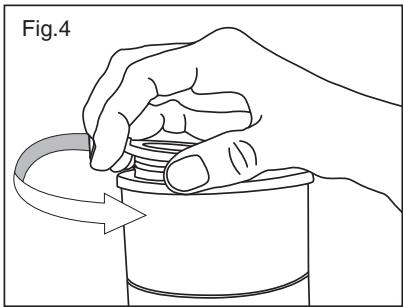
• The brewing process can be stopped at any time by pressing the on button. IMPORTANT! Remove the cover (6) from the cup carefully to add sugar or milk to the coffee. The cover comes off by turning it to the right (Fig. 4).
TIMER
- To set the current time, press button (11). The digits on the screen show '00:00'. Then set the current time using the hour button (12) and the minutes button (13).
• (12) Hour button: press the button continuously until the correct hour appears on the screen.
• (13) Minutes button: press the button continuously until the correct minutes appear on the screen.
- Press the button (11) again to confirm the entered time.
PROGRAMMING
- This coffee-maker can be programmed so that your coffee can be made when you prefer. To do this, leave the coffee-maker ready with water, coffee, the cups and 1 or 2 cups selected. Make sure everything is correct as shown in the section titled Making the coffee.
- Next, check that the time on the digital clock is correct (see the above Timer section). Turn the PROG programme button (1) on and use buttons (12) and (13) to set the hour and minutes of the time at which you want the coffee-maker to automatically come on
- Press the PROG button (10) again to confirm the programmed time.
- Once the time has been programmed, the light in the on/off button flashes green until the programmed time is reached.
- When the coffee begins to brew at the programmed time, the coffee-maker beeps 3 times and the green light stops flashing.
- Once the coffee has been made, the red light comes on and the coffee-maker beeps 5 times.
• The brewing process can be stopped at any time by pressing the on button.
IMPORTANT! When you unplug the coffee-maker from the mains, the time and the programme are deleted.
PILOT LIGHT INDICATIONS
- Off: the coffee-maker is not plugged in.
- Red light: the coffee-maker is plugged into the mains but the coffee is not being brewed or has been brewed.
- Flashing green light: the coffee-maker is programmed to brew at a set time.
- Green light: the coffee-maker is brewing the coffee.
CLEANING AND MAINTENANCE
- Before cleaning the coffee-maker, leave it to cool and check that it is unplugged. You must not place it in water nor spray it with water.
• To clean the body of the coffee-maker, simply use a sponge or a damp cloth.
- The thermal cup and the filter holder can be washed in hot, soapy water or in the dishwasher.
- Descale the coffee-maker approximately once every 6 months, depending on how often you use it and the hardness of the water. To remove incrusted scale, we recommend cleaning out all the pipes that carry water. To do so, add equal amounts of water and vinegar. Switch the coffee-maker on and let all the liquid come out. Then, let the coffee-maker work twice with nothing but water, to clean it out completely.
• FRANÇAISE