
TRC-970C - Cassette player SANYO - Free user manual and instructions
Find the device manual for free TRC-970C SANYO in PDF.


| Product type | Cassette player/recorder |
| Brand | SANYO |
| Model | TRC-970C |
| Power supply | 2 AA 1.5V batteries or 3V DC AC adapter (model no. 3CV230XE or NT-3CV) |
| Main functions | Recording (dictation and conference), playback, fast forward, rewind, stop, pause |
| Voice activation system (VAS) | Yes, with sensitivity adjustment via the VOLUME control |
| Playback speed | 3 speeds: slow (SLOW), normal (NOR), fast (FAST) |
| Cue index (CUE INDEX) | Yes, to mark important segments |
| Tape counter | Yes, with reset |
| Microphone | Built-in + MIC input for external microphone |
| Earphones | EAR jack for private listening |
| Maintenance | Clean heads, pinch roller and capstan after approximately 10 hours of use with a cotton swab and head cleaner |
| Accidental erasure protection | By tabs on the cassette (break to protect, cover with adhesive tape to reuse) |
| Rechargeable battery | Support for SANYO NBP-30B rechargeable battery (recharge via AC adapter) |
| AC adapter | Compatible models: 3CV230XE or NT-3CV (center pin positive) |
| Warranty (Canada) | 1 year parts, 90 days labor |
| Manufacturing | Printed in China |
Frequently Asked Questions - TRC-970C SANYO
User questions about TRC-970C SANYO
0 question about this device. Answer the ones you know or ask your own.
Ask a new question about this device
Download the instructions for your Cassette player in PDF format for free! Find your manual TRC-970C - SANYO and take your electronic device back in hand. On this page are published all the documents necessary for the use of your device. TRC-970C by SANYO.
USER MANUAL TRC-970C SANYO
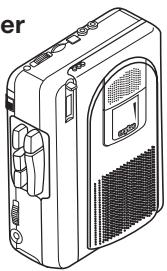
Compact Cassette Recorder
natural_image
Line drawing of a portable electronic device with ports and ventilation slots (no text or symbols)SANYO'S HELP-LINE
Call the toll-free number below if you have any difficulties operating this product.
1-877-999-1840 (Weekdays: 8:00 AM - 5:00 PM, Pacific Time)
LINEA DE CONSULTA SANYO
TRC-970C, Issue Number 1
Printed in China
ENGLISH
ESPAÑOL
ENGLISH
CONTROLS (Fig. 1)
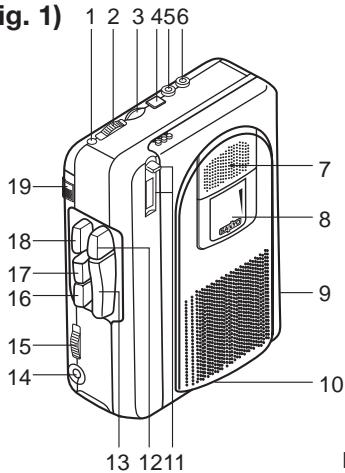
Fig. 1
- Battery/Operation indicator (BATT/OPR)
- Voice activated system switch (VAS)
- Volume control (VOLUME)
- Cue index button (CUE INDEX)
- Microphone jack (MIC)
- Earphone jack (EAR)
- Built-in microphone
- Cassette compartment
-
Battery compartment (back panel)
-
Tape speed switch (TAPE SPEED) (bottom)
-E1-
- Tape counter and reset button
- Record button (REC)
- Play button (PLAY)
- External DC 3V jack (EXT DC 3V)
- Dictation/Conferene switch (DICT/CONF)
- Fast forward/Cue button (FFWD/CUE)
- Rewind/Review button (REW/REV)
- Stop button (STOP)
- Pause switch (PAUSE)
POWER
AC adaptor
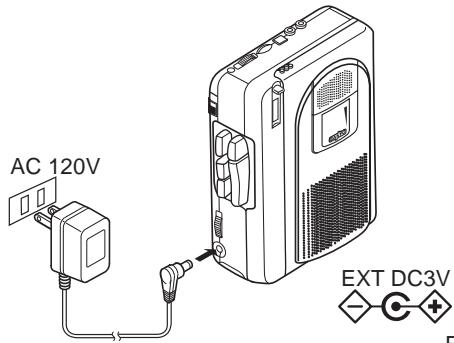
Connect the included AC adaptor (Sanyo Model No. 3CV230XE or NT-3CV) to the EXT DC 3V jack (Fig. 2). (The batteries are automatically disconnected.)
• The centre pin of the EXT DC 3V jack is positive (+).
-E2-
Fig. 2
Battery
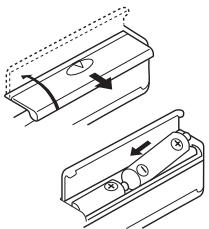
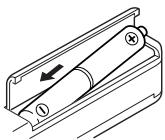
Install two "AA" batteries (not supplied) as shown in Fig. 3. Observe proper polarity.
- If you are not going to use the unit with batteries for one month or more, remove the batteries.
natural_image
Technical line drawing of two mechanical components with directional arrows indicating movement (no text or symbols)Fig. 3
Battery replacement
When the BATT/OPR indicator does not light during operation or is lit dimly, replace the batteries.
- When replacing the batteries, use two new batteries of the same type. Do not mix a used battery with a new one or mix different types of batteries.
IMPORTANT NOTE:
SPENT OR DISCHARGED BATTERIES MUST BE RE- CYCLED OR DISPOSED OF PROPERLY IN COMPLI- ANCE WITH ALL APPLICABLE LAWS. FOR DETAILED INFORMATION, CONTACT YOUR LO- CAL COUNTY SOLID WASTE AUTHORITY.
Rechargeable battery
Install the rechargeable battery (SANYO NBP-30B, not supplied) as shown in Fig. 4. Connect the AC adaptor. The battery fully charged approximately 8 hours after the AC adaptor is connected.
- Do not charged continuously for 24 hours or more.
natural_image
Technical line drawing of a mechanical component with an arrow indicating direction (no text or symbols)Fig. 4

Ni-Cd
IMPORTANT NOTE:
SPENT NICKEL-CADMIUM RECHARGE-ABLE BATTERY MUST BE RECYCLED OR DISPOSED OF PROPERLY IN COMPLIANCE WITH ALL APPLICABLE LAWS.
CONNECTIONS
External microphone
Connect an external microphone (not supplied) to the MIC jack. (The built-in microphone is automatically disconnected.)
Earphone
Connect an earphone (not supplied) to the EAR jack for private listening. (The speaker is automatically disconnected.)
RECORDING (Fig. 5)
NOTE: Do not use C-120 or endless cassettes.
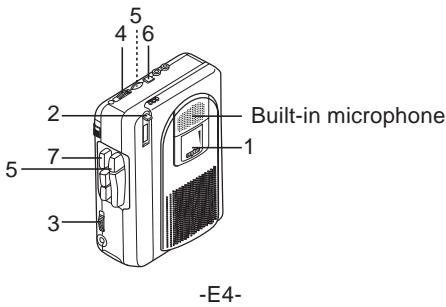
Fig. 5
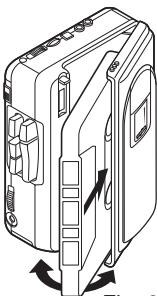
- Load a cassette as shown in Fig. 6.
- Press the reset button to set the counter to "000". The counter shows relative tape position.
- Use the DICT/CONF switch to select the recording mode.
DICT: Recording dictation CONF: Recording conferences
-
Set the VAS switch to ON or OFF.
-
Press the REC button. (The PLAY button is engaged simultaneously.)
natural_image
Line drawing of a mechanical device with directional arrows indicating rotation or movement (no text or symbols)Fig. 6
VAS ON: Voice activated recording
When you talk, the unit will start recording. When you stop talking for as long as 4 to 8 seconds, the unit will stop recording (variations in voice level do not stop recording).
Use the VOLUME control to adjust the microphone sensitivity to your voice. If voices are not activating recording, increase the volume. If recording does not stop when talking stops, decrease volume.
NOTE: If the first few words you speak activate recording but are not recorded, say an extra word to start recording before you dictate. (For important recordings, set the VAS switch to OFF.)
VAS OFF: Standard recording
Recording will continue until the STOP button is pressed.
- Press and hold the CUE INDEX button for at least 3 seconds to mark important segments of the recording. The unit records an index tone on the tape. Release the CUE INDEX butto to resume recording.
• An index tone can heard when the tape is played back.
- Press the STOP button to stop recording.
Fast forwarding or rewinding
In the stop mode, press the FFWD/CUE or REW/REV button. Press the STOP button when the desired point or end of the tape is reached.
Temporarily stopping operation (all modes)
Slide the PAUSE switch right. Slide it left to resume operation.
Quick reviewing and recording
While recording, press and hold the REW/REV button (the REC button is released) until the tape has rewound to the desired point. Release the REW/REV button to play back your recording. Press the REC button to resume recording.
Safeguards against accidental erasure (Fig. 7)
To protect side A, break out tab (1). To protect side B, break out tab (2).
- To erase or record a protected cassette, cover the tab openings with adhesive tape (3).
NOTE: The REC button cannot be depressed when using a protected cassette.
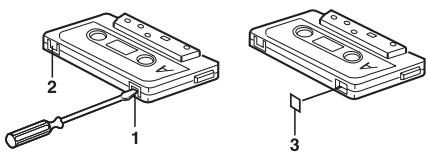
Fig. 7
-E6-
PLAYBACK (Fig. 8)
- Load the cassette as shown in Fig. 6.
- Press the PLAY button and adjust the VOLUME control.
- Use the TAPE SPEED switch to select a playback speed. (This switch does not affect recording.)
SLOW: Slow speed
NOR: Normal speed
FAST: Fast speed
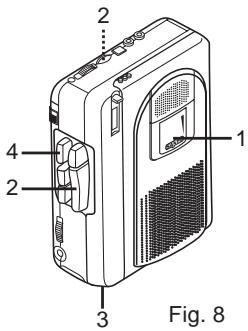
- Press the STOP button to stop playback.
Cue and reviewing
While playback, press and hold the FFWD/CUE or REW/REV button. Release the button when the desired point is reached. Playback continues.
MAINTENANCE
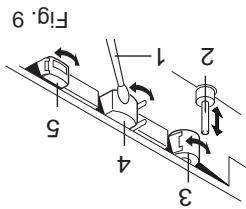
To ensure continued high performance, use cotton swab (1) moistened with head cleaner to clean the heads (4, 5), pinch roller (3) and capstan (2) after about every 10 hours of use (Fig. 9).
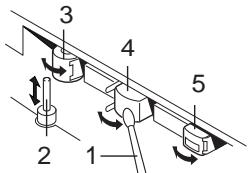
Fig. 9
-E7-
For USA
SANYO SERVICE PLUS LIMITED WARRANTY DICTATION PRODUCTS ONLY
OBLIGATIONS
In order to obtain factory warranty service for Sanyo Dictation Products, call the toll-free number below. The unit must be packed in the original carton or a well-padded sturdy carton in order to avoid shipping damage.
Note: Do not return this unit to the retail store for service.
To obtain Service Plus Warranty service, product operation information or for problem resolution, call
Toll Free 1-877-999-1840
Weekdays 8:00 AM - 5:00 PM Pacific Time
THIS WARRANTY IS VALID ONLY ON SANYO DICTATION PRODUCTS PURCHASED AND USED IN THE UNITED STATES OF AMERICA, EXCLUDING ALL U.S. TERRITORIES AND PROTECTORATES. THIS WARRANTY APPLIES ONLY TO THE ORIGINAL RETAIL USER, AND DOES NOT APPLY TO PRODUCTS USED FOR ANY INDUSTRIAL, PROFESSIONAL, OR COMMERCIAL PURPOSE. THE ORIGINAL DATED BILL OF SALE OR SALES SLIP MUST BE SUBMITTED AT THE TIME WARRANTY SERVICE IS REQUESTED.
-E8-
Subject to the OBLIGATIONS above and EXCLUSIONS below, SANYO FISHER COMPANY (SFC) warrants this SANYO Dictation product against defects in materials and workmanship for the periods of LABOR and PARTS specified below. SFC will, at its option, within two business days after its receipt of any dictation product that fails to conform to this warranty at SFC's designated facility, either (a) repair such product or any of its parts which fail to conform to this warranty or (b) ship a replacement product. The warranty period commences on the date the product was first purchased at retail.
| LABOR | PARTS |
| 1 YEAR | 1 YEAR |
EXCLUSIONS
This warranty does not cover (A) the adjustment of customer-operated controls as explained in the appropriate model's instruction manual, or (B) the repair of any product, whose serial number has been altered, defaced or removed. This warranty shall not apply to the cabinet or cosmetic parts, knobs or routine maintenance.
This warranty does not apply to repairs or replacements necessitated by any cause beyond the control of SFC including, but not limited to, any malfunction, defect, or failure caused by or resulting from unauthorized service or parts, improper maintenance, operation contrary to furnished instructions, shipping or transit accidents, modification or repair by the user, abuse, misuse, neglect, accident, incorrect line voltage, fire, flood, or other Acts of God, or normal wear and tear.
The foregoing is in lieu of all other expressed warranties and SFC does not assume or authorize any party to assume for it any other obligation or liability.
THE DURATION OF ANY WARRANTIES WHICH MAY BE IMPLIED BY LAW (INCLUDING THE WARRANTIES OF MERCHANTABILITY AND FITNESS) IS LIMITED TO THE TERM OF THIS WARRANTY. IN NO EVENT SHALL SFC BE LIABLE FOR SPECIAL, INCIDENTAL OR CONSEQUENTIAL DAMAGES ARISING FROM OWNERSHIP OR USE OF THIS PRODUCT, OR FOR ANY DELAY IN THE PERFORMANCE OF ITS OBLIGATIONS UNDER THIS WARRANTY DUE TO CAUSES BEYOND ITS CONTROL. SOME STATES DO NOT ALLOW LIMITATIONS ON HOW LONG AN IMPLIED WARRANTY LASTS AND/OR DO NOT ALLOW THE EXCLUSION OR LIMITATION OF CONSEQUENTIAL DAMAGES, SO THE ABOVE LIMITATIONS AND EXCLUSIONS MAY NOT APPLY TO YOU. THIS WARRANTY GIVES YOU SPECIFIC LEGAL RIGHTS. YOU MAY HAVE OTHER RIGHTS, WHICH VARY FROM STATE TO STATE.
S/D R2
For your protection in the event of theft or loss of this product, please fill in the information below for your own personal records.
Model No. ____
Serial No. ____
(Located on back or bottom side of unit)
Date of Purchase ____
Purchase Price ____
Where Purchased ____

21605 Plummer Street
Chatsworth, CA 91311
-E10-
For Canada
THE SANYO COMFORT WARRANTY BUSINESS SYSTEMS - DICTA RECORDERS
WARRANTY APPLICATION
New, unused Sanyo Dicta Recorder products purchased in Canada are warranted against manufacturing defects in materials and workmanship for ONE YEAR for parts and NINETY DAYS for labour, from the date of purchase by the original retail purchaser. This warranty only applies in favour of the original retail purchaser of the warranted product.
SANYO CANADA INC.'S RESPONSIBILITY
During the warranty period, SANYO Canada Inc. will repair, or at our option, replace a Sanyo Dicta Recorder product which shows evidence of a manufacturing defect in materials or workmanship.
Replacement PARTS are warranted for the remaining portion of the warranty period.
WHAT IS NOT COVERED
(a). Dicta Recorder products purchased outside Canada.
(b). Dicta Recorder products purchased in a used condition.
(c). Problems due to product set-up and installation.
(d). Adjustments that are outlined in the Operating Manual.
(e). Accessory items including carrying cases, cassette tapes and cables.
(f). Damage in or due to transportation.
(g). Damage due to improper maintenance, accident, abuse, misuse or negligence.
ORIGINAL RETAIL PURCHASER'S RESPONSIBILITY
You, the original retail purchaser, must present your original, dated bill-of-sale together with this warranty to SANYO Canada Inc. or to an authorized Sanyo Service Depot when you make a claim under this Warranty.
You, the original retail purchaser, are responsible for any costs of TRANSPORTING the product to and from SANYO Canada Inc. or an authorized Sanyo Service Depot. You also are responsible for the cost of any MAINTENANCE necessary in respect of the product.
WARRANTY BECOMES VOID
This warranty becomes void if the product's serial numbers are altered or removed or if any repair to the product is made other than by SANYO Canada Inc. or by an authorized Sanyo Service Depot.
LIMITATIONS
(a) SANYO Canada Inc. reserves the right to change or improve the design of the model of the product warranted hereunder without incurring any obligation to make any modifications to or to install any improvement in or on the product.
(b) In no event shall SANYO Canada Inc. or any of its Authorized Dealers be liable for special or consequential damage arising from the use of this product.
-E12-
STATUTORY WARRANTIES
The above provisions do not preclude the operation of any applicable provincial statute which in certain circumstances may not allow some of the limitations and exclusions described in this Warranty. Where any terms of this Warranty are prohibited by such a statute, they shall be deemed null and void but the remainder of this warranty shall remain in effect.
HOW TO OBTAIN WARRANTY SERVICE
Please contact the Sanyo Authorized Dealer from whom the product was purchased, or contact us directly at:
SANYO Canada Inc.
1-300 Applewood Crescent
Concord, Ontario
L4K 5C7
(905) 760-9944
1-800-263-2244
http://www.sanyocanada.com
SDR 01/05 (R11)
Model No. ____
Serial No. ____
(Located on back or bottom side of unit)
Date of Purchase ____
Purchase Price ____
Where Purchased ____
SANYO
SANYO Canada Inc.
ESPAÑOL
COMMANDES (Fig. 1)
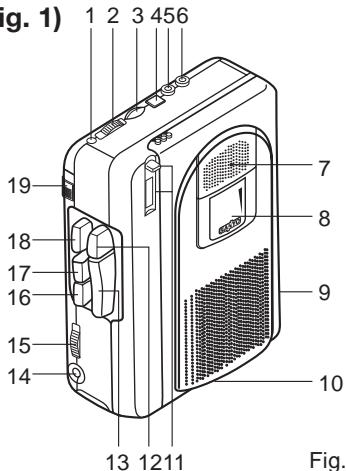
Fig. 1
natural_image
Technical line drawing of two mechanical components with arrows indicating motion or movement (no text or symbols)Fig. 3
natural_image
Technical line drawing of a mechanical component with an arrow indicating direction (no text or symbols)Fig. 4

Ni-Cd
NOTA IMPORTANTE:
PILA RECARGABLES DE NÍQUEL-CADMIO
natural_image
Technical line drawing of a mechanical device with internal components and directional arrows indicating motion (no text or symbols)Fig. 6
-S7-
Fig. 7
Fig. 9
Para EE, UU
GARANTÍA LIMITADA SERVICE PLUS DE SANYO SÓLO PARA PRODUCTOS DE DICTADO
OBLIGACIONES
Chatsworth, CA 91311
-S12-


F12
SANYO Canada Inc.
SAVYO
Lieu d'achat
Prix d'achat
Date d'achat
APPLICATION DE LA GARANTIE
DICTAPHONES
GARANTIE DE FIABILITE SANSYO
Pour le CANADA
F8
I ^' engistrement.
natural_image
Technical line drawing of a mechanical component with an arrow indicating direction (no text or symbols)I'adapter test connecte.
REMARQUES IMPORTAUTE:
les piles.
natural_image
Line drawing of a computer case with ventilation grilles and buttons (no text or symbols)Magnetophone a casstets Compact
TRC-970C
MODE D'EMPLOL
SAVYO
- Compact Cassette Recorder
- SANYO'S HELP-LINE
- LINEA DE CONSULTA SANYO
- ENGLISH
- POWER
- AC adaptor
- Battery
- Battery replacement
- IMPORTANT NOTE:
- Rechargeable battery
- CONNECTIONS
- External microphone
- Earphone
- RECORDING (Fig. 5)
- VAS ON: Voice activated recording
- VAS OFF: Standard recording
- Fast forwarding or rewinding
- Temporarily stopping operation (all modes)
- Quick reviewing and recording
- Safeguards against accidental erasure (Fig. 7)
- PLAYBACK (Fig. 8)
- Cue and reviewing
- MAINTENANCE
- SANYO SERVICE PLUS LIMITED WARRANTY DICTATION PRODUCTS ONLY
- OBLIGATIONS
- EXCLUSIONS
- For Canada
- THE SANYO COMFORT WARRANTY BUSINESS SYSTEMS - DICTA RECORDERS
- WARRANTY APPLICATION
- SANYO CANADA INC.'S RESPONSIBILITY
- WHAT IS NOT COVERED
- ORIGINAL RETAIL PURCHASER'S RESPONSIBILITY
- WARRANTY BECOMES VOID
- LIMITATIONS
- STATUTORY WARRANTIES
- HOW TO OBTAIN WARRANTY SERVICE
- SANYO Canada Inc.
- ESPAÑOL
- NOTA IMPORTANTE:
- GARANTÍA LIMITADA SERVICE PLUS DE SANYO SÓLO PARA PRODUCTOS DE DICTADO
- OBLIGACIONES
- REMARQUES IMPORTAUTE:
Brand : SANYO
Model : TRC-970C
Category : Cassette player