VAILLANT

ClimaVAIR V 7-050 M2N - Air Conditioning VAILLANT - Free user manual and instructions

Find the device manual for free ClimaVAIR V 7-050 M2N VAILLANT in PDF.

📄 25 pages English EN Download 💬 AI Question 10 questions ⚙️ Specs
Notice VAILLANT ClimaVAIR V 7-050 M2N - page 1
Pick your language and provide your email: we'll send you a specifically translated version.
Product TypeSplit Air Conditioner (Indoor Unit)
BrandVaillant
ModelClimaVAIR V 7-050 M2N
Cooling Capacity2.05 kW (7,000 BTU/h)
Heating Capacity2.20 kW (7,500 BTU/h) (if heat pump)
Energy Efficiency Rating (Cooling)A++ (EER 3.5)
Energy Efficiency Rating (Heating)A+ (COP 3.6)
Power Supply230 V / 50 Hz / 1 Ph
Rated Power Input (Cooling)585 W
Rated Power Input (Heating)610 W
RefrigerantR32
Indoor Unit Dimensions (W x H x D)800 x 280 x 200 mm
Indoor Unit Weight8.5 kg
Outdoor Unit Dimensions (W x H x D)700 x 550 x 250 mm
Outdoor Unit Weight25 kg
Airflow Rate (High)500 m³/h
Noise Level (Indoor)25 - 40 dB(A)
Noise Level (Outdoor)55 dB(A)
FunctionsCooling, Heating, Dehumidification, Fan, Sleep Mode, Timer, Auto Restart
Filter TypeWashable Mesh Filter
Remote ControlInfrared with LCD Display
Installation TypeWall-Mounted
Refrigerant Line Connection1/4" (Liquid) + 3/8" (Gas)
MaintenanceClean air filter every 2 weeks; professional service annually
Safety FeaturesAuto Overheat Protection, Compressor Delay Timer, Anti-Freeze
Spare Parts AvailabilityRemote control, filters, fan motor, PCB (available through service centers)

Frequently Asked Questions - ClimaVAIR V 7-050 M2N VAILLANT

How do I clean the air filters?
Turn off the unit and unplug it. Open the front panel, remove the filters, and wash them with warm water and mild detergent. Let them dry completely before reinstalling. Clean every 2 weeks for optimal performance.
What do the error codes on the display mean?
Common error codes: E1 (room sensor fault), E2 (pipe sensor fault), E3 (condenser sensor), E4 (outdoor sensor). Refer to the manual for a full list. If an error persists, contact a Vaillant service center.
Can I use the air conditioner for heating in winter?
Yes, if your model is a heat pump (check specifications). The ClimaVAIR V 7-050 M2N provides both cooling and heating. Set the mode to 'HEAT' and adjust the temperature. It operates efficiently down to -15°C outdoors.
How do I set the timer?
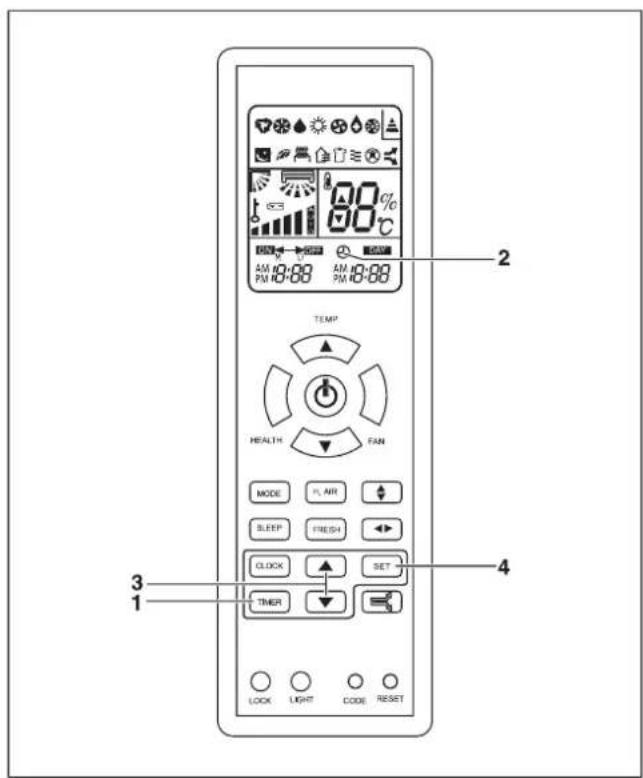
Press the TIMER button on the remote. Use +/- to set the desired on/off time. Confirm by pressing TIMER again. The unit will automatically start/stop at the programmed time.
Why is the unit not cooling properly?
Check if the air filter is dirty, the set temperature is lower than room temperature, or the doors/windows are open. Ensure the outdoor unit has clearance. If problem persists, check for refrigerant leaks or call a technician.
What is the recommended maintenance schedule?
Clean the air filter every 2 weeks. Have a professional service annually to check refrigerant levels, electrical connections, and clean the outdoor coils. This ensures efficiency and longevity.
Can I install the unit myself?
Installation requires specialized knowledge of electrical wiring, refrigerant handling, and structural mounting. It is strongly recommended to hire a certified HVAC technician to avoid damage and ensure warranty validity.
How do I use the sleep mode?
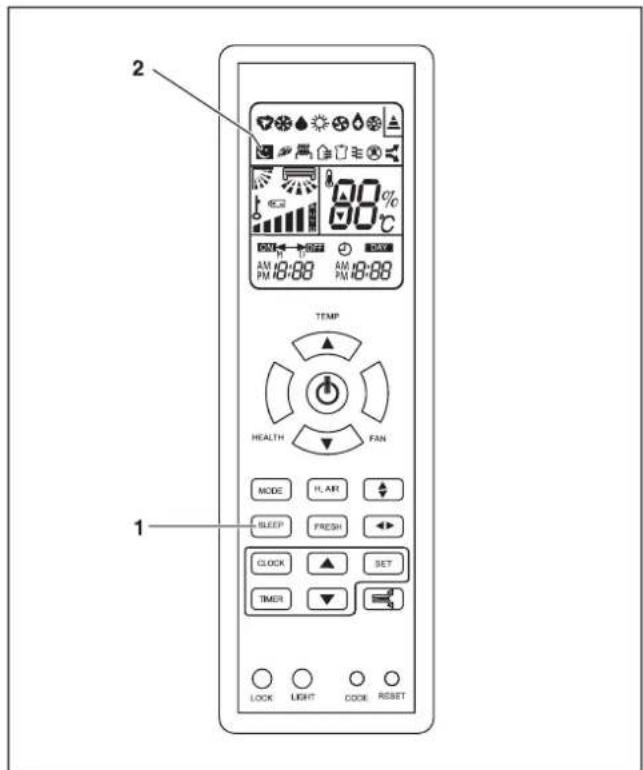
Press the SLEEP button on the remote. The unit will gradually adjust the temperature (warmer in cooling, cooler in heating) to save energy and provide comfortable sleep. It also reduces fan noise.
What should I do if the remote control is not working?
Replace the batteries (two AAA). Ensure the remote is within 8 meters and pointed at the indoor unit. Clean the infrared sensor on the unit. If still not working, try resetting the remote by removing batteries for 10 seconds.
Is the refrigerant R32 safe?
R32 is slightly flammable (A2L classification). It is used in modern ACs for lower global warming potential. The unit is designed with safety features. Never attempt to service refrigerant yourself; always call a professional.

User questions about ClimaVAIR V 7-050 M2N VAILLANT

0 question about this device. Answer the ones you know or ask your own.

Ask a new question about this device

The email remains private: it is only used to notify you if someone responds to your question.

No questions yet. Be the first to ask one.

Download the instructions for your Air Conditioning in PDF format for free! Find your manual ClimaVAIR V 7-050 M2N - VAILLANT and take your electronic device back in hand. On this page are published all the documents necessary for the use of your device. ClimaVAIR V 7-050 M2N by VAILLANT.

USER MANUAL ClimaVAIR V 7-050 M2N VAILLANT

natural_image Pure diagram of four directional arrows on horizontal lines with no text or symbols

VAILLANT ClimaVAIR V 7-050 M2N - 1

VAILLANT ClimaVAIR V 7-050 M2N - 2

VAILLANT ClimaVAIR V 7-050 M2N - 3

VAILLANT ClimaVAIR V 7-050 M2N - 4

VAILLANT ClimaVAIR V 7-050 M2N - 5

VAILLANT ClimaVAIR V 7-050 M2N - 6

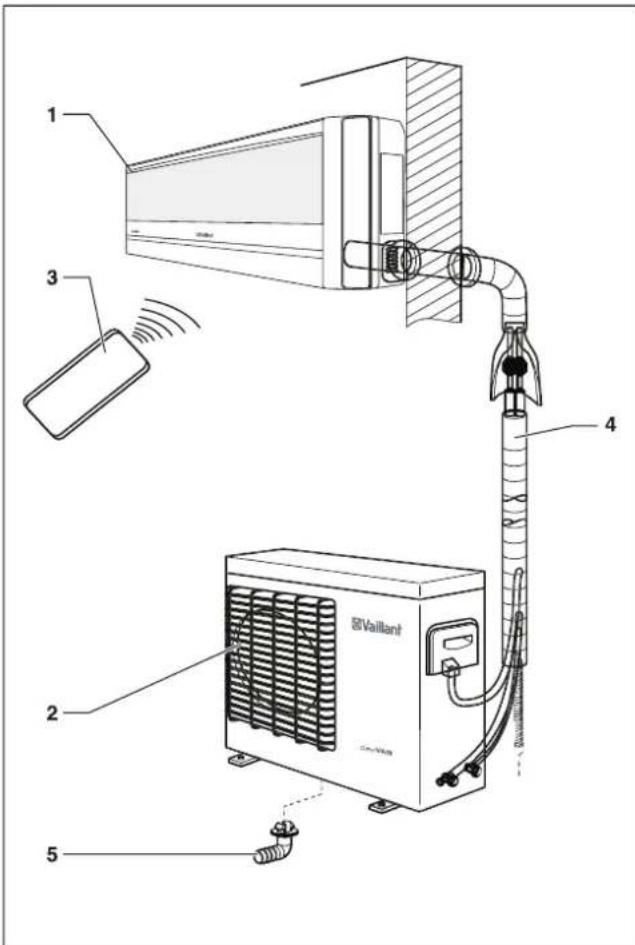
text_image 1 2 3 4 5 Vaillant
[0W6K]
VAILLANT ClimaVAIR V 7-050 M2N - 7
VAILLANT ClimaVAIR V 7-050 M2N - 8
[H50X]
VAILLANT ClimaVAIR V 7-050 M2N - 9
[6K3S]
[DD6S]
VAILLANT ClimaVAIR V 7-050 M2N - 10
VAILLANT ClimaVAIR V 7-050 M2N - 11
[257B]
VAILLANT ClimaVAIR V 7-050 M2N - 12
VAILLANT ClimaVAIR V 7-050 M2N - 13
VAILLANT ClimaVAIR V 7-050 M2N - 14

VAILLANT ClimaVAIR V 7-050 M2N - 15

VAILLANT ClimaVAIR V 7-050 M2N - 16

VAILLANT ClimaVAIR V 7-050 M2N - 17

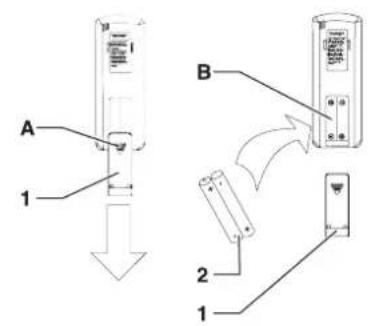
text_image A 1 B 2 1

VAILLANT ClimaVAIR V 7-050 M2N - 18

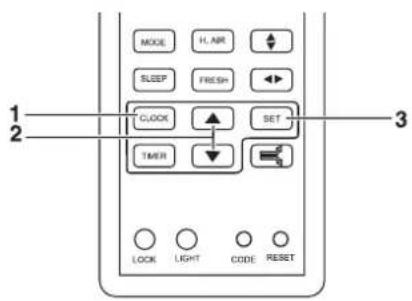
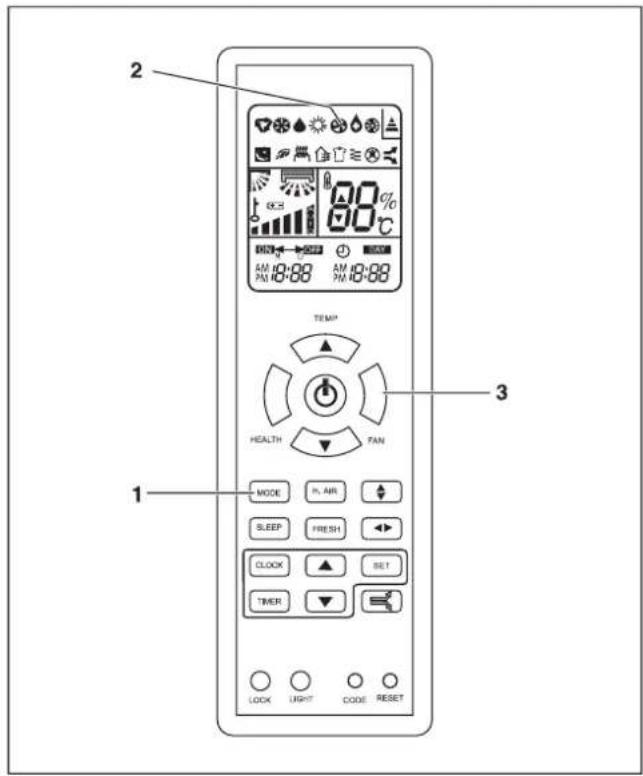
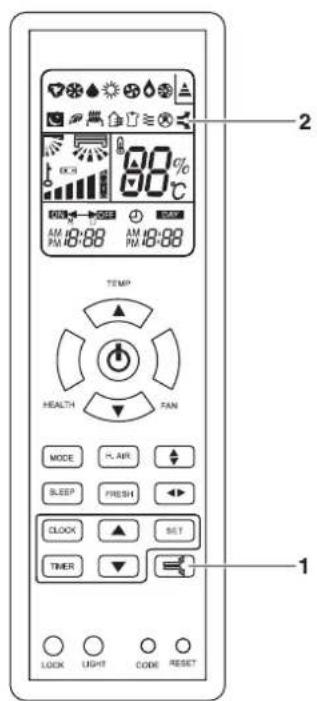
text_image MODE H.AIR SLEEP FRESH CLOCK SET TIMER LOCK LIGHT CODE RESET 1 2 3

VAILLANT ClimaVAIR V 7-050 M2N - 19

VAILLANT ClimaVAIR V 7-050 M2N - 20

[Non-Text]

[Non-Text]

[NO TEXT]

!

VAILLANT ClimaVAIR V 7-050 M2N - 21

VAILLANT ClimaVAIR V 7-050 M2N - 22

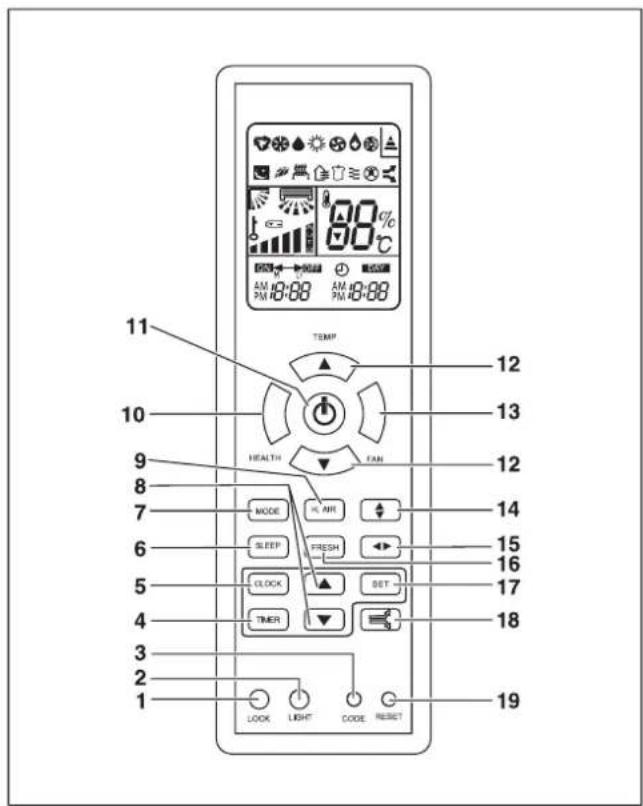
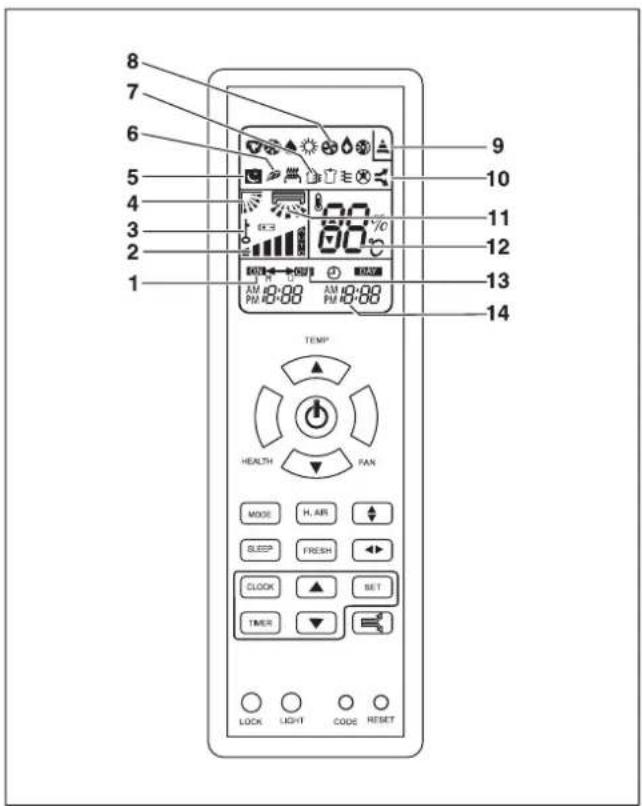
text_image 11 10 9 8 7 6 5 4 3 2 1 TEMP HEALTH FAN MODE LIFE SLEEP FRESH CLOCK SET TIMER LOOK LIGHT CODE RESET 12 13 12 14 15 16 17 18 19
VAILLANT ClimaVAIR V 7-050 M2N - 23

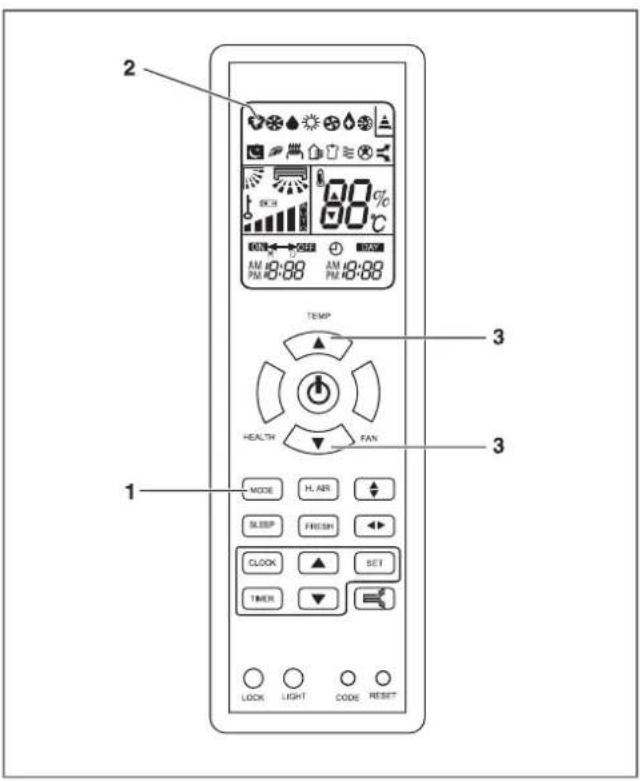
text_image 8 7 6 5 4 3 2 1 9 10 11 12 13 14 TEMP HEALTH FAN MODE H. AIR SLEEP FRESH CLOCK SET TIMER LOCK LIGHT CODE RESET
VAILLANT ClimaVAIR V 7-050 M2N - 24

text_image 2 3 1 TEMP HEALTH PAN MODE H, AIR ↑ SLEEP FRESH ▶ CLOCK SET TIMER LOCK LIGHT CODE RESET

VAILLANT ClimaVAIR V 7-050 M2N - 25

natural_image Simple diagram with five icons: downward arrow, sun, drop, swirl, and sun (no text or labels)
VAILLANT ClimaVAIR V 7-050 M2N - 26

VAILLANT ClimaVAIR V 7-050 M2N - 27

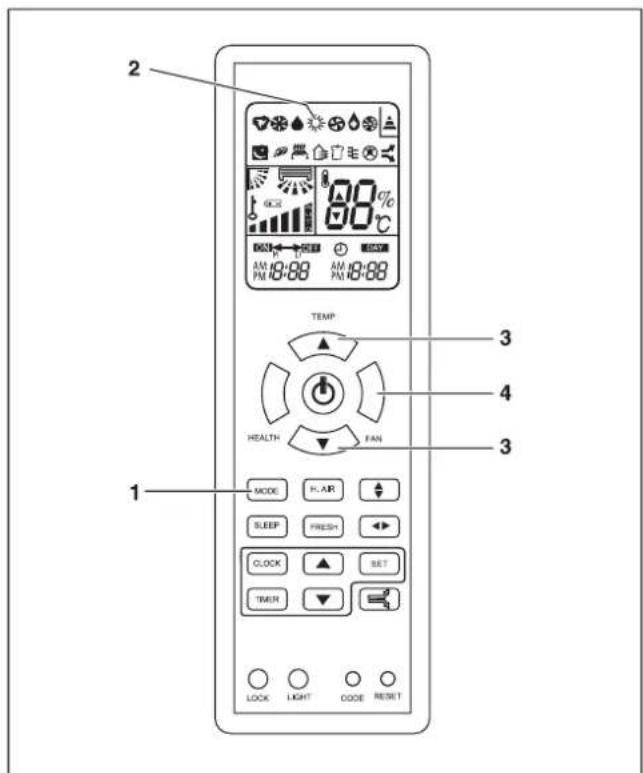
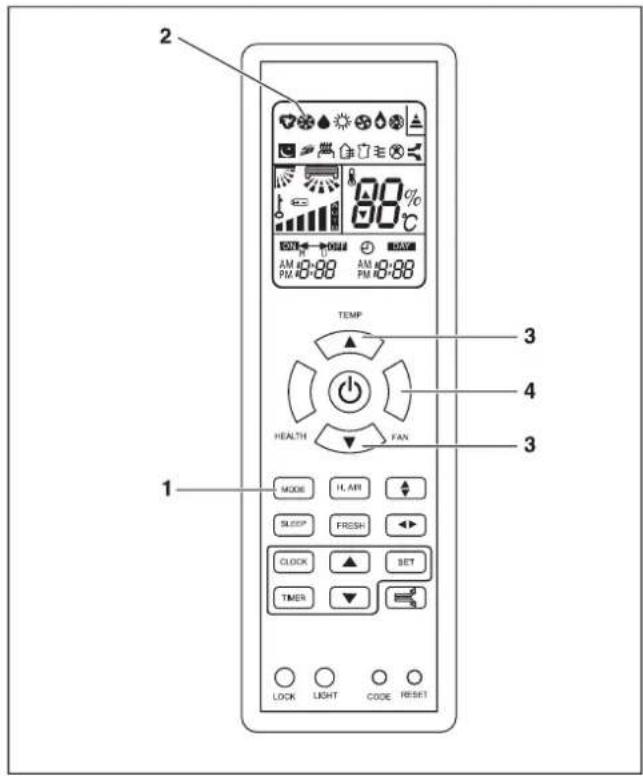
text_image 2 TEMP 3 4 1 HEALTH FAN 3 MODE IL AM SLEEP FRESH CLOCK SET TIMER LOCK LIGHT CODE RESET

VAILLANT ClimaVAIR V 7-050 M2N - 28

flowchart
graph LR
    A["LO"] --> B["MED"]
    B --> C["HI"]
    C --> D["AUTO"]

VAILLANT ClimaVAIR V 7-050 M2N - 29

VAILLANT ClimaVAIR V 7-050 M2N - 30

natural_image Pure diagram of six symbolic icons (inverted triangle, snowflake, droplet, sun, and gear) without any text or labels

VAILLANT ClimaVAIR V 7-050 M2N - 31

text_image 2 90% AM 10:00 AM 10:00 TEMP HEALTH FAN 3 4 3 1 MODE HL AIR SLEEP FRESH CLOCK SET TIMER LOCK LIGHT CODE RESET

VAILLANT ClimaVAIR V 7-050 M2N - 32

flowchart
graph LR
    A["LO"] --> B["MED"]
    B --> C["HI"]
    C --> D["AUTO"]

VAILLANT ClimaVAIR V 7-050 M2N - 33

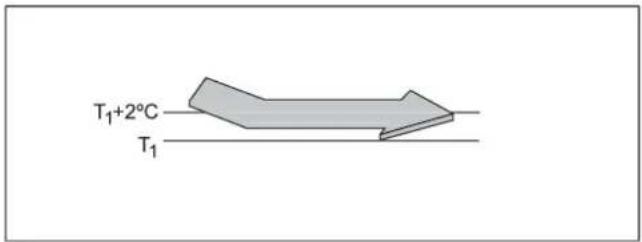
text_image T₁+2°C T₁

VAILLANT ClimaVAIR V 7-050 M2N - 34

natural_image Pure diagram with icons for weather symbols (no text or labels)

VAILLANT ClimaVAIR V 7-050 M2N - 35

VAILLANT ClimaVAIR V 7-050 M2N - 36

VAILLANT ClimaVAIR V 7-050 M2N - 37

text_image 2 60°C AM 10:00 AM 18:00 PM 10:00 PM 18:00 TEMP* HEALTH TAN MODE P, AIR SLEEP FRESH CLOCK SET TIMER 1 LOCK LIGHT CODE RESET 3

VAILLANT ClimaVAIR V 7-050 M2N - 38

flowchart
graph LR
    A["LO"] --> B["MED"]
    B --> C["HI"]
    C --> D["AUTO"]

VAILLANT ClimaVAIR V 7-050 M2N - 39

natural_image Pure graphical icons representing weather symbols (no text or labels)

VAILLANT ClimaVAIR V 7-050 M2N - 40

text_image 2 TEMP 3 4 1 HEALTH FAN 3 MODE R. AIR SLEEP FRESH CLOCK SET TIMER LOCK LIGHT CODE RESET

VAILLANT ClimaVAIR V 7-050 M2N - 41

flowchart
graph LR
    A["LO"] --> B["MED"]
    B --> C["HI"]
    C --> D["AUTO"]

VAILLANT ClimaVAIR V 7-050 M2N - 42

VAILLANT ClimaVAIR V 7-050 M2N - 43

natural_image Pure diagram of six symbolic icons (inverted triangle, snowflake, droplet, sun, and gear) without any text or labels
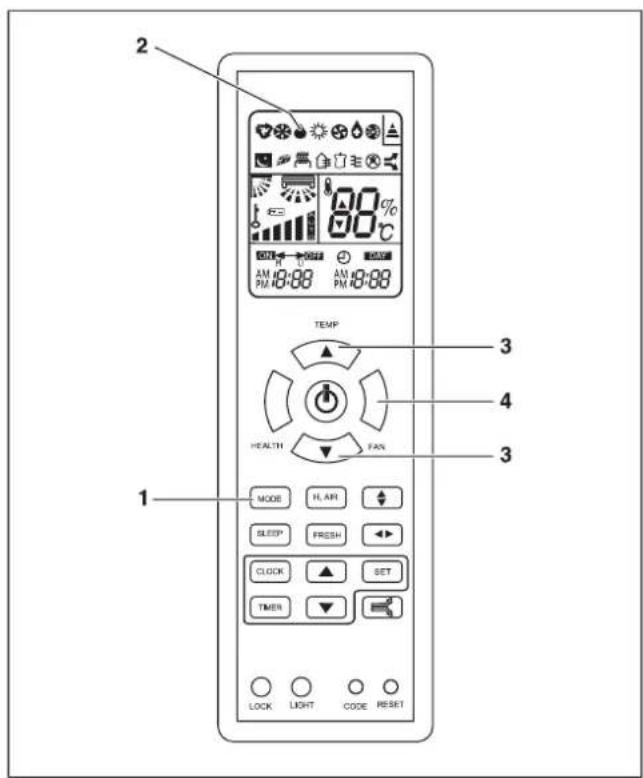
VAILLANT ClimaVAIR V 7-050 M2N - 44

VAILLANT ClimaVAIR V 7-050 M2N - 45

VAILLANT ClimaVAIR V 7-050 M2N - 46

VAILLANT ClimaVAIR V 7-050 M2N - 47

VAILLANT ClimaVAIR V 7-050 M2N - 48

VAILLANT ClimaVAIR V 7-050 M2N - 49

D-
D、
D
D
D
D

VAILLANT ClimaVAIR V 7-050 M2N - 50

VAILLANT ClimaVAIR V 7-050 M2N - 51

VAILLANT ClimaVAIR V 7-050 M2N - 52

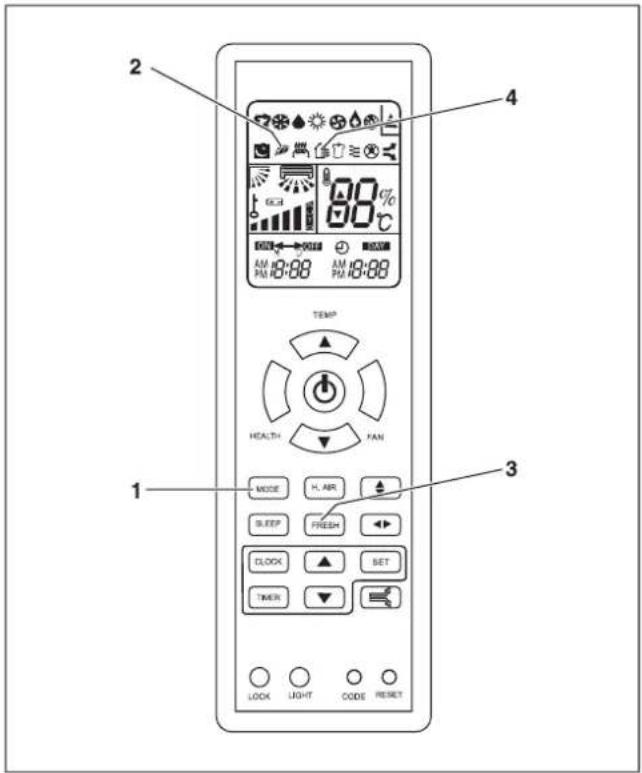
text_image 2 4 TEMP HEALTH 1 3 1 LOCK LIGHT CODE RESET MODE H. AIR SLEEP FRESH CLOCK BET TIMER

VAILLANT ClimaVAIR V 7-050 M2N - 53

VAILLANT ClimaVAIR V 7-050 M2N - 54

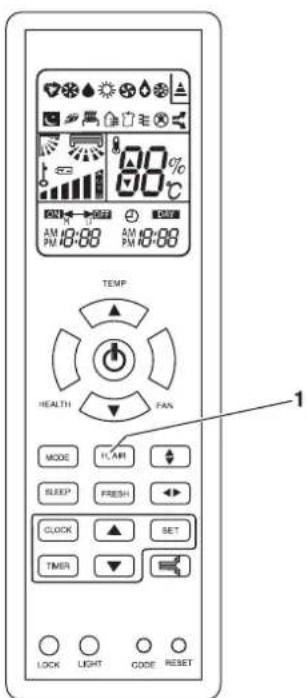
text_image TEMP HEALTH FAN MODE FLAIR SLEEP FRESH CLOCK SET TIMER LOCK LIGHT CODE RESET 1

VAILLANT ClimaVAIR V 7-050 M2N - 55

VAILLANT ClimaVAIR V 7-050 M2N - 56

VAILLANT ClimaVAIR V 7-050 M2N - 57

VAILLANT ClimaVAIR V 7-050 M2N - 58

text_image 2 TEMP HEALTH FAN MODE H. ART SLEEP FRESH CLOCK SET TIMER 1 LOCK LIGHT CODE RESET

VAILLANT ClimaVAIR V 7-050 M2N - 59

line | Time | Temperature (°C) | |---|---| | t₀ | T₁ | | t₀+1h | T₁+1°C | | t₀+2h | T₁+2°C | | t₀+6h | T₁+6°C |

t

VAILLANT ClimaVAIR V 7-050 M2N - 60

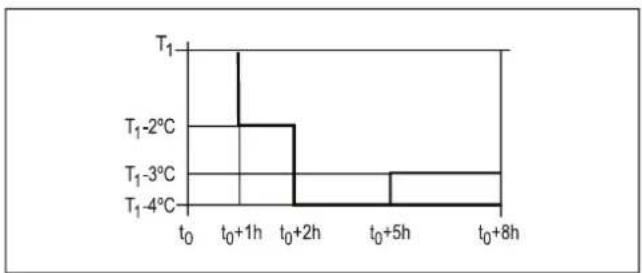
line | Time (hours) | Temperature (°C) | |---|---| | t₀ | T₁ | | t₀ + 1h | T₁ - 2°C | | t₀ + 2h | T₁ - 3°C | | t₀ + 5h | T₁ - 4°C | | t₀ + 8h | T₁ - 4°C |

t

[Non-Text]

VAILLANT ClimaVAIR V 7-050 M2N - 61

VAILLANT ClimaVAIR V 7-050 M2N - 62

text_image 1 2 3 4 TEMP HEALTH FAN MODE FL AIR SLEEP FRESH CLOCK SET TIMER LOCK LIGHT CODE RESET

VAILLANT ClimaVAIR V 7-050 M2N - 63

VAILLANT ClimaVAIR V 7-050 M2N - 64

VAILLANT ClimaVAIR V 7-050 M2N - 65

VAILLANT ClimaVAIR V 7-050 M2N - 66

text_image AM 12:00 N 12:00 AM 12:00 12:00

VAILLANT ClimaVAIR V 7-050 M2N - 67

text_image 2 80% 90% AM 18:88 AM 18:88 TEMP HEALTH TAN MODE H AIR SLEEP FRESH CLOCK SET TIMER 1 LOCK LIGHT CODE RESET
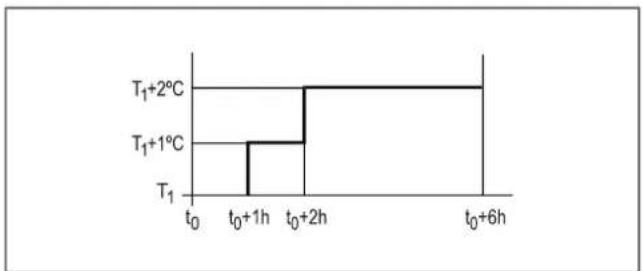

VAILLANT ClimaVAIR V 7-050 M2N - 68

VAILLANT ClimaVAIR V 7-050 M2N - 69

VAILLANT ClimaVAIR V 7-050 M2N - 70

natural_image Simple diagram with two curved arrows pointing in opposite directions (no text or symbols)
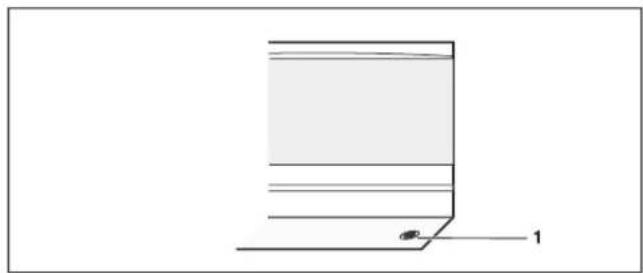
VAILLANT ClimaVAIR V 7-050 M2N - 71

natural_image Simple line drawing of a rectangular object with horizontal lines and a small labeled point '1' (no text or symbols beyond the label)

VAILLANT ClimaVAIR V 7-050 M2N - 72

VAILLANT ClimaVAIR V 7-050 M2N - 73

text_image 88% 80°C ① ② ③ ④ ⑤ ⑥ ⑦
WERKINGSMODUSAUTOCOOLDRYHEATFAN
AFSTANDSBEDIENING
BEDIENINGSPANEEL

VAILLANT ClimaVAIR V 7-050 M2N - 74

[Non-Text]

[NO TEXT]

!

!

!

[Non-Text]

[Non-Text]

[Non-Text]

VAILLANT ClimaVAIR V 7-050 M2N - 75

VAILLANT ClimaVAIR V 7-050 M2N - 76

VAILLANT ClimaVAIR V 7-050 M2N - 77

VAILLANT ClimaVAIR V 7-050 M2N - 78

VAILLANT ClimaVAIR V 7-050 M2N - 79

natural_image Symbol of a trash bin crossed with a diagonal line and a horizontal bar below (no text or labels)
Manual assistant
Powered by Anthropic
Waiting for your message
Product information

Brand : VAILLANT

Model : ClimaVAIR V 7-050 M2N

Category : Air Conditioning