VAILLANT ClimaVAIR V 7-060 M2N - Air Conditioning

ClimaVAIR V 7-060 M2N - Air Conditioning VAILLANT - Free user manual and instructions

Find the device manual for free ClimaVAIR V 7-060 M2N VAILLANT in PDF.

📄 25 pages English EN Download 💬 AI Question 10 questions ⚙️ Specs
Notice VAILLANT ClimaVAIR V 7-060 M2N - page 1
Pick your language and provide your email: we'll send you a specifically translated version.
Product Type Split Air Conditioner
Model ClimaVAIR V 7-060 M2N
Brand Vaillant
Cooling Capacity 7000 BTU/h (approx. 2.05 kW)
Heating Capacity Not specified (likely cooling-only or heat pump)
Indoor Unit Dimensions (W x H x D) Approx. 800 x 295 x 215 mm
Outdoor Unit Dimensions (W x H x D) Approx. 700 x 550 x 260 mm
Indoor Unit Weight Approx. 10 kg
Outdoor Unit Weight Approx. 25 kg
Power Supply 230 V / 50 Hz / 1 Ph
Refrigerant Type R32
Energy Efficiency (EER/COP) EER approx. 3.0, COP approx. 3.5
Main Functions Cooling, dehumidification, fan, timer, sleep mode, auto restart
Airflow Rate (High) Approx. 500 m³/h
Noise Level (Indoor) Approx. 25-45 dB(A)
Noise Level (Outdoor) Approx. 50-60 dB(A)
Filter Type Washable mesh filter
Remote Control Included
Maintenance Clean filter every 2 weeks; professional service annually
Safety Features Overload protection, auto shut-off, compressor delay start
Spare Parts Availability Contact Vaillant authorized service centers
Reparability Index Not specified; typical for split ACs is 7/10
General Information User manual available online in PDF

Frequently Asked Questions - ClimaVAIR V 7-060 M2N VAILLANT

How do I install the Vaillant ClimaVAIR V 7-060 M2N?
Installation should be performed by a qualified technician. The indoor unit must be mounted on a sturdy wall, and the outdoor unit placed on a level surface with proper drainage. Refer to the user manual for detailed installation instructions.
What is the recommended temperature setting for cooling?
For optimal comfort and energy efficiency, set the thermostat between 24°C and 26°C (75°F to 78°F) during cooling mode.
How often should I clean the air filter?
The air filter should be cleaned every 2 weeks under normal usage. A dirty filter reduces airflow and cooling capacity. Refer to the manual for removal and cleaning instructions.
What should I do if the air conditioner does not turn on?
Check that the unit is plugged in and the circuit breaker has not tripped. Also verify that the remote control has fresh batteries. If the problem persists, contact a Vaillant service center.
Can I use an extension cord with the air conditioner?
No, using an extension cord is not recommended. The unit must be connected directly to a dedicated power outlet with the correct voltage (230V). Failure to do so may cause fire or electrical hazard.
Does the ClimaVAIR V 7-060 M2N have a heating function?
This model is primarily a cooling-only air conditioner. It does not include a heat pump. For heating, consider a reverse-cycle model.
What is the maximum distance between indoor and outdoor units?
The maximum refrigerant line length is typically 15 meters. Contact your installer for exact specifications.
How do I use the timer function?
Press the TIMER button on the remote control. You can set the unit to turn on or off after a delay of 1 to 24 hours. Refer to the manual for step-by-step instructions.
What does the 'Sleep' mode do?
Sleep mode gradually adjusts the temperature over time to provide a comfortable sleeping environment. It also reduces noise and energy consumption.
How can I improve energy efficiency?
Keep windows and doors closed, use curtains to block direct sunlight, clean the filter regularly, and set a moderate temperature. The timer function can also help avoid unnecessary operation.

User questions about ClimaVAIR V 7-060 M2N VAILLANT

0 question about this device. Answer the ones you know or ask your own.

Ask a new question about this device

The email remains private: it is only used to notify you if someone responds to your question.

No questions yet. Be the first to ask one.

Download the instructions for your Air Conditioning in PDF format for free! Find your manual ClimaVAIR V 7-060 M2N - VAILLANT and take your electronic device back in hand. On this page are published all the documents necessary for the use of your device. ClimaVAIR V 7-060 M2N by VAILLANT.

USER MANUAL ClimaVAIR V 7-060 M2N VAILLANT

VAILLANT ClimaVAIR V 7-060 M2N - 1

VAILLANT ClimaVAIR V 7-060 M2N - 2

VAILLANT ClimaVAIR V 7-060 M2N - 3

VAILLANT ClimaVAIR V 7-060 M2N - 4

VAILLANT ClimaVAIR V 7-060 M2N - 5

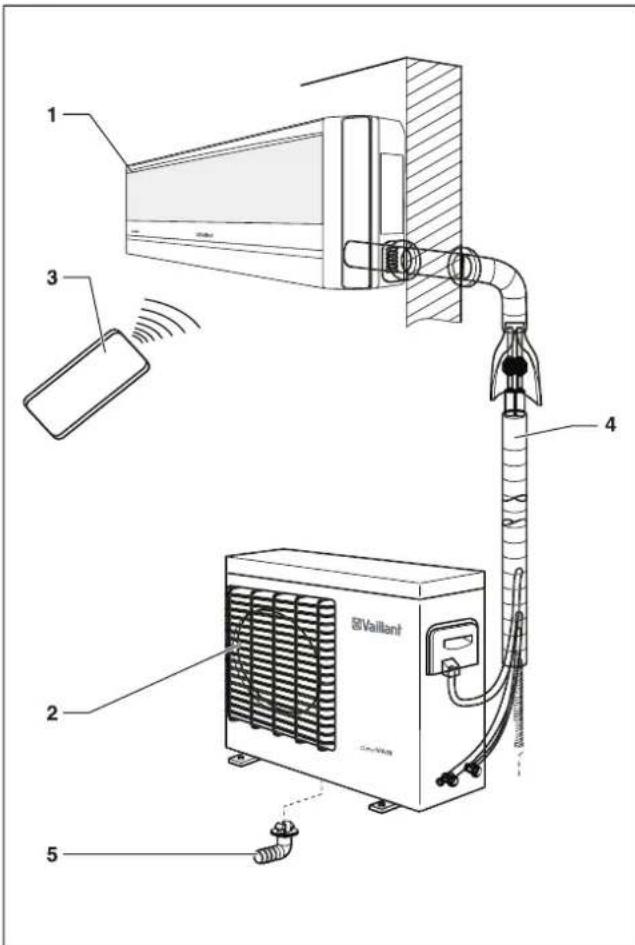
1 2 3 4 5 Vaillant

VAILLANT ClimaVAIR V 7-060 M2N - 7
VAILLANT ClimaVAIR V 7-060 M2N - 8
VAILLANT ClimaVAIR V 7-060 M2N - 9
VAILLANT ClimaVAIR V 7-060 M2N - 10
VAILLANT ClimaVAIR V 7-060 M2N - 11
VAILLANT ClimaVAIR V 7-060 M2N - 12
VAILLANT ClimaVAIR V 7-060 M2N - 13
VAILLANT ClimaVAIR V 7-060 M2N - 14
VAILLANT ClimaVAIR V 7-060 M2N - 15
VAILLANT ClimaVAIR V 7-060 M2N - 16
VAILLANT ClimaVAIR V 7-060 M2N - 17
VAILLANT ClimaVAIR V 7-060 M2N - 18
VAILLANT ClimaVAIR V 7-060 M2N - 19

VAILLANT ClimaVAIR V 7-060 M2N - 20

VAILLANT ClimaVAIR V 7-060 M2N - 21

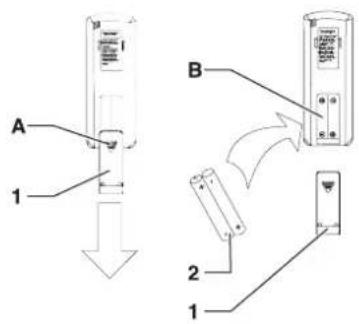
A 1 B 2 1

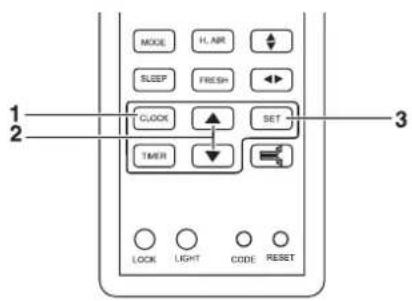
MODE H.AIR SLEEP FRESH CLOCK SET TIMER LOCK LIGHT CODE RESET 1 2 3

VAILLANT ClimaVAIR V 7-060 M2N - 24

VAILLANT ClimaVAIR V 7-060 M2N - 25

[Non-Text]

[Non-Text]

[NO TEXT]

!

VAILLANT ClimaVAIR V 7-060 M2N - 26

11 10 9 8 7 6 5 4 3 2 1 TEMP HEALTH FAN MODE LIFE SLEEP FRESH CLOCK SET TIMER LOOK LIGHT CODE RESET 12 13 12 14 15 16 17 18 19

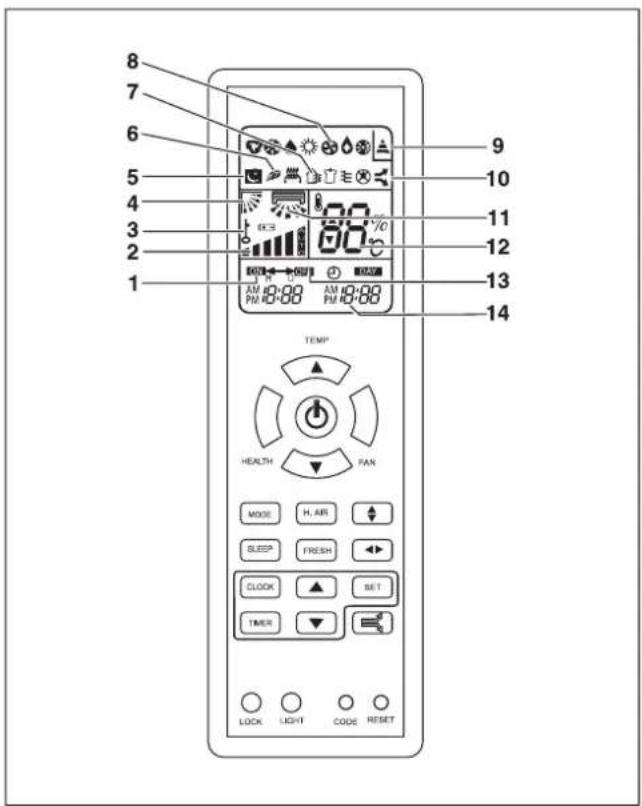
8 7 6 5 4 3 2 1 9 10 11 12 13 14 TEMP HEALTH FAN MODE H. AIR SLEEP FRESH CLOCK SET TIMER LOCK LIGHT CODE RESET

2 3 1 TEMP HEALTH PAN MODE H, AIR ↑ SLEEP FRESH ▶ CLOCK SET TIMER LOCK LIGHT CODE RESET

Simple diagram with five icons: downward arrow, sun, drop, swirl, and sun (no text or labels)

VAILLANT ClimaVAIR V 7-060 M2N - 31

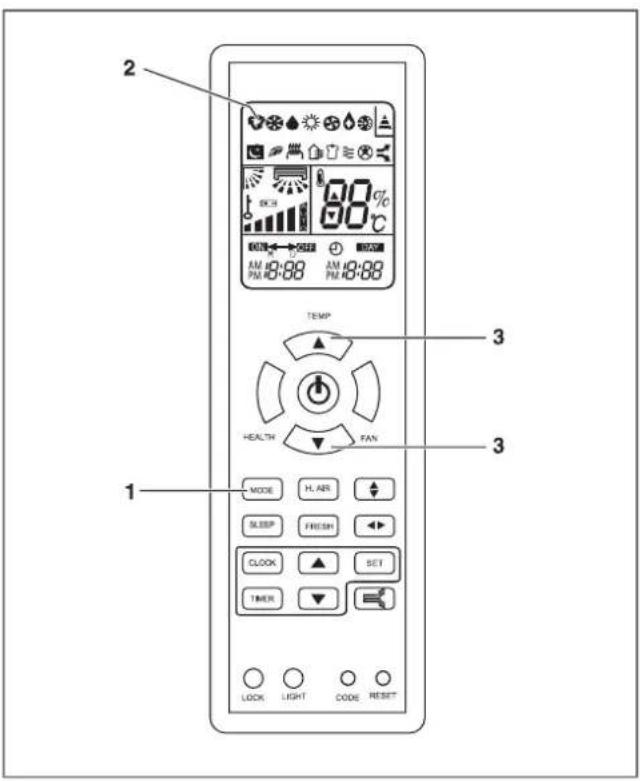
2 TEMP 3 4 1 HEALTH FAN 3 MODE IL AM SLEEP FRESH CLOCK SET TIMER LOCK LIGHT CODE RESET

graph LR A["LO"] --> B["MED"] B --> C["HI"] C --> D["AUTO"]

VAILLANT ClimaVAIR V 7-060 M2N - 34

Pure diagram of six symbolic icons (inverted triangle, snowflake, droplet, sun, and gear) without any text or labels

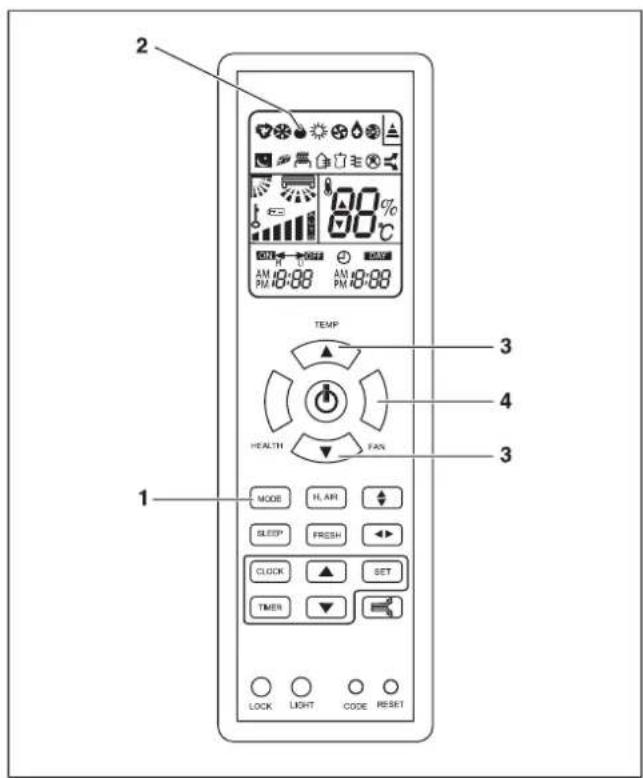
2 90% AM 10:00 AM 10:00 TEMP HEALTH FAN 3 4 3 1 MODE HL AIR SLEEP FRESH CLOCK SET TIMER LOCK LIGHT CODE RESET

graph LR A["LO"] --> B["MED"] B --> C["HI"] C --> D["AUTO"]

T₁+2°C T₁

Pure diagram of six symbolic icons (inverted triangle, star, droplet, swirl, sun) without any text or labels

VAILLANT ClimaVAIR V 7-060 M2N - 40

VAILLANT ClimaVAIR V 7-060 M2N - 41

2 60°C AM 10:00 AM 18:00 PM 10:00 PM 18:00 TEMP* HEALTH TAN MODE P, AIR SLEEP FRESH CLOCK SET TIMER 1 LOCK LIGHT CODE RESET 3

graph LR A["LO"] --> B["MED"] B --> C["HI"] C --> D["AUTO"]

Pure graphical icons representing weather symbols (no text or labels)

2 TEMP 3 4 1 HEALTH FAN 3 MODE R. AIR SLEEP FRESH CLOCK SET TIMER LOCK LIGHT CODE RESET

graph LR A["LO"] --> B["MED"] B --> C["HI"] C --> D["AUTO"]

VAILLANT ClimaVAIR V 7-060 M2N - 47

Pure diagram of six symbolic icons (inverted triangle, snowflake, droplet, sun, and gear) without any text or labels

VAILLANT ClimaVAIR V 7-060 M2N - 49

VAILLANT ClimaVAIR V 7-060 M2N - 50

VAILLANT ClimaVAIR V 7-060 M2N - 51

VAILLANT ClimaVAIR V 7-060 M2N - 52

VAILLANT ClimaVAIR V 7-060 M2N - 53

VAILLANT ClimaVAIR V 7-060 M2N - 54

D-
D、
D
D
D
D

VAILLANT ClimaVAIR V 7-060 M2N - 55

VAILLANT ClimaVAIR V 7-060 M2N - 56

2 4 TEMP HEALTH 1 3 1 LOCK LIGHT CODE RESET H. AIR SLEEP FRESH CLOCK BET TIMER

VAILLANT ClimaVAIR V 7-060 M2N - 58

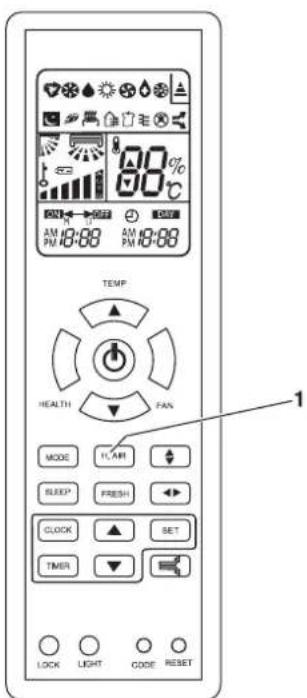
TEMP HEALTH FAN MODE FLAIR SLEEP FRESH CLOCK SET TIMER LOCK LIGHT CODE RESET 1

VAILLANT ClimaVAIR V 7-060 M2N - 60

VAILLANT ClimaVAIR V 7-060 M2N - 61

VAILLANT ClimaVAIR V 7-060 M2N - 62

2 TEMP HEALTH FAN MODE H. ART SLEEP FRESH CLOCK SET TIMER 1 LOCK LIGHT CODE RESET

| Time | Temperature (°C) | |---|---| | t₀ | T₁ | | t₀+1h | T₁+1°C | | t₀+2h | T₁+2°C | | t₀+6h | T₁+6°C |

t

| Time (hours) | Temperature (°C) | |---|---| | t₀ | T₁ | | t₀ + 1h | T₁ - 2°C | | t₀ + 2h | T₁ - 3°C | | t₀ + 5h | T₁ - 4°C | | t₀ + 8h | T₁ - 4°C |

t

[Non-Text]

VAILLANT ClimaVAIR V 7-060 M2N - 66

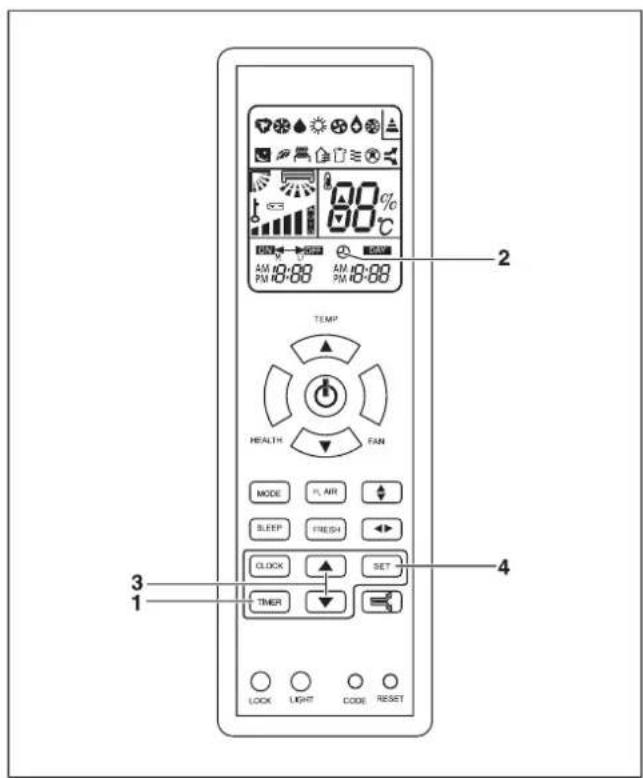
2 TEMP HEALTH FAN MODE FL AIR SLEEP FRESH CLOCK SET TIMER 3 1 4 LOCK LIGHT CODE RESET

VAILLANT ClimaVAIR V 7-060 M2N - 68

VAILLANT ClimaVAIR V 7-060 M2N - 69

VAILLANT ClimaVAIR V 7-060 M2N - 70

AM 12:00 N 12:00 AM 12:00 12:00

2 80% 60% AM 18:88 AM 18:88 TEMP HEALTH TAN MODE H AIR SLEEP FRESH CLOCK SET TIMER 1 LOCK LIGHT CODE RESET

VAILLANT ClimaVAIR V 7-060 M2N - 73

VAILLANT ClimaVAIR V 7-060 M2N - 74

Simple diagram with two curved arrows pointing in opposite directions (no text or symbols)

Simple line drawing of a rectangular object with horizontal lines and a small labeled point '1' (no text or symbols beyond the label)

VAILLANT ClimaVAIR V 7-060 M2N - 77

88% 80°C ① ② ③ ④ ⑤ ⑥ ⑦

WERKINGSMODUSAUTOCOOLDRYHEATFAN
AFSTANDSBEDIENING
BEDIENINGSPANEEL

VAILLANT ClimaVAIR V 7-060 M2N - 79

[Non-Text]

[NO TEXT]

!

!

!

[Non-Text]

[Non-Text]

[Non-Text]

VAILLANT ClimaVAIR V 7-060 M2N - 80

VAILLANT ClimaVAIR V 7-060 M2N - 81

VAILLANT ClimaVAIR V 7-060 M2N - 82

VAILLANT ClimaVAIR V 7-060 M2N - 83

Symbol of a trash bin crossed with a diagonal line and a horizontal bar below (no text or labels)

Manual assistant
Powered by Anthropic
Waiting for your message
Product information

Brand : VAILLANT

Model : ClimaVAIR V 7-060 M2N

Category : Air Conditioning