
PC301B - CD Player GPX - Free user manual and instructions
Find the device manual for free PC301B GPX in PDF.


Pick your language and provide your email: we'll send you a specifically translated version.
| Product Type | CD Player |
| Brand | GPX |
| Model | PC301B |
| Dimensions (Approx.) | 12 x 10 x 3 inches |
| Weight (Approx.) | 2.5 lbs |
| Power Supply | AC 120V, 60Hz |
| Power Consumption | 10W |
| Disc Compatibility | CD, CD-R, CD-RW |
| Playback Functions | Play, Pause, Stop, Skip, Repeat, Program, Random |
| Output Jacks | Headphone (3.5mm), RCA Audio Out |
| Display | LED |
| Remote Control | Included |
| Anti-Shock Protection | Yes |
| Programmable Memory | 20 tracks |
| Cleaning Instructions | Use a soft dry cloth. Do not use liquids or sprays. |
| Safety Precautions | Keep away from moisture and heat sources. Do not attempt to open or repair by yourself. |
| Repairability | Refer to a qualified service technician for repairs. |
| Accessories Included | Remote control, RCA cable, power cord, user manual |
Frequently Asked Questions - PC301B GPX
How do I turn on the GPX PC301B CD player?
Press the Power button on the front panel or remote control. The LED display will light up.
Why won't the CD player read my disc?
Ensure the disc is inserted label-side up. Check if the disc is scratched or dirty. Clean discs with a soft cloth. The player supports CD, CD-R, and CD-RW formats.
Can I play MP3 CDs on this player?
No, the GPX PC301B is designed for standard audio CDs only and does not support MP3 playback.
How do I program tracks to play in a specific order?
Press the Program button, then use Skip to select a track and press Program again to add it. Repeat up to 20 tracks, then press Play to start.
What should I do if the remote control stops working?
Check the batteries in the remote and replace them if needed. Ensure there is no obstruction between the remote and the player's sensor.
Can I connect this CD player to external speakers?
Yes, use the RCA Audio Out jacks to connect to a stereo system or amplifier. You can also use the Headphone jack for personal listening.
How do I repeat a single track or the entire disc?
Press the Repeat button once to repeat the current track, twice to repeat the entire disc, and a third time to cancel repeat.
Why is there no sound from the headphone jack?
Check that headphones are fully inserted and the volume is turned up. Ensure the player is not in pause or stop mode.
How should I clean the CD player?
Unplug the unit and wipe the exterior with a soft, dry cloth. Do not use any liquids, sprays, or abrasives. For the disc tray, gently clean with a dry cotton swab.
What does the anti-shock protection do?
The Anti-Shock feature uses a buffer to prevent skipping during movement or vibration. It is ideal for portable use.
User questions about PC301B GPX
0 question about this device. Answer the ones you know or ask your own.
Ask a new question about this device
No questions yet. Be the first to ask one.
Download the instructions for your CD Player in PDF format for free! Find your manual PC301B - GPX and take your electronic device back in hand. On this page are published all the documents necessary for the use of your device. PC301B by GPX.
USER MANUAL PC301B GPX
MODEL: PC301B (KARWI) 60s ESP
ITEM: LINE DRAWING
DATE: JAN 28, 11.
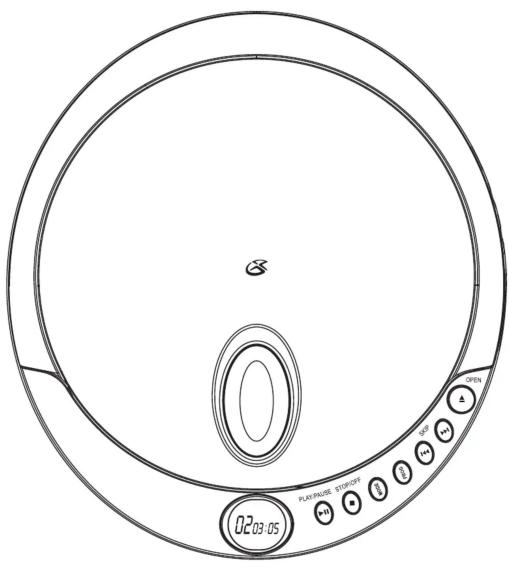

natural_image
Top-down schematic of a circular mechanical or electrical component with no visible text, numbers, or symbols.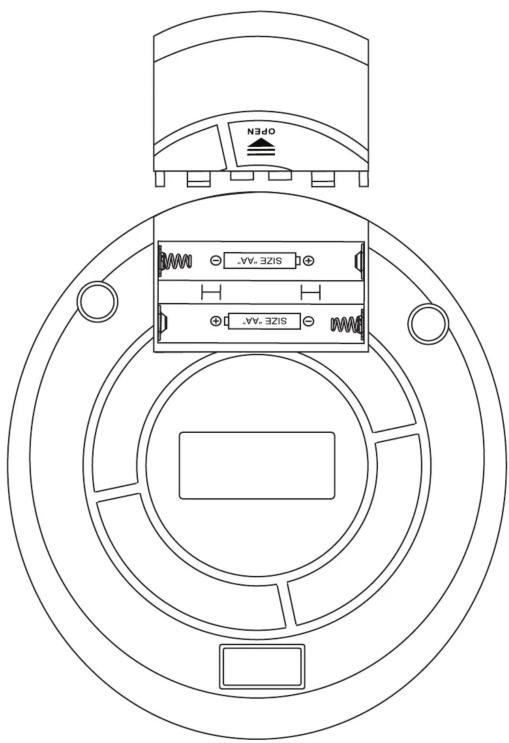


natural_image
Line drawing of a medical or electronic device with two earphones and a coiled cable (no text or symbols)


Manual assistant
Powered by Anthropic
Waiting for your message
Product information
Brand : GPX
Model : PC301B
Category : CD Player