PCB319 - CD Player GPX - Free user manual and instructions
Find the device manual for free PCB319 GPX in PDF.


Pick your language and provide your email: we'll send you a specifically translated version.
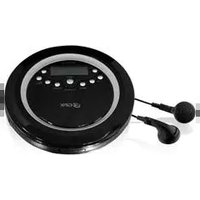
| Product Type | CD Player |
| Brand | GPX |
| Model | PCB319 |
| Dimensions (Approx) | 12.5 x 10.5 x 3.5 inches |
| Weight (Approx) | 2.5 lbs |
| Power Supply | AC 120V 60Hz |
| Power Consumption | 10W |
| Disc Format | CD, CD-R, CD-RW |
| Playback Modes | Play, Pause, Stop, Skip, Repeat (1/All), Random, Program |
| Output | Headphone Jack (3.5mm), RCA Line Out |
| Controls | Front Panel Buttons and Remote Control |
| Display | LED Screen with Track/Time Information |
| Maintenance | Clean the lens with a soft dry cloth. Do not use liquid cleaners. |
| Safety Warnings | Do not expose to moisture; avoid placing near heat sources; use only specified power adapter. |
| Spare Parts | Remote control, power cord (contact GPX support for replacements) |
| Repairability | No user-serviceable parts. Contact professional service for repairs. |
| General Information | User manual available for download from GPX website or notice-facile.com |
Frequently Asked Questions - PCB319 GPX
How do I play a CD?
Press the Power button to turn on the player. Open the disc tray, place a CD with the label side up, and close the tray. Press the Play/Pause button to start playback.
How can I skip to the next track?
Press the Skip Forward button (usually marked with >>|) to go to the next track. Press Skip Backward (|<<) to return to the beginning of the current track or previous track.
How do I repeat a single track or the entire CD?
Press the Repeat button repeatedly. One press repeats the current track (display shows 'Repeat 1'). A second press repeats all tracks (display shows 'Repeat All'). Press again to cancel repeat mode.
Can I play burned CDs?
Yes, this CD player supports CD-R and CD-RW discs. Ensure the disc is finalized and free of scratches for best performance.
How do I clean the CD player?
Unplug the unit. Use a soft, dry cloth to wipe the exterior. For the lens, use a CD lens cleaner disc or a soft brush. Do not use liquid cleaners or spray directly.
What should I do if there is no sound?
Check that the speakers or headphones are properly connected to the headphone jack or RCA output. Ensure the volume is turned up and not muted. Also confirm the CD is not damaged or dirty.
How do I program tracks to play in a specific order?
Press the Program button. Use the Skip buttons to select a track number, then press Program again to add it. Repeat for up to 20 tracks. Press Play to start the programmed sequence.
The remote control is not working. What can I do?
Replace the batteries with new ones. Point the remote directly at the player's sensor from within 10 feet. Remove any obstacles. If still not working, try pressing the buttons on the front panel.
Can I connect the CD player to an amplifier or home stereo?
Yes, use an RCA cable to connect the player's line out to an auxiliary input on your amplifier or stereo system. Adjust volume on the amplifier.
Where can I get a replacement power cord or remote?
Contact GPX customer support or visit the GPX website. You can also find compatible accessories online. Refer to the user manual for part numbers.
User questions about PCB319 GPX
0 question about this device. Answer the ones you know or ask your own.
Ask a new question about this device
No questions yet. Be the first to ask one.
Download the instructions for your CD Player in PDF format for free! Find your manual PCB319 - GPX and take your electronic device back in hand. On this page are published all the documents necessary for the use of your device. PCB319 by GPX.
USER MANUAL PCB319 GPX


Manual assistant
Powered by Anthropic
Waiting for your message
Product information
Brand : GPX
Model : PCB319
Category : CD Player