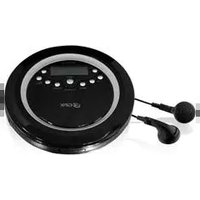
PC800 - CD Player GPX - Free user manual and instructions
Find the device manual for free PC800 GPX in PDF.


| Product Type | CD Player |
| Brand | GPX |
| Model | PC800 |
| Color | Black |
| Dimensions (approx.) | 5.0 x 5.0 x 1.0 inches |
| Weight (with batteries) | 0.5 lbs |
| Power Source | 2 AA batteries (not included) or AC adapter (not included) |
| Playback Formats | CD, CD-R, CD-RW |
| Audio Output | Headphone jack (3.5mm) |
| Playback Modes | Programmable play, repeat, shuffle, anti-skip (10 seconds) |
| Controls | Play/Pause, Stop, Skip, Volume, Open/Close |
| Display | LCD display (track number, elapsed time) |
| Connectivity | Headphone output only |
| Maintenance | Clean with soft dry cloth; avoid touching the lens |
| Safety | Do not expose to moisture; do not disassemble |
| Spare Parts | Batteries, AC adapter, headphones |
| Reparability | Contact GPX support for service; no user-serviceable parts |
| General Info | Portable personal CD player with anti-skip protection |
Frequently Asked Questions - PC800 GPX
User questions about PC800 GPX
0 question about this device. Answer the ones you know or ask your own.
Ask a new question about this device
Download the instructions for your CD Player in PDF format for free! Find your manual PC800 - GPX and take your electronic device back in hand. On this page are published all the documents necessary for the use of your device. PC800 by GPX.
USER MANUAL PC800 GPX
WARNINGS AND PRECAUTIONS
- CAUTION: TO PREVENT ELECTRIC SHOCK, MATCH WIDE BLADE OF PLUG TO WIDE SLOT, FULLY INSERT.
- WARNING: To prevent fire or shock hazards, do not expose this unit to rain or moisture.
- CAUTION: Use of controls or adjustments or performance of procedures other than those specified may result in hazardous radiation exposure.
- WARNING: Changes or modifications to this unit not expressly approved by the party responsible for compliance could void the user's authority to operate the equipment.
- WARNING: Do not place the unit on top of any soft, porous, or sensitive surfaces to avoid damaging the surface. Use a protective barrier between the unit and surface to protect the surface.
- CAUTION: Danger of explosion if battery is incorrectly replaced. Replace only with the same or equivalent type.
- PRÉCAUTION: Danger d'explosion si les piles sont remplacées de façon incorrect. Remplacer les piles seulement par le même type de pile ou l'équivalent.
Do not mix old and new batteries.
Do not mix alkaline, standard (carbon-zinc), or rechargeable (ni-cad, ni-mh, etc) batteries.
Main plug is used as disconnect device and it should remain readily operable during intended use.

WARNING: TO REDUCE THE RISK OF ELECTRIC SHOCK, DO NOT REMOVE COVER (OR BACK). NO USER-SERVICEABLE PARTS INSIDE. REFER SERVICING TO QUALIFIED SERVICE PERSONNEL.

The lightning flash with arrowhead symbol, within an equilateral triangle, is intended to alert the user to the presence of uninsulated "dangerous voltage" within the product's enclosure that may be of sufficient magnitude to constitute a risk of electric shock to persons.

The exclamation point within an equilateral triangle is intended to alert the user to the presence of important operating and maintenance (servicing) instructions in the literature accompanying the appliance.
NOTE: This equipment has been tested and found to comply with the limits for a Class B digital device, pursuant to Part 15 of the FCC Rules. These limits are designed to provide reasonable protection against harmful interference in a residential installation. This equipment generates, uses, and can radiate radio frequency energy and, if not installed and used in accordance with the instructions, may cause harmful interference to radio communications. However, there is no guarantee that interference will not occur in a particular installation. If this equipment does cause harmful interference to radio or television reception, which can be determined by turning the equipment off and on, the user is encouraged to try to correct the interference by one or more of the following measures:
• Reorient or relocate the receiving antenna.
- Increase the separation between the equipment and receiver.
- Connect the equipment into an outlet on a circuit different from that to which the receiver is connected.
- Consult the dealer or an experienced radio/TV technician for help.
IMPORTANT SAFETY INSTRUCTIONS
- Read these Instructions.
- Keep these Instructions.
- Heed all Warnings.
- Follow all instructions.
- Do not use this apparatus near water.
- Clean only with a dry cloth.
- Do not block any ventilation openings. Install in accordance with the manufacturer's instructions.
- Do not install near any heat sources such as radiators, heat registers, stoves, or other apparatus (including amplifiers) that produce heat.
- Do not defeat the safety purpose of the polarized or grounding - type plug. A polarized plug has two blades with one wider than the other. A grounding type plug has two blades and a third grounding prong. The wide blade or the third prong are provided for your safety. When the provided plug does not fit into your outlet, consult an electrician for replacement of the obsolete outlet.
- Protect the power cord from being walked on or pinched particularly at plugs, convenience receptacles, and the point where they exit from the apparatus.
- Only use attachments/accessories specified by the manufacturer.
- Use only with a cart,
stand, tripod, bracket, or table specified by the manufacturer, or sold with the apparatus. When a cart is used, use caution when moving the cart/apparatus combination to avoid injury from tip-over. - Unplug this apparatus during lightning storms or when unused for long periods of time.
- Refer all servicing to qualified service personnel. Servicing is required when the apparatus has been damaged in any way, such as power-supply cord or plug is damaged, liquid has been spilled or objects have fallen into the apparatus, the apparatus has been exposed to rain or moisture, does not operate normally, or has been dropped.

INTRODUCTION
10 + Album
Press to skip forward 10 tracks on the loaded CD.
Volume
Press to adjust the volume of the CD player.
Repeat
Press to cycle through play modes.
REPT 1 - repeat the current track
REPT ALL - repeat the entire album
INTRO - play the first 10 seconds of every track
RND - play tracks in a random order
Play/Pause
Press to play or pause the loaded CD.
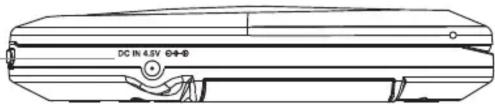
DC Power Input
Use to connect an AC/DC adapter or a DC car charger to the CD player.
Line Output
Use to connect the CD player to a stereo system.

EQ/PROG
Press to adjust the EQ mode. (Normal, DBB, Pop, Classic, Jazz, Rock)
With the loaded CD stopped, press to program the CD to play selected tracks in a specified order.
Skip/Search
Press to skip forwards or backwards through tracks on a loaded CD.
Press and hold to search forwards or backwards through an individual track.
Stop/Off
Press to stop a CD during play. With the loaded CD stopped, press and hold to turn the unit off.


natural_image
Line drawing of a rectangular electronic device with no visible text or symbolsHeadphone Jack
Use to connect a set of headphones or earbuds to the CD player.
Open
Use to open the CD door.
Features
• CD Player: CD, CD-R/RW
• MP3 Disc Playback
• 60-Second Anti-Skip Protection
• 100-Second Anti-Skip Protection on MP3
• ID3 Tag Compatible Simple LCD Display
• Low Battery Indicator
• Programmable Tracks
- Repeat Play
- Song Skip/Search
- Preset EQ
• Electronic Volume
• Line-Out Jack, 3.5mm type
- DC power: requires 2 AA batteries (not included), AC/DC adapter (not included)
• Includes: stereo earbuds
What's Included
PC800
• One set of Stereo Earbuds
- Documentation

PC800
Personal CD/MP3 Player with Skip Protection
Green Initiative
Environmental Commitment to ‘Protect for Today and Sustain for Tomorrow’
2009 marks the official launch of DPI, Inc.'s corporate campaign for a greener and cleaner world. DPI and its four brands, iLive, WeatherX, Capri, and GPX, are building upon environmental initiatives introduced at all of their facilities to help formulate and sustain significant and important conservation efforts within its manufacturing and marketing communities. In addition to targeting and selecting energy efficient
product features, and structuring ‘green office’ procedures, other initial program efforts include:
• Reduction of all packaging sizes
• Recyclable plastics for clamshell packages, with a plan to eventually replace plastic with recyclable paper
• Recycled fiber board in place of the polyfoam in packing boxes
• Recycled plastics in place of the virgin material in product construction
Requires 2 AA batteries, not included.
Insert 2 AA batteries into the battery compartment to power the CD player.

natural_image
Diagram of a circular device with internal components and a battery symbol, no text or labels presentDC Car Adapter
Use the DC POWER INPUT to connect the CD player to a DC car power outlet. Requires a DC car adapter, not included.
AC/DC Adapter
Use the DC POWER INPUT to connect the CD player to a standard AC outlet. Requires an AC/DC adapter, not included.

natural_image
Line drawing of a DC power cord connected to an air conditioner unit via cable (no text or symbols)PLAYING AN AUDIO CD OR MP3 CD
Loading a CD Programming a CD
Use the OPEN switch on the side of the CD player to open the CD door.
Place a CD inside of the unit with the label side facing up, towards the CD door.
Close the CD door.
Press the PLAY/PAUSE button to begin playing the loaded CD.
Basic Playback Advanced Playback
Play/Pause
Press to play or pause the loaded CD.
Stop/Off
Press to stop a CD during play.
With the loaded CD stopped, press and hold to turn the unit off.
Skip/Search
Press to skip forwards or backwards through tracks on a loaded CD.
Press and hold to search forwards or backwards through an individual track.
Volume
Press to adjust the volume of the CD player.

natural_image
Diagram showing a device being open and then placed on a CD, with an arrow indicating the process (no text or symbols present)10 + Album
Press to skip forward 10 tracks on the loaded CD.
Repeat
Press to cycle through play modes.
REPT 1 - repeat the current track
REPT ALL - repeat the entire album
INTRO - play the first 10 seconds of every track
RND - play tracks in a random order
EQ/PROG
Press to adjust the EQ mode. (Normal, DBB, Pop, Classic, Jazz, Rock)
With the loaded CD stopped, press to program the CD to play selected tracks in a specified order.
- Load a CD and press the STOP button to enter Stop Mode.
- Press the EQ/PROG button.
- Press the Skip/Search buttons to select a track.
- Press the EQ/PROG button to save the selected track as P-01 in the program.
- Repeat steps 3 and 4 to program up to 20 tracks to play in the selected order.
- Press the Play/Pause button to begin playing the programmed tracks.
- Power the CD player off or press the Stop button twice to cancel the Program Mode.
Using the Line Output
Requires a 3.5mm mini-phono cable, not included.
Connect the CD player to a stereo using the Line Output.
Set the connected stereo to the proper input settings.
Load and begin playing a CD through the CD player.
Audio from the CD player will play over the connected stereo's speakers.


- WARNINGS AND PRECAUTIONS
- IMPORTANT SAFETY INSTRUCTIONS
- INTRODUCTION
- + Album
- Volume
- Repeat
- Play/Pause
- DC Power Input
- Line Output
- EQ/PROG
- Skip/Search
- Stop/Off
- Headphone Jack
- Open
- Features
- What's Included
- PC800
- Green Initiative
- DC Car Adapter
- AC/DC Adapter
- PLAYING AN AUDIO CD OR MP3 CD
- Loading a CD Programming a CD
- Basic Playback Advanced Playback
- Using the Line Output
Brand : GPX
Model : PC800
Category : CD Player