
XRM 7 - Hi-Fi System MPMAN - Free user manual and instructions
Find the device manual for free XRM 7 MPMAN in PDF.


User questions about XRM 7 MPMAN
0 question about this device. Answer the ones you know or ask your own.
Ask a new question about this device
Download the instructions for your Hi-Fi System in PDF format for free! Find your manual XRM 7 - MPMAN and take your electronic device back in hand. On this page are published all the documents necessary for the use of your device. XRM 7 by MPMAN.
USER MANUAL XRM 7 MPMAN
Please read and keep these instructions
Important safety instructions – please read carefully and keep for future reference
| A | To reduce the risk of fire or electric shock, do not expose this product to water, rain or moisture. To prevent the risk of electric shock, do not remove the cover or back of this product. In case of product failure, only qualified personnel can repair. There are no user-serviceable parts inside. |
| ! | Use of controls, adjustments, or performance of procedures other than those specified herein may result in dangerous radiation exposure. This product is rated as LASER CLASS 1 PRODUCT. CAUTION: Laser radiation when open - never stare into the laser beam. |
CAUTION!
Dangerous tension inside the product! Do not open. Risk of electric shock! No parts can be repaired by the end-user. Only qualified personnel can repair and maintain this product.
If the electric cord is damaged, it must be replaced by the manufacturer or qualified after-sales personnel in order to avoid any danger.
The product must be installed in accordance with local laws.
Damaged batteries must be properly disposed. In order to protect the environment, please dispose the batteries properly, in accordance with local laws (information is available at your reseller).
Where to install the product
- Place the product on a straight, rigid and stable place. Do not place the product on a carpet.
- Do not place the product on top of another that may cause overheating (for example, a receiver or amplifier).
- Do not place anything underneath the product (for example, CDs or magazines).
Proper ventilation
- Place the product in a sufficiently-aerated place to avoid overheating. Allow at least 10cm spacing at the back and top of the product, and 5cm spacing on both sides to prevent overheating.
- Do not place items such as newspapers, tablecloth, curtains, in front of the ventilating openings.
Do not expose the product to high temperatures, moisture, water and dust.
- The apparatus shall not be exposed to dripping or splashing. No object filled with liquids, such as vases, shall be placed on the apparatus.
- Do not place other items close to this product that may damage it (for example, objects containing water or lightened candles).
- No naked flame sources, such as lighted candles, should be placed on the apparatus.
Electric supply
- Please unplug the product in case of prolonged non-use.
- If the supply cable is damaged, it must be replaced by the manufacturer or qualified after-sales personnel to avoid any danger.
- This product must be connected to an electrical supply 230 ~V 50 ~Hz .
- The plug must be accessible after installation.

This product is compliant with directives 2006/95/CE (abrogating the directive 73/23/CEE modified by the directive 93/68/CEE) and 2004/108/CE (abrogating the directive 89/336CEE).
- This logo set on the product means that the recycling of this apparatus comes within the framework of the directive 2002/96/EC of January 27, 2003 concerning the waste on electrical and electronic equipment (WEEE).
- The presence of dangerous substances in the electrical and electronic equipments can have potential consequences on the environment and human health in the cycle of reprocessing this product.
- Therefore, at the end of its lifetime, this product shall not be disposed with other non-recycled waste.
- As the end user, your role is of prime importance in the cycles of re-using, recycling, and other forms of valorization of this electrical and electronic equipment. Local authorities and resellers have set special procedures for the purpose of collecting and recycling this product.
- You have the obligation to use the selective waste collection systems put in place by your local authorities.
INTRODUCTION
Thank you for choosing this Schaub Lorenz product. Here are the main characteristics of your new microsystem:
- Equipped with a digital PLL tuner, you can easily search and memorize FM radios,
- With its compact with elegant design, this Hi-Fi system can easily find its place at home and be installed in just a couple of minutes,
- Thanks to its USB input, it becomes a real multimedia player, able to play all your favorite songs in MP3 and WMA format,
- Finally, you can enjoy an uncompromised music experience with convenient and easy-to-use audio settings thanks to the EQ and bass-booster systems.
FUNCTION
COMPATIBLE WITH AUDIO CD/CD-R(W)MP3/CD-R(W)WMA
DIGITAL DISPLAY
MATCHED TWO SPEAKERS TOTAL OUTPUT POWER : 2 X 8W RMS
DIGITAL PLL FM TUNER
USB READER FUNCTION
LIST OF MAIN PARTS
Master Unit
2 Speakers
Remote Control
Manual
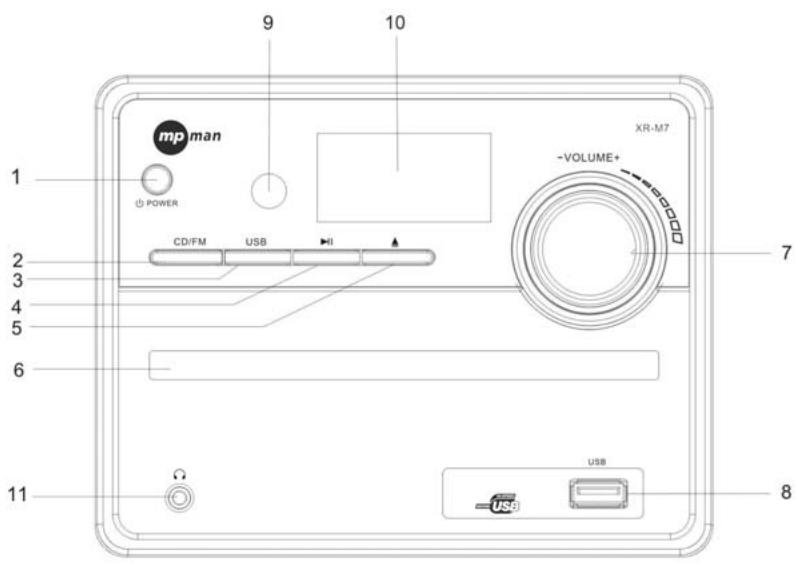
1、POWER ON/OFF
2、CD/FM
3、USB
4、PLAY/PAUSE(AUTO)
5、OPEN/CLOSE
6、CDDOOR
- Remove the battery door.
- Install 2pc
AAAbattery into the battery bracket (batteries not provided). Make sure that the + symbol is respected - Close the battery door.
Note:
- Battery chemicals can cause a rash. If the batteries leak, clean the battery compartment with a cloth. If chemicals touch you skin, wash immediately.
- If the remote control is not going to be used for an extended period of time, remove the batteries.
- Dispose of used battery by following your local hazardous waste regulations.
SYSTEM CONNECTION
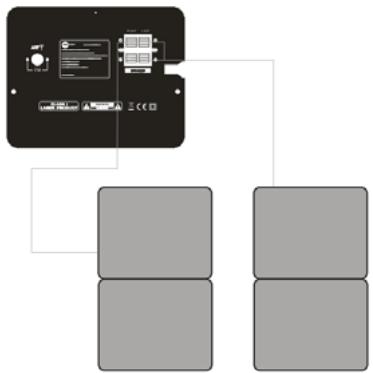
You can connect the player to the speakers and enjoy listening.
Connect the speaker cables to the SPEAKER jacks which on the back of the player.
BASIC OPERATION
PREPARATIVE
1). Before turning on, check whether all the connection are correct and reliable. Plug the power cord at last.
2). Press POWER button on the front panel to turn on.
3). Press EJECT button on the front panel to open the disc door, put the disc into the CD compartment, and then close the disc door. The unit starts reading and playing.
POWER
Press the POWER button on the remote control (or front panel) to turn on or back to standby mode
NUMBER BUTTONS
While playing songs, press the NUMBER buttons on the remote control to select the songs you need. For example, the second song is required: press the 0 and 2 buttons. If the 16 th song is need, press the 1 and 6 buttons.
VOLUME ADJUSTMENT
Press the VOL-/+ buttons on the remote control to turn up or down the volume of this unit. You can also turn the VOLUME KNOB on the front panel to control volume.
PLAY/PAUSE
In play status, press the PLAY/PAUSE button, the play will be paused, and press it again to continue playing.
STOP
While playing CD disc, press the STOP button on the remote control, and then press PLAY/PAUSE button, the disc will be played from the beginning.
MUTE
In play status, If the MUTE button is pressed, there will be no audio output, the sound is eliminated. Then press this button again or press VOL+/- buttons to exit the mute status, the sound resumes to be its normal status.
FAST REWIND / FAST FORWARD
While playing the CD disc, press the button or button, the disc will play fast rewind or fast forward. Press the PLAY/PAUSE button to exit this status and resume to normal playing.
SEEK-/+
While in radio mode, press the SEEK- button or SEEK+ button, the player will seek the frequency up or down.
REPEAT
Wile playing the CD discs, repeatedly press the REPEAT button to separately select the different contents for repetition: Track repeat, All repeat.
PROGRAMMED PLAYBACK
Up to 20 tracks can be programmed in to play in any desired sequence.
- In stop mode, press the PROG button the display shows"PO1" in the display
- Press number key to input the desired track to be memorized.
- Press to the PROG twice, the display shows "PO2" the first program is OK. Operate repeatedly
- Press PLAY/PAUSE to start playing. To cancel program play,Press STOP.
Note: when you operate this function, please make sure the mode is STOP. Otherwise you would just find the selections to set the play mode
RANDOM
While playing the CD disc, press the RANDOM button to play the disc in random.
AUTO
While in radio mode, press the AUTO button to search the bands automatically.
PREVIOUS/NEXT
While playing the CD disc, press or button to go to the previous or next song.
CH-/CH+
While in radio mode, press CH- or CH+ button to go to the previous or next band.
MONO/STEREO
While in radio mode, press the MO/ST button on the remote control to select the mono or stereo.
SAVE
While in radio mode, press the SAVE button on the remote control to store the current band.
EQUALIZER
In play status, press EQ button on the remote control, you can select different sound field effects. It could exist automatically
Note: Some disc content is unsuitable for this EQ format, it may arouse distortion while selecting.
BASS/TREBLE
In play status, press the BASS and TREBLE button on the remote control, and then press VOL-/+ to adjust the BASS and TREBLE value.
This function provides a better quality of BASS and TREBLE sound.
PLAYING USB
Press the "CD/USB" button to switch to CD / USB playback.
NOTE: If in FM mode, please press CD/FM first to switch to CD mode before switch to USB
Connecting a USB device
1) Insert a USB key inside the connector.
2) Press the CD / USB key to start.
Remark: Depending on the capacity of the device, the reading can take more than 1 minute.
The unit cannot read my USB device.
- Once you have plugged your device to the unit, you may need to switch on the USB device before it can operate.
- This unit does not support a direct USB connection with a computer. You need to use a USB device, a MP3 player or a PMP (Portable Multimedia Player with hard disk).
- If you are using a USB external hard disk: you need to connect your device simultaneously to an external power source and to the unit. If you are using a self-powered PMP, make sure that the battery is sufficiently loaded.
- Check that the files system of your USB device is formatted into the FAT or FAT 32 format. USB device formatted into NTFS are not compatible with this unit. Caution: if you attempt to modify your file system, formatting your device will erase all data. Please refer to your USB device's instruction manual first.
USING HEADPHONE
Inserting the plug of your headphone into the Headphone socket (on the front panel). It will enable you to listen to the audio in private.
Note: 1. Avoid impairing your hearing, please turn the volume to the lowest status before listening.
2. When plugging the headphone, the speakers have no sound.
Remark: Headphone is not provided.
FM RADIO OPERATION
1. Enter FM Function
In the turn-on or playing status, press the CD/FM button on the remote control (or front panel) to enter FM status. Press this button again to switch between FM and CD playing.
2. Select Bands
1) Select band by pressing SEEK- or SEEK+ button: under some frequency, press the button, the frequency will be up or down on the step. The step of FM is 0.05 MHz
2) Select band by pressing number buttons: you may select the bands that have been saved by pressing the number buttons. For example: press 10+ button once, 5 button once, you may
select the 15th band. Press the CH- or + button, the band will be switched up or down.
3) Automatically search bands: press the AUTO button, this unit will start to search bands from the lowest part to highest part automatically. Meanwhile the searched bands will be saved orderly. Press the button again to stop searching.
3. Soundtrack Selection
Press the MO/ST button on the remote control, you may select Mono and Stereo soundtrack output in FM status. If the signal is not strong enough, you cannot select Stereo.
4. Exit FM Status
Press the CD/FM button on the remote control (or front panel) to exit FM status, and press CD/USB switch to other modes.
Remark: FM Frequency range: 87.5-108 MHz
NOTE: 1. You may adjust the best radio effect by adjusting the antenna.
- You can search further bands by pressing AUTO button when adjusted the antenna in a right position.
- If the band is not clear by auto search, you choose the way manual search adjustment by press SEEK-/SEEK+ button.
- The channel number could not exceed 20
- Cannot input the frequency number directly.
SPECIFICATION
| Output ports | L/R speaker output ports |
| Input ports | USB In, Headphone Jack |
| Power supply | 230V~ 50Hz |
| Max power | 30W |
| Frequency | 20Hz-20KHz ±3dB |
TROUBLE SHOOTING
Please use the following methods to solve the following problems while using this unit.
| Fault Phenomenon | Possible Cause | Handling |
| Power supply cannot be turned on | Power plug is not fully inserted into the socket | Insert the power plug into the socket securely |
| The remote control does not work | Battery is used up | Replace with a new battery |
| The front end of the remote control is not aimed at the infrared reception part of the player | Please aim at the remote control window | |
| Play can not be realized | The disc door is not close well | Close the disc door |
| No disc inserted | Place a disc in the compartment | |
| Inverse placement of disc | Be sure that the side with pictures of the disc points upwards | |
| No sound from loudspeaker | Audio cable not connected or not connected securely | Connect the cable as the diagram |
| The volume is in the lowest status | Turn the volume up | |
| Discontinuous sound | Disc not clean | Use a piece of clean and soft cloth to clean the disc |
| Disc scratched | Replace the disc with a new one | |
| Disc distorted | ||
| Operation cannot be done | Embedded micro computer fails due to lightning, static or other interference | Power OFF, and restart the player after 10 seconds |
PLAYING USB
Press the "CD/USB" button to switch to CD / USB playback.
NOTE: If in FM mode, please press CD/FM first to switch to CD mode before switch to USB.