EchoStream EN1223D - Controller Inovonics - Free user manual and instructions
Find the device manual for free EchoStream EN1223D Inovonics in PDF.


| Product Type | Double-Button Panic Alarm Transmitter |
| Brand | Inovonics |
| Model | EchoStream EN1223D |
| Dimensions | 5.6 x 4.8 x 1.8 cm (2.2 x 1.9 x 0.72 in) |
| Weight | Approx. 30 g (1.1 oz) |
| Power Supply | 3 VDC, 60 mA |
| Battery Type | Renata CR2450 or Panasonic CR2450 (3V lithium) |
| Typical Battery Life | 3 to 5 years |
| Operating Temperature | 0 to 60°C (32 to 140°F) |
| Humidity | 90% RH non-condensing |
| Frequency Bands | 902-928 MHz (North America), 915-928 MHz (Australia), 921-928 MHz (New Zealand) |
| Activation | Press both buttons simultaneously for ≥1 second |
| LED Indicator | Blinks during alarm transmission |
| Reset Button | Yes, for frequency config and registration |
| Supervision | Check-in every 3 minutes when registered |
| Compatible Receiver | EN4216R |
| UL Listings | UL 1023, ULC/ORD-C1023-74 |
| Construction | Indoor use only |
| Cleaning | Wipe with a dry cloth |
| Warranty | 36 months from date of manufacture |
Frequently Asked Questions - EchoStream EN1223D Inovonics
User questions about EchoStream EN1223D Inovonics
0 question about this device. Answer the ones you know or ask your own.
Ask a new question about this device
Download the instructions for your Controller in PDF format for free! Find your manual EchoStream EN1223D - Inovonics and take your electronic device back in hand. On this page are published all the documents necessary for the use of your device. EchoStream EN1223D by Inovonics.
USER MANUAL EchoStream EN1223D Inovonics
EN1223D EchoStream® Double-Button Panic Alarm
Installation and Operation Manual - 05583A, April 29, 2009
1 Overview
Inovonics EN1223D panic alarm transmitters are our smallest, lightest, and most versatile pendants.
Note: For UL installations, refer to the EN4216R Installation and Operation Manual.
1.1 Inovonics Wireless Contact Information
If you have any problems with this procedure, contact Inovonics Wireless technical services:
• E-mail: support@inovonics.com
• Phone: (800) 782-2709; (303) 939-9336
1.2 Inovonics Wireless Contact Information
If you have any problems with this procedure, contact Inovonics Wireless technical services:
• E-mail: support@inovonics.com
• Phone: (800) 782-2709
1.3 Transmitter Components
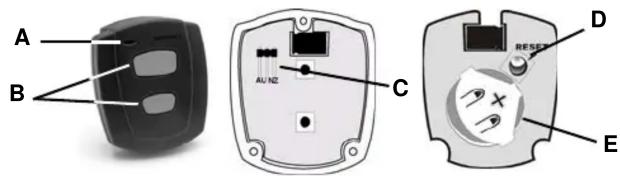
Figure 1 Transmitter components
A Transmit LED
B Activation buttons
C Frequency band selection pins
D Reset button E Battery
2 Installation and Startup
2.1 Installation Notes
• These products are designed to be maintained by professional security technicians.
- Products are intended for indoor use.
- Manually test all products weekly.
2.2 Install/Replace the Batteries
- If present, remove the 3 three housing screws on the back of the transmitter.
- Open the housing.
- Install the new batteries, ensuring the positive terminals (+) face the indicated side of the holder.
2.3 Select the Frequency Band
EchoStream products are able to use a range of radio frequencies, and must be configured for your geographic area. To configure the transmitter:
-
Place a selection jumper on the appropriate frequency band selection pins.
-
Place the jumper on the top two pins, marked NZ, to set the frequency range to 921-928 MHz for New Zealand.
- Place the jumper on the bottom two pins, marked AU, to set the frequency range to 915-928 MHz for Australia.
- Leave the jumper off the pins to set the frequency range to 902-928 MHz for North America.
Note: Only devices set for use in North America are configured for UL installations.
- Press the Reset button to complete configuration.
Caution: When pressing the Reset button, make sure you don't also touch the frequency band selection pins. Touching the frequency band selection pins while pressing the Reset button can inadvertently set the transmitter to the wrong frequency band.
2.4 Register the Transmitter
The transmitter must be registered with the system in order to be monitored and supervised. When supervised, the transmitter will send a check-in message to the serial receiver or network coordinator every three minutes. Each transmitter has a unique factory-programmed identification number. Refer to the receiver's installation instructions for details on registering a transmitter.
- When prompted by the receiver to reset transmitter, press the Reset button.
Caution: The transmitter should be tested after registration to ensure operation. To test the transmitter, activate each of the conditions and ensure an appropriate response.
3 Operate the Transmitter
To activate single button transmitters, press the button for at least one second. To activate double button transmitters, press both buttons simultaneously. Alarm signals are transmitted multiple times and are indicated by the blinking transmission LED. When the buttons are released, the transmitter sends an alarm restoral signal. To test a transmitter, activate the alarm by pressing the button(s).
4 Specifications
Dimensions: 5.6 x 4.8 x 1.8 cm (2.2 x 1.9 0.72")
Operating temperature: 0 to 60°C (32 to 140°F), 90% relative humidity, noncondensing
Typical battery life: 3-5 years
Battery type (BAT609): Renata CR2450, Panasonic CR2450
Power requirement: 3 VDC, 60 mA
UL listings: UL 1023, ULC/ORD-C1023-74
Compatible receiver: EN4216R
Note: Specifications and data are subject to change without notice.
5 Warranty and Disclaimer
Note: Changes or modifications to this unit not expressly approved by Inovonics Wireless Corporation may void the installer's authority to operate the equipment as well as the product warranty.
Inovonics Wireless Corporation ("Inovonics") warrants its products ("Product" or "Products") to conform to its own specifications and to be free of defects in materials and workmanship under normal use for a period of thirty-six (36) months from the date of manufacture. Within the warranty period, Inovonics will repair or replace, at its option, all or any part of the warranted Product. Inovonics will not be responsible for dismantling and/or reinstallation charges. To exercise the warranty, the User ("User", "Installer" or "Consumer") must work directly through their authorized distributor who will be given a Return Material Authorization ("RMA") number by Inovonics. Details of shipment will be arranged directly through the authorized distributor.
This warranty is void in cases of improper installation, misuse, failure to follow installation and operating instructions, alteration, accident or tampering, and repair by anyone other than Inovonics.
This warranty is exclusive and expressly in lieu of all other warranties, obligations or liabilities, whether written, oral, express, or implied. There is no warranty by Inovonics that Inovonics product will be merchantable or fit for any particular purpose, nor is there any other warranty, expressed or implied, except as such is expressly set forth herein. In no event shall Inovonics be liable for an incidental, consequential, indirect, special, or exemplary damages, including but not limited to loss of profit, revenue, or contract, loss of use, cost of down time, or interruption of business, nor any claim made by distributor's customers or any other person or entity. This warranty will not be modified or extended. Inovonics does not authorize any person to act on its behalf to modify or extend this warranty. This warranty will apply only to Inovonics Products. Inovonics will not be liable for any direct, incidental, or consequential damage or loss whatsoever, caused by the malfunction of Product due to products, accessories, or attachments of other manufacturers, including batteries, used in conjunction with Inovonics Products.
Note: E-mail support@inovonics.com for a copy of the CE Declaration of Conformity.

- EN1223D EchoStream® Double-Button Panic Alarm
- Overview
- Inovonics Wireless Contact Information
- Inovonics Wireless Contact Information
- Installation and Startup
- Installation Notes
- Install/Replace the Batteries
- Select the Frequency Band
- Register the Transmitter
- Operate the Transmitter
- Specifications
- Warranty and Disclaimer
Brand : Inovonics
Model : EchoStream EN1223D
Category : Controller