
EN7017 - Security Camera Inovonics - Free user manual and instructions
Find the device manual for free EN7017 Inovonics in PDF.


| Product Type | Wireless Security Camera |
| Model | EN7017 |
| Brand | Inovonics |
| Wireless Technology | Bluetooth |
| Frequency Range | 2400-2500 MHz |
| Antenna Type | Chip antenna (Johanson 2450AT18B100) |
| Antenna Gain | 0.5 dBi peak, -0.5 dBi average |
| Power Source | Rechargeable battery via mini USB |
| Battery Charging Indicator | Red LED (charging), off (fully charged) |
| Pairing Method | MAC address matching via app |
| Signal Coverage | Up to 25,000 sq ft per transmitter, expandable to 50,000 sq ft with repeater |
| Installation Tools Required | Survey receiver, pendant transmitter, mobile device with app |
| App Compatibility | iOS and Android (Site Survey App by Inovonics) |
| Regulatory Compliance | FCC Part 15, IC RSS-GEN |
| Operating Environment | Indoor; avoid direct sunlight, store at room temperature |
| Maintenance | Keep away from metal barriers and electronic equipment; charge at room temperature |
| Accessories Included | Survey receiver, pendant transmitter, mini USB cable |
| Warranty | Refer to manufacturer |
Frequently Asked Questions - EN7017 Inovonics
User questions about EN7017 Inovonics
0 question about this device. Answer the ones you know or ask your own.
Ask a new question about this device
Download the instructions for your Security Camera in PDF format for free! Find your manual EN7017 - Inovonics and take your electronic device back in hand. On this page are published all the documents necessary for the use of your device. EN7017 by Inovonics.
USER MANUAL EN7017 Inovonics
EN7017 Survey Kit and App Installation and Site Survey Instructions
Install the Survey Kit and App
- Survey kit carrying case.
• EN4017SK survey receiver.
• EN1223SK pendant survey transmitter. - Mini USB charging cable.

Use a mini USB charging cable and any standard USB charger to fully charge the survey receiver. The LED will light red while charging, and turn off when fully charged.
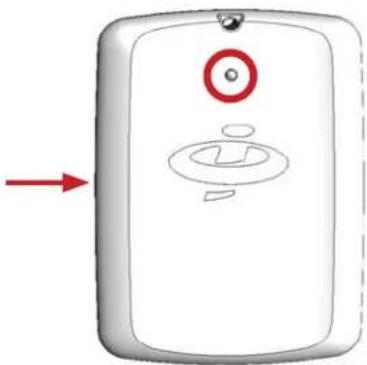

Use a pen or a paper clip to move the switch up to activate the survey receiver battery. The survey receiver battery can remain activated indefinitely, and once activated, the survey receiver LED will blink green until paired.


- Download and open the Site Survey App by Inovonics.


If located somewhere other than North America, select your frequency band.


Select the Inovonics device that matches the MAC address on the back of your survey receiver to pair it with the app. Once paired, the receiver LED will light green.
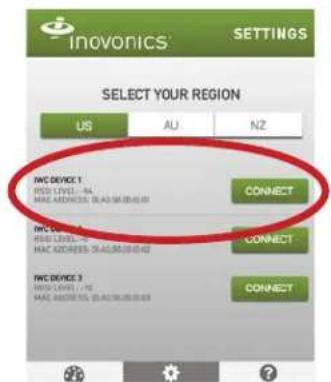

Go to the display screen.


Press the pendant survey transmitter activation button; the LED will flash red.


Enter the TXID found on the back of the pendant survey transmitter to pair it with the app. Once paired, the signal strength needles will begin to move, indicating you have successfully completed setup.

Perform a Site Survey

Place the activated pendant survey transmitter where you plan to install the Inovonics receiver.
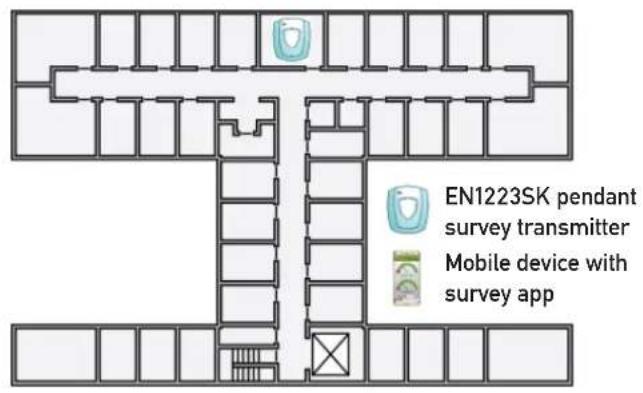

Take the survey receiver and your mobile device to the first place you plan to install a transmitter.


Look at the app display. If the signal strength is green, no repeater is needed.


If the average signal strength is green but the current signal strength dips into the red, you may need a repeater; if the average and current signal strength are red you will need a repeater.


If a repeater is needed, walk from the installation point back towards the pendant survey transmitter. When the average and current signal strength are consistently green, this is the best location to place a repeater.
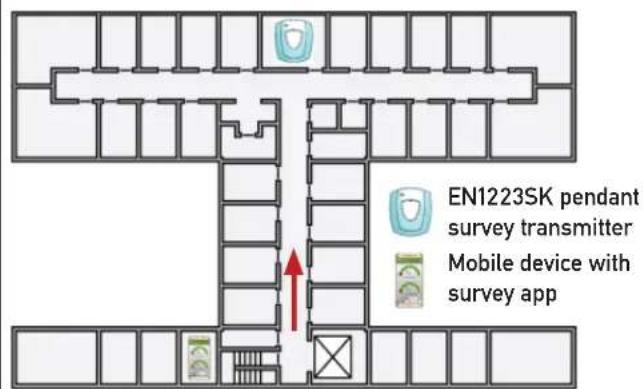

Repeat steps 2 through 5 for each transmitter to be installed.


Press the pendant survey transmitter activation button to turn it off.


Close the app and disconnect the receiver when prompted; the survey receiver will automatically go into sleep mode.

Tips:
- Never store the EN4017SK survey receiver in direct sunlight, such as on a vehicle dashboard.
- Only charge the EN4017SK survey receiver at room temperature.
- Make sure both Bluetooth wireless technology and location are enabled on your mobile device before using the app.
- When surveying a large site, put your mobile device in airplane mode to conserve battery life.
- Inovonics recommends ensuring your mobile device remains active, without timing out to the lock screen, while performing site surveys.
- Depending on the size and complexity of the site, you may find it useful to refer to a building blueprint or floorplan during your survey, noting where you plan to install the receiver, transmitters and any required repeaters.
- You can use the carabiner on the receiver to keep it attached to your person while performing the survey.
- You can use any Inovonics transmitter with the app however we recommend the EN1223SK pendant survey transmitter or the EN1210SK universal survey transmitter, sold separately.
- You can also use the survey app to verify message delivery with the apps' status indicator.
- If the status indicator is fl ashing fi ve times per second or more, then message receipt is fi ne. Anything less means you are dropping messages.
- Repositioning the transmitter to avoid obstacles like metal barriers and electronic equipment can help improve message receipt.
- If message receipt remains low, consider adding a repeater.
- For guidance on RF gateway placement see the RF gateway's installation instructions and the "EchoStream Device Installation Recommendation" tech note. Both are available at www.inovonics.com.
• The signal from a single Inovonics transmitter will generally cover 25,000 square feet in an indoor environment. Addition of a repeater will generally expand that range to 50,000 square feet.
- If you have any problems, contact Inovonics technical services at support@inovonics.com or (800) 782-2709.
Antenna Warning
This device is tested with a standard SMA connector and with the antenna listed below. When integrated in the OEM's product, this fixed antenna requires installation preventing end-users from replacing them with non-approved antennas. Any antenna not in the following table must be tested to comply with FCC Section 15.203 for unique antenna connectors and Section 14.247 for emissions.
| ItemDescription | |
| Chip antenna manufacturer Johanson Technology Inc. | |
| Chip antenna part number 2450AT18B100 | |
| Frequency range 2400-2500 MHz | |
| Peak gain 0.5-dBi typical | |
| Average gain -0.5dBi typical | |
| Return loss 9.5-dB minimum | |
Caution: RF Exposure
To comply with FCC RF Exposure requirements, the Original Equipment Manufacturer (OEM) must ensure to install the approved antenna in the previous.
The radiated output power of CYBLE-022001-00 with the chip antenna mounted (FCC ID: WAP2001) is far below the FCC radio frequency exposure limits. Nevertheless, use CYBLE-022001-00 in such a manner that minimizes the potential for human contact during normal operation.
FCC Notice:
This device CYBLE-022001-00, including the antenna 2450AT18B100 from Johanson Technology, complies with Part 15 of the FCC Rules. The device meets the requirements for modular transmitter approval as detailed in FCC public Notice DA00-1407. Transmitter operation is subject to the following two conditions: (1) This device may not cause harmful interference, and (2) This device must accept any interference received, including interference that may cause undesired operation.
Caution:
The FCC requires the user to be notified that any changes or modifications made to this device that are not expressly approved by Cypress Semiconductor may void the user's authority to operate the equipment.
This equipment has been tested and found to comply with the limits for a Class B digital device, pursuant to Part 15 of the FCC Rules. These limits are designed to provide reasonable protection against harmful interference in a residential installation. This equipment generates uses and can radiate radio frequency energy and, if not installed and used in accordance with the instructions. May cause harmful interference to radio communications. However, there is no guarantee that interference will not occur in a particular installation. If this equipment does cause harmful interference to radio or television reception, which can be determined by turning the equipment off and on, the user is encouraged to try to correct the interference by one or more of the following measures:
- Reorient or relocate the receiving antenna.
- Increase the separation between the equipment and receiver.
- Connect the equipment into an outlet on a circuit different from that to which the receiver is connected.
- Consult the dealer or an experienced radio/TV technician for help.
IC Notice:
The device CYBLE-022001-00, including the antenna 2450AT18B100 from Johanson Technology, complies with Canada RSS-GEN Rules. The device meets the requirements for modular transmitter approval as detailed in RSS-GEN. Operation is subject to the following two conditions: (1) This device may not cause harmful interference, and (2) This device must accept any interference received, including interference that may cause undesired operation.
IC Radiation Exposure Statement for Canada:
This device complies with Industry Canada license-exempt RSS standard(s). Operation is subject to the following two conditions: (1) This device may not cause interference, and (2) This device must accept any interference, including interference that may cause undesired operation of the device.
• Google Play and the Google Play logo are trademarks of Google Inc.
• Apple and the Apple logo are trademarks of Apple Inc., registered in the U.S. and other countries. App Store is a service mark of Apple Inc., registered in the U.S. and other countries.
- The Bluetooth word mark and logos are registered trademarks owned by Bluetooth SIG, Inc., and any use of such marks by Inovonics is under license. Other trademarks and trade names are those of their respective owners.
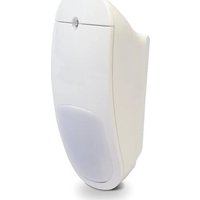
Brand : Inovonics
Model : EN7017
Category : Security Camera