H10X-80-240 - Water dispenser Bunn - Free user manual and instructions
Find the device manual for free H10X-80-240 Bunn in PDF.


| Product Type | Water Dispenser |
| Brand | Bunn |
| Model | H10X-80-240 |
| Power Supply | 200-240 V AC, Single Phase |
| Current Rating | 40 A |
| Water Supply Connection | 1/4 inch flare fitting |
| Water Pressure Range | 20-90 psi (138-620 kPa) |
| Water Output | Very hot water (near boiling) |
| Heating Time (Cold Start) | Approximately 20 minutes |
| Safety Features | Limit thermostat, overflow protection switch, dry plug protection |
| Control System | Electronic control board with temperature sensor |
| Indicator Lights | HEATER, REFILL, READY LEDs |
| Construction Material | Stainless steel tank, metal chassis |
| Warranty (Parts/Labor) | 2 years parts, 1 year labor (electronic boards: 3 years) |
| Cleaning Instructions | Use damp cloth with mild, non-abrasive liquid detergent |
| Installation Requirements | Comply with International Plumbing Code; cold water line required |
| Certifications | CE compliant |
Frequently Asked Questions - H10X-80-240 Bunn
User questions about H10X-80-240 Bunn
0 question about this device. Answer the ones you know or ask your own.
Ask a new question about this device
Download the instructions for your Water dispenser in PDF format for free! Find your manual H10X-80-240 - Bunn and take your electronic device back in hand. On this page are published all the documents necessary for the use of your device. H10X-80-240 by Bunn.
USER MANUAL H10X-80-240 Bunn
OPERATING & SERVICE MANUAL
BUNN-O-MATIC CORPORATION
To ensure you have the latest revision of the manual or to obtain the illustrated parts catalog, please visit the Bunn-O-Matic website, at www.bunn.com. This is absolutely FREE, and the quickest way to obtain the latest catalog and manual updates. Contact Bunn-O-Matic Corporation at 1-800-286-6070 to obtain a paper copy of the required Illustrated Parts Catalog mailed via U.S. Postal Service.
BUNN-O-MATIC COMMERCIAL PRODUCT WARRANTY
Bunn-O-Matic Corp. ("BUNN") warrants equipment manufactured by it as follows:
1) All equipment other than as specified below: 2 years parts and 1 year labor.
2) Electronic circuit and/or control boards: parts and labor for 3 years.
3) Compressors on refrigeration equipment: 5 years parts and 1 year labor.
4) Grinding burrs on coffee grinding equipment to grind coffee to meet original factory screen sieve analysis: parts and labor for 3 years or 30,000 pounds of coffee, whichever comes first.
These warranty periods run from the date of installation BUNN warrants that the equipment manufactured by it will be commercially free of defects in material and workmanship existing at the time of manufacture and appearing within the applicable warranty period. This warranty does not apply to any equipment, component or part that was not manufactured by BUNN or that, in BUNN's judgment, has been affected by misuse, neglect, alteration, improper installation or operation, improper maintenance or repair, damage or casualty. This warranty is conditioned on the Buyer 1) giving BUNN prompt notice of any claim to be made under this warranty by telephone at (217) 529-6601 or by writing to Post Office Box 3227, Springfield, Illinois 62708-3227; 2) if requested by BUNN, shipping the defective equipment prepaid to an authorized BUNN service location; and 3) receiving prior authorization from BUNN that the defective equipment is under warranty.
THE FOREGOING WARRANTY IS EXCLUSIVE AND IS IN LIEU OF ANY OTHER WARRANTY, WRITTEN OR ORAL, EXPRESS OR IMPLIED, INCLUDING, BUT NOT LIMITED TO, ANY IMPLIED WARRANTY OF EITHER MERCHANTABILITY OR FITNESS FOR A PARTICULAR PURPOSE. The agents, dealers or employees of BUNN are not authorized to make modifications to this warranty or to make additional warranties that are binding on BUNN. Accordingly, statements by such individuals, whether oral or written, do not constitute warranties and should not be relied upon.
If BUNN determines in its sole discretion that the equipment does not conform to the warranty, BUNN, at its exclusive option while the equipment is under warranty, shall either 1) provide at no charge replacement parts and/or labor (during the applicable parts and labor warranty periods specified above) to repair the defective components, provided that this repair is done by a BUNN Authorized Service Representative; or 2) shall replace the equipment or refund the purchase price for the equipment.
THE BUYER'S REMEDY AGAINST BUNN FOR THE BREACH OF ANY OBLIGATION ARISING OUT OF THE SALE OF THIS EQUIPMENT, WHETHER DERIVED FROM WARRANTY OR OTHERWISE, SHALL BE LIMITED, AT BUNN'S SOLE OPTION AS SPECIFIED HEREIN, TO REPAIR, REPLACEMENT OR REFUND.
In no event shall BUNN be liable for any other damage or loss, including, but not limited to, lost profits, lost sales, loss of use of equipment, claims of Buyer's customers, cost of capital, cost of down time, cost of substitute equipment, facilities or services, or any other special, incidental or consequential damages.
BrewWISE, BUNN Gourmet Ice, BUNN Pour-O-Matic, BUNN, Bunn-OMatic, Bunn-O-Matic, BUNNlink, BUNNserve, BUNN Espress, DBC, Dr. Brew, Dual, EasyClear, EasyGard, Easy Pour, FlavorGard, Gourmet Ice, Gourmet Juice, High Intensity, IMIX, Infusion Series, Legendary for Quality, The Mark of Quality in Beverage Equipment Worldwide, My Café, Power-Logic, Safety-Fresh, Scale-Pro, Single, Smart Funnel, Smart Hopper, Soft Heat, SplashGard, System III, ThermoFresh, 392, AXIOM, Beverage Profit Calculator, Beverage Bar Creator, BrewLOGIC, BrewMETER, BrewWIZARD, BUNNSERVE, BUNNsource, Coffee At Its Best, Cool Froth, Digital Brewer Control, Intellisteam, Nothing Brews Like a BUNN, Pouring Profits, Pulse Wave, Quality Beverage Equipment Worldwide, Signature Series, Silver Series, Smart Heat, SmartWAVE, Tea At Its Best, The Horizontal Red Line, Titan, Ultra, are either trademarks or registered trademarks of Bunn-O-Matic Corporation.
USER NOTICES
Carefully read and follow all notices on the equipment and in this manual. They were written for your protection. All notices are to be kept in good condition. Replace any unreadable or damaged labels.

WARNING
Very Hot Water
Use With Care!
12593.0000
This equipment must be installed to comply with the International Plumbing Code of the International Code Council and the Food Code Manual of the Food and Drug Administration (FDA). For models installed outside the U.S.A., comply with the applicable Plumbing /Sanitation Code.
00656.0000
NOTICE
ALL COMPONENTS ARE 200 TO 240 VOLT A.C.
Replace only with components listed in the accompanying literature rated for the same voltage
12537.0000

WARNING
◆ Fill water tank before turning - on - thermostat or connecting appliance to power source.
◆ Use only on a properly protected circuit capable of the rated load.
◆ Electrically ground the chassis.
◆ Follow national/local electrical codes.
◆ Do not use near combustibles.
FAILURE TO COMPLY RISKS EQUIPMENT DAMAGE, FIRE, OR SHOCK HAZARD
READ THE ENTIRE OPERATING MANUAL BEFORE BUYING OR USING THIS PRODUCT
THIS APPLIANCE IS HEATED WHENEVER CONNECTED TO A POWER SOURCE 00831.0000F 3/98 ©1998 BUNN-C-MATIC CORPORATION
00831.0000

WARNING
To reduce the risk of electric shock, do not remove or open cover. No user-serviceable parts inside. Authorized service personnel only. Disconnect power before servicing.
37881.0000
ELECTRICAL REQUIREMENTS
CAUTION - The dispenser must be disconnected from the power source until specified in Initial Set-Up.
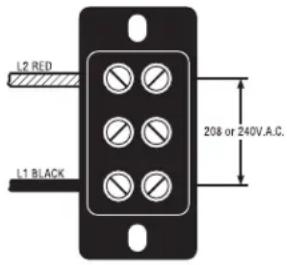
This dispenser requires 2-wire, grounded service rated 208 or 240 volts ac, 40 amp, single phase.
(Refer to the dispenser's dataplate for exact voltage requirement.)
Electrical Hook-Up
CAUTION – Improper electrical installation will damage electronic components.
- An electrician must provide electrical service as specified.
- Using a voltmeter, check the voltage and color coding of each conductor at the electrical source.
- Remove the side panel.
- Install the proper electrical wiring to the terminal block.
- Connect the dispenser to the power source and verify the voltage at the terminal block before proceeding. Reinstall the side panel.
- If plumbing is to be hooked-up later be sure the dispenser is disconnected from the power source. If Plumbing has been hooked-up, the dispenser is ready for Initial Set-Up.
PLUMBING REQUIREMENTS
This dispenser must be connected to a COLD WATER system with operating pressure between 20 and 90 psi (138 and 620 kPa) from a 12 " or larger supply line. A shut-off valve should be installed in the line before the dispenser. Install a regulator in the line when pressure is greater than 90 psi (620 kPa) to reduce it to 50 psi (345 kPa). The water inlet fitting is 14 " flare.
NOTE - Bunn-O-Matic recommends 14 " tubing for installations of less than 25 feet and 3/8" for more than 25 feet from the 12 " water supply line. At least 18 inches of an FDA approved flexible beverage tubing, such as reinforced braided polyethylene or silicone, before the dispenser will facilitate movement to clean the countertop. Bunn-O-Matic does not recommend the use of a saddle valve to install the dispenser. The size and shape of the hole made in the supply line by this type of device may restrict water flow.
This equipment must be installed to comply with the International Plumbing Code of the International Code Council and the Food Code Manual of the Food and Drug Administration (FDA). For models installed outside the U.S.A., you must comply with the applicable Plumbing/Sanitation Code for your area.
Plumbing Hook-Up
- Flush the water line and securely attach it to the flare fitting at the rear of the dispenser.
- Turn on the water supply.
CE REQUIREMENTS
- This appliance must be installed in locations where it can be overseen by trained personnel.
- For proper operation, this appliance must be installed where the temperature is between 0^ to 35^ .
- Appliance shall not be tilted more than 10^ for safe operation.
- An electrician must provide electrical service as specified in conformance with all local and national codes
- This appliance must not be cleaned by water jet.
- This appliance is not intended for use by persons (including children) with reduced physical, sensory or mental capabilities, or lack of experience and knowledge, unless they have been given instructions concerning use of this appliance by a person responsible for its safety.
- If the power cord is ever damaged, it must be replaced by the manufacturer or authorized service personnel with a special cord available from the manufacturer or its authorized service personnel in order to avoid a hazard.
INITIAL SET-UP
CAUTION - The dispenser must be disconnected from the power source throughout the initial set-up, except when specified in the instructions.
- Connect the dispenser to the power source and turn on the water supply.
- The "HEATER" LED will glow for approximately five seconds. During this time, the electronic circuitry will check for a full tank of water.
- If the tank is not full of water, the refill circuit will energize, indicated by the "REFILL" LED glowing. Water will automatically flow into the tank to the proper level and then shut off.
- When the tank is full of water, the heater circuit will energize, indicated by the "HEATER" LED glowing intermittently until the proper temperature is achieved. A completely cold tank will take approximately twenty minutes for the water to heat.
- The "READY" LED will glow when the proper water temperature is achieved.
NOTE - Stop dispensing if the "READY" LED is off. Dispense only when the "READY" LED glows.
DRAINING THE DISPENSER
CAUTION - The dispenser must be disconnected from the power source throughout these steps.
- Disconnect the dispenser from the power source.
- Shut-off and disconnect the incoming water supply
- Remove the small screws from the sides and front of the top panel.
- Gently remove one of the grommets from the tank lid.
- Insert a tube to the bottom of the tank and syphon ALL of the water out.
NOTE - The dispenser must be refilled using the INITIAL SET-UP steps before reconnecting to the power source.
CLEANING
The use of a damp cloth rinsed in any mild, non-abrasive, liquid detergent is recommended for cleaning all surfaces on Bunn-O-Matic equipment.
TROUBLESHOOTING
A troubleshooting guide is provided to suggest probable causes and remedies for the most likely problems encountered. If the problem remains after exhausting the troubleshooting steps, contact the Bunn-O-Matic Technical Service Department.
- Inspection, testing, and repair of electrical equipment should be performed only by qualified service personnel.
- All electronic components have 200-240 volt ac and low voltage dc potential on their terminals. Shorting of terminals or the application of external voltages may result in board failure.
- Intermittent operation of electronic circuit boards is unlikely. Board failure will normally be permanent. If an intermittent condition is encountered, the cause will likely be a switch contact or a loose connection at a terminal or crimp.
- Solenoid removal requires interrupting the water supply to the valve. Damage may result if solenoids are energized for more than ten minutes without a supply of water.
- The use of two wrenches is recommended whenever plumbing fittings are tightened or loosened. This will help to avoid twists and kinks in the tubing.
- Make certain that all plumbing connections are sealed and electrical connections tight and isolated.
- This dispenser is heated at all times. Keep away from combustibles.
WARNING
• Exercise extreme caution when servicing electrical equipment.
- Disconnect the dispenser from the power source when servicing, except when electrical tests are specified.
- Follow recommended service procedures.
- Replace all protective shields or safety notices.
PROBLEM
Equipment will not operate.
PROBABLE CAUSE
- No power or incorrect voltage
REMEDY
(A) Check the terminal block for the correct voltage. It should be 200 to 240 volts ac across the red and black terminals for 200 to 240 volt models.
(B) Check circuit breakers or fuses.
- Overflow protection switch
Refer to Service - Overflow protection switch for testing procedures. See page 16.
TROUBLESHOOTING (cont.)
| PROBLEM | PROBABLE CAUSE | REMEDY |
| Automatic refill will not operate after drawing hot water. | 1. No water | Check plumbing and shut-off valves. |
| 2. Water strainer/flow control | (A) Direction of flow arrow must be pointing towards dispenser. | |
| (B) Remove the strainer/flow control and check for obstructions. Clear or replace. | ||
| 3. Overflow protection switch | Refer to Service - Overflow protection switch for testing procedures. See page 16. | |
| 4. Liquid level system | Refer to Service - Electronic controls for testing procedures. See page 11. | |
| 5. Solenoid valve | Refer to Service - Solenoid valve for testing procedures. See page 17. | |
| 1. Solenoid valve | Refer to Service - Solenoid valve for testing procedures. See page 17. | |
| Water flows into the tank continuously. (Dispenser disconnected from power source). | 1. Liquid level system | Refer to Service - Electronic controls for testing procedures. See page 11. |
| Water flows into the tank continuously (Dispenser connected to power source). | 1. Overflow protection switch | Refer to Service - Overflow protection switch for testing procedures. See page 16. |
| Water is cold. | 2. Limit thermostat | Refer to Service - Limit thermostat for testing procedures. See page 15. |
CAUTION - Do not eliminate or bypass limit thermostat. Use only B.O.M. replacement part #23717.0003.
TROUBLESHOOTING (cont.)
| PROBLEM | PROBABLE CAUSE | REMEDY |
| Water is cold (cont.) | 3. Tank heater | Refer to Service - Tank heater for testing procedures. See page 19. |
| 4. Temperature control | Refer to Service - Electronic controls for testing procedures. See page 12. | |
| 5. Dry plug protection | Check connections to Interlock board and sheath of tank temperature probe. | |
| Water boils continuously. | 1. Temperature control | Refer to Service - Electronic controls for testing procedures. See page 12. |
| 2. Lime build-up | Inspect the tank assembly for excess lime deposits. Delime as required. |
CAUTION - Tanks and tank components should be delimed regularly depending on local water conditions. Excessive mineral build-up on stainless steel surfaces can initiate corrosive reactions resulting in serious leaks.
| Dispenser is making unusual nois-es. | 1. Solenoid valve | The nut on top of the solenoid valve must be tight or it will vibrate during operation. |
| 2. Plumbing lines | Plumbing lines should not be resting on the counter top. | |
| 3. Water supply | (A) the dispenser must be connected to a cold water line. | |
| (B) Water pressure to the dispenser must not be higher than 90 psi. Install a regulator if necessary to lower the working pressure to approximately 50 psi. | ||
| Ready indicator will not light. (when temperature is within 4° of its selected setting.) | 1. Temperature control | Refer to Service - Electronic controls for testing procedures. See page 12. |
| 2. Ready Indicator LED | Replace the indicator LED. |
SERVICE
This section provides procedures for testing and replacing various major components used in this dispenser should service become necessary. Refer to Troubleshooting for assistance in determining the cause of any problem.
Component Access
WARNING - Disconnect the dispenser from the power source before the removal of any panel or the replacement of any component.
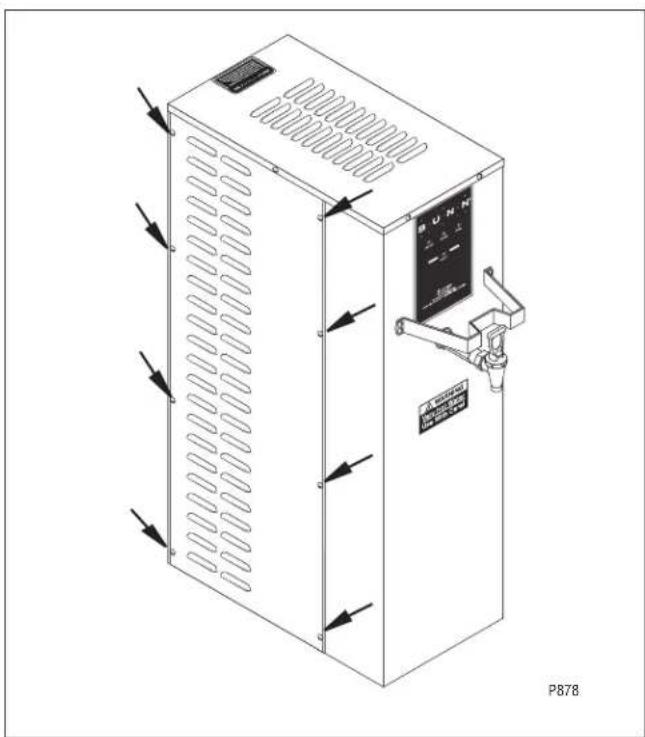
The check valve, electronic control assembly, overflow protection switch, solenoid valve, overflow tube temperature sensor, triac assembly and terminal block are located on the side of the dispenser. Access is gained by removing the side panel. The panel is attached with eight 8-32 slotted-head screws.
natural_image
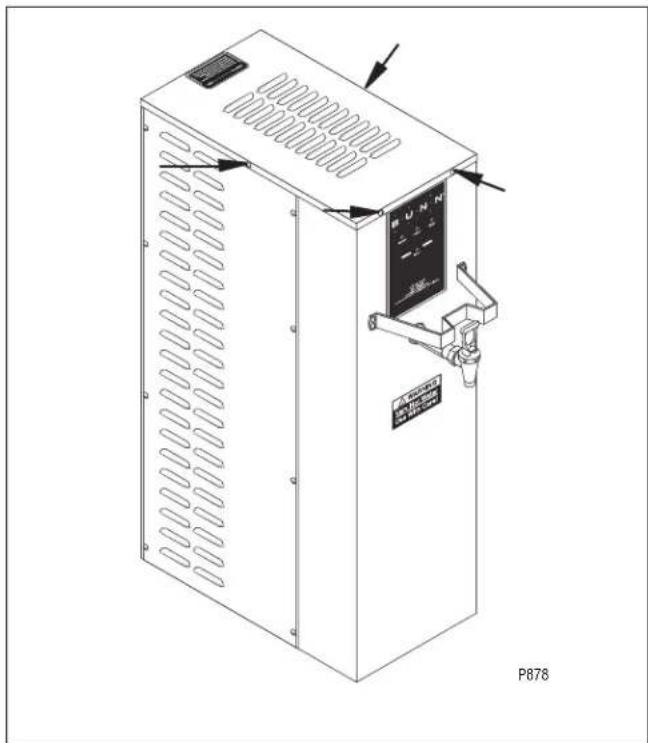
Technical line drawing of an industrial control unit with ventilation grilles and a digital display (no text or symbols)The limit thermostat, liquid level probe, tank heater, and temperature sensor are located at the top of the dispenser. Access is gained by removing the top lid, attached with four 4-40 slotted-head screws.
WARNING - Inspection, testing, and repair of electrical equipment should be performed only by qualified service personnel. Disconnect the dispenser from the power source when servicing, except when electrical tests are required and the test procedure specifically states to connect the dispenser to the power source.
Electronic Controls 10-14
Limit Thermostat 15
Safety Overflow Switch 16
Solenoid Valve 17
Tank Heater 19
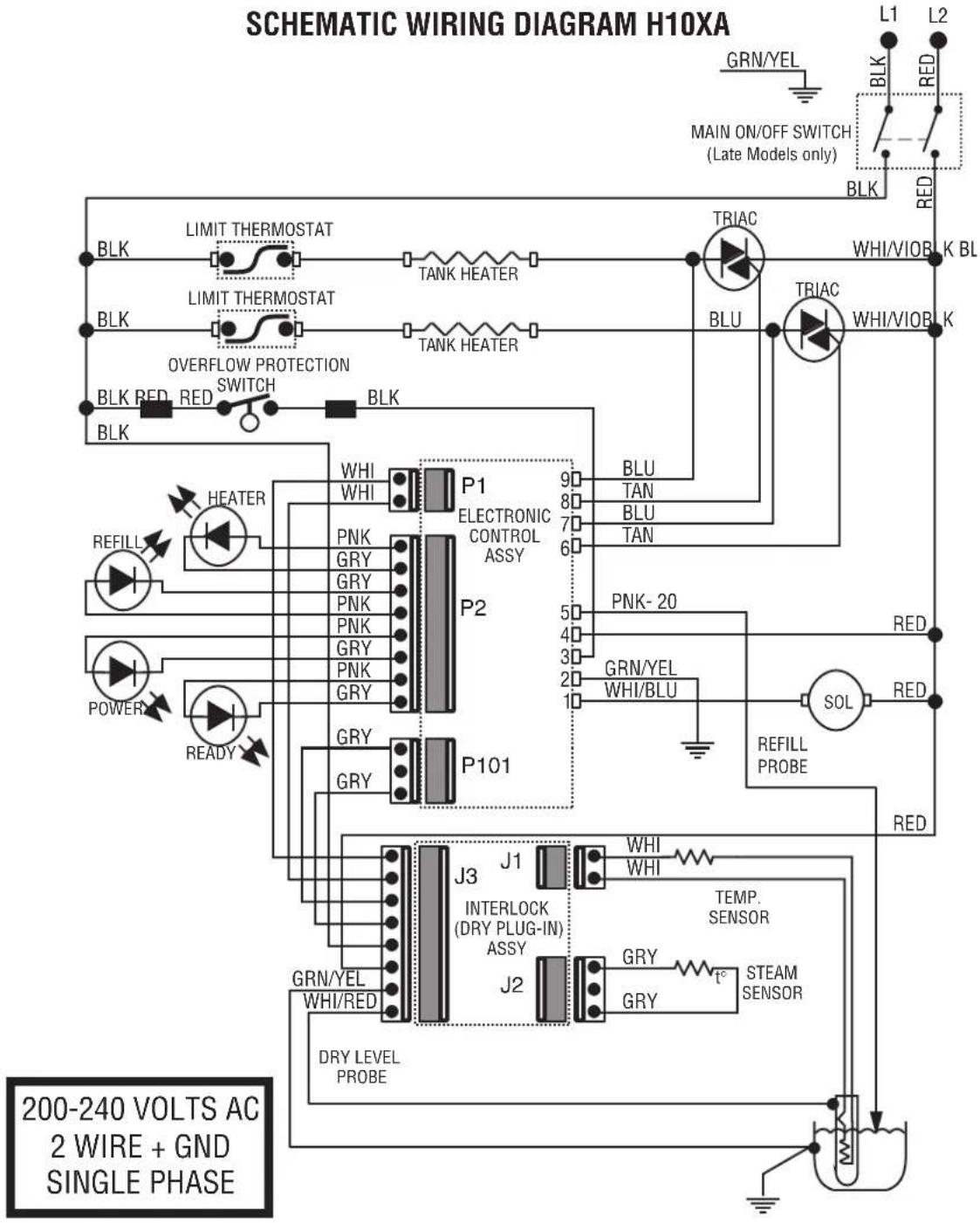
Electrical Schematic 20
SERVICE (cont.)
Electronic Control Assembly Troubleshooting: Check these items first
• Is circuit board popped out of bracket?
- Is circuit board wet due to misaligned overflow tube?
• Is water in overflow cup activating float switch?
- Is overflow cup not making good contact with tank?
- Is dispenser being operated with panels removed?
Location:
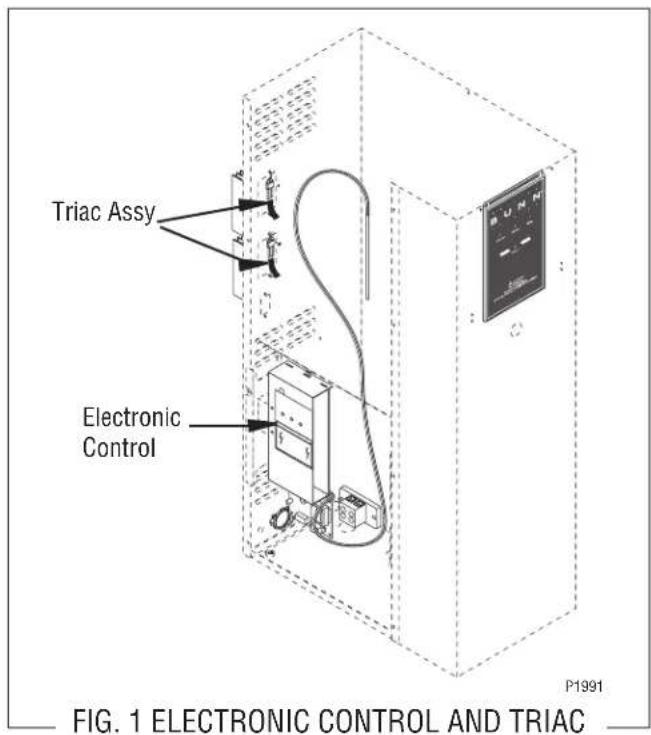
The electronic control assembly is located inside the side of the dispenser. Access will also be needed to the temperature sensor, overflow tube temperature sensor, and liquid level probe located on the tank lid and to the triac assembly located on the inside of the rear wall.
General:
This system controls the liquid level and water temperature of the dispenser. These two functions act independently of each other and should be tested separately.
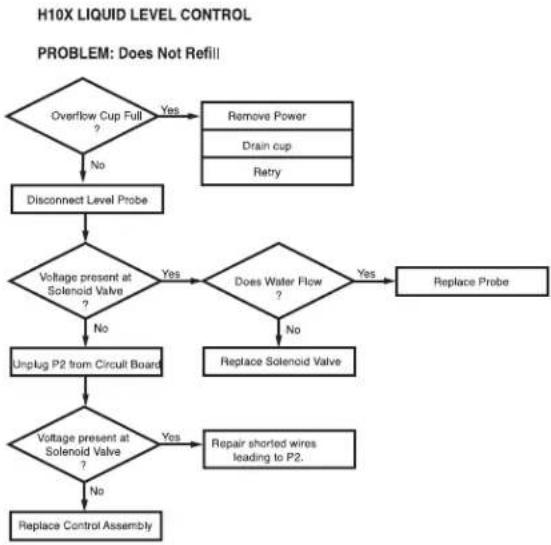
flowchart
graph TD
    A["Overflow Cup Full ?"] -->|Yes| B["Remove Power"]
    A -->|No| C["Disconnect Level Probe"]
    C --> D{Voltage present at Solenoid Valve ?}
    D -->|Yes| E{Does Water Flow ?}
    D -->|No| F["Unplug P2 from Circuit Board"]
    E -->|Yes| G["Replace Probe"]
    E -->|No| H["Replace Solenoid Valve"]
    H --> I{Voltage present at Solenoid Valve ?}
    I -->|Yes| J["Repair shorted wires leading to P2."]
    I -->|No| K["Replace Control Assembly"]
Liquid Level Control Test Procedure
- Disconnect the dispenser from the power source.
- Check the voltage across terminals 3 & 4 of the electronic control assembly with a voltmeter. Connect the dispenser to the power source. The indication must be 200 to 240 volts ac for 200 to 240 volt models.
- Disconnect the dispenser from the power source. If voltage was present as described, proceed to #4. If voltage was not present as described, refer to the Wiring Diagrams and check the dispenser wiring harness.
- Remove the pink wire from terminal 5 of the electronic control assembly.
- Check the voltage across terminals 1 & 4 of the electronic control assembly with a voltmeter. Connect the dispenser to the power source. The indication must be 200 to 240 volts ac for 200 to 240 volt models after a delay of approximately 5 seconds.
- Disconnect the dispenser from the power source.
If voltage was present as described, the liquid level control of the system is operating properly, proceed to #7.
If voltage was not present as described, replace the electronic control assembly and the temperature sensor in the tank lid.
NOTE - Each electronic control assembly is calibrated to a temperature sensor. Both components MUST be replaced as a set.
- Reconnect the pink wire to terminal 5 of the electronic control assembly.
-
Loosen the compression fitting, remove the probe from the tank lid, and inspect it for mineral deposits. Replace it if necessary. Keep the exposed ends of the probe away from any metal surface of the dispenser.
-
Check the voltage across the terminals 1 & 4 of the electronic control assembly with a voltmeter. Connect the dispenser to the power source. The indication must be 200 to 240 volts ac for 200 to 240 volt models after a delay of approximately 5 seconds.
- Touch the screw head end of the probe to the dispenser housing. The indication must be 0.
- Move the probe away from the dispenser housing. The indication must again be 200 to 240 volts ac for 200 to 240 volt models after a delay of approximately 5 seconds.
- Disconnect the dispenser from the power source.
If voltage was present as described, reinstall the probe, the sensing function of the system is operating properly.
If voltage was not present as described, check the pink probe wire and the green ground wire for continuity and/or replace the probe.
Temperature control Flow Charts
H10X THERMOSTAT
PROBLEM: Water Not Hot Enough
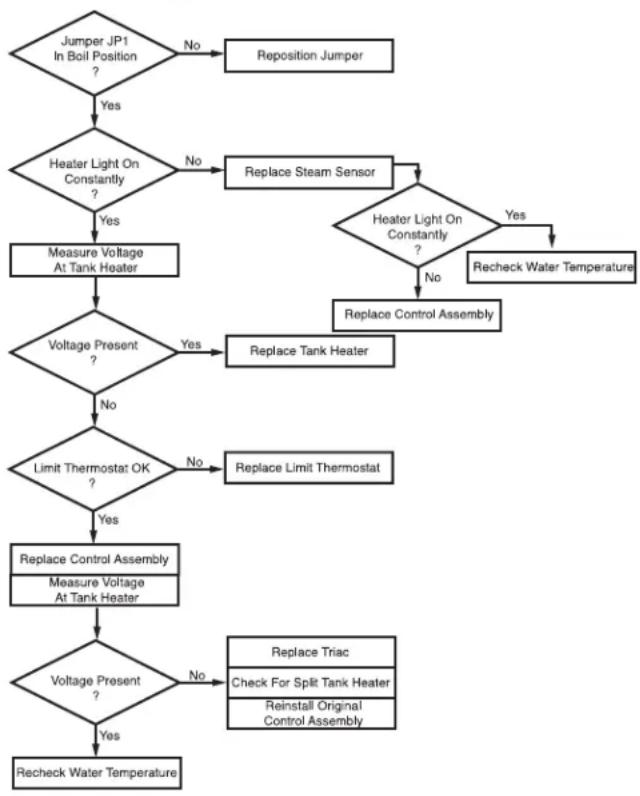
flowchart
graph TD
    A["Jumper JP1\nIn Boil Position\n?"] -->|Yes| B{Heater Light On\nConstantly\n?}
    B -->|No| C["Replace Steam Sensor"]
    B -->|Yes| D["Measure Voltage\nAt Tank Heater"]
    C --> E{Heater Light On\nConstantly\n?}
    E -->|Yes| F["Replace Control Assembly"]
    E -->|No| G["Replace Tank Heater"]
    D --> H{Voltage Present\n?}
    H -->|Yes| I["Limit Thermostat OK\n?"]
    H -->|No| J["Replace Limit Thermostat"]
    I --> K{Voltage Present\n?}
    K -->|Yes| L["Replace Control Assembly\nMeasure Voltage\nAt Tank Heater"]
    K -->|No| M["Replace Triac\nCheck For Split Tank Heater\nReinstall Original\nControl Assembly"]
    L --> N{Voltage Present\n?}
    N -->|Yes| O["Recheck Water Temperature"]
    N -->|No| P["Recheck Water Temperature"]
    C --> Q["Recheck Water Temperature"]
SERVICE (cont.)
Electronic Controls (cont.)
Temperature Control Flow Charts (cont.)
H10X THERMOSTAT
PROBLEM: Boils Excessively - Fills Cup
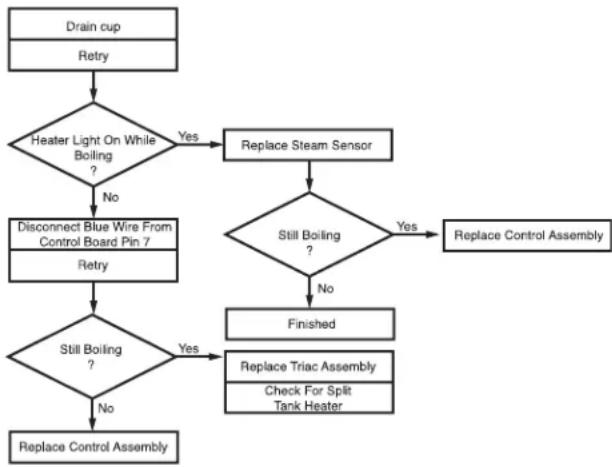
flowchart
graph TD
    A["Drain cup\nRetry"] --> B{Heater Light On While Boiling?}
    B -->|Yes| C["Replace Steam Sensor"]
    B -->|No| D["Disconnect Blue Wire From Control Board Pin 7\nRetry"]
    D --> E{Still Boiling?}
    E -->|Yes| F["Replace Triac Assembly\nCheck For Split Tank Heater"]
    E -->|No| G["Replace Control Assembly"]
    C --> H{Still Boiling?}
    H -->|Yes| F
    H -->|No| I["Finished"]
    F --> J["Replace Control Assembly"]
Temperature Control Test Procedure
- Disconnect the dispenser from the power source.
- Check the voltage across terminals 3 & 4 of the electronic control circuit board with a voltmeter. Connect the dispenser to the power source. The indication must be 200 to 240 volts ac for 200 to 240 volt models.
- Disconnect the dispenser from the power source.
If voltage was present as described, proceed to #4. If voltage was not present as described, refer to the Wiring Diagram and check the dispenser wiring harness.
- Connect the dispenser to the power source.
- Observe the red indicator on the electronic control circuit board.
- Disconnect the dispenser from the power source.
If the indicator was on or blinking, the temperature sensor is operating properly, proceed to #7.
If the indicator was off, check the sensor connection on the electronic control circuit board and/or replace the temperature sensor and the electronic control assembly.
NOTE - Each temperature sensor is calibrated to an electronic control assembly. Both components MUST be replaced as a set.
- Check the voltage across the tank heater terminals with a voltmeter. Connect the dispenser to the power source. The indication must be 200 to 240 volts ac for 200 to 240 volt models while the red indicator on the circuit board is on or blinking.
- Disconnect the dispenser from the power source.
If voltage was present as described, the temperature control of the system is operating properly.
If voltage was not present as described, contact Bunn-O-Matic to order an electronic control assembly temperature sensor, and triac assembly for evaluation and proceed to #9.
- Replace the electronic control assembly and temperature sensor.
NOTE - Each electronic control assembly is calibrated to a temperature sensor. Both components MUST be replaced as a set.
- Check the voltage across the tank heater terminals with a voltmeter. Connect the dispenser to the power source. The indication must be 200 to 240 volts ac for 200 to 240 volt models while the red indicator on the circuit board is on or blinking.
SERVICE (cont.)
Electronic Controls (cont.)
- Disconnect the dispenser from the power source.
If voltage was present as described, return the new triac assembly to Bunn-O-Matic for credit. The temperature control of the system is operating properly. If voltage was not present as described, reinstall your existing electronic control assembly and temperature sensor, and proceed to #12
- Replace the triac assembly.
- Check the voltage across the tank heater terminals with a voltmeter. Connect the dispenser to the power source. The indication must be 200 to 240 volts ac for 200 to 240 volt models while the red indicator on the circuit board is on or blinking.
- Disconnect the dispenser from the power source.
If voltage was present as described, the temperature control of the system is operating properly. Return the new electronic control assembly and temperature sensor to Bunn-O-matic for credit.
Electronic Control Removal and Replacement
NOTE - Each electronic control assembly is calibrated to a temperature sensor probe. Both components MUST be replaced as a set.
- Remove all wires from the electronic control assembly terminals.
- Remove the two 8-32 screws holding the electronic control assembly to the component bracket.
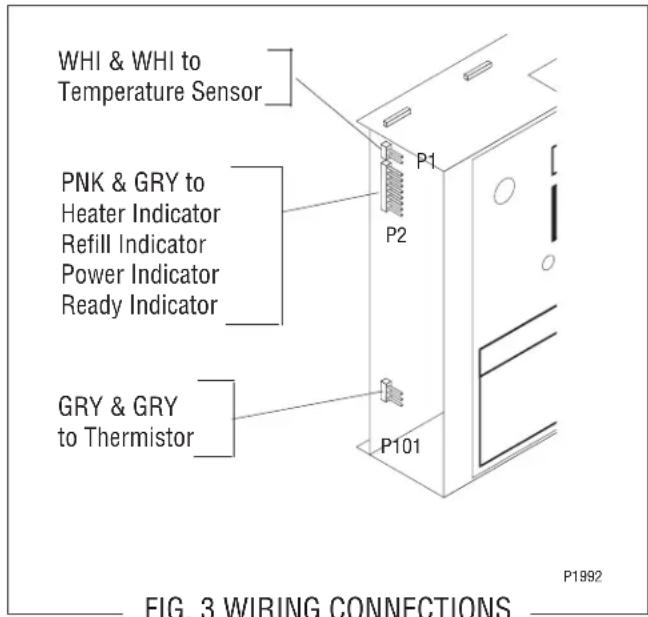
- Disconnect the temperature sensor, overflow tube temperature sensor, and indicator wires from the left side of the electronic control assembly board.
-
Remove the temperature sensor from the grommet in the tank lid.
-
Install the new temperature sensor into the grommet on the tank lid. Route the wires to the location of the new electronic control assembly.
- Attach the temperature sensor, overflow tube temperature sensor, and indicator wires to the electronic control assembly.
- Fasten the new electronic control assembly to its bracket.
- Reconnect the wires.
- Review the initial set-up procedures.
SERVICE (cont.)
Electronic Controls (cont.)
Triac Assembly Removal and Replacement
NOTE - Each triac installation requires the use of an approved silicone heat sink compound. Bunn-O-Matic recommends the use of Dow Corning 340 compound or equivalent. It can be purchased direct from Bunn-O-Matic (P.N. M2522.1000)
- Remove the existing triac assembly held in place with a 10-32 hex keps nut.
-
Apply a small amount of the silicone heat sink compound to the copper heat sink.
-
Securely fasten the new triac assembly to the rear panel in the same relative position as the one removed. Bunn-O-matic recommends tightening the nut to a torque setting of approximately 18 inch-pounds.
- Disconnect the other ends of the old triac assembly wires.
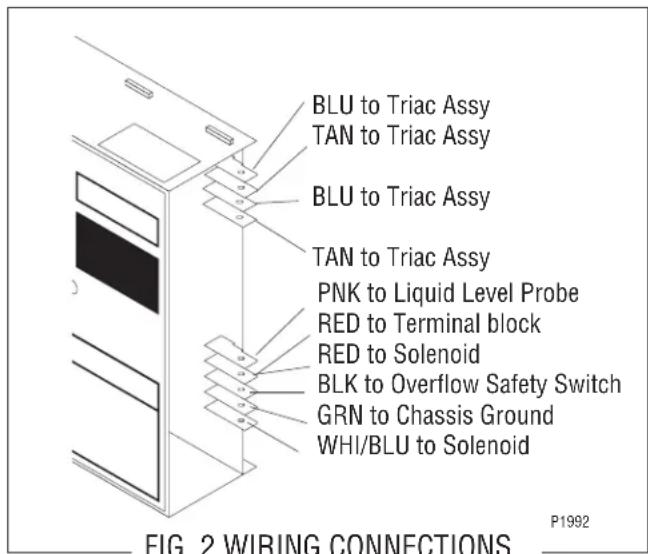
- Connect the TAN and BLU wires with spade terminals of the new assembly to the electronic control assembly, FIG. 2.
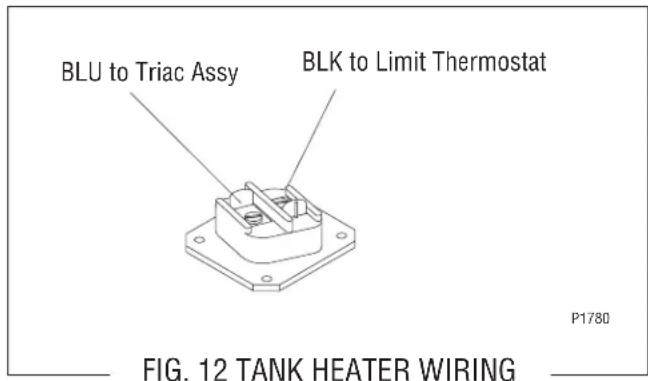
- Connect the BLU wire with the ring terminal to the tank heater, FIG. 12.
- Connect the WHI/VIO wire of the new assembly to the RED terminal at the terminal block.
SERVICE (cont.)
Limit Thermostat
Limit Thermostat
Location:
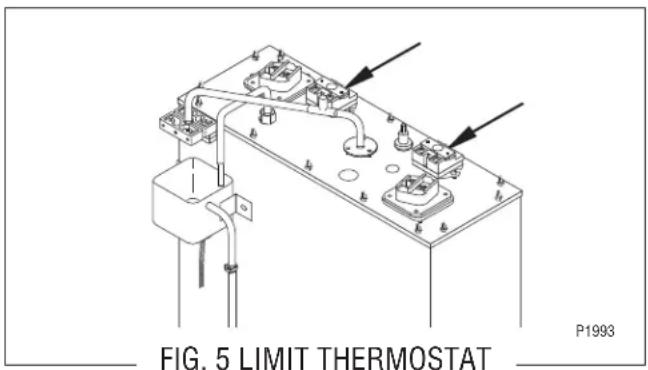
The limit thermostats are located on the tank lid. To test the limit thermostats, access will also be needed to the terminal block located on the side of the dispenser.
Test Procedure:
- Disconnect the dispenser from the power source.
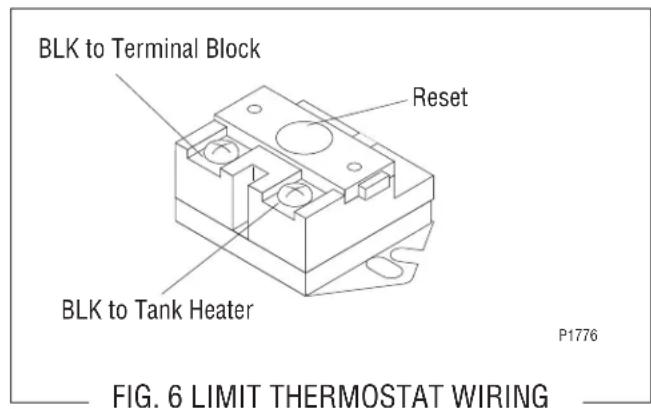
- There are two black wires on the limit thermostat terminals. One comes from the terminal block. The other goes directly to the tank heater terminal. Remove the black wire at the limit thermostat coming from the terminal block.
- Check the voltage across the black wire removed from the limit thermostat and the red wire of the terminal block with a voltmeter. Connect the dispenser to the power source. The indication must be 200 to 240 volts ac for 200 to 240 volt models.
- Disconnect the dispenser from the power source.
If voltage was present as described, reconnect the black wire and proceed to #5.
If voltage was not present as described, refer to the Wiring Diagrams and check the dispenser wiring harness.
- Check for continuity across the terminals of the limit thermostat.
If continuity is not present as described, the circuit is broken. Press the reset button of the limit thermostat and recheck for continuity.
If continuity is not present as described, replace the limit thermostat.
Removal and Replacement:
- Remove both wires from the limit thermostat terminals.
- Remove the two #10-32 nuts attaching the limit thermostat to the top of the tank.
- Install the new limit thermostat and secure into place with two #10-32 nuts.
- Refer to FIG. 6 when reconnecting the wires.
SERVICE (cont.)
Overflow Protection Switch
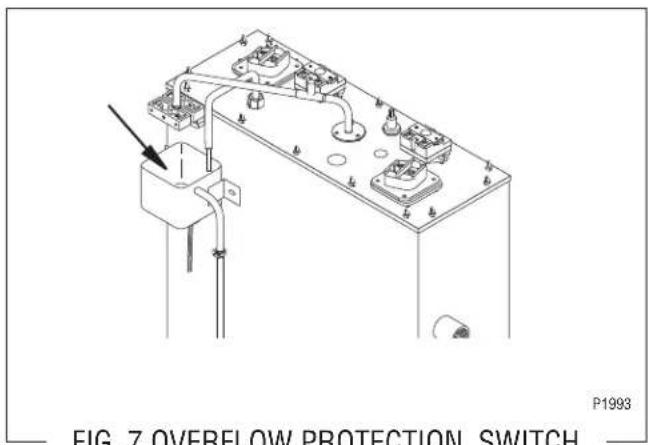
FIG. 7 OVERFLOW PROTECTION SWITCH
Removal and Replacement:
- Disconnect the black wires from the overflow protection switch.
- Remove the nut beneath the copper overflow cup.
- Remove the entire switch assembly from the cup.
- Place the new switch assembly into the cup, wires first. Make sure that a gasket is in place around the threaded switch stem.
NOTE - The magnets must be at the top of the float and there must be NO stainless steel washers installed for the overflow protection switch to operate properly.
- Install the nut beneath the copper overflow cup. Be sure not to overtighten.
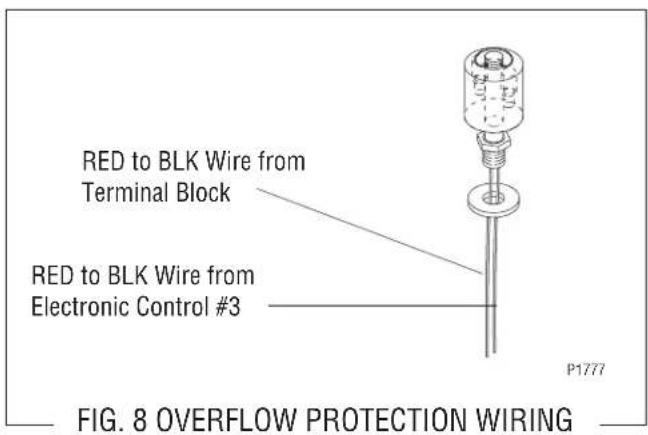
- Reconnect the wires, FIG. 8.
Location:
The overflow protection switch is located within the side of the dispenser inside the copper overflow cup. For testing or removal of the overflow protection switch, access may also be needed by removing the two screws attaching the electronic control assembly to its mounting bracket.
Test Procedure:
- Once voltage is verified at the power source, check for continuity across the overflow protection switch red wires only until the plastic float is raised and check that continuity returns when the plastic float is again lowered.
If continuity is present as described, reconnect each of the red wires to the black wires, the overflow protection switch is operating properly. If continuity is not present as described, replace the overflow protection switch.
SERVICE (cont.)
Solenoid Valve
Location:
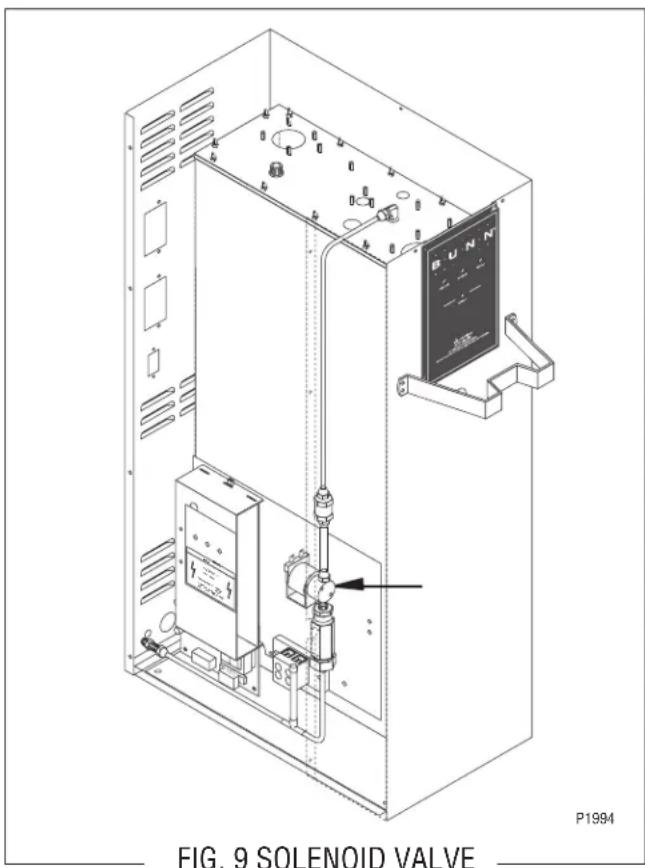
The solenoid valve is located within the side of the dispenser on the right side near the bottom.
To test the solenoid valve, access will also be needed to the electronic control assembly.
Test Procedure:
- Disconnect the dispenser from the power source and turn off the water supply to the dispenser.
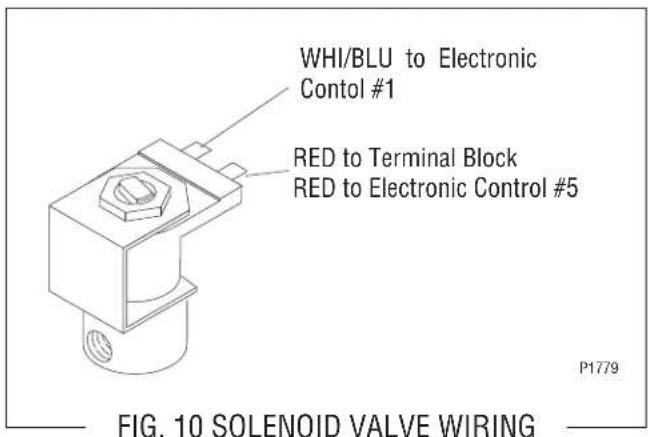
- Remove the pink wire from terminal 5 of the electronic control assembly.
- Check the voltage across the solenoid valve coil terminals with a voltmeter. Connect the dispenser to the power source. The indication must be 200 to 240 volts ac for 200 to 240 volt models after a delay of approximately 5 seconds.
- Disconnect the dispenser from the power source.
If voltage was present as described, proceed to #5. If voltage was not present as described, refer to the Wiring Diagrams and check the dispenser wiring harness.
- Remove both wires from the solenoid valve coil terminals.
- Check for continuity across the solenoid valve coil terminals.
If continuity is present as described, reconnect the wires and proceed to #7.
If continuity is not present as described, replace the solenoid valve coil.
-
Check the solenoid valve for coil action. Connect the dispenser to the power source. Listen carefully in the vicinity of the solenoid valve for a “clicking” sound after approximately 5 seconds, as the coil magnet attracts the plunger.
-
Disconnect the dispenser from the power source.
-
Reconnect the pink wire to terminal 5 of the electronic control assembly.
If the sound was heard as described and water will not pass through the solenoid valve, there may be a blockage in the water line before or after the solenoid valve or the solenoid valve may require inspection for wear and removal of waterborne particles.
If the sound was not heard as described, replace the solenoid valve.
Removal and Replacement:
- Remove all wires from the solenoid valve coil.
- Turn off the water supply to the dispenser.
- Disconnect the water lines to and from the solenoid valve.
- Remove the two 8-32 slotted-head screws holding the solenoid valve and mounting bracket to the component bracket.
SERVICE (cont.)
Solenoid Valve (cont.)
- Lift out the solenoid valve.
- Remove the two 10-32 slotted-head screws holding the solenoid valve to its mounting bracket.
- Securely install the new solenoid valve to its mounting bracket. The direction of flow arrow must be pointing towards the tank lid.
- Attach the solenoid valve and mounting bracket to the component bracket.
- Securely fasten the water lines to and from the solenoid valve.
- Reconnect the wires, FIG. 10.
SERVICE (cont.)
Tank Heater
Location:
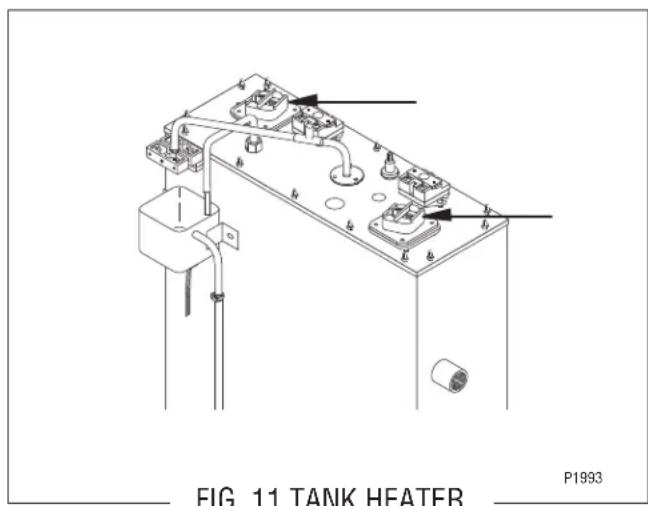
The tank heater is located in the tank lid.
Test Procedure:
- Disconnect the dispenser from the power source.
- Check the voltage across the terminals of the tank heater with a voltmeter. Connect the dispenser to the power source. The indication must be 200 to 240 volts ac for 200 to 240 volt models.
- Disconnect the dispenser from the power source.
If voltage is present as described, proceed to #4. If voltage is not present as described, replace the tank heater.
- Remove the tank heater from the tank lid and inspect it for cracks in the sheath.
If continuity is present as described, reinstall the tank heater. The tank heater is operating properly. If continuity is not present as described, replace the tank heater.
Removal and Replacement:
- Remove the wires to the tank heater.
- Remove the 8-32 nuts from the tank heater flange.
- Remove the tank heater.
- Inspect the tank heater gasket and replace if necessary.
- Securely install the new tank heater. Be certain of a watertight seal.
- Reconnect the wires, FIG. 12.
WIRING DIAGRAM
flowchart
graph TD
    A["200-240 VOLTS AC 2 WIRE + GND SINGLE PHASE"] --> B["BLK"]
    B --> C["LIMIT THERMOSTAT"]
    C --> D["TANK HEATER"]
    D --> E["TRIAC"]
    E --> F["BLU"]
    F --> G["TRIAC"]
    G --> H["WHI/VIQB K BL"]
    H --> I["RED"]
    I --> J["MAIN ON/OFF SWITCH (Late Models only)"]
    J --> K["L1 L2"]
    J --> L["BLK RED"]
    J --> M["BLK RED"]
    J --> N["BLK RED"]
    J --> O["BLK RED"]
    J --> P["BLK RED"]
    J --> Q["BLK RED"]
    J --> R["BLK RED"]
    J --> S["BLK RED"]
    J --> T["BLK RED"]
    J --> U["BLK RED"]
    J --> V["BLK RED"]
    J --> W["BLK RED"]
    J --> X["BLK RED"]
    J --> Y["BLK RED"]
    J --> Z["BLK RED"]
    J --> AA["BLK RED"]
    J --> AB["BLK RED"]
    J --> AC["BLK RED"]
    J --> AD["BLK RED"]
    J --> AE["BLK RED"]
    J --> AF["BLK RED"]
    J --> AG["BLK RED"]
    J --> AH["BLK RED"]
    J --> AI["BLK RED"]
    J --> AJ["BLK RED"]
    J --> AK["BLK RED"]
    J --> AL["BLK RED"]
    J --> AM["BLK RED"]
    J --> AN["BLK RED"]
    J --> AO["BLK RED"]
    J --> AP["BLK RED"]
    J --> AQ["BLK RED"]
    J --> AR["BLK RED"]
    J --> AS["BLK RED"]
    J --> AT["BLK RED"]
    J --> AU["BLK RED"]
    J --> AV["BLK RED"]
    J --> AW["BLK RED"]
    J --> AX["BLK RED"]
    J --> AY["BLK RED"]
    J --> AZ["BLK RED"]
    J --> BA["BLK RED"]
    J --> BB["BLK RED"]
    J --> BC["BLK RED"]
    J --> BD["BLK RED"]
    J --> BE["BLK RED"]
    J --> BF["BLK RED"]
    J --> BG["BLK RED"]
    J --> BH["BLK RED"]
    J --> BI["BLK RED"]
    J --> BJ["BLK RED"]
    J --> BK["BLK RED"]
    J --> BL["BLK RED"]
    J --> BM["BLK RED"]
    J --> BN["BLK RED"]
    J --> BO["BLK RED"]
    J --> BP["BLK RED"]
    J --> BQ["BLK RED"]
    J --> BR["BLK RED"]
    J --> BS["BLK RED"]
    J --> BT["BLK RED"]
    J --> BU["BLK RED"]
    J --> BV["BLK RED"]
    J --> BW["BLK RED"]
    J --> BX["BLK RED"]
    J --> BY["BLK RED"]
    J --> BZ["BLK RED"]
    J --> CA["BLK RED"]
    J --> CB["BLK RED"]
    J --> CC["BLK RED"]
    J --> CD["BLK RED"]
    J --> CE["BLK RED"]
    J --> CF["BLK RED"]
    J --> CG["BLK RED"]
    J --> CH["BLK RED"]
    J --> CI["BLK RED"]
    J --> CJ["BLK RED"]
    J --> CK["BLK RED"]
    J --> CR["BLK RED"]
    J --> CS["BLK RED"]
    J --> CT["BLK RED"]
    J --> CU["BLK RED"]
    J --> CV["BLK RED"]
    J --> CW["BLK RED"]
    J --> CX["BLK RED"]
    J --> CY["BLK RED"]
    J --> CZ["BLK RED"]
    J --> DA["BLK RED"]
    J --> DB["BLK RED"]
    J --> DC["BLK RED"]
    J --> DD["BLK RED"]
    J --> DE["BLK RED"]
    J --> DF["BLK RED"]
    J --> DG["BLK RED"]
    J --> DH["BLK RED"]
    J --> DI["BLK RED"]
    J --> DJ["BLK RED"]
    J --> DK["BLK RED"]
    J --> DL["BLK RED"]
    J --> DV["BLK RED"]
    J --> DW["BLK RED"]
    J --> DX["BLK RED"]
    J --> DXB["BLK RED"]