MUL-110 - Multimeter Steren - Free user manual and instructions
Find the device manual for free MUL-110 Steren in PDF.


| Product Type | Digital Multimeter |
| Brand | Steren |
| Model | MUL-110 |
| Dimensions | Approx. 126 x 70 x 28 mm |
| Weight | Approx. 170 g (including battery) |
| Power Supply | 9V battery (6F22 or equivalent) |
| Display | LCD, 3.5 digits, 2000 counts |
| DC Voltage Range | 200 mV, 2 V, 20 V, 200 V, 600 V |
| AC Voltage Range | 200 V, 600 V |
| DC Current Range | 200 µA, 2 mA, 20 mA, 200 mA, 10 A |
| AC Current Range | 200 µA, 2 mA, 20 mA, 200 mA, 10 A |
| Resistance Range | 200 Ω, 2 kΩ, 20 kΩ, 200 kΩ, 2 MΩ, 20 MΩ |
| Capacitance Measurement | Not available |
| Frequency Measurement | Not available |
| Temperature Measurement | Not available |
| Continuity Test | Yes, with buzzer |
| Diode Test | Yes |
| Transistor Test | Not available |
| Safety Rating | CAT II 600V |
| Overload Protection | Fuse for current ranges (10A/250V) |
| Low Battery Indication | Yes, battery symbol on display |
| Auto Power Off | Yes, after approx. 15 minutes |
| Accessories Included | Test leads, 9V battery, user manual |
| Maintenance | Replace battery when low; clean with dry cloth; do not use wet. |
| Repairability | Fuse replaceable; no other user-serviceable parts. |
Frequently Asked Questions - MUL-110 Steren
User questions about MUL-110 Steren
0 question about this device. Answer the ones you know or ask your own.
Ask a new question about this device
Download the instructions for your Multimeter in PDF format for free! Find your manual MUL-110 - Steren and take your electronic device back in hand. On this page are published all the documents necessary for the use of your device. MUL-110 by Steren.
USER MANUAL MUL-110 Steren
MEDICIONES
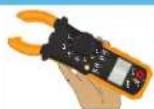
Brazos del gancho
Mexico, D.F., RFC, ESC9610258N4
ELECTRONICA STEREN DE GUADALAJARA, S.A.
Lopez Cotilla No. 51, Centro, 44108, Guadalajara, Jal. RFC: ESGB10511HT6 ELECTRONICA STEREN DE MONTERREY S A
ELECTRONICA OTEREN DE MONTERREY, U.A. Colón 130 Pte. Centro 64001 Montesrey, NJ. PE
ELECTRONICA STEREN DE TIJUANA, S.A. de C.V.
Cale 2a, Juárez 7636, Centro, 22000, Tijuana, B.C.N. RPC: E5T980909NU5
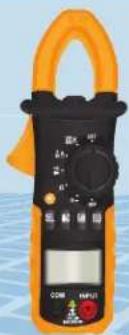
Auto range hook multi-tester
natural_image
Close-up of a black and orange handheld clamp meter with a digital display and control knobs (no visible text or symbols)Instruction manual
0914z
IMPORTANT
The instructions of this manual are for reference about the product. There may be differences due to updates.
Please check our website (www.steren.com) to obtain the latest version of the instruction manual.
CAUTIONS
• To avoid shock hazard, do the high voltage measures, carefully.
• Always disconnect the tested circuit before connecting testing leads.
- Before to use the range switch, disconnect the testing leads.
- Never operate this multimeter over the maximal indicated tolerance
- When you use this multimeter on TV sets or interrupted power circuits, could have voltage pulses with high amplitudes and may cause damages on the ammeter.
- Be careful when you manage with high voltages around 60VDC (V=) or 30 VAC RMS (V-).
- Keep the fingers in back of the test barriers, during measuring.
- Unplug the test leads from all the electrical current before to open the ammeter.
- Never use the ammeter if the battery cover is not placed correctly.
- Only clean with a soft, damp cloth.
HIGHLIGHTS
• The auto range hook multi-tester has an ergonomic design.
- The ampere-meter function - using the hook- is very accurate and free of risks, with it you don't require to peel the cable to measure.
- It can perform measuring of resistances, diodes, AC and DC voltage, AC amperage, and continuity.
- Very useful for students, technicians and engineers.
- It has a luminous display, hold, maximum value and auto range.
• Auto range.
• Audible continuity.
- Hold.
• Maximum value.
• Light for the hook and screen.
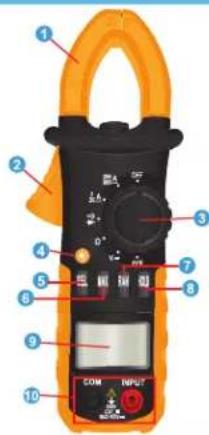
CONTROLS
- Hook: it measures the magnetic field of a cable.
- Hook button: Opens or closes the arms of the hook.
- Select knob: select ranges and functions to be carried out.
- [★]: Press and hold to switch on the illumination of the display. In current measurement light, at the same time, the auxiliary light.
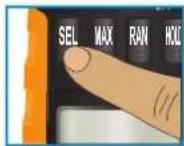
- SEL: Select different measurements.
- MAX: Shows the maximum value of the measurement.
- RAN: It selects the range manually. Leave it pressed to return to the automatic selection.
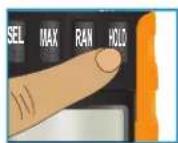
- HOLD: Holds the measuring data.
- LCD screen.
- Inputs: Connect the measuring leads.
MEASUREMENTS
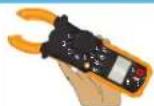
Hook arms
Place the current-carrying conductor (A\~) in the middle of the arms of the hook by pressing the hook button to open and releasing it to close it.
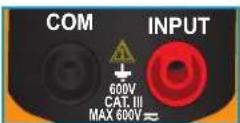
Inputs
This device has two entries that are protected against overload. During use connect the black measuring lead into the COM jack and the red lead to the INPUT one.
If you want to keep a measure on the screen for easy reading, press the HOLD button. Press once more to return to the measurement screen.
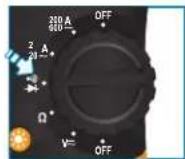
Current measurement
- Turn the selector knob to the desired A\~ position. Hook arms will measure the amps of AC (\~) that circulate through the conductor.
- When "0.L" appears on the LCD, it means that there is a situation of overload. Select a higher range.
Voltage measurement
- Place the selector knob on the V range and connect the measuring leads.
- Press the SEL button to select voltage of direct (DC) or alternating (AC) current.
- When "0.L" appears on the LCD, it means that there is a situation of overload.
Resistance measurement
- Place the selector knob on the Ω position and connect the measuring leads.
If the resistance being measured exceeds the maximum possible value, "0.L" will be displayed on the LCD. - When making a resistance measurement in circuits, be careful that these are without power and capacitors are fully discharged.
Diode measurement
To prevent electrical shock and/or equipment damage, disconnect the circuits and discharge capacitors with high voltage before making measurements of diodes.

- Set the selector knob in the range.
- Press the SEL button to activate the diode test mode.
- Will appear on screen.
- The meter will show the approximate voltage of the diode.
Continuity measurement

- Place the selector knob in the position
- Press the SEL button to activate the function of continuity.
- will appear on screen.
- When the measurement result is less than 25 Ω, a continuous tone will sound.
BATTERY REPLACEMENT
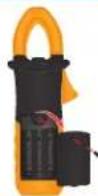
If the symbol "☐" appears on the LCD, the battery should be replaced with a new one.
- Make sure that measurement probes are unplugged to prevent electric shock.
- Open the battery compartment using a screwdriver and place 3 new AAA batteries. Be careful with the polarity, since it can cause permanent damage to the equipment.
- Replace the compartment cover.
- Turn on the meter.
SPECIFICATIONS
Input: 4.5 V= (3 x AAA)
Resistance: 200 to 20 Ω accuracy ± 1.2%
DC voltage: 200 mV to 600 V accuracy ± 0.8%
AC voltage: 2 to 600 V accuracy ± 1.0%
AC current: 200 mA-20 A ±3%, 20/200 A ±2.5%, 200/600 A ±1.5%
LCD screen: 3 1/2 digits, with polarity indicator
Operating temperature: 0 to 50 °C
RH: < 75%
Consumption: 0.01 W/h
Stand-by power consumption: not applicable
Product design and specifications are subject to change without notice.


STEREN
Product: Auto range hook multi-tester
Part number: MUL-110
Brand: Steren
WARRANTY
This Steren product is warranted under normal usage against defects in workmanship and materials to the original purchaser for one year from the date of purchase.
CONDITIONS
- This warranty card with all the required information, invoice or purchase ticket, product box or package, and product must be presented when warranty service is required.
-
- If the product stills on the warranty time, the company will repair it free of charge.
- The repairing time will not exceed 30 natural days, from the day the claim was received.
-
- Steren sell parts, components, consumables and accessories to customer, as well as warranty service, at any of the addresses mentioned later.
THIS WARRANTY IS VOID IN THE NEXT CASES:
If the product has been damaged by an accident, sole of God, mishancing, leaky batteries, failure to follow enclosed instructions, improper repair by unauthorized personnel, improper safe keeping, among others.
a) The consumer can also claim the warranty service in the purchase establishment.
b) If you lose the warranty card, we can reissue it, if you show the invoice or purchase ticket.
RETAILER INFORMATION
Name of the retailer
Address
Product
Branc
Serial number
Date of delivery
In case your product fails or have questions, please contact your nearest dealer. If you are in Mexico, please give a call to our Call Center.
01 800 500 9000
- MEDICIONES
- Brazos del gancho
- Auto range hook multi-tester
- IMPORTANT
- CAUTIONS
- HIGHLIGHTS
- CONTROLS
- MEASUREMENTS
- Hook arms
- Inputs
- Current measurement
- Voltage measurement
- Resistance measurement
- Diode measurement
- Continuity measurement
- BATTERY REPLACEMENT
- SPECIFICATIONS
- STEREN
- WARRANTY
- CONDITIONS
- THIS WARRANTY IS VOID IN THE NEXT CASES:
- RETAILER INFORMATION
- 800 500 9000
Brand : Steren
Model : MUL-110
Category : Multimeter