
Detroit 100 BT - Hi-Fi System BLAUPUNKT - Free user manual and instructions
Find the device manual for free Detroit 100 BT BLAUPUNKT in PDF.


| Brand | Blaupunkt |
| Model | Detroit 100 BT |
| Product Type | Hi-Fi System |
| Dimensions (Main Unit) | 360 x 250 x 150 mm |
| Weight (Main Unit) | 3.5 kg |
| Power Supply | AC 100-240 V, 50/60 Hz |
| Power Consumption | 30 W (standby < 1 W) |
| Bluetooth Version | 5.0 |
| Supported Audio Formats | MP3, WMA, WAV, FLAC |
| Radio Tuner | FM, AM (MW) |
| USB Playback | Yes, up to 32 GB |
| CD Player | Yes, CD, CD-R/RW |
| Speaker Output Power | 2 x 10 W RMS |
| Number of Speakers | 2 (passive) |
| Remote Control | Included |
| Display | LED dot matrix |
| Cleaning Instructions | Wipe with a soft dry cloth; do not use liquid cleaners. |
| Safety Certifications | CE, RoHS |
| Spare Parts Availability | Contact Blaupunkt service center |
| Reparability Index | 5.6 / 10 |
Frequently Asked Questions - Detroit 100 BT BLAUPUNKT
User questions about Detroit 100 BT BLAUPUNKT
0 question about this device. Answer the ones you know or ask your own.
Ask a new question about this device
Download the instructions for your Hi-Fi System in PDF format for free! Find your manual Detroit 100 BT - BLAUPUNKT and take your electronic device back in hand. On this page are published all the documents necessary for the use of your device. Detroit 100 BT by BLAUPUNKT.
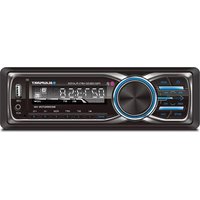
USER MANUAL Detroit 100 BT BLAUPUNKT
- Power on/off
- Band Button/Answer Call
- Fast Forward/Fast Rewind
- Play/Pause
- Repeat Button
- Number Keypad
- Mute Button
- Mode Button/End Call
- APS Button (Auto Program Stations)
- Volume Controls
- Select Button
- Display Button
- Random Playback
- INT Button/Browse Function
BASIC FUNCTIONS
POWER On/Off
To turn ON the unit, press the Power button. To turn off the unit, press the button once. The unit can power on without ACC power, and will automatically power off after 60 minutes.
EJECT
Press to eject disc. If disc is not removed within 10 seconds, the disc will retract back into disc slot, but not play.

- In Radio mode:
Press and hold to surf stations one at a time in descending order. Press once to automatically surf stations in descending order.
- In CD/USB/SD mode:
Press to go back to the last track. Press and hold to rewind the track that is currently playing.

- In Radio mode:
Press and hold to surf stations one at a time in ascending order. Press once to automatically surf stations in ascending order.
- In CD/USB/SD mode:
Press to skip to next track. Press and hold to fast forward the track that is currently playing.
BAND
In Radio Mode, press BAND to cycle between AM/FM stations as shown below:
FM1-FM2-FM3-AM1-AM2
In Bluetooth mode, BAND is used to answer incoming calls.
APS (Auto Program Stations)
Press briefly to cycle through each programmed station for 5 seconds. Press and hold the APS button for 2 seconds to automatically seek stations, memorize them, and assign them to keys M1 to M6. Once complete, the unit returns to play.
Note: While the unit is seeking stations, it will enter sleep mode. Each band can store up to six stations, for a total of eighteen programmable stations.
DISP
In USB/SD mode, press the DISP button to display Track/Artist/Folder information.
MUTE
Press to turn on or off. Alternatively, audio can be muted using the volume controls.
SEL (Tone Adjustment)/ Volume Control
Turn the volume knob right to increase the volume level. Turn it left to decrease. Press SEL repeatedly to access settings for BASS, TREBLE, LEFT CHANNEL, and RIGHT CHANNEL. You can also adjust the levels using the volume button.
Note: Bass and Treble cannot be selected or changed when the equalizer is turned on.
Pause/Play/ Key Number 1
In CD/USB/SD mode, press the Pause/Play button to pause, play, or resume audio playback. Turning the volume knob will also resume playback. In Radio mode, press to select preset station number 1.
Browse/ Key Number 2
In CD/USB/SD mode, press the Browse button to play a 10-second snippet of each song. In Radio mode, press to select preset station number 2.
Repeat / Key Number 3
In CD/USB/SD mode, press the repeat button to repeat a single song. In Radio mode, press to select preset station number 3.
Random Play / Key Number 4
In CD/USB/SD mode, press the Random play button to shuffle through your music. In Radio mode, press to select preset station number 4.
D- / Key Number 5
In CD/USB/SD mode, press the D- button to display the previous folder. In Radio mode, press to select preset station number 5.
D+ / Key Number 6
In CD/USB/SD mode, press the D+ button to display the next folder. In Radio mode, press to select preset station number 6.
MODE
Press the MODE button to cycle between RADIO/DISC/USB/SD/AUX modes. In Bluetooth mode, the MODE key is used to end a call.
USB/SD Card Playback
Insert USB or SD card into respective ports. Media will begin playing from your USB or SD Card automatically. If auto play does not begin, press the MODE button to select USB/SD Card playback mode. Support for USB/SD Cards up to 16 GB.
Bluetooth Pairing
- Enable Bluetooth on your device.
- Scan for available devices.
- "BLAUPUNKT" or similar will appear. Select "BLAUPUNKT".
- Enter the Code: 0000
Once paired you can receive calls and play music via Bluetooth
SPECIFICATIONS
System Parameter
Working Voltage: DC 10.8V-14.8V
Working Current: MAX 10A
Memory Current:<10mA
Working Temperature: -20°C to +20°C
Storage Temperature: -30°C to +80°C
Audio Parameter
Sound Non-balance ≤2dB
Channel Separation ≥56dB
Frequency Response
20Hz-20KHz(±3dB)
RADIO PARAMETER
Frequency Range:
FM: 87.50MHz-108.00MHz
AM: 530KHz-1710KHz
Storage number:
FM: 18 radio stations
AM: 12 radio stations
Search Method: manual/auto
Amplifier Parameter
Test Voltage 14.4V
4 x 30 Watts
Speaker Impedance 4-8 Ω
TROUBLE SHOOTING
| Problem | cause | Solution |
| Unit will not turn on (no power) | Yellow wire not connected or incorrect voltageRed wire not connected or incorrect voltage | Check connections for proper voltage(11-14.4VDC) |
| Black wire not connected | Check connection to ground | |
| Fuse blown | Replace fuse | |
| Unit has power (bus no sound) | Speaker wires not connected | Check connections at speakers |
| One or more speaker wires touching each other or touching chassis ground | Insulate all bare speaker wires from each other and chassis ground | |
| Unit blows fuses | Yellow or red wire touching chassis ground | Check for pinched wire |
| Speaker wires touching chassis ground | Check for pinched wire | |
| Incorrect fuse rating | Use fuse with correct rating | |
| Excessive skipping | Unit is not mounted correctly or back strap is not secure | Check mounting sleeve and back strap support |
NOTE: This equipment has been tested and found to comply with the limits for a Class B digital device, pursuant to Part 15 of the FCC Rules. These limits are designed to provide reasonable protection against harmful interference in a residential installation. This equipment generates, uses and can radiate radio frequency energy and, if not installed and used in accordance with the instructions, may cause harmful interference to radio communications. However, there is no guarantee that interference will not occur in a particular installation. If this equipment does cause harmful interference to radio or television reception, which can be determined by turning the equipment off and on, the user is encouraged to try to correct the interference by one or more of the following measures:
- Reorient or relocate the receiving antenna.
- Increase the distance between the equipment and receiver.
- Connect the equipment into an outlet on a circuit different from that to which the receiver is connected.
- Consult the dealer or an experienced radio/TV technician for help.

- BASIC FUNCTIONS
- POWER ON/OFF
- EJECT
- BAND
- APS (AUTO PROGRAM STATIONS)
- DISP
- MUTE
- SEL (TONE ADJUSTMENT)/ VOLUME CONTROL
- PAUSE/PLAY/ KEY NUMBER
- BROWSE/ KEY NUMBER
- REPEAT / KEY NUMBER
- RANDOM PLAY / KEY NUMBER
- D- / KEY NUMBER
- D+ / KEY NUMBER
- MODE
- USB/SD CARD PLAYBACK
- BLUETOOTH PAIRING
- SPECIFICATIONS
- TROUBLE SHOOTING
Brand : BLAUPUNKT
Model : Detroit 100 BT
Category : Hi-Fi System