
Ercole Plus INN-556 - Air purifier Innoliving - Free user manual and instructions
Find the device manual for free Ercole Plus INN-556 Innoliving in PDF.


| Product Type | Air Purifier |
| Brand | Innoliving |
| Model | Ercole Plus INN-556 |
| Rated Voltage | 220-240V AC, 50/60 Hz |
| Rated Power | 45W |
| WiFi Frequency Band | 2412 - 2472 MHz |
| Maximum Transmission Power | 17.9 dBm |
| Filtration Type | Composite Filter (HEPA-type) |
| Fan Speeds | Low, Medium, High |
| Auto Mode | Yes (based on PM2.5 levels) |
| Timer Settings | 1, 2, 4, 8 hours |
| Air Quality Indicator (PM2.5) | Green (0-15), Blue (15-35), Red (>35) |
| PM2.5 Sensor | Yes, real-time display |
| Negative Ion Generator | Automatic, no separate control |
| Smart App Control | Tuya Smart App (iOS/Android) |
| Voice Control | Amazon Alexa (via Tuya skill) |
| Filter Reset Button | Yes, press and hold 3 seconds after replacement |
| Safety Class | Class II insulation |
| Minimum Clearance from Walls | 20 cm |
| Power Cord Length | Approx. 1.5 m (typical) |
Frequently Asked Questions - Ercole Plus INN-556 Innoliving
User questions about Ercole Plus INN-556 Innoliving
0 question about this device. Answer the ones you know or ask your own.
Ask a new question about this device
Download the instructions for your Air purifier in PDF format for free! Find your manual Ercole Plus INN-556 - Innoliving and take your electronic device back in hand. On this page are published all the documents necessary for the use of your device. Ercole Plus INN-556 by Innoliving.
USER MANUAL Ercole Plus INN-556 Innoliving
innoliving easy tech, easy life
PURIFICATORE ARIA AIR PURIFIER
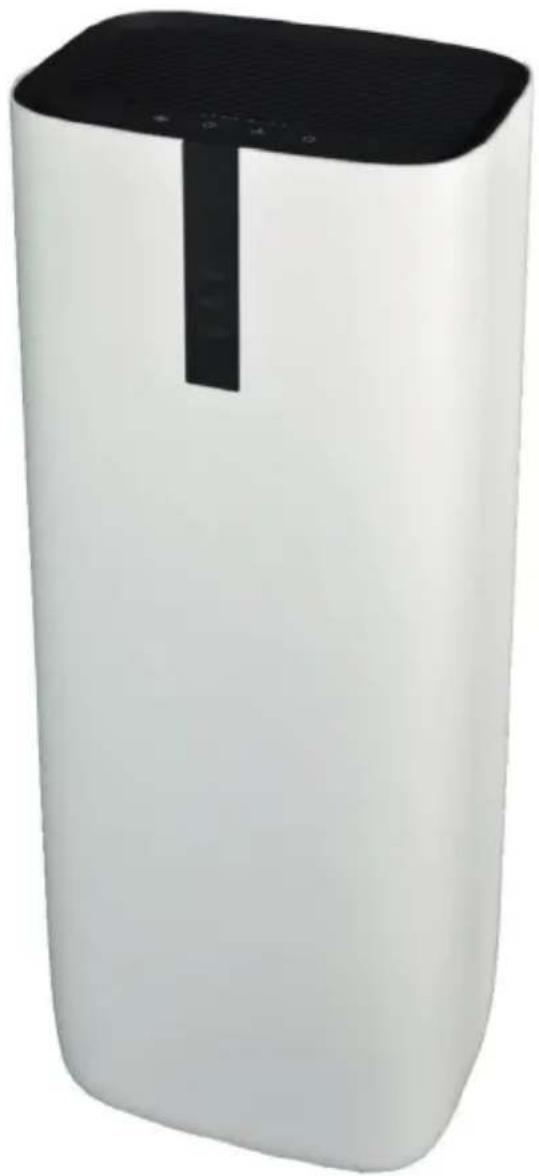
natural_image
White rectangular electronic device with black lid and ventilation grille (no visible text or symbols)Ercole ULTRA
INN-556
MANUALE D'USO
USER MANUAL
natural_image
Illustration of hands operating a tool on a container with liquid, labeled Fig. 1 (no text or symbols on diagram)natural_image
Diagram of a portable air conditioner unit with labeled parts (Fig. 2 and Fig. 3), showing internal structure without any text or symbols on the device itself.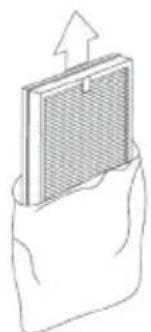
natural_image
Illustration of a mesh filter component being placed on a surface, with an upward arrow indicating motion (no text or symbols)natural_image
Line drawing of a hand opening a device into a rack (no text or symbols)natural_image
Line drawing of a hand holding a coiled cable or spring against a wall (no text or symbols)natural_image
Line drawing of a portable air conditioner unit with a coiled cable attached to its side (no text or symbols)Fig. 7
natural_image
Line drawing of a portable air conditioner unit with ventilation grille and power cord (no text or symbols)ISTRUZIONI DEL PANNELLO DI CONTROLLO
Thank you for purchasing Innoliving air purifier INN-556, able to give healthy and comfortable living environment.
The problem of indoor air pollution is serious, and indoor air pollution mainly comes from natural air pollution, pollen, dust mites, harmful gases (formaldehyde, second-hand smoke, sweaty body odor and other substances and odors.)
Because of the existence of these sources of pollution, people often have adverse reactions such as dizziness, drowsiness, cough, and nausea. Air quality of the room is important to health. Using the Air Purifier, there will be a healthier and more comfortable living environment.
Before use read carefully this manual and keep it safe for future references.
Before using the appliance, carefully read the instructions for use and in particular the safety warnings and follow them. Keep this manual safe for the entire life of the appliance for future references. Failure to follow the instructions could cause accidents and void the warranty, relieving the manufacturer of all responsibility.
IMPORTANT SAFETY NORMS
- Keep all packing material (plastic bags, cardboard, polystyrene, etc.) out of reach of children, since they are potential sources of danger and must be disposed of as provided by law.
- Make sure that the voltage indicated on the rating label matches the mains voltage before plugging in the appliance. Please verify also that the socket and the power supply are correct for the required load.
- Before use, check that the power cord and plug are not visibly damaged. If the cord or plug is damaged, it must be replaced by the manufacturer or by an authorized technical assistance service or by a personal with similar skill and qualification, in order to prevent any risk.
- The appliance can be used by children under the age of 8 and by people with reduced physical, sensory or mental abilities, or without experience or the necessary knowledge, as long as they are under supervision or after they have received instructions relating to safe use of the appliance and an understanding of the inherent dangers. Children must not play with the appliance. Cleaning and maintenance intended to be carried out by the user must not be carried out by unsupervised children. Keep the device far from children less than 8 years age.
• Make sure children do not play with the appliance.
• To unplug the power cord, always pull the plug and never the cord. -
Do not touch the plug or the power cord with wet hands.
-
Disconnect the plug from the mains when the product is not in use.
- Make sure the plug has been inserted fully into the electrical socket before turning on the appliance.
• Always place the product on a flat and stable surface. - Do not use the product outdoors or near bath tub, swimming pools, showers etc.
- Do not insert foreign objects into the device.
- Do not obstruct the entry and exit of air in any way.
- Do not add chemicals or metals inside the appliance. These components can cause damage to the product and compromise its correct functioning
- Do not leave the unit exposed to direct sunlight for a long period of time.
- Do not use aggressive detergents to clean the product.
- Do not allow the appliance and / or the cord to come into contact with hot surfaces.
- Do not use the product if it has fallen to the ground, if there are visible signs of damage or loss. Avoid bumps and falls.
- In case of failure or malfunction of the appliance, switch it off and do not try to tamper with it. For repairs, contact only the authorized after sales service.
- Use the appliance in a well-ventilated area. During use, the appliance must be kept at a distance of at least 20 cm from the walls to guarantee correct operation of the air intakes. The appliance must not be placed immediately under or behind a curtain or similar. Do not cover the appliance with blankets or similar, during use.
- Make sure the appliance is off or unplugged during care and maintenance operations.
- Use an easily reachable plug in case of danger.
This appliance must be used only for the purpose for which it was designed, i.e. as an air purifier for domestic use and in shops, offices and other similar workplaces, on farms or similar, by customers of hotels, motels and other residential type environments, in bed and breakfast type environments. Any
other use is considered non-compliant and therefore dangerous.
PACKAGING
Remove the packing material carefully, taking care not to damage the plastic body of the appliance.
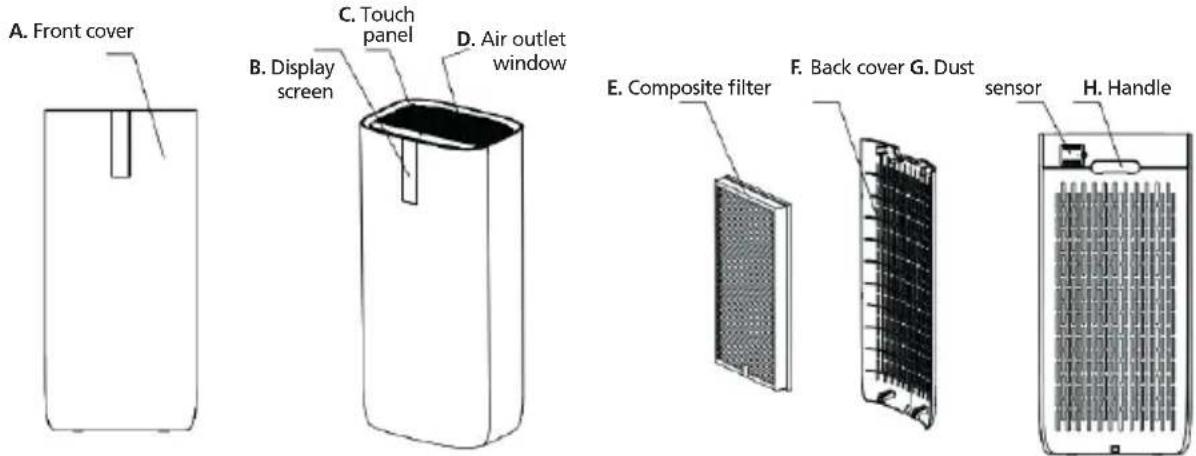
PARTS DESCRIPTION
INSTALLATION OF FILTER
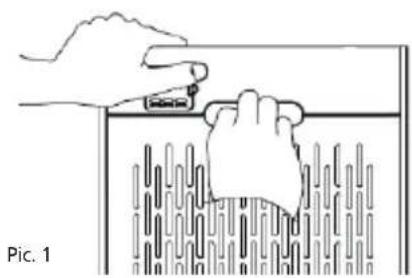
Please remember to remove the plastic bag before putting the filter in the air purifier
natural_image
Illustration of hands using a tool to interact with a container, no text or symbols present- Remove the back cover holding the machine and pull the handle. (Pic1)
-
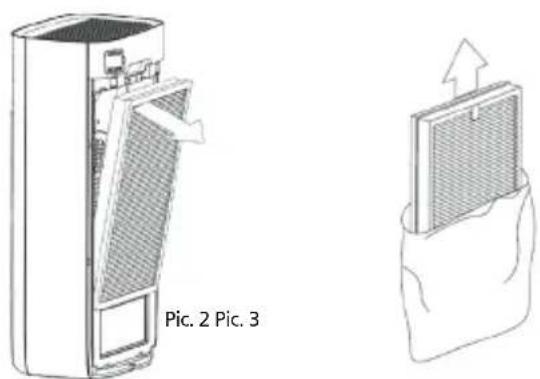
Remove the filter. (Pic 2)
-
Take the composite filter out of the plastic bag (Pic 3)
natural_image
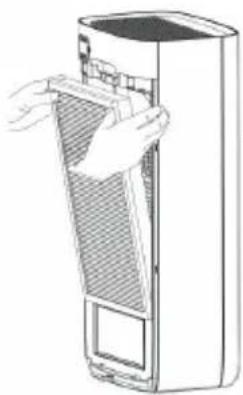
Line drawing of a hand opening a device into a rack (no text or symbols)- Then put the composite filter into the machine. Please note that a wrong installation of filters will cause abnormal operation. (Pic 4)
Pic. 4
natural_image
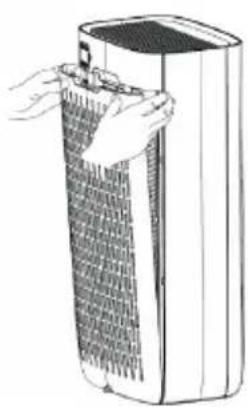
Illustration of a hand holding a textured cylindrical object next to a rectangular device (no text or symbols visible)- Next, put the back cover to the machine. (Pic 5)
Pic. 5
natural_image
Line drawing of a portable air purifier unit with a hand inserting a plug into it (no text or symbols on the device itself)Pic. 7
natural_image
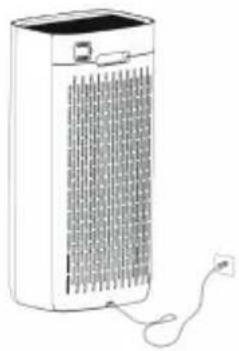
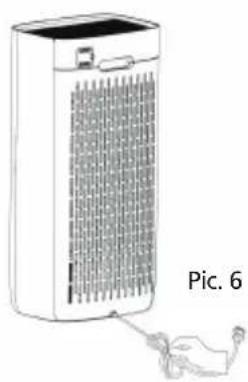
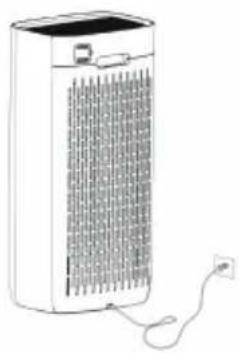
Line drawing of a portable air purifier with ventilation grilles and power cord (no text or symbols)- As last step, stretch the power cord strap and connect the power supply to use. (Pic. 6.7)
CONTROL PANEL AND FUNCTIONS
INSTRUCTION OF THE CONTROL PANEL
| Button Function Description | ||||
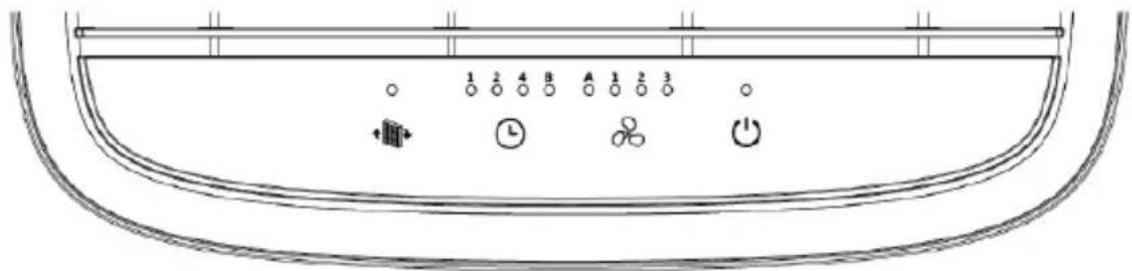
 | ON/OFFWiFi | Once the air purifier is connected to the socket, an acoustic signal will sound, the lights will turn on and off except the power buttonthis means that the purifier is in standby mode. Press the power buttonon the top of the purifier to turn it on. Press the power buttonagain to turn it off. All the lights will go off except the power button and the device will enter standby mode again.Note: there is no control for the negative ion function, which is activated when the appliance starts up and turns off when the appliance is turned off.Wifi connectionConnect your mobile device to the purifier's Wi-Fi network.1. Turn on the air purifier and press the ON / OFF button for 5 seconds. The Wi-Fi symbol on the purifier screen will flash and be ready to connect as described in the connectivity part of this manual.2. When the air purifier connects to your mobile device, the Wi-Fi icon will stop blinking.Do not press any buttons during Wi-Fi connection mode. | ||
 | FanSpeed | Auto Mode | ||
| PM2.5 0-15 15-35 >35 | ||||
| Fans speed Low Medium High | ||||
| Air quality indicator display | Green Blue Red | |||
| Timer | Press the timer button to set the time for 1 hour, 2 hours, 4 hours or 8 hours | |||
| [2GHz] | Filter reset button | When the filter reset button is flashing, it reminds to replace the filter.After replacing the filter, hold the button for 3 seconds, all the lights will turn on and the purifier will emit a beep sound. After that the calculation of operation time restarts again. | ||
SMART OPERATION INSTRUCTION TUYA APP
1. Download & Registration
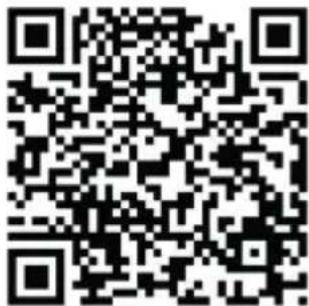
- Scan the QR code to download the "Tuya" APP. You can also find the "Tuya" app in the APP store or Google Play and install it.
- Open the "Tuya" APP, press "Register" to register a "Tuya" account with your phone number or e-mail. Then proceed with the log in.
2. Add Devices in Easy Mode (Recommended)
- Make sure that the purifier is powered and the smartphone is connected to the WiFi network:
press the ON/OFF button for 4 seconds, wait for the "beep" and then release it: this means that the device is ready to pair with the smartphone.
- Open the "Tuya" APP and press "+" at the top right of the APP. Select the type of device you want to connect, press "Small appliances" and press "Air purifier", then enter the password of the WiFi network to which the smartphone is connected and set the connection to 2.4 GHz. Then press "Next" to connect to the purifier.
- When, after the pairing process, the message "Adding 1 device successful" is shown, it means that the connection is complete and the device will be listed in the list of devices associated with the APP.
3. Add Devices in AP Mode
If failed in Easy Mode, users could also add devices in AP Mode.
- Press the ON/OFF button for 4 seconds seconds until the purifier emits a "beep" and the WiFi indicator light starts flashing quickly, then press the ON/OFF button for another 4 seconds until another "beep" sounds "and the indicator light starts flashing slowly, this means that the purifier is ready for configuration in AP mode.
- Press "+" at the top right of the APP. Select "Small Appliance". Then enter the password of the internet network (2.4GHz) and select "AP Mode" at the top right, press "Connect now" to enter the WLAN settings interface in the smartphone and select the WiFi network named "Tuya_XXXX" and connect to this.
- Go back to the "Tuya" APP, the connection will start automatically.
- When "Added 1 device successfully" is displayed, it means the connection is completed and the device will be listed in the APP list.
Now you can control the purifier via the APP anytime and anywhere (make sure your smartphone and purifier are both connected to the internet). You can share devices with friends or family after they are successfully added. It is also possible to change the device name with a recognizable phrase or word such as "Innoliving purifier"
4. Q&A
Why was not possible to add the purifier?
a. Make sure the purifier is turned on and close to your smartphone during the connection process between devices.
b. Make sure your smartphone is connected to the WiFi network and that the WiFi router is working properly.
c. Make sure the purifier is ready for setup. Refer to the product instructions "Add devices in Easy Mode" or "Add devices in Access Point mode" for details.
d. Make sure that the connected devices have not reached the maximum number of WiFi routers. If not, disconnect the network of some devices.
e. Make sure the WiFi network password is correct when adding a new purifier.
f. Make sure you haven't used Chinese characters to name the WiFi network.
Is it possible to manage a purifier with a 2G/3G/4G/5G network?
When adding a purifier for the first time, your smartphone and purifier must be connected to the same WiFi network. After successfully adding the purifier, the purifier can be remotely controlled with the 2G / 3G / 4G / 5G network.
How can I share the control of the purifier with others?
Open the Tuya APP, select the purifier and press the icon in the upper right corner. Press "Device Sharing" and "Add Share", then select the "country / region" to which the account belongs and enter the "Account Number" (a phone number or email address) with which you want to share the purifier. (Make sure the phone number or email is registered.)
How can I manage the purifier shared by others?
Open Tuya and choose the purifier by pressing the product icon in the "Shared devices" section on the home page.
How can the purifier be removed?
Open the "Tuya" APP, select the purifier and press the button in the upper right corner. Press "More". Then press "Remove Purifier" at the bottom: the WiFi indicator light will start flashing rapidly again.
Echo APP
- What you need to get started
Before using Echo to control your purifier, make sure you meet the following conditions.
- Have an Echo device like Echo, Echo Tap, or Echo Dot.
- Have an Amazon account.
- Having downloaded the "Tuya" App and have a related account.
-
Have a purifier.
-
Add devices in the "Tuya" app (refer to the app instructions)
-
Set Amazon Echo and enable Tuya Skill
User can set up Echo via web or the Alexa app.
For the web configuration: http://alexa.amazon.com/spa/index.html
Search for "Amazon Alexa" in the App Store or Google Play to install the app.
Below is an example via app configuration: (web and app configuration are basically the same).
-
Link the Tuya account to Alexa
-
Press "Skills and Games" in the menu and search for "Tuya". Select "Tuya" and press "ENABLE" to enable the skill.
-
You will be redirected to the "Tuya" account link page. Log in with your Tuya account and password, without forgetting to select the country / region to which your account belongs. Then press "Connect Now" to link your "Tuya" account.
-
Control by voice commands
Now you can control your devices via Echo. You can use the following commands:
Alexa, turn on / off the purifier
Alexa, set the purifier to "mode one"
Alexa, set the purifier to "mode two"
Alexa, set the purifier to "mode three"
Notice: Alexa may only support on / off function or fan speed
FAULT HANDLING
| Problem Possible cause Solutions | ||
| Air flow from air outlet is weak | 1. The plastic bag of the filter has not been removed.2. There are objects blocking the air outlet. | 1. Take away the plastic bag. Please refer to “Installation of filters” section.2. Clear the objects from air outletPlease refer to “Cleaning and Maintenance” section. |
| Air purifying performance is not good and there is no improvement in the air quality. | 1. Filters have not been installed2. Doors or windows are always kept opened. Pollutants outside flowed into the room continuously. Therefore, it takes longer time to purify the air.3. Product is placed in a too tight area or with objects blocking nearby.4. Filters are dirty resulting in filtration efficiency. | 1. Install the filters.2. Do not place the product too near the window unless the window is closed. Please keep the door closed.3. Place the product in an area with good airflow environment.3. Clean or replace filter. |
| Air quality indicator light keeps at red color for very long time | 1. Dust sensor is dirty.2. Doors or windows are always kept opened. Pollutants outside flowed into the room continuously. Therefore, it takes longer time to purify the air. | 1. Please clean the dust sensor to restore its sensitivity. Please refer to “Cleaning and Maintenance” section.2. Close the windows and door first. Turn to high fan speed so that the product can purify the air in short time. |
If you can't solve the problems based on the above information you should contact the product agent immediately, do not disassemble, repair and install it by yourself.
RATING LABEL
Innoliving Spa
Via Merloni 9 - 60131 Ancona - Italy
INN-556 PURIFICATORE ARIA AIR PURIFIER
220-240V\~50/60Hz 45W
MADE IN CHINA
Lot n.
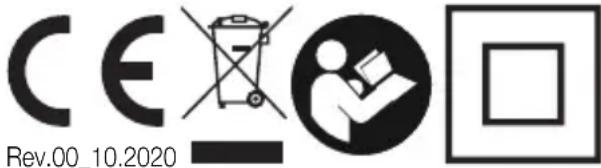

This product complies with all the applicable European directives.

Read carefully instructions manual.
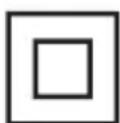
Class II insulation
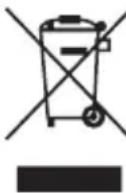
INFORMATION TO USERS according to Legislative Decree No. 49 of March 14, 2014 "2012/19/UE Implementation of the Directive on Waste Electrical and Electronic Equipment (WEEE)" The crossed-out dustbin symbol indicates that the product at the end of its life must be collected separately from other waste. The user should, therefore, take the equipment with the essential components at the end of its useful life to the separate collection center of electronic and electrical waste, or return it to the retailer when purchasing new equipment of equivalent type, in ratio of one to one, or one to zero for devices with larger side less than 25 CM. The separate collection for the decommissioned equipment for recycling, treatment and environmentally compatible disposal contributes to avoid possible negative effects on the environment and human health and promotes recycling of the materials. Improper disposal of the product by the user entails the application of administrative sanctions according to Legislative Decree No. 49 of 14 March 2014
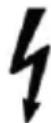
CAUTION:dangerous voltage
The manufacturer Innoliving S.p.a. declares that the INN-556 air purifier complies with Directive 2014/53/EU.
The full text of the EU declaration of conformity is available at the following internet address: https://www.innoliving.it/prodotti/inn-556-purificatore-daria-2/
Frequency band: 2412 - 2472MHz
Maximum transmission power: 17.9 dBm
innoliving easy tech, easy life
Innoliving Spa
Via Merloni, 9
60131 Ancona Italy
Tel 071 2133550
www.innoliving.it
MADE IN CHINA
CE


- innoliving easy tech, easy life
- PURIFICATORE ARIA AIR PURIFIER
- IMPORTANT SAFETY NORMS
- PACKAGING
- INSTALLATION OF FILTER
- SMART OPERATION INSTRUCTION TUYA APP
- Download & Registration
- Add Devices in Easy Mode (Recommended)
- Add Devices in AP Mode
- Q&A
- Why was not possible to add the purifier?
- Is it possible to manage a purifier with a 2G/3G/4G/5G network?
- How can I share the control of the purifier with others?
- How can I manage the purifier shared by others?
- How can the purifier be removed?
- Echo APP
- RATING LABEL
- Innoliving Spa
- INN-556 PURIFICATORE ARIA AIR PURIFIER
Brand : Innoliving
Model : Ercole Plus INN-556
Category : Air purifier