
INN-559 - Air purifier Innoliving - Free user manual and instructions
Find the device manual for free INN-559 Innoliving in PDF.


| Product Type | Air Purifier |
| Brand | Innoliving |
| Model | INN-559 |
| Power Supply | 220-240 V~ 50/60 Hz, 70 W |
| Fan Speed Levels | 4 (1-4) |
| Timer Range | 0-12 hours |
| Filtration System | 6-stage: HEPA, Active Carbon, Photocatalyst, Cold Catalyst, Silver Ions & Negative Ions, UV Lamp |
| HEPA Filter Efficiency | 99.9% removal of particles 0.3 microns |
| UV Lamp | Eliminates bacteria and viruses |
| Negative Ion Output | Over 3 million ions |
| Control Panel | Touch buttons with LCD display |
| Remote Control | Infrared, distance < 5 m, battery CR2032 |
| Smart App | Tuya (WiFi 2.4 GHz, iOS/Android) |
| Voice Control | Compatible with Amazon Alexa |
| Child Lock | Yes, press 3 seconds to unlock |
| Auto Mode | Yes, detects air quality automatically |
| Filter Life | 1500 hours (countdown display) |
| Filter Replacement Reminder | Flashes when <60 hours remaining |
| Minimum Distance from Walls | 10 cm |
| Cleaning | Soft cloth with neutral cleanser; do not use water on air outlet |
| Safety Features | UV-C radiation warning; automatic shut-off when back cover not installed |
| Country of Origin | China |
Frequently Asked Questions - INN-559 Innoliving
User questions about INN-559 Innoliving
0 question about this device. Answer the ones you know or ask your own.
Ask a new question about this device
Download the instructions for your Air purifier in PDF format for free! Find your manual INN-559 - Innoliving and take your electronic device back in hand. On this page are published all the documents necessary for the use of your device. INN-559 by Innoliving.
USER MANUAL INN-559 Innoliving
innoliving easy tech, easy life
PURIFICATORE ARIA AIR PURIFIER PROFESSIONAL L
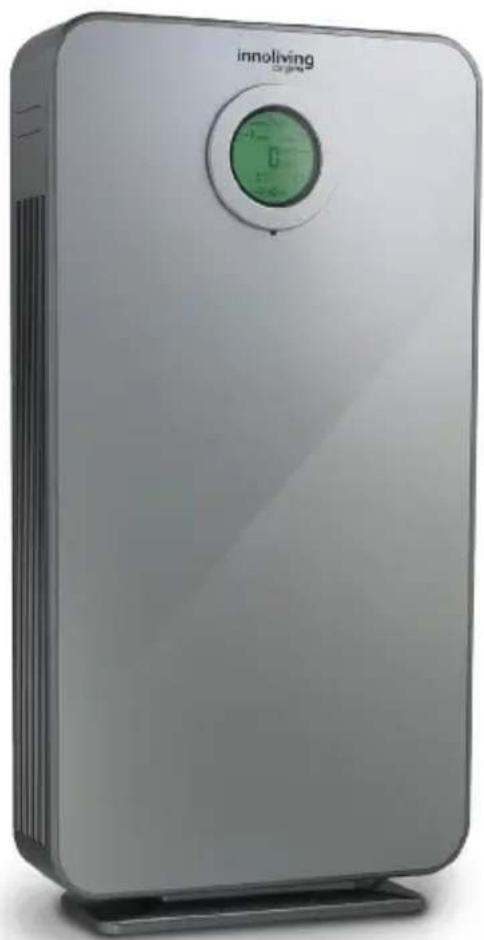
natural_image
Exterior view of a silver Innoliving air purifier with green control panel (no text or symbols on device body)INN-559
MANUALE D'USO
USER MANUAL
flowchart
graph LR
    A["Device with heat sink"] --> B["Grid-patterned Panel"]
    B --> C["Arrow pointing to the grid pattern"]
    C --> D["Arrow pointing to the grid pattern"]
    D --> E["Arrow pointing to the grid pattern"]
natural_image
Three smartphone models showing internal components before and after transformation, with no visible text or symbols.natural_image
Two black-and-white icons: a trash bin crossed out and a person reading a book (no text or symbols)
Thank you for purchasing Innoliving air purifier INN-559, able to give healthy and comfortable living environment.
The problem of indoor air pollution is serious, and indoor air pollution mainly comes from natural air pollution, pollen, dust mites, harmful gases (formaldehyde, second-hand smoke, sweaty body odor and other substances and odors.)
Because of the existence of these sources of pollution, people often have adverse reactions such as dizziness, drowsiness, cough, and nausea. Air quality of the room is important to health.
Using the Air Purifier, there will be a healthier and more comfortable living environment.
Before use read carefully this manual and keep it safe for future references.
Before using the appliance, carefully read the instructions for use and in particular the safety warnings and follow them. Keep this manual safe for the entire life of the appliance for future references. Failure to follow the instructions could cause accidents and void the warranty, relieving the manufacturer of all responsibility.
IMPORTANT SAFETY NORMS
- Keep all packing material (plastic bags, cardboard, polystyrene, etc.) out of reach of children, since they are potential sources of danger and must be disposed of as provided by law.
- Make sure that the voltage indicated on the rating label matches the mains voltage before plugging in the appliance.
- Before use, check that the power cord and plug are not visibly damaged. If the cord or plug is damaged, it must be replaced by the manufacturer or by an authorized technical assistance service or by a personal with similar skill and qualification, in order to prevent any risk.
- The appliance can be used by children under the age of 8 and by people with reduced physical, sensory or mental abilities, or without experience or the necessary knowledge, as long as they are under supervision or after they have received instructions relating to safe use of the appliance and an understanding of the inherent dangers. Children must not play
with the appliance. Cleaning and maintenance intended to be carried out by the user must not be carried out by unsupervised children. Keep the device far from children less than 8 years age.
• Make sure children do not play with the appliance.
• To unplug the power cord, always pull the plug and never the cord.
- Do not touch the plug or the power cord with wet hands.
- Disconnect the plug from the mains when the product is not in use.
- Make sure the plug has been inserted fully into the electrical socket before turning on the appliance.
• Always place the product on a flat and stable surface.
- Do not use the product outdoors or near bath tub, swimming pools, showers etc.
- Do not insert foreign objects into the device.
- Do not obstruct the entry and exit of air in any way.
- Do not add chemicals or metals inside the appliance. These components can cause damage to the product and compromise its correct functioning
- Do not leave the unit exposed to direct sunlight for a long period of time.
- Do not use aggressive detergents to clean the product.
- Do not allow the appliance and / or the cord to come into contact with hot surfaces.
- Do not use the product if it has fallen to the ground, if there are visible signs of damage or loss. Avoid bumps and falls.
- In case of failure or malfunction of the appliance, switch it off, unplug and do not try to tamper with it. For repairs, contact only the authorized after sales service.
- Use the appliance in a well-ventilated area. During use, the appliance must be kept at a distance of at least 10 cm from the walls to guarantee correct operation of the air intakes. The appliance must not be placed immediately under or behind a curtain or similar. Do not cover the appliance with blankets or similar, during use.
- Make sure the appliance is off or unplugged during care and maintenance operations.
- Use an easily reachable plug in case of danger.
ATTENTION: contains a UV lamp, do not stare into the light source.
- Any incorrect use of the equipment or any damage to the lamp housing can cause the escape of dangerous UV radiation. UV-C radiation can, even in small doses, cause damage to the eyes and skin.
- Do not use the appliance if it is damaged
- If it is necessary to replace the UV lamp, contact a specialized center, do not try to do it independently, it could be dangerous
This appliance must be used only for the purpose for which it was designed, i.e. as an air purifier for domestic use and in shops, offices and other similar workplaces, on farms or similar, by customers of hotels, motels and other residential type environments, in bed and breakfast type environments. Any other use is considered non-compliant and therefore dangerous.
PACKAGING
Remove the packing material carefully, taking care not to damage the plastic body of the appliance.
PRODUCT PARTS
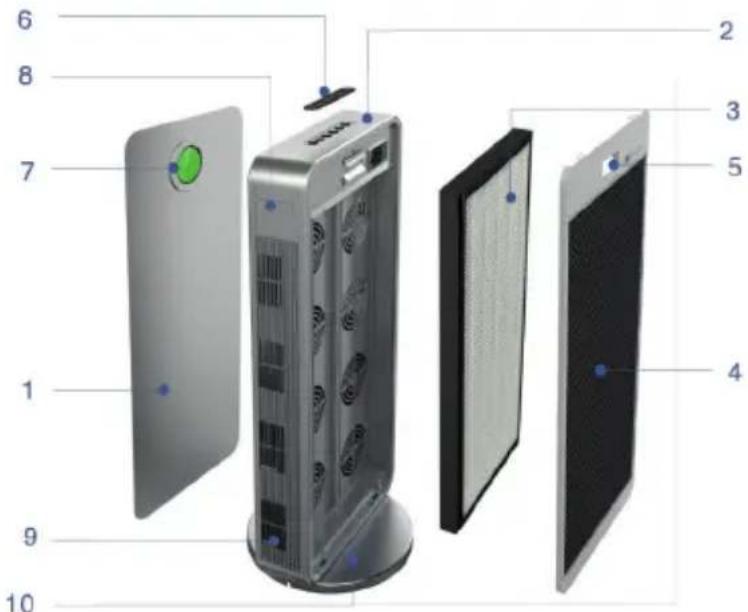
- Frontal Part
- Main chassis
- Filter
- Back cover
- Handle
- Control panel
- High definition display screen
- Side handles
- Air outlets
- Base
DESCRIPTION OF PARTS AND COMPONENTS
- LCD display
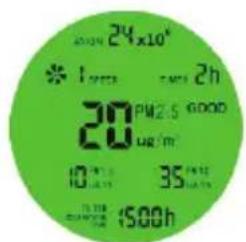
When the display screen is green
PM2.5 < 75UG/m²
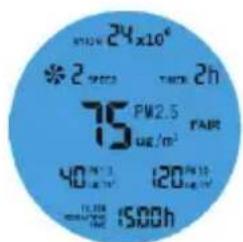
When the display screen is blue
75 ≤ PM2.5 < 150UG/m^2
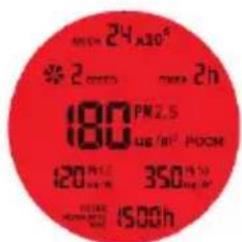
When the display screen is red
PM2.5 ≥ 150UG/m²
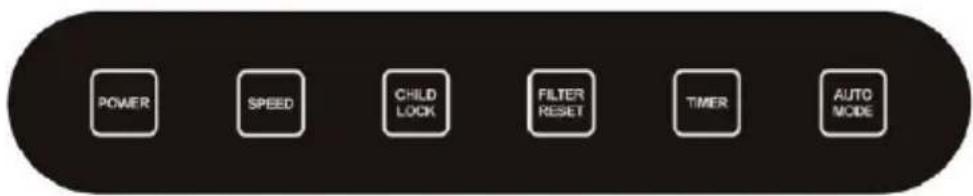
- Control panel
3. Remote control
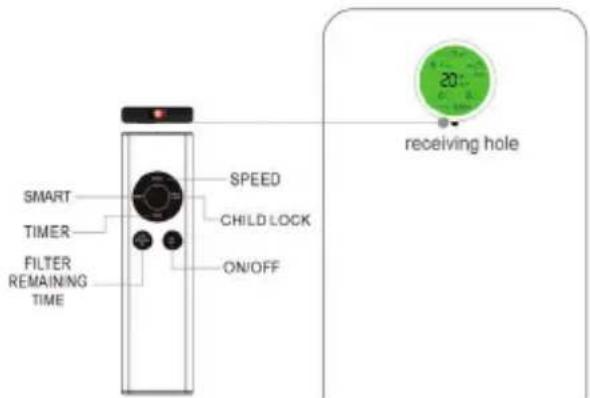
This product uses infrared remote control. Please keep the remote control and remote-control receiving window free from object barrier, and try to keep the remote control and remote-control receiving window vertical (vertical remote-control distance is less than 5 meters).
PRODUCT USAGE
- Connect the power cable with the socket: the power supply is switched on normally and the purifier will enter standby mode.
- Press the switch button once to turn on the device and the default functions: power supply indicator, timer, fan speed at 3rd speed level, filter cumulative countdown; press the switch button again to turn off the device.
- In the startup state, press the fan speed button to control the speed of the fans from 1 to 4 level.
- Short press child lock button: the machine enters in the lock mode; all key functions can't be managed (except child lock): press 3 seconds again to unlock the machine.
- Countdown of filter change reminder is 1,500hrs, machine will start to alert from 1,440hrs. After replacing the filter, press and hold the Filter button for 3 seconds to restart the filter count counter.
- Smart mode button: press this button to enter smart mode in boot state.
FUNCTIONS
This purifier works through a 4 steps purification system, able to effectively purify the air and make like healthier.
Power
Turn ON/OFF the machine
Touch once to turn off and enter standby
State and touch once again to turn on.
Fan speed
The default fan speed at boot-up is Level 3. The fan speed can be adjusted between 1-4 level.
ChildLock

Touch the button to lock all button functions at one time, and press 3 seconds to unlock them.
Filter reset
The initial value on the screen is 1500 hours. When the data of screen "FILTER REMAINING TIME" is less than 60 hours, it will flash to remind that the filter must be replaced. After replacing, press the "FILTER RESET" button for 3 seconds to reset.

Timer
The default mode is continuous working status, touch the button to set the timer which can be between 0-12 hours.
Auto mode
Tap once to turn the auto mode on: it will detect automatically the quality of the air and all the settings will be set by the machine itself.
POSITION
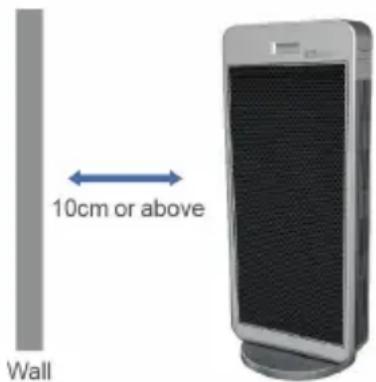
In order to have the best performance of air purifier, the air inlet of machine should be kept at a certain distance from the wall and other obstacles.
Note: When using the purifier, it is recommended to close the doors and windows to achieve better purification effect: When you want to move the product from a place to another place, lift the product using the handles on both sides, and do not use the back handle to lift it.
INTRODUCTION OF PRODUCT CHARACTERISTICS AND FUNCTIONS
Six-fold filtration and purification system can effectively filter and remove ash, dandruff and pollen plant germ, and remove indoor smoke and odor.
HEPA filter
Super-efficient filter: the range of removal of minor particles from 0 to 0.3 microns brought by the air flow can reach up to 99.9%. It stops the spread of allergens and bacteria in the air flow, such as pollen, smog and viruses.
Active carbons filter
This filter retains volatile organic compounds, such as secondhand smoke and some types of polluting gases. The air is purified and the polluting molecules completely oxidized through the photocatalysis process.
Photocatalyst filter
Its catalytic oxidation mechanism at room temperature breaks down completely the formaldehyde particles into carbon dioxide and water, removing all of the harmful substances such as formic acid.
Cold catalyst filter
It decomposes many harmful odorous gases into harmless substances, decomposes harmful gases such as
formaldehyde, benzene, xylene, toluene, TVOC.
Filter with silver ions and negative ions
It is able to remove 650 broad spectrum pathogens, non-toxic, non-polluting, long-lasting purifying. In addition, more than 3 million negative ions are produced, which increase air purification, help in the removal of dust and
UV lamp
The UV lamp effectively eliminates a large variety of common bacteria and viruses as well it inhibits production, acts on the filters helping them to eliminate the dirt on them.
REPLACEMENT OF FILTER
flowchart
graph LR
    A["Flat Screen Display"] --> B["Cell with Panel"]
    B --> C["Multi-chamber System with Fan-like Components"]
    C --> D["Handheld with Sensor Icon"]
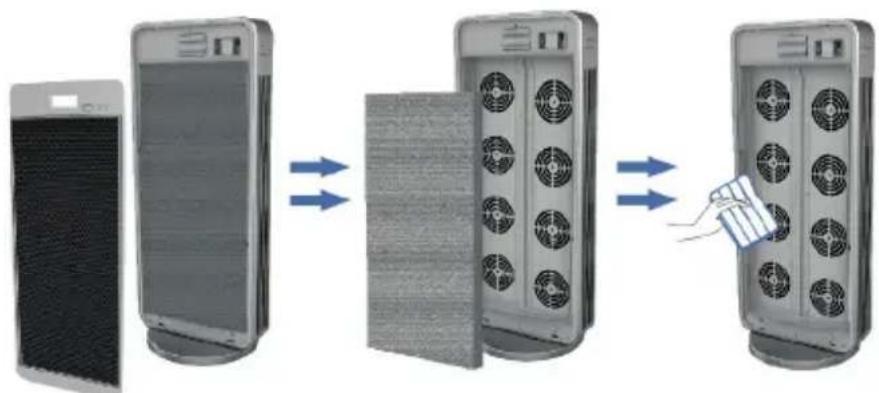
- Unplug form the power and pull down the back cover by handle and remove the filter cover
- Remove the old filter
- Clean the internal part
natural_image
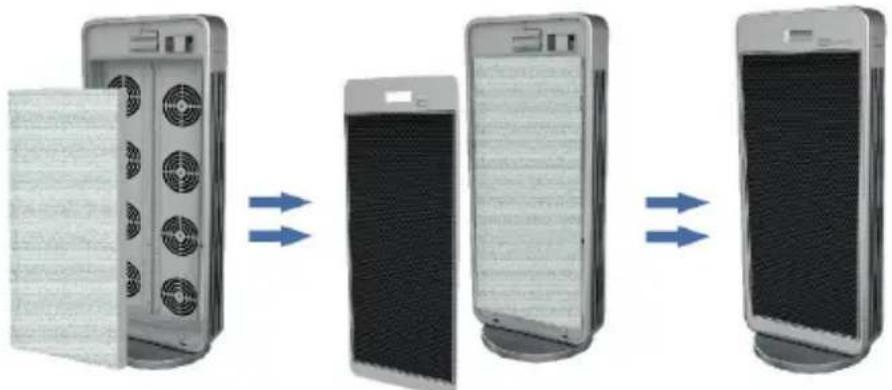
Three smartphone panels showing internal components and heat dissipation, with blue arrows indicating deformation (no text or symbols)- Install a new filter
- Close the cover
- Installation completed
Note: After installation, press the "filter reset" button to reset, and the filter data will be restarted. When the countdown time is less than 60 hours or finished (initial value is 1500 hours), the screen sign flickers (standby lights go out); Once replaced, press the button for 43 seconds, the filter time will return to 1500 hours and the device will sound for 3 times (this button is invalid when the filter has not reached 1440 hours of use and the icon doesn't flicker), the filter time returns to 1500 hours and the device will sound for three times. (this button is invalid when the screen sign does not flicker)
CLEANING AND STORAGE
- Ensure the machine is power-off and unplugged.
- Use a soft cloth with neutral cleanser to clean away any dust or debris from the surface of the unit and air inlet/outlet.
• After the machine completely dry out place it in a cool and well-ventilated place. - If you do not use it for a long time, please turn on the machine for a few minutes from time to time to ensure a good performance.
Notice: Please don't drop any water into the machine when clean the air outlet.
HOW TO REPLACE BATTERIES
Remove the battery compartment from the bottom of the remote control by sliding the compartment out. Remove the old battery and insert the new battery paying attention to the polarity. Once inserted, place the battery compartment inside the remote control and dispose of the exhausted battery in the appropriate containers or separate collection centers.
SMART OPERATION INSTRUCTION TUYA APP
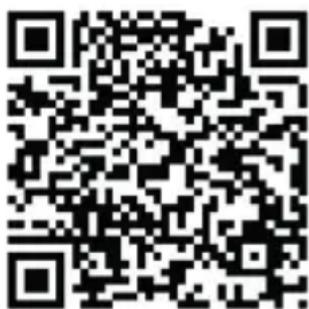
1. Download & Registration
- Scan the QR code to download the "Tuya" APP. You can also find the "Tuya" app in the APP store or Google Play and install it.
- Open the "Tuya" APP, press "Register" to register a "Tuya" account with your phone number or e-mail. Then proceed with the log in.
2. Add Devices in Easy Mode (Recommended)
- Make sure that the purifier is powered and the smartphone is
connected to the WiFi network:
press the Timer button for 3 seconds, wait for the "beep" and then release it: this means that the device is ready to pair with the smartphone.
- Open the "Tuya" APP and press "+" at the top right of the APP. Select the type of device you want to connect, press "Small appliances" and press "Air purifier", then enter the password of the WiFi network to which the smartphone is connected and set the connection to 2.4 GHz. Then press "Next" to connect to the purifier.
- When, after the pairing process, the message "Adding 1 device successful" is shown, it means that the connection is complete and the device will be listed in the list of devices associated with the APP.
3. Add Devices in AP Mode
If failed in Easy Mode, users could also add devices in AP Mode.
- Press the Timer button for at least 3 seconds until the purifier emits a "beep" and the WiFi indicator light starts flashing quickly, then press the Timer button for at least 3 seconds until another "beep" sounds "and the indicator light starts flashing slowly, this means that the purifier is ready for configuration in AP mode.
- Press "+" at the top right of the APP. Select "Small Appliance". Then enter the password of the internet network (2.4GHz) and select "AP Mode" at the top right, press "Connect now" to enter the WLAN settings interface in the smartphone and select the WiFi network named "Tuva_XXXX" and connect to this.
- Go back to the "Tuya" APP, the connection will start automatically.
- When "Added 1 device successfully" is displayed, it means the connection is completed and the device will be listed in the APP list.
Now you can control the purifier via the APP anytime and anywhere (make sure your smartphone and purifier are both connected to the internet). You can share devices with friends or family after they are successfully added. It is also possible to change the device name with a recognizable phrase or word such as "Innoliving purifier"
4. Q&A
Why was it not possible to add the purifier?
a. Make sure the purifier is turned on and close to your smartphone during the connection process between devices.
b. Make sure your smartphone is connected to the WiFi network and that the WiFi router is working properly.
c. Make sure the purifier is ready for setup. Refer to the product instructions "Add devices in Easy Mode" or "Add devices in Access Point mode" for details.
d. Make sure that the connected devices have not reached the maximum number of WiFi routers. If not, disconnect the network of some devices.
e. Make sure the WiFi network password is correct when adding a new purifier.
f. Make sure you haven't used Chinese characters to name the WiFi network.
Is it possible to manage a purifier with a 2G / 3G / 4G / 5G network?
When adding a purifier for the first time, your smartphone and purifier must be connected to the same WiFi network. After successfully adding the purifier, the purifier can be remotely controlled with the 2G / 3G / 4G / 5G network.
How can I share the control of the purifier with others?
Open the Tuya APP, select the purifier and press the icon in the upper right corner. Press "Device Sharing" and "Add Share", then select the "country / region" to which the account belongs and enter the "Account Number" (a phone number or email address) with which you want to share the purifier. (Make sure the phone number or email is registered.)
How can I manage the purifier shared by others?
Open Tuya and choose the purifier by pressing the product icon in the "Shared devices" section on the home page.
How can the purifier be removed?
Open the "Tuya" APP, select the purifier and press the button in the upper right corner. Press "More". Then press "Remove Purifier" at the bottom: the WiFi indicator light will start flashing rapidly again.
Echo APP
- What you need to get started
Before using Echo to control your purifier, make sure you meet the following conditions.
- Have an Echo device like Echo, Echo Tap, or Echo Dot.
• Have an Amazon account. - Having downloaded the "Tuya" App and have a related account.
-
Have a purifier.
-
Add devices in the "Tuya" app (refer to the app instructions)
-
Set Amazon Echo and enable Tuya Skill
User can set up Echo via web or the Alexa app.
For the web configuration: http://alexa.amazon.com/spa/index.html
Search for "Amazon Alexa" in the App Store or Google Play to install the app.
Below is an example via app configuration: (web and app configuration are basically the same).
-
Link the Tuya account to Alexa
-
Press "Skills and Games" in the menu and search for "Tuya". Select "Tuya" and press "ENABLE" to enable the skill.
-
You will be redirected to the "Tuya" account link page. Log in with your Tuya account and password, without forgetting to select the country / region to which your account belongs. Then press "Connect Now" to link your "Tuya" account.
-
Control by voice commands
Now you can control your devices via Echo. You can use the following commands:
Alexa, turn on / off the purifier
Alexa, set the purifier to "mode one"
Alexa, set the purifier to "mode two"
Alexa, set the purifier to "mode three"
Notice: Alexa may only support on / off function or fan speed
FAULT HANDLING
| Problem Cause Solution | ||
| The machine turns on or off | The plug is in good contact or not | Plug in the power plug |
| The back cover is not properly installed | Install the back cover | |
| When the purification function is turned on the sound is dull and the air outlet is small. | All the packaging of the filter has not been removed | Remove the package and reinstall the according to instructions |
| Is there any foreign object blocking the outlet or intake? | Turn off the machine and remove the blocked foreign bodies | |
| Bad odor The composite filter has reached the replacement time accumulatively. | Clean or replace filter | |
RATING LABEL
Innoliving Spa
Via Merloni 9 - 60131 Ancona - Italy
INN-559 PURIFICATORE ARIA AIR PURIFIER
220-240V\~50/60Hz 70W
MADE IN CHINA
Lot n.


Rev.00_10.2020
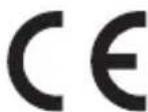
This product complies with all the applicable European directives.

Read carefully instructions manual.
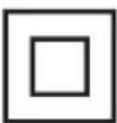
Class II insulation
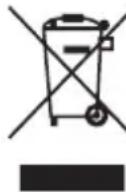
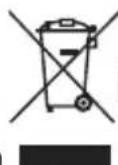
INFORMATION TO USERS according to Legislative Decree No. 49 of March 14, 2014 "2012/19/UE Implementation of the Directive on Waste Electrical and Electronic Equipment (WEEE)"
The crossed-out dustbin symbol indicates that the product at the end of its life must be collected separately from other waste. The user should, therefore, take the equipment with the essential components at the end of its useful life to the separate collection center of electronic and electrical waste, or return it to the retailer when purchasing new equipment of equivalent type, in ratio of one to one, or one to zero for devices with larger side less than 25 CM. The separate collection for the decommissioned equipment for recycling, treatment and environmentally compatible disposal contributes to avoid possible negative effects on the environment and human health and promotes recycling of the materials. Improper disposal of the product by the user entails the application of administrative sanctions according to Legislative Decree No. 49 of 14 March 2014
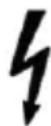
CAUTION: dangerous voltage
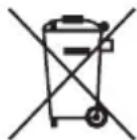
The remote control of this appliance works with a CR2032 type battery which falls under the European directive 2013/56 / EU and which cannot be disposed of with normal household waste. Find out about local regulations relating to separate collection of batteries: proper disposal allows you to avoid negative consequences for the environment and health. Do not throw the batteries into fire.
The manufacturer Innoliving S.p.a. declares that the INN-559 air purifier complies with Directive 2014/53/EU.
The full text of the EU declaration of conformity is available at the following internet address: https://www.innoliving.it/prodotti/inn-559-purificatore-daria/
Frequency band: 2412 – 2472 MHz
Maximum transmission power: 17.52 dBm
innoliving easy tech, easy life
Innoliving Spa
Via Merloni, 9
60131 Ancona Italy
Tel 071 2133550
www.innoliving.it
MADE IN CHINA
CE


- innoliving easy tech, easy life
- PURIFICATORE ARIA AIR PURIFIER PROFESSIONAL L
- IMPORTANT SAFETY NORMS
- PACKAGING
- PRODUCT PARTS
- DESCRIPTION OF PARTS AND COMPONENTS
- Remote control
- PRODUCT USAGE
- FUNCTIONS
- Power
- Fan speed
- ChildLock
- Filter reset
- Timer
- Auto mode
- POSITION
- INTRODUCTION OF PRODUCT CHARACTERISTICS AND FUNCTIONS
- HEPA filter
- Active carbons filter
- Cold catalyst filter
- Filter with silver ions and negative ions
- UV lamp
- CLEANING AND STORAGE
- HOW TO REPLACE BATTERIES
- SMART OPERATION INSTRUCTION TUYA APP
- Download & Registration
- Add Devices in Easy Mode (Recommended)
- Add Devices in AP Mode
- Q&A
- How can I manage the purifier shared by others?
- How can the purifier be removed?
- Echo APP
- RATING LABEL
- Innoliving Spa
Brand : Innoliving
Model : INN-559
Category : Air purifier