INN-557 - Air purifier Innoliving - Free user manual and instructions
Find the device manual for free INN-557 Innoliving in PDF.


| Product Type | Air Purifier |
| Model | INN-557 |
| Brand | Innoliving |
| Dimensions (H x W x D) | 50 x 25 x 25 cm |
| Net Weight | 4 kg |
| Power Supply | 220-240 V ~ 50 Hz |
| Power Consumption | 50 W (max) |
| Coverage Area | Up to 30 m² |
| Filtration System | Pre-filter + HEPA H13 + Activated Carbon + Ionizer |
| Fan Speeds | 3 speeds (Low, Medium, High) |
| Sleep Mode | Yes, with ultra-quiet operation |
| Timer | 1-8 hours |
| Air Quality Sensor | Yes, with LED indicator |
| Noise Level | 30-55 dB(A) |
| Filter Replacement Indicator | Yes |
| Pre-filter Cleaning | Every 2 weeks (vacuum or rinse) |
| HEPA Filter Replacement | Every 6-12 months |
| Carbon Filter Replacement | Every 3-6 months |
| Auto Shut-off | Yes, when cover is opened |
| Child Lock | Yes |
| Spare Parts Available | HEPA filter, Carbon filter, Pre-filter |
| Certifications | CE, RoHS |
Frequently Asked Questions - INN-557 Innoliving
User questions about INN-557 Innoliving
0 question about this device. Answer the ones you know or ask your own.
Ask a new question about this device
Download the instructions for your Air purifier in PDF format for free! Find your manual INN-557 - Innoliving and take your electronic device back in hand. On this page are published all the documents necessary for the use of your device. INN-557 by Innoliving.
USER MANUAL INN-557 Innoliving
innoliving easy tech, easy life
PURIFICATORE ARIA AIR PURIFIER PROFESSIONAL PLUS
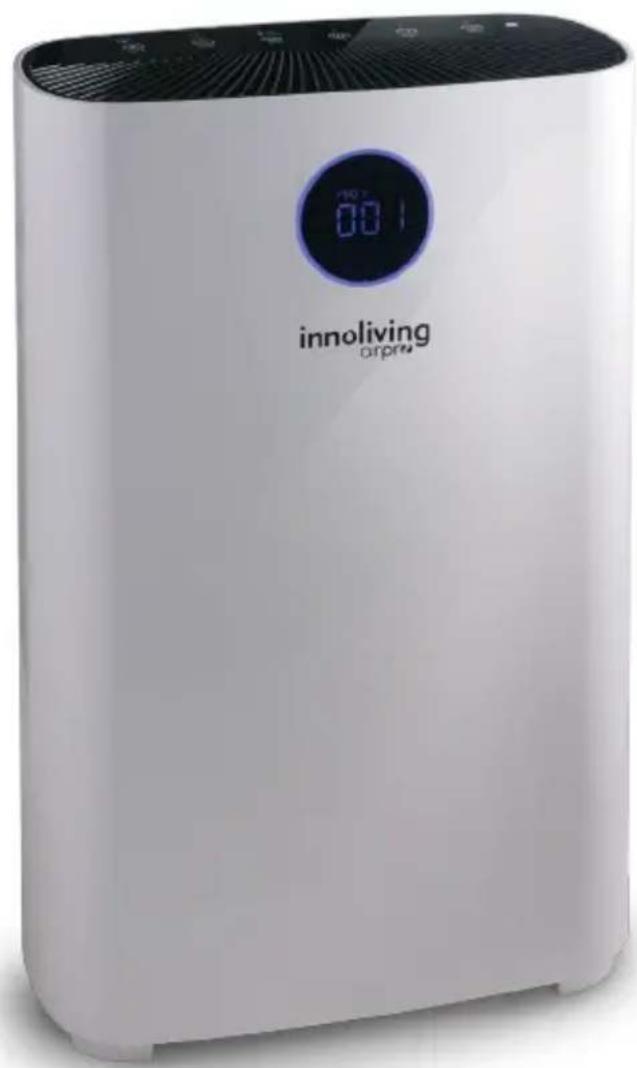
INN-557
MANUALE D'USO
USER MANUAL
natural_image
Two-step diagram showing a device being open and then closed, with arrows indicating the process (no text or symbols present)SMONTAGGIO E INSTALLAZIONE DEL PANNELLO POSTERIORE
natural_image
Illustration of a hand inserting a card into a digital heater (no text or symbols visible)natural_image
Diagram of a device with a panel inserted into a housing, showing hands inserting or removing it (no text or symbols present)natural_image
Exploded view diagram of an air purifier with internal components (no text or labels)I
natural_image
Diagram showing a device transitioning from a rectangular box to a curved surface, with an arrow indicating direction (no text or symbols present)natural_image
Exploded view diagram of an air purifier with internal panel structure (no text or labels)natural_image
Illustration of a white portable air conditioner unit with cooling fins and ventilation slots (no text or symbols visible)natural_image
Illustration of a portable electronic device with a black panel inserted, showing internal components and a hand pointing to it (no text or symbols visible)FILTRI E FUNZIONALITÀ
flowchart
graph LR
    A["Stage 1: Solar cells"] --> B["Stage 2: Cell membrane"]
    B --> C["Stage 3: Cell grid structure"]
    C --> D["Stage 4: Solar cells with particles"]
1) Pre filtro
2) Filtro HEPA
Timer
natural_image
Illustration of a hand inserting a card into a banknote (no text or symbols visible)natural_image
Line drawing of a laptop with a card slot and screen (no text or symbols)natural_image
Diagram of an electronic device showing internal components and wiring (no text or labels)natural_image
Illustration of a hand inserting a device into a device panel (no text or symbols visible)natural_image
3D rendering of a mechanical component with a lever and grid base (no text or symbols)natural_image
Illustration of a hand inserting a device into a device (no text or symbols visible)natural_image
Diagram showing internal components of a device with grid layout, no text or symbols present
Thank you for purchasing Innoliving air purifier INN-557, able to give healthy and comfortable living environment.
The problem of indoor air pollution is serious, and indoor air pollution mainly comes from natural air pollution, pollen, dust mites, harmful gases (formaldehyde, second-hand smoke, sweaty body odor and other substances and odors.)
Because of the existence of these sources of pollution, people often have adverse reactions such as dizziness, drowsiness, cough, and nausea. Air quality of the room is important to health. Using the Air Purifier, there will be a healthier and more comfortable living environment.
Before use read carefully this manual and keep it safe for future references.
Before using the appliance, carefully read the instructions for use and in particular the safety warnings and follow them. Keep this manual safe for the entire life of the appliance for future references. Failure to follow the instructions could cause accidents and void the warranty, relieving the manufacturer of all responsibility.
IMPORTANT SAFETY NORMS
- Keep all packing material (plastic bags, cardboard, polystyrene, etc.) out of reach of children, since they are potential sources of danger and must be disposed of as provided by law.
- Make sure that the voltage indicated on the rating label matches the mains voltage before plugging in the appliance. Please verify also that the socket and the power supply are correct for the required load.
- Before use, check that the power cord and plug are not visibly damaged. If the cord or plug is damaged, it must be replaced by the manufacturer or by an authorized technical assistance service or by a personal with similar skill and qualification, in order to prevent any risk.
- The appliance can be used by children under the age of 8 and by people with reduced physical, sensory or mental abilities, or without experience or the necessary knowledge, as long as they are under supervision or after they have received instructions relating to safe use of the appliance
and an understanding of the inherent dangers. Children must not play with the appliance. Cleaning and maintenance intended to be carried out by the user must not be carried out by unsupervised children. Keep the device far from children less than 8 years age.
• Make sure children do not play with the appliance.
• To unplug the power cord, always pull the plug and never the cord.
- Do not touch the plug or the power cord with wet hands.
- Disconnect the plug from the mains when the product is not in use.
- Make sure the plug has been inserted fully into the electrical socket before turning on the appliance.
• Always place the product on a flat and stable surface.
- Do not use the product outdoors or near bath tub, swimming pools, showers etc.
- Do not insert foreign objects into the device.
- Do not obstruct the entry and exit of air in any way.
- Do not add chemicals or metals inside the appliance. These components can cause damage to the product and compromise its correct functioning
- Do not leave the unit exposed to direct sunlight for a long period of time.
- Do not use aggressive detergents to clean the product.
- Do not allow the appliance and / or the cord to come into contact with hot surfaces.
- Do not use the product if it has fallen to the ground, if there are visible signs of damage or loss. Avoid bumps and falls.
- In case of failure or malfunction of the appliance, switch it off, unplug and do not try to tamper with it. For repairs, contact only the authorized
after sales service.
- Use the appliance in a well-ventilated area. During use, the appliance must be kept at a distance of at least 10 cm from the walls to guarantee correct operation of the air intakes. The appliance must not be placed immediately under or behind a curtain or similar. Do not cover the appliance with blankets or similar, during use.
- Make sure the appliance is off or unplugged during care and maintenance operations.
- Use an easily reachable plug in case of danger.
ATTENTION: contains a UV lamp, do not stare into the light source.
- Any incorrect use of the equipment or any damage to the lamp housing can cause the escape of dangerous UV radiation. UV-C radiation can, even in small doses, cause damage to the eyes and skin.
- Do not use the appliance if it is damaged
- If it is necessary to replace the UV lamp, contact a specialized center, do not try to do it independently, it could be dangerous
This appliance must be used only for the purpose for which it was designed, i.e. as an air purifier for domestic use and in shops, offices and other similar workplaces, on farms or similar, by customers of hotels, motels and other residential type environments, in bed and breakfast type environments. Any other use is considered non-compliant and therefore dangerous.
PACKAGING
Remove the packing material carefully, taking care not to damage the plastic body of the appliance.
COMPONENTS
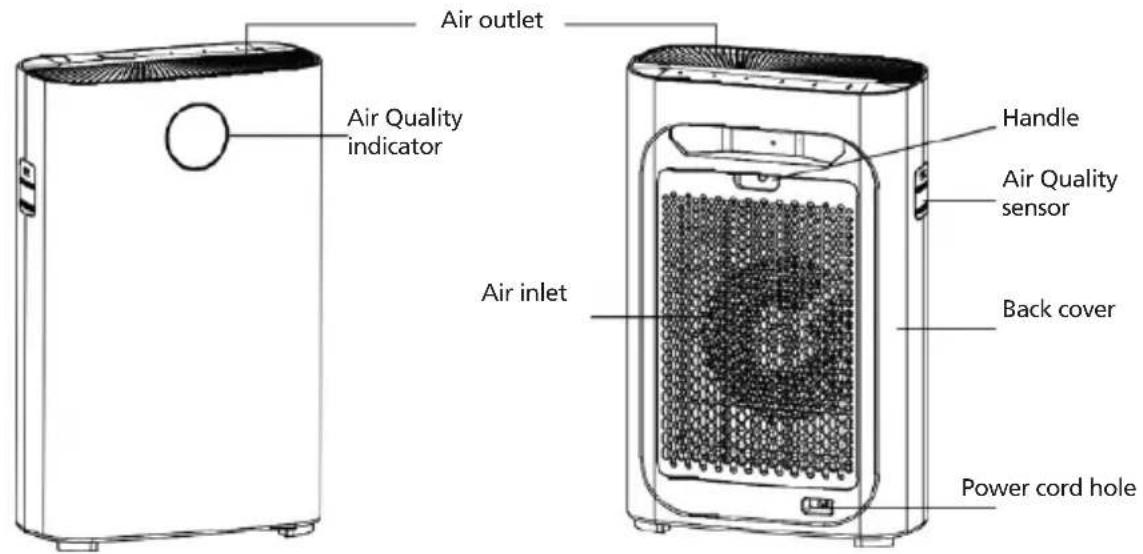
CONTROL PANEL
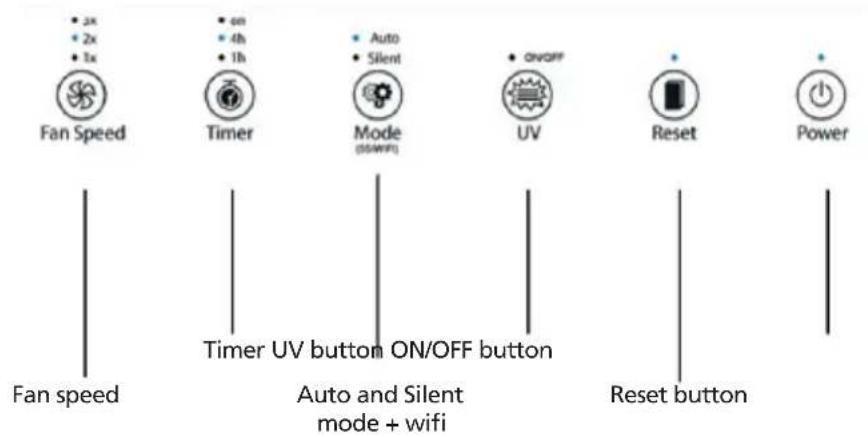
The control panel is touch screen and pushing the icons is possible to set and change the functioning modes
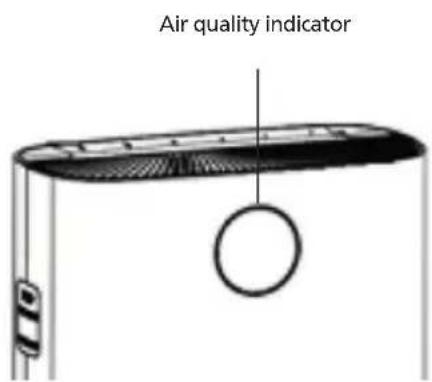
Air quality indicator
| Blue | (PM2.5=0~50) Perfect |
| Green | (PM2.5=50~100) Good |
| Purple | (PM2.5=100~150) Normal |
| Red | (PM2.5=150~) Bad |
| Advice: push the reset button if you want turn the air quality indicator off. | |
natural_image
Two illustrations of a device with a door panel and a smartphone, showing hand movement and rotation arrows (no text or symbols)REMOVE AND INSTALL THE BACK COVER
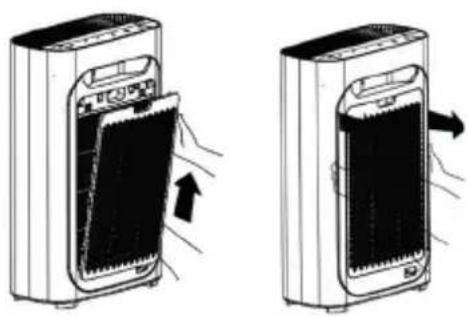
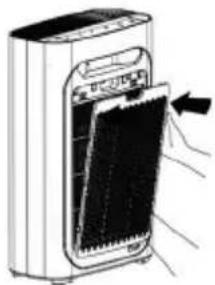
Keep the back handle of the purifier (air inlet) and lift it up gently.
natural_image
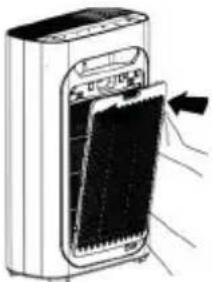
Diagram of a device with a panel inserted into a housing, showing internal components and arrows indicating movement (no text or symbols)To reinstall the cover, align it with the holes and insert it the grooves below, then gently push it up.
PLACE THE AIR PURIFIER
In order to make the air flowing correctly through the room and in the both sides of the purifier, make sure the space between the inlet of the air and the wall is at least 50 cm and the outlet of the air of at least 10 cm. TKeep the television, radio etc. 1 meter far.
Don't plug the purifier together with television, radio and other plugs in the same socket (screen defects and noise can be generated)
Placing the purifier in the same place for a long time can dirt the near walls.
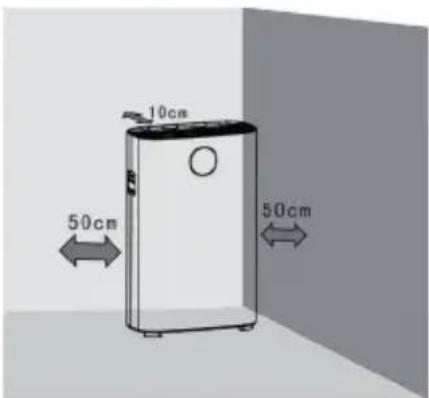
To guarantee a good ventilation and maximum efficiency to the machine, don't block the inlet and outlet of the air.
FILTER INSTALLATION
natural_image
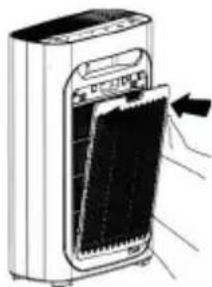
Illustration of a hand inserting a card into a device (no text or symbols visible)- Turn off the appliance and disconnect the plug, remove the rear panel.
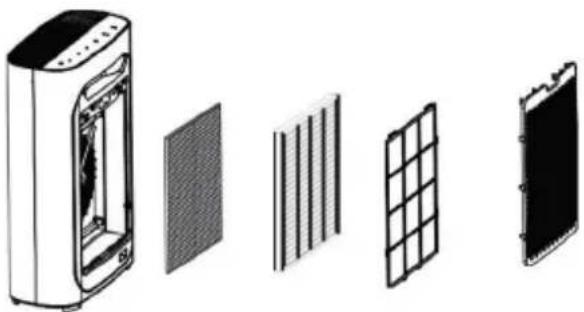
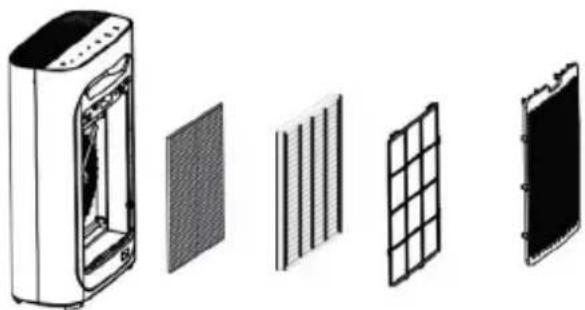
- Remove the filters
natural_image
Exploded view diagram of an air purifier with internal components (no text or labels)- Remove the packaging and place the purifier on a dry, stable and horizontal ground.
natural_image
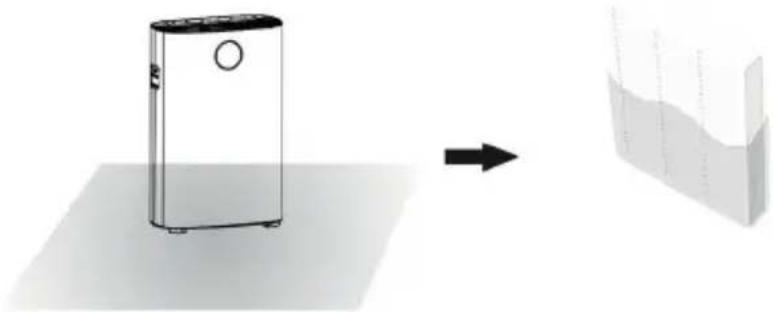
Diagram showing a device transforming into a layered structure (no text or symbols)- Install all the filters in order.
natural_image
Exploded view diagram of an air purifier with internal grid structure (no text or labels)- Remember to install the pre filter as the final one.
natural_image
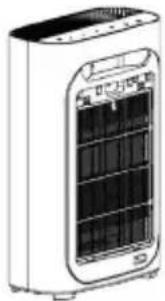
Illustration of a white electric heater with cooling fins and ventilation slots (no text or symbols)- Install again the inlet air panel: align it and insert it in the grooves, then push it gently.
natural_image
Illustration of a hand inserting a card into a device inside a container (no text or symbols visible)FILTERS AND FUNCTIONS
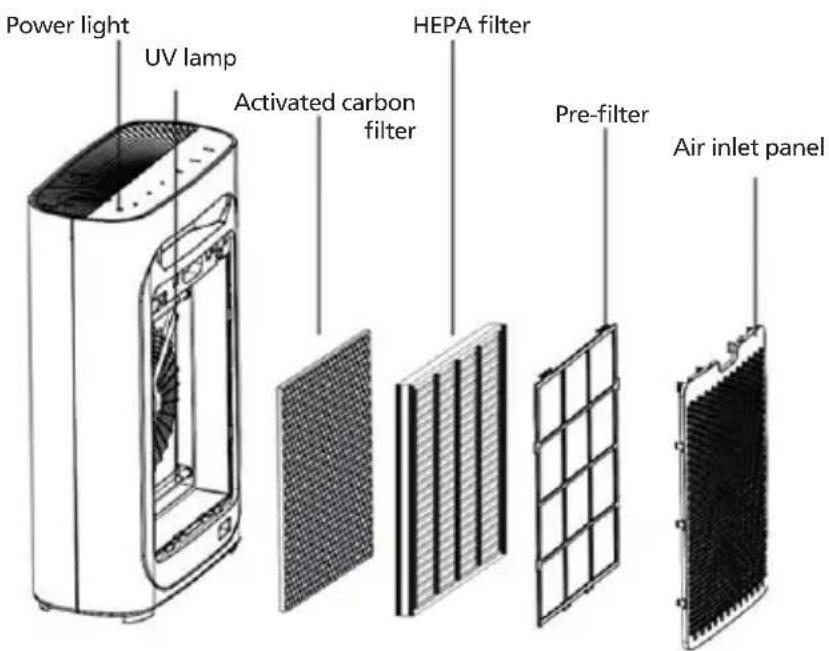
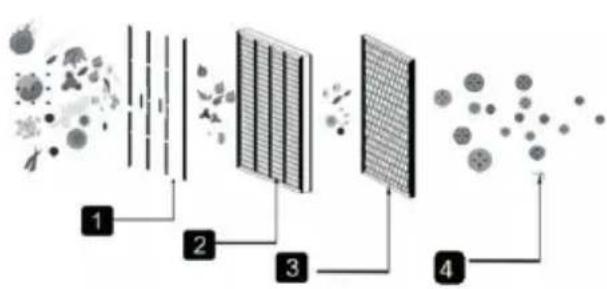
This purifier works through a 4 phases purification system, able to purify efficiently the air and make life healthier.
flowchart
graph LR
    A["Initial Dispersion"] --> B["Filter"]
    B --> C["Drying"]
    C --> D["Storage Cell"]
    D --> E["Final Product"]
    style A fill:#f9f,stroke:#333
    style B fill:#ccf,stroke:#333
    style C fill:#cfc,stroke:#333
    style D fill:#fcc,stroke:#333
    style E fill:#ffc,stroke:#333
1) Pre filter
2) HEPA filter
3) Active carbons filter + photocatalyst filter
4) UV lamp
Pre filter
It is a very tightly meshed filter (micron unit of measure), which effectively blocks 2.5mm fibrous particulate matter.
Effectiveness rate>99.9%. It can be easily cleaned for tens of thousands of times.
It also traps larger particles such as pet hair, dander and coarse dust, etc. being very resistant, it can increase the life of the other filters.
HEPA filter
Super-efficient filter: the range of removal of minor particles from 0 to 0.3 microns carried by the air flow can reach up to 99.9%. Stops the spread of allergens and bacteria in the air stream, such as pollen, smog and viruses.
Activated carbon filter + Photocatalytic filter
This filter retains volatile organic compounds, such as secondhand smoke and some types of polluting gases. The air is purified and the polluting molecules are completely oxidized through the photocatalysis process.
UV lamp
The UV lamp effectively eliminates a large variety of common bacteria and viruses and inhibits their production, acts on the filters helping them to eliminate the dirt on them.
USAGE
Plug the air purifier: it will emit a sound and all the icons will light up for 3 times and then the machine will enter the standby mode, leaving only the power indicator in red.
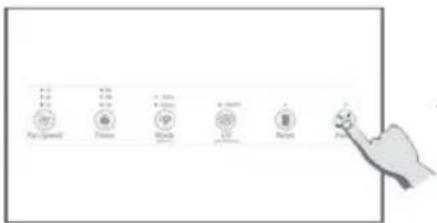
Press the power button. When starting the machine, the default mode is Auto. When the purifier is turned on, the Negative Ion function automatically turns on
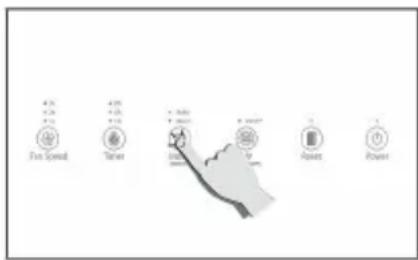
Auto Mode
Choosing the Auto mode, the purifier will start detecting the air quality after preheating for 5 seconds. The automatic mode will automatically detect the air quality and set the operating parameters according to it. Choosing automatic mode, you will have the most appropriate fan speed.
Silent Mode
The Silent Mode allows to darken the air quality indicator and set the fan speed at the minimum level, avoiding to produce noise and create a quiet environment.
Wifi function
Press and hold the Mode button for 5 seconds to activate the Wifi function within the first 5 seconds in which the machine is turning on.
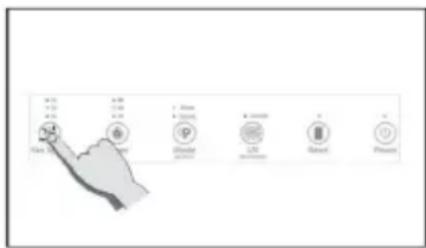
Fan speed setting
The speed of the fans can be selected at 3 different levels, depending on the desired power. the fan speeds can be set among 3 different levels, according to the required power.
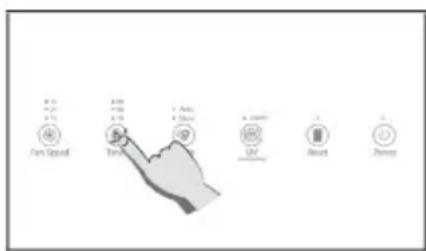
Timer
Pressing the Timer Button is possible to chose 3 different time functioning: 1h, 4h and 8h, or otherwise not setting it the machine will work continuously.
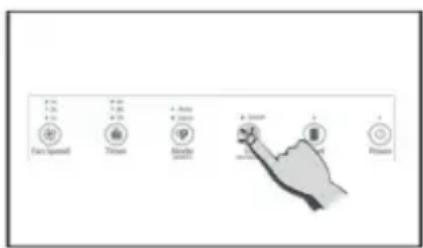
UV function (negative ions function)
Push the UV button to activate the UV lamp. Keep it pushed for 5 seconds to turn the ions function OFF (this function turns automatically ON when the machine starts to work)
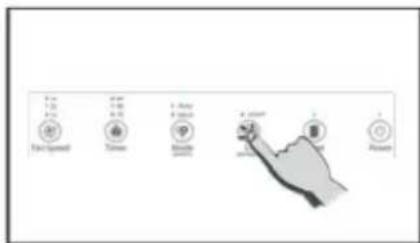
Reset
This function is activated only when the purifier has reached the maximum limit of use of the filters (1600 hours). Once replaced, press Reset to reactivate the purifier.
CARE AND MAINTENANCE
CLEAN THE AIR QUALITY SENSOR
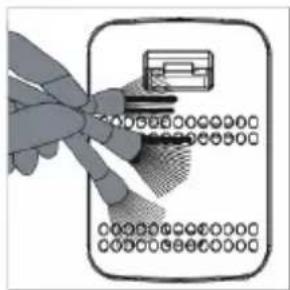
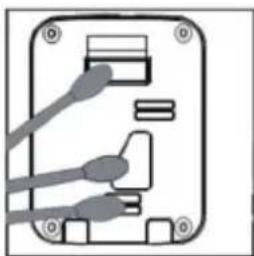
Clean the air quality sensor every two months to make sure the purifier is operating at best performance. If the purifier is used in dusty environments, clean it more often. Turn off the air purifier and pull out the plug before cleaning and maintenance. Remember that only the pre-filter can be cleaned, the other filters cannot.
natural_image
Illustration of a hand inserting a card into a banknote (no text or symbols visible)- Use a small brush to clean the air quality sensor inlet / outlet
natural_image
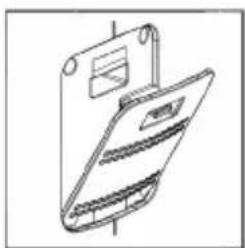
Line drawing of a foldable device with a paper clip and cover (no text or symbols)- Remove the protective cover of the air quality sensor.
natural_image
Pure electrical circuit lines without any symbols-
Clean gently the sensor, the inlet and outlet of the air with a wet cotton swab and dry with wet cotton swabs
-
Reinstall the protective cover.
For best performance, clean the pre filter every two months (approximately 480 hours) from start to use.
This is based on the average frequency of 8 hours a day, 7 days a week.
External parts maintenance: use a damp cloth (or mild detergent) to clean the surface to avoid the accumulation of dust.
CLEAN THE PRE-FILTER
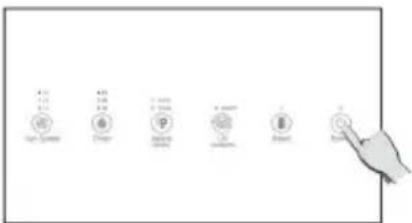
- Turn off and unplug the air purifier.
natural_image
Illustration of a hand inserting a device into a device panel (no text or symbols visible)-
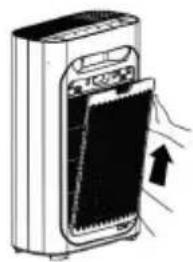
Remove the back cover
-
To remove the filter, help with the small labels on the pre filter.
natural_image
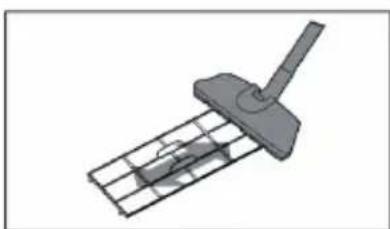
3D rendered mechanical component with a lever and grid base (no text or symbols)- Use a soft brush or a vacuum cleaner to remove particles, use water to clean the filter and reinstall it in the machines when it's completely dry
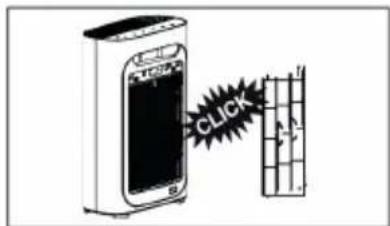
-
Reinstall the filter in the air purifier and reinstall the back part.
-
Plug, turn the air purifier on and start to work.
FILTER REPLACEMENT.
When the Reset icon flashes red, it means that the total operating hours of the 1600-hour filters are ending; the filters must be replaced.
natural_image
Illustration of a device with a door and screen, showing hand placement and an arrow indicating rotation (no text or symbols)- Turn off and unplug the air purifier.
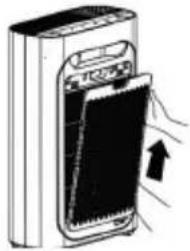
2.Remove the back panel from the purifier.
natural_image
Diagram showing a device with internal components and four separate grid-like structures (no text or symbols)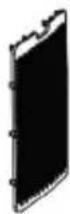
-
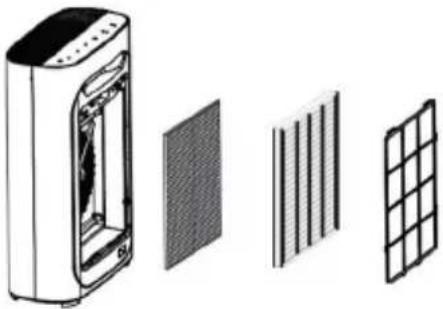
Remove all the filters.
-
Remove all the packaging and install the filters inside the purifier together with the pre filter.
-
Reinstall the cover, keep the alignment and insert it in the fix groove, then push it gently inside.
-
After rpelacing it, plug the machine and keepinh pushed the Reset button for 5 seconds to reset the machine.
FAULT HANDLING
| Problem Cause Solution | ||
| The machine doesn’t turn on. | The panel could be not installed. | Remove and install the panel to solve this problem. |
| The plug is not inserted in the socket. | Insert the plug in the socket. | |
| The plug or the cable are damaged. | Contact the customer care. | |
| The machine doesn’t work. | The machine is not turned on. | Insert the plug and turn again the machine. |
| The plastic packaging of each filter has not been removed. | Before the use, remove the plastic packaging of each filter. | |
| The machine is placed wrongly. | Place the machine on a plan surface. | |
| The purification performance is bad. | The filter is dirty. Clean the | filter. |
| The filter has not been replaced. | Replace the filter. | |
| The inlet and the outlet are blocked. | Contact the customer care. | |
| The plastic packaging of each filter has not been removed. | Before the use, remove the plastic packaging of each filter. | |
| The space between the machine is not enough. | Maintain a free space of at least 50 cm on both sides of the air inlets and 10 cm on the back for the outlets. |
SMART OPERATION INSTRUCTION TUYA APP
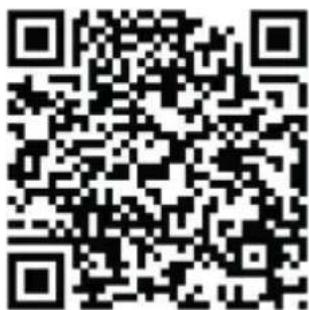
1. Download & Registration
- Scan the QR code to download the "Tuya" APP. You can also find the "Tuya" app in the APP store or Google Play and install it.
- Open the "Tuya" APP, press "Register" to register a "Tuya" account with your phone number or e-mail. Then proceed with the log in.
2. Add Devices in Easy Mode (Recommended)
• Make sure that the purifier is powered and the smartphone is
connected to the WiFi network:
press the Mode button for 4 seconds, wait for the "beep" and then release it: this means that the device is ready to pair with the smartphone.
- Open the "Tuya" APP and press "+" at the top right of the APP. Select the type of device you want to connect, press "Small appliances" and press "Air purifier", then enter the password of the WiFi network to which the smartphone is connected and set the connection to 2.4 GHz. Then press "Next" to connect to the purifier.
- When, after the pairing process, the message "Adding 1 device successful" is shown, it means that the connection is complete and the device will be listed in the list of devices associated with the APP.
3. Add Devices in AP Mode
If failed in Easy Mode, users could also add devices in AP Mode.
- Press the Mode button for at least 5 seconds until the purifier emits a "beep" and the WiFi indicator light starts flashing quickly, then press the Mode button for at least 5 seconds until another "beep" sounds "and the indicator light starts flashing slowly, this means that the
purifier is ready for configuration in AP mode.
- Press "+" at the top right of the APP. Select "Small Appliance". Then enter the password of the internet network (2.4GHz) and select "AP Mode" at the top right, press "Connect now" to enter the WLAN settings interface in the smartphone and select the WiFi network named "Tuya XXXX" and connect to this.
- Go back to the "Tuya" APP, the connection will start automatically.
- When "Added 1 device successfully" is displayed, it means the connection is completed and the device will be listed in the APP list.
Now you can control the purifier via the APP anytime and anywhere (make sure your smartphone and purifier are both connected to the internet). You can share devices with friends or family after they are successfully added. It is also possible to change the device name with a recognizable phrase or word such as "Innoliving purifier"
4. Q&A
Why was not possible to add the purifier?
a. Make sure the purifier is turned on and close to your smartphone during the connection process between devices.
b. Make sure your smartphone is connected to the WiFi network and that the WiFi router is working properly.
c. Make sure the purifier is ready for setup. Refer to the product instructions "Add devices in Easy Mode" or "Add devices in Access Point mode" for details.
d. Make sure that the connected devices have not reached the maximum number of WiFi routers. If not, disconnect the network of some devices.
e. Make sure the WiFi network password is correct when adding a new purifier.
f. Make sure you haven't used Chinese characters to name the WiFi network.
Is it possible to manage a purifier with a 2G/3G/4G/5G network?
When adding a purifier for the first time, your smartphone and purifier must be connected to the same WiFi network. After successfully adding the purifier, the purifier can be remotely controlled with the 2G / 3G / 4G / 5G network.
How can I share the control of the purifier with others?
Open the Tuya APP, select the purifier and press the icon in the upper right corner. Press "Device Sharing" and "Add Share", then select the "country / region" to which the account belongs and enter the "Account Number" (a phone number or email address) with which you want to share the purifier. (Make sure the phone number or email is registered.)
How can I manage the purifier shared by others?
Open Tuya and choose the purifier by pressing the product icon in the "Shared devices" section on the home page.
How can the purifier be removed?
Open the "Tuya" APP, select the purifier and press the button in the upper right corner. Press "More". Then press "Remove Purifier" at the bottom: the WiFi indicator light will start
flashing rapidly again.
Echo APP
- What you need to get started
Before using Echo to control your purifier, make sure you meet the following conditions.
- Have an Echo device like Echo, Echo Tap, or Echo Dot.
- Have an Amazon account.
- Having downloaded the "Tuya" App and have a related account.
-
Have a purifier.
-
Add devices in the "Tuya" app (refer to the app instructions)
-
Set Amazon Echo and enable Tuya Skill
User can set up Echo via web or the Alexa app.
For the web configuration: http://alexa.amazon.com/spa/index.html
Search for "Amazon Alexa" in the App Store or Google Play to install the app.
Below is an example via app configuration: (web and app configuration are basically the same).
-
Link the Tuya account to Alexa
-
Press "Skills and Games" in the menu and search for "Tuya". Select "Tuya" and press "ENABLE" to enable the skill.
-
You will be redirected to the "Tuya" account link page. Log in with your Tuya account and password, without forgetting to select the country / region to which your account belongs. Then press "Connect Now" to link your "Tuya" account.
-
Control by voice commands
Now you can control your devices via Echo. You can use the following commands:
Alexa, turn on / off the purifier
Alexa, set the purifier to "mode one"
Alexa, set the purifier to "mode two"
Alexa, set the purifier to "mode three"
Notice: Alexa may only support on / off function or fan speed
RATING LABEL
Innoliving Spa
Via Merloni 9 - 60131 Ancona - Italy
INN-557 PURIFICATORE ARIA
AIR PURIFIER
220-240V\~50/60Hz 23W
MADE IN CHINA
Lot n.

Rev.00_10.2020
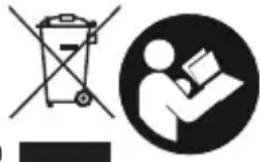
natural_image
Two black-and-white icons: a trash bin symbol crossed out and a person reading a book (no text or symbols present)

This product complies with all the applicable European directives.

Read carefully instructions manual.

Class II insulation
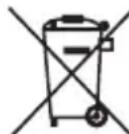
INFORMATION TO USERS according to Legislative Decree No. 49 of March 14, 2014 "2012/19/UE Implementation of the Directive on Waste Electrical and Electronic Equipment (WEEE)"
The crossed-out dustbin symbol indicates that the product at the end of its life must be collected separately from other waste. The user should, therefore, take the equipment with the essential components at the end of its useful life to the separate collection center of electronic and electrical waste, or return it to the retailer when purchasing new equipment of equivalent type, in ratio of one to one, or one to zero for devices with larger side less than 25 CM. The separate collection for the decommissioned equipment for recycling, treatment and environmentally compatible disposal contributes to avoid possible negative effects on the environment and human health and promotes recycling of the materials. Improper disposal of the product by the user entails the application of administrative sanctions according to Legislative Decree No. 49 of 14 March 2014
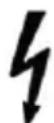
CAUTION:dangerous voltage
The manufacturer Innoliving S.p.a. declares that the INN-557 air purifier complies with Directive 2014/53 / EU.
The full text of the EU declaration of conformity is available at the following internet address: https://www.innoliving.it/prodotti/inn-557-purificatore-daria/
Maximum transmission band: 17.52 dBm
Frequency band: 2412MHz a 2472MHz
innoliving - easy tech, easy life
Innoliving Spa
Via Merloni, 9
60131 Ancona Italy
Tel 071 2133550
www.innoliving.it
MADE IN CHINA
CE