
GXLD2 - Microphone CAD Audio - Free user manual and instructions
Find the device manual for free GXLD2 CAD Audio in PDF.


| Product Type | Digital Wireless Microphone System (Dual Channel) |
| Model | GXLD2 |
| Brand | CAD Audio |
| Transmitter Options | Handheld (TXHGXLD) and Bodypack (TXBGXLD) |
| Handheld Capsule | CADLive™ D38 Moving Coil Dynamic, Supercardioid |
| Frequency Response (Handheld) | 80 Hz – 16 kHz |
| Frequency Response (Bodypack & Receiver) | 20 Hz – 20 kHz |
| Handheld Sensitivity | -43 dBV (6.8 mV) @ 1 Pa |
| Handheld Max SPL | 145 dB |
| RF Output Power | 10 mW |
| Modulation | High Definition Digital QPSK |
| Frequency Band | 902 – 928 MHz (channelized) |
| Receiver Output Level (Max) | +10 dBV |
| Receiver Output Connectors | 2 x XLRM-type (balanced), 1 x 1/4" unbalanced (mixed out) |
| Battery Type | 2 x AA alkaline or rechargeable |
| Battery Life | >10 hours (alkaline) |
| Included Accessories (Bodypack) | WXGTR guitar cable and WXHW condenser headworn microphone |
| Warranty | Two-Year Limited Warranty |
| Safety Notice | Caution for pacemaker users; FCC rules for unlicensed operation |
| Distributor | American Music and Sound (distributed worldwide) |
Frequently Asked Questions - GXLD2 CAD Audio
User questions about GXLD2 CAD Audio
0 question about this device. Answer the ones you know or ask your own.
Ask a new question about this device
Download the instructions for your Microphone in PDF format for free! Find your manual GXLD2 - CAD Audio and take your electronic device back in hand. On this page are published all the documents necessary for the use of your device. GXLD2 by CAD Audio.
USER MANUAL GXLD2 CAD Audio
Individuals with cardiac pacemakers and other similar medical devices should consult with their physician before using any RF devices. Though the output level of this wireless system is below 50 milliwatts, the proximity of the transmitter to the implant device could pose a threat.
As with any wireless product, environmental conditions can reduce or in some cases prohibit a successful connection between the transmitter and the receiver.
Most users of CAD Audio wireless products in the United States do not need a license for operation. However, the rules for unlicensed operation state that this device must not operate in excess of 50 milliwatts and it must not cause harmful interference to other wireless devices. Wireless products meeting CAD factory standards adhere to these rules. The FCC reserves the right to change these rules at any time.
For more information contact the FCC at 1-888 - CALL- FCC (TTY: 1-888-TELL-FCC) or visit the FCC's wireless microphone website at: www.fcc.gov/cgb/wirelessmicrophones
Two-Year Limited Warranty
For warranty issues visit cadaudio.com and visit the support page

www.cadaudio.com
Distributed Worldwide by American Music and Sound 925 Broadbeck Drive, Suite 220 Newbury Park, CA 91320 U.S.A. Tel: (800) 431-2609 Fax: (800) 431-3129
©2018 CAD Audio Part No. 62275-63-00 Apr2018

GXLD
GXLD2
Digital Single and Dual
Wireless Microphone Systems
Manual and
Quick Start-up Guide
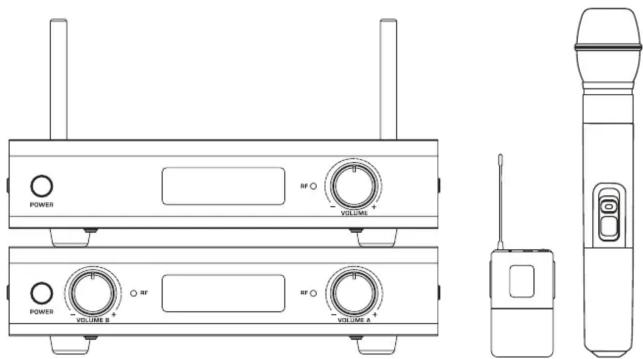
GXLD GXLD2
Digital Single and Dual Wireless Microphone Systems
Introduction
Please enjoy the easy and exciting performance that the GXL ™ Digital Wireless Series provides for your next performance. CAD Audio has been creating valued product since 1931 and prides itself on developing and supporting the live performer. Our design criterion was straightforward. Develop a high value wireless microphone system that can cope with today's challenging RF environment that is both easy to use and exciting to operate.
The GXLD/GXLD2 Wireless includes the following features:
• Each channel has an RF indicator light that indicates the presence of connectivity.
• Digital High Definition Audio
- Advanced dipole antenna technology for increased operating range.
- Multiple output options on the receiver for maximum performance and flexibility of use.
- Professional balanced XLRM-type discrete output
- 14 inch unbalanced output for easy connection to unbalanced 14 inch input.
- Handheld transmitters feature the CADLive™ D38 capsule
- Handheld transmitter outfitted with on/off and mute function for flexibility of use.
- Bodypack transmitter outfitted with on/off, mute function for flexibility of use.
- Handheld transmitter features battery life indicator.
- Battery life of >10 hrs.
- All Bodypack systems ship with WXGTR guitar cable and WXHW condenser headworn mic included.
Channelization
The GXLD/GXLD2 system is available in the following frequencies:
AH = 9 0 2. 9 MHz / 9 1 5. 5 MHz
AI = 9 0 9. 3 MHz / 9 2 6. 8 MHz
Interfacing to TXBGXLD input connector

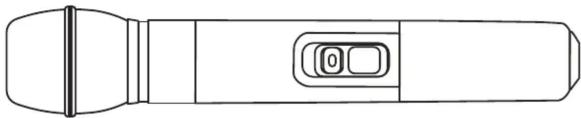
Handheld TXHGXLD Transmitter
- Transmitter Switch
- Power on/off switch
- Mute on/off switch
• Power indicator light - Battery life indicator light
Specifications TXHGXLD Handheld
Operating Principle......Moving coil dynamic
Capsule......CADLive™ D38
Polar Pattern....Supercardioid
Frequency Response 80Hz - 16KHz
Sensitivity......-43dBV (6.8mV) @ 1Pa
Maximum SPL....145dB
RFTransmitter Output.... 10mW
Modulation......High Definition Digital QPSK
Power requirements....2x AA alkaline or rechargeable battery
Battery Life ....>10 hours (alkaline)
natural_image
Line drawing of a handheld device with a handle and control panel (no text or symbols)Bodypack TXBGXLD Transmitter
- On/Off, mute switch
- TB4M-type connector receives
TA4F-type terminated connection - Battery compartment
- Antenna
- LED indicator light

Specifications TXBGXLD Bodypack
Frequency Response 20Hz – 20KHz
Maximum Input Level
Microphone Input: 1.5Vrms (5Vpp)
Instrument Input: 1.5Vrms (5Vpp)
RFTransmitter Output.... 10mW
Modulation....High Definition Digital QPSK
Power Requirements .... 2x AA alkaline or rechargeable battery
Battery Life ....>10 hours (alkaline)
Operating Instructions
- Insert new high quality alkaline batteries into your transmitter.
- Utilize the flexible output format of the receiver to match your application. Connect to mixer or amplifier appropriately.
• Power up the receiver.
• Power up the transmitters. - The RF indicator light will show connectivity between the receiver and the transmitter.
Receiver RXGXLD
- Power switch
- LCD display
- RF indicator light
- Volume control

- Antenna
- Power jack
- Unbalanced output
- XLR output

Specifications RXGXLD Receiver
Maximum Output Level ....+10dBV
Frequency Response 20Hz - 20KHz
Frequency Band 902 - 928MHz
Output Connectors ....1x XLRM-type, 1x 1/4"
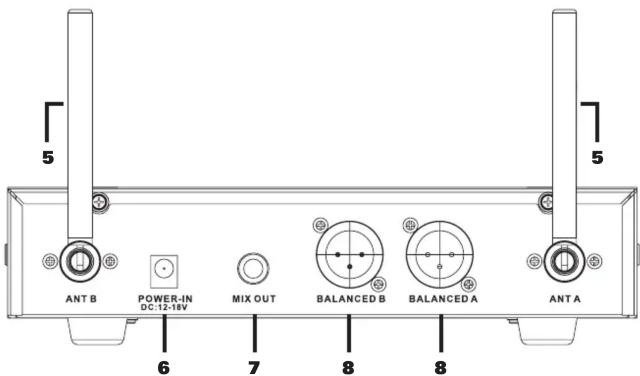
Receiver RXGXLD2
- Power switch
- Volume control
- RF indicator light
- LCD display

- Antenna
- Power jack
- Mixed output
- XLR output
Specifications RXGXLD2 Receiver
Maximum Output Level ....+10dBV
Frequency Response 20Hz - 20KHz
Frequency Band 902 - 928MHz
Output Connectors ....2x XLRM-type, 1x 1/4"
- GXLD GXLD2
- Digital Single and Dual Wireless Microphone Systems
- Introduction
- The GXLD/GXLD2 Wireless includes the following features:
- Channelization
- Handheld TXHGXLD Transmitter
- Specifications TXHGXLD Handheld
- Bodypack TXBGXLD Transmitter
- Specifications TXBGXLD Bodypack
- Operating Instructions
- Receiver RXGXLD
- Specifications RXGXLD Receiver
- Receiver RXGXLD2
- Specifications RXGXLD2 Receiver
Brand : CAD Audio
Model : GXLD2
Category : Microphone