TX3010 - Microphone CAD Audio - Free user manual and instructions
Find the device manual for free TX3010 CAD Audio in PDF.


Pick your language and provide your email: we'll send you a specifically translated version.
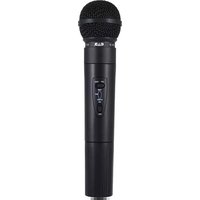
| Product Type | Dynamic vocal microphone |
| Brand | CAD Audio |
| Model | TX3010 |
| Category | Microphone |
| Polar Pattern | Cardioid |
| Frequency Response | 50 Hz - 15 kHz |
| Impedance | 300 ohms |
| Connector | XLR |
| Housing Material | Die-cast metal |
| Finish | Matte black |
| Dimensions | 6.5 x 1.9 x 1.9 inches |
| Weight | 0.6 lbs |
| Power | No phantom power required |
| Operating Temperature | -10°C to 50°C |
| Maintenance | Clean with a dry cloth |
| Safety | Avoid drops and excessive humidity |
| Spare Parts | Available from CAD Audio service center |
| Repairability | Serviceable by qualified technician |
| Package Contents | TX3010 microphone, clip, warranty card |
| Warranty | 1 year limited |
Frequently Asked Questions - TX3010 CAD Audio
Is the CAD Audio TX3010 suitable for live performances?
Yes, the TX3010 is designed for live vocals with a cardioid polar pattern that minimizes feedback and isolates the sound source effectively.
Does the TX3010 require phantom power?
No, the TX3010 is a dynamic microphone, so it does not require phantom power. It works with standard XLR inputs on mixers and interfaces.
What type of connector does the TX3010 use?
The TX3010 uses a standard XLR connector, making it compatible with most professional audio equipment.
How can I reduce feedback when using this microphone?
To reduce feedback, keep the microphone at least 2 inches from the speaker, point it away from monitors, and use a high-pass filter if available.
What is the recommended microphone technique for vocals?
Sing directly into the front of the microphone at a distance of 1 to 2 inches for optimal bass response and volume. This takes advantage of the proximity effect.
Can the TX3010 be used for instruments?
Yes, while it is optimized for vocals, the TX3010 can capture amplified instruments like guitar amps and brass instruments with good clarity.
How should I clean the TX3010 microphone?
Wipe the body with a soft dry cloth after use. Avoid using liquids or sprays, and keep the grille clean to maintain sound quality.
What should I do if the output level is low?
Check the XLR cable and mixer input. Ensure the microphone is not muted and that the mixer provides adequate gain. Also verify that the capsule is not blocked.
Is the TX3010 compatible with wireless systems?
The TX3010 is a wired microphone and does not have a built-in wireless transmitter. However, it can be used with plug-on wireless transmitters that accept XLR inputs.
What is included in the package?
The package includes the TX3010 microphone, a microphone clip, and a warranty card.
User questions about TX3010 CAD Audio
0 question about this device. Answer the ones you know or ask your own.
Ask a new question about this device
No questions yet. Be the first to ask one.
Download the instructions for your Microphone in PDF format for free! Find your manual TX3010 - CAD Audio and take your electronic device back in hand. On this page are published all the documents necessary for the use of your device. TX3010 by CAD Audio.
USER MANUAL TX3010 CAD Audio
Manual assistant
Powered by Anthropic
Waiting for your message
Product information
Brand : CAD Audio
Model : TX3010
Category : Microphone