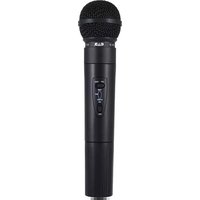
WX1600 - Microphone CAD Audio - Free user manual and instructions
Find the device manual for free WX1600 CAD Audio in PDF.


Pick your language and provide your email: we'll send you a specifically translated version.
| Product Type | Wireless Microphone System (Handheld) |
| Brand | CAD Audio |
| Model | WX1600 |
| Frequency Range | UHF 600-700 MHz (specific band may vary) |
| Number of Channels | 100 selectable channels |
| Transmission Range | Up to 300 feet (90 meters) in open air |
| Microphone Element | Dynamic, cardioid polar pattern |
| Transmitter Power Output | 10 mW (typical) |
| Transmitter Battery | 2 x AA alkaline batteries, 8 hours continuous use |
| Receiver Type | Single-channel, diversity UHF receiver |
| Receiver Output | 1/4" unbalanced (6.35mm) and XLR balanced |
| Receiver Power | 12V DC via included adapter or 2 x AA batteries |
| Dimensions (Receiver) | 7.5 x 4.2 x 1.5 inches (19 x 10.7 x 3.8 cm) |
| Weight (Receiver) | 1.2 lbs (0.54 kg) without batteries |
| Dimensions (Transmitter) | 9.8 x 2.0 x 2.0 inches (25 x 5.1 x 5.1 cm) |
| Weight (Transmitter) | 0.5 lbs (0.23 kg) without batteries |
| Frequency Response | 50 Hz - 15 kHz |
| Signal-to-Noise Ratio | > 100 dB |
| Total Harmonic Distortion | < 1% (at 1 kHz, ±15 kHz deviation) |
| Cleaning | Wipe with a dry, soft cloth; do not use solvents |
| Safety | Keep away from water and extreme temperatures; use only specified batteries |
| Spare Parts and Repairability | Contact CAD Audio or authorized service centers for replacement parts and repairs |
Frequently Asked Questions - WX1600 CAD Audio
How do I set up the WX1600 wireless microphone system?
Connect the receiver to a mixer or amplifier using an XLR or 1/4" cable, plug in the power adapter, insert batteries into the transmitter, and press the power button on both units. Select a clear channel by scanning or manually choosing one.
What type of batteries does the WX1600 transmitter use?
The transmitter requires 2 AA alkaline batteries. Rechargeable NiMH batteries can also be used, but operating time may vary.
How long do the batteries last in the WX1600 transmitter?
With fresh alkaline batteries, the transmitter provides approximately 8 hours of continuous use.
Can I use the WX1600 with rechargeable batteries in the receiver?
The receiver can be powered by 2 AA batteries (optional), but it is recommended to use the included AC adapter for reliable operation. Rechargeable batteries in the receiver may work but are not officially supported.
How do I avoid interference with other wireless devices?
Perform a channel scan on the receiver before use to find an open frequency. Avoid using multiple wireless systems on the same channel. Ensure no other devices (e.g., Wi-Fi, cordless phones) operate in the same UHF band nearby.
What is the operating range of the WX1600?
The line-of-sight range is up to 300 feet (90 meters). Obstacles like walls and metal objects can reduce range.
How do I clean and maintain the WX1600 microphone?
Use a dry, soft cloth to wipe the microphone and receiver. Avoid using liquids or solvents. Store in a cool, dry place when not in use.
Can I use the WX1600 with a guitar or instrument?
The WX1600 is designed for vocal use with a dynamic microphone element. For instruments, a separate wireless instrument system is recommended.
What should I do if the sound is distorted or noisy?
Check the battery level, move the transmitter closer to the receiver, change the channel to one with less interference, and ensure the audio input levels on your mixer are not too high.
Where can I find replacement parts or service for the WX1600?
Contact CAD Audio customer support or an authorized service center. Parts such as batteries, antenna, and microphone grille may be available through official channels.
User questions about WX1600 CAD Audio
0 question about this device. Answer the ones you know or ask your own.
Ask a new question about this device
No questions yet. Be the first to ask one.
Download the instructions for your Microphone in PDF format for free! Find your manual WX1600 - CAD Audio and take your electronic device back in hand. On this page are published all the documents necessary for the use of your device. WX1600 by CAD Audio.
USER MANUAL WX1600 CAD Audio
Manual assistant
Powered by Anthropic
Waiting for your message
Product information
Brand : CAD Audio
Model : WX1600
Category : Microphone