
Motion Vision X - Soundbar Martin Logan - Free user manual and instructions
Find the device manual for free Motion Vision X Martin Logan in PDF.


| Product type | Soundbar |
| Brand | Martin Logan |
| Model | Motion Vision X |
| Dimensions (W x H x D) | 1016 x 89 x 127 mm |
| Weight | 5.4 kg |
| Power supply | 100-240 V, 50/60 Hz |
| Power consumption | 30 W (standby < 0.5 W) |
| Number of channels | 2.1 |
| Output power | 120 W RMS |
| Speakers | 2 soft dome tweeters, 2 woofers, 2 built-in subwoofers |
| Connectivity | HDMI eARC, optical, analog, Bluetooth |
| Supported audio formats | Dolby Atmos, Dolby Digital, DTS, PCM |
| Main functions | Cinema, music, night, enhanced dialogue modes |
| Remote control | Included (infrared) |
| Wall mounting | Wall mount included |
| Housing material | Brushed aluminum |
| Care and cleaning | Wipe with a soft dry cloth. Do not use abrasive or liquid cleaners. |
| Safety | Do not expose to moisture, do not block ventilation openings. |
| Operating temperature | 0 °C to 35 °C |
| Box contents | Soundbar, remote control, wall mount, HDMI cable, optical cable, quick start guide |
| Repairability | Spare parts available on request. Repairability index: 7.0/10 |
Frequently Asked Questions - Motion Vision X Martin Logan
User questions about Motion Vision X Martin Logan
0 question about this device. Answer the ones you know or ask your own.
Ask a new question about this device
Download the instructions for your Soundbar in PDF format for free! Find your manual Motion Vision X - Martin Logan and take your electronic device back in hand. On this page are published all the documents necessary for the use of your device. Motion Vision X by Martin Logan.
USER MANUAL Motion Vision X Martin Logan
natural_image
Abstract black ink brushstroke design on gray horizontal stripes (no text or symbols)user's manual
Motion® Martin LOGAN Vision X

natural_image
Technical line drawing of a curved mechanical component with a small inset showing a 88° angle (no text or symbols)
Compatible with SWT-2 Equipped MartinLogan Subwoofer Systems

Do Not Open! Risk of Electrical Shock. Voltages in this equipment are hazardous to life. No user-serviceable parts inside. Refer all servicing to qualified service personnel. To prevent fire or shock hazard, do not expose this module to moisture.

The lightning bolt flash with arrowhead symbol within an equilateral triangle, is intended to alert the user to the presence of potentially "dangerous voltage" within the product's enclosure that may be of sufficient magnitude to constitute a risk of electric shock to persons.

The exclamation point within an equilateral triangle is intended to alert the user to the presence of important operating and maintenance (servicing) instructions in the literature accompanying the appliance.
MOTION VISION X
Tested to comply with FCC standards. FOR HOME OR OFFICE USE
IMPORTANT SAFETY INSTRUCTIONS!
1 Read these instructions.
2 Keep these instructions.
3 Heed all warnings.
4 Follow all instructions.
5 Do not use this apparatus near water.
6 Clean only with dry cloth.
7 Do not block any ventilation openings. Install in accordance with the manufacturer's instructions.
8 Do not install near any heat sources such as radiators, heat registers, stoves, or other apparatus (including amplifiers) that produce heat.
9 Do not defeat the safety purpose of the polarized or grounding-type plug. A polarized plug has two blades with one wider than the other. A grounding type plug has two blades and a third grounding prong. The wide blade or the third prong are provided for your safety. If the provided plug does not fit into your outlet, consult an electrician for replacement of the obsolete outlet.
10 Protect the power cord from being walked on or pinched, particularly at plugs, convenience receptacles, and the point where they exit from the apparatus.
11 Only use attachments/accessories specified by the manufacturer.
12 Use only with the cart, stand, tripod, bracket, or table specified by the manufacturer, or sold with the apparatus. When a cart is used, use caution when moving the cart/apparatus combination to avoid injury from tip-over.

-
Unplug this apparatus during lightning storms or when unused for long periods of time.
-
Refer all servicing to qualified service personnel. Servicing is required when the apparatus has been damaged in any way, such as power-supply cord or plug is damaged, liquid has been spilled or objects have fallen into the apparatus, the apparatus has been exposed to rain or moisture, does not operate normally, or has been dropped.
-
To completely disconnect this equipment from the AC mains, disconnect the power supply cord plug from the AC receptacle.
-
The mains plug of the power supply cord shall remain readily operable.
17 CAUTION: Danger of explosion if battery is incorrectly replaced. Replace only with the same or equivalent type (AAA). Dispose of dead batteries in accordance with local regulation.
-
To prevent overheating, do not cover the apparatus. Install in accordance with the manufacturer's instructions.
-
No naked flame sources, such as candles, should be placed on the product.
-
Do not expose this apparatus to dripping or splashing and ensure that no objects filled with liquids, such as vases, are placed on the apparatus.
-
Batteries (battery pack or batteries installed) shall not be exposed to excessive heat such as sunshine, fire, or the like.
-
For apparatus mounted to wall, the apparatus shall be installed on solid wood, bricks, concrete or solid wood columns and battens.
-
DO NOT overload wall outlets or extension cords beyond their rated capacity as this can cause electric shock or fire.
-
Minimum distances around the apparatus for sufficient ventilation.
-
The ventilation should not be impeded by covering the ventilation openings with items, such as newspapers, tablecloths, curtains, etc.
-
Do not ingest the battery, Chemical Burn Hazard.
-
Keep new and used batteries away from children.
-
If the battery compartment does not close securely, stop using the product and keep it away from children.
-
If you think batteries might have been swallowed or placed inside any part of the body, seek immediate medical attention.
-
The battery (battery or batteries or battery pack) shall not be exposed to excessive heat such as sunshine, fire or the like.
-
Risk of leakage. Only use the specified type of Batteries. Never mix new and used batteries. Observe correct polarity. Remove batteries from products that are not in use for extended periods of time. Store batteries in a dry place.
-
Do not recharge non-rechargeable batteries.
-
Avoid exposure to extreme heat or cold.
-
This equipment is a Class II or double insulated electrical appliance. It has been designed in such a way that it does not require a safety connection to electrical earth.
- Danger of explosion if battery is incorrectly replaced. Replace only with the same or equivalent type.
- (The remote control supplied with) This product contains a AAA battery. If the AAA battery is swallowed, it can cause severe internal burns in just 2 hours and can lead to death.
- Do not handle leaking or damaged AAA batteries.
-
THIS PRODUCT CONTAINS A AAA BATTERY. IF MISUSED OR ABUSED THIS CAN RESULT IN:
-
Smoke or gas hazard
- Heat hazard
- Fire hazard
- Explosion hazard
WARNING: This product is intended to be operated ONLY from the AC Voltages listed on the back panel or included power supply of the product. Operation from other voltages other than those indicated may cause irreversible damage to the product and void the product warranty. The use of AC Plug Adapters is cautioned because it can allow the product to be plugged into voltages in which the product was not designed to operate. If the product is equipped with a detachable power cord, use only the type provided with your product or by your local distributor and/or retailer. If you are unsure of the correct operational voltage, please contact your local distributor and/or retailer.
This device complies with Part 15 of the FCC Rules. Operation is subject to the following two conditions: (1) This device may not cause harmful interference, and (2) this device must accept any interference received, including interference that may cause undesired operation.
FEDERAL COMMUNICATIONS COMMISSION INTERFERENCE
STATEMENT: This equipment has been tested and found to comply with the limits for a Class B digital device, pursuant to part 15 of the FCC Rules. These limits are designed to provide reasonable protection against harmful interference in a residential installation. This equipment generates, uses and can radiate radio frequency energy and, if not installed and used in accordance with the instructions, may cause harmful interference to radio communications. However, there is no guarantee that interference will not occur in a particular installation. If this equipment does cause harmful interference to radio or television reception, which can be determined by turning the equipment off and on, the user is encouraged to try to correct the interference by one or more of the following measures:
- Reorient or relocate the receiving antenna.
- Increase the separation between the equipment and receiver.
- Connect the equipment into an outlet on a circuit different from that to which the receiver is connected.
- Consult the dealer or an experienced radio/TV technician for help.

Approved under the verification provision of FCC Part 15 as a Class B Digital Device.
Any changes or modifications not expressly approved by the grantee of this device could void the user's authority to operate the equipment.
RF EXPOSURE WARNING: This equipment must be installed and operated in accordance with provided instructions and the antenna(s) used for this transmitter must be installed to provide a separation distance of at least 20 cm from all persons and must not be co-located or operating in conjunction with any other antenna or transmitter. End-users and installers must be provide with antenna installation instructions and transmitter operating conditions for satisfying RF exposure compliance.
5GHz RF DEVICE STATEMENT: This device operates in the 5.15–5.25GHz frequency range and is restricted to indoor use only. Outdoor operations in the 5150–5250MHz frequency range is prohibited.
CANADA, INDUSTRY CANADA (IC) NOTICES: This Class B digital apparatus complies with Canadian ICES-003 and RSS-210. Operation is subject to the following two conditions: (1) this device may not cause interference, and (2) this device must accept any interference, including interference that may cause undesired operation of the device.
RADIO FREQUENCY (RF) EXPOSURE INFORMATION: The radiated output power of the Wireless Device is below the Industry Canada (IC) radio frequency exposure limits. The Wireless Device should be used in such a manner such that the potential for human contact during normal operation is minimized. This device has also been evaluated and shown compliant with the IC RF Exposure limits under mobile exposure conditions. (antennas are greater than 20cm from a person's body).
Caution: (i) The device operating in the band 5150–5250 MHz is only for indoor use to reduce the potential for harmful interference to co-channel mobile satellite systems; (ii) The maximum antenna gain permitted for devices in the bands 5250–5350 MHz and 5470–5725 MHz shall comply with the e.i.r.p. limit; and (iii) The maximum antenna gain permitted for devices in the band 5725–5825 MHz shall comply with the e.i.r.p. limits specified for point-to-point and non point-to-point operation as appropriate. (iv) Users should also be advised that high-power radars are allocated as primary users (i.e. priority users) of the bands 5250–5350 MHz and 5650–5850 MHz and that these radars could cause interference and/or damage to LE-LAN devices.
CE: Hereby, MartinLogan Ltd., declares that this Motion Vision X is in compliance with the essential requirements and other relevant provisions of:
1995/5/EC — R&TTE
2004/108/EC - EMC
2006/95/EC - LVD
2011/65/EU - ROHS2

Introduction and Overview....6
Placement and Mounting 6
Location....6
Installing on a Flat Surface....6
On-Wall Installation 6
Connection....9
Power Connection 9
Signal Connection 9
An Introduction to Audio Connections ..... 11
Network Connection for DTS Play-Fi ^® .....12
Subwoofer Connection 12
IR Input 14
Surround Sound Decoding 14
Digital Inputs (Optical and Coaxial) .....14
Analog Input....14
DTS Play-Fi 15
Network Requirements 15
DTS Play-Fi App Requirements 15
Wi-Fi Setup and Status Button 15
Downloading the DTS Play-Fi App. 15
Connecting to a Wireless Network: Acces Point Setup . . 15
Connecting to a Wireless Network: Wi-Fi Protected Setup (WPS) . . 16
Connecting to a Wired Network ..... 16
Playing Audio Using Play-Fi....17
Controlling Multiple Speakers. 18
Additional Play-Fi Features....18
How to use Connect....18
Updates and Rebooting 19
DTS Play-Fi App Update 19
DTS Play-Fi Module Update....19
Soundbar Firmware Update....19
Rebooting Your Soundbar 19
Top Panel Controls 19
Remote Control 20
Changing the Remote's Battery....20
Programming a Second Remote 20
The Menu System 20
Entering and Exiting the Menu 20
An Overview of the Menu Structure....21
Navigating the Menu....22
Menu Options. 22
Sub 22
Bass Level 23
Install 23
Surround. 23
Stereo 24
Modes 24
Display 24
Power 25
Learn 25
Source Name 26
Service. 26
Contacting Customer Service 27
General Information 27
Warranty Information 27
Serial Number 27
Service 27
Frequently Asked Questions....28
Troubleshooting 29
Specifications 32
Dimensional Drawings 33
Serial Number: \_\_\_\_
Record your serial number here for easy reference. You will need this information when filling out your warranty registration. The serial number is located on the back of the sound bar and on the product carton.

WARNING/CAUTION!
- Hazardous voltages exist inside — do not remove cover.
• Refer servicing to a qualified technician.
• To prevent fire or shock hazard, do not expose this module to moisture.
- Unplug speaker should any abnormal conditions occur.
- Turn speaker off before making or breaking any signal connections!
- The power cord should not be installed, removed, or left detached from the speaker while the other end is connected to an AC power source.
- No candles or other sources of open flame should be placed on the speaker.
- No liquids either in glasses or vases should be placed on speaker.
- Speaker should not be exposed to dripping or splashing liquids.
- The terminals marked with the lightning bolt symbol should be connected by an instructed person or by way of ready made terminals.
- The power cord should remain readily operable should any abnormal conditions occur.
- Any changes or modifications not expressly approved by the grantee of this device could void the user's authority to operate the equipment.

WEEE NOTICE
Note: This mark applies only to countries within the European Union (EU) and Norway.
In accordance with the European Union WEEE (Waste Electrical and Electronic Equipment) directive 2002/96/EC effective August 13, 2005, we would like to notify you that this product may contain regulated materials which upon disposal, according to the WEEE directive, require special reuse and recycling processing. For this reason Martin Logan has arranged with our distributors in European Union member nations to collect and recycle this product at no cost to you.
To find your local distributor please contact the dealer from whom you purchased this product, email info@martinlogan.com or visit the distributor locator at www.martinlogan.com.
Please note, only this product itself falls under the WEEE directive. When disposing of packaging and other related shipping materials we encourage you to recycle these items through the normal channels.

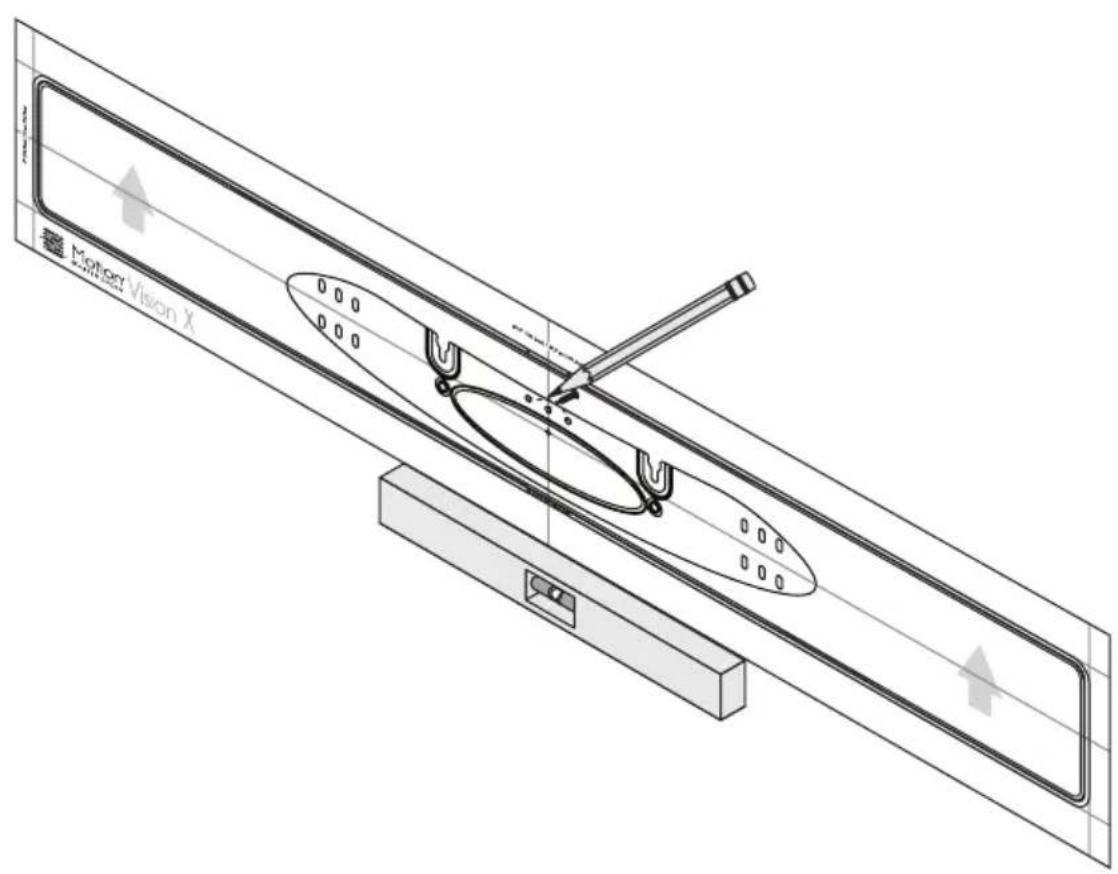
wall mount installation template




natural_image
Technical line drawing of a mechanical assembly with exploded and assembled views (no text or symbols)INTRODUCTION AND OVERVIEW
Thank you—the MartinLogan owner, for loving what we do, and making it possible for us to do what we love.
MartinLogan's dedicated in-house engineering and design team developed the Motion Vision X soundbar to deliver exceptional multi-channel performance from a single system that easily integrates and installs in a diverse variety of environments—whether table or wall mounted. The Motion Vision X produces an enveloping field of richly detailed audio for both music and movies via three tweeters incorporating MartinLogan's award-winning Folded Motion technology, four high-performance woofers, and seven channels of dedicated amplification representing 100 watts of total system power.
Advanced digital signal processing technology allows MartinLogan to replace five dedicated home theater speakers with a one piece solution capable of reproducing multi-channel recordings with unflinching accuracy, resolution, and detail—the inspiration behind every MartinLogan design. The Motion Vision X reproduces front left, right, and center channels via the system's dedicated tweeters and woofers. Surround channels are simulated using sophisticated digital signal processing that directs sound from the system's tweeters and woofers throughout the room.
Additionally, for a fully authentic surround sound experience, the Motion Vision X's built in SWT-2 wireless transmitter makes connecting a dedicated compatible MartinLogan subwoofer as simple as the push of a button—no wires necessary.
The Motion Vision X's simple remote control quickly adjusts volume and selects inputs. The remote also allows you to easily switch between three discrete acoustic modes—'Night' mode (to dial down the bass), 'Bass +' mode (for those moments requiring a little extra thunder), and a 'Normal' mode that restores normal levels.
PLACEMENT AND MOUNTING
LOCATION
We recommend locating the soundbar centered directly above or below your video display. The soundbar menu allows you to optimize acoustic performance for either 'on-wall' or 'on-shelf' installations. You will learn more about accessing these options in the "Controls" section of this manual.
INSTALLING ON A FLAT SURFACE
If you have a surface that provides a wide, level, and stable platform (such as a table or audio/video rack), the soundbar can be placed directly on top.
When installing the system in this configuration, use the soundbar's menu system to choose 'INSTAL > ON.SHLF' [ON SHELF].
Please note: This soundbar is not magnetically shielded and therefore should not be placed directly beneath or on top of a CRT (cathode ray tube) television. The magnetic field of the soundbar will not affect plasma and LCD style televisions.
ON-WALL INSTALLATION
Note: These instructions assume the mounting surface is standard wood frame and sheetrock construction. If you wish to mount to another type of surface, consult a bonded contractor.
WARNING! We strongly recommend locating the wall bracket so at least one of the screw locations attaches to a stud. WARNING

To prevent injury, this apparatus must be securely attached to the floor/wall in accordance with the installation instructions.
Note: When installing the system in this configuration, use the soundbar's menu system to choose 'INSTAL > ON.WALL'.
Required tools (not included):
- Stud finder
- Level
• Electric drill and drill bits - Phillips screwdriver
Required hardware (included):
• (1) Installation template
• (1) Wall bracket
Required hardware (not included):
• (5) Screws appropriate for mounting surface
• (5) Sheet rock anchors (sized for screws)
1 Locate mounting location using a level and the installation template (fig. 1).
2 Mark the three central pilot hole locations and remove the installation template (fig. 1).
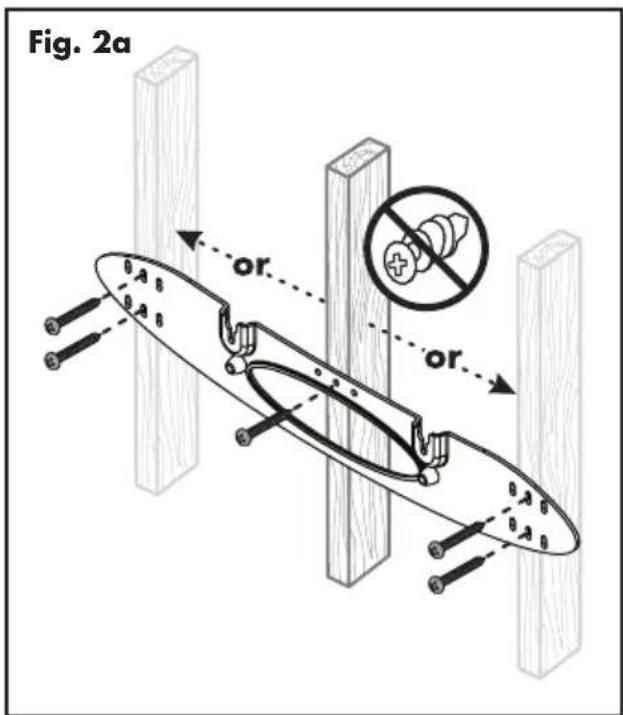
3 Using a stud finder, determine if there is a wall stud directly behind one of the three center screw locations (fig. 2a).
Fig. 1
If no stud is found: use the center most screw location and drill a pilot hole for the wall anchor. Install a wall anchor at this location. If a wall stud is found: drill a pilot hole into the stud.
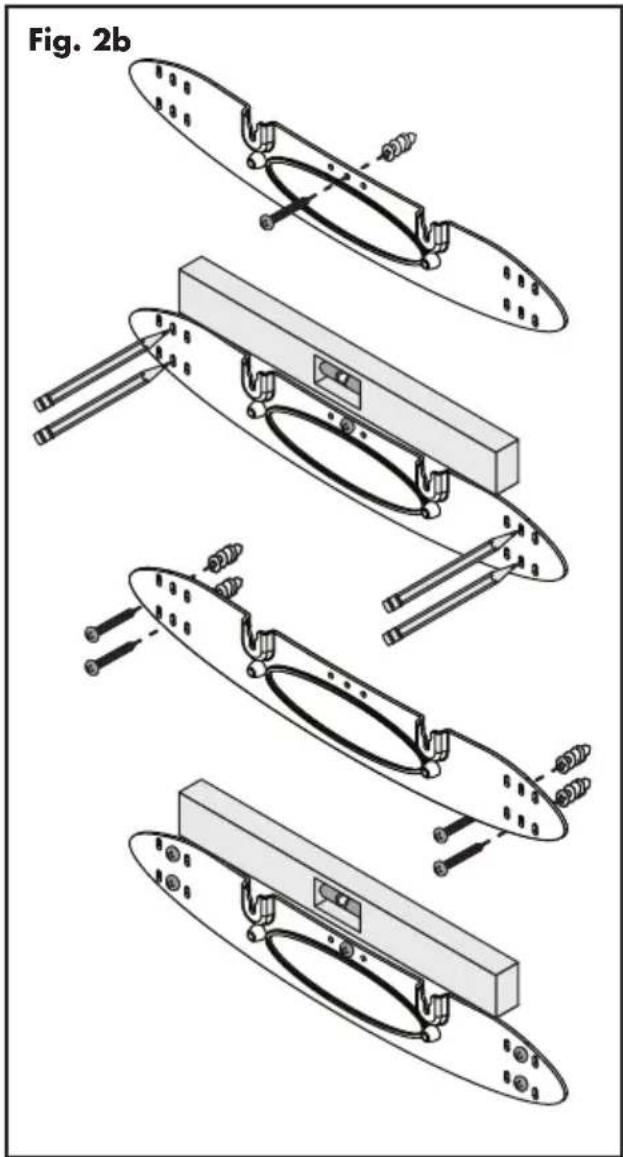
4 Using a screw, attach the wall bracket to the wall. DO NOT tighten (fig. 2b).
5 Using a stud finder, determine if a wall stud is directly behind any of the remaining screw locations (fig. 2a).
If no stud is found: use the top and bottom center-most screw locations. If a wall stud is found: use the top and bottom screw locations with a stud behind them.
Use a level to square the wall bracket and mark the remaining pilot hole locations (fig. 2b).
6 Remove the wall bracket or pivot to access the remaining screw locations (fig. 2b).
If no stud is found: drill pilot holes and install wall anchors. If a wall stud is found: drill pilot holes into the stud.
7 Using the screws, attach the wall bracket to the wall. DO NOT fully tighten.
8 Use a level to square the wall bracket. Tighten all screws (fig. 2b).
9 Attach audio and power cables as needed. Refer to the 'Connection' section of this manual.
10 Move the soundbar into place and drop the shoulder bolts into the wall bracket keyholes. Before releasing, make sure the soundbar has dropped fully into the keyholes and is held firmly in place (fig. 3).

natural_image
Technical line drawing of a curved mechanical component with mounting flanges and a circular opening (no text or symbols)CONNECTION
WARNING! Turn your soundbar off before making or breaking any signal connections! WARNING! The power cord should not be installed, removed, or left detached from the soundbar while the other end is connected to an AC power source.

POWER CONNECTION
The power cord should be firmly inserted into the AC power receptacle on the rear connection panel of the soundbar, then to any convenient AC wall outlet. The soundbar also integrates a signal sensing power supply that automatically switches off after sensing no audio signal for 30 minutes (this will only occur when the menu's power setting is set to 'Auto').
If you remove your soundbar from the country of original sale, be certain that AC power supplied in any subsequent location is suitable before connecting and operating the soundbar. Substantially impaired performance or severe damage may occur to the soundbar if operation is attempted from an incorrect AC power source.
SIGNAL CONNECTION
When utilizing the soundbar to reproduce audio, a television's audio output should be defeated. Some televisions will allow you to turn off the internal speaker via the television's menu system. Other televisions may require you to turn the television's volume to "zero" or "mute".
Additionally, your television may require you to turn on the digital optical or digital coaxial output and configure the output for 5.1 surround sound. Please refer to your television's manual.
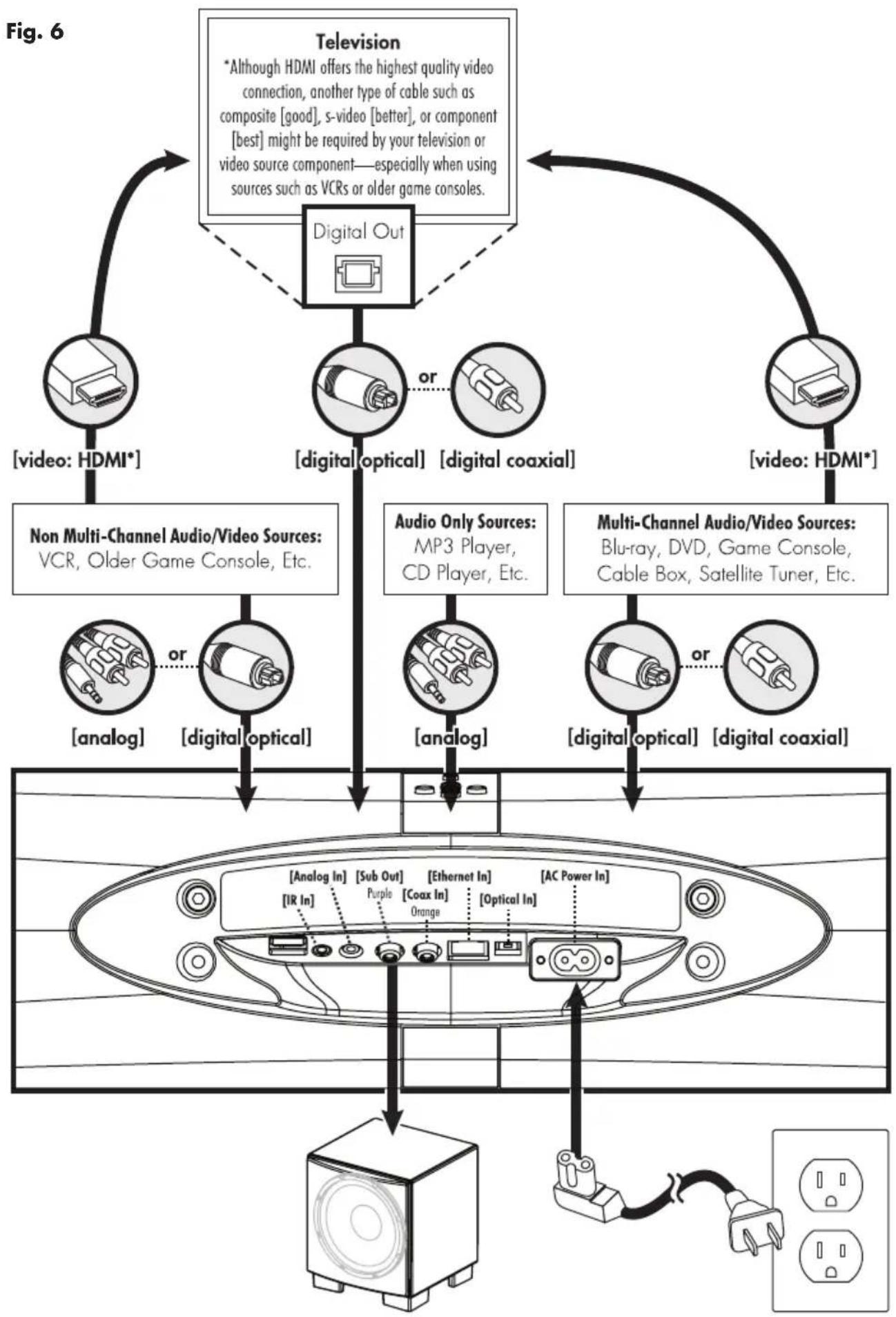
Connections are made at the signal input section on the rear electronics panel of the soundbar. Your soundbar features three wired audio inputs:
• 1 x Digital Optical inputs
• 1 x Digital Coaxial input
• 1 x Left/Right Analog (3.5mm) input
When connecting your system, there are any variety of configurations that will work, and these methods will vary based on user preference.
Some users will choose to route all sources (such as DVD player, cable box, game console, media streamer, etc.) to their television via a digital (optical or coaxial) connection and use the television to switch between audio/video sources. The advantage of this connection method is that only one audio cable (either a digital optical or digital coaxial cable) needs to connect between the television and the soundbar—and changing the input on your television will change the audio signal being sent to the soundbar (without having to change the input setting on the soundbar itself). Please note: most televisions are not capable of passing multi-channel encoded audio signals and will down-mix these signals to a 2-channel stereo mix before sending them to the television's digital output.
Most users will want to run cables directly from the source to the soundbar while simultaneously running HDMI from each source to the TV for the video signal. This has the advantage of allowing the soundbar to receive multi-channel encoded material. However, some newer source devices turn off their optical/coaxial outputs when their HDMI output is used.
Depending on your number of sources, the TV may be used for switching some sources while audio output from the primary source devices may be directly connected to the soundbar for multi-channel sound.
A few important points to remember when connecting your soundbar:
- Digital optical and digital coaxial connections will provide the highest audio fidelity when connecting to the soundbar.
- If your soundbar is not producing sound or surround sound from your Blu-ray player, DVD player, or other multi-channel audio capable
![Fig. 5 [Analog In] [Sub Out] [Ethernet In] [AC Power In] [IR In] Purple [Coax In] [Optical In]](/content/2026/05/950060/images/1bcb31f80320b4bf352e25195bf5090386599f58e403d17c90ff3d2a7cb2fa75.jpg)
source, you may need to set the player's digital audio output to "Bitstream" (also called "Raw", "Direct Digital", or "High Bit Rate"). If "PCM" is selected you'll lose the multi-channel encoded sound. Some players only require you to turn PCM off to configure for multi-channel encoded sound. Please refer to your player's manual.
- In a setup where HDMI is used to connect your audio/video source component to your television, you will likely need to run an additional digital optical or coaxial cable between the source component and your soundbar. This extra connection
An Introduction to Audio Connections

natural_image
Illustration of a 3-pin connector with a black cable (no text or symbols visible)HDMI: HDMI utilizes one cable to pass high-definition video signals and multi-channel encoded digital audio between a source component and television or receiver. Your soundbar is not equipped with an HDMI input. However, in many installations you will want to use HDMI to connect a video source component to your television (to pass video) and an additional digital optical or digital coaxial cable (to pass audio) to the soundbar.

natural_image
Illustration of a black cable with a white connector and multiple metallic pins (no text or symbols)Digital Optical: Digital optical utilizes one cable to pass digital audio information (no video). A digital optical cable offers a high-quality digital connection and passes multi-channel encoded audio between a source component and an audio output device.

Digital Coaxial: Digital coaxial utilizes one cable to pass digital audio information (no video). A digital coaxial cable offers a high-quality digital connection and passes multi-channel encoded audio between a source component and an audio output device. Please note: The 'RCA' style end of a digital coaxial cable is identical to those found on common left/right analog RCA cables. However, a cable
designed specifically for digital coaxial connections should be employed—do not use a standard left/right analog RCA style cable because it will likely not be up to the task of handling the high bit-rate necessary for a reliable digital connection.

Analog Left/Right RCA to Stereo 3.5mm: Analog cables are used to pass audio information (no video). Older gaming consoles, portable media player docks, VCRs and similar source components (which are not capable of playing multi-channel encoded content) will often offer connection only through left/right analog RCA cables. To connect to these devices use a Left/Right RCA to stereo 3.5mm cable.

Play-Fi®: This audio streaming technology allows a wide variety of devices to connect to an audio output device and stream audio. PlayFi establishes a connection directly with an audio output device and requires both devices to
be connected to a local area network (via a Wi-Fi or Ethernet connection).
will allow for multi-channel encoded audio to reach the soundbar.
- Audio-only sources capable of only stereo output (such a portable media player docks or CD player) will often connect directly to the soundbar via the analog input.
NETWORK CONNECTION FOR DTS PLAY-FI®
To stream audio to your soundbar via DTS PlayFi, a LAN (local area network) connection is required. This connection can be established using Wi-Fi or Ethernet. Refer to the DTS PlayFi section of this manual for setup and usage details.
SUBWOOFER CONNECTION
You may choose to employ a separate subwoofer to reproduce the .1/LFE channel information in multi-channel recordings and/or reinforce bass performance of stereo recordings. Any aftermarket home theater subwoofer can be connected via the soundbar's "LFE Out" RCA connection. We, of course, recommend using a superb MartinLogan subwoofer.
Additionally, this soundbar integrates a built-in SWT-2 subwoofer wireless transmitter compatible with select MartinLogan subwoofers. Subwoofers utilizing SVWT-2 technology will reference this wireless system on the connection panel.
Please note: When utilizing a wireless connection, it is not necessary to use the SWT-2 wireless transmitter included with the subwoofer.
No Subwoofer
For systems not using a separate subwoofer, use the soundbar's menu system and choose "SUB > NO SUB". This sets the soundbar to reproduce the entire frequency range when playing content.
Wired Subwoofer Connection
Using a high-quality RCA style cable designed for subwoofer connection, connect "Sub Out" from the soundbar to the "LFE In/Sub In" on the subwoofer.
Use the soundbar's menu system and choose 'SUB > VWIRED'.
Reference your subwoofer's manual to learn how to properly adjust the sub's level and phase controls to achieve proper blending with the soundbar. The subwoofer's crossover should be set to "bypass", "LFE". For subwoofers that do not have a "bypass" or "LFE" crossover setting, we recommend adjusting the crossover to its highest setting.

Compatible with SWT-2 Equipped MartinLogan Subwoofer Systems
Wireless Subwoofer Connection
Press the subwoofer's sync button and hold for 3 seconds. The subwoofer's LED will blink quickly.
Use the soundbar's menu system and choose 'SUB > WIRELS > SYNC'. The soundbar will display 'PSH.BTN' [PUSH BUTTON].
If pairing has completed successfully, the subwoofer's LED will stop blinking and remain on and the soundbar will display 'SYNCED'. Please note: If a link is not established after 30 seconds, the subwoofer's LED will start blinking slowly and the soundbar will display 'FAILED'. Repeat if syncing fails.
Reference your subwoofer's manual to learn how to properly adjust the sub's level and phase controls. The subwoofer's crossover should be set to "bypass" or "LFE". For subwoofers that do not have a "bypass" or "LFE" crossover setting, we recommend adjusting the crossover to its highest setting.
Please note: MartinLogan once utilized a wireless subwoofer connection system named "SWT-1". Subwoofers equipped with SWT-1 tech-
flowchart
graph TD
    A["Television"] --> B["Digital Out"]
    B --> C["Non Multi-Channel Audio/Video Sources: VCR, Older Game Console, Etc."]
    B --> D["Audio Only Sources: MP3 Player, CD Player, Etc."]
    B --> E["Multi-Channel Audio/Video Sources: Blu-ray, DVD, Game Console, Cable Box, Satellite Tuner, Etc."]
    A --> F["Speaker"]
    B --> G["Other Digital Out"]
    C --> H["Other Analog In"]
    D --> I["Other Analog In"]
    E --> J["Other Analog In"]
    F --> K["Sub Out"]
    F --> L["Ethernet In"]
    F --> M["AC Power In"]
    G --> N["Sub Out"]
    G --> O["Ethernet In"]
    G --> P["AC Power In"]
    H --> Q["Other Analog In"]
    H --> R["Other Analog In"]
    I --> S["Other Analog In"]
    I --> T["Other Analog In"]
    J --> U["Other Analog In"]
    J --> V["Other Analog In"]
nology are not capable of wireless connectivity with this soundbar—a wired connection will work for these subwoofers.
Please note: If you decide to no longer use wireless, turn off the soundbar's wireless transmitter by using the menu system and choosing 'SUB > WIRELS > TRN.OFF' [TURN OFF] or 'SUB > NO SUB'. Doing this will turn off the transmitter and automatically set the soundbar for no sub.
WARNING! When operating wirelessly, the subwoofer may be susceptible to RF interference in the 2.4GHz bandwidth from microwave ovens and wireless devices such as Wi-Fi systems, video game consoles, cordless telephones, Bluetooth devices, and baby monitors. Generally, this issue (intermittent sound or slight popping noises) is easily resolved by physically separating problematic devices from one another—a distance as little as two feet will often alleviate the interference. In the case of microwave ovens, the interference will only occur when the microwave is operating.
Using a MartinLogan Dynamo Subwoofer
When configuring your subwoofer we recommend beginning with the following settings:
Low-pass: Bypass
Phase: 180
Volume: Knob set to vertical (12-o'clock to 1-o'clock position)
IR INPUT
This mono 3.5mm jack allows you to connect after market IR repeater systems to the soundbar.
This soundbar is capable of detecting and automatically decoding multi-channel audio formats, such as those found on DVD and Blu-ray movies.
DIGITAL INPUTS (Optical and Coaxial)
When utilizing a digital connection, the soundbar can process the following formats: Dolby® Digital, DTS Digital Surround™, and digital stereo.

dts®
Digital Surround

DOLBY
AUDIO
ANALOG INPUT
Digitally encoded sound information cannot be transmitted to an analog input. This connection method is adequate for most devices that only offer two channels of output (such as VCRs, CD players, older game consoles, or portable media player docks). Although most surround sound capable devices, such as DVD and Blu-ray players, offer both analog and digital connections, the digital connection should always be employed. If a source device is connected via an analog left/right RCA connection, the 5.1-channel encoded audio content will not be sent to the soundbar.
DTS PLAY-FI®
NETWORK REQUIREMENTS
You must have the following to connect your soundbar to your network:
- A wireless router.
- A high-speed internet connection for reliable playback of internet based music services.
- Have your network password ready before connecting the soundbar to your network.
TIP! If wireless connectivity is weak or not available, connect to your router with an Ethernet cable.
TIP! Your soundbar communicates with wireless networks that support 802.11g/n. For best performance, a network that supports 802.11n wireless technology is recommended. A network supporting 802.11b may be used, but it will effectively stream to only one device equipped with DTS Play-Fi®. Your soundbar communicates over a 2.4 GHz wireless band, however, it can become slow in locations, such as apartments, where many routers are in operation. Consequently, your soundbar is capable of jumping onto a 5 GHz band on dual band wireless routers.
DTS Play-Fi® APP REQUIREMENTS
- An Android device running Android 2.2 or later.
- An iOS device running iOS 6.0 or later.
- A Windows® PC running Windows 7, 8 (32 and 64 bit), or later.
Fig. 7
flowchart
graph TD
    A["Wi-Fi Setup"] --> B["Press 3 seconds"]
    B --> C["Access Point Setup: Press 8 seconds"]
    style A fill:#f9f,stroke:#333
    style C fill:#ccf,stroke:#333
WI-FI SETUP AND STATUS BUTTON
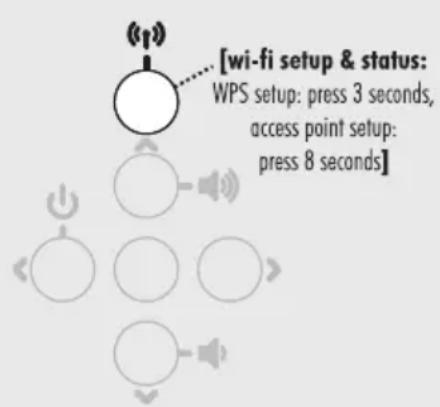
The Wi-Fi Setup and Status button tells you what your soundbar is doing (fig. 7).
• Rapid Blinking: booting up.
- Blinking: connecting to a wireless router.
- Slow Pulse: Access Point Setup Mode.
- Two Blinks: WPS (Wi-Fi Protected Setup) Mode.
• Solid: wirelessly connected to a router.
- Off: connected to a router using an Ethernet connection.
DOWNLOADING THE DTS PLAY-FI APP
Android Device Users: Download the free DTS Play-Fi app from Google Play or the Amazon App Store.
iOS Device Users: Download the free DTS PlayFi app from the Apple App Store.
PC Users: Download and install the free DTS PlayFi program from https://play-fi.com/apps/windows
CONNECTING TO A WIRELESS NETWORK: ACCESS POINT SETUP
Access Point Setup causes your soundbar to behave as if it were a wireless router. Using your mobile device or Wi-Fi capable PC, you connect directly to your soundbar using Wi-Fi, select your home wireless network, and enter the network password.
- For optimal setup conditions place your soundbar next to your wireless router. The soundbar can be moved to its final location after wi-fi setup.
- Plug in your soundbar and press the Power button.
- The Wi-Fi Setup and Status button will start rapidly blinking for 20 seconds while your soundbar boots. If this is the first time your
new soundbar is plugged in, the Wi-Fi Setup and Status button will start pulsing slowly. If the soundbar is already configured to connect to a wi-fi network, the button will turn solid (connected) or blink rapidly (not connected).
-
Once the Wi-Fi Setup and Status button starts pulsing slowly, your soundbar is in Access Point Mode and ready to connect to your wireless network. Note: If the soundbar's Wi-Fi Setup and Status button is not pulsing slowly, press and hold the button for 8 seconds until you have heard two tones—one at 3 seconds and another at 8 seconds. The soundbar will display "ACCS.PNT." After 20 seconds, the Wi-Fi Setup and Status button will begin pulsing slowly to indicate Access Point mode is ready. At anytime you can press the button again to cancel the setup mode.
-
Launch the DTS Play-Fi® app.
Android Device Users:
a) The app will automatically find your device and provide prompts for setup.
b) Touch the "Setup" button on the screen.
c) Enter the password for your wireless network; the app will connect your device to your network.
d) Once your device is connected, you will notice that the Wi-Fi Setup and Status button on your soundbar will change from blinking to solid. This may take up to a minute. If, after a minute, the button continues to blink rapidly, setup failed and you should try again.
iOS Device Users:
a) The app will prompt you to set up a new speaker. Click on the screen to view setup instructions. If the app does not prompt you to set up a new device, within the app, go to 'Settings > Add Play-Fi Device'. Follow the on-screen instructions.
b) You will be prompted to exit the DTS Play-Fi
app and open your iOS device's Settings app.
c) Select Wi-fi in Settings. Ensure that Wi-Fi is enabled on your device. Select the Wi-Fi network with "Play-Fi" in the name.
d) Once your soundbar is selected as the Wi-Fi network, exit iOS Settings and open the DTS Play-Fi app. You should now be prompted to select your wireless network and enter your wireless network password.
e) Once your device is connected, you will notice that the Wi-Fi Setup and Status button on your soundbar will change from blinking to solid. This may take up to a minute. If, after a minute, the button continues to blink rapidly, setup failed and you should try again.
PC Users:
a) The app will automatically find your device and provide prompts for set up. If the app does not prompt you to set up a new device, within the app go to the settings screen and click 'Setup PlayFi Device'. Follow the on-screen instructions.
b) Click the "Set-up" button on the screen.
c) Select the speaker(s) you want to set up.
d) Enter the password for your wireless network; the app will connect your device to your network. You will notice the Wi-Fi Setup and Status button will have changed from blinking to solid. This may take up to a minute. If, after a minute, the button continues to blink rapidly, setup failed and you should try again.
6 Your soundbar is now connected to your wireless network. Reconnect your mobile device or PC to your wireless network. You may re-name your device using the app.
CONNECTING TO A WIRELESS NETWORK: WI-FI PROTECTED SETUP (WPS)
Wi-Fi Protected Setup (WPS) is a feature found on most wireless routers that allows your soundbar product to securely and automatically connect
without needing to enter a password. WPS is not a standard feature on all routers, and only one wireless device can be set up at a time.
Check your router's owner's manual to see if WPS is an available feature, or look for a button on your router marked with the WPS logo ( ). If your router does not have WPS, then use the Access Point Wireless Setup.
- For optimal setup conditions place your soundbar next to your wireless router. The soundbar can be moved to its final location after wifi setup
- Plug in your soundbar and press the Power button.
- The Wi-Fi Setup and Status button will start rapidly blinking for 20 seconds while your soundbar boots. If this is the first time your new soundbar is plugged in, the Wi-Fi Setup and Status button will start pulsing slowly. If the soundbar is already configured to connect to a wifi network, the button will turn solid (connected) or blink rapidly (not connected).
- For 3 seconds, press the soundbar's Wireless Setup and Status button until you hear a tone. The soundbar will display "WF.SETUP" and after a few seconds the Wi-Fi Setup and Status button will blink twice in continuous intervals to indicate WPS mode. At any time you can press the Wi-Fi Setup and Status button again to cancel the setup mode.
5 Now push the WPS button ( ) on your router.
-
Once the Wi-Fi Setup and Status button is solid (not blinking), this indicates your soundbar is connected to the wireless network. This may take up to a minute. If, after a minute, the button continues to blink rapidly, setup failed and you should try again.
-
Connect your mobile device or PC to the same network as your soundbar. Launch the DTS Play-Fi® app. Upon launching, it will automatically detect your soundbar and should prompt you to name your soundbar.
CONNECTING TO A WIRED NETWORK
- Using an Ethernet cable, connect your soundbar to your router.
- Plug in your soundbar and press the Power button.
- The Wi-Fi Setup and Status button will start rapidly blinking for about 20 seconds while your soundbar is booting up.
- The Wi-Fi Setup and Status button turns off when the soundbar is connected via Ethernet.
- Connect your mobile device or PC to the same network as your soundbar. Launch the DTS Play-Fi app. Upon launching, it will automatically detect your soundbar and should prompt you to name your soundbar.
PLAYING AUDIO USING PLAY-FI
Note: Future updates to the DTS Play-Fi application may change functionality.
-
Launch the DTS Play-Fi app on your mobile device or PC (located in the system tray).
-
Android and iOS Device Users: Within the Play-Fi app, select your music source. You can choose from your personal music library, Internet Radio, or from select internet music services. PC Users: Any audio content from your computer can be streamed using Play-Fi.
-
If you have more than one Play-Fi® speaker connected to your network, you will be prompted to select the speaker to which you want to stream.
CONTROLLING MULTIPLE SPEAKERS
If you have more than one Play-Fi speaker connected to your network, you can simultaneously stream the same audio to multiple speakers.
-
Android and iOS Device Users: Within the app, press the Play-Fi logo in the lower corner of the app. PC Users: open the Play-Fi program using the icon in your system tray.
-
Select additional devices to play audio from. PC Users: The free version of the Windows app may not allow streaming to multiple speakers. An upgraded version of the DTS Play-Fi app, with this capability, can be purchased from the DTS website.
Note: 8 Play-Fi speakers can be synced to play the same audio content at the same time. We recommend up to 32 Play-Fi speakers on a network for the best experience, but the only limit to connected devices is how many your router can support.
TIP! Primary and Secondary Speakers
When streaming audio content to multiple devices, you will be asked to assign them to two categories: primary and secondary devices. The DTS PlayFi module requires a primary device be selected. This maximizes synchronization between multiple devices simultaneously streaming the same content.
Select the DTS Play-Fi device with the strongest signal as your primary device. Secondary devices connect to your primary device, so if you disable your primary device, you will need to select a new primary device before audio resumes on your secondary devices.
ADDITIONAL PLAY-FI FEATURES
New versions of the PlayFi app will add features not mentioned in this manual. Please refer to the app and related documentation for details on new and enhanced features such as streaming different audio content to multiple zones and grouping of two discrete speakers for stereo (left/right) playback.
How to use Connect
You'll need Spotify Premium to use Connect, see details overleaf.
-
Add your new device to the same wifi network as your phone, tablet or PC (see product user instructions for details).
-
Open the Spotify app on your phone, tablet or PC, and play any song.
-
If you're using the app on a phone - tap the song image in the bottom left of the screen. For tablet and PC move to step 4.
-
Tap the Connect icon

- Pick your device from the list. If you can't see it, just check it's connected to the same wifi network as your phone, tablet or PC.
All done! Happy listening.
Licenses
The Spotify Software is subject to third party licenses found here: www.spotify.com/connect/third-party-licenses.
UPDATES AND REBOOTING
DTS PLAY-FI® APP UPDATE
If the DTS PlayFi app on your mobile device or PC requires an update, you will be notified that an update is available and guided through the update process.
DTS PLAY-FI MODULE UPDATE
The DTS Play-Fi module within your speaker will occasionally require an update. If an update is needed, the DTS Play-Fi app will notify you and guide you through the update process.
SOUNDBAR FIRMWARE UPDATE
Your soundbar may occasionally require firmware updates. Please check www.martinlogan.com for the latest firmware updates.
On the soundbar's top control panel, press and release both the Next and Previous Input (< and >) buttons. Upon releasing the button, two tones will play and the soundbar will reboot. This reboot will cycle the power off and on and force the soundbar to reconnect to your network.
Top Panel Controls
Your soundbar features six buttons on top of the unit to control the following functions:

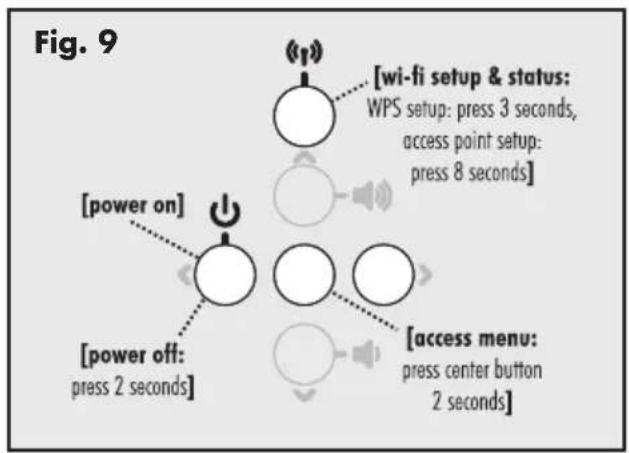
POWER: Turns the soundbar on. Press and for 2 seconds to turn the soundbar off (fig. 9).
PREVIOUS/NEXT INPUT: Cycles through the inputs. The order of inputs is: Digital Optical > Digital Coaxial > Left/Right Analog > Play-Fi (fig. 8).

VOL+/VOL-: Adjusts volume (fig. 8).
MUTE: When muted, the soundbar will display 'MUTE'. Pressing this button a second time or pressing either volume button will restore the previous volume setting (fig. 8).
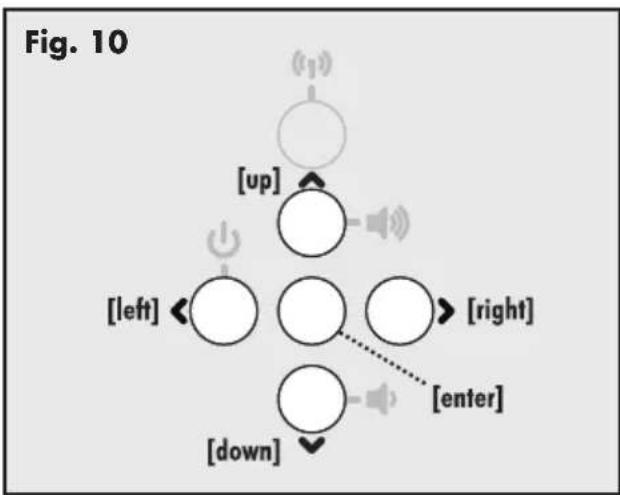
Accessing the Menu: To access the menu, for 2 seconds press and hold the center button. After the menu is activated, the buttons will function as up/down/left/right/enter. Exit the menu by repeatedly pressing the left directional button (fig. 9 and fig. 10).
Wi-Fi Setup and Status: For information on this button, please refer to the PlayFi section of this manual (fig. 9).

flowchart
graph TD
    A[" "] --> B[" "]
    B --> C[" "]
    C --> D[" "]
    D --> E[" "]
    E --> F[" "]
    style A fill:#fff,stroke:#000
    style B fill:#fff,stroke:#000
    style C fill:#fff,stroke:#000
    style D fill:#fff,stroke:#000
    style E fill:#fff,stroke:#000
    style F fill:#fff,stroke:#000
flowchart
graph TD
    A["Power On"] --> B["Wi-Fi Setup & Status: WPS Setup: press 3 seconds, access Point Setup: press 8 seconds"]
    C["Power Off: Press 2 seconds"] --> D["Access Menu: press center button 2 seconds"]
REMOTE CONTROL
Your soundbar remote controls these functions:

POWER: Turns the soundbar on and off.
VOL+/VOL-: Adjusts volume level.
MUTE: When muted, the soundbar will display 'MUTE'. Pressing this button a second time or pressing either volume button will restore the previous volume setting.
MENU: Enters the soundbar menu. Exit the menu by pushing the menu button again.
BASS MODE - NIGHT: Reduces bass output and compresses the dynamic range.
BASS MODE - BASS+: Increases bass output.
BASS MODE - NORMAL: Restores normal levels.
INPUT: Activates the selected input.
CHANGING THE REMOTE'S BATTERY
The remote control for your speaker uses two AAA type batteries. Access the battery compartment by using a Phillips screwdriver to remove the screw located on the bottom of the remote.
Caution! Danger of explosion if battery is incorrectly replaced. Replace only with the same or equivalent type.

PROGRAMMING A SECOND REMOTE
This soundbar can be programmed to respond to a second remote. See "The Menu System" section of this manual for programming instructions.
Please note: There may be remote controls that the soundbar cannot learn or that the soundbar can not learn correctly. Due to the number of available remote controls, it is impossible to advise which will or will not work.
Please note: When learning from a second remote, you will likely find it does not have buttons that directly correspond with all available soundbar commands. Not all soundbar commands have to be programmed. Some remote controls offer 'function' buttons (F1, F2, etc.) that can be used to program unique soundbar commands such as 'NITE.MD' or 'OPTIC'.
Please note: Some remote controls offer discrete 'power on' and 'power off' buttons. Some offer only a single button to toggle power on and off. The learning function of the soundbar allows you to program for either scenario.
THE MENU SYSTEM
ENTERING AND EXITING THE MENU
To access the menu from the remote, press 'Menu'. To exit the menu from the remote, press 'Menu' again or repeatedly press left until the menu exits.
To access the menu from the top panel, for 2 seconds press and hold the center button (fig. 9). To exit, repeatedly press the left directional button. The menu auto exits after 30 seconds.
An Overview of the Menu Structure\*\*
SUB [subwoofer, select subwoofer configuration]
![→*↑NO.SUB [no sub, select when not using a subwoofer] → WIRED [wired, select when attaching a subwoofer via a cable] → WIRELS [wireless, configure when using a wireless subwoofer] → SYNC [sync, select to begin syncing wireless subwoofer] → TRN.OFF [turn off, select to deactivate wireless transmitter]](/content/2026/05/950060/images/abcd84244b6667dd136898cf6944a3f620bf3843b1b6fd06202cffb9c4e86107.jpg)
BASS.LV [bass level, adjust bass level]
![→ +1 O [increases bass output by 10dB] → +8 [increases bass output by 8dB] → +6 [increases bass output by 6dB] → +4 [increases bass output by 4dB] → +2 [increases bass output by 2dB] → *†O [normal bass level] → -2 [decreases bass output by 2dB] → -4 [decreases bass output by 4dB] → -6 [decreases bass output by 6dB] → -8 [decreases bass output by 8dB] → -1 O [decreases bass output by 10dB]](/content/2026/05/950060/images/fbaa03d90c3fb054d4efe40a51cfaac34821da4b1600785ccfe283e598175938.jpg)
INSTAL [install, select installation location]
![→*†ON.SHLF [on-shelf, select when set on a flat surface] → ON.WALL [on-wall, select when mounted to a wall]](/content/2026/05/950060/images/7964655a9e74931fa101b05c1604299e52acf4bda312cc19a473ac944044f7ca.jpg)
SURRND [surround, configure surround options for 5.1-channel sources]
![→† +6dB [on: +6dB, increases level of simulated surrounds] →*OdB [on: 0dB, use simulated surrounds] →OFF [off, turns off simulated surrounds]](/content/2026/05/950060/images/84f8e0ae13464e00b9e7748a2da83b1768b4c3db2ac999c559f8ac8b5dc9efd4.jpg)
STEREO [stereo, configure options for 2-channel stereo sources]
![WIDE [wide, creates a wider stereo image] *†VOICE+ [voice plus, simulates a center channel for stereo sources] NORMAL [normal, use original stereo signal]](/content/2026/05/950060/images/076904af2c9a338ba68ee0bfc57dd74d9258995aa913f9863e472032383aad1a.jpg)
MODES [modes, select EQ listening mode]
![→† BASS+ [bass plus mode, sets EQ mode for enhanced bass] →*NORMAL [normal mode, returns EQ to normal levels] →NIGHT [night mode, sets EQ mode for night listening]](/content/2026/05/950060/images/2b8fa0203dc30a6c06237daf6a8f48357a217fc7422e0c5053084db26429d2c6.jpg)
DISPLY [display, select display mode]
![→† BRIGHT [bright, use full display brightness at all times] → DIM [dim, use dimmed display at all times] → *AUTO.BR [auto bright, display turns off automatically] → AUTO.DM [auto dim, display turns off automatically]](/content/2026/05/950060/images/b87e07ef7a6e5f5b2da868a03efc559c07c0def387daaceef9500926e8834154.jpg)
POWER [power, configure power on/off behavior]
![→*†AUTO [auto, soundbar turns itself off and on as needed] →FULL.ON [full on, the soundbar is always powered on]](/content/2026/05/950060/images/d560e2decbc19d2672f38490d322e1d70c3bcf09a6977ac09eaa476638782609.jpg)
LEARN [learn remote codes for second remote control]
![-→ VOL+ [volume up, program to respond to second remote] ->→ VOL- [volume down, program to respond to second remote] ->→ MUTE [mute, program to respond to second remote] ->→ NX.INPT [next input, program to respond to second remote] ->→ PR.INPT [previous input, program to respond to second remote] ->→ UP [up, program to respond to second remote] ->→ DOWN [down, program to respond to second remote] ->→ LEFT [left, program to respond to second remote] ->→ RIGHT [right, program to respond to second remote] ->→ ENTER [enter, program to respond to second remote] ->→ NITE.MD [night mode, program to respond to second remote] ->→ NRML.MD [normal mode, program to respond to second remote] ->→ BASS.MD [bass+, program to respond to second remote] ->→ PWR.TGL [power toggle, program to respond to second remote] ->→ PWR.ON [power on, program to respond to second remote] ->→ PWR.OFF [power off, program to respond to second remote] ->→ MENU [menu, program menu to respond to second remote] ->→ OPTIC[optical input, program input to respond to second remote] ->→ COAX [coaxial input, program input to respond to second remote] ->→ ANALOG [analog input, program input to respond to second remote] ->→ PLAYFI [Play-Fi , program input to respond to second remote] ->→ ERASE [erase, clear programmed codes for second remote control] L→CONFRM [confirm factory defaults, choose YES or NO]](/content/2026/05/950060/images/d5546a947bfdc6d63bf4907bafd8d968e3181aa603244b1fdbad2006d15f10ad.jpg)
SRC.NAM [source name, assign new names to inputs]
![→ OPTIC [digital optical, assign a new name for this input] → COAX [digital coaxial, assign a new name for this input] → ANALOG [analog, assign a new name for this input]](/content/2026/05/950060/images/4763acb0d86c612ad36cc45b7afcbb07c7832425d3677861105181e8761379e5.jpg)
SERVICE [service, advanced controls]
![→ FRMWRE [firmware, display firmware version] → RESET [reset soundbar to original factory settings] → AT.HOME [at home, factory defaults for home use] → CONFRM [confirm factory defaults, choose YES or NO] → STORE [store, factory defaults for in-store use] → CONFRM [confirm factory defaults, choose YES or NO]](/content/2026/05/950060/images/a05b308d0f7f4af657582e32e86a46b98d6738a7f5c67030bb2ff2c9c4ac32bc.jpg)
*AT.HOME: Factory default setting, home use.
^+ STORE: Factory default setting, in-store use.
NAVIGATING THE MENU\*\*
The menu is navigated using the 'up/down/left/right/enter' navigation system. Up and Down are used to cycle through the menu and submenu options.
Right or Enter are used to access a submenu or to select an option. Left is used to exit a submenu and go back one level (fig. 10 and fig. 11).
MENU OPTION: SUB
SUB: Enter the 'SUB' submenu by pressing the enter button. Here you may configure external subwoofer integration. Please note: When integrating an external subwoofer, you must choose either a wireless connection or a wired connection. Your soundbar does not simultaneously output via both connections. The soundbar can connect to only one wireless subwoofer. However, it is possible to connect multiple wired subwoofers if you utilize a 'Y' splitter attached to the subwoofer cable, or if your subwoofer offers an output designed to daisy chain multiple subs.
SUB > NO.SUB: This option configures the soundbar to handle all bass information and will not output information via the subs wired or wireless subwoofer connections. Activate by pressing the enter button and the soundbar will respond with 'SET'.
SUB > WIRED: This option configures the soundbar to use an external subwoofer connected via a cable to the soundbar's Sub Out RCA connection. Activate by pressing the enter button and the soundbar will respond with 'SET'. With this option, the wireless sub transmitter is turned off.
Reference your subwoofer's manual to learn how to properly adjust the sub's level and phase controls to achieve proper blending with the soundbar. The subwoofer's crossover should be set to "bypass" or "LFE". For subwoofers that do not have a "bypass"
flowchart
graph TD
    A[" "] --> B[" "]
    B --> C[" "]
    C --> D[" "]
    D --> E[" "]
    E --> F[" "]
    F --> G[" "]
    G --> H[" "]
    H --> I[" "]
    I --> J[" "]
    J --> K[" "]
    K --> L[" "]
    L --> M[" "]
    M --> N[" "]
    N --> O[" "]
    O --> P[" "]
    P --> Q[" "]
    Q --> R[" "]
    R --> S[" "]
    S --> T[" "]
    T --> U[" "]
    U --> V[" "]
    V --> W[" "]
    W --> X[" "]
    X --> Y[" "]
    Y --> Z[" "]
    Z --> A

or "LFE" crossover setting, we recommend adjusting the crossover to its highest setting.
SUB > WIRELS: [WIRELESS] Enter the 'SUB > WIRELS' submenu by pressing the enter button. Here you can sync the soundbar with a compatible wireless subwoofer.
Reference your subwoofer's manual to learn how to properly adjust the sub's level and phase controls to achieve proper blending with the soundbar. The subwoofer's crossover should be set to "bypass" or "LFE". For subwoofers that do not have a "bypass" or "LFE" crossover setting, we recommend adjusting the crossover to its highest setting.
SUB > WIRELS > SYNC: This option will initiate syncing with an SWT-2 equipped wireless subwoofer. With this option, the soundbar's Sub Out RCA connection is turned off. Please note: MartinLogan subwoofers utilizing SWT-2 technology will reference this wireless technology on their connection panel. Please note: At one time MartinLogan utilized a wireless subwoofer connection system named "SWT-1". Subwoofers equipped with SWT-1 technology are NOT capable of wireless connectivity with this soundbar—although a wired connection will work for these subwoofers.
Press the subwoofer's sync button and hold for 3 seconds. The sub's LED will blink quickly. Sync by pressing the enter button. The soundbar will respond with 'PUSH.BTN'. Pairing of the soundbar and subwoofer may take up to 30 seconds.
If pairing has completed successfully, the sub's LED will stop blinking and remain on and the soundbar will display "SYNCED". If a link is not established, the subwoofer's LED will start blinking slowly and the soundbar will display "FAILED". Repeat if syncing fails.
SUB > WIRELS > TRN.OFF: [TURN OFF] This option configures the soundbar to handle all bass information, and when selected, will not output information via the wired or wireless subwoofer connections. Activate by pressing the enter button and the soundbar will respond with 'OFF'. Activating this option performs the same function as 'SUB > NO.SUB'.
MENU OPTION: BASS LEVEL
BASS.LV: [BASS LEVEL] Enter the 'BASS.LV' submenu by pressing the enter button. Here you can configure bass output by ±10dB in increments of 2dB.
BASS.LV > -10 to +10: Using the up/down directional buttons, choose the desired bass level (from -10dB to +10dB). Bass level output will be automatically set to match the value currently displayed.
MENU OPTION: INSTALL
INSTALL: [INSTALL] Enter the 'INSTALL' submenu by pressing the enter button. The settings in this menu will adjust the soundbar's equalization and voicing for optimal performance in on-wall or shelf top installations.
INSTAL > ON.SHLF: [ON SHELF] This option configures the soundbar's audio output to sound best in shelf-top installations. Activate by pressing the enter button and the soundbar will respond with 'SET'.
INSTAL > ON.WALL: [ON WALL] This option configures the soundbar's audio output to sound best in on-wall installations. Activate by pressing the enter button and the soundbar will respond with 'SET'.
MENU OPTION: SURROUND
SURRND: [SURROUND] Enter the 'SURRND' sub-menu by pressing the enter button. This menu allows you to turn simulated surround channels on or off when the soundbar detects a multi-channel source.
SURRND > +6dB: [SURROUND ON +6dB] This option configures the soundbar (when it detects 5.1-channel encoded content) to fully reproduce all 5.1-channels of information including simulated surround channels with 6dB of extra output. Activate by pressing the enter button and the soundbar will respond with 'SET'.
SURRND > 0dB: [SURROUND ON 0dB] This option configures the soundbar (when it detects 5.1-channel encoded content) to fully reproduce
all 5.1-channels of information including simulated surround channels. Activate by pressing the enter button and the soundbar will respond with 'SET'.
SURRND > OFF: [SURROUND OFF] This option configures the soundbar (when it detects 5.1-channel encoded content) to down-mix to 3.1-channel output (left/center/right channels + subwoofer) and does not utilize simulated surround channels. All content originally intended for the surround channels is routed to the left/center/right channels. Activate by pressing the enter button and the soundbar will respond with 'SET'.
MENU OPTION: STEREO
STEREO: Enter the 'STEREO' submenu by pressing the enter button. Here, you may set how the soundbar reproduces audio from 2-channel (stereo) sources.
STEREO > WIDE: This option configures the soundbar (when it detects 2-channel content) to create a wider stereo image. Activate by pressing the enter button, and the soundbar will respond with 'SET'.
STEREO > VOICE+: [VOICE PLUS] This option configures the soundbar (when it detects 2-channel content) to reproduce the left and right channels with a simulated center channel. Activate by pressing the enter button and the soundbar will respond with 'SET'.
STEREO > NORMAL: This option configures the soundbar (when it detects 2-channel content) to reproduce the content using only the left and right channels and does not alter the original signal. Activate by pressing the enter button and the soundbar will respond with 'SET'.
MENU OPTION: MODES
MODES: Enter the 'MODES' submenu by pressing the enter button. Here you may adjust the bass equalization of the soundbar. These options can also be activated directly from the soundbar's remote control.
MODES > BASS+: [BASS PLUS] This mode enhances bass output. Activate by pressing the enter button and the soundbar will respond with 'SET'.
MODES > NORMAL: This mode returns the bass to normal levels. Activate by pressing the enter button and the soundbar will respond with 'SET'.
MODES > NIGHT: This mode decreases bass output. Activate by pressing the enter button and the soundbar will respond with 'SET'.
MENU OPTION: DISPLAY
DISPLAY: [DISPLAY] Enter the 'DISPLAY' submenu by pressing the enter button. The settings in this menu allow you to adjust the brightness of the display and configure the display to automatically turn on and off.
DISPLY > BRIGHT: This option configures the soundbar's display to be on at full brightness when the soundbar is on. Activate by pressing the enter button and the soundbar will respond with 'SET'.
DISPLY > DIM: This option configures the soundbar's display to be on at a reduced brightness when the soundbar is on. Activate by pressing the enter button and the soundbar will respond with 'SET'.
DISPLY > AUTO.BR: [AUTO BRIGHT] This option configures the soundbar's display to be on at full brightness when a setting (such as volume or input) is changed. After a few seconds, the display will turn off. Activate by pressing the enter button and the soundbar will respond with 'SET'.
DISPLY > AUTO.DM: [AUTO DIM] This option configures the soundbar's display to be on at a reduced brightness when a setting (such as volume or input) is changed. After a few seconds the display will turn off. Activate by pressing the enter button and the soundbar will respond with 'SET'.
MENU OPTION: POWER
POWER: Enter the 'POWER' submenu by pressing the enter button. Here you may adjust how the soundbar turns on and off.
POWER > AUTO: This option configures the soundbar to turn itself off after no audio signal is detected for approximately 30 minutes. When the soundbar detects an audio signal, it will immediately turn itself on. Activate by pressing the enter button and the soundbar will respond with 'SET'.
Please note: When set to 'AUTO', if the soundbar is manually turned off (using the power button on the top panel or remote control), the soundbar will not respond to an incoming audio signal and will not turn on automatically. In this situation, turn the soundbar on using the power button on the top panel or remote control and the soundbar will resume automatic power handling.
POWER > FULL.ON: [FULL ON] This option configures the soundbar to remain on at all times until it is manually turned off using the power button on the top panel or remote control. Activate by pressing the enter button and the soundbar will respond with 'SET'.
MENU OPTION: LEARN
Please note: There may be remotes that the soundbar cannot learn or that the soundbar can not learn correctly. Due to the number of available remotes, it is impossible to advise which remotes will or will not work. Please note: When learning from a second remote, you will likely find it does not have buttons that directly correspond with all available soundbar commands. Not all commands have to be programmed. Some remotes offer 'function' buttons (F1, F2, etc.) that can be used to program unique soundbar commands such as 'NITE.MD' or 'OPTIC'.
Please note: Some remote controls offer discrete 'power on' and 'power off' buttons. Some offer a single button to toggle power on and off. The learning function of the soundbar allows you to program either scenario.
LEARN: Enter the 'LEARN' submenu by pressing the enter button. The settings in this menu program the soundbar to respond to a second remote control. The factory supplied remote control will always work with the soundbar, even if the soundbar is programmed to respond to a second remote.
Using the up/down directional buttons, you can select and program the following commands:
• VOL+ [VOLUME +]
- VOL- [VOLUME -]
- MUTE [MUTE VOLUME]
- NX.INPT [NEXT INPUT]
• PR.INPT [PREVIOUS INPUT]
• UP
- DOWN
• LEFT
• RIGHT
- ENTER
• NITE.MD [NIGHT MODE]
- NRML.MD [NORMAL MODE]
• BASS.MD [BASS+ MODE]
- PWR.TGL [POWER TOGGLE] (toggle on/off)
- PWR.ON [POWER ON] (power on only)
- PWR.OFF [POWER OFF] (power off only)
- MENU
• OPTIC [OPTICAL INPUT] (direct access)
• COAX [COAXIAL INPUT] (direct access)
• ANALOG [ANALOG INPUT] (direct access)
- PLAYFI [Play-Fi INPUT] (direct access)
Choose the command you want to program and press the enter button. The soundbar will respond with 'PUSH.BTN'. Hold the second remote approximately 12 inches (30cm) from the soundbar and press the appropriate button four times.
If the new command is learned successfully, the soundbar's display will display "SET". If the new command is not learned, the soundbar will display "FAILED". Repeat the process if learning fails.
LEARN > ERASE: Enter the 'ERASE' submenu by pressing the enter button. Erasing will clear programming for the second remote. The 'ERASE' function requires confirmation.
LEARN > ERASE > CONFIRM: Enter the 'CONFIRM' submenu by pressing the enter button.
LEARN > ERASE > CONFIRM > NO: Activate by pressing the enter button. Choosing this option will exit without erasing the remote programming.
LEARN > ERASE > CONFIRM > YES:
Activate by pressing the enter button. The soundbar will respond with 'ERASED'. After the remote codes are erased, there is no way to recover the previous user-configured settings.
MENU OPTION: SOURCE NAME
SRC.NAM: [SOURCE NAME] Enter the 'SRC.NAM' submenu by pressing the enter button. The settings in this menu will allow you to assign new names to display on the soundbar when changing inputs. For example, you can program the 'OPTIC' input to display 'DVD'.
Using the up/down directional buttons, you can select and program the following input names:
• OPTIC [DIGITAL OPTICAL]
• COAX [DIGITAL COAXIAL]
• ANALOG [LEFT/RIGHT ANALOG]
Choose the input name you want to reprogram and press the enter button. The soundbar display will appear to be blank or will display the current name. Pressing the up/down directional buttons will cycle through the available alpha-numeric characters. Pressing the left/right directional buttons will move to the next space. You can use up to seven characters when inputting a new name.
To finish programming an input name, use the left/right buttons to move all the way to the left or right.
MENU OPTION: SERVICE
SERVICE: [SERVICE] Enter the 'SERVICE' submenu by pressing the enter button.
SERVICE > FRMWRE: [FIRMWARE] Pressing the enter button will display the current firmware version.
SERVICE > RESET: Enter the 'RESET' submenu by pressing the enter button.
SERVICE > RESET > AT.HOME: Enter the 'AT.HOME' submenu by pressing the enter button. Resetting the soundbar will erase all user-configured presets and wi-fi settings and restore all settings to the factory defaults home settings. The 'RESET' function requires confirmation to reduce risk of performing an accidental reset.
SERVICE > RESET > AT.HOME > CONFRM:
[CONFIRM] Enter the 'CONFRM' submenu by pressing the enter button.
SERVICE > RESET > AT.HOME > CONFRM
NO: Activate by pressing the enter button. Choosing this option will exit without performing a reset.
SERVICE > RESET > AT.HOME > CONFRM > YES: Activate by pressing the enter button. The soundbar will respond with 'RESETNG' [RESETTING]. Once complete, your soundbar will be reset to factory default home settings. After a reset has been performed, there is no way to recover the previous user-configured settings.
SERVICE > RESET > STORE: Enter the 'STORE' submenu by pressing the enter button. Resetting the soundbar will erase all user-configured presets and wi-fi settings and restore all settings to the factory defaults retail store settings.
The 'RESET' function requires confirmation to reduce risk of performing an accidental reset.
SERVICE > RESET > STORE > CONFRM: [CONFIRM] Enter the 'CONFRM' submenu by pressing the enter button.
SERVICE > RESET > STORE > CONFRM > NO: Activate by pressing the enter button. Choosing this option will exit without performing a reset.
SERVICE > RESET > STORE > CONFRM > YES: Activate by pressing the enter button. The soundbar will respond with 'RESETNG' [RESETTING]. Once complete, your soundbar will be reset to factory default retail store settings. After a reset has been performed, there is no way to recover the previous user-configured settings.
CONTACTING CUSTOMER SERVICE
MartinLogan customer service is available Monday–Friday between the hours of 8am–5pm (central time) by calling (785) 749-0133 or by emailing service@martinlogan.com.
GENERAL INFORMATION
WARRANTY INFORMATION
Your soundbar is provided with an automatic Limited 90 Day Warranty coverage. You have the option, at no additional charge, to receive a Limited 2 Year Warranty coverage. For your convenience, MartinLogan offers online warranty registration at www.martinlogan.com.
MartinLogan may not honor warranty service claims unless we have a completed Warranty Registration card on file! If you did not receive a Certificate of Registration with your new soundbar, you cannot be assured of having received new units. If this is the case, please contact your authorized MartinLogan dealer.
SERIAL NUMBER
The serial number is located on back of the soundbar, near the connection panel. The serial number may also be found on the product carton.
SERVICE
Should you use your MartinLogan product in a country other than the one in which it was originally purchased, we ask that you note the following:
1 The appointed MartinLogan distributor for any given country is responsible for warranty servicing only on units distributed by or through it in that country in accordance with its applicable warranty.
2 Should a MartinLogan product require servicing in a country other than the one in which it was originally purchased, the end user may seek to have repairs performed by the nearest MartinLogan distributor, subject to that distributor's local servicing policies, but all cost of repairs
(parts, labor, transportation) must be borne by the owner of the MartinLogan product.
3 If, after owning your speaker for six months, you relocate to a country other than the one in which you purchased your speaker, your warranty may be transferable. Contact MartinLogan for details.
FREQUENTLY ASKED QUESTIONS
Can my soundbar be used as a dedicated center channel?
No. The soundbar is designed to work as a 2-channel stereo or multi-channel surround sound playback device.
Why is my soundbar not reproducing multi-channel (surround sound) audio?
This could be caused by any number of things. Review the "Connection" section of this manual for a better understanding of recommended connection methods and possible options that might impact the soundbar's ability to receive multi-channel encoded audio from your television and other audio/video source components.
Will this soundbar decode Dolby® TrueHD or DTS-HD Master Audio™?
No. This soundbar will not decode Dolby TrueHD or DTS-HD Master Audio™. If your audio source (most likely a Blu-ray player) supports either of these formats, you should configure it to default to the Dolby Digital or DTS Digital Surround™ encoded sound track.
How do I connect the soundbar if my television does not have a digital (optical or coaxial) output?
If your television has analog outputs these can be used instead. For a digital connection connect the digital audio output of your cable box (or DVD, Blu-ray, game console, etc.) directly to the soundbar using a digital (optical or coaxial) cable. A direct digital connection with a source component is always ideal
How do I clean my soundbar?
Use a dust free cloth (such as a micro fiber cloth) or a soft brush to remove dust from your speakers.
Do not spray any kind of cleaning agent on or in close proximity to the drivers.
Can I use other cables other than those provided with the soundbar?
The cables included with the soundbar are intended to get you started. You may find it necessary to augment your system with additional cables or replace the included cables with cables of different length.
Can I mount this soundbar on the wall with a mounting bracket that pivots?
MartinLogan does not provide a pivoting wall-bracket for this soundbar. Aftermarket options may exist, but we can not recommend or guarantee a specific brand or model.
I have a MartinLogan subwoofer with a built-in SWT-2 wireless receiver. Do I have to use the wireless connection?
No. MartinLogan subs with built in SWT-2 receivers may still be attached via a wired connection.
Can I use this soundbar as a dedicated center channel speaker?
This soundbar is not designed to operate as a dedicated center channel speaker.
Could you suggest a list of suitable electronics and cables ideal for MartinLogan speakers?
We have no favorites and use electronics and cables quite interchangeably. We would suggest listening to a number of brands—and above all else—trust your ears. Dealers are always the best source for information when purchasing additional audio equipment.
Is there likely to be any interaction between my speakers and the television in my A/V system?
Yes, but only with CRT televisions. This soundbar is not magnetically shielded and should be kept at least 2 feet away from a CRT television. LCD and plasma televisions will not be affected.
How can I remove the grille cloth from the soundbar?
The soundbar grille cover is not removable.
TROUBLESHOOTING
I'm having trouble using the Play-Fi® app.
- For information on the DTS Play-Fi app, please visit: https://play-fi.com/faq
Soundbar does not turn on.
- Check that the soundbar's AC power cord is firmly attached to the AC Power In input and plugged into a working AC outlet.
The Wi-Fi Setup and Status button does not light up.
- When connected to a network with an Ethernet cable, this light will turn off.
I am unable to connect my soundbar to my network.
- Verify that your wireless network is functioning.
- Your router's wireless signal may be weak or your soundbar may be out of the range of your Wi-Fi network. Move the soundbar closer to the router or use an Ethernet connection instead.
- Reboot your soundbar. On the soundbar's top control panel, press and release both the Next
and Previous Input (< and >) buttons. Upon releasing the button, two tones will play and they soundbar will reboot. This reboot will cycle the power off and on and force the soundbar to reconnect to your network.
- Reset your soundbar to factory settings. From the menu choose 'SERVICE > RESET > AT.HOME > CONFRM > YES'. The soundbar will respond with 'RESETNG' [RESETTING]. Once complete, your soundbar will be reset to factory default home settings. After a reset has been performed, there is no way to recover the previous user configured settings.
The Play-Fi app cannot find my soundbar.
- If you are trying to setup your soundbar, verify the soundbar is fully powered on and in Access Point Mode (Wi-Fi Setup and Status light is pulsing slowly). If the Wi-Fi Setup and Status button does not pulse slowly, press and hold the Wi-Fi Setup and Status button for 8 seconds. You will hear two tones—one at 3 seconds and another at 8 seconds.
- Verify you are within the recommended range of your wireless router.
- Verify your mobile device or PC has its Wi-Fi enabled or is otherwise connected to your network.
- Verify there are no other apps running on your device that might impede wireless connectivity to your network.
- Restart your phone, tablet or PC.
- If you still can't find the soundbar on your network and are in an office environment, verify with your network administrator that no special permissions are enabled that would prevent external wireless devices from communicating with the network.
- If the soundbar is still not found, uninstall, re-download, and re-install the DTS Play-Fi® app on your mobile device or PC. Reboot the soundbar. On the soundbar's top control panel, press and release both the Next and Previous Input (< and >) buttons. Upon releasing the button, two tones will play and the soundbar will reboot. This reboot will cycle the power off and on and force the soundbar to reconnect to your network.
The Play-Fi app reports "Play-Fi Devices Lost."
- Check that your device is powered on.
- Verify you have a strong network signal.
- Verify the network connection has not been lost.
- Check for other devices that might be causing heavy network traffic.
- Verify that your mobile device or PC has not left the range of your router.
- Verify that your mobile device or PC and your soundbar are connected to the same network.
- Verify that your soundbar's wireless streaming has not been taken over by another app.
- Exit and then restart the DTS Play-Fi app.
- Uninstall, re-download, and re-install the DTS PlayFi app on your mobile device or PC.
- Reboot the soundbar. On the soundbar's top control panel, press and release both the Next and Previous Input (< and >) buttons. Upon
releasing the button, two tones will play and the soundbar will reboot. This reboot will cycle the power off and on and force the soundbar to reconnect to your network.
No output from the soundbar
- Check that the soundbar is turned on.
- Check that the soundbar is not muted.
- Check that the soundbar's volume is not turned all the way down.
- Check that the soundbar is set to the proper input.
- Check that all system components are turned on and source material is playing.
- Turn the soundbar off and on using the remote control or the top panel power button.
- Unplug the sound bar, wait 30 seconds, and plug it back in.
- Check that all interconnecting cables are connected at both ends.
- If necessary, try connecting an alternate source component to make sure the original source component isn't the problem.
The sound bar displays 'DSP NG'
- Turn the soundbar off and on using the remote control or the top panel power button.
- Unplug the sound bar, wait 30 seconds, and plug it back in.
No surround sound
- Review the "Connection" section of this manual for a better understanding of recommended connection methods and possible options that might impact the soundbar's ability to receive multi-channel encoded audio from your television and other audio/video source components.
Sound is coming from both my soundbar and my television
- When utilizing the soundbar to reproduce audio, the television's audio output should be
defeated. Some televisions will allow you to turn off the internal speaker via the television's menu system. Other televisions may require you to turn the television's volume to "zero" or to "mute" the television.
The soundbar is too quiet even when the soundbar is turned up
- Check that the output on your television or other source components are not connected via a variable level output. Sometimes this option may be configured in your source components menu. Please refer the manual for the source component in question.
Soundbar won't learn remote codes from aftermarket remote
- Review the "Menu Option: Learn" section of this manual.
- Hold the remote 12 inches (30 cm) from the soundbar during the learning process.
- Press the appropriate button on the second remote four times.
- There may be remote controls that the soundbar cannot learn or that the soundbar can not learn correctly. Due to the number of available remote controls, it is impossible to advise which will or will not work.
- Check the user manual and/or manufacturer's web-site for your aftermarket remote to see if MartinLogan is supported. If so, instead of 'learning' with the soundbar, use the code provided by the manufacturer to program the aftermarket remote itself.
Soundbar remote won't work
- Replace the remote control's batteries with matching batteries.
- If new batteries do not fix the problem, you may have a faulty remote. Call MartinLogan customer service at 785-749-0133 for details.
When using an aftermarket remote, the soundbar turns off when the television turns on
- Turn the television on. Manually press the Power button on the soundbar so that both the soundbar and television are both on at the same time.
No sound coming from external sub
- Check that the external sub is turned on.
- Check that the soundbar is configured for a wired or wireless subwoofer connection. Refer to the "Subwoofer Connection" section of this manual.
- If utilizing a wired connection, check that the subwoofer cables are attached to the Sub Out connection on the soundbar and to the appropriate input on the subwoofer.
- If utilizing a wireless connection, attempt to re-sync the wireless connection. Refer to the "Subwoofer Connection" section of this manual.
- If utilizing a wireless connection, move the subwoofer closer to the soundbar.
- Turn the soundbar off and on using the remote control or the top panel power button.
- Unplug the sound bar, wait 30 seconds, and plug it back in.
External sub is too quiet
- Turn up the volume on the subwoofer.
- Adjust the bass level setting in the soundbar menu system.
- Try moving the subwoofer to a different location in the listening room.
My soundbar is not behaving as expected.
- Turn the soundbar off and on using the remote control or the top panel power button.
- Unplug the sound bar, wait 30 seconds, and plug it back in.
SPECIFICATIONS\*
Frequency Response 43-23,000 Hz ± 3 dB
Crossover Frequency. 3,000 Hz
Amplifier Power .... 100 Watts (200 Watts peak) combined total output across 7 amps.
High Frequency Drivers. Three 1" x 1.4" (2.6cm x 3.6cm) Folded Motion Transducers with 5.25" x 1.75" (13.3cm x 4.4cm) diaphragm.
Low Frequency Drivers .... Four 4" (10.2cm) fiber cones with extended throw drive assembly. Non-resonant asymmetrical chamber format.
Cabinet....Ported
Components. DSP based preamplifier.
Inputs. (1x) Optical SPDIF (digital optical), (1x) Coax SPDIF (digital coaxial), (1x) Analog 3.5mm (1x) Ethernet, (1x) AC Power
Output ..... (1x) Subwoofer Out via Analog RCA
Wireless Connectivity 2.4 GHz and 5.0 GHz; 802.11 g/n
Wireless Input DTS Play-Fi®
Wireless Output .... Built-in SWT-2 Subwoofer Wireless Transmitter compatible with select MartinLogan subwoofers.
Decoding .... Dolby® Digital, DTS Digital Surround™
Power Draw. Max: 120 Watts, Idle: 9 Watts
Remote Battery. (2x) AAA
Weight. 20.5 lbs. (9.3 kg)
Dimensions (HxWxD) 5" × 39.9" × 5.85" (12.7cm × 101.3cm × 14.8cm)
*Specifications are subject to change without notice.
DIMENSIONAL DRAWINGS MARTINLOGAN MOTION VISION X

natural_image
Pure technical line drawing of a symmetrical mechanical or architectural component with no text, numbers, or symbols.


natural_image
Simple line drawing of a symmetrical object with two U-shaped elements and circular features, enclosed in a rectangular border (no text or symbols)Manufactured under license from Dolby Laboratories. Dolby, Dolby Audio and the double-D symbol are trademarks of Dolby Laboratories.
For DTS patents, see http://patents.dts.com. Manufactured under license from DTS, Inc. DTS, the Symbol, DTS in combination with the Symbol, and DTS Digital Surround are registered trademarks or trademarks of DTS, Inc. in the United States and/or other countries. © DTS, Inc. All Rights Reserved.
For DTS patents, see http://patents.dts.com. Manufactured under license from DTS, Inc. DTS, PlayFi, the Symbol, and PlayFi together in combination with the Symbol are trademarks of DTS, Inc. DTS and PlayFi are registered trademarks of DTS, Inc. © DTS, Inc. All Rights Reserved.
The Spotify software is subject to third party licenses found here: www.spotify.com/connect/third-party-licenses

Lawrence, Kansas, USA tel 785.749.0133 fax 785.749.5320 www.martinlogan.com
Rev. 013©2016 Mart

natural_image
Abstract black ink brushstroke design on gray horizontal stripes (no text or symbols)natural_image
Technical line drawing of a curved mechanical component with a small inset showing internal features (no text or symbols)
Compatible with SWT-2 Equipped MartinLogan Subwoofer Systems

Display (affichage)....58
Power (alimentation) 59
Learn (apprendre) 59
natural_image
Technical line drawing of a mechanical assembly with exploded and assembled views (no text or symbols)INTRODUCTION ET APERÇU
natural_image
Technical line drawing of a curved mechanical component with mounting flanges and a central oval feature (no text or symbols)Raccordelement
natural_image
Illustration of a 3-pin connector with a black cable, no text or symbols presentnatural_image
Illustration of a black cable with a white connector and multiple leads (no text or symbols)natural_image
Line drawing of a black audio jack with no text or symbolswww.spotify.com/connect/third-party-licenses.
natural_image
Pure technical line drawing of a symmetrical mechanical or architectural component with no text, numbers, or symbols.5 po (12,7cm)

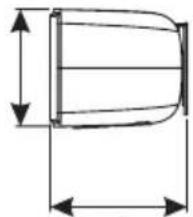
natural_image
Technical line drawing of a cylindrical object with dimension lines (no text or symbols)5,85 po
(14,8cm)
39,9 po (101,3cm)

natural_image
Pure diagram of a rectangular container with internal oval and circular features, no text or symbols present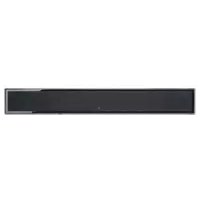
- Motion® Martin LOGAN Vision X
- MOTION VISION X
- IMPORTANT SAFETY INSTRUCTIONS!
- FEDERAL COMMUNICATIONS COMMISSION INTERFERENCE
- Introduction and Overview....6
- Placement and Mounting 6
- Connection....9
- Surround Sound Decoding 14
- DTS Play-Fi 15
- Playing Audio Using Play-Fi....17
- How to use Connect....18
- Updates and Rebooting 19
- Top Panel Controls 19
- Remote Control 20
- The Menu System 20
- Contacting Customer Service 27
- General Information 27
- Frequently Asked Questions....28
- Troubleshooting 29
- Specifications 32
- Dimensional Drawings 33
- Serial Number: \_\_\_\_
- WARNING/CAUTION!
- WEEE NOTICE
- INTRODUCTION AND OVERVIEW
- PLACEMENT AND MOUNTING
- LOCATION
- INSTALLING ON A FLAT SURFACE
- ON-WALL INSTALLATION
- Required tools (not included):
- Required hardware (included):
- Required hardware (not included):
- CONNECTION
- POWER CONNECTION
- SIGNAL CONNECTION
- An Introduction to Audio Connections
- NETWORK CONNECTION FOR DTS PLAY-FI®
- SUBWOOFER CONNECTION
- No Subwoofer
- Wired Subwoofer Connection
- Wireless Subwoofer Connection
- Using a MartinLogan Dynamo Subwoofer
- IR INPUT
- DIGITAL INPUTS (Optical and Coaxial)
- ANALOG INPUT
- DTS PLAY-FI®
- NETWORK REQUIREMENTS
- DTS Play-Fi® APP REQUIREMENTS
- WI-FI SETUP AND STATUS BUTTON
- DOWNLOADING THE DTS PLAY-FI APP
- CONNECTING TO A WIRELESS NETWORK: ACCESS POINT SETUP
- Android Device Users:
- iOS Device Users:
- PC Users:
- CONNECTING TO A WIRELESS NETWORK: WI-FI PROTECTED SETUP (WPS)
- CONNECTING TO A WIRED NETWORK
- PLAYING AUDIO USING PLAY-FI
- CONTROLLING MULTIPLE SPEAKERS
- TIP! Primary and Secondary Speakers
- ADDITIONAL PLAY-FI FEATURES
- How to use Connect
- UPDATES AND REBOOTING
- DTS PLAY-FI® APP UPDATE
- DTS PLAY-FI MODULE UPDATE
- SOUNDBAR FIRMWARE UPDATE
- Top Panel Controls
- REMOTE CONTROL
- CHANGING THE REMOTE'S BATTERY
- PROGRAMMING A SECOND REMOTE
- THE MENU SYSTEM
- ENTERING AND EXITING THE MENU
- An Overview of the Menu Structure\*\*
- NAVIGATING THE MENU\*\*
- MENU OPTION: SUB
- MENU OPTION: BASS LEVEL
- MENU OPTION: INSTALL
- MENU OPTION: SURROUND
- MENU OPTION: STEREO
- MENU OPTION: MODES
- MENU OPTION: DISPLAY
- MENU OPTION: POWER
- MENU OPTION: LEARN
- LEARN > ERASE > CONFIRM > YES:
- MENU OPTION: SOURCE NAME
- MENU OPTION: SERVICE
- SERVICE > RESET > AT.HOME > CONFRM:
- CONTACTING CUSTOMER SERVICE
- GENERAL INFORMATION
- WARRANTY INFORMATION
- SERIAL NUMBER
- SERVICE
- FREQUENTLY ASKED QUESTIONS
- Can my soundbar be used as a dedicated center channel?
- Why is my soundbar not reproducing multi-channel (surround sound) audio?
- Will this soundbar decode Dolby® TrueHD or DTS-HD Master Audio™?
- How do I connect the soundbar if my television does not have a digital (optical or coaxial) output?
- How do I clean my soundbar?
- Can I use other cables other than those provided with the soundbar?
- Can I mount this soundbar on the wall with a mounting bracket that pivots?
- I have a MartinLogan subwoofer with a built-in SWT-2 wireless receiver. Do I have to use the wireless connection?
- Can I use this soundbar as a dedicated center channel speaker?
- Could you suggest a list of suitable electronics and cables ideal for MartinLogan speakers?
- Is there likely to be any interaction between my speakers and the television in my A/V system?
- How can I remove the grille cloth from the soundbar?
- TROUBLESHOOTING
- I'm having trouble using the Play-Fi® app.
- Soundbar does not turn on.
- The Wi-Fi Setup and Status button does not light up.
- I am unable to connect my soundbar to my network.
- The Play-Fi app cannot find my soundbar.
- The Play-Fi app reports "Play-Fi Devices Lost."
- No output from the soundbar
- The sound bar displays 'DSP NG'
- No surround sound
- Sound is coming from both my soundbar and my television
- The soundbar is too quiet even when the soundbar is turned up
- Soundbar won't learn remote codes from aftermarket remote
- Soundbar remote won't work
- When using an aftermarket remote, the soundbar turns off when the television turns on
- No sound coming from external sub
- External sub is too quiet
- My soundbar is not behaving as expected.
- SPECIFICATIONS\*
- DIMENSIONAL DRAWINGS MARTINLOGAN MOTION VISION X
- INTRODUCTION ET APERÇU
- Raccordelement
Brand : Martin Logan
Model : Motion Vision X
Category : Soundbar