
HSB32B26 - Loudspeaker HITACHI - Free user manual and instructions
Find the device manual for free HSB32B26 HITACHI in PDF.


| Product Type | Soundbar Speaker |
| Brand | Hitachi |
| Model | HSB32B26 |
| Dimensions (W x H x D) | 900 x 62 x 86 mm |
| Weight | 2.2 kg |
| Power Output | 120W RMS |
| Frequency Response | 40 Hz - 20 kHz |
| Connectivity | Bluetooth 5.0, HDMI ARC, Optical, AUX, USB |
| Speaker Configuration | 2.1 channels (2 full-range + 1 subwoofer) |
| Driver Size | 2 x 2.5" full-range, 1 x 4" subwoofer |
| Remote Control | Included |
| Power Supply | AC 100-240V, 50/60 Hz |
| Energy Consumption | 30W typical |
| Standby Power | < 0.5W |
| Wall Mountable | Yes, with included bracket |
| Compatibility | TV, smartphone, tablet, computer |
| Audio Decoding | Dolby Digital, DTS |
| Cable Length | 1.5 m power cord |
| Package Contents | Soundbar, remote control, mounting kit, manual |
| Warranty | 2 years |
| Maintenance | Clean with dry cloth; avoid liquids |
| Safety Warnings | Do not expose to water; keep away from heat sources |
| Spare Parts Availability | Contact Hitachi service center for replacements |
Frequently Asked Questions - HSB32B26 HITACHI
User questions about HSB32B26 HITACHI
0 question about this device. Answer the ones you know or ask your own.
Ask a new question about this device
Download the instructions for your Loudspeaker in PDF format for free! Find your manual HSB32B26 - HITACHI and take your electronic device back in hand. On this page are published all the documents necessary for the use of your device. HSB32B26 by HITACHI.
USER MANUAL HSB32B26 HITACHI
133W Bluetooth® Sound Bar

natural_image
Exterior view of a black cylindrical electronic device labeled 'HATCH' with control panel and indicator lights (no readable text beyond branding)Model: HSB40B16

natural_image
Black cylindrical electronic device with metallic legs and mounting feet (no visible text or symbols)Model: HSB32B26
Owner's Guide
Thank you for purchasing this Hitachi product. Please read these instructions carefully.
You may download, save and print this Owner's Guide for future reference.
For additional assistance please call 800.HITACHI (800.448.2244).
For further information on Hitachi products, please visit www.hitachi.us/tv.
Table of Contents
Important Safety Instructions 2
Chapter 1 – Introduction and Placement 4
Chapter 2 – Indicators and Buttons 6
Chapter 3 – Quick Connect Guide 9
Chapter 4 – Connecting the Sound Bar 11
Chapter 5 – Controlling the Sound 16
Chapter 6 – Care and Service Information 19
Chapter 7 -- Specifications 21
Trademark Notices 23


COVED™

DOLBY DIGITAL
SAFETY POINTS YOU SHOULD KNOW ABOUT YOUR HITACHI SOUND BAR
Our reputation has been built on the quality, performance, and ease of service of Hitachi products.
Safety is also foremost in our minds in the design of these units. To help you operate these products properly, this section illustrates safety tips which will be of benefit to you. Please read it carefully and apply the knowledge you obtain from it to the proper operation of your Hitachi sound bar.
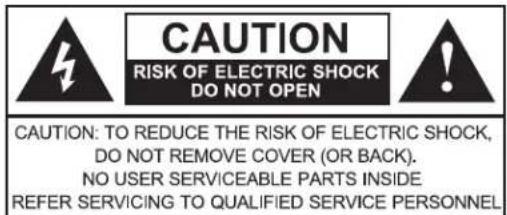

The lightning flash with arrowhead symbol, within an equilateral triangle, is intended to alert the user to the presence of uninsulated "dangerous voltage" within the product's enclosure that may be of a sufficient magnitude to constitute a risk of electric shock to a person.

The exclamation point within an equilateral triangle, is intended to alert the user to the presence of important operating and maintenance (servicing) instructions in the literature accompanying the appliance.
READ BEFORE OPERATING EQUIPMENT
Follow all warnings and instructions marked on this Sound Bar.
- Read these instructions.
- Keep these instructions.
- Heed all warnings.
- Follow all instructions.
- Do not use this apparatus near water.
- Clean only with a dry cloth
-
Do not block any ventilation openings. Install in accordance with the manufacturer's instructions.
-
Do not install near any heat sources such as radiators, heat registers, stoves, or other apparatus (including amplifiers) that produce heat.
-
Do not defeat the safety purpose of the polarized or grounding type plug. A polarized plug has two blades with one wider than the other. A grounding type plug has two blades and a third grounding prong. The wide blade or the third prong are provided for your safety. If the provided plug does not fit into your outlet, consult an electrician for replacement of the obsolete outlet.
-
Protect the power cord from being walked on or pinched particularly at plugs, convenience receptacles, and the point where they exit from the apparatus.
-
Only use attachments/accessories specified by the manufacturer.
-
Use only with the cart stand, tripod, bracket or table specified by the manufacturer or sold with the apparatus. When a cart is used, use caution when moving the cart/apparatus combination to avoid injury from tip-over.
-
Unplug this apparatus during lightning storms or when unused for long periods of time.

- Refer all servicing to qualified service personnel. Servicing is required when the apparatus has been damaged in any way, such as power-supply cord or plug is damaged, liquid has been spilled or objects have fallen into the apparatus, the apparatus has been exposed to rain or moisture, does not operate normally, or has been dropped.
- WARNING: To reduce the risk of fire or electric shock do not expose this apparatus to rain or moisture.
- Do not allow the product to output distorted sound for an extended period of time. It may cause speaker overheating and fire.
- Sudden high volume sound may cause hearing or speaker damage. Turn sound bar volume down before connecting other devices.
- Do not push objects through any opening in this unit, as they may touch dangerous voltage points that could result in fire or electric shock. Never spill or spray any type of liquid into the unit.
- Do not connect this unit to AC power using any device other than the supplied AC adaptor and AC cord. This could cause fire, electrical shock, or damage.
- Do not use with a voltage other than the power voltage specified. This could cause fire, electrical shock, or damage. Connect to 120VAC, 60Hz power only.
- If you need to replace the supplied AC adapter or AC cord, contact the dealer from which you purchased the unit.
- The Mains plug is used as the disconnect device, and shall remain readily operable.
NOTICE ABOUT SOUND BAR PLACEMENT
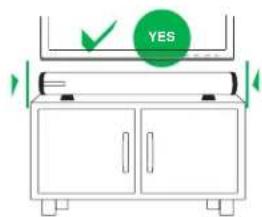
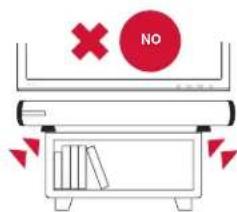
Mounting the unit on a cabinet smaller than the length of the unit could create a tip-over risk resulting in personal injury, and product damage. Hitachi accepts no responsibility or liability for any injuries or property damage resulting from improper installation of this Sound Bar.
POWER SOURCE
This sound bar is designed to operate on 120 volts 60 Hz, AC current from the supplied AC to DC external power adapter. To prevent electric shock, do not use the plug with an extension cord, receptacle, or other outlet unless the blades and ground terminal can be fully inserted to prevent blade exposure.
Never connect the AC adapter to 50 Hz, direct current, or anything other than the specified voltage.
CAUTION NOTICE FOR 32" BASS PORTS
Never insert any object or liquids into the bass ports at each end of the 32" Sound Bar (model HSB32B26). Any such foreign object(s) will distort the sound quality and may permanently damage your Sound Bar. Such damage is not covered by this product's warranty.
Important Safety Instructions
CANADIAN RSS NOTICE
This device complies with Industry Canada RSS-210.
Operation is subject to the following two conditions:
(1) this device may not cause harmful interference, and
(2) this device must accept any interference, including interference that may cause undesired operation.
This device meets the exemption from the routine evaluation limits in section 2.5 of RSS-102 and compliance with RSS-102 RF exposure, users can obtain Canadian information on RF exposure and compliance.
U.S. FEDERAL COMMUNICATIONS COMMISSION NOTICE
This equipment has been tested and found to comply with the limits for a Class B digital device, pursuant to part 15 of the FCC Rules. These limits are designed to provide reasonable protection against harmful interference in a residential installation. This equipment generates, uses and can radiate radio frequency energy and, if not installed and used in accordance with the instructions, may cause harmful interference to radio communications. However, there is no guarantee that interference will not occur in a particular installation. If this equipment does cause harmful interference to radio or television reception, which can be determined by turning the equipment off and on, the user is encouraged to try to correct the interference by one or more of the following measures:
Reorient or relocate the receiving antenna.
— Increase the separation between the equipment and receiver.
— Connect the equipment into an outlet on a circuit different from that to which the receiver is connected.
— Consult the dealer or an experienced radio/TV technician for help.
MODIFICATIONS
FCC regulations state that any changes or modifications made to this device that are not expressly approved by Hitachi America, Ltd. may void the user's authority to operate the equipment.
CABLES
Connections to this device must be made with shielded cables with metallic RFI/EMI connector hoods to maintain compliance with FCC Rules and Regulations.
Any cables or power cords or power adapters supplied with the system must be replaced with identical parts in order to assure compliance.
You may order those replacement parts from Hitachi.
DECLARATION OF CONFORMITY
This device complies with Part 15 of the FCC Rules.
Operation is subject to the following two conditions:
(1) this device may not cause harmful interference, and
(2) this device must accept any interference received, including interference that may cause undesired operation.
For questions regarding this declaration, contact:
Hitachi America, Ltd.
900 Hitachi Way
Chula Vista, CA. 91914
800.448.2244 (800.HITACHI)
ATTN: Customer Relations
LEAD NOTICE
This product contains lead. Dispose of this product in accordance with applicable environmental laws. For product recycling and disposal information, contact your local government agency or www.erecycle.org (in
California), the Electronic Industries Alliance at www.eiae.org (in the U.S.) or the Electronic Product Stewardship Canada at www.epsc.ca. (in Canada). For more information, call 800.HITACHI.

This unit meets
ENERGY STAR for A/V
program requirements.
If no audio input signal has been detected for 30 minutes, this unit automatically powers down to save you energy.
Press the Power button on the remote control or top panel to wake the unit.
Chapter 1 - Introduction and Placement
Your new Sound Bar includes a 6-speaker high efficiency design coupled to state-of-the-art Class D digital amplifiers totaling 133 watts for clear and powerful sound reproduction. CONEQ™ equalization tunes the Sound Bar like a musical instrument for natural sound and clear voices. Bluetooth® lets you wirelessly stream your favorite music to the Sound Bar.
Unpacking the Sound Bar and Accessories:
Carefully remove the Sound Bar and accessories from the package. Check the condition of each item and check that all of the accessories are included with the Sound Bar.
IMPORTANT: Check and make sure you have the items below. Hitachi recommends you keep the box and packing to protect the Sound Bar for moving or shipping.
① Sound Bar (Table Stands already attached)

natural_image
Black cylindrical electronic device with a HATCH logo and control panel, shown against a white background (no text or symbols on the device itself)The speaker grill is not removable.
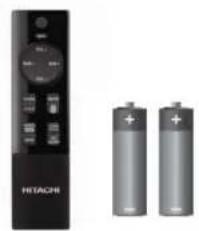
② Remote Control + AAA batteries (2)
natural_image
Exterior view of a Hitachi remote control unit next to two batteries (no text or symbols visible)③ Quick Start Guide
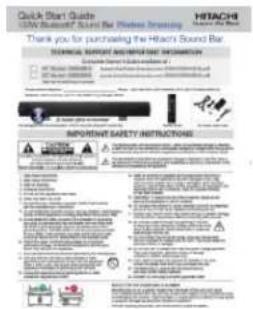
④ AC Power Adaptor
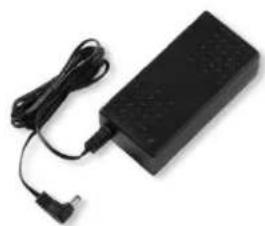
natural_image
Black electronic device with attached cables and a small plug (no visible text or symbols)⑤ AC Power Cord
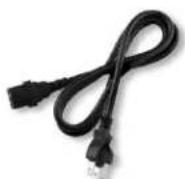
⑥ Audio 3.5mm Mini Plug to Pin Jack (RCA) Cable
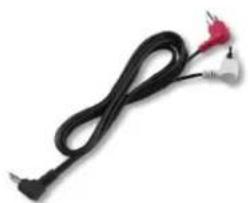
natural_image
Black and white cable with two connectors, no visible text or symbolsChapter 1 - Introduction and Placement
Placement -- Table Stands / Wall Mount Brackets:
The Sound Bar is shipped with the table stands attached. Position the Sound Bar on a secure table or shelf as noted in the Safety Instructions to avoid damage or injury. The table stands can also be removed and re-attached for wall mounting. Please carefully read the wall mounting information provided below.
CAUTION: Wall Bracket Installation: Only a professional installer should install the Sound

Bar onto the wall. Dangerous voltages exist inside walls and extreme caution must be exercised to avoid injury or deadly electrical currents. High pressure water and natural gas pipes are also hidden in walls and only professionals are trained to avoid in-wall hazards.
Tips For Professionals: Follow the instructions below for wall mounting the Sound Bar.
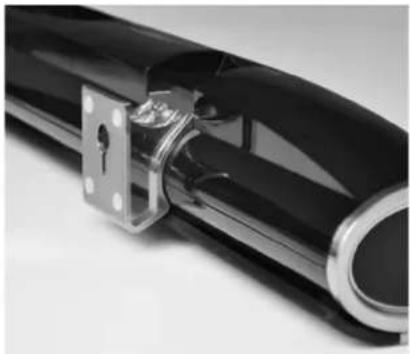
Place the Sound Bar on a secure surface and remove the table stands from the Sound Bar using a slotted screw driver of appropriate size. See Figure 1.
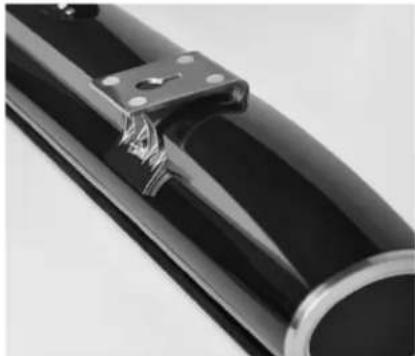
- Reverse the stands and securely re-attach them to the Sound Bar as shown in Figure 2.
- Measure and attach wall fasteners that are appropriate to the type of wall (drywall, masonry, etc.) and fasten them securely. Wall anchors are not provided by Hitachi.
-
Insert screws (not included) into wall, leaving enough of the screws protruding from the wall to slide into the key slots of the Sound Bar brackets.
-
Secure the Sound Bar onto the screws.

NEVER PLACE OBJECTS ON TOP PANEL OF SOUND BAR – IT IS NOT A SHELF.
natural_image
Close-up of a black mechanical component with metallic bracket and mounting holes (no visible text or symbols)Figure 1
natural_image
Close-up of a black cylindrical object with metallic clamps and a metal bracket (no visible text or symbols)Figure 2
NOTE: Your product may vary in finish or appearance from the photographs in this Owner's Guide.
Front Panel Lights:
The Front Panel shows the status of the Sound Bar using high efficiency light emitting diodes (LEDs). When you press a button on the Sound Bar remote control or top panel controls, the LED lights indicate the operation of the Sound Bar.
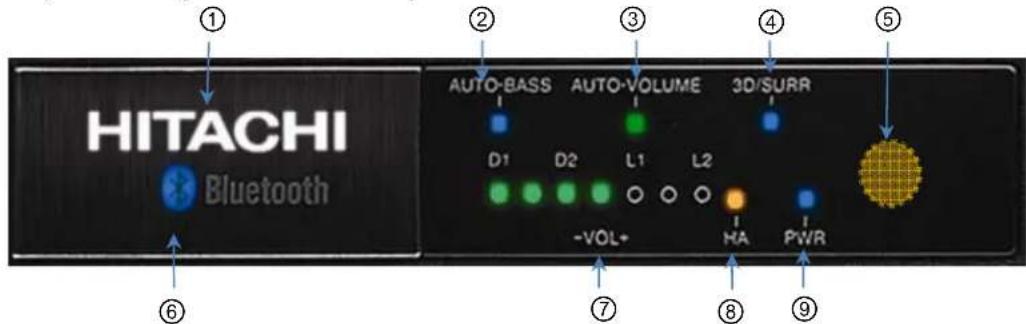
① HITACHI logo:
Illuminates for about 15 seconds when power is turned "On".
② AUTO-BASS:
Enhances low frequencies at low volume levels.
③ AUTO-VOLUME:
Reduces sudden loud sounds and simultaneously raises whispers for easy listening.
④ 3D/ SURR:
Press the remote' 3D/SURR button to switch from "3D" (blue LED) to "Surround" sound effects (LED turns green). Press again to turn effects and LED off.
⑤ Remote Control Sensor:
For best response point the remote control directly at this area from roughly 30 degrees to the left, right, up or down. The remote control range is approximately 30 feet. Do not put obstacles between the remote control and the sensor window.
⑥ Bluetooth Light:
Illuminates when the Bluetooth input is selected.
⑦ Volume/ Input indicator:
Seven lights indicates the volume level, input source selection and Tone modes.
⑧ HA mode:
The HEARING AID mode enhances certain frequencies for the hearing impaired.
⑨ PWR indicator:
Indicates the Sound Bar's power "On" or "Off" status.
Top Panel Control Buttons:
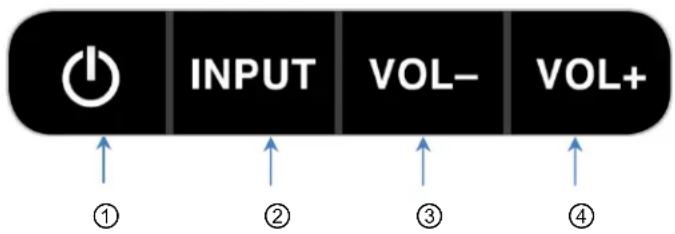
The Control Buttons are located on the top of the Sound Bar.
flowchart
graph LR
    A["Power"] --> B["INPUT"]
    B --> C["VOL-"]
    C --> D["VOL+"]
    style A fill:#000,stroke:#fff,color:#fff
    style B fill:#000,stroke:#fff,color:#fff
    style C fill:#000,stroke:#fff,color:#fff
    style D fill:#000,stroke:#fff,color:#fff
    subgraph Input
        A
        B
        C
        D
    end
    subgraph VOL-
        B
        C
        D
    end
    subgraph VOL+
        C
        D
    end
    A -->|①| B -->|②| C -->|③| D
    B -->|②| C -->|③| D
    A -->|④| D
    B -->|④| D
① Power Button:
This button turns the Sound Bar on and off. If no audio is received, the Sound Bar will automatically shut off after 30 minutes to save you energy.
② INPUT Button:
Press this button to change the input. Cycle through the inputs,
$$ \boxed {\begin{array}{c}\rightarrow D 1 \rightarrow D 2 \rightarrow B l u e t o o t h \rightarrow L 1 \rightarrow L 2\\hline\end{array}} $$
③ VOL- Button:
Press this button to decrease the Sound Bar's volume level.
④ VOL+ Button:
Press this button to increase the Sound Bar's volume level.

CAUTION: Reduce volume settings on both the Sound Bar and an external device before connecting to avoid damaging your hearing or the Sound Bar.
Button Combinations:
In addition to the primary button functions above, additional button combination functions noted below are also provided.
- Vol+ and Vol-
Press and hold together for one second to mute the Sound Bar.
When the Sound Bar is muted, the Volume indicator lights blink on and off at the current volume setting.
• Power, Vol+ and Vol-
Press and hold together for 10 seconds to return the Sound Bar to factory default settings.
Chapter 2 - Indicators and Buttons
Remote Control Features & Functions:
INPUT button:
Cycles through the inputs: D1, D2, Bluetooth, L1, L2
VOL+/- button:
Adjusts sound level. VOL+ to increase. VOL- to decrease.
D1/D2 button:
Press to select D1 input. Press again to select D2 input.
L1/L2 button:
Press to select L1 input. Press again to select L2 input.
HEARING AID button:
This listening mode is designed to improve sound for the listening impaired.
NITE mode button:
Press to change listening mode. NITE1: reduces volume level and increases bass sound. NITE2: reduces volume level only
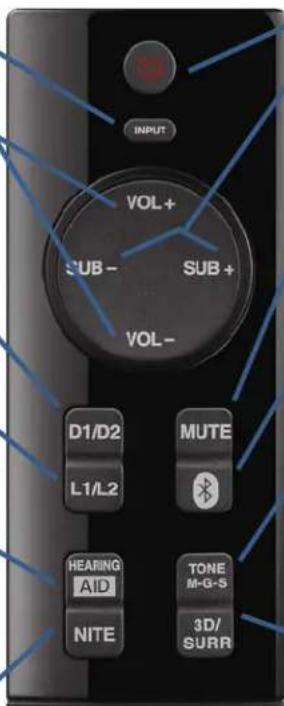
POWER button:
Turns Sound Bar On & Off.
SUB+/- button:
Adjust Subwoofer output level: SUB+ to increase. SUB- to decrease.
MUTE button:
Press to turn off the volume. Press again to restore volume.
Bluetooth button:
Press this button to select the Bluetooth input.
TONE M-G-S button:
Press for Game mode; press again for Sports tone mode and press again to return to default Music tone mode.
3D/SURR button:
Press to activate 3D Sound mode. Press again to activate Surround Sound mode, press again to return to normal listening.
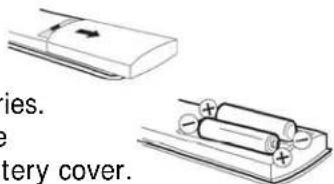
How to install the batteries:
- Slide open the back battery cover and insert 2 AAA batteries.
- Make sure each battery's positive (+) symbol matches the (+) symbol in battery compartment before replacing battery cover.

Caution:
- Inserting batteries incorrectly may result in damage to remote control.
- Dispose of batteries in accordance with local laws and regulations.
- Keep the batteries away from children and pets.
- Do not expose batteries OR remote control to excessive heat (direct sunshine, fire, etc.).
- Keep remote control dry; avoid high humidity.
- If the Sound Bar doesn't respond to the remote control, check the batteries.
- When batteries are low or worn out, replace with fresh ones.
- Remove the batteries if remote control will not be used for a long period of time.
- Do not subject the remote control to undo physical stress, such as striking or dropping.
- Do not clean the remote control with any solvent. Wipe only with clean moist cloth.
Rear Panel Input / Output Jacks:
HSB40B16
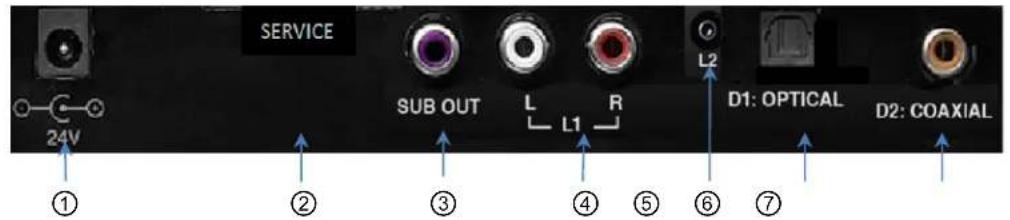
HSB32B26

① 24V DC input:
Insert the DC plug of Hitachi provided external AC Adapter here.

Caution: Use only provided AC adapter and AC power cord with the Sound Bar. Use of any other adapter may damage the Sound Bar or create a shock hazard.
② SERVICE:

The service connection is for service personnel only. Do not remove the cover. Tampering with the Service connection may void your warranty.
③ SUB OUT:
Connect an external subwoofer (not supplied) to this variable output. Adjust the subwoofer volume using the remote control SUB+ and SUB- buttons.
④ L1:
Connect your TV or other accessory device to the Line 1 input.
⑤ L2:
Connect the headphone output of your TV or mobile device to the 1/8" (3.5mm) Line 2 input.
⑥ D1: OPTICAL Input:
Connect your TV Optical Digital Output to this digital input.
⑦ D2: COAXIAL Input:
Connect your TV Coaxial Digital Output to this digital input.
Chapter 3 - Quick Connect Guide

CAUTION: Lower the volume on television, source device and Sound Bar when connecting or disconnecting devices to avoid damage when TV, source device and Sound Bar are turned on.
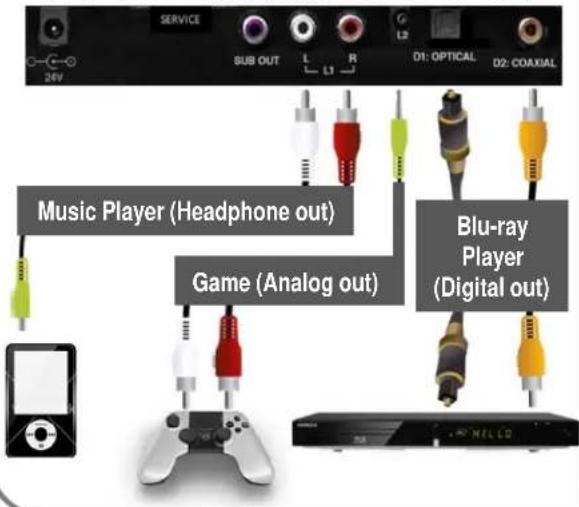
- TV to Sound Bar connections ... Use any one of the 4 types shown below:
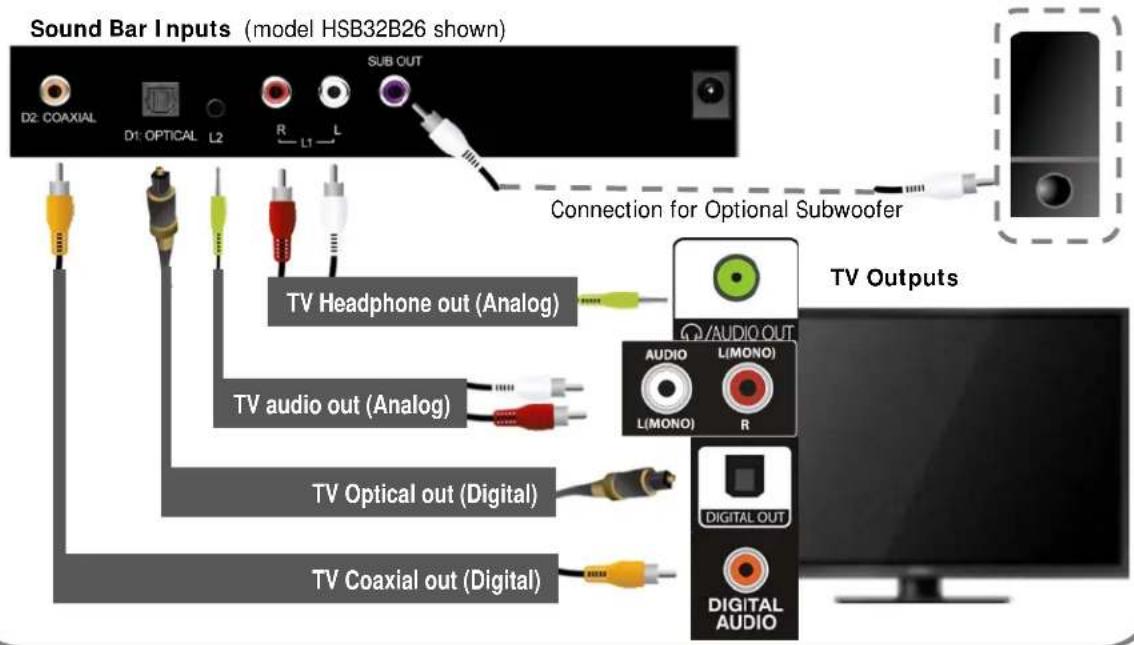
- Connecting other devices is easy: (music player, games, etc.)
Sound Bar Inputs (model HSB40B16 shown)
3. NO WIRES with Bluetooth® :
(a) Turn on Bluetooth in your audio source device such as a music player, smartphone or tablet (consult your device's operating manual for details).
(b) Point the Sound Bar remote control at the Sound Bar's front panel, then press & hold the remote control's Bluetooth button until "Hitachi Sound Bar" appears in your audio
source device's Bluetooth device list.
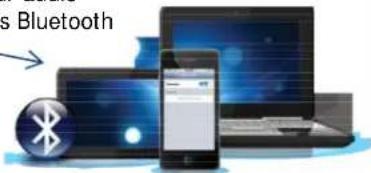
(c) The Sound Bar's front panel Bluetooth LED blinks when searching for a connection and turns to a

steady blue when paired successfully with your audio source device.
Detailed Connection Instructions:

Be sure to lower the volume on the TV or other audio source device and the Sound Bar to avoid damage when source device and Sound Bar are turned on.
L1: Analog Line Connection
- Turn off the power to the Sound Bar and the audio source device (TV, music player, etc.).
a) Connect the 3.5mm Stereo plug of supplied audio cable to the audio source device headphone output.
b) Connect the other end of the audio cable (white and red connectors) to the L1 input jacks on the Sound Bar.
- Turn on the power to the Sound Bar and the audio source device.
- Select the L1 input by pressing INPUT on the top of the Sound Bar or L1/ L2 on the remote control until the front panel L1 LED briefly flashes indicating L1 is selected.
L2: Analog Line Connection
-
Turn off the power to the Sound Bar and the audio source device (TV, music player, etc.).
a) Connect the supplied audio cable's white and red connectors to the audio source device's matching white and red audio output jacks.
b) Connect the other end (3.5mm plug) of the supplied audio cable to the L2 input jack on the Sound Bar. -
Turn on the power to the Sound Bar and the audio source device.
- Select the L2 input by pressing INPUT on the top of the Sound Bar or L1/ L2 on the remote control until the front panel L2 LED briefly flashes indicating L2 is selected.
Notes:
- Many audio source devices commonly use a 3.5mm stereo mini-jack. In this case, use the included 3.5mm to RCA cable.
- If wall mounting of the Sound Bar is planned, purchase a right-angle audio cable to avoid mounting interference.
- Refer to your audio source device user manual for more information about it's audio output settings and connections.
CAUTION:

Consult your audio source device user manual to determine if a docking unit or equivalent conversion unit is required to adapt line level audio for compatibility to the Sound Bar.
Detailed Connection Instructions (Cont.):

Be sure to lower the volume on the TV or other audio source device and the Sound Bar to avoid damage when source device and Sound Bar are turned on.
D1: Optical Digital Connection
If your audio source device (TV, DVD player, computer, etc.) has an Optical digital audio output, you can connect it to the matching Optical digital input on the Sound Bar.
- Turn off the power to the Sound Bar and the audio source device.
- Connect one end of an Optical (S/PDIF) cable to the digital audio output on the audio source device and the other end to the D1 input on the Sound Bar.
- Turn on the power to the Sound Bar and the audio source device.
- Select a Digital Output type on your audio source device. The Sound Bar supports either: (a) Dolby Digital, or (b) PCM digital audio output from the audio source device.
- Select the D1 input by pressing INPUT on the top of the Sound Bar or D1/ D2 on the remote control until the front panel D1 LED briefly flashes indicating D1 is selected.
D2: Coaxial Digital Connection
If your audio source device (TV, DVD player, computer, etc.) has a Coaxial digital audio output, you can connect it to the matching Coaxial digital input on the Sound Bar.
- Turn off the power to the Sound Bar and the audio source device.
- Connect one end of a Coaxial digital cable to the digital audio output on the audio source device and the other end to the D2 input on the Sound Bar.
- Turn on the power to the Sound Bar and the audio source device.
- Select a Digital Output type on your audio source device. The Sound Bar supports either: (a) Dolby Digital, or (b) PCM digital audio output from the audio source device.
- Select the D2 input by pressing INPUT on the top of the Sound Bar or D1/D2 on the remote control until the front panel D2 LED briefly flashes indicating D2 is selected.
Notes:
- The Sound Bar detects PCM or Dolby digital audio formats automatically.
- DTS audio formats are not supported by the Sound Bar.
• Refer to the user manual that came with your audio source device for more information.
Chapter 4 - Connecting the Sound Bar
Bluetooth® Connection:
The Bluetooth light ① is located on the front of the Sound Bar below the HITACHI logo.
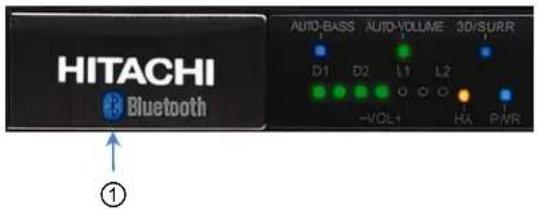
Bluetooth States & Display
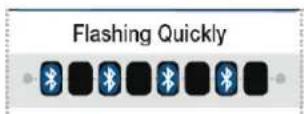
There are four Bluetooth connection states, and each is indicated via the Sound Bar's front panel Bluetooth LED.
1. Discoverable (ready to pair)
Sound bar is discoverable and ready to pair with a new device. The Bluetooth indicator slowly fades on and off approximately once every second. The Sound Bar is placed into "discoverable mode" by pressing and holding the Bluetooth button on the remote control for more than 5 seconds, or by pressing and holding the Input button on the Sound Bar for more than 5 seconds.
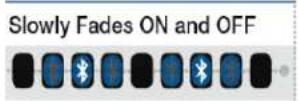
2. Connecting
Sound bar is attempting to connect to a paired device. The Bluetooth indicator flashes on and off approximately twice every second.
3. Connected
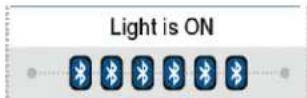
Sound bar is connected to a paired device. The Bluetooth indicator remains steadily on. A connection can only be initiated by an end user from a device. Once connected, a device stays connected forever until disconnected by the user, even if the device goes out of range. If a connected device comes back into range, the connection will be automatically re-established. However, if the input has been set to something other than Bluetooth, the Sound Bar will not switch to Bluetooth.
4. Disconnected
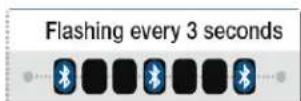
Sound bar is available to connect to any already-paired device. The Bluetooth indicator flashes on and off approximately once every three seconds.
Note:
It is a good idea to review your audio source device operating manual (smart phone, tablet, music player, etc.) for detailed information about it's Bluetooth capabilities and setup.
Bluetooth® Connection:
1 ^st Time Pairing with a Bluetooth Audio Source Device
- Set the Bluetooth audio source device (e.g. smart phone, tablet, etc.) to "discover" the Sound Bar. Set your audio source device Volume to \~90% of max.
- Turn on the Sound Bar, reduce the Sound Bar Volume setting to very low.
- Press and hold the Bluetooth button on the Sound Bar remote control or press and hold the Input button on the Sound Bar top panel until "Hitachi Sound Bar" appears in your audio source device's Bluetooth device list.
- The Sound Bar is automatically switched to the Bluetooth input and the Bluetooth indicator on the Sound Bar fades on and off to show the Sound Bar is discoverable.
- After a few seconds "Hitachi Sound Bar" will appear in your audio source device's Bluetooth list. If "Hitachi Sound Bar" does not appear after 30 seconds, turn the Sound Bar and your audio device off, then back on and try again from step 1 above.
- When "Hitachi Sound Bar" appears in your device's Bluetooth device list, select it.
- If your audio source device requests a passkey, check the source device's user guide for details. Many devices use "0000" (four zeros).
The Sound bar indicates pairing is complete when the Bluetooth indicator stops fading on and off and remains steadily on.
Now you can select and play music from your smart phone, tablet, music player or other device library and it will be streamed to your Sound Bar wirelessly.
Notes about Bluetooth pairing:
- The Bluetooth audio source device will also indicate when pairing is complete.
- If no connection is successfully made after 60 seconds in “discoverable mode”, the Sound Bar exits discoverable mode and the Bluetooth indicator turns off.
- Exit discoverable mode by pressing the Bluetooth button on the remote or the Input button on the Sound Bar.
- When exiting discoverable mode unsuccessfully, the Sound Bar will resume the prior mode: if the Sound Bar was connected to a Bluetooth device, it will reconnect to that device. If the Sound Bar was in disconnected mode, it will re-enter disconnected mode.
- The Sound Bar should be able to pair with up to six Bluetooth devices.
- Once paired, information about the connection is stored in the Sound Bar and the source device should not need to be paired again.
- The Sound Bar can only connect to and play audio from one device at a time.
Bluetooth® Connection: (Cont.)
Re-connecting an Already Paired Source Device
- Press the Bluetooth button on the Sound Bar remote control.
- The Sound Bar will attempt to connect to the most recently used audio source device.
- If unsuccessful, it will try the next most recently used device until it has attempted connection to each of the six stored devices.
- While attempting to connect, the Bluetooth indicator on the Sound Bar flashes on and off approximately twice every second until the device connects.
- Once connected, the Bluetooth indicator stops flashing and remains steadily on.
Disconnecting from Connected Bluetooth Device
- Press the Sound Bar's remote control Bluetooth button to disconnect the device.
- The Sound Bar will wait for a paired device to initiate a connection; or press the Bluetooth button again to connect to the last connected device.
- When a device is disconnected, the only way to reconnect is for the user to initiate connection from their device.
Clearing the Sound Bar Memory of All Paired Devices
- Press and hold the Bluetooth button on the remote control, or the Input button on the Sound Bar for about 10 seconds.
- The Sound Bar Bluetooth indicator will flash rapidly four times.
- The Sound Bar clears all Bluetooth devices from its memory and becomes "discoverable". The Bluetooth indicator will then slowly fade on and off.
Sleep Mode
- When the Bluetooth input is selected, and no device connects within 30 minutes, the Sound Bar enters sleep mode and cannot connect to audio source devices.
- To wake the Sound Bar press the Power button.
Preserving the Connection When Switching Inputs
- If a Bluetooth device is connected, switching the input to another audio source does not terminate the device connection.
- The Sound Bar maintains the Bluetooth connection, and if the input is switched back to Bluetooth, the audio resumes playing instantly.
To Pair Additional Devices
- With the Bluetooth device and the Sound bar both turned on, press and hold the Bluetooth button on the remote control, or the Input button on the Sound Bar for three seconds to make the Sound Bar discoverable again.
- The Sound Bar memory can hold up to six paired devices.
- Users can pair more than six devices, but the memory will never contain more than six.
- When the memory is full with six devices and an additional device is paired, the least recently used device is deleted from memory and the newly paired device is added.
Chapter 5 – Controlling the Sound
Basic Features and Indicators:
The Sound Bar's basic features (Power, Volume, Input selection) can be controlled by either the top panel control buttons or the remote control.
Power button:

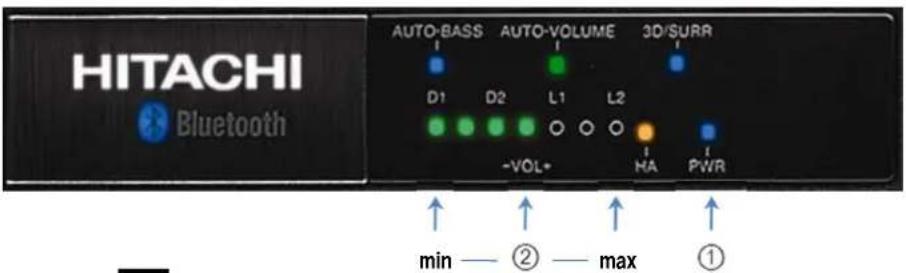
This button turns the Sound Bar on & off. A soft blue LED ① glows when the power is on.
Volume buttons:
Press the top panel or remote control VOL+ or VOL- buttons to raise or lower the Sound Bar speaker's volume. The number of lighted LEDs increase as the volume is raised and decrease as the volume is lowered. The Volume indicator lights ② will turn off after about five (5) seconds. When MUTED the volume LEDs will blink at the current volume setting.
Input buttons:
When the top panel INPUT button or the INPUT, D1/ D2 or L1/ L2 buttons on the remote control are pressed, the front panel LED indicators begin flashing, and then go off after a few seconds. The INPUT button cycles through each Sound Bar input in the order shown below.
| Selected Input Indicator Description | ||
| D1(Digital Optical) | 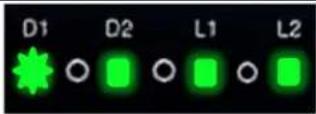 | D1 LED will briefly flash. |
| D2(Digital Coaxial) | 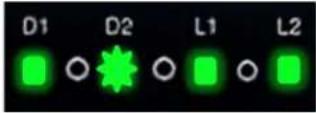 | D2 LED will briefly flash. |
| Bluetooth(Digital Wireless) |  | Bluetooth logo begins flashing. |
| L1(Analog Line In) | 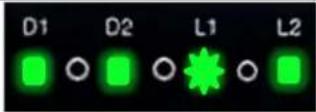 | L1 LED will briefly flash. |
| L2(Analog 3.5mm) | 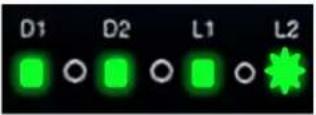 | L2 LED will briefly flash. |
Convenience and Advanced Features and Indicators:
Some of the Sound Bar's features are accessible only by the dedicated remote control buttons discussed below and on the following page.
Sub-Woofer Volume:
The remote control SUB+ and SUB- buttons adjust the volume of an optional sub-woofer connected to the SUB OUT jack on the Sound Bar's rear panel. The connected sub-woofer must be self-powered as the Sound Bar's SUB OUT is line level audio only. The Sound Bar's front panel LEDs will indicate the SUB OUT level from minimum to maximum as shown below. The LEDs will turn off after about 5 seconds. Once you have set the SUB OUT level, it will increase and decrease with the Sound Bar's main VOL+ and VOL- buttons. When the Sound Bar is MUTED, the connected sub-woofer will also be muted.
| SUB OUT volume min | SUB OUT volume max | Description |
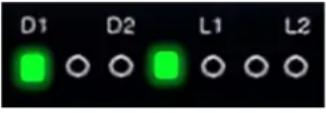 | 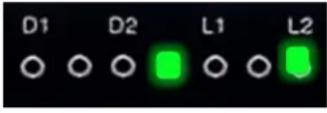 | As SUB OUT volume increases the LED moves from left to right. Center LED is the reference point. |
Muting the Volume:
To quickly turn down the Sound Bar's output (and any connected sub-woofer), press the MUTE button on the remote control. When MUTED the Sound Bar's volume LEDs will blink at the current volume setting. Press the MUTE button again to resume listening to the Sound Bar.
Tone modes:
Press the tone M-G-S button on the remote control to cycle through the tone modes indicated by LEDs as shown below. Note that TONE Mode changes are slight and may be difficult to hear depending on your listening environment and source material. The Hitachi Sound Bar is equalized to provide accurate tonal qualities at all times.
| ModelIndicatorDescription | ||
| MUSIC | 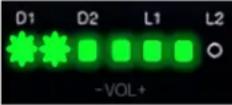 | MUSIC mode is ideal for most programs. The left-hand LEDs near D1 will briefly blink. |
| GAME | 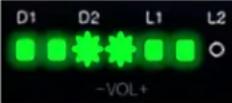 | GAME mode boosts bass and treble. The Center LEDs near D2 will briefly blink. |
| SPORTS | 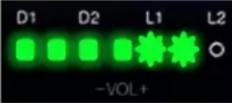 | SPORTS mode emphasizes the sound of sporting events. The right-hand LEDs near L1 will briefly blink. |
Chapter 5 – Controlling the Sound
Convenience and Advanced Features and Indicators: (Cont.)
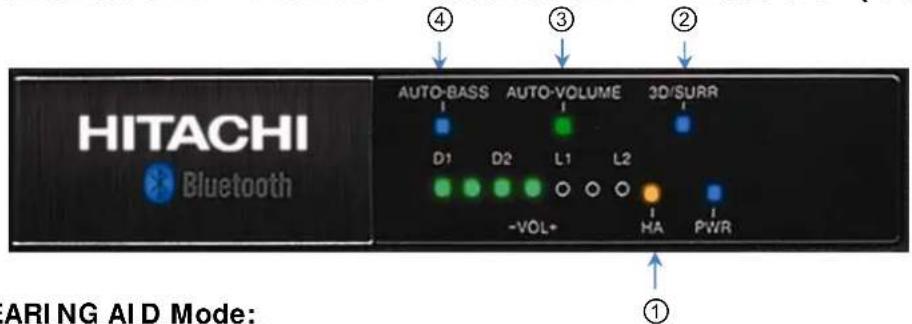
① HEARING AID Mode:
Press the Hearing AID button on the remote control to boost the volume of higher frequencies providing better sound quality for some listeners. Hearing AID mode produces improved clarity and intelligibility so the elderly and hearing-impaired may be able to enjoy clear sound, sometimes without hearing aids.
② 3D Sound / Surround Sound Modes:
Press the 3D/ SURR button and the 3D/SURR LED glows BLUE for 3D Sound mode - a natural 3-dimensional sound. Press 3D/ SURR again and the 3D/SURR LED turns GREEN in Surround Sound mode - a sound image which, depending on content, can make program dialog easier to hear. Press 3D/ SURR again to turn the LED and all surround effects off.
③ AUTO VOLUME Mode:
AUTO-VOLUME reduces the sudden loud audio (from commercials, movie special effects) while simultaneously raising the level of whispers for easier listening. This mode helps avoid bothering others late at night. It is controlled by the NI TE mode button (see table below).
④ AUTO BASS Mode:
AUTO-BASS enhances low frequencies at low volume settings. The effect of AUTO-BASS is reduced as the Sound Bar's volume is increased. AUTO-BASS is always on as shown by it's blue LED unless disabled by the remote control's NITE mode button (see table below).
| NITE Mode | Front Panel Indicators | AUTO-BASS / AUTO-VOLUME Description |
| NITE1 | 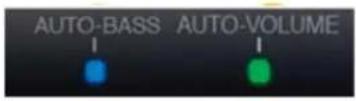 | The first press of the remote control NITE button activates AUTO-VOLUME to limit peak sound of commercials and special effects. It also boosts program whispers for easy listening. |
| NITE2 | 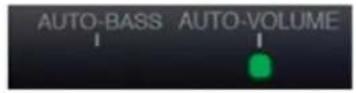 | The second press of the NITE button turns off AUTO-BASS for the quietest listening mode. |
| OFF (AUTO-BASS on) | 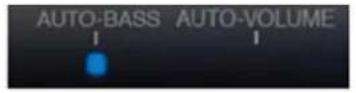 | The third press of the NITE button exits NITE mode and turns AUTO-BASS on for normal listening levels and maximum dynamic range. |
Chapter 6 - Care and Service Information
Maintenance
Make sure that the power cables are removed from the back of the Sound Bar before cleaning.
Do not use volatile solvent (such as toluene, rosin and alcohol) to clean the Sound Bar.
Solvents may damage the Sound Bar finish and grill cloth.
Cleaning the Housing and Remote Control
Use a soft, lint-free cloth for cleaning.
Do not allow liquid to penetrate into the cabinet.
Troubleshooting Guide
| Problem Solution | |
| No power | Press thePowerbutton on the top of the Sound Bar or on the remote control.Make sure the DC plug is securely connected to the 24VDC input on the back of the Sound Bar.Make sure the power cord is securely connected to the power adapter.Make sure the power LED on the power adapters are glowing green.Verify the wall AC outlet is working by plugging in another electrical device. |
| No sound | PressMUTEon the remote control to make sure the Sound Bar is not muted.Press the Volume + (Up) button on the top of the Sound Bar or on the remote control.PressINPUTon the top of the Sound Bar orD1/D2,L1/L2on the remote control to select an active input source. |
| No sound with Optical Digital Input | If the data contains an unsupported format or there is an error in the data stream. Select a supported format such as AC3 or PCM from the Source Device’s settings menu. |
| Buzzing or Humming | Make sure that both ends of the audio cables are connected securely.Test on an alternate source device or replace the audio cable.Test the device and cable on an alternate input on the Sound Bar. |
Our trained support personnel can often resolve the problem over the phone.
For more information on warranty service, or repair after the warranty period, please contact Customer Support at the phone numbers shown on the next page.
800.HITACHI
(800.448.2244)
Monday \~ Friday 8:00 am - 7:00 pm CST
www.hitachi.us/tv

Sincere - Prompt - Efficient
HITACHI Inspire the Next
HITACHI AMERICA, LTD., DIGITAL MEDIA DIVISION
HITACHI has made every effort to assure you enjoy trouble free operation from your Hitachi product. Should you require service assistance with OPERATIONAL, HOOK UP, TECHNICAL ASSISTANCE OR WARRANTY SERVICE SUPPORT, please contact one of our knowledgeable Customer Service Advocates at 800.HITACHI (800.448.2244).
Please be prepared to submit proof of purchase and/or delivery receipts to your 800.HITACHI Customer Service Representative. Warranty coverage will be provided in accordance with the provisions of your Limited Warranty (see the Limited Warranty page in this operating guide).
Customer Service Support
P.O. Box 99652
Troy, MI 48099
U.S.A. customerservice.ce@hal.hitachi.com
Canada: customerservice.canada@hal.hitachi.com
Model: HSB32B26 & HSB40B16
| Items | Specifications |
| Audio Processing Features | Digital Signal Processor: High Performance 32 Bit @ 150MHzDigital Sampling Frequencies: 32kHz, 44.1kHz, 48kHz |
| Speakers• HSB32B26: | (4) 2.75” Midrange/ Woofers(2) 0.75” Soft Dome Acoustic Lens TweetersDual Port Bass-Reflex EnclosureHSB40B16:(4) 3.0” Midrange/ Woofers(2) 0.75” Soft Dome Acoustic Lens TweetersSealed Hi-SPL Enclosure |
| Acoustic Performance | Frequency Response: 80 Hz to 20kHzSound Pressure Level (SPL):96dB(HSB32B26)100dB (HSB40B16) |
| Amplifier Performance | Type: New Integrated Class-D Digital AmplifiersPower Output: 133Wrms @ 10% THD with a 1KHz signal, 200Wpeak @ 1KHz |
| Sound Modes | CONEQTM EQ: Acoustic Power Equalization for Clear SoundCONEQTM 3D Sound, CONEQTM Surround Sound, CONEQTM Hearing Aid, Auto-Volume, Auto-Bass ModeNITE Modes : NITE1, NITE2 |
| Wireless ConnectionBluetooth® | Bluetooth 2.1 compliantSupports Enhanced Data Rate (EDR)Advanced Audio Distribution Profile (A2DP) 1.2High Quality 12 bit A/D and D/A convertersCompatible with existing Bluetooth source audio devicesSmartphonesTabletsBluetooth Capable Music PlayersWireless Range: Up to 100 feet |
Chapter 7 - Specifications
| Items | Specifications |
| Remote Control• Power | Master Volume +/- ; Mute; Sub-Woofer Volume +/-CONEQTM Sound Mode SelectionsInput Selection |
| Inputs | (1) Analog RCA L/R Input(1) Analog Mini 3.5mm L/R input(1) Optical Digital Input (SPDIF)(1) Coaxial Digital Input(Digital Inputs Automatically Detect Dolby & PCM Audio) |
| Output | (1) Subwoofer Variable Output: RCAjack,2Vpp |
| Power | External Power Supply: 120VAC/60Hz to 24V/2.5APower Consumption: 60W max. |
| Certifications• FCC | UL/cULENERGY STAR® |
| Dimensions: (W x H x D) | HSB32B26:Soundbar with Table Stand: 31.6" x 4.2" x 3.4"Soundbar without Stand: 31.6" x 3.4" x 3.4"Unit Weight: 6.6 lbs.HSB40B16:Soundbar with Table Stand: 39.8" x 5.4" x 4.2"Soundbar without Stand: 39.8" x 4.5" x 4.2"Unit Weight: 7.7 lbs. |
| Supplied Accessories | Quick Start GuideAC power adaptorAC power cord3.5mm to RCA cableRemote controlAAA batteries (2) |

Bluetooth®
The Bluetooth® word mark and logos are registered trademarks owned by Bluetooth SIG, Inc. and any use of such marks by Hitachi is under license.
COVED™
Manufactured under license from Real Sound Lab, SIA.
CONEQ is a trademark of Real Sound Lab, SIA.
CONEQ delivers clear, rich sound using proprietary professional equalizing technology.
Dialog is clear and music sounds more dynamic when the speakers are perfectly optimized.
COVED™
HA MODE
CONEQ HA mode (Hearing Aid) technology produces natural sound for the hearing impaired. The listener can enjoy details in music and clear dialog often without the help of a hearing aid.

DOLBY®
DIGITAL
Manufactured under license from Dolby Laboratories.
Dolby® and the double-D symbol are trademarks of Dolby Laboratories.
HITACHI
- 133W Bluetooth® Sound Bar
- Owner's Guide
- Table of Contents
- SAFETY POINTS YOU SHOULD KNOW ABOUT YOUR HITACHI SOUND BAR
- READ BEFORE OPERATING EQUIPMENT
- NOTICE ABOUT SOUND BAR PLACEMENT
- POWER SOURCE
- CAUTION NOTICE FOR 32" BASS PORTS
- Important Safety Instructions
- CANADIAN RSS NOTICE
- U.S. FEDERAL COMMUNICATIONS COMMISSION NOTICE
- MODIFICATIONS
- CABLES
- DECLARATION OF CONFORMITY
- LEAD NOTICE
- Chapter 1 - Introduction and Placement
- Unpacking the Sound Bar and Accessories:
- The speaker grill is not removable.
- Placement -- Table Stands / Wall Mount Brackets:
- Front Panel Lights:
- Top Panel Control Buttons:
- ① Power Button:
- ② INPUT Button:
- ③ VOL- Button:
- ④ VOL+ Button:
- Button Combinations:
- - Vol+ and Vol-
- • Power, Vol+ and Vol-
- Chapter 2 - Indicators and Buttons
- Remote Control Features & Functions:
- INPUT button:
- VOL+/- button:
- D1/D2 button:
- L1/L2 button:
- HEARING AID button:
- NITE mode button:
- POWER button:
- SUB+/- button:
- MUTE button:
- Bluetooth button:
- TONE M-G-S button:
- 3D/SURR button:
- How to install the batteries:
- Caution:
- Rear Panel Input / Output Jacks:
- ① 24V DC input:
- ② SERVICE:
- ③ SUB OUT:
- ④ L1:
- ⑤ L2:
- ⑥ D1: OPTICAL Input:
- ⑦ D2: COAXIAL Input:
- Chapter 3 - Quick Connect Guide
- NO WIRES with Bluetooth® :
- Detailed Connection Instructions:
- L1: Analog Line Connection
- L2: Analog Line Connection
- Notes:
- Detailed Connection Instructions (Cont.):
- Be sure to lower the volume on the TV or other audio source device and the Sound Bar to avoid damage when source device and Sound Bar are turned on.
- D1: Optical Digital Connection
- D2: Coaxial Digital Connection
- Chapter 4 - Connecting the Sound Bar
- Bluetooth® Connection:
- Bluetooth States & Display
- Discoverable (ready to pair)
- Connecting
- Connected
- Disconnected
- Note:
- st Time Pairing with a Bluetooth Audio Source Device
- Notes about Bluetooth pairing:
- Bluetooth® Connection: (Cont.)
- Re-connecting an Already Paired Source Device
- Disconnecting from Connected Bluetooth Device
- Clearing the Sound Bar Memory of All Paired Devices
- Sleep Mode
- Preserving the Connection When Switching Inputs
- To Pair Additional Devices
- Chapter 5 – Controlling the Sound
- Basic Features and Indicators:
- Volume buttons:
- Input buttons:
- Convenience and Advanced Features and Indicators:
- Sub-Woofer Volume:
- Muting the Volume:
- Tone modes:
- Convenience and Advanced Features and Indicators: (Cont.)
- ① HEARING AID Mode:
- ② 3D Sound / Surround Sound Modes:
- ③ AUTO VOLUME Mode:
- ④ AUTO BASS Mode:
- Chapter 6 - Care and Service Information
- Maintenance
- Cleaning the Housing and Remote Control
- 800.HITACHI
- (800.448.2244)
- Monday \~ Friday 8:00 am - 7:00 pm CST
- HITACHI AMERICA, LTD., DIGITAL MEDIA DIVISION
- Bluetooth®
- COVED™
- HA MODE
- DOLBY®
- DIGITAL
- HITACHI
Brand : HITACHI
Model : HSB32B26
Category : Loudspeaker