MP21DX - Calculator CANON - Free user manual and instructions
Find the device manual for free MP21DX CANON in PDF.


User questions about MP21DX CANON
0 question about this device. Answer the ones you know or ask your own.
Ask a new question about this device
Download the instructions for your Calculator in PDF format for free! Find your manual MP21DX - CANON and take your electronic device back in hand. On this page are published all the documents necessary for the use of your device. MP21DX by CANON.
USER MANUAL MP21DX CANON
| Calculation | Operation | Print Out |


| 2+(3x4)-5=9 | |
| -2x3=-6 | 2 3 |
| 3^3 =27 | 3 0 |
| 1/7=0.14285714285 | DECIMAL 7 0 |
| 12.55+15.75-5.30 =23.00 | DECIMAL 1255 1575 530 0 |
| 8+3x3.7+9=18.866666666 | DECIMAL 8 3 3 7 0 |
| 123x 756 456=56,088 | DECIMAL 123 756 456 0 |
| 123x 455 6=56,088 | 123 455 6 0 |
Delta Percent Calculation / Calcul de Pourcentage Delta / Cálculos de Delta Porcentaje
| Last year sales 15,000This year sales18,000Increased ratio = ? (20%) | 15000 18000 | 15,000. △18,000. =3,000.00 △*20.00 △% |
Mark-up, Mark-down Calculation / Calcul de prix de vente, revient / Cálculo del precio de venta, coste
| Mark-upCost 2,000Profit=20% of selling PriceProfit=? (500)Selling Price=? (2,500) | 2000MUWD20 | 2,000.M20.%500.00△*2,500.00* |
| Mark-downSelling Price2,400Profit=20% of costProfit=? (400)Cost=? (2,000) | 2400MUWD20 | 2,400.M20.-%400.00△*2,000.00* |
Grand Total Calculation / Calcul du total global / Cálculo del Grand total
| 500+103+32=635500+96+44 =640+) 500+84+38 =6221,897 | ( ) 500 103 32 500 96 44 500 84 38 1,897.00 GT | 500.00 +103.00 +32.00 +635.00 G+500.00 +96.00 +44.00 +640.00 G+500.00 +84.00 +38.00 +622.00 G+1,897.00 G◇1,897.00 G* |
| Set Tax RateRate: 5% | 0. % | |
| 5. % | ||
| Add the Tax AmountPrice 2,000 without taxTax= ? (100)Selling Price with tax = ? (2,100) | 2000 TAX- | 2,000.5. %100.00 △+2,100.00 * |
| Deduct the Tax AmountSelling Price3,150 with taxTax = ? (150)Price without Tax = ? (3,000) | 3150 TAX- | 3,150.5. %150.00 △-3,000.00 * |
| Recall Tax Rate | OT→ | 5. % |
Item Count / Comptage d'articles / Cuenta de articulo
| 18......1)14......2)+) 23......3)/55-20......4)+) 10......5)/45 | 18.00+14.00+23.00+00355.00◇20.00-10.00+00545.00* | ||
Percentage Calculation / Calcul de pourcentage / Cálculos de porcentaje
| 2,000+(2,000x12%)=2,240 | ITEM( ) | 2000 | 2,000. x |
| 12 | 12. % | ||
| 240.00 * | |||
| 2,240.00+% | |||
| 2,000-(2,000x15%)=1,700 | 2000 | 2,000. x | |
| 15 | 15. % | ||
| 300.00 * | |||
| 1,700.00-% |
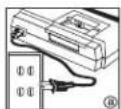
1) Be sure to remove the insulation tape at the back of the calculator before connecting AC cord with your machine.
2) Plug in AC power cord. (Figure a)
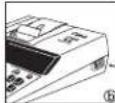
3) Turn power switch on. (Power switch is located on the
right side of the cabinet.) "C" will automatically be printed on the paper tape if the switch is set to print. (Figure ⑥)
DECIMAL POINT SELECTOR SWITCH
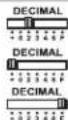
- Used for designating the decimal point position (+, 0, 2, 3, 4, 6, F) for calculated results.
- Addition and subtraction functions are performed with an automatic 2-digit decimal. It is convenient for currency calculations.
- All effective numbers up to 12 digits are printed or displayed.
ROUNDING SWITCH

- Used for round-up [↑], round-off [5/4], or round-down [↓] to the pre-selected decimal digits in the result.
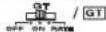
GRAND TOTAL/RATE SET SWITCH
GRAND TOTAL

GT - When the calculations are performed with the GT switch set to "ON", the totals are accumulated in the grand total memory. Each time is pressed, the subtotal number is printed with the symbols G+. When GT is pressed, the intermediate grand total is printed with the symbols G◇. Press GT successively to get the grand total followed by the symbols GX.
RATE SET

- Set switch to "RATE" for setting or recalling the TAX rate.
ITEM COUNT SWITCH

At "n+" or "n+/−" position, the calculator count and print the number of calculation items up to 999.
When the "ITEM" switch is set at "n+", the calculator counts the number of times the + and - keys are pressed.
When the switch is set at "n+/-", the calculator counts the number of times the + key is pressed and subtracts from the total numbers of times the - key is pressed.
When the "ITEM" switch is set at "n+", the calculator counts number of times M and M keys are pressed.
When the switch is set at "n+/-", the calculator counts the number of times the M2 key is pressed and subtracts from the total number of times the M3 key is pressed.
When the PRINT switch is turned "ON", and the "ITEM" switch is at the "n+" or "n+/-" position, the number of items recorded by the counter can print up to three digits on the left-hand side of the paper by pressing either the ☑ key or the ✗ key for item count and M☉ key or MK☉ key for memory item count.
PRINT ON, OFF SWITCH

– Entries and results will appear on the display but will not be printed out.
- Entries and results will appear on the display and printout.
TAX CALCULATION FUNCTION

– Used for adding the tax amount to the displayed figure.
– Used for deducting the tax amount from the displayed figure.
OVERFLOW FUNCTION
In the following cases, when "E" is displayed, the keyboard is electronically locked, and further operation is impossible. Press CE to clear the overflow. The overflow function occurs when:
- The result or the memory content exceeds 12 digits to the left of the decimal point.
- Dividing by "0".
- The sequential operation speed is faster than the calculation processing speed (Buffer Register Overflow)
■ Electromagnetic interference or electrostatic discharge may cause the
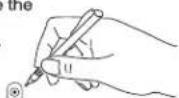
display to malfunction or the contents of the memory to be lost or altered. Should this occur, use the tip of a ball point pen (or similar sharp object) to press the [RESET] button at the back of the calculator. After resetting, be sure to set the tax rate again.
SPECIFICATIONS
Power Source: AC 120V, 60Hz
Operation Temperature: 32°F to 104°F (0°C to 40°C)
Calculating Capacity: 12 digits maximum
Dimension: 306mm(L) x 230mm(W) x 75mm(H) / 12-3/64" (L) x 9-1/16" (W) x 2-61/64" (H)
Weight: 1.74 kg (3.84 oz)
(Subject to change without notice)
For CA, USA Only
Included battery contains perchlorate material - special handling may apply.
See http://www.dtsc.ca.gov/hazardouswaste/perchlorate/ for detail.
The socket-outlet shall be installed near the equipment and shall be easily accessible.
PRÉPARATIFS
FRANÇAIS
TECLA DE GRAN TOTAL / RATE SET
GRAN TOTAL
Note: Turn the power switch off.
1) Lift up the tab on the back-side of the printer cover, and then remove the cover. (Figure 1)
2) While pinching together the ribbon lock (A) in the direction of arrow, lift ribbon spools off the shafts. Discard the old ribbon and spools. (Figure 2)
3) Separate the spools of new ribbon between the tape and printer head. Guide it around the four positions of the ribbon guide (B) and place the spools on the shafts. (Figure 3)
4) When the ribbon spools have settled, release the ribbon locks. If necessary, rotate the spools until the pegs on the bottom of the spool seat themselves in the holes of the spool holder. (Figure 4)
5) Rotate either spool to take up any ribbon slack, making sure that the ribbon is positioned around the four ribbon guides. Replace the printer cover. (Figure 5)
IMPORTANT: Use only the same type of ribbon spools.
COMMENT CHANGER LE RUBAN
FRANÇAIS
1) Lift up the paper arm. (Figure 6)
- When inserting the paper, cut the edge of the paper as shown.
2) Place the new paper roll on the arm. The edge of the paper should be positioned as shown. (Figure 7)
- Suitable paper roll – Width: 2-1/4" (57mm)
Diameter: 3-3/8" (86mm) max.
3) Insert the paper into the slit at the back of the machine as indicated. (Figure 8)
4) Turn the power switch on. Press the paper feed key [FEED] to advance the paper as shown. (Figure 9)
CHARGEMENT DU PAPIER D'IMPRESSION
FRANÇAIS
The limited warranty set forth below is given by Canon U.S.A., Inc., (Canon U.S.A.) and Canon Canada Inc., (Canon Canada) with respect to Calculators purchased and used in the United States and Canada respectively.
This limited warranty is only effective upon presentation of proof of purchase (bill of sale) to Canon U.S.A. or Canon Canada Factory Service Center. Canon Calculators, when delivered to you in a new condition in the original container, are warranted against defective materials or workmanship as follows: for a period of one (1) year from the date of original purchase, defective parts or Calculators returned to a Canon U.S.A. or Canon Canada Factory Service Center and proven to be defective upon inspection, will be exchanged at Canon U.S.A.'s or Canon Canada's sole option, for new or comparable rebuilt parts or calculators (of the same or similar model). Warranty for replacement shall not extend the original warranty period of the defective calculator.
When returning Calculators under this limited warranty, you must pre-pay the shipping charges, if any, and enclose a complete explanation of the problem. Calculators covered by this limited warranty will be repaired at Canon U.S.A.'s or Canon Canada's sole option, and returned to you without charge by any Canon U.S.A. or Canon Canada Service Center. This warranty does not cover rechargeable batteries that may be supplied with the Calculator, as to which batteries there shall be no warranty or replacement.
Information Technology Services and CANON CANADA INFORMATION/SERVICE CENTER will refer you to the nearest Factory Service Center. Repairs not under warranty will be at such cost as Canon U.S.A. or Canon Canada may from time to time generally establish.
This limited warranty covers all defects encountered in normal use of the calculators, and does not apply in the following cases:
(a) Loss or damage to the Calculators due to abuse, mishandling, alteration, accident, electrical current fluctuations, failure to follow operating instructions, maintenance and environmental instructions prescribed in Canon U.S.A.'s or Canon Canada's instruction manual or service performed by other than a Canon U.S.A. or Canon Canada Factory Service Center.
(b) Use of parts (other than those distributed by Canon U.S.A. or Canon Canada) which damage the Calculator or cause abnormally frequent service calls or service problems.
(c) If any Calculator has had its serial numbers or dating altered or removed.
(d) Loss or damage to the Calculator due to leaking batteries (other than rechargeable batteries supplied as original equipment with the Calculator by Canon U.S.A. or Canon Canada) or water damage.
NO IMPLIED WARRANTY (OR CONDITION)* INCLUDING ANY IMPLIED WARRANTY (OR CONDITION)* OF MERCHANTABILITY OR FITNESS FOR A PARTICULAR PURPOSE, APPLIES TO THE CALCULATORS AFTER THE APPLICABLE PERIOD OF EXPRESS WARRANTY STATED ABOVE, AND NO OTHER EXPRESS WARRANTY OR GUARANTY, EXCEPT AS MENTIONED ABOVE, GIVEN BY ANY PERSON, FIRM OR CORPORATION WITH RESPECT TO THE CALCULATORS SHALL BIND CANON U.S.A. OR CANON CANADA. (SOME STATES OR PROVINCES DO NOT ALLOW LIMITATIONS ON HOW LONG AN IMPLIED WARRANTY LASTS, SO THE ABOVE LIMITATION MAY NOT APPLY TO YOU.) NEITHER CANON U.S.A. NOR CANON CANADA SHALL BE LIABLE FOR LOSS OF REVENUE OR PROFITS, FAILURE TO REALIZE SAVINGS OR OTHER BENEFITS, OR FOR ANY OTHER SPECIAL, INCIDENTAL OR CONSEQUENTIAL DAMAGES CAUSED BY THE USE, MISUSE OR INABILITY TO USE THE CALCULATOR, REGARDLESS OF THE LEGAL THEORY ON WHICH THE CLAIM IS BASED, AND EVEN IF CANON U.S.A. OR CANON CANADA HAS BEEN ADVISED OF THE POSSIBILITY OF SUCH DAMAGES. NOR SHALL RECOVERY OF ANY KIND AGAINST CANON U.S.A. OR CANON CANADA BE GREATER IN AMOUNT THAN THE PURCHASE PRICE OF THE CALCULATOR SOLD BY CANON U.S.A. OR CANON CANADA AND CAUSING THE ALLEGED DAMAGE. WITHOUT LIMITING THE FOREGOING, YOU ASSUME ALL RISK AND LIABILITY FOR LOSS, DAMAGE OR INJURY TO YOU AND YOUR PROPERTY AND TO OTHERS AND THEIR PROPERTY ARISING OUT OF USE, MISUSE OR INABILITY TO USE ANY CALCULATOR SOLD BY CANON U.S.A. OR CANON CANADA NOT CAUSED DIRECTLY BY THE NEGLIGENCE OF CANON U.S.A. OR CANON CANADA. (SOME STATES OR PROVINCES DO NOT ALLOW THE EXCLUSION OR LIMITATION OF INCIDENTAL OR CONSEQUENTIAL DAMAGES, SO THE ABOVE LIMITATION OR EXCLUSION MAY NOT APPLY TO YOU.) THIS LIMITED WARRANTY SHALL NOT EXTEND TO ANYONE OTHER THAN THE ORIGINAL PURCHASER OF ANY CALCULATOR OR THE PERSON FOR WHOM IT WAS PURCHASED AS A GIFT AND STATES YOUR EXCLUSIVE REMEDY.
This warranty gives you specific legal rights, and you may also have other rights which vary from state to state or province to province.
Canon U.S.A., Inc. One Canon Plaza, Lake Success, New York 11042-1198 Canon Canada Inc. 6390 Dixie Road, Mississauga, Ontario L5T 1P7 *CANADA
Canon Information Technology Services in the United States
For all general inquiries, operational assistance, accessory orders or for the location of the nearest service facility for this product in the United States, please contact:
Canon U.S.A., Inc.
One Canon Plaza, Lake Success, NY 11042,
Customer Relations Division
1-800-828-4040
Please keep a copy of your original bill of sale. In order to obtain warranty service, you will need to present a copy of your original bill of sale from your Consumer Calculator retailer at the time of service. Also please keep all packing materials and the original packing box to protect your equipment, should you need to transport it for service.
Canon Information/Service Centers in Canada
Should service be necessary, please call 1 800-OK CANON for information regarding the nearest Authorized Service Facility:
Canon Canada Inc.
2828 16th Street, N.E. Calgary, Alberta T2E 7K7
Canon Canada Inc.
E Memory backup battery retains the tax rate, when the power is off or even when the AC Power cord is disconnected.
Battery : 1 Lithium battery (Type : CR 2032)
Battery life : Backup time 2000 hours
CAUTION: Risk of explosion if battery is replaced by an incorrect type. Dispose of used batteries according to the instruction.
Customer Relations Division
1-800 628-4040
This device complies with Part 15 of the FCC Rules. Operation is subject to the following two conditions; 1) this device may not cause harmful interference, and
2) this device must accept any interference received, including interference that may cause undesired operation. NOTE: This equipment has been tested and found to comply with the limits for a Class B digital device, pursuant to Part 15 of the FCC Rules. These limits are designed to provide reasonable protection against harmful interference in a residential installation. This equipment generates, uses and can radiate radio frequency energy and, if not installed and used in accordance with the instructions, may cause harmful interference to radio communications. However, there is no guarantee that interference will not occur in a particular installation. If this equipment does cause harmful interference to radio or television reception, which can be determined by turning the equipment off and on, the user is encouraged to try to correct the interference by one or more of the following measures:
• Reorient of relocate the receiving antenna.
- Increase the separation between the equipment and receiver.
- Connect the equipment into an outlet on a circuit different from that to which the receiver is connected. - Consult the devices on an experienced radio/TV technician for help.
- Consult the dealer of an experienced radio/TV technician for help.
Do not make any changes or modifications to the equipment unless otherwise specified in the manual. If such changes or modifications should be made, you could be required to stop operation of the equipment.
Canon U.S.A., Inc.
Lake Success, New
Lakc Success, New York Phone : (516) 328-5000
RÈGLEMENT DE LA FCC
Interference-Causing Equipment Regulations This digital apparatus does not exceed the Class B limits for radio noise emissions from digital apparatus as set out in the interference-causing equipment standard entitled "Digital Apparatus", ICES-003 of the Industry Canada." Règlement sur le matériel brouilleur
17/F. Ever Gain Plaza, Tower One, 82-100 Container Port Road
Kwai Chung, New Territories, Hong Kong
CANON U.S.A., INC.
One Canon Plaza, Lake Success, NY 11042, U.S.A.
CANON CANADA INC.
6390 Dixie Road, Mississauga, Ontario, L5T 1P7, Canada
CANON LATIN AMERICA, INC.
703 Waterford Way, suite 400, Miami, FL 33126, U.S.A.