
MP25-MG - Calculator CANON - Free user manual and instructions
Find the device manual for free MP25-MG CANON in PDF.


| Product Type | Desktop Printing Calculator |
| Display | 12-digit LCD |
| Printing | 2-color (black/red) ink ribbon |
| Paper Roll Width | 57 mm |
| Dimensions (W x D x H) | 200 x 170 x 50 mm |
| Weight | 0.5 kg |
| Power Supply | AC adapter (included) or 4 x AA batteries |
| Basic Functions | Addition, subtraction, multiplication, division, percentages, grand total |
| Tax Calculation | Tax key with programmable rate and automatic tax addition/subtraction |
| Memory | 2 independent memory keys (M+, M-, MR, MC) |
| Decimal Selector | F, 0, 2, 3, 4, ADD2 modes |
| Rounding Selector | 5/4, cut, up |
| Item Count | Built-in item count function |
| Maintenance | Clean exterior with a dry, soft cloth. Avoid solvents. |
| Battery Replacement | Replace 4 x AA when display dims; use alkaline batteries |
| Safety | Do not expose to moisture or extreme temperatures. Use only specified power adapter. |
| Spare Parts & Repairability | Authorized service centers only. Spare parts: ink roller, paper roll, adapter. |
| General Information | Designed for office and home use. Complies with CE and RoHS. |
Frequently Asked Questions - MP25-MG CANON
User questions about MP25-MG CANON
0 question about this device. Answer the ones you know or ask your own.
Ask a new question about this device
Download the instructions for your Calculator in PDF format for free! Find your manual MP25-MG - CANON and take your electronic device back in hand. On this page are published all the documents necessary for the use of your device. MP25-MG by CANON.
USER MANUAL MP25-MG CANON
INSERTING PRINTING PAPER....P.2
REPLACING THE INK RIBBON.... P.2
BACKUP BATTERY P.3
GENERAL MAINTENANCE P.3
DECIMAL POINT SELECTOR SWITCH P.4
ROUNDING SWITCH.... P.4
GRAND TOTAL / TAX RATE SET SWITCH P.4
PRINT / ITEM COUNT SWITCH P.4
TAX CALCULATION FUNCTION.... P.5
BUSINESS SALES CALCULATION.... P.5
CLOCK & CALENDAR FUNCTION.... P.5
OVERFLOW P.6
SPECIFICATIONS.... P.6
CALCULATION EXAMPLE P.61-68
BEFORE STARTING
1) Remove the insulation tape at the back of the calculator. (Figure a) 2) Remove the tape on the ink ribbon of the calculator. (Figures ①, ②) 3) Plug in the AC power cord. (Figure d) 4) Turn the power switch on. (Figure e) 5) Press the [RESET] key before use. (Figure f)
![graph TD A["a"] --> B["Square Node"] B --> C["Star Symbol"]](/content/2026/06/1296777/images/60e8a865e946ec21e37ad548654961494577869f2bc99d52cfdce8ca40aa33db.jpg)


INSERTING PRINTING PAPER
Note: Turn the power off.
1) Remove the printer cover (Figure ①) and lift up the paper arm (Figure ②). 2) Replace the printer cover (Figure 3).
- When inserting the paper, cut the edge of the paper as shown (Figure 4).
3) Place the new paper roll on the arm. The edge of the paper should be positioned as shown (Figure 5). - Suitable paper roll -- Width: 57mm (2-1/4") / Diameter: 86mm (3-3/8") 4) Insert the paper into the slit located on the machine as indicated (Figure 6). 5) Turn the power switch on (Figure 7). Press the paper feed key to advance the paper (Figure 8).


REPLACING THE INK RIBBON
Note: Turn the power off.
1) Remove the cover and lift up the paper arm. 2) Lift ribbon spools off the shafts. Discard the old ribbon and spools. 3) Place the ribbon spool on the left spool pin and push it down until it clicks. 4) Thread the ribbon along the outer edge of the side guide, making sure that the black half of the ribbon is still on the top. 5) Place the ribbon between the printing ring and printing roller. Thread the ribbon along the outer edge of the left side guide. 6) Place the other ribbon spool on another spool pin. 7) Push the spool down until it clicks. 8) Take up any ribbon slack by rotating the left spool counterclockwise. 9) Replace the printer cover.


IMPORTANT: Use only the same type of ribbon spools.
BACKUP BATTERY
Memory backup battery retains the tax rate, calendar and clock setting, even if the power is off or the AC cord is disconnected.
Battery: 1 Lithium battery (Type: CR2032)
Battery life: Backup time 2000 hours
CAUTION: Risk of explosion if battery is replaced by an incorrect type. Dispose of used batteries according to the instructions.
Dispose of batteries according to local regulations. Do not dispose as household waste.

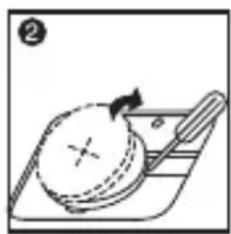


After replacing the back-up battery, press the [RESET] button. After resetting, be sure to set the tax rate, clock, and calendar again.
GENERAL MAINTENANCE
1) Do not use or leave the calculator under direct sunlight. Also avoid subjecting it to rapid temperature changes, high humidity, dust, and dirt. 2) Use a dry cloth to clean the casing of the unit. Do not use water or detergents. 3) Activate the printer when the paper roll is loaded. 4) Avoid using the calculator in places where there are iron filings, as this may affect the electrical circuits of the calculator. 5) Do not place anything on top of the machine, particularly on top of the printer mechanism. 6) Turn the calculator off before removing the plug from the electrical outlet. 7) Pull the main plug out of the wall socket if you want to switch off the main power, or in case of electrical fault (i.e., smoke), disconnect the plug from the electrical socket outlet immediately. 8) The AC outlet must be located near the equipment and easily accessible. 9) Under an environment with electrostatic discharge, the sample may malfunction and require the user to reset the sample.
DECIMAL POINT SELECTOR SWITCH
- Designed for designating the decimal point position (+0.2346F) for calculated results.

+ (Add-Mode) – Addition and subtraction functions are performed with an automatic 2-digit decimal. It is convenient for currency calculations.
F (Floating Decimal Point) – All effective numbers up to 12 digits are printed or displayed.
ROUNDING SWITCH

- Used for round-up [↑], round-off [5/4], or round-down [↓] to the pre-selected decimal digits in the result.
GRAND TOTAL / TAX RATE SET SWITCH
GRAND TOTAL

When calculations are performed with the GT switch set to "ON", the total(s) are accumulated in the grand total memory. Each time * is pressed, the subtotal number is printed with the symbols G+. When GT is pressed, the intermediate grand total is printed with the symbols G. Press GT successively to get the grand total followed by the symbols G*.
TAX RATE SET
—Set switch to "TAX RATE SET" for setting or recalling the TAX rate.
PRINT / ITEM COUNT SWITCH

Print Off – Entries and results will appear on the display, but will not be printed out.

Print On – Entries and results will appear on the display and will be printed out.

Item – Set switch to "ITEM" to count the number of times the +, -, M± and M≡ keys have been pressed. The item count will be printed on the left hand side of the paper roll (up to 999 times) when the ◇, *, M◇ or M※ keys are pressed.
TAX CALCULATION FUNCTION

Add Tax Key – Used for adding the tax amount to the displayed figure.

Deduct Tax Key – Used for deducting the tax amount from the displayed figure.
BUSINESS SALES CALCULATION
cost used for calculating the cost, selling price and profit margin value. Enter the value of any 2 items to obtain the balance value item. (e.g. enter the value of the cost and the selling price to obtain the profit margin %.)
CLOCK & CALENDAR FUNCTION
Used to switch between calendar or clock mode. Used to switch between 12 or 24 hour at clock mode. Used to set the date and time in calendar & clock mode. Used to switch between AM or PM at clock mode time setting. Used to select date format between "YYYY/MM/DD", "DD/MM/YYYY" or "MM/DD/YYYY" at calendar mode.
- Note: If all the power sources and backup battery “CR2032” are disconnected, the clock, calendar and tax rate will be cleared. In this case, please set the clock, calendar and tax rate again.
OVERFLOW
In the following cases, when "E" is displayed, "ERR" is printed, the keyboard is electronically locked, and further operation is impossible.
Press CE/C to clear the overflow. The overflow occurs when:
- The result or the memory content exceeds 12 digits to the left of the decimal point.
- Dividing by "0".
- The sequential operation speed is faster than the calculation processing speed. (Buffer Register Overflow)
Electromagnetic interference or electrostatic discharge may cause the display to malfunction or the memory, currency rate and tax rate to be lost or altered. Should this occur, use the tip of a ballpoint pen
(or similar sharp object) to press the [RESET] button on the back of the calculator. After resetting be sure to set the calendar, clock and tax rate again.

SPECIFICATIONS
Power Source: AC100V—240V, 50/60Hz
Operation Temperature: 0°C to 40°C (32°F to 104°F)
Calculating Capacity: 12 digits maximum
Dimension: 320mm (L) x 193 mm (W) x 71mm (H) /
12-39/64" (L) x 7-39/64" (W) x 2-51/64" (H)
Weight: 1,532 g (3.37 lbs)
(Subject to change without notice)

The bottom case and printer cover in this product are made from recycled Canon copier plastic.
European Union (and EEA) only.
These symbols indicate that this product is not to be disposed of with your household waste, according to the WEEE Directive (2002/96/EC), the Battery Directive (2006/66/EC) and/or your national laws implementing those Directives.
This product should be handed over to a designated collection point, e.g., on an authorized one-for-one basis when you buy a new similar product or to an authorized collection site for recycling waste electrical and electronic equipment (EEE) and batteries and accumulators. Improper handling of this type of waste could have a possible impact on the environment and human health due to potentially hazardous substances that are generally associated with EEE. Your cooperation in the correct disposal of this product will contribute to the effective usage of natural resources.
For more information about the recycling of this product, please contact your local city office, waste authority, approved scheme or your household waste disposal service or visit www.canon-europe.com/environment.
(EEA: Norway, Iceland and Liechtenstein)
EUROPE ONLY


- BEFORE STARTING
- INSERTING PRINTING PAPER
- NOTE: TURN THE POWER OFF
- REPLACING THE INK RIBBON
- BACKUP BATTERY
- GENERAL MAINTENANCE
- DECIMAL POINT SELECTOR SWITCH
- ROUNDING SWITCH
- GRAND TOTAL / TAX RATE SET SWITCH
- GRAND TOTAL
- TAX RATE SET
- PRINT / ITEM COUNT SWITCH
- TAX CALCULATION FUNCTION
- BUSINESS SALES CALCULATION
- CLOCK & CALENDAR FUNCTION
- OVERFLOW
- SPECIFICATIONS
- EUROPEAN UNION (AND EEA) ONLY
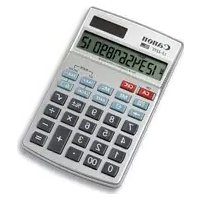
Brand : CANON
Model : MP25-MG
Category : Calculator