
PLVHR75 - Monitor Pyle - Free user manual and instructions
Find the device manual for free PLVHR75 Pyle in PDF.


User questions about PLVHR75 Pyle
0 question about this device. Answer the ones you know or ask your own.
Ask a new question about this device
Download the instructions for your Monitor in PDF format for free! Find your manual PLVHR75 - Pyle and take your electronic device back in hand. On this page are published all the documents necessary for the use of your device. PLVHR75 by Pyle.
USER MANUAL PLVHR75 Pyle
- When connect the electric power wires, you should make clear about the positive and negative electrode (the red one is positive and the black is negative). If you wrongly connected the fuse in the filter box will be broken protectively. Please replace the fuse in same parameter.
- Because the LCD screen is the main component It should be paid attention to be damp-proof.
- The device must be installed firmly to prevent falling of device that will possibly cause injury and device-broken.
- The connecting-point of direct current (12V) should connect on the Main line of storage battery as possible as it can, for keeping this device in normal operation and be away from the large voltage drop influence.
- There is high voltage cluster in this machine, if you are the professional person, should never to take part the machine if malfunction and contact the dealer in time.
Accessories
1 x bracket 1 x headrest shroud
1 x remote control 1 x instruction manual
2 x connection wire

Instruction Manual
PLVHR75

7" Widescreen TFT/LCD Video Monitor w/Headrest Shroud and Stand
HTTP://WWW.PYLEAUDIO.COM
Thank you for purchasing the TFT LCD color monitor. To enjoy the features of this device and to ensure years of trouble-free operation, please read this manual carefully and follow the instructions.
Front Panel
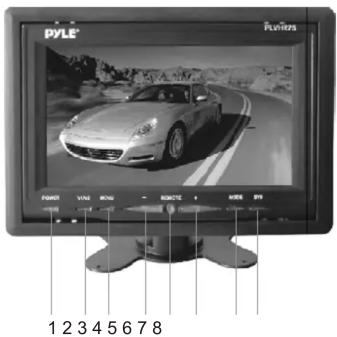
- Power ON/OFF
- V1/V2 switch
- Activation of menu indicator
-
Negative adjustment
-
Remote sensor
- Positive adjustment
- 16:9/4:3 display switch
- Image rotation
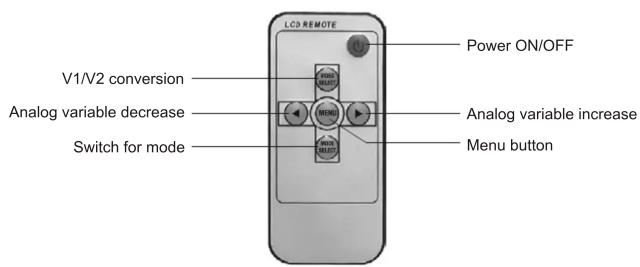
Remote control
Specification
Screen Size: 7 inch
Resolution: 1440xRGBx234
System: NTSC/PAL
Power source: DC 12V
Power consumption: <9W
Video Input: Composition video signal
Operating Temperature: 0^ C \~ 60^ C
Storage Temperature: -20^ 80^
Headrest bracket
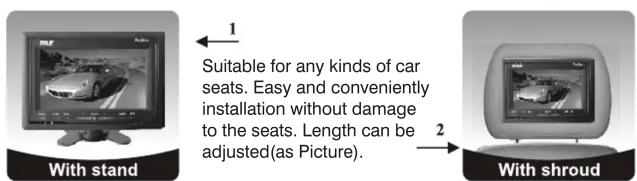
Installation Diagram

Brand : Pyle
Model : PLVHR75
Category : Monitor