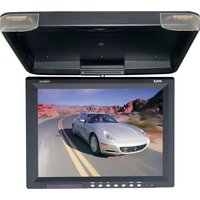
PLVWR1544 - Monitor Pyle - Free user manual and instructions
Find the device manual for free PLVWR1544 Pyle in PDF.


| Product Type | 15.4" TFT LCD Flip Down Monitor |
| Brand | Pyle |
| Model | PLVWR1544 |
| Display Size | 15.4 inches |
| Display Type | Color TFT LCD |
| Aspect Ratio | 4:3 |
| Resolution | 1024 x 768 pixels |
| Video System | PAL/NTSC |
| Power Source | DC 12V +/-10%, >700mA |
| Operating Temperature | 0°C to +40°C |
| Storage Temperature | -10°C to +60°C |
| Video Inputs | 2 x Composite AV Inputs |
| Special Features | Flip-down design, super slim, swivel screen, OSD menu, built-in IR transmitter for wireless headphones, dual dome lights |
| Mounting | Universal roof mount console |
| Dimensions (W x D x H) | 16" x 14" x 1.9" |
| Accessories Included | Remote control, user manual, mounting screws |
| Care & Cleaning | Wipe with a soft dry cloth; avoid exposure to humidity, dust, steam, oily smoke, and direct sunlight. |
| Safety Warning | Do not use in 24V vehicles; driver should not watch while driving; unplug when not in use. |
| Repairability | No user-serviceable parts; contact dealer or manufacturer for service. |
Frequently Asked Questions - PLVWR1544 Pyle
User questions about PLVWR1544 Pyle
0 question about this device. Answer the ones you know or ask your own.
Ask a new question about this device
Download the instructions for your Monitor in PDF format for free! Find your manual PLVWR1544 - Pyle and take your electronic device back in hand. On this page are published all the documents necessary for the use of your device. PLVWR1544 by Pyle.
USER MANUAL PLVWR1544 Pyle
PYLE® view
OPERATING INSTRUCTIONS
PLVWR1544
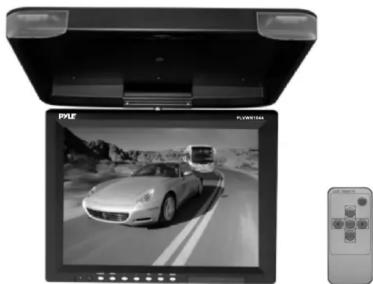
natural_image
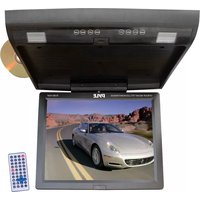
Exterior view of a flat-screen TV displaying a car on a road, with a remote control unit nearby (no visible text or symbols)Features:
15.4" TFT LCD Flip Down Monitor
Super Slim Design
On Screen Display Menu
Display Mode: 4:3
Swivel Screen
High Resolution 1024 x 768
2 AV Inputs
Built-In IR Transmitter for Wireless IR Headphones
Full Function Remote Control
Dual Dome Light
Universal Roof Mount Console
Dimensions: 16"x 14"x1.9"
Before operating the Monitor. Please read this manual thoroughly and retain it for future reference.
www.pyleaudio.com

1.Open
2.Power
3.AV Switch
4.Mode
5.Sleep
6.Adjustment -
7. Menu
8. Adjustment +
Remote control

- Power On/off
2.Video1/Video2
3.Mode- - Mode Select
5.Mode+
6.Menu
Specifications
System:
PAL/NTSC
Power source/Consumption:
DC 12V+/-10%,>700mA
Video Input:
Composition Video signal
Operating Temperature:
0^ C +40^ C
Storage Tempetature:
-10°C\~+60°C
Display Method:
Color LCD
Resolution(HXV):
1024 × 768
Cautions
➢ Never connect the car adaptor to cigarette lighters such as trucks or buses which use 24V DC power.
Do not expose the monitor to high humidity. Dust. Steam, oily smoke, direct sunlight etc.
For your safety. please turn power off when not in use and unplug the adaptor.
➢ Never attempt your own maintenance. Consult your dealer or the company.
▶ Avoid dropping and strong impact.
For your safety, the driver should not watch the TV while driving.
Accessories
1x Remote control
1x User's manual
Mouting Screw
Brand : Pyle
Model : PLVWR1544
Category : Monitor