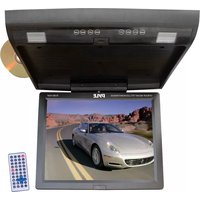
PLRD153IF - Monitor Pyle - Free user manual and instructions
Find the device manual for free PLRD153IF Pyle in PDF.


| Product Type | Monitor |
| Brand | Pyle |
| Model | PLRD153IF |
| Screen Size | 15.6 inches |
| Resolution | 1920 x 1080 (Full HD) |
| Dimensions (with stand) | 14.4 x 9.9 x 7.1 inches |
| Weight | 4.2 lbs |
| Power Consumption | 15W (typical) |
| Input Voltage | 100-240V AC, 50/60Hz |
| Connectivity | HDMI, VGA, Audio Out |
| Refresh Rate | 60Hz |
| Viewing Angle | 170° horizontal / 160° vertical |
| Contrast Ratio | 1000:1 |
| Brightness | 250 cd/m² |
| Response Time | 5ms |
| Mounting Interface | VESA 75 x 75mm |
| Built-in Speakers | Yes, 2 x 2W |
| Safety Features | Anti-slip base, Kensington lock slot |
| Cleaning Instructions | Wipe with a soft dry cloth. Avoid liquids and abrasive cleaners. |
| Spare Parts Availability | Contact Pyle customer support for replacement parts. |
| Repair Information | Refer to user manual for troubleshooting. Do not attempt internal repairs. |
| Warranty | 1 year limited warranty |
Frequently Asked Questions - PLRD153IF Pyle
User questions about PLRD153IF Pyle
0 question about this device. Answer the ones you know or ask your own.
Ask a new question about this device
Download the instructions for your Monitor in PDF format for free! Find your manual PLRD153IF - Pyle and take your electronic device back in hand. On this page are published all the documents necessary for the use of your device. PLRD153IF by Pyle.
USER MANUAL PLRD153IF Pyle
natural_image
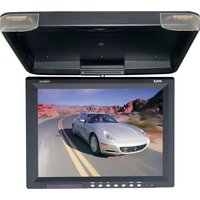
Exterior view of a modern office building (no signage)15.1" TFT LCD Flip-Down Roof Mount Built-in DVD Player with FM Modulator/ IR Transmitter
PRECAUTIONS FOR SAFETY

.Make sure to read the "manual" for safety precautions before installing unit or accessories. Do not install unit in location where it may obstruct or cause injury to driver or passengers. Do not install unit where it may be exposed to high temperatures, moisture, dust or any foreign matter which will damage unit and cause it to malfunction. Do not watch TV/Monitor while driving.
TABLE OF CONTENTS
- Precautions Before Use....2
- Features....3
- General Information....4
- Remote Control Instructions....5
- Descriptions of Function....6-8
- Trouble Shooting....9
- Specifications....9
MEMO
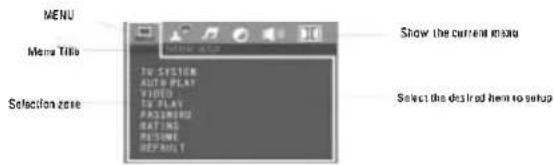
Move Up/Down to select the desired item,
Move Left/Right to select the desired item,
Press Enter to confirm
Trouble shooting
No sound or bad sound effect
Please check if cables are connected properly
Please check audio shift setup.
Please adjust the receiving frequency to harmonized with the transmitting frequency
No Picture
Check if cables are connected properly.
Video Input is not yet set up correctly.
The monitor is on or off.
Poor picture
The color is not properly adjusted; please operate the remote controller to adjust it.
The disc is scratched or spotted.
The remote control does not work properly
There is an obstacle in the path of the remote control and this unit.
Remove the obstacle, check if remote control point to receiver or not. The batteries in
the remote control are exhausted. Replace the batteries with new ones.
Note: please contact with the dealer or approved service center help if the troubles can't
be solved by the methods offered.
Technical Specifications
| Product | yoy-100 |
| System units | 12 pack 18.0 |
| Total: | |
| Tension units | Operation frequency (10^4 to 15^3). |
| Brightness | Range of maximum (10^3 to 15^3) |
| Light Service | 100 gm to 90 gm |
| Noise ratio | 75, 97% (interrated) |
| Balance | 100 gm to 100 gm (100 gm to 100 gm), 100 gm to 100 gm |
| Dance | 100 gm to 100 gm |
| Balance ratio | 100 gm to 100 gm |
| dB | 100 dB |
| Fully dB | 100 dB |
| Speed dB | 100 dB |
| Audio Group Control | 100 dB |
| Audio Unit/Control | 100 dB to 100 dB |
| Power Units | 100 dB |
| Frequency | 100 Hz / 10 Hz |
Your attention please:
The design and specifications are subject to change without notice
·9·
Please read the manual carefully before using and keep it in a safe place for future reference.
Important Safety Instructions:
For your safety, do not turn on, watch or operate the unit while driving. In some countries and regions, it may be against the laws. The product is comprised of many precision electronic components. Self-renovation or disassembling may cause malfunction to the device.
Note:
To reduce the risk of fire or electric shock, do not expose this product to rain or moisture.
High voltage inside! Do not open or dismantle the unit. Do not repair yourself. Refer servicing to qualified personnel.
The product is a laser product. Make sure to read instruction manual before operating.
Do not try to open the covers to avoid direct laser radiation.
When the cover of the unit is opened or the Interlocking system gets unlocked, the laser light can be visible. Direct vision of laser beam is hazardous to your eyes.
In order to prolong the life of the unit which has a large scale of integrate circuits and precision pick-up device, Frequent turn ON/OFF might damage the unit. More than 5 seconds interval is required.
Note:
LCD may have a few color dots, which is common for the matrix display technology, and doesn't indicate defects or faults.
FM Function
PRESS Menu button, press "E" button or press "MENU" to select audio control item; press touch button "E" or Remote control "▼" button to choose FM function. Press or - to choose FM channel.
IR Function
PRESS Menu button, press "b" button or press "MENU" to select audio control item; press touch button "b" or Remote control "▼" button to choose FM function. Press or - to choose IR.
·2·
Features:
- The display unit has built in DVD player.
- Built In USB 2.0 host and SD card reader.
- Built in wireless FM Audio transmitter.
- Built in IR Audio transmitter.
- AV input channel
Discs for playback
| Type | Content | Size |
| DVD | Video & Audio (dynamic Image) | 12cm / 8cm |
| VCD | Video & Audio (dynamic image) | 12cm / 8cm |
| CD | Audio | 12cm / 8cm |
| MP3 | Audio | 12cm / 8cm |
| MP4 | Video & Audio (dynamic image) | 12cm / 8cm |
Disc-related terms
• Title (DVD only)
The main film content or accompanying feature content or additional feature content, or music album. Each title is assigned a title reference number enabling you to locate it easily.
• Chapter (DVD only)
Sections of a picture or a musical piece that are smaller than titles.
A title is composed of one or several chapters. Each chapter is assigned a chapter number, enabling you to locate the chapter you want. Depending on the disc, no chapters may be recorded.
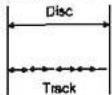
• Track (Video CD and audio CD only)
Sections of a picture or a musical piece on a video CD or an audio CD.
Each track is assigned a track number, enabling you to locate the track you want.
Diagram of DVD disc
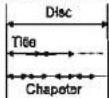
Diagram of VCD/CD
Safety Precaution
Before installation, please check the voltage in the car that the machine requires. Please hold the plug slightly and avoid dragging the power cords when Inserting the plug in or pulling it out from the jack.
This machine has a laser system that is harmful to the eyes. Please refrain from opening the casing. If repair is needed, refer to specialized personnel.
Press Search, input a title, a chapter or a time, the player starts playing from the desired point to the end point.
Subtitle
While playing DVD disc with multi-subtitles, choose the desired subtitle, it shows on the screen.
Will show on the screen when this feature is not available on the disc.
Note: This feature setting is valid only for the current disc. the sub title language can be changed from DVD setting menu.
Audio
There is multi-language feature while DVD disc is playing.
When playing discs with this function, you can select the desired voice by pressing Audio.
The left audio, right audio and the stereo shows on the screen while playing VCD disc. You can select the desired one playing story disc with dual languages.
Note: This feature setting is valid only for the current disc which has multi-language settings.
ANGLE
If the disc contains scenes recorded at different camera angles, you can change to a different camera angle during playback. Press ANGLE repeatedly during playback to select a desire angle. (Only for the functional disc)
Will show on the screen when this function is not available on the disc.
Zoom
In this mode, the dynamic or still picture can be zoomed in at most by 4 folds.
Press Zoom for three times, the picture is zoomed in by 2X, 3X, 4X folds per order. And press Zoom again to return to the normal playing mode.
Repeat
(1) While playing DVD disc, press Repeat for the first time to repeat playing one chapter, press Repeat for second time to repeat playing one title. Press Repeat for the third time to repeat playing the entire disc, and press repeat to cancel.
(2) In PBC off mode:
While playing VCD disc, press Repeat for first time to repeat one song. press Repeat for the second time to repeat the entire disc.
Direction Buttons
Press Direction Buttons to make free selection is title, content and setup menu easily.
Note: Direction buttons on the player can perform Fast Forward/Fast Back ward, Previous/Next functions.
Program
Press Program to enter into program menu, input the number of the title, the chapter or a song. Press direction button to select the track you want to start playing.
To cancel program function, press Program to enter into program menu and select Stop.
Mute
Press Mute one or more to select mute on or mute off.
CONSLE
Press CONSOLE button and you will be able to change the factoy settings for Brightness, Contrast, Color and Hue levels and you can adjust FM transmitter and IR frequency as well with +/- buttons.
Note: By selecting RESET you will return to factory de fault settings.
Setup
Press Setup to enter into Setup page.
Slow
While DVD disc is playing . press Slow button . picture shows at 1/2 . 1/4 . 1/8 . 1/16 speed circularly . the scree shows as following:

Note: Press play to shift to normal playing mode.
Previous/Next
To select previous item or chapter by pressing Pressing Previous button to select next item or chapter press Next button.
Note:
When a title on a disc has more that one chapter or a disc has more than one track, using chapter function can move to another desired chapter/track to play. If there is no Chapter/track on the disc, the above functions will be disable automatically.
Functions Explanation
Menu/PBC
(1) press Menu/pbc to return to the main menu or the Title menu while playing DVD disc.
(2) While playing VCD disc. Press Menu/PBCto turn PBCon or off.
Title/Return
(1) while playing DVD disc . press Title to enter into title menu directly . select the
desired item by pressing the Direction buttons or Number buttons
(2) while playing VCD2.0 press Title to enter to previous menu; however this function
is disabled in PBC-off mode (Only for functional disc).
AV/IN
Press AV/IN. It will dis play a dialogue as below.

OSD
User can check the elapsep time or remaining time of current title and chapterby pressing Display Press Display continuously, the screen shows as below: (1) playing DVD disc
press Display for the first time, screen shows the elapsed time of current title.

Press Display for the second time, screen shows the remaining time of current title.

Search
.7.
Placement
The storage temperature ranges from -30°C to -75°C, operating temperature ranges from -10°C to 55°C.
Please keep the pick-up clean and away the dust. If so, the cleaning disc can help deal with this problem. For detailed operation instructions for cleaning the pick-up, you can consult the user's manual of pick-up cleaning disc.
Do not expose this unit to rain or moisture. Avoid dropping or direct impact to the unit.
Vapor on convex mirror and troubleshooting
There's liquid on the convex mirror which is a normal occurrence. Due to sudden changes in temperature or if the air conditioner is ON, a vapor will form on the convex mirror. To devaporize it, please take out the disc and power the unit ON for about an hour.
Please wipe the machine with soft and dry cloth dipped optional washing liquor in case of scratching the screen.
Note
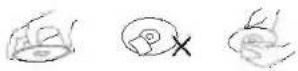
Handling discs:
Do not touch the playback side of the disc. Hold the disc by the edges so that fingerprints will not get on the surface.
Do not stick paper or tape on the disc.
Storing discs:
After playing, store the disc in its case.
Do not expose the disc to direct sunlight or sources of heat, or leave it in a packed car exposed to direct sunlight, as there may be a considerable temperature increases inside the car.
Cleaning discs:
Fingerprints and dust on the disc can cause poor picture quality and sound distortion. Before playing, clean the disc with a clean cloth. Wipe the disc from the center out. Do not use strong solvents such as alcohol, benzine, thinner.
ACCESSORIES
| Remote controller | 1 |
| User's manual | 1 |
| Rubber pillow | 6 |
MODE
Press the button of "MODE" then it will show the window

• 4 •
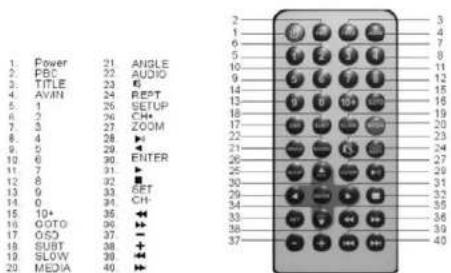
Instructions for remote control (shown as pictures)
Warning:
Store the battery where children cannot reach. Do not recharges, short, disassemble or heat the battery or dispose it is afire.
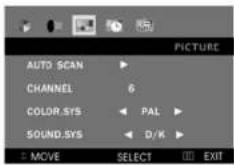
* Press button "MENU", then press button "/→" to select TV MENU as below:
* Press button "→ / →" and "→ / →" for selecting.
MONITOR DESCRIPTION:


· 5 ·
- ◀◀: Under the condition of DVD: skip to former, names or titles. When the menu is open, the button shows up.
- MENU: show the page of menu, under the condition of power off, press for three seconds and turn to the mode of changing time.
- AV IN/ ■: When DVD stopped, press for three seconds and turn to the mode of DVD or AV
- ⏻/▶: When DVD is paused or played, press for three seconds and turn to the module of open or power off.
- ⏻/▶: Under the condition of DVD, pin to the next, many or titles. When the menu is open, the button
- ▶: under the cb shows down.
- : Fast backward when DVD is playing: when the menu is open, the button shows left or minus.
- ▶ Fast forward when DVU is playing: when the menu is open, the button shows right or plus.
- Press for three seconds is the mode of out; generally the light is turned off.
- Remote control window
- OPEN: open the button
- IR TRANSMITTER, YOU WINDOW
- Disc in and out
- USB jack
- SD jack card and under the condition of window.
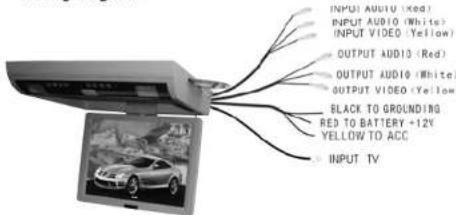
Wiring diagram
Basic operation
Make sure that you have correctly connected your unit as described earlier in this book. Turn on the power, and place the disc in.
- press power button to turn ON (power Indicator is OFF), display is ON and play will start loading the disc.
- while playing DV discs, please select one in DVD menu or title menu. While playing VCD2.0 or CD, this player plays one by one.
- press Direction Buttons or the Number Buttons to select the desired item, then press Enter or Play to start.
- The player will play automatically. Press Pause to stop temp orarily. Press again Pause or Play to cancel pause. While playing DVD disc, press stop for memory stop, press Play for memory play, press Stop twice to stop playing.
Note: To stop playing DVD by pressing Stop for twice.
Fast Forward/Fast Backward
While DVD disc is playing . Press Fast Forward to play at 2X . 4X . 8 X . 16X . 32X speed circularly . screen shows as following:

Press Fast Backward to play at 2X . 4X . 8X . 16X . 32X speed circularly , screen shows as following:

Press Play to shift to normal playing mode.
· 6 ·
Brand : Pyle
Model : PLRD153IF
Category : Monitor