
CT3011 - Coffee maker AMICA - Free user manual and instructions
Find the device manual for free CT3011 AMICA in PDF.


| Product Type | Coffee Maker (Espresso/Cappuccino) |
| Model | CT3011 |
| Brand | Amica |
| Rated Voltage | 220-240 V ~ 50 Hz |
| Rated Power | 1280-1520 W |
| Pump Pressure | 15 bar |
| Protection Class | I (grounding required) |
| Power Cord Length | Approximately 1 m |
| Water Tank Capacity | 1.52 L |
| Boiler Material | Stainless steel |
| Super Crema System | Yes (for dense, strong froth) |
| Removable Cup Stand | Yes |
| Movable Steam Nozzle | Yes |
| Hot Water Function | Yes |
| Filter Holder | Coated, with handle |
| Coffee Filter | 1 piece (mesh for espresso) |
| Coffee Scoop/Rammer | Yes (2-in-1) |
| Drip Tray | Removable, with waste tank |
| Auto Shut-off | After 5 minutes of inactivity |
| Descaling Required | Every 2-3 weeks (citric acid) |
| Dishwasher Safe Parts | No; wash by hand |
| Safety Features | Boiler pressure protection, grounded plug, automatic shut-off |
Frequently Asked Questions - CT3011 AMICA
User questions about CT3011 AMICA
0 question about this device. Answer the ones you know or ask your own.
Ask a new question about this device
Download the instructions for your Coffee maker in PDF format for free! Find your manual CT3011 - AMICA and take your electronic device back in hand. On this page are published all the documents necessary for the use of your device. CT3011 by AMICA.
USER MANUAL CT3011 AMICA


Your Amica appliance is exceptionally easy to use and extremely efficient. Before being packaged and leaving the manufacturer, the appliance was thoroughly checked with regard to safety and functionality.
Before using the appliance, please carefully read these Operating Instructions

The appliance is designed for household use only.
The manufacturer reserves the right to introduce changes, which do not affect operation of the appliance.
CONTENTS
DISPOSING/SCRAPPING OF USED EQUIPMENT....16
SAFETY INSTRUCTIONS FOR USE....17
OPERATION 19
IMPORTANT NOTES ON USING THE MACHINE....22
CLEANING AND MAINTENANCE....22
FAULTS AND TROUBLESHOOTING....24
NOTES ON THE COFFEE MAKER AND THE COFFEE MAKING PROCESS ....25
TECHNICAL SPECIFICATIONS....25
WARRANTY AND AFTER SALES SERVICE ....26


UNPACKING
During transportation, protective packaging was used to protect the appliance against any damage.
After unpacking, please dispose of all elements of packaging in a way that will not cause damage to the environment.
All materials used for packaging the appliance are environmentally friendly; they are 100% recyclable and are marked with the appropriate symbol.
Important! During unpacking, keep the packaging material (polyethylene bags, polystyrene pieces, etc.) out of reach of children.
DISPOSAL OF THE APPLIANCE
At the end of its useful life, this product must not be disposed of with normal municipal waste. Instead, it should be taken to an electronic waste collection and recycling point. It is indicated by the symbol on the product itself, or on the Operating Instructions or packaging.
The materials used in making of this appliance can be reused, as indicated. By reusing or recycling the materials or parts, you will be playing an important part in protecting our environment.
Information about the relevant disposal points for worn-out electrical goods is available from your local authorities.
This appliance can be used by children aged 8 years and older or by persons with physical, mental or sensory handicaps, or by those who are inexperienced or unfamiliar with the appliance, provided they are supervised or have been instructed how to safely use the appliance and are familiar with risks associated with the use of the appliance. Ensure that children do not play with the appliance. Cleaning and maintenance of the appliance should not be performed by children unless they are 8 years or older and are supervised by a competent person.

Important! To minimize the risk of fire, electric shock or injury:
- The appliance becomes hot during operation. When turned off some parts may still be hot for some time. To avoid burns, do not touch the chrome part of the filter holder and other metal surfaces. Never move the appliance during operation.
- Never use the coffee maker if the water tank is empty. Check before and after use.
● Children do not realize the dangers that can arise when using electrical appliances; therefore keep the appliance out of reach of children. - Do not immerse the body of the appliance in water or other liquids. Immersing in water may cause an electric shock.
- If water spills on the external components of the appliance, dry it thoroughly before switching back on.
- Do not use the appliance if it shows any signs of damage to the power cord, or if the appliance has been dropped on the floor.
● After use, always pull out the plug from the socket, and also in case of any malfunction, before cleaning or before changing accessories. - When pulling out the plug from the wall outlet, never pull by the cord, only the plug, holding the socket with your other hand.
- Do not attempt to remove any parts of the housing.
- To prevent damage to the power cord, do not place it over sharp edges or close to hot surfaces.
- Do not expose the appliance to rain or humidity, and do not use it outdoors. Do not operate the appliance with wet hands.
- Use clean, cold water only and slowly fill the water tank. A strong water jet causes water splashes.
- If the power cord or plug is damaged, it should be replaced by a professional repair shop in order to avoid hazard.

- Using attachments that were not supplied with the product may cause damage to the appliance.
- Coffee maker is designed for making coffee and frothing milk, do not use the appliance for other purposes.
- Never fill the boiler to a higher level than indicated by the maximum water level.
- Unplug the appliance from the power outlet and wait until it cools down before cleaning.
- Never plug to a wall outlet with wet hands, this may cause electric shock.
- It is not recommended to use extension cords to connect the appliance to the power outlet.
- This appliance is not intended for use by persons (including children) with physical, mental or sensory handicaps, or by persons inexperienced or unfamiliar with the appliance, unless under supervision or in accordance with the instructions as communicated to them by persons responsible for their safety. Children shall not play with the appliance.
- The coffee maker is a class I electrical shock protection appliance, and therefore power outlet to which it is connected to must be equipped with grounding pin.
- During the coffee making or frothing process, do not open the boiler or remove the filter holder. The boiler is under high pressure, you might get burnt by hot steam or water.
- To reduce pressure inside the boiler, when coffee is done set the function control knob to froth. Steam will be released out the nozzle and the pressure will drop.
- When making coffee, do not touch metal parts of the filter holder. Hold the filter holder by the handle, you may cool it under running water.
Electrical requirements
Make sure that the voltage indicated on the nameplate corresponds to that of your home electrical mains.
Alternating current must be used, typically marked \~.
Appliance components (Fig. 1):
Model CT 3011


1
- Function selector knob
- Coffee percolator switch, ON/OFF switch
- Steam switch
- Filter holder
- Coffee nozzle
- Drip tray
- Waste tank
- Frother nozzle
- Water tank
- Coffee scoop/rammer
-
Filter holder
-
Coffee percolator switch, ON/OFF switch
- Steam switch
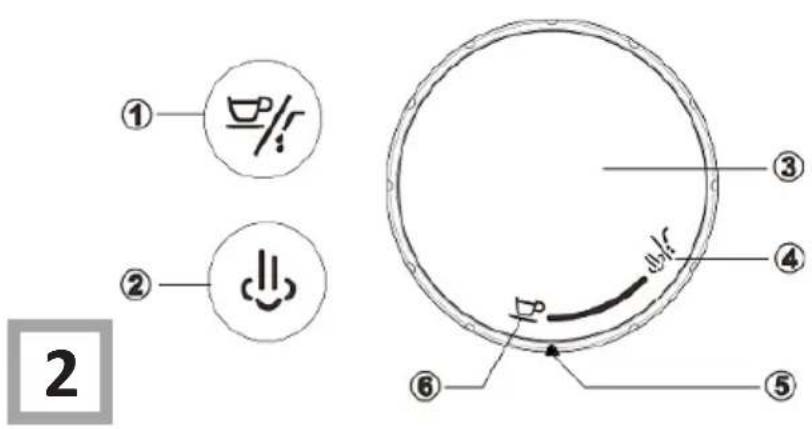
- Function selector knob
- Steam/hot water mode
- Arrow symbol
- Coffee making mode
Before first use
- After unpacking the appliance, make sure that the set includes all the attachments, and if there are no visible signs of damage.
● Before first use, wash all parts that come in contact with the coffee in hot water. - Fill the boiler with water before you make coffee for the first time. Following the procedure for coffee making, turn off the coffee making function but do not put ground coffee into a suitable container.
The appliance will be flushed and cleaned. Repeat this action for milk frothing / heating
Use
● The appliance is designed for household use only.
- Place the body of the appliance on a solid and level surface.
- Holding the appliance body, take the water container (grabbing the container lid) and pull up (Fig. 1, item. 9).
- Fill the water container (see max water level)
- Remember that the tank should be filled with water to the max level.
- Carefully place the tank in the right place at the rear of the body and push it down.
- Do not use the coffee machine if the water tank is empty.
- Do not fill the water tank with hot or boiling water.
Coffee making
- After carrying out all the steps from the "Use" section, press the on/off switch (Fig. 2 item 1). The switch will start to flash, meaning that the appliance is heating. The switch will stop flashing when the water in the machine reaches the correct temperature.
- When using the scoop (Fig. 1 item 10), pour one scoop of coffee into the filter located in the flask. Use the rammer to beat and level the coffee (Fig. 4).
very careful because the chrome part of the holder is very hot.

- Put the holder with filter filled with coffee in the coffee maker head. To ensure a proper position of the filter holder, turn the holder to the left, put it in the head, then turn it to the right so that the filter holder was securely fitted in the head.
- Place a cup directly below the openings where the filter is located.
- Turn the selector knob (Fig. 2 item 1) to coffee making mode (Fig. 2 item 6) so that the arrow (Fig. 2 item 5) points to coffee mode.
- Press the coffee making function button (Fig. 1 item 2), the freshly brewed coffee will start to flow from the two openings (nozzles) located in the flask. Peculiar sounds are heard when the coffee is percolating, these are a perfectly normal part of the process
● Percolation stops automatically with a sound signal.


Do not remove the water tank while the coffee is being made. If the water tank is empty the coffee machine should stop working.
OPERATION
- The percolation process can be stopped at any moment by pressing the percolation function switch (Fig. 1 item 2).
- After percolation is complete, unscrew the flask from the percolation head by twisting it to the left, while simultaneously holding the body of the appliance with the other hand, then clean the filter under running water.

Important!
- The chrome-plated part of the filter holder, filter, and the head are hot during the appliance operation,
do not touch them. Hold the filter holder by the handle.
- Make sure that the filter holder is properly secured in the head, this will prevent the filter holder become loose from vibrations.
- Monitor the level of liquid in the waste tank to avoid spillage.
Frother function (Special cappuccino)
Frother nozzle is designed for easy milk heating and frothing, which you could use to prepare delicious cappuccino. Because the temperature of the steam function is higher than that of the coffee, it is recommended that you prepare the coffee before making the milk froth.
NOTE! Take special care to avoid scalding.
● Tilt the steam nozzle so that the nozzle can easily be placed in the milk container.
● Place the milk container under the nozzle in such a way that the nozzle is immersed in 5 cm of milk.
- Press the steam switch (Fig. 2 item 2). The appliance will heat the water. The steam switch flashes, is lights up when the appliance reaches the appropriate temperature.
- Turn the selector knob (Fig. 1 item 1) to hot water/steam mode (Fig. 2 item 4) to release the steam. Hot steam will emerge from the nozzle.
- Continue frothing milk for approximately 1 minute while making circular movements so that the frother nozzle comes in and out from the milk. When the right amount of froth has formed, turn the steam stream knob back to coffee making mode (Fig. 2 item 6).
- Switch the appliance off and unplug it. Appliances with hot parts should not be left unattended as those elements may burn or scald, wait until the appliance cools.
Prepare warm water
- Fill the tank with water.
● Plug the appliance into the mains. - Press the on/off switch (Fig. 2 item 1). The appliance will heat the water.
- Place the empty tank under the steam nozzle.
● Turn the selector knob (Fig. 1 item 1) to hot water/steam mode (Fig. 2 item 4). - Press the coffee making/hot water button (Fig. 2 item 1). Hot water will start to issue from the nozzle.
● To stop the hot water process, press the coffee making/hot water button (Fig. 2 item 1) again. - Switch the appliance off and unplug it. Appliances with hot parts should not be left unattended as those elements may burn or scald, wait until the appliance cools.
Prepare cappuccino
- Froth milk as described above, then wait approximately 1 minute until froth has reached an appropriate density.
- Put the cup with frothed milk under the head and prepare coffee as described in section “coffee making”.
For a better visual effect, it is best to use a transparent Cup, then you will see layers of froth and coffee.

Important! Hot steam is released from the nozzle. Take all necessary precautions to avoid burns.
Important! In order not to damage the appliance, after each 5 uses of the frother function, activate the coffee percolation function for two or three minutes. This process is explained in detail on the next page.
Automatic switch-off
● The appliance switches itself off automatically if it has not been used for 5 minutes.
● To reactivate the appliance, press the on/off switch (Fig. 2 item 1).

Hints on using the frother function
NOTE: When the frother function is active, water from the tank is not pumped to the boiler (whose function is to heat the water). The boiler contains enough water at a time to use the frother function for 5-7 minutes. In order not to damage the appliance, after each five uses of the frother function, activate the coffee percolation function for two or three minutes. Setting this function starts the process of delivering water to the boiler. This protects the appliance against overheating and permanent damage.
Hints on using the heating function
● To interrupt the flow of coffee, use the coffee percolation function button.
- If you wish to brew another portion of coffee, fill the mesh filter with another portion of coffee according to the relevant points of the instructions, then wait until the percolation button stops flashing.
CLEANING AND MAINTENANCE
Cleaning
Preparation for cleaning
- Before cleaning, make sure the appliance is disconnected from the power source and completely cold.
- Do not use abrasive or harsh cleaning agents.
- Do not wash the coffee maker accessories in a dishwasher.
● Do not put the body of the appliance in any liquid, wipe it with a damp cloth dry with a towel. - Clean the frother nozzle after each frothing or heating of milk. After each frothing or heating of milk, put the nozzle in hot water and run frothing cycle. After this, wipe the nozzle with a dry cloth. You can also remove the rubber nozzle attachment and wash it separately with mild detergent, then rinse and dry, then reattach.
Cleaning the strainer in the brewing head
Clean the strainer in the head every 50 cups of espresso.
● Unplug the appliance from the power outlet and wait until completely cold.
- Use your own screwdriver to remove two screws on the strainer in the brewing head.
● Wash the strainer in warm water with a detergent.
● Dry thoroughly after washing.
● Put a clean and dry strainer in place and tighten with screws.
Filter cleaning
Clean the filter in the holder after each use.
● Wait until it cools down before washing.
- Wash the filter in warm water.
● Thoroughly dry the filter after washing.
How to descale the appliance?
Descale the appliance every 2-3 weeks. Removing deposits from the system will extend the service life of the coffee maker.
● Dissolve two teaspoons (approx. 30 grams) of citric acid in one litre of water.
● Unplug the appliance and ensure it has cooled down.
- Remove the water tank and drip tray.
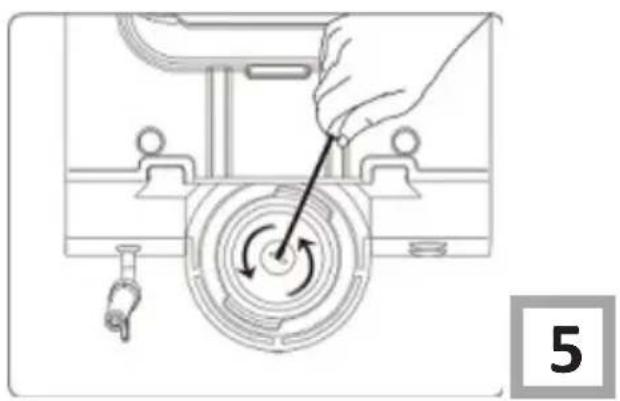
- Turn the appliance upside down and remove the mesh from the percolation head by unscrewing the fixing bolt (Fig. 5).
● Clean the leftover ground coffee and limescale from the mesh and percolation head.
- Set the appliance in its normal position.
- Fill the tank with water and the citric acid solution. Fit the water tank and the drip tray to the appliance.
- Secure the filter holder (without coffee) according to the relevant operating instructions section
- Place the empty container over the percolation head to collect the descaled water.
● Activate the appliance using the on/off switch and wait until it is ready to operate (the on/off switch stops flashing).
● Activate the coffee percolation process.
- Repeat the action until the water and citric acid solution is exhausted.
- Remove and clean the water tank with clean water and repeat the steps above in order to clean the nozzle with clean water.
● Fill the tank with clean water and replace it in the appliance.
- Repeat the process in order to clean the head with clean water.
- When the process is complete, unplug the appliance from the mains, wait until it cools, then remove the water tank and drip tray.
● Turn the appliance round and screw the filter mesh back on to the percolation head.
- Set the appliance in its normal position. Reattach the drip tray and water tank.


Descaling should be done manually.
| Fault Reason Troubleshooting | ||
| The appliance does not work The appliance is not connected to the mains | - Connect the appliance to the mains.- Check the cable and plug | |
| Water leaks from the coffee maker on the table top. | Waste tank is full. Empty the waste tank under the brewing head. | |
| Coffee tastes funny after descaling process. | The cleaning process was not done correctly. | Rinse the appliance again with clean water. |
| Milk will not froth. - Skimmed milk. | - Use whole or semi-skimmed milk.- Use properly cooled milk.- Clean out and wipe the nozzles. | |
| The coffee is not pouring from one of the nozzles. | The nozzle is clogged. Clean out and wipe the nozzle. | |
| The appliance takes to long to heat up. | Too much limescale. Descale the appliance. | |
| When making coffee, coffee leaks out at the connection between the filter holder and head. | Leaky connection. | When the head and filter holder are completely cold, wipe the seal and the edge of the head with a damp cloth, then wipe dry. When filling the filter with ground coffee, make sure that the edge of the head is free from dust and other contaminants. Even the finest contaminants cause leaks. |

Important!
Do not wash the coffee maker accessories in a dishwasher.
NOTES ON THE COFFEE MAKER AND THE COFFEE MAKING PROCESS
Amica coffee maker is equipped with a specially designed filter for a dense, strong froth containing the most essential coffee taste. This system is called SUPER CREMA.
● The filter in the holder must be always dry.
- Coffee in the filter holder must be always well rammed. If coffee is not rammed well, the flowing water will have more impact on less rammed areas. Improperly rammed coffee will give, weak in taste, watery, bitter espresso.
- Espresso should be drunk warm, when coffee stays too long in water, some coffee ingredients dissolve and coffee becomes bitter and unpalatable. This is called overbrewing. When coffee is in water too short, it is the opposite, underbrewing. Coffee is weak in flavour.
- Do not make more than one/two/four cups of coffee at a time (depending on the amount of coffee in the filter).
- Our coffee maker is equipped with a movable milk frother nozzle, you can change its position for easier frothing of milk.
TECHNICAL SPECIFICATIONS
| Type CT 3011 | |
| Rated voltage 220V-240V ~ 50 Hz | |
| Rated power 1280-1520 W | |
| Pressure 15 bar | |
| Protection class I | |
| Power Cord ~1 m | |
| Super Crema system | Yes |
| Removable cup stand | Yes |
| Stainless steel boiler | Yes |
| Movable steam nozzle | Yes |
| Hot water function | Yes |
| Water tank | Yes / 1,520 l |
| Coated filter holder | Yes |
| Coffee filter | 1 pcs |
| Coffee rammer/coffee scoop | Yes (2 in 1) |
Warranty
Warranty service as stated on the warranty card.
The manufacturer shall not be held liable for any damage caused by improper use of the product.
Manufacturer's Declaration
The manufacturer hereby declares that this product meets the requirements of the following European directives:
• Low Voltage Directive 2014/35/EC
• Electromagnetic Compatibility (EMC) Directive 2014/30/EC
• ErP Directive 2009/125/EC
• Directive RoHS 2011/65/EC
and has thus been marked with the symbol and been issued with a declaration of compliance made available to market regulators.
Amica S.A.
ul.Mickiewicza 52
64-510 Wronki
tel. 67 25 46 100
fax 67 25 40 320
www.amica.pl
IO-SDA-0009
(11.2019./1)


- CONTENTS
- UNPACKING
- DISPOSAL OF THE APPLIANCE
- ELECTRICAL REQUIREMENTS
- BEFORE FIRST USE
- USE
- COFFEE MAKING
- OPERATION
- IMPORTANT
- FROTHER FUNCTION (SPECIAL CAPPUCCINO)
- NOTE! TAKE SPECIAL CARE TO AVOID SCALDING
- PREPARE WARM WATER
- PREPARE CAPPUCCINO
- AUTOMATIC SWITCH-OFF
- HINTS ON USING THE FROTHER FUNCTION
- HINTS ON USING THE HEATING FUNCTION
- CLEANING AND MAINTENANCE
- CLEANING
- PREPARATION FOR CLEANING
- CLEANING THE STRAINER IN THE BREWING HEAD
- FILTER CLEANING
- HOW TO DESCALE THE APPLIANCE
- NOTES ON THE COFFEE MAKER AND THE COFFEE MAKING PROCESS
- WARRANTY
- MANUFACTURER'S DECLARATION
Brand : AMICA
Model : CT3011
Category : Coffee maker