Splash - Docking Station JAM - Free user manual and instructions
Find the device manual for free Splash JAM in PDF.


| Type | Docking Station |
| Brand | Jam |
| Model | Splash |
| Dimensions (approx.) | 20 cm x 10 cm x 5 cm |
| Weight (approx.) | 500 g |
| Power Input | USB-C (5V, 2A) |
| Battery Capacity | 2000 mAh |
| Bluetooth Version | 5.0 |
| Water Resistance | IPX4 (splash-proof) |
| Speaker Output | 10 W |
| Charging Dock | Compatible with smartphones (up to 6.7 inch) |
| Functions | Bluetooth speaker, hands-free calling, charging dock |
| Controls | Power, volume, play/pause, call answer |
| LED Indicator | Yes (power and Bluetooth status) |
| Cleaning | Wipe with a soft, dry cloth. Avoid abrasive cleaners. |
| Safety Precautions | Do not immerse in water. Keep away from heat sources. |
| Spare Parts | Not available separately. Contact support for repairs. |
| Repairability | Limited. Refer to user manual for troubleshooting. |
| Compatibility | Most Bluetooth-enabled devices |
| In the Box | Docking station, USB charging cable, user manual |
Frequently Asked Questions - Splash JAM
User questions about Splash JAM
0 question about this device. Answer the ones you know or ask your own.
Ask a new question about this device
Download the instructions for your Docking Station in PDF format for free! Find your manual Splash - JAM and take your electronic device back in hand. On this page are published all the documents necessary for the use of your device. Splash by JAM.
USER MANUAL Splash JAM
One Year Limited Warranty
For detailed Warranty Instructions and Information visit: http://www.hmdxaudio.com/products/jam-wireless- portable-speaker.html. To obtain warranty service on your HMDX product, contact a Consumer Relations Representative by telephone at 1-800-753-3000 or email cservice@hmdxaudio.com for assistance. Please make sure to have the model number of the product available. Representatives are available 8:30am-7:00pm EST Monday-Friday.
HMDX Jam and HMDX are trademarks of HMDX. ©2013 HMDX. All Rights Reserved. IB-HXP530
Thank you for spreading the Jam and purchasing the HMDX Jam Splash Wireless Shower Speaker. Be sure to check out the entire JAM product line on our website: www.hmdxaudio.com — Where there's a Jam there's a party!
Package Contents
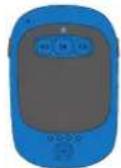
Jam Splash
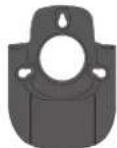
Holster

USB Cord
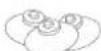
3 Suction Cups

2 Fasteners

Showerhead
Hangcord & Grip

User Manual
Charging the Unit
Be sure to remove product from holster and allow approximately 3 hours for a full charge. Can be charged by using the USB to Micro USB cord (included) through computer or AC adapter with USB jack (not included).
NOTE: Battery will last up to 8 hours when connected wirelessly.
Indicators
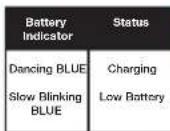
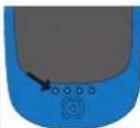
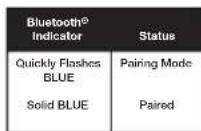
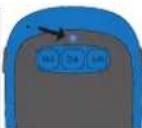
NOTE: When unit is fully charged, indicator light will be solid BLUE.
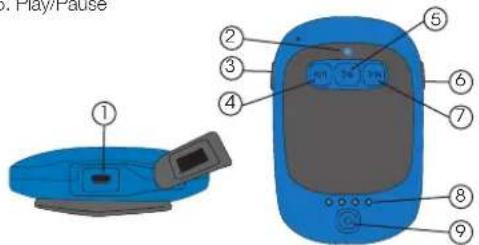
Controls
- Charging Port
- Bluetooth ^® Indicator
- Volume Down
- Reverse Track
-
Play/Pause
-
Volume Up
- Forward Track
- Battery Status Indicator
- Power Button
Pairing the Jam Splash Speaker
To listen to your music over the Bluetooth® wireless connection, you need to pair your device with the Jam Splash:
- Make sure your device has Bluetooth® capability.
- Press and hold power button for 5 seconds; indicator will begin to flash.
- Follow the instructions of your device to pair the unit.
- Pair your device by selecting JAM Splash from your Bluetooth ^® listings on your device or selecting YES.
- Press play on your device and use controls on the unit to adjust desired volume.
NOTE:
- Once you have successfully paired your device, you may not need to repeat the above steps.
- When pairing with a computer, please consult your computer manufacturer for Bluetooth® pairing instructions and/or the latest Bluetooth® Drivers.
- Keep all non-water-resistant devices (phones, mp3 players, etc.) in a dry place where they will not come in contact with water.
- A pairing code is not required.
Built-In Speakerphone
The Jam Splash is equipped with a built-in speakerphone, for easy hands free talking:
-
Make sure the Jam Splash is successfully paired with your device.
-
To answer or end a call, simply press any button when you hear a ringtone.
-
To reject an incoming call, press and hold (5 sec.) any button.
NOTE: When an incoming call is detected, the Splash will pause the music and a ringtone will sound. After the call is terminated, the music will resume to play automatically where it left off. When making a call, use your phone to dial and the Splash will automatically go into hands free mode.
Mounting Options
Kickstand (Fig. 1):
Simply pull kickstand out fully and the Jam Splash will stand upright. This is perfect for taking the Splash to the beach or pool side.
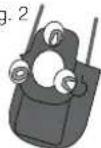
Suction Cup (Fig. 2):
-
Attach the 3 suction cups (provided) in the cut outs on back of holster.
-
Gently slide the Jam Splash into the holster.
-
Find a clean, dry surface and press the Jam Splash in its holster to shower wall or glass door.
NOTE: For an airtight seal, attach suction cups to a solid, non-porous surface such as glass, metal, smooth tile or polished wood surfaces. For best results, ensure that the shower surface is thoroughly clean and dry.
Fig. 1
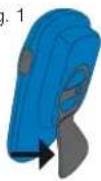
Fig. 2
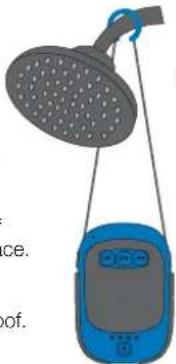
Hang From Showerhead (Fig. 3):
- Thread one end of the cord into the hole on the side of the holster and attach one of the spring fasteners to the cord by inserting it into the hole in the fastener. Repeat this process on opposite side of the holster.
- Lift the holster up by the cord to determine the center. Secure the rubber showerhead grip (provided) to this part of the cord.
- Insert the Jam Splash into holster and hang off of the shower head pipe close to the wall surface.
NOTE: For best results, attach a suction cup to back of holster and press unit against surface.
NOTE: This product is splash proof, not waterproof. Never submerge the Jam Splash in water or any other liquid.
natural_image
Illustration of a showerhead hanging from a blue device (no text or symbols)Fig. 3
Maintenance
Only use a soft dry cloth to clean the enclosure of the unit. NEVER use liquids or abrasive cleaner to clean.
NOTE: This device complies with part 15 of the FCC Rules. Operation is subject to the following two conditions: (1) This device may not cause harmful interference, and (2) this device must accept any interference received, including interference that may cause undesired operation.
NOTE: This equipment has been tested and found to comply with the limits for a Class B digital device, pursuant to part 15 of the FCC Rules. These limits are designed to provide reasonable protection against harmful interference in a residential installation. This equipment generates, uses and can radiate radio
frequency energy and, if not installed and used in accordance with the instructions, may cause harmful interference to radio communications. However, there is no guarantee that interference will not occur in a particular installation. If this equipment does cause harmful interference to radio or television reception, which can be determined by turning the equipment off and on, the user is encouraged to try to correct the interference by one or more of the following measures:
- Reorient or relocate the receiving antenna.
- Increase the separation between the equipment and receiver.
- Connect the equipment into an outlet on a circuit different from that to which the receiver is connected.
- Consult the dealer or an experienced radio/TV technician for help.
Changes or modifications not expressly approved by HMDX could void the user's authority to operate the equipment.
IMPORTANT SAFEGUARDS:
When using an electrical product, basic precautions should always be followed, including the following:
READ ALL INSTRUCTIONS BEFORE USING
- WARNING: Do not place speakers too close to ears. May cause damage to ear drums, especially in young children.
- Use this product only for its intended use as described in this manual. Do not use attachments not recommended by HMDX.
- HMDX is not liable for any damage caused to Smartphones, iPod/MP3 player or any other device.
- Do not place or store this product where it can fall or be dropped into a tub or sink.
- Do not submerge into water or any other liquid.
• Not for use by children. THIS IS NOT A TOY. - Never operate this product if it has a damaged cord, plug, cable or housing
- Keep away from heated surfaces.
- Only set on dry surfaces. Do not place on surface wet from water or cleaning solvents.
Brand : JAM
Model : Splash
Category : Docking Station