BTS650P - Loudspeaker Xmusic - Free user manual and instructions
Find the device manual for free BTS650P Xmusic in PDF.


| Product Type | Portable Bluetooth Speaker |
| Model | BTS650P |
| Brand | Xmusic |
| Bluetooth Version | 5.3 |
| Total Power Output | 20 W (2 x 10 W) |
| Impedance | 4 Ω |
| Battery Capacity | 2200 mAh, 7.4 V |
| Battery Life | Up to 12 hours (at 50% volume) |
| Charging Time | Up to 4 hours |
| Charging Input | USB-C, 5 V / 1.5 A |
| Inputs | USB-C, 3.5 mm AUX, microSD card slot |
| Supported Audio Formats | MP3, WMA, FLAC, WAV |
| MicroSD Card Support | Up to 32 GB, FAT32 |
| FM Radio Frequency | 87.5 – 108 MHz |
| Waterproof Rating | IPX6 |
| TWS Function | Yes (pair two BTS650 speakers) |
| Call Support | Answer, reject, redial via Bluetooth |
| Operating Temperature Range | 0 °C to 40 °C |
| Wireless Range | Approximately 10 m |
| Dimensions (Approx.) | Not specified in manual - typical for portable speaker |
| Weight (Approx.) | Not specified in manual - typical for portable speaker |
| Cleaning | Wipe with slightly moistened soft cloth; do not use strong detergents |
| Safety | Not for use near pacemakers; keep away from water; avoid high volume for long periods |
| Warranty | 24 months from delivery (conditions apply) |
Frequently Asked Questions - BTS650P Xmusic
User questions about BTS650P Xmusic
0 question about this device. Answer the ones you know or ask your own.
Ask a new question about this device
Download the instructions for your Loudspeaker in PDF format for free! Find your manual BTS650P - Xmusic and take your electronic device back in hand. On this page are published all the documents necessary for the use of your device. BTS650P by Xmusic.
USER MANUAL BTS650P Xmusic
*- speaker colour designation
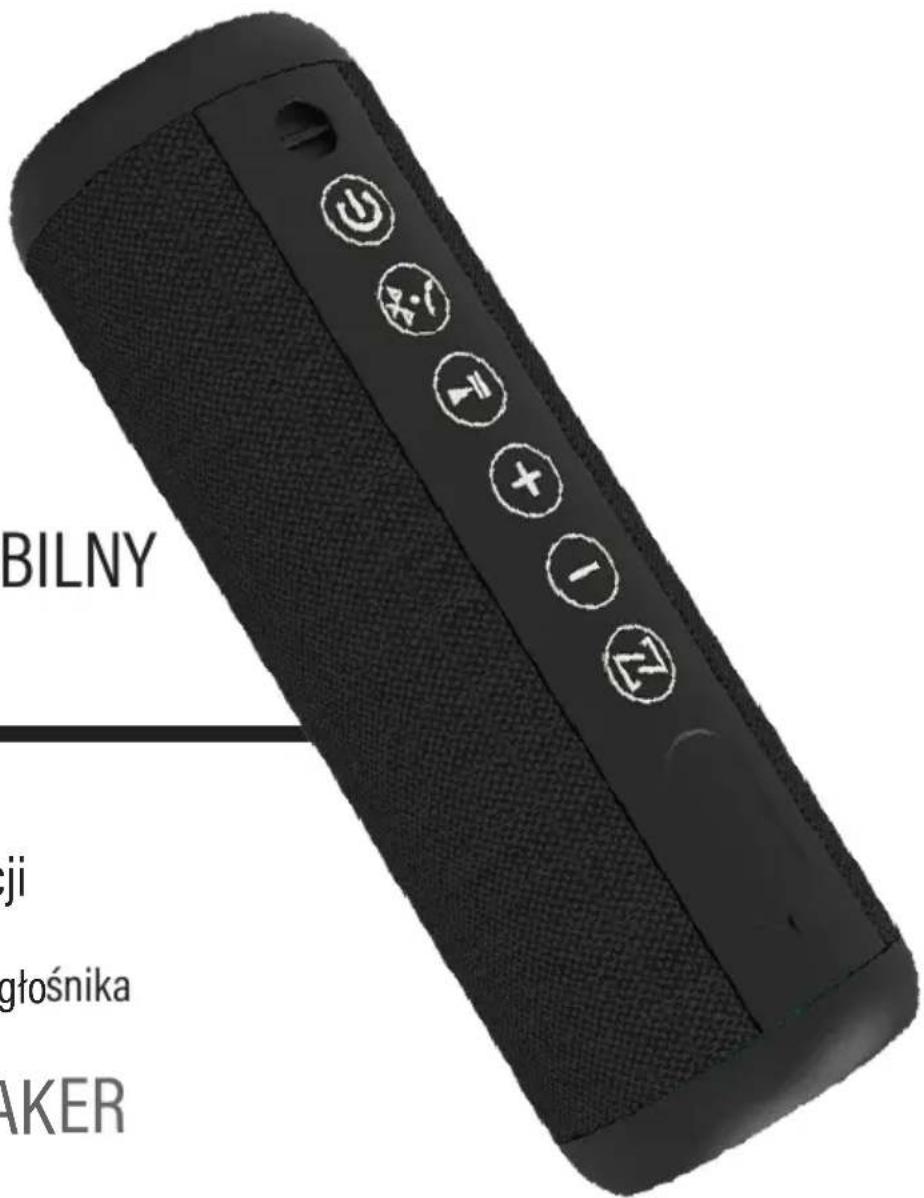
OBSŁUGA
1. Włącz / Wyłącz
6. Zmiana trybu
d) Tryb karty SD
PROBLEMY I ROZWIAZANIA
SAFETY AND HAZARD CONDITIONS
Before using the device please read the entire user manual carefully.
- The range of operation of wireless Bluetooth technology is about 10m, however, it may vary depending on the environment (walls, metal objects, devices).
- This product emits radio waves, when used in wireless mode.
- Use the device according to its intended purpose described in the operating manual. Do not interfere and do not change the design of the device, as this is dangerous.
- This product may only be operated by children 8 or more years old, mentally and/or physically deficient persons and persons without knowledge of or experience in operation of this appliance type if supervised or instructed in safe operation, with clear understanding of all related risks. Children should not play with the device. Children without supervision should not carry out the cleaning and maintenance of the device.
- This device emits electromagnetic energy. Avoid contact with other electronic devices, as this may affect their correct operation.
- Do not use the device near people with a pacemaker or other electronic implants.
- Do not use the device in hospitals as it may interfere with the operation of medical devices.
- Do not immerse the device in water and other liquids. Do not expose the device to moisture.
- Do not expose the device to excessively high or low temperatures: below 0^ C or above 40^ C.
- Do not use the device in dusty rooms and do not store it near or on hot surfaces.
- To avoid damage to your hearing, never operate the device at a high volume level for a prolonged period of time. Make sure that the device
with a fixed high volume will no be used by children whose hearing is particularly vulnerable to damage.
- Do not use the device in wireless mode onboard of aircraft, or follow the instructions of the crew regarding the use of the product in this mode.
- The device does not guarantee it will establish connection to all other Bluetooth devices. All devices must comply with the Bluetooth standard, and their technical specifications should allow you to connect to other devices.
- Do not expose the appliance to severe shocks.
- If you experience discomfort while using the device, please immediately stop using it.
- Although the device is waterproof, do not immerse it in water.
- The product should be stored out of the reach of children.
- Do not use the device if its components are damaged. Any repairs should be ordered from the manufacturer, an authorized service center or a person with appropriate qualifications.
INTRODUCTION
Thank you for the trust you have placed in us when you purchased your XMUSIC device.
We are convinced that this high quality device will provide you with a lot of joy and satisfaction during its use.
PLEASE CAREFULLY READ AND FOLLOW THE OPERATING MANUAL!
This device is intended for domestic or other non-commercial use.
The manufacturer will not be held liable for damages resulting from improper or non-compliant use.
TECHNICAL DATA
| Model BTS650* | |
| Bluetooth 5.3 | |
| Power 20 W (2 x 10 W) | |
| Charging voltage 5 V | ---1,5 V |
| Impedance 4 Ω | |
| TWS Function YES | |
| FM Frequency 87.5 MHz - 108 MHz | |
| Supported Bluetooth formats AVRCP.HFP,A2DP | |
| Charging time up to 4 h | |
| Battery life up to 12 h* | |
| Battery 2200 mAh, 7.4 V | |
| Inputs USB-C | |
| 3.5 mm mini Jack | |
| microSD | |
| Support for memory cards up to 32 GB | |
| Supported playback formats MP3, WMA, FLAC, WAV | |
| Waterproof rating IPX6 | |
| Operating frequency 2402 – 2480 MHz | |
| Maximum transmission power from 20 dBm |
*Operation time will depend on the playback volume. The estimated battery life assumes operation at approx. 50% of the volume.
DEVICE DESCRIPTION
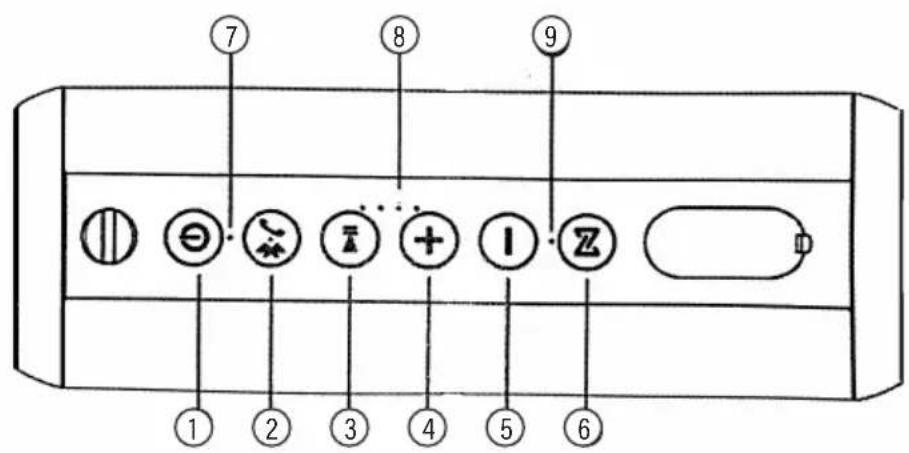
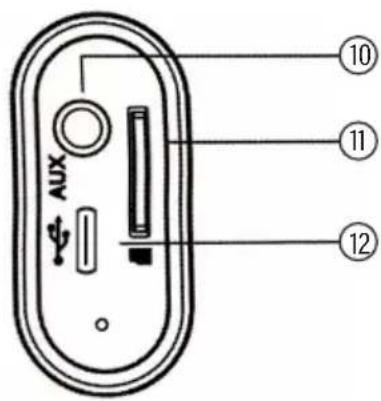
- On / Off
- Enable Bluetooth / Answer or reject call
- Stop or resume playback
- Increase Volume / Next Track
- Decrease Volume / Previous Track
-
TWS mode
-
Bluetooth mode indicator
- Battery status indicator
- TWS mode indicator
- AUX input
- MicroSD card slot
- USB-C charging port
OPERATION
1. ON / OFF
Hold down the Ⓐ button to turn the device on or off.
2. Adjusting volume
Hold down the + or - button to increase or decrease the volume of the device. The volume in the device works independently of the connected phone.
3. Changing the tracks
Press the + button once to play the next track, or the - button once to play the previous track.
4. Pause / Resume
Press the button once to resume or pause playback.
5. TWS function (Pairing two speakers)
The TWS function only works in BLUETOOTH mode. To pair two BTS650 speakers, make sure that the speakers are turned on and in Bluetooth mode. Press the button on one of the speakers, then repeat the operation on the other speaker.
After pairing the two speakers, the speaker where the button was pressed first becomes the main speaker, and its button indicator will illuminate blue. The LED of the second speaker will illuminate in orange. Use your phone to pair the BTS650 main speaker and play music wirelessly on both speakers.
To disconnect the speakers, press the button on one of the speakers. Holding down this button will clear the pairing memory.
The correct operation of the TWS function is possible only with two BTS650 speakers, in the same colour variant.
6. Changing Mode
The speaker has 4 modes of operation. Once the speaker is on, press ⬤ to switch between them.
a) Bluetooth mode
To connect your smartphone to the speaker in Bluetooth mode:
Enable Bluetooth mode on speaker
Turn on the Bluetooth module in your smartphone
Select BTS650 from the list of available devices and pair it
After a proper connection, you will hear the sound message „Device paired“
b) FM Radio Mode
For the correct operation of the FM radio mode, it is recommended to connect the AUX cable included in the kit, which will serve as an antenna.
In the FM Radio mode, hold down until the speaker starts scanning for available radio stations.
After about a minute, the speaker will finish scanning and stop at one of the stations.
To switch between the stations found, press the + or - once. Holding the + and - buttons will change the playback volume.
c) AUX Mode
To start AUX mode, connect the 3.5 mm mini Jack cable included in the set to the speaker.
Switch to AUX mode and connect the other end of the cable to another device from which the sound is to be played.
d) SD Card Mode
To start playback mode from the SD card, insert a MicroSD card into the speaker.
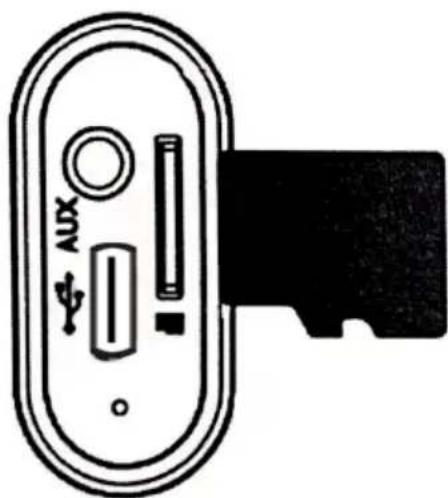
The device should automatically switch to playback from the memory card, if it does not, switch it to this mode. Press the + or - to toggle tracks from the memory card. Holding one of these buttons will change the volume. Pressing the + or - button twice will change the playback folder on the memory card.
7. Call support
When the speaker is connected to the phone via Bluetooth, you can answer an incoming call by pressing the button once, or reject it holding. Pressing twice will call back the last number.
Power saving
In order to save energy, if the sound is not played on the speaker for 10 minutes and no action has been taken, the speaker will turn off.
Charging
To charge the device, connect it to a charger with an output voltage of 5V 1.5A. The device should charge for up to 4 hours (depending on the power of the charger). Once the speaker is fully charged, all 4 lights on the speaker panel, indicating the state of charge, will illuminate.
CAUTION! BATTERY DETERIORATION DURING OPERATION OF THE DEVICE IS A NATURAL PHENOMENON. TO KEEP THE BATTERY IN GOOD CONDITION AND EXTEND ITS LIFE, PLEASE FOLLOW THESE GUIDELINES:
- Do not start the device if the battery is discharged.
- Charge the battery according to the voltage and charging current data on the rating plate.
- Before a longer storage period, charge the battery to 50% and recharge it every 3-4 months. If it is not possible to determine a specific charge level in the product, discharge the device, then charge it for half the time required to fully charge it. Leaving a discharged battery for a prolonged period of time may result in its damage or loss of its properties.
-
When using the device regularly, avoid full discharge of the battery and always charge it to the full.
-
Once the battery is charged, disconnect the charger plug from the charging socket on the device.
- Do not leave the device unattended while charging.
- Using chargers and cables other than those recommended in the device manual with may lead to damage to the product and even an explosion of the battery.
- Charge in a dry, well-ventilated place that is not exposed to direct sunlight.
CLEANING AND MAINTENANCE
For cleaning, use a slightly moistened cloth of soft material to wipe the outer housing of the speaker. Do not tamper with the device housing to clean the product and do not use strong cleaning agents.
The product is IPX6 waterproof, yet it cannot be washed in the dishwasher or under running water in the sink.
TROUBLESHOOTING
| PROBLEM POSSIBLE CAUSE SOLUTION | ||
| Unable to connect to the speaker. | Bluetooth on the phone is disabled. The phone does not support A2DP transmission. | Turn on Bluetooth in your phone. Make sure your device supports A2DP transmissions. |
| There are too many Bluetooth-enabled devices nearby, causing interference and preventing connection. | Turn off other Bluetooth devices. | |
| The speaker does not respond to button presses. | The speaker software system encountered an error which prevented further operation of the device. | Reset the device by holding the button for about 10s. |
| The speaker does not play music from the portable storage medium. | Invalid type of saved files or unsupported memory card size. | Check that the device complies with the protocols presented in the user manual. Check that the memory medium does not exceed 32GB and that the recommended FAT32 file format of memory card is used. |
| The radio does not work. Signal missing. | Connect the audio cable to the speaker and make sure that your area has sufficiently good radio signal coverage and there are no interferences. | |
| The frequency is no longer reachable due to change in location. | Scan again for available radio frequencies. | |
DECLARATION
ART-DOM Sp. z o.o. hereby declares that the BTS650* speaker complies with the Directive 2014/53/EU. The full text of the EU declaration of conformity is available at the following address:
This device is marked, in accordance with Directive 2012/19/EU of the European Parliament and of the Council of 4 July 2012 on waste electrical and electronic equipment (WEEE), with the symbol of a crossed-out waste container:
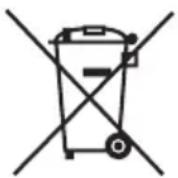
Do not dispose of the device marked with this symbol together with household waste. For disposal return the device to your local waste treatment and disposal facility or contact your local authorities.
You can help protect the environment!
Proper handling of waste electrical and electronic equipment contributes to avoiding harmful consequences for human health and the environment resulting from the presence of hazardous components and improper storage and processing of such equipment.
Disposing of Used Batteries
In accordance with the EU Directive 2006/66/EC, as amended, on batteries, this product is marked with the symbol of a crossed out waste bin. The symbol indicates that the batteries or rechargeable batteries used in this product should not be disposed of together with normal household waste. Users of batteries and rechargeable batteries must use the available collection network for these elements, which allows them to be returned, recycled and disposed of.
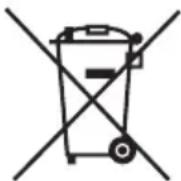
Li-ion
SPEAKER WARRANTY TERMS
- ART-DOM Sp. z o.o. with its registered office in Łódź (92-402) at ul. Zakładowa 90/92 National Court Register Number 0000354059 (Guarantor) guarantees that the purchased device is free from physical defects. The warranty covers only defects resulting from the causes inherent in the item sold (manufacturing defects).
- A disclosed defect will be removed at the Guarantor's expense within 14 days from the date of reporting the damage to the authorized service or point of sale.
-
In exceptional cases, e.g. the need to import spare parts from their manufacturer, the repair period may be extended up to 30 days.
-
The warranty period for the user is 24 months from the date of delivery of the goods.
- The goods are intended for use only in the conditions of an individual household.
- The present warranty does not cover:
a. damage caused by using the device in a manner inconsistent with the user manual,
b. mechanical, chemical or thermal damage,
c. repairs and modifications made by companies or persons that were not authorized to do so by the manufacturer,
d. parts that are easily worn or consumables such as: batteries, bulbs, fuses, filters, knobs, shelves, accessories,
e. installation, maintenance, inspection, cleaning, unlocking, removal of contaminants and instruction.
- The Guarantor will select the mode of defect removal at its own discretion. Removal of a confirmed defect of the device will take place through warranty repair or replacement of the device. The Guarantor may perform repairs when the buyer requests replacement or the Guarantor may perform replacements when the buyer requests repair, if bringing the goods (device) into conformity in accordance with the granted warranty in the manner selected by the buyer is impossible or would require excessive costs at the part of Guarantor. In particularly justified cases, if both repair and replacement are impossible or would require excessive costs for the Guarantor, the Guarantor may refuse to bring the goods into compliance with the granted warranty and propose another way to settle the warranty claim.
- The exchange of goods is made at the point of sale at which the goods were purchased (replacement or refund) or an authorized service point, if it offers such service (replacement). The returned device must be complete, without mechanical damage. Failure to comply with these conditions may result in failure to accept the warranty claim.
- In the event of non-compliance of the goods with the sales contract, the buyer is entitled by law to legal protection measures on the part and at the expense of the seller, and the warranty does not affect these legal protection measures.
- The warranty is valid in Poland.
- The condition for the warranty repair or replacement of the device is the presentation of proof of purchase and the use of the goods in accordance with the information contained in the user manual.
CAUTION!
Damage or removal of the rating plate from the device may result in warranty being deemed void.
We are constantly improving our products, so they may differ slightly from the images presented on the packaging and in the user manual. Please read the user manual before operating the appliance.
ART-DOM Sp. z o.o., ul. Zakładowa 90/92, 92-402 Łódź, info@artdom.net.pl. National Court Register number 0000354059.
- OBSŁUGA
- Włącz / Wyłącz
- Zmiana trybu
- d) Tryb karty SD
- SAFETY AND HAZARD CONDITIONS
- INTRODUCTION
- PLEASE CAREFULLY READ AND FOLLOW THE OPERATING MANUAL!
- DEVICE DESCRIPTION
- OPERATION
- ON / OFF
- Adjusting volume
- Changing the tracks
- Pause / Resume
- TWS function (Pairing two speakers)
- Changing Mode
- a) Bluetooth mode
- b) FM Radio Mode
- c) AUX Mode
- d) SD Card Mode
- Call support
- Power saving
- Charging
- CAUTION! BATTERY DETERIORATION DURING OPERATION OF THE DEVICE IS A NATURAL PHENOMENON. TO KEEP THE BATTERY IN GOOD CONDITION AND EXTEND ITS LIFE, PLEASE FOLLOW THESE GUIDELINES:
- CLEANING AND MAINTENANCE
- DECLARATION
- You can help protect the environment!
- Disposing of Used Batteries
- SPEAKER WARRANTY TERMS
- CAUTION!
Brand : Xmusic
Model : BTS650P
Category : Loudspeaker