
SW-100-05PD - Network switch Luxul - Free user manual and instructions
Find the device manual for free SW-100-05PD Luxul in PDF.


User questions about SW-100-05PD Luxul
0 question about this device. Answer the ones you know or ask your own.
Ask a new question about this device
Download the instructions for your Network switch in PDF format for free! Find your manual SW-100-05PD - Luxul and take your electronic device back in hand. On this page are published all the documents necessary for the use of your device. SW-100-05PD by Luxul.
USER MANUAL SW-100-05PD Luxul
PoE+ Powered 5 Port Gigabit Compact Switch SW-100-05PD
Setting up your switch:
- Place your new switch in the desired location
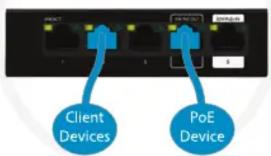
- Connect a PoE+ Ethernet network cable to port 5
- Attach devices via Ethernet cables
• Ports 1 - 3: Gigabit Ethernet ports
• Port 4: PoE (15W) output port

Attach
PoE+ Power

Please note:

PoE Input port
This switch is powered by PoE+ (30W) only

Place Switch


Connect
Client Devices

What if...
I need to restart my switch?
To restart your switch, unplug the Ethernet cable from port 5 for 5 seconds.
Where is my power supply?
The SW-100-05PD is a PoE+ powered switch and simply requires a 802.3at/POE+ power source.

What do the LEDs on the switch indicate?
| Indicator | Front | Back | State | Description |
| 30W PoE+ In | Green | Amber | Solid | Receiving PoE+ power as per 802.3at specification |
| Off | No PoE+ power detected | |||
| 15W PoE Out | Green | Amber | Solid | Port is connected properly and supplying 15W of power |
| Off | No power or device detected | |||
| Link/ Activity | Green | Amber | Solid | Port is connected properly |
| Blinking | Data is being transmitted or received over port | |||
| Off | Port is disconnected or not properly connected to a device |
Note: Back green LEDs, top right of each port, are currently unused
Copyright and Trademark Notices
No part of this document may be modified or adapted in any way, for any purposes without permission in writing from Luxul. The material in this document is subject to change without notice. Luxul reserves the right to make changes to any product to improve reliability, function, or design. No license is granted, either expressly or by implication or otherwise under any Luxul intellectual property rights. An implied license only exists for equipment, circuits and subsystems contained in this or any Luxul product.
© Copyright 2020 Legrand AV Inc. All rights reserved. The name Luxul, the Luxul logo, the Luxul logo mark and Simply Connected are all trademarks and or registered trademarks of Legrand AV Inc. All other trademarks and registered trademarks are property of their respective holders.
Technical Support
P: 801-822-5450
E: support@luxul.com
For support chat go to: luxul.com
Sales
P: 801-822-5450
E: sales@luxul.com


Brand : Luxul
Model : SW-100-05PD
Category : Network switch