VS-260F - Flash Drive Bolt - Free user manual and instructions
Find the device manual for free VS-260F Bolt in PDF.


| Product Type | On-camera TTL automatic flash |
| Compatible Cameras | Fuji cameras with built-in hot shoe and TTL flash systems |
| Guide Number (ISO 100) | 72 ft / 22 m |
| Flash Coverage | Equivalent to a 35mm lens on a 35mm-format camera |
| Flash Duration | 1/2,000 – 1/40,000 second |
| Recycle Time | 0.3 – 10 seconds |
| Power Source | 2 x AA batteries (Lithium 1.5V, Ni-MH 1.2V, or Alkaline 1.5V) |
| Number of Flashes (fresh batteries) | Approx. 100 |
| Bounce Positions | 0°, 45°, 60°, 75°, 90° |
| Dimensions (W x H x D) | 2.6 x 3.9 x 2 in (65 x 98 x 54 mm) |
| Weight (without batteries) | Approx. 4.6 oz (127 g) |
| TTL Autoflash | Yes, compatible with Fuji TTL metering |
| Autofocus-Assist Light | Red beam for low-light autofocus |
| Red-Eye Reduction | Supported (set via camera) |
| Rear-Curtain Sync | Supported |
| Power-Saving Mode | Automatic after 3 minutes of inactivity |
| Flash Exposure Compensation | Adjustable via camera controls |
| Test Fire Button | Yes, combined with Ready light |
| Battery Types Recommended | Lithium and Ni-MH for fastest recycle times |
| Cleaning Instructions | Use a dry cloth; clean battery contacts with isopropyl alcohol on cotton swab. Avoid corrosive solvents. |
| Safety Warnings | Contains high-voltage parts; do not disassemble. Do not fire into eyes. Allow cooling after 20 continuous full-power flashes. |
| Spare Parts / Repair | No user-serviceable parts; contact authorized service center for repair. |
| Warranty | One-year limited warranty |
Frequently Asked Questions - VS-260F Bolt
User questions about VS-260F Bolt
0 question about this device. Answer the ones you know or ask your own.
Ask a new question about this device
Download the instructions for your Flash Drive in PDF format for free! Find your manual VS-260F - Bolt and take your electronic device back in hand. On this page are published all the documents necessary for the use of your device. VS-260F by Bolt.
USER MANUAL VS-260F Bolt
Copyright © 2015 Gradus Group.
Bolt and other names of Bolt products are trademarks of Gradus Group. Other product and corporate names mentioned herein are trademarks of their respective holders.
natural_image
Black Bolt-branded flash unit with visible lens and red trigger (no text or symbols beyond branding)Introduction
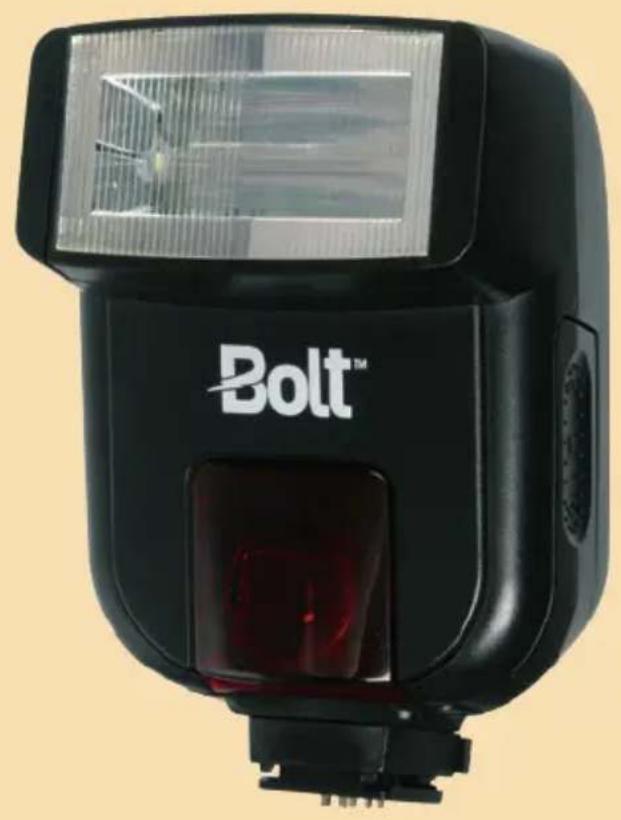
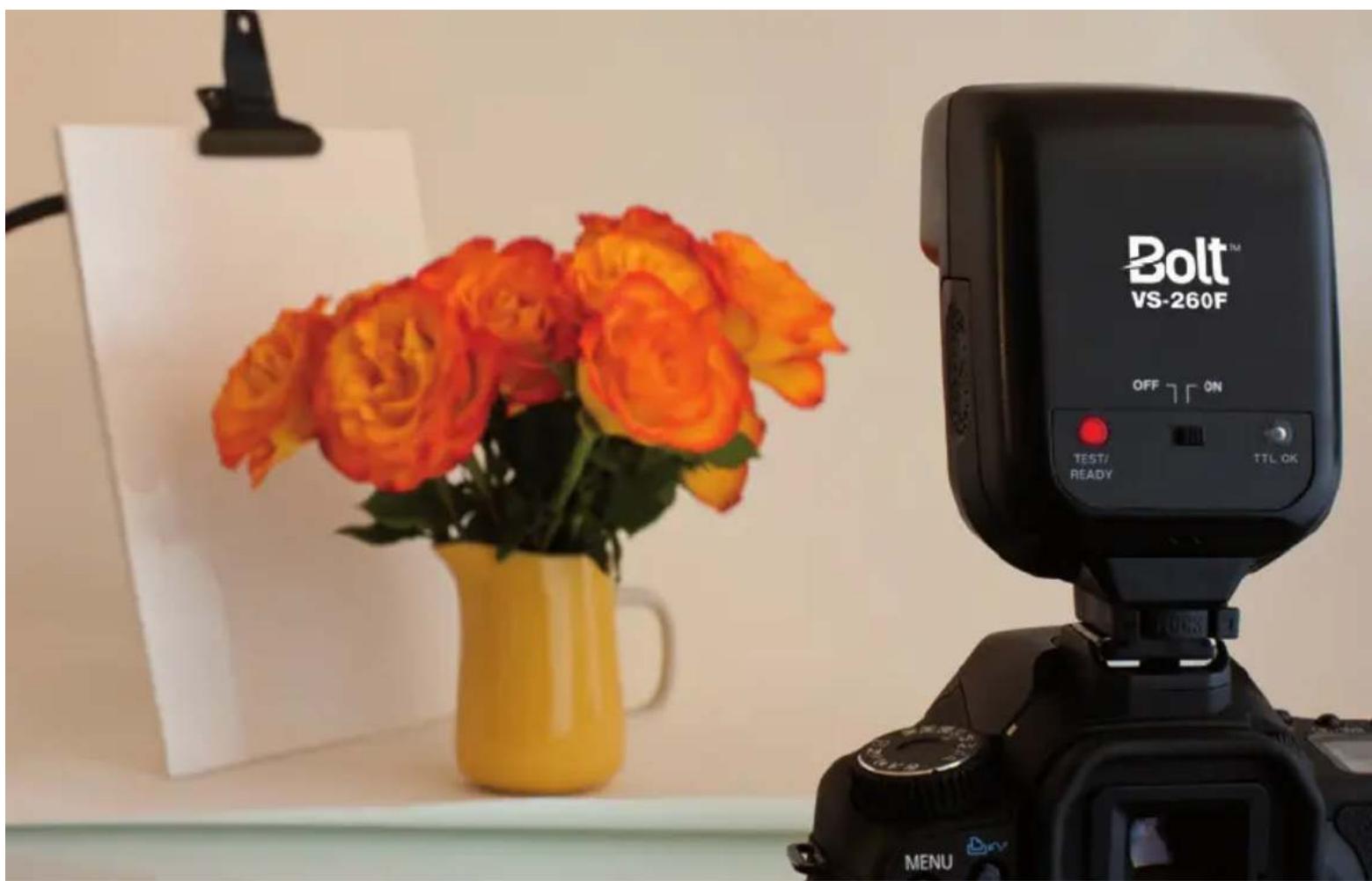
Thank you for choosing the Bolt VS-260F TTL Autofocus Flash. This flash unit combines a compact design with versatile features to give you both automatic ease of use and creative lighting control. Among the benefits you'll enjoy:
Full compatibility with Fuji's TTL metering system
- Adjustable five-position flash head
- Autofocus-assist for low-light photography
- Rear-curtain sync
• Automatic power-saving function
natural_image
Black Bolt VS-260F camera on display with orange roses in a yellow vase, no visible text or symbols on the main subject.Contents
Overview 6-7
Warnings 8-10
Installing Batteries 10–11
Mounting the Flash 12-13
Turning on the Flash and Firing a Test....14
Red-Eye Reduction 14
Taking Photos 15
Using Flash Exposure Compensation....16
Using the Autofocus-Assist Light....17
Bouncing Your Flash....18–19
Using Rear- or Second-Curtain Synchronization 20
Troubleshooting 21
Specifications 22
Warranty 23
natural_image
Technical line drawing of a mechanical device with no visible text or symbolsOverview
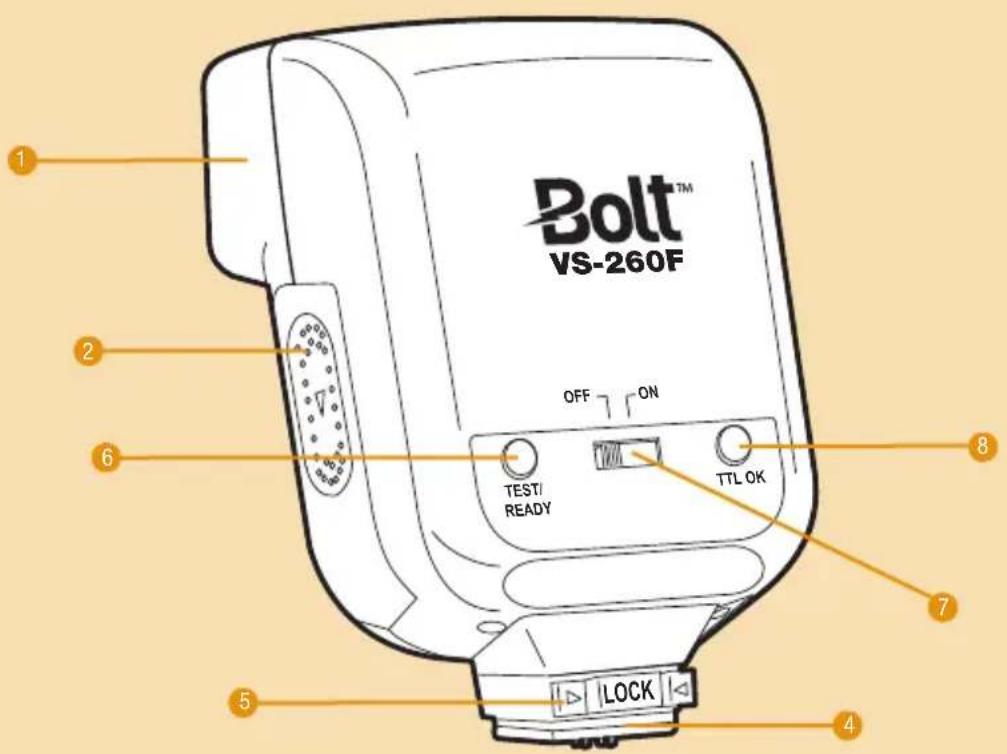
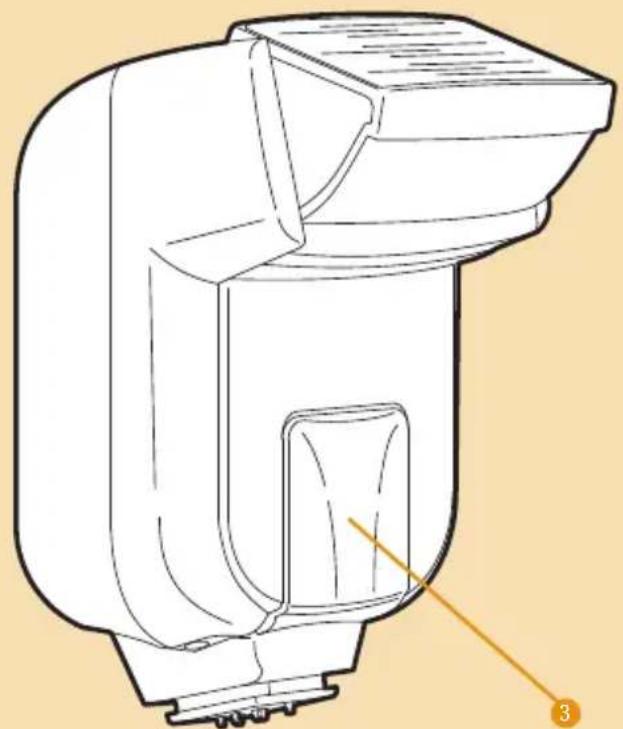
- Flash head
- Battery compartment cover
- Autofocus-assist light
- Mounting foot
- Mounting foot lock
- Test button / Ready light
- Power switch
- Automatic exposure confirmation light
Warnings
Before using your VS-260F, please read the following safety notices carefully and thoroughly to ensure safe use, and to help prevent damage to your flash or injury to yourself or others.
- Do not fire the flash at close range directly into the eyes of people or animals. This can cause damage to the retina and may even lead to blindness.
- To avoid overheating and damaging your flash unit, please wait for at least 10 minutes after 20 continuous flashes at full power.
- Do not disassemble or attempt to repair this product yourself. There are high-voltage components inside that can produce a hazardous electric shock.
- Keep this product and its batteries out of reach of children.
- Use only the power sources specified in this manual.
• Always switch the flash off before changing the batteries. -
Always install AA batteries of the same type, brand, and age. Do not combine different types or brands, or old and new batteries. This could cause batteries to leak, overheat, or explode.
-
Install batteries in the proper orientation according to the indicator in the battery chamber. Installing batteries in the reverse orientation could cause them to leak, overheat, or explode.
- Do not use or store the VS-260F in flammable conditions (such as environments containing flammable gases or liquid chemicals). This could damage the flash, start a fire, or cause an electric shock.
- Do not clean the VS-260F with agents containing corrosive or flammable substances such as paint thinner, benzene, or nail polish remover.
- This product is not water resistant. Keep it away from rain, snow, humidity, and general moisture.
- Should the VS-260F get damaged, do not touch any exposed interior metal parts. If touched, they may generate an electric shock or cause a malfunction. Promptly remove the batteries, and take the product to an authorized service center for repair.
- If you detect excessive heat, smoke, or a burning smell coming from the flash, immediately stop operation and remove the batteries to prevent the product from igniting or melting. Take the product to an authorized service center for repair.
- Do not drop or otherwise cause a strong physical impact to the VS-260F, as this could cause a malfunction that may cause it to explode or ignite.
- Remove all batteries from the VS-260F before long-term storage in order to prevent the product from igniting or leaking corrosive liquids.
-
Do not store or use this product at temperatures above 104^ (40°C).
-
Keep the metal contacts in the battery compartment clean and free of corrosion and dirt. Do not touch them with your fingers. Corrosive elements on the contacts can damage the VS-260F and prevent it from functioning properly. Contacts may be cleaned with isopropyl alcohol on a cotton swab.
- Dispose of used batteries properly. Never heat them or throw them into a fire, as this could cause the batteries to leak, overheat, or explode.
Installing Batteries
The VS-260F can be powered by two AA batteries of several types:
- Lithium (1.5 V)
• Nickel-metal hydride (Ni-MH) (1.2 V) - Alkaline (1.5 V)
Note: For the fastest recycle times and longest battery life, lithium and Ni-MH batteries are recommended.
To install batteries, make sure the VS-260F is turned off and follow these steps:
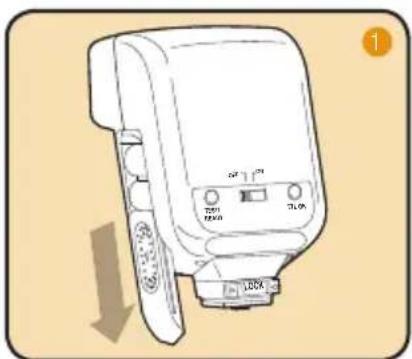
- Press on the battery compartment cover and slide it in the direction of the arrow.
- Insert batteries in the orientations indicated inside the compartment.
- Replace the battery compartment cover by pressing and sliding it into place, in the opposite direction of the arrow on the cover.
natural_image
Line drawing of a device with labeled ports and an arrow indicating downward motion (no text or symbols present)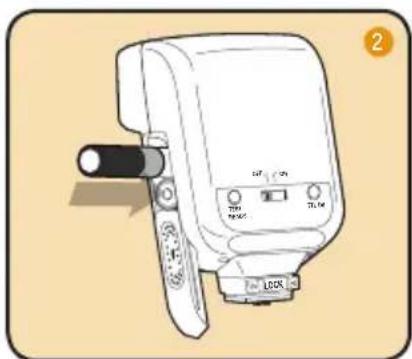
natural_image
Illustration of a handheld electronic device with a black lever and control buttons (no text or symbols visible)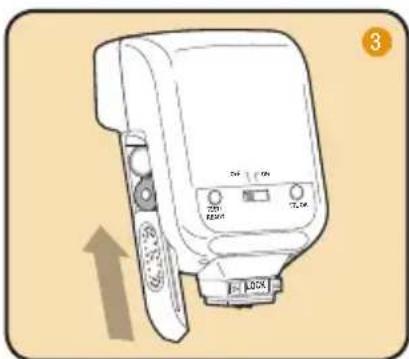
natural_image
Line drawing of a camera lens with control buttons and an upward arrow indicator (no text or symbols)Important!
Replace both batteries at the same time. Do not mix battery types or brands, or use old and new batteries together.
Mounting the Flash
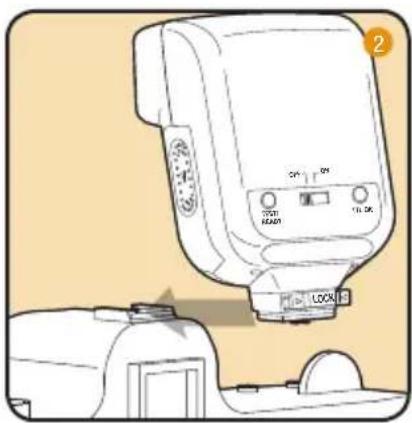
To mount the VS-260F on your camera, turn it off and follow these steps:
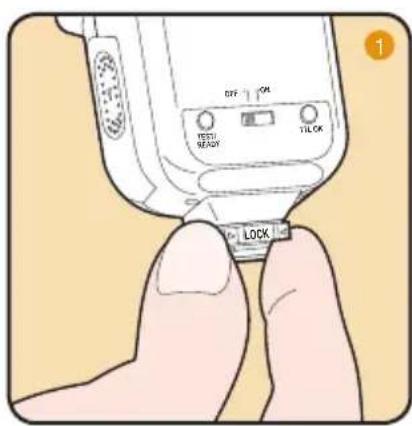
- Press both sides of the mounting foot lock in; it will pop out, away from the flash.
- Slide the mounting foot all the way into your camera's hot shoe.
- Push the mounting foot lock in.
natural_image
Illustration of a medical device with control buttons and a device labeled 'LOCK' (no text or symbols on the device itself)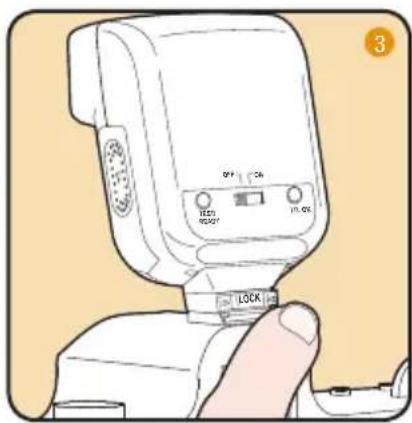
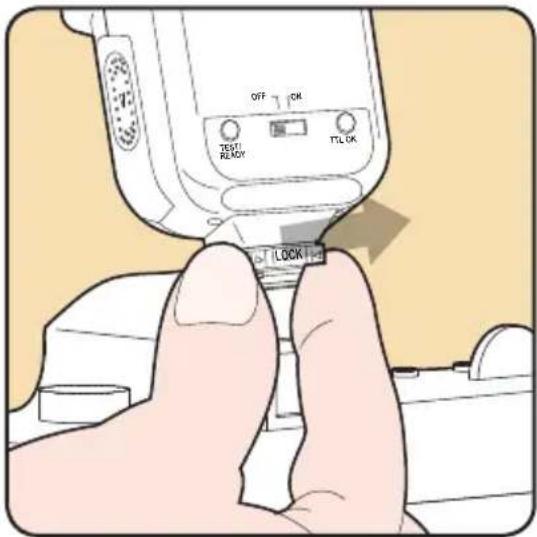
Dismounting the VS-260F:
- Turn the flash off.
- Press both sides of the mounting foot lock in; it will pop out, away from the flash.
- Slide the mounting foot out of your camera's hot shoe.
Turning on the Flash and Firing a Test
To turn the flash on, simply slide the power switch to the On position.
When the flash is ready to fire, the Ready light will glow red. If the flash is mounted on your camera, a flash icon will also appear in the camera's viewfinder when you press the shutter-release button halfway.
To fire a test flash, press the Ready light / Test button.
Automatic power-saving function: After 3 minutes of inactivity, the flash will automatically enter power-saving mode to conserve battery life. The Ready light will turn off. To reactivate the VS-260F, simply press the Ready light / Test button or your camera's shutter-release button. During long periods of inactivity, it is recommended that you use the power switch to turn the flash off completely.
Red-Eye Reduction
The Bolt VS-260F supports red-eye reduction. For details on how to set red-eye reduction, consult your camera's user manual.
Taking Photos
When the VS-260F is mounted on a compatible camera, it will set the appropriate flash level automatically, in conjunction with the camera's through-the-lens (TTL) metering system.
For information about your camera's flash sync speed range (the shutter speed range your camera will allow you to use when taking flash photos), consult your camera manual.
To take photographs with the flash, turn the flash and camera on and follow these steps:
- Press the shutter-release button on your camera halfway to ensure that the camera is communicating with the flash. A flash icon will appear in the camera's viewfinder.
- Press your camera's shutter-release button to take the picture. The TTL OK light will glow green momentarily to indicate that the proper exposure was attained.
Using Flash Exposure Compensation
You can use flash exposure compensation to adjust the VS-260F's flash output incrementally, just as you would adjust exposure with the exposure compensation function on your camera.
To apply flash exposure compensation, press the flash exposure compensation button on your camera and adjust the flash exposure level up or down with your camera's controls.
The flash exposure compensation range and controls vary between different camera models. Consult your camera's manual for more information about this feature.
Using the Autofocus-Assist Light
Camera autofocus systems can have difficulty locking on a subject in dim light. When the ambient light level is low, the VS-260F will emit a red autofocus-assist beam when you press your camera's shutter-release button halfway to autofocus. The camera will then be able to autofocus by locking on the projected light.
Note that not all Fuji cameras allow autofocus assist via the flash. Consult your camera's manual for more information.
Bouncing Your Flash
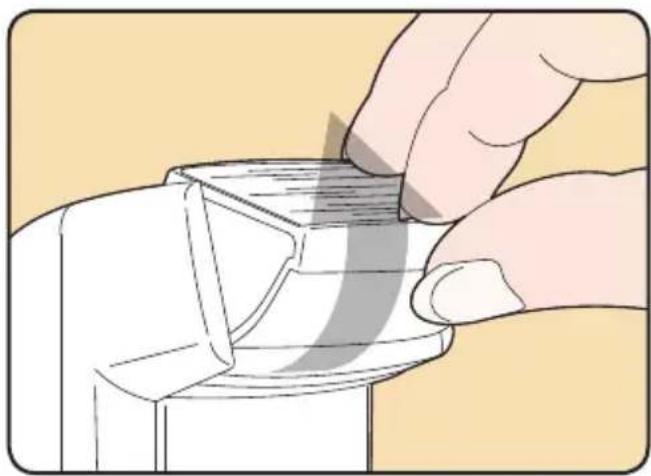
Using flash to directly illuminate a subject often creates harsh, unnatural, and unattractive shadows. To avoid this, the flash can be tilted up, allowing you to aim it at a large white or neutral-colored surface, such as a ceiling, a wall, or a reflector. The light will bounce off of the larger surface before striking your subject, providing softer, more natural illumination.
natural_image
Illustration of a hand pressing down on a mechanical component (no text or symbols visible)The VS-260F flash head can be tilted up at 45-, 60-, 75-, and 90-degree angles to the lens.
When bouncing your flash, you may need to adjust your exposure settings, since the level of light falling on your subject will be reduced. The farther apart the bounce surface and your subject are, the more illumination will be reduced.
Tip: Bouncing your flash off colored surfaces can create a color cast in your images. Bouncing off a white or neutral-colored surface will not alter the color of the light, while bouncing off a gold-toned surface can give portraits a warmer look. Other colors, while usually not desirable, can be used for creative effects.
Using Rear- or Second-Curtain Synchronization
When you photograph a moving subject with a slow (1/30 second or longer) shutter speed and a flash, the flash will freeze the moving subject and the long exposure will cause motion blur and light trails to appear in the image, especially in low light. This “slow-sync” flash technique, also referred to as “dragging the shutter,” can be applied in two different ways: The flash can be synchronized with the camera’s shutter release so that it fires at the beginning of the period when the shutter opens, or it can fire near the end of that period. The former is called “front-curtain” or “first-curtain” flash sync, and the latter is called “rear-curtain” or “second-curtain” sync. Front-curtain sync causes motion blur and light trails to appear in front of moving subjects, while rear-curtain sync makes them appear behind moving subjects. That means rear-curtain sync creates a more realistic impression of movement.
The VS-260F supports rear-curtain sync modes on cameras that offer the setting. Consult your camera's manual to find out how to activate it. Use your camera's manual or shutter-priority mode to control the amount of blurring and light trails you capture by varying the shutter speed.
Troubleshooting
| Problem Solution | |
| The flash is stuck in the camera hot shoe. Make sure | that the mounting foot lock is released. |
| The flash is turned on but won’t fire. Make sure that fresh batteries are installed and in the proper orientation. | |
| The edges of images look dark. Your lens angle of view is wider than the flash angle of coverage. Use a lens with a longer focal length. | |
| There’s a whining sound coming from the flash. This is normal and does not indicate a malfunction.When the flash becomes warm from continuous use, vibrations inside the unit may cause this sound.It will dissipate as the unit cools. | |
Customer Service
For customer service, please go to www.boltflashes.com.
Specifications
Type: On-camera TTL automatic flash
Compatible cameras: Fuji cameras with a built-in hot shoe and TTL flash systems
Guide number (at ISO 100): 72 feet / 22 meters
Flash coverage: Equivalent to a 35mm lens on a 35mm-format camera
Flash duration: 1/2,000–1/40,000 second
Flash recycle time: 0.3–10 seconds
Power source: 2 AA lithium, Ni-MH, or alkaline batteries
Number of flashes with fresh batteries: Approx. 100
Bounce positions: 0°, 45°, 60°, 75°, 90°
Dimensions (W × H × D): 2.6 × 3.9 × 2 in. (65 × 98 × 54 mm)
Weight (without batteries): Approx. 4.6 oz. (127 g)
One-Year Limited Warranty
This BOLT product is warranted to the original purchaser to be free from defects in materials and workmanship under normal consumer use for a period of one (1) year from the original purchase date or thirty (30) days after replacement, whichever occurs later. The warranty provider's responsibility with respect to this limited warranty shall be limited solely to repair or replacement, at the provider's discretion, of any product that fails during normal use of this product in its intended manner and in its intended environment. Inoperability of the product or part(s) shall be determined by the warranty provider. If the product has been discontinued, the warranty provider reserves the right to replace it with a model of equivalent quality and function.
This warranty does not cover damage or defect caused by misuse, neglect, accident, alteration, abuse, improper installation or maintenance. EXCEPT AS PROVIDED HEREIN, THE WARRANTY PROVIDER MAKES NEITHER ANY EXPRESS WARRANTIES NOR ANY IMPLIED WARRANTIES, INCLUDING BUT NOT LIMITED TO ANY IMPLIED WARRANTY OF MERCHANTABILITY OR FITNESS FOR A PARTICULAR PURPOSE. This warranty provides you with specific legal rights, and you may also have additional rights that vary from state to state.
To obtain warranty coverage, contact the BOLT Customer Service Department to obtain a return merchandise authorization (“RMA”) number, and return the defective product to BOLT along with the RMA number and proof of purchase. Shipment of the defective product is at the purchaser’s own risk and expense.
For more information or to arrange service, visit www.boltflashes.com or call Customer Service at 212-594-2353.

BOLT™
A Gradus Group Brand
Product warranty provided by the Gradus Group.
www.gradusgroup.com
BOLT is a registered trademark of the Gradus Group. © 2015 Gradus Group LLC. All Rights Reserved.
Bolt™
www.boltflashes.com
GG2 97254
- Introduction
- Contents
- Overview
- Warnings
- Installing Batteries
- The VS-260F can be powered by two AA batteries of several types:
- To install batteries, make sure the VS-260F is turned off and follow these steps:
- Important!
- Mounting the Flash
- Dismounting the VS-260F:
- Turning on the Flash and Firing a Test
- Red-Eye Reduction
- Taking Photos
- To take photographs with the flash, turn the flash and camera on and follow these steps:
- Using Flash Exposure Compensation
- Using the Autofocus-Assist Light
- Bouncing Your Flash
- Using Rear- or Second-Curtain Synchronization
- Troubleshooting
- Customer Service
- Specifications
- One-Year Limited Warranty
- Bolt™
Brand : Bolt
Model : VS-260F
Category : Flash Drive