
NI-WL55 - Iron PANASONIC - Free user manual and instructions
Find the device manual for free NI-WL55 PANASONIC in PDF.


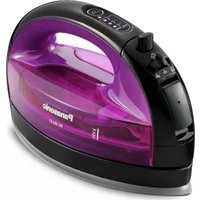
| Type | Cordless Steam Iron |
| Model Number | NI-WL55 |
| Brand | Panasonic |
| Power Source | 220-240 V ~ 50-60 Hz |
| Power Consumption | 1,680-2,000 W |
| Weight (Iron only) | Approx. 1.0 kg |
| Weight (with Cover Case) | Approx. 1.9 kg |
| Dimensions (W x D x H) | Approx. 288 x 180 x 210 mm |
| Water Tank Capacity | Approx. 135 mL |
| Cordless Design | Yes, with power base |
| Steam Function | Low steam and High steam settings |
| Power Shot | Yes, for stubborn wrinkles and vertical steaming |
| Vertical Shot | Yes, for hanging garments |
| Dry Ironing | Yes, selectable via steam/dry selector |
| Anti-Calc System | Built-in anti-calc cassette in water tank |
| Anti-Drip System | Automatic water seal prevents water leakage |
| Automatic Shut-Off | After approx. 10 minutes on power base |
| Temperature Control | Push-button with indicator lights (LOW, MED, HIGH) |
| Fabric Guide | Printed on iron for recommended settings |
| Cover Case | Included for storage |
| Soleplate | Non-stick, smooth soleplate |
| Self-Cleaning | Via power shot to clean steam chamber |
| Safety Features | Auto shut-off, anti-drip, overheat protection |
| Intended Use | Household only |
Frequently Asked Questions - NI-WL55 PANASONIC
User questions about NI-WL55 PANASONIC
0 question about this device. Answer the ones you know or ask your own.
Ask a new question about this device
Download the instructions for your Iron in PDF format for free! Find your manual NI-WL55 - PANASONIC and take your electronic device back in hand. On this page are published all the documents necessary for the use of your device. NI-WL55 by PANASONIC.
USER MANUAL NI-WL55 PANASONIC
Operating Instructions
使用説明書
Arahan Penggunaan
(Household Use Only) Cordless Steam Iron
(空腹家庭使用) 無绳蒸気電熨斗
Model No. / 型號 / No. Model NI-WL55

natural_image
Line drawing of two hard hats, one open and one closed, with no text or symbols present.Website: http://www.panasonic.com
c Panasonic Corporation 2024
Printed in China
中國印
Dicetak di China
P0924-0
English 3-15
繁體中文 16-27
Melayu 28-40
i6200A-6S63A
Panasonic
English
Operating Instructions
(Household Use Only) Cordless Steam Iron
Model No. NI-WL55
Contents
| Safety precautions | -04-08 |
| Anti-Calc system | -08 |
| Automatic shut-off | -06 |
| Anti-drip system (Automatic water seal) | -08 |
| Parts identification | -09 |
| How to use as a steam iron | -10-12 |
| How to use the power shot and the vertical shot | -12 |
| How to use as a dry iron | 12 |
| Fabric and ironing recommendations | -13 |
| How to care for your iron | -13 |
| Frequently asked questions | 14 |
| Trouble shooting | -14 |
| Specifications | -15 |
Thank you for purchasing this Panasonic product.
Before operating this unit, please read these instructions completely and save them for future use.
Safety precautions
To reduce the risk of injury, loss of life, electric shock, fire, and damage to properly, always observe the following safety precautions.
Explanation of symbols
The following symbols are used to classify and describe the level of hazard, injury, and properly damage caused when the denolation is disregarded and improper use is performed.
WARNING
Denotes a potential hazard that could result in serious injury or death.
CAUTION
Denotes a hazard that could result in minor injury or damage your belongings.
The following symbols are used to classify and describe the type of instructions to be observed.

This symbol is used to alert users to a specific operating procedure that must not be performed.

This symbol is used to alert users to a specific operating procedure that must be followed in order to operate the unit safely.

WARNING
Do not use when the power plug or power cord is damaged or hot.
Never use the iron if the power plug fits loosely in a household outlet.
- Doing so may cause electric shock, or fire due to a short circuit.
Do not leave the appliance unattended while it is connected to the outlet. - Doing so may cause fire.
Do not connect or disconnect the power plug to a household outlet with wet hands. - Doing so may cause electric shock or injury.
Do not damage, modify, forcibly bend, pull, or twist the power cord. Do not place anything heavy on or pinch the power cord. - Doing so may cause electric shock or fire due to a short circuit.
Do not wrap the power cord around the appliance when storing. - Doing so may cause breakage to the wire of the cord, and may cause electric shock or fire due to a short circuit.
Do not use with the power cord bundled. - Doing so may cause fire or electric shock.
Do not use the iron with wet hands. - Doing so may cause electric shock or fire due to a short circuit.
Do not use in proximity of flammable materials (such as benzine). - Doing so may cause an explosion or fire.
WARNING
Do not allow the power cord to touch hot surfaces of the iron. - Doing so may cause electric shock or injury.
Never modify, disassemble, or repair the appliance by yourself. - Doing so may cause ignition or injury due to abnormal operation. Contact an authorized service agent for repair.
Do not immerse the iron in water or other liquids. Do not supply water to the unit directly from the faucet. - Doing so may cause burns, electric shock or fire due to a short circuit.
The iron is not to be used if it has been dropped, if there are visible signs of damage or if it is leaking. - Contact an authorized service agent for repair.
Always ensure the appliance is operated on an electric power source matched to the rated voltage indicated on the appliance. Fully insert the power plug.
! Be sure to take out the water tank when adding water; be sure to install the water tank in place when installing it back to the base. - Failure to do so may cause electric shock.
The iron must only be used with the power base provided. When the iron is not in use, always place the iron securely into the power base. - Failure to do so may cause the product to fall, fire, injury or burn.
! Regularly clean the power plug to prevent dust from accumulating. - Disconnect the power plug and wipe with a dry cloth. - Failure to do so may cause an accident or injury.
Immediately stop using and unplug the power plug if there is an abnormality or malfunction. Examples of abnormalities: - The iron stops occasionally, the power cord or the power plug is abnormally hot or discolored. - The iron is deformed or smells of burning. - Contact an authorized service agent for repair.
This appliance is not intended for use by persons (including children) with reduced physical, sensory or mental capabilities, or lack of experience and knowledge, unless they have been given supervision or instruction concerning use of the appliance by a person responsible for their safety. Children should be supervised to ensure that they do not play with the appliance. - Failure to do so may cause an accident or injury.
WARNING
If the power cord is damaged, it must be replaced by the manufacturer, its service center, or similarly qualified persons in order to avoid a hazard.
The iron must be firmly rested on the power base, and the power base must be placed on a flat and stable surface. When this product is used as a horizontal steam iron, the iron must be used and rested on a flat, stable surface.
The soleplate may be scratched, or even injuries or scald injuries may occur if the iron head falls over.
CAUTION
Do not touch the hot surface (such as the surface of the soleplate, any side of the iron and the hot area around it) during use.
Do not place your hands, feet, etc. under the ironing board.
Do not place the appliance on your hand, knee or any other part of the body.
Do not use steam when the iron is partially sticking out from the ironing board.
- Doing so may cause scalds.
Do not insert pins or needles into the steamer head or use the product on clothes with sewing needles or the like inserted.
- Doing so may cause these articles to enter the product, thus resulting in a fire.
Do not add perfume, vinegar, starch, descaling agents, ironing aids or other chemicals in the water tank. (Only use normal temperature tap water in the iron.)
- Doing so may cause scalds or damage to the product.
Do not touch the steam or "power shot" during USB.
- When using an ironing board through which steam can penetrate, do not put your hand, leg, etc., under the ironing board.
• Do not aim the steam towards your hand, knee, or any other part of the body.
- Do not use steam or "power shot" when the iron is partially sticking out from the ironing board.
• Do not iron the clothes that you are wearing.
Do not put the soleplate too close to you or others since steam may unexpectedly erupt from it.
- Doing so may cause scalds or injury.
Do not use the iron with the exception of fabric. - Failure to do so may cause damage it.
Do not store the iron until it has fully cooled down
- Doing so may cause scalds.
Do not tilt or violently move the iron back and forth.
- Doing so may cause burns due to hot water leaks.
CAUTION
Do not store the power cord coiled with sharp angles.
- This may damage the cord.
Do not repeatedly and quickly press the power shot button.
- If repeated operation is conducted over an interval of less than 2 seconds, it may result in burns due to hot water leakage.
If the shot intensity becomes low, do not operate the power shot button.
- Doing so may cause bums due to hot water leaks.
Do not use any ironing accessories available on the market.
- Doing so may cause burns or damage to cloth due to incorrect operation.
Do not use the product in the following places. • Near walls or furniture that cannot withstand
high temperature or humidity
- Doing so may damage the wall or furniture. - With high temperature, high humidity and too much dust
- Doing so may cause fire or electric shock.
- With oily smoke, like kitchens
- Otherwise, the product may be corroded by oily smoke, thus resulting in injury or electric shock, and fire may be caused due to a short circuit.
• Where flammable gases are present
- Doing so may cause smoking or ignition.
Do not hold the iron in opposite handle direction. - Doing so may cause burn due to water leak by wrong operation.
Do not use steam when wearing gloves through which steam can penetrate.
Doing so may cause scalds.
Use a dry iron on moist clothing (spray misted). - Failure to do so may damage the clothing.
Drain water from the water tank after use. - Failure to do so may cause the water to leak out from the soleplate when the iron is used next time.
! Disconnect the power plug by holding the wire instead of pulling on the power cord.
- Failure to do so may break the power cord, and may cause bums, electric shock, or fire due to a short circuit.
When using with following fabric, test on an inconspicuous area, or place a cloth over the fabric to prevent the fabric from marking.
- Expensive or specially processed fabrics (valvet, acrylic, nylon, cashmere, etc.)
• Fabrics that are labeled as "low heat" or
"medium heat", or dark colored fabrics.
- Failure to do so may damage the clothing.
CAUTION
The plug must be removed from the socket-outlet before the water tank is filled with water.
Also, disconnect the power plug during emptying, cleaning and not in use.
- Failure to do so may cause electric shock or fire due to electrical leakage resulting from insulation deterioration.

Use the appliance only for its intended purpose, for ironing fabric
- Failure to do so may cause injury.

Do not store the product in the following places. - With high temperature or high humidity, or where fireworks are present.
With water spray.
- Doing so may cause product deterioration or malfunction, or result in an accident or injury.
Anti-Calc system
• The built-in anti calc system in the water tank continuously
reduces scale build up in the vaporizing
chamber of the iron. This system makes
possible to use the steam function for a
long period of time and prevents steam vents from clogging.
• Ordinary water can be used in this iron
for a long time, and steam function

Anti calcium cassette
(In the water tank)
Automatic shut-off
• The iron will automatically shut itself off if the iron has been
left on the power base more than about 10 minutes.
• Turn the iron back on
* Tum the iron back on to resume ironing, simply push the temperature select
button until the red light appears at
the desired temperature control
Indicator.
*when at automatic shut-off mode, if the supply power shuts off and
if the supply power shuts oil and resumes to normal, the iron will
remain at automatic shut-off mode.

Anti-drip system (Automatic water seal)
Auto-drip system is built-in in the soleplate. when the
temperature of the sceleplate's surface drops to a certain temperature. The valve for the vaporizing
temperature, the valve for the vaporizing chamber in the iron automatically closes.
and stops the water from going in further
This prevents water from spitting out the
soleplate, staining the clothes. Besides
It is unnecessary for you to heat the
soleplate again and it will automatically dry, rises the iron when it rolled.

Auto-drip system
Parts identification


Cover case
Case lock lever
Power shot button
(1) Temperature control pad
Handle
- Water tank release button
① Water tank release ② Fabrio guide chart
Fabric guide Power hope
Power base
① Maximum water level
Indicator ("MAX" line)
Power cord
Power plug
Power cord storage
compartment
Water tank
N Soleplate
Water fill cover
Steam/dry selector
- Steamfly selector ※ Plug type may vary compiv
with respective country or
region requirement
D Temperature control pad

How to use as a steam iron
- Remove the cover case:
Place the unit on a himm and stable surface, while
pull/press the case lock
lever, lift the cover case
to open.

[NO TEXT]
- Move the steam/dry selector to "Dry" position.

- Remove the water tank by pressing the water tank release button. ① Press the release button. ② Remove the water tank.

- Open the water fill cover. Fill the water tank up to the "MAX" line.

- Close the water fill cover. Re-install the water tank into the main unit. Push it until a click sound is heard.

- Take the power cord out of the power cord storage compartment, untie the power cord.
Power cord storage compartment

Notes:
- While filling the water tank with water, do not plug the power cord into an outlet.
- Do not overfill the water tank. Check the water level with the water tank held in its vertical position.
- Use pure tap water.
-
Falling off may cause fracture of the water tank, thus resulting in water leakage. Please be careful.
-
Plug the power cord into an electrical outlet.
Set the iron on the power base securely. Push the temperature select button.
Until the temperature control indicator
light for steam zone starts blinking.

Notes
- When using the slearn, please set the temperature select scale to *MED* or "HIGH".
- For high steam, please set to "HIGH". Low temperature will lead to water leakage.
-
Do not leave the iron unattended while it is connected to the electrical source.
-
a) Preheat the iron until the temperature control
indicator light changes from blink to illumination
(when the iron is placed on the power base during use.
it is reheated as long as
the temperature
decreases, however
the light will Illuminate Instead of
blinking.)
b) Move the steam/dry
selector, select steam
quantity; and start to iron
c) Please confirm the water volume during use. Pull out
the plug before remining the iron according to the step 2.6
Notes
- The iron should be set on the power base securely for connecting to power supply. While not in use, please set back on the power base to maintain the selected temperature. Just put the iron into power base, don't put it at other place.
- This iron must only be used with the power base provided.
- When steam does not come out enough during use, set the iron back on the power base to reheat it for approx. 30 seconds.
Steam/dry selector (switch as the following)

Dry | Low steam | High steam
Low sleetam for thin or delicate fabrics that require small amount of sleetam.
High steam: for fabrics that require high amount of steam (i.e.thick materials, items with stubborn wrinkles.)
After use
- After ironing, push the temperature select button until the "OFF" light turns on, pull out the plug. Move the steam/dry selector to "Dry" position
- Press the water tank release button, take out the water tank.
Empty water from the water tank. - Re-install the water tank, kee the steam/dry selector in the "Dry" position.


- Set the iron back to the power base.
Push the cover case down until a
click sound is heart iron in a safe place.
• After ironing, while cool down
and store; always keep the steam
button in the "Dry" position.
• The Iron can be stored in the cover case when it is still hot.

How to use the power shot and the vertical shot
For fabrics of thick materials and with stubborn wrinkles, and cleaning the steam vents at the same time.
-
Keep the steam/dry selector in the "Dry" position and set the temperature select button to "HIGH" zone, or some hot water will drop from the iron.
-
Pump the power shot button
after the indicator ligh
changes from blink to
nummation.
The interval of pumping for the power-shot blow-up
for the power shot should not be shorter than
2 seconds to avoid
hot water dripping from the soleplate.
- When the steam does not come out sufficiently at the beginning of use, pump the power shot button several times until the steam comes out.
When using the vertical shot
Hang the garment on a clothes hanger. Hold the iron
away from your body, close to but not touching the
fabric. Pull the fabric tight with your free hand and pump the power shot button 2-5 seconds interval.
Notes:
- Never iron clothes on the body or point your iron at anyone when steaming.
- When steam does not come out enough during use, set the iron back on the power base to reheat it for approx. 30 seconds.
How to use as a dry iron
-
Remove the cover case same as step 1 of "How to use as a steam iron", move the steam/dry selector to the "Dry" position.
-
Set the iron on the power base securely, insert the
appliance plug into the power base and plug the
power plug into an electrical outlet.
- According to «Fabric and Ironing recommendations» push the temperature select button to the desired position.
Preheat the iron until the temperature control indicator light changes from blink to illumination, and start to iron.
- After ironing, set the iron back to the power base and pull out the plug. Push the cover case vertically until a click sound is heard; then store the Iron in a safe place.
Fabric and ironing recommendations
| Fabric | Temperature setting | Ironing recommendations |
| Acrylic Acetate | LOW | Dry iron on reverse side, or use a press cloth on top of fabric. |
| Nylon Silk | Dry iron on reverse side. | |
| Polyester Rayon | MED | Dry iron on reverse side. To touch-up collars, cuffs, pockets, etc., iron lightly on right side. |
| Wool | Iron lightly on right side. | |
| Cotton | HIGH | Steam ironing is suggested. Iron dark fabrics on reverse side to avoid unwanted sheen. |
| Linen |
Notes:
- For heal-sensitive fabric, use a press cloth on top of fabric,
otherwise it will ruin or damage the clothes. - Iron blended fabrics, setting the temperature according to lower-temperature fiber.
- Iron clothes with less heat resistance first while ironing the different kinds of cloth.
How to care for your iron
▶ Surface of the Iron
• After unplugging and
cooling the iron, simply
wipe with a damp cloth and if necessary use a X — Remove stain powder
and if necessary, use of neutral detergent
• Never use any
strong cleaners.
Banana liquid
[Non-Text]
move stain powder
/volatile detergent
[Non-Text]

[Non-Text]
▶ Soleplate
• Starch and other residue may be easily removed from the crystals with a demo cloth.
Soleplate with a camp dog.
- To avoid scratching the surface, never use a metallic pad to clean the coloniate, and never place the iron on a rough
surface
• The best way to remove synthetic residue from the soleplate
is to iron over an old cotton cloth rag after healing the iron.
Notes:
* Never use cleaners or steam iron detergent in the iron, since
they may damage the working parts of the iron.
- Some odor may be released during initial use of the iron.
however, this is normal and the odor will not effect to your
clothes.
Self-cleaning
Cleaning the steam chamber of soleplate
and steam vents with power shot, according
to «How to use the power shot and the
vertical shot×(P12), pump the power shot
Dutton several miles until security is invalid.

Frequently asked questions
| English | Why click sound or metallic sound can be heard while using or shaking the iron? | These sounds are made by the internal parts of the iron, leakage prevention, etc., moving slightly. This is normal. |
| Why do the clothes sometimes become brown after being ironed? | If there is laundry detergent remaining on the fabric, the clothes may become brown after being ironed. | |
| Why are there white powder/particles coming out of the steam vents while using the steam function (especially when using "power shot")? | The powder/particles are hydrophilic treatment or impurities and minerals found in hard water, etc. These are not harmful and can be brushed off clothing. |
Trouble shooting
| Problem Causes, Solution | |
| No heating | Make sure the power plug and the appliance plug are fully plugged into a household outlet or the power base. |
| No steam | Fill the water tank with tap water up to maximum water level indicator.If there is no steam, set the steam/dry selector to the steam position, or set the temperature select button to "HIGH". |
| Poor steaming power | For poor steam, move the steam/dry selector several times, then reset to the steam position, set the temperature select button to "HIGH".Press the power shot button several times when the "power shot" appears insufficient.Wait until the temperature control indicator light changes from blink to illumination. |
| Water leaks from steam vents | Press the power shot button in intervals of at least 2-5 seconds when using the "power shot".Make sure the temperature control indicator setting is on "HIGH" position. |
| Clothes are marked | Empty the water tank and fill it with clean water. It using a container to fill the water, use a clean one. There may be contaminants in the iron. |
Specifications
| Model No. | NI-WL55 |
| Power source | 220-240 V ~ 50-60 Hz |
| Power consu- mption | 1 680-2 000 W |
| Weight (approx.) | 1.0 kg |
| Weight (with cover case) (approx.) | 1.9 kg |
| Water tank capacity (approx.) | 135 mL |
| Dimension (approx.) | (WxDxH) 288 × 180 × 210 mm |
This iron is intended for household use only.
Panasonic
使用說明書
(無依家店使用) 無線蒸氣電熨斗
A Bekas penutup
③ Tuil kunci bekas
© Butang power shot
Pad kawala
Pemegang
F Butang pelepasan tangki air
Carta panduan fabrik
Tapak kuasa
① Petunjuk paras air
maksimum/paris "MAX"
maksimum (gains MAX) Kord kuasa
Koru kuasa Palam kuasa
- Tekan butang power shot
- Panasonic
- Safety precautions
- Explanation of symbols
- WARNING
- CAUTION
- Anti-Calc system
- Automatic shut-off
- Anti-drip system (Automatic water seal)
- How to use as a steam iron
- Notes:
- Notes
- Steam/dry selector (switch as the following)
- After use
- How to use the power shot and the vertical shot
- How to use as a dry iron
- How to care for your iron
- Self-cleaning
Brand : PANASONIC
Model : NI-WL55
Category : Iron