
DS-082 - Digital media player Advantech - Free user manual and instructions
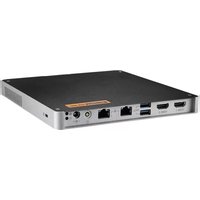
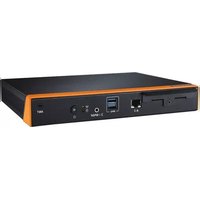
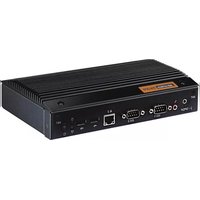
Find the device manual for free DS-082 Advantech in PDF.


| Product Type | Digital Signage Player |
| Brand | Advantech |
| Model | DS-082 Series |
| Processor | AMD Ryzen V1807B/V1605B/R1606G |
| Graphics | Integrated AMD Radeon graphics |
| Memory | 2x 260-pin DDR4 SODIMM, up to 16GB per slot |
| Storage | M.2 2242 M Key (SATA/NVMe) |
| Video Output | 3 or 4 HDMI 2.0, up to 3840x2160@60Hz |
| Ethernet | 1x Gigabit LAN (RTL8111G) |
| USB Ports | 2x USB 3.0, 2x USB 2.0 |
| Serial Port | 1x RS-232 (D-sub 9-pin) |
| Audio | SPDIF/Line-out/Mic-in combo jack |
| Expansion Slot | M.2 2230 E Key (Wi-Fi/Bluetooth) |
| Dimensions (LxWxH) | 180 x 190 x 19 mm |
| Weight | 0.87 kg (1.92 lbs) |
| Power Input | DC 19V, 3.42A or 4.74A depending on model |
| Operating Temperature | 0°C to 40°C (32°F to 122°F) |
| Cooling | Active blower or fanless (model dependent) |
| Mounting | VESA mount compatible, bracket included |
| Warranty | 2 years |
Frequently Asked Questions - DS-082 Advantech
User questions about DS-082 Advantech
0 question about this device. Answer the ones you know or ask your own.
Ask a new question about this device
Download the instructions for your Digital media player in PDF format for free! Find your manual DS-082 - Advantech and take your electronic device back in hand. On this page are published all the documents necessary for the use of your device. DS-082 by Advantech.
USER MANUAL DS-082 Advantech
natural_image
Illustration of four electronic circuit boards with white outlines on a purple background, no text or symbols present.DS-082
Ultra Slim
Digital Signage Player
Copyright
The documentation and the software included with this product are copyrighted 2019 by Advantech Co., Ltd. All rights are reserved. Advantech Co., Ltd. also reserves the right to improve the products described in this manual at any time without notice. No part of this manual may be reproduced, copied, translated, or transmitted in any form or by any means without the prior written permission of Advantech Co., Ltd. Information provided in this manual is intended to be accurate and reliable. However, Advantech Co., Ltd. assumes no responsibility for its use, nor for any infringements on the rights of third parties that may result from its use.
Acknowledgements
Award is a trademark of Award Software International, Inc.
IBM, PC/AT, PS/2 and VGA are trademarks of International Business Machines Corporation.
Intel® and ATOM® are trademarks of Intel Corporation.
RTL is a trademark of Realtek Semi-Conductor Co., Ltd..
ESS is a trademark of ESS Technology, Inc.
UMC is a trademark of United Microelectronics Corporation.
SMI is a trademark of Silicon Motion, Inc.
Creative is a trademark of Creative Technology LTD.
CHRONTEL is a trademark of Chrontel Inc.
All other product names or trademarks are properties of their respective owners.
For more information about this and other Advantech products, please visit our website at: http://www.advantech.com/ For technical support and service, please visit our support website at: http://support.advantech.com.tw/support/
Part No. 2006008200 Edition 1
Printed in China August 2019
Product Warranty (2 years)
Advantech warrants the original purchaser that each of its products will be free from defects in materials and workmanship for two years from the date of purchase.
This warranty does not apply to any products that have been repaired or altered by persons other than repair personnel authorized by Advantech, or products that have been subject to misuse, abuse, accident, or improper installation. Advantech assumes no liability under the terms of this warranty as a consequence of such events.
Because of Advantech's high quality-control standards and rigorous testing, most customers never need to use our repair service. If an Advantech product is defective, it will be repaired or replaced at no charge during the warranty period. For out-of-warranty repairs, customers are billed according to the cost of replacement materials, service time, and freight. Please consult your dealer for more details.
If you suspect your product to be defective, follow the steps listed below:
- Collect all information about the problem encountered (for example, CPU speed, Advantech products used, other hardware and software used, etc.). Note anything abnormal and list any onscreen messages displayed when the problem occurs.
- Call your dealer and describe the problem. Please have the manual, product, and any relevant information readily available.
- If your product is diagnosed as defective, obtain an RMA (return merchandise authorization) number from your dealer. This allows us to process your return more quickly.
- Carefully pack the defective product, a completed Repair and Replacement Order Card, and proof of the purchase date (such as a photocopy of your sales receipt) in a shippable container. Products returned without proof of purchase date are not eligible for warranty service.
- Write the RMA number clearly on the outside of the package; then ship the product prepaid to your dealer.
Declaration of Conformity
FCC Class B
Note: This equipment has been tested and found to comply with the limits for a Class B digital device, pursuant to part 15 of the FCC Rules.
These limits are designed to provide reasonable protection against harmful interference when the equipment is operated in a commercial environment. This equipment generates, uses, and can radiate radio frequency energy and, if not installed and used in accordance with the instruction manual, may cause harmful interference to radio communications. Operation of this equipment in a residential area is likely to cause harmful interference in which case the user will be required to correct the interference at his own expense.
Technical Support and Assistance
- Visit the Advantech website at http://support.advantech.com for the latest product information.
- Contact your distributor, sales representative, or Advantech's customer service center for technical support if you require additional assistance. Please have the following information ready before calling:
– Product name and serial number
– Description of your peripheral attachments
– Description of your software (operating system, version, application software, etc.)
– A complete description of the problem
– The exact wording of any error messages
Warnings, Cautions, and Notes
Warning! Warnings indicate conditions, which if not observed, can cause personal injury!

Caution! Cautions are included to help users avoid hardware damage and data loses.

For example, “New batteries are at risk of exploding if incorrectly installed. Do not attempt to recharge, force open, or heat the battery. Replace the battery only with the same or equivalent type recommended by the manufacturer. Discard used batteries according to the manufacturer's instructions.”
Note! Notes provide additional information.

Packing List
Before installation, please ensure that the following items have been shipped:
■ 1 x DS-082 series player
1 x Driver/Utility Disk
1 x China RoHS Sheet
1 x User manual
1 x Mounting kit
■ 1x 19V power adapter
Safety Instructions
- Read these safety instructions carefully.
- Retain this user manual for future reference.
- Disconnect this equipment from all AC outlets before cleaning. Do not use liquid or spray detergents for cleaning. Instead, use only a damp cloth.
-
For pluggable equipment, the power outlet socket should be located nearby and easily accessible.
-
Protect this equipment from humidity.
-
Place this equipment on a reliable surface during installation. Dropping or letting the equipment fall can cause damage.
-
The openings on the enclosure are for air convection to protect the equipment from overheating. Do not cover the openings.
-
Ensure that power voltage is correct before connecting the equipment to a power outlet.
-
Position the power cord so that people cannot step on it. Do not place anything over the power cord.
-
All cautions and warnings on the equipment should be noted.
-
If not used for a long time, disconnect the equipment from the power source to avoid damage by transient overvoltage.
-
Never pour liquid into the openings. This can cause fire or electrical shock.
-
Never open the equipment. For safety reasons, the equipment should only be opened by qualified service personnel.
-
If one of the following occurs, have the equipment checked by authorized service personnel:
■ The power cord or plug is damaged.
■ Liquid has penetrated the equipment.
■ The equipment has been exposed to moisture.
The equipment is malfunctioning, or does not operate according to the user manual.
■ The equipment has been dropped or damaged.
■ The equipment shows obvious signs of breakage.
-
Do not store this equipment in an environment where the temperature fluctuates below -20 ^ ( -4 ^ ) or above 60 ^ ( 140 ^ ) as this can cause damage. The equipment should be stored in a controlled environment.
-
CAUTION: Batteries are at risk of exploding if incorrectly installed. Replace only with the same or equivalent type recommended by the manufacturer. Discard used batteries according to the manufacturer's instructions.
-
The sound pressure level at the operator's position according to IEC 704-1:1982 is no more than 70 dB (A).
-
RESTRICTED ACCESS AREA: The equipment should only be installed in a Restricted Access Area.
-
DISCLAIMER: These instructions are provided according to IEC 704-1. Advantech disclaims all responsibility for the accuracy of all statements contained herein.
DS-082 Series Part Number
Chapter 1 General Introduction ......1
1.1 Introduction 2
1.2 Product Features.... 2
1.2.1 General 2
1.2.2 Display 2
1.2.3 Thermal Solution.... 2
1.3 Hardware Specifications .... 3
1.4 Mechanical Specification.... 4
1.4.1 Dimension 4
Figure 1.1 Dimensions....4
1.4.2 Weight.... 4
1.5 Power Requirements.... 5
1.5.1 System Power: 5
1.5.2 RTC Battery: 5
1.6 Environmental Specifications 5
1.6.1 Operating Temperature.... 5
1.6.2 Relative Humidity 5
1.6.3 Storage Temperature.... 5
1.6.4 Vibration Loading During Operation (HDD) 5
1.6.5 Shock During Vibration 5
1.6.6 Safety....5
1.6.7 EMC 5
Chapter 2 Hardware Installation ....7
2.1 DS-082 Series I/O Connectors 8
Figure 2.1 Front View 8
Figure 2.2 Rear View 8
2.2 DS-082 Series External I/O Connectors 8
2.2.1 Power ON/OFF Button 8
Figure 2.3 Power Button 8
2.2.2 DC Input Connector 8
Figure 2.4 DC Input Connector....8
2.2.3 LAN Connector 9
Figure 2.5 LAN Connector 9
2.2.4 HDMI Connector 10
Figure 2.6 HDMI Connector.... 10
2.2.5 USB Connectors 11
Figure 2.7 USB Connector.... 11
2.2.6 COM Connector 11
Figure 2.8 COM Connector.... 11
2.2.7 Audio Connectors 12
Figure 2.9 Audio Connector.... 12
2.3 Hardware Installation 12
2.3.1 Storage Installation (M.2 2242).... 12
Figure 2.10M.2 Storage Installation.... 12
2.3.2 M.2 2230 Module/Memory Module Installation 13
Figure 2.11M.2 2230 Module / Memory Module Installation..... 13
2.3.3 Mounting Bracket Installation.... 14
Figure 2.12Mounting Bracket Installation 14
2.3.4 Mounting Direction 14
Figure 2.13Mounting Direction.... 14
Chapter 1
General Introduction
This chapter gives background information on the DS-082 series.
1.1 Introduction
DS-082 series is powered by AMD Ryzen V1000 & R1000 processors for 4K video playback performance. DS-082 series is a media player that delivers advanced graphics performance for all your signage applications. DS-082 series has 3/4 HDMI to provide multi display outputs simultaneously. For better connectivity, it supports 1x LAN, internal 1 x M.2 2230 interface for add-on functions such as wireless network/Bluetooth fulfill different requirements. It also supports 4x USB (2.0x2, 3.0x2), 1xCOM ports for system integration and applications.
1.2 Product Features
1.2.1 General
■ Supports AMD Ryzen V1807B/V1605B/R1606G processors
■ Supports 3/4 x HDMI, 1 x GbE, 4 x USB, 1 x COM (RS-232)
■ Supports M.2 2242 M Key for storage
■ Built-in M.2 2230 E Key slot for easy expansion
■ Ultra Slim Features, easy to install. Easy integration and easy maintenance
1.2.2 Display
HDMI 2.0 x 4 @3840x2160@60Hz (DS-082GB-T4A1E / DS-082GB-U0A1E / DS-082GBF-U0A1E)
■ HDMI 2.0 x 3 @3840x2160@60Hz (DS-082GB-U6A1E / DS-082GBF-U6A1E)
1.2.3 Thermal Solution
Active Blower
(DS-082GB-T4A1E / DS-082GB-U0A1E / DS-082GB-U6A1E)
Fanless
(DS-082GBF-U0A1E / DS-082GBF-U6A1E)
1.3 Hardware Specifications
CPU: AMD V1807B/V1605B/R1606G
■ System Chipset: Integrated in SOC
■ Graphic chipet: Integrated graphics built in Processor
BIOS AMI uEFI 128 Mbit
System Memory: 2 x 260pin DDR4 SODIMM, Up to 16GB single DIMM
■ Storage: M.2 2242 M Key
■ Watchdog Timer: supported by Advantech SUSIAccess
IO Interfaces
- 1 x RS-232
- 3/4 x HDMI
- 4 x USB (2.0 x 2, 3.0 x 2)
- 1 x (SPDIF/Line-out/ Mic-in), support Jack Sense
Ethernet Chipset: 1 x RTL8111G
– Speed: 100/1000 Mbps
- Interface: 1 x RJ-45 jacks with LED
- Standard: IEEE 802.3z/ab (1000 Base-T), IEEE 802.3u 100 Base-T compliant
Resolution
- 3840 x 2160 @ 60Hz
Expansion
- M.2 2230 E Key x 1
1.4 Mechanical Specification
1.4.1 Dimension
180 x 190 x 19mm (L x W x H)

Figure 1.1 Dimensions
1.4.2 Weight
0.87 kg (1.92 lbs)
1.5 Power Requirements
1.5.1 System Power:
Minimum power input: DC19V, 3.42A (DS-082GB-U0A1E/ DS-082GBF-U0A1E/ DS-082GB-U6A1E/ DS-082GBF-U6A1E)
Minimum power input: DC19V, 4.74A (DS-082GB-T4A1E)
1.5.2 RTC Battery:
BATTERY 3V 195mAh BR2032
1.6 Environmental Specifications
1.6.1 Operating Temperature
0°C - 40°C (32\~122°F) with 0.7 m/s airflow
1.6.2 Relative Humidity
95% @ 40°C ( Non Condensing )
1.6.3 Storage Temperature
-20 \~ 60°C (-4\~140°F)
1.6.4 Vibration Loading During Operation (HDD)
0.5 Grms, IEC 60068-2-64, random, 5 \~ 500 Hz, 1 hr/axis.
1.6.5 Shock During Vibration
20 G, IEC 60068-2-27, half sine, 11 ms duration
1.6.6 Safety
UL, BSMI, CCC
1.6.7 EMC
CE, FCC Class B, BSMI, CCC
Chapter 2
Hardware Installation
This chapter introduces external I/O and the installation of DS-082 series hardware.
2.1 DS-082 Series I/O Connectors
![ANT HDMI 1 HDMI 2 HDMI 3 HDMI 4 22 [0.87]](/content/2026/05/942833/images/d7dd70e7bff48f68e2d331aef65ad5e24582fcec207f00f24f3d00f3c6465cc1.jpg)
Figure 2.1 Front View
![ANT SPDIF 19 [0.75]](/content/2026/05/942833/images/1efc3731c7985c2157e07fdbc2389e631c369da58309f5732c10e4e88e7df630.jpg)
Figure 2.2 Rear View
2.2 DS-082 Series External I/O Connectors
2.2.1 Power ON/OFF Button
DS-082 Series has a power ON/OFF button on the front side. Push this button to turn the system ON and OFF. It also supports a 5 second delay soft power off.

natural_image
Simple diagram showing a power button and concentric circles (no text or symbols)Figure 2.3 Power Button
2.2.2 DC Input Connector
DS-082 Series supports 19VDC DC power in.

natural_image
Pure electrical circuit symbol diagram without any text or labelsFigure 2.4 DC Input Connector
2.2.3 LAN Connector
DS-082 Series provides one RJ-45 LAN interface connector, fully compliant with IEEE802.3u 10/100/1000 Base-T CSMA/CD standards. The Ethernet port provides a standard RJ-45 jack connector with LED indicators to show its Active/Link status and speed status.

natural_image
Pure electrical connector diagram without any text, numbers, or symbolsFigure 2.5 LAN Connector
| LAN Port Pin Assignments | |||
| Pin Signal | |||
| 1 | M | D | I |
| 2 | M | D | I |
| 3 | M | D | I |
| 4 | M | D | I |
| 5 | GND | ||
| 6 | GND | ||
| 7 | M | D | I |
| 8 | M | D | I |
| 9 | M | D | I |
| 10 MDI3- | |||
| 11 VCC | |||
| 12 ACT | |||
| 13 +V3.3 & Link1000# | |||
| 14 +V3.3 & Link100# | |||
2.2.4 HDMI Connector
The HDMI (High-Definition Multimedia Interface) provides an all-digital audio/video interface to transmit the uncompressed audio/video signals and is HDCP compliant. Connect the HDMI audio/video device to this port. HDMI technology can support a maximum resolution of 3840 x 2160 @ 60 Hz but the actual resolution supported depends on the monitor being used.

natural_image
Diagram of an internal connector with labeled pins (no text or symbols beyond labels)Figure 2.6 HDMI Connector
| HDMI Pin Assignments | |||
| Pin Signal | |||
| 1 | T | M | D |
| 2 TMDS Data 2 shield | |||
| 3 | T | M | D |
| 4 | T | M | D |
| 5 TMDS Data 1 shield | |||
| 6 | T | M | D |
| 7 | T | M | D |
| 8 TMDS Data 0 shield | |||
| 9 TTMD S Data 0- | |||
| 10 TMDS Clock+ | |||
| 11 TMDS Clock shield | |||
| 12 TMDS Clock- | |||
| 13 CEC | |||
| 14 Reserved | |||
| 15 SCL | |||
| 16 SDA | |||
| 17 DDC/CEC Ground | |||
| 18 +5V | |||
| 19 Hot Plug Detect | |||
2.2.5 USB Connectors
DS-082 Series provides four USB interface connectors, which gives complete Plug & Play and hot swapping capability for up to 127 external devices. The USB interface is compliant with USB UHCI, Rev. 3.0/2.0. The USB interface supports Plug and Play, which enables you to connect or disconnect a device without turning off the system.

Figure 2.7 USB Connector
| USB Port Pin Assignments | |
| Pin Signal | |
| 1 | VCC |
| 2 USB Data- | |
| 3 USB Data+ | |
| 4 | GND |
2.2.6 COM Connector
DS-082 Series provides one D-sub 9-pin connectors serial communication interface port. The ports support RS-232 communications.

Figure 2.8 COM Connector
| COM Port Pin Assignments | |
| Pin Signal | |
| 1 DCD | |
| 2 | RxD |
| 3 | TxD |
| 4 | DTR |
| 5 | GND |
| 6 | DSR |
| 7 | RTS |
| 8 | CTS |
| 9 | RI |
2.2.7 Audio Connectors
DS-082 Series S/PDIF can be connected to Stereo speakers, earphone or surround speakers.
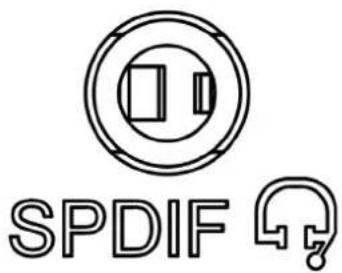
Figure 2.9 Audio Connector
2.3 Hardware Installation
2.3.1 Storage Installation (M.2 2242)
- Remove the top cover by loosening the fixing screws
- Install M.2 2242 module and fix screw
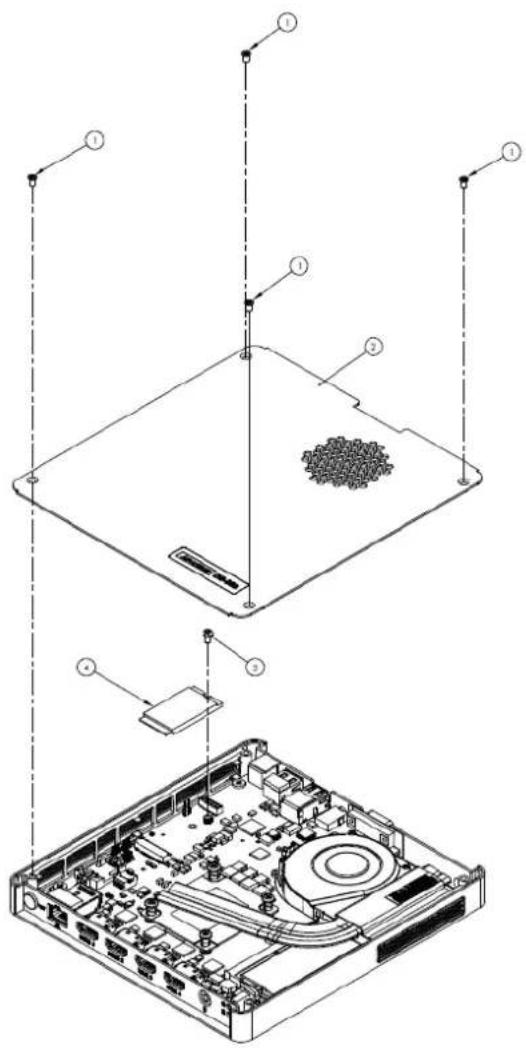
Figure 2.10 M.2 Storage Installation
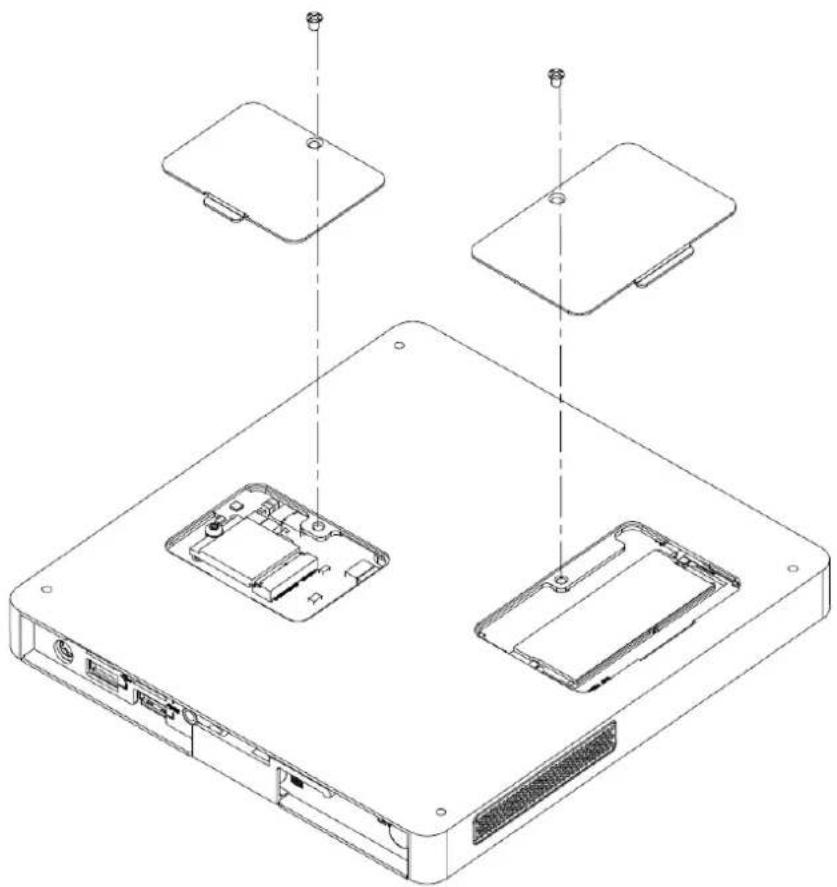
2.3.2 M.2 2230 Module/Memory Module Installation
- Remove the bottom cover by loosening the fixing screws and then insert M.2 2230 Module and Memory Module into the socket.
natural_image
Technical line drawing of an electronic device showing internal components and mounting points (no text or symbols)Figure 2.11 M.2 2230 Module / Memory Module Installation
2.3.3 Mounting Bracket Installation
- Find 4 pcs of M3 screws to affix the mounting brackets on system bottom. (The screws and mounting brackets are both included in the system accessory box)

natural_image
Technical line drawing of a device chassis with mounting hardware and internal compartments (no text or symbols)Figure 2.12 Mounting Bracket Installation
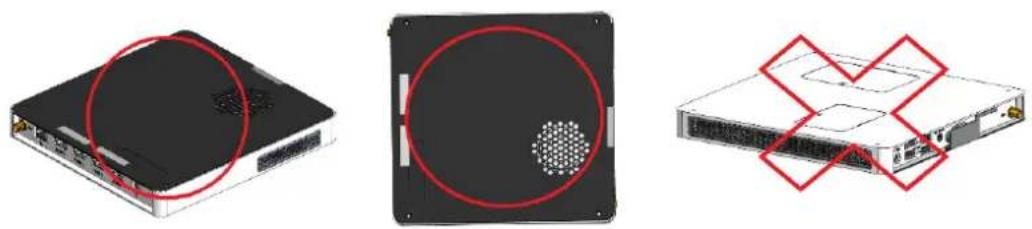
2.3.4 Mounting Direction

natural_image
Three technical illustrations of a server rack with labeled ports and a red circle highlighting the front panel (no text or symbols present)Figure 2.13 Mounting Direction
ADVANTECH
Enabling an Intelligent Planet
www.advantech.com
Please verify specifications before quoting. This guide is intended for reference purposes only.
All product specifications are subject to change without notice.
No part of this publication may be reproduced in any form or by any means, such as electronically, by photocopying, recording, or otherwise, without the prior written permission of the publisher.
All brand and product names are trademarks or registered trademarks of their respective companies.
© Advantech Co., Ltd. 2019
用户手册

natural_image
Illustration of four electronic circuit boards with white outlines on a purple background (no text or symbols)DS-082
计算机
版权声明
0^ C - 40^ C (32\~122° F) with 0.7 m/s airflow
1.6.2 相对湿度
95% @ 40° C(非凝结)
1.6.3 储存温度
-20^ C -60^ C (-4-140^ F)
1.6.4 工作时震动规格
0.5 Grms, IEC 60068-2-64, 随机, 5 \~ 500 Hz, 1 hr/axis
1.6.5 工作时冲击规格
natural_image
Simple line drawing of a power button and concentric circles (no text or symbols)图 2.3: 电源开关
2.2.2 电源输入
natural_image
Pure mechanical component diagram with concentric circles and a plus symbol below (no text or labels)图 2.4: 电源输入
2.2.3 音频接口
natural_image
Pure electrical connector diagram without any text or symbols图 2.6: 网络接口 (LAN)
| 网络接口 (LAN) 接脚定义 |
| Pin Signal |
| 1 MDT0+ |
| 2 MDT0- |
| 3 MD11+ |
| 4 MD11- |
| 5 GND |
| 6 GND |
| 7 MDT2+ |
| 8 MDT2- |
| 9 MD13+ |
| 10 MD13- |
| 11 VCC |
| 12 ACT |
| 13 +V3.3 & Link1000# |
| 14 +V3.3 & Link100# |
2.2.5 HDMI 界面
natural_image
Diagram of an electronic connector housing with labeled pins (no text or symbols beyond labels)图 2.7: HDMI 界面
| HDMI 接口接脚定义 |
| Pin Signal |
| 1 TMDS Data 2+ |
| 2 TMDS Data 2 shield |
| 3 TMDS Data 2- |
| 4 TMDS Data 1+ |
| 5 TMDS Data 1 shield |
| 6 TMDS Data 1- |
| 7 TMDS Data 0+ |
| 8 TMDS Data 0 shield |
| 9 TTMDS Data 0- |
| 10 TMDS Clock+ |
| 11 TMDS Clock shield |
| 12 TMDS Clock- |
| 13 CEC |
| 14 Reserved |
| 15 SCI |
| 16 SDA |
| 17 DDC/CEC Ground |
| 18 +5V |
| 19 Hot Plug Detect |
2.2.6 USB 界面
图 2.10: 安装储存装置
natural_image
Technical line drawing of an electronic device showing internal components and mounting points (no text or symbols)natural_image
Technical line drawing of a device chassis with mounting hardware and internal compartments (no text or symbols)图 2.12: 安装壁挂支架
2.3.4 安装方向
natural_image
Three technical illustrations of a server rack with labeled ports and mounting holes, showing no text or symbols.图2.13:安装方向
2.4 限用物质含有情况标示声明书
| 设备名称:计算机型号:DS-082Equipment nameType designation (Type) | ||||||
| 单元 Unit | 限用物质及其化学符号Restricted substances and its chemical symbols | |||||
| 铅 Lead(Pb) | 汞Mercury(Hg) | 镉Cadmium(Cd) | 六价铬Hexavalent chromium( Cr^+6 ) | 多溴联苯Polybrominated biphenyls(PBB) | 多溴二苯醚Polybrominated diphenyl ethers(PBDE) | |
| 电路板 - | ○ ○ ○ | ○ ○ | ||||
| 外壳 ○ ○ | ○ ○ ○ | ○ | ||||
| 螺丝、铜柱 | - | ○ | ○ | ○ | ○ | |
| 电源供应器 | - | ○ | ○ | ○ | ○ | |
| 散热模块 | ○ ○ ○ | ○ | ○ ○ | |||
| 备考1.“超出0.1 wt %”及“超出0.01 wt %”系指限用物质之百分比含量超出百分比含量基准值。Note 1.“Exceeding 0.1 wt %”and“exceeding 0.01 wt %”indicate that the percentage content of the restricted substance exceeds the reference percentage value of presence condition.备考2.“○”系指该项限用物质之百分比含量未超出百分比含量基准值。Note 2.“○”indicates that the percentage content of the restricted substance does not exceed the percentage of reference value of presence.备考3.“-”系指该项限用物质为排除项目。Note 3.The “-” indicates that the restricted substance corresponds to the exemption. | ||||||
www.advantech.com.cn
natural_image
Illustration of four electronic circuit boards with white outlines on a purple background (no text or symbols)DS-082
電腦
版權聲明
natural_image
Simple line drawing of a power button and concentric circles (no text or symbols)圖 2.3: 電源開關
2.2.2 電源輸入
natural_image
Pure mechanical component diagram with concentric circles and a plus symbol below (no text or labels)圖 2.4: 電源輸入
2.2.3 音訊介面
natural_image
Technical diagram of an electronic connector housing with labeled pins (no text or symbols beyond labels)圖 2.7: HDMI 介面
| HDMT 介面接腳定義 |
| Pin Signal |
| 1 TMDS Data 2+ |
| 2 TMDS Data 2 shield |
| 3 TMDS Data 2- |
| 4 TMDS Data 1+ |
| 5 TMDS Data 1 shield |
| 6 TMDS Data 1- |
| 7 TMDS Data 0+ |
| 8 TMDS Data 0 shield |
| 9 TTMDS Data 0- |
| 10 TMDS Clock+ |
| 11 TMDS Clock shield |
| 12 TMDS Clock- |
| 13 CEC |
| 14 Reserved |
| 15 SCL |
| 16 SDA |
| 17 DDC/CEC Ground |
| 18 +5V |
| 19 Ilot Plug Detect |
2.2.6 USB 介面
圖 2.10: 安裝儲存裝置
natural_image
Technical line drawing of an electronic device showing internal components and mounting points (no text or symbols)natural_image
Technical line drawing of a device chassis with mounting hardware and internal compartments (no text or symbols)圖 2.12: 安裝壁掛支架
2.3.4 安装方向

natural_image
Three technical illustrations of a server rack with highlighted ports and red prohibition signs (no text or symbols)圖 2.13: 安裝方向
2.4 限用物質含有情況標示聲明書
| 設備名稱:電腦Equipment name | 型號(型式):DS-082Type designation (Type) | |||||
| 單元 Unit | 限用物質及其化學符號Restricted substances and its chemical symbols | |||||
| 鉛 Lead(Pb) | 汞Mercury(Hg) | 鎘Cadmium(Cd) | 六價鉻Hexavalent chromium( Cr^+6 ) | 多溴聯苯Polybrominated biphenyls(PBB) | 多溴二苯醚Polybrominated diphenyl ethers(PBDE) | |
| 電路板- | ○ ○ ○ | ○ ○ | ||||
| 外殼 ○ ○ | ○ ○ ○ | ○ | ||||
| 螺絲、銅柱 | - | ○ | ○ | ○ | ○ | ○ |
| 電源供應器 | - | ○ | ○ | ○ | ○ | ○ |
| 散熱模組 | ○ ○ ○ | ○ | ○ ○ | |||
| 備考1.“超出0.1 wt %”及“超出0.01 wt %”係指限用物質之百分比含量超出百分比量基準值。Note 1.“Exceeding 0.1 wt %”and“exceeding 0.01 wt %”indicate that the percentage content of the restricted substance exceeds the reference percentage value of presence condition.備考2.“○”係指該項限用物質之百分比含量未超出百分比含量基準值。Note 2.“○”indicates that the percentage content of the restricted substance does not exceed the percentage of reference value of presence.備考3.“-”係指該項限用物質為排除項目。Note 3.The “-” indicates that the restricted substance corresponds to the exemption. | ||||||
ADVANTECH
Enabling an Intelligent Planet
www.advantech.tw

- DS-082
- Copyright
- Acknowledgements
- Product Warranty (2 years)
- Declaration of Conformity
- FCC Class B
- Technical Support and Assistance
- Warnings, Cautions, and Notes
- Packing List
- Safety Instructions
- DS-082 Series Part Number
- Chapter 1 General Introduction ......1
- Chapter 2 Hardware Installation ....7
- Chapter 1
- General Introduction
- Introduction
- Product Features
- General
- Display
- Thermal Solution
- Hardware Specifications
- Mechanical Specification
- Dimension
- Weight
- Power Requirements
- System Power:
- RTC Battery:
- Environmental Specifications
- Operating Temperature
- Relative Humidity
- Storage Temperature
- Vibration Loading During Operation (HDD)
- Shock During Vibration
- Safety
- EMC
- Chapter 2
- Hardware Installation
- DS-082 Series I/O Connectors
- DS-082 Series External I/O Connectors
- Power ON/OFF Button
- DC Input Connector
- LAN Connector
- HDMI Connector
- USB Connectors
- COM Connector
- Audio Connectors
- Hardware Installation
- Storage Installation (M.2 2242)
- M.2 2230 Module/Memory Module Installation
- Mounting Bracket Installation
- Mounting Direction
- ADVANTECH
- www.advantech.com
- 用户手册
- 版权声明
- 相对湿度
- 储存温度
- 工作时震动规格
- 工作时冲击规格
- 电源输入
- 音频接口
- HDMI 界面
- USB 界面
- 安装方向
- 限用物质含有情况标示声明书
- 版權聲明
- 電源輸入
- 音訊介面
- USB 介面
- 限用物質含有情況標示聲明書
Brand : Advantech
Model : DS-082
Category : Digital media player