
IT-200 - Medical thermometer UFESA - Free user manual and instructions
Find the device manual for free IT-200 UFESA in PDF.


| Product Type | Non-contact infrared thermometer |
| Dimensions (L×W×H) | 128.5 mm × 48.83 mm × 38.85 mm |
| Weight | Approx. 80 g (with batteries) |
| Power Supply | 2 × 1.5V AAA alkaline batteries |
| Measuring Range (Human) | 34 °C to 43 °C (93.2 °F to 109.4 °F) |
| Measuring Range (Object) | 0 °C to 100 °C (32 °F to 212 °F) |
| Accuracy (Human) | ±0.2 °C (±0.4 °F) from 34 to 43 °C |
| Accuracy (Object) | < 40 °C: ±2 °C; ≥ 40 °C: ±5% |
| Display Resolution | 0.1 °C |
| Measuring Distance | 0.5 to 3 cm (approx. 1 inch) |
| Response Time | 1 second |
| Modes | Human, Object, Human/Night, Object/Night |
| Fever Alarm | Red LED and beep when temperature ≥ 38 °C (only in Human mode) |
| Memory | Up to 30 readings, recallable |
| Backlight | Illuminated display |
| Auto Power Off | After approx. 30 seconds |
| Cleaning & Disinfecting | Clean sensor with 70% ethanol or isopropyl alcohol after each use; wipe device with mild soapy solution |
| Safety | Do not disassemble, avoid extreme temperatures/humidity/shock |
| Spare Parts & Repairability | Only batteries replaceable; no user-serviceable parts; contact authorized service; calibration recommended every 1 year |
| Standards Compliance | CE (MDD 93/42/EEC), ISO 80601-2-56, IEC/EN 60601-1, IEC/EN 60601-1-2 |
Frequently Asked Questions - IT-200 UFESA
User questions about IT-200 UFESA
0 question about this device. Answer the ones you know or ask your own.
Ask a new question about this device
Download the instructions for your Medical thermometer in PDF format for free! Find your manual IT-200 - UFESA and take your electronic device back in hand. On this page are published all the documents necessary for the use of your device. IT-200 by UFESA.
USER MANUAL IT-200 UFESA
instructions manual manual de instrucciones manual de instruções инструкция за употреба
EN ES PT BG
se f
non-contact infrared thermometer
IT-200
Contents
Introduction 1
Important Information Before Use 2
Product Identification 3
Description of LCD Display 4
Battery Installation 5
Switching Between Fahrenheit or Celsius 6
Switching between 4 Kinds of Scan Mode 6
Tips for Measuring Human Temperature 7
Measuring Human Temperature 8
Measuring Object/Liquid Temperature 9
Memory Function 10
Clinical accuracy validation method 11
Cleaning and Disinfecting 11
Applied Standards 12
Error Codes 13
Operating the Bluetooth function 14
EMC Tables 15
Explanation of Symbols 16
Introduction
Utilizing infrared technology, this thermometer takes temperatures in seconds by measuring heat generated by measuring heat generated by the surface skin of the forehead or other objects. This product conforms to the provisions of the EC directive MDD(93/42/EEC).Its advantages include:
- Multi functions
Human Body/Object/Night Mode Option/Fever Alarm/30 User Memory/Backlight - Night Mode Option
Switch to Night mode to reduce the interference of buzzer during your baby sleeping. - LED Light for Fever Alarm
This device has the LED light to remind user their readings are over 38° C and plus the beep sound only in Human Body Mode. - 30 User Memory
- Illuminated Backlight Display
- °C / °F Switch-able Function
- One-second Reading
- Auto power off for power saving
- Low-battery Indicator Indications for battery condition and measuring range.
- Large LCD Display
Important Information Before Use
When using this product, please be sure to follow all the notes listed below. Any action against these notices may cause injury or affect the accuracy.
- Do not disassemble, repair, or remodel the thermometer.
- Be sure to clean the thermometer lens each time after usage.
- Avoid direct finger contact with the lens.
- No modification of this equipment is allowed.
- It is recommended that user may take 3 temperatures. If they are different, use the highest reading.
- Do not expose the thermometer to extreme temperature, very high humidity, or direct sunlight.
- Avoid extreme shock or dropping the device.
- Before the measurement, patients and thermometer should stay in steady state room condition for at least 30 minutes.
- Avoid measuring temperature in 30 minutes after exercise, bathing, or returning from outdoor.
- To protect the environment, dispose of empty batteries at appropriate collection sites according to national or local regulations.
- It is ill-advised to disassemble the thermometer.
- Please use the thermometer solely for its intended purpose.
- Carefully hold the device when in use to avoid dropping the device.
- Allow one minute between successive measurements as slight variations may occur if measurements are taken over a short period of time. Use average temperatures instead.
-
There are no absolute body temperature standards.
Keep reliable records of your personal temperature to serve as a reference for judging a fever. -
Under any circumstances, the temperature taking result is ONLY for reference. Before taking any medical action, please consult your physician.
- It is recommended calibrate the device every 1 year.
- WARNING: Equipment modification is not allowed
- Contact „European representative or manufacturer”, if necessary, in the configuration, use or maintenance of the device or report of unwanted operation of the product.
- In case of changes in operation, contact the brand's authorized technical service
- Remove dust from the product for proper operation
- In case of changes in operation, contact the authorized technical service of the brand
- Store the product in its box and in a dry place with temperatures between -25 and 55°C
- The useful life of the product will depend on its use. It will not be less than 2 years.
- You should not make any major decisions without first consulting your doctor.
Product Identification


1 LCD Display
2 LED Light
3 Human/Object Button
4 Power and Measure Button
5 Memory Button
6 Infrared Sensor
7 Buzzer
8 Battery Compartment Lid
Description of LCD Display
 | Degree of measurement |
 | Measuring sequence in process |
 | Night Mode (Mute Mode) |
 | Human Mode |
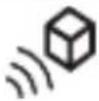 | Object Mode |
 | Celsius Scale |
 | Fahrenheit Scale |
 | Low battery indicator |
 | Frowning Face(temperature is equal or higher than 38 °C) |
 | Smiling Face(temperature is lower than 38 °C) |
 | Memory Symbol and sets of records |
Battery Installation
Low battery warning:
When the battery power becomes low, the low battery symbol will appear on the display. The thermometer can still be used during this time, but the batteries should be replaced as soon as possible. If the batteries run out completely, “Lo” will be displayed along with the low battery symbol. In this case, the batteries will need to be replaced before using the thermometer again.
Replacing the Battery:
- Gently slide the battery cover back.
- Carefully remove the old batteries and properly discard.
- Insert new batteries (Two 1.5V alkaline AAA Size) according to the proper polarity.
- Slide the battery cover back on.

natural_image
Diagram of an electric shock absorber with internal components and battery pack (no text or labels)NOTE: Battery-operated
- Please properly dispose of the batteries away from small children and heat.
- It is recommended to remove the batteries if the unit will not be used for an extended period of time.
- For long durations of non-operation, please remove all batteries from the device.
- Batteries must be disposed of in accordance with local environmental and institutional policies.
- Dispose of used batteries in accordance with the applicable legal regulations. Never dispose of batteries in the normal household waste.
Switching Between Fahrenheit or Celsius
Your thermometer can display results in either degrees Celsius (°C) or degrees Fahrenheit (°F).
To switch between Celsius and Fahrenheit, while the unit is on press and hold both the Human/Object button and the Memory button for approximately 3 seconds. This will change the mode to either °C or °F. Once the thermometer beeps, at which time the mode has been changed and you may release the buttons.
Switching between 4 Kinds of Scan Mode
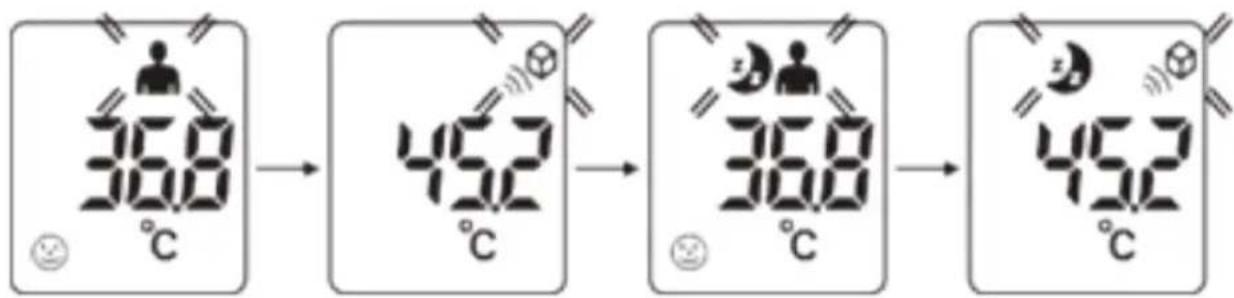
- Under power on status, you can press the Human/Object button to switch different scan mode. There are 4 kinds of mode which including Human, Object, Human/Night, and Object/Night mode (in order).
- The beep sounds will be closed when your choice in Human/Night mode, and Object/Nightmode, and the Moonsymbolwillappearson the LCD in both Night mode.
flowchart
graph LR
    A["36.8°C"] --> B["45.2°C"]
    B --> C["36.8°C"]
    C --> D["45.2°C"]
NOTE:
Each press will comes with a beep sound to ensure the setting is activated. (Except both Night modes)
Tips for Measuring Human Temperature
Bear in mind that the thermometer needs to have been in the room in which the measurement is taken for at least 30 minutes before use.
NOTE:
- Attempting to take temperature readings from sites on the body other than the forehead may produce inaccurate results.
- The patient should remain still while the reading is being taken.
- Infrared forehead temperature readings are equivalent to oral temperature readings. In all of these cases, please consult your doctor.
- Readings taken while asleep should not be compared directly to readings taken while awake, as body temperature while asleep is typically lower.
- Do not take body temperature readings within 30 minutes of being outdoors, exercising or bathing.
Measuring Human Temperature
Taking a Measurement
- Press the Measure button to power on the thermometer. The unit will run a self-test and the LCD will briefly display all of its symbols during this time. When the device is ready, '00' will appear on the screen.
- Select the desired mode by pressing and releasing the Human/Object button.
- Position the thermometer under 3cm (around 1 inches) from the center of the patient's forehead with the sensor aimed between the eyebrows.
- Press and release the Measure button.
- As you hear a short beep means this temperature reading has been completed and accompany with a back-light.
- If the temperature measurement is below 38° C, a “Smiling Face” will be appear next to the reading. If the reading is 38° C or above, a “Frowning Face” will be displayed and the RED LED light up.
- After about 30 seconds after use, the thermometer will automatically beep and shut off.
Fever Alarm:
Only in Human Mode and Human/Night Mode
Note:
- When taking a patient's temperature, ensure that the thermometer is in Human mode; the Human symbol “ ” will appear on the display.
- If the patient's skin is covered with hair, sweat, or dirt, clean the area and wait 10 minutes before taking a measurement.
- Ensure that the thermometer is held firmly during measurement and that the patient does not move until the measurement is complete. Movement can impact the measurement.
Measuring Object/Liquid Temperature
-
Press the Power button to turn the thermometer on. All symbols on the display will momentarily appear.
-
Ensure that the thermometer is in Object mode; the Object symbol will be on the display. To alternate between modes press and release the Human/Object Mode button until you see the desired measurement symbol on the display.
-
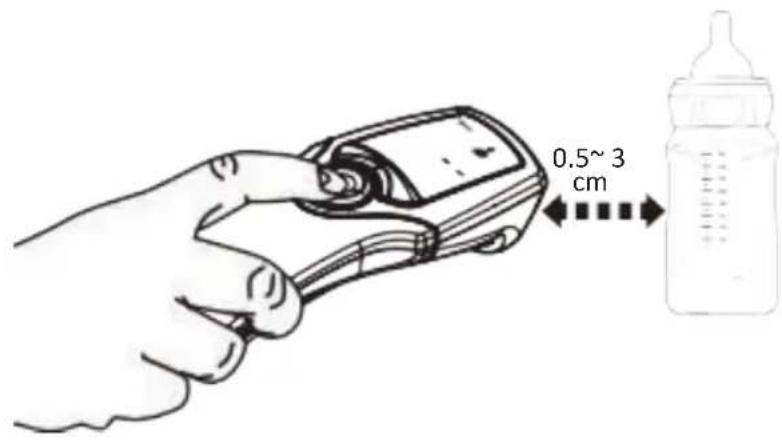
Position the thermometer under 3cm (around 1 inches) from the object.
-
Press and release the "Power & Measure button" and the temperature reading will be displayed.
-
After about 30 seconds after use, the thermometer will automatically beep and shut off.
Memory Function
Memory Recall:
You can recall up to 30 measurements currently stored in memory to share with your physician or trained healthcare professional.
-
When the device is on, press once briefly on the „Memory Button“, then pass it again to show the last measurement.
-
The “Human mode” symbol or “Object mode” symbol will appear with each measurement stored in memory to indicate whether a person or object temperature was taken.
-
Each press of the same button recalls a previous measurement.
Memory Deletion:
-
Under power on status, you may keep press "Memory Button" for more than 3 seconds to delete all the readings.
-
You will see „- -” on display and “sound a beep”, that mean all the memories are cleared.
Note:
All the readings will be cleared no matter record in Human mode or Object mode.
Clinical accuracvalidation method
Cleaning and Disinfecting
For home use device disinfection, 70% Ethanol or Isopropyl alcohol (available in the pharmacy) can be used.
- Clean the measuring sensor after each use. Use a clean cloth or cotton bud that can be moistened with 70 % alcohol.
- To clean the entire device, please use a soft cloth slightly moistened with a mild soapy solution. Under no circumstance may liquid enter the device. Do not use the device again until it is completely dry.

natural_image
Line drawing of a hand inserting a screw into a cylindrical device (no text or symbols)
natural_image
Illustration of hands using a handheld device to adjust or install a device (no text or symbols visible)Applied Standards
This product conforms to the provisions of the EC directive MDD(93/42/ EEC). The following standards apply to design and/or manufacture of the products:
- ISO 80601-2-56
Medical electrical equipment -- Part 2-56: Particular requirements for basic safety and essential performance of clinical thermometers for body temperature measurement
- IEC/EN 60601-1
Medical electrical equipment- Part 1: General requirement for safety
- IEC/EN 60601-1-2
Medical electrical equipment- Part 2: Collateral standard: Electromagnetic compatibility - Requirements and tests
Error Codes
When a malfunction or incorrect temperature measurement occurs, an error message will appear as described below.
| LCD Display | Cause | Solution |
 | The temperature measured is higher than1. Human thermometer mode: 43°C (109.4 °F)2. Object temperature mode: 100°C (212.0 °F) | Operate the thermometer only between the specified temperature ranges. If necessary, clean the sensor tip.In the event of a repeated error message, contact your retailer or Customer Services. |
 | The temperature measured is lower than1. Human thermometer mode: 34°C (93.2 °F)2. Object temperature mode: 0°C(32 °F) | |
 | The operating temperature is not in the range16°C ~40°C (60.8 °F ~104 °F) | Operate the thermometer only between the specified temperature ranges. |
Specifications
- Measuring range:
Human Body : 34°C \~43°C (93.2 °F \~109.4 °F)
Object: 0° C \~100 ° C (32.0 ° F \~212.0 ° F )
- Calibration Accuracy:
Human Body :
±0.2°C (±0.4 °F): from 34 to 43°C (93.2 to 109.4 °F)
Object: < 40°C ± 2°C ; >= 40°C ± 5%
• Display resolution: 0.1°C
• Measuring site: Forehead
- Operating environment:
16° C 40° C (60.8 °F \~ 104 °F)
with relative humidity up to 95% (non condensing)
• Storage/ Transportation environment:
-25 to 55 °C (-13 to 131 °F)
with relative humidity up to 95% (non condensing)
- Power supply:
2 x 1.5V AAA size alkaline batteries
• Weight: approx. 80g (with batteries)
- Dimensions:
approx. 128.5mm × 48.83mm × 38.85mm (L×W×H)
• Operation Distance: 0.5\~3 cm
Explanation of Symbols
 0598 0598 | The CE marking with the Registration Number of the Notified Body. This denotes the compliance of European Medical Device Directive 93/42/EEC |
 | Follow instructions for use |
 | Disposal information: Should you wish to dispose of the article, do so in accordance with current regulations. Details are available from your local authority |
 | Type of protection of applied part against electric shock, body floating |
 | Temperature limits |
 | European Authorized Representative |
 | Manufacturer's name and address |
 | Lot of production |
 | The empty, completely flat batteries must be disposed of through specially designated collection boxes, recycling points or electronics retailers. You are legally required to dispose of the batteries. |
 | This product fulfilling the requirements of the RoHS Directive 2011/65/EU. |
 | This product fulfilling the requirements of the REACH Directive EC 1907/2006 and its amendments, do not contain Substances of Very High Concern in concentration above the limit of 0.1%. No substance(s) is/are present in the parts of the product above the concentration of 0.1% weight by weight. |
Contenidos
Introduccion 1
natural_image
Diagram of an electric shock absorber with internal components and battery pack (no text or labels)NOTA: con pilas
natural_image
Line drawing of a hand inserting a screw into a cylindrical device (no text or symbols)
natural_image
Illustration of hands using a handheld device to adjust or install a device (no text or symbols visible)natural_image
Diagram of an electric shock absorber with internal components and battery pack (no text or labels)natural_image
Line drawing of a hand inserting a screw into a cylindrical device (no text or symbols)
natural_image
Illustration of hands using a handheld device to adjust or install a device (no text or symbols visible)Normas Aplicadas
natural_image
Diagram of an electric vehicle battery with internal components and external batteries (no text or labels)natural_image
Line drawing of a hand using a screwdriver to insert or insert a circular object (no text or symbols)
natural_image
Illustration of hands using a handheld device to adjust or install a device (no text or symbols visible)Приложни стандарти
9F., No. 78, Sec. 1, Kwang-Fu Rd.,
San-Chung Dist., New Taipei City,
Taiwan(R.O.C)
Made in P.R.C
_
| _
一
1
ufesa
B&B TRENDS, S.L. · C.I.F. B-86880473
- se f
- Contents
- Introduction
- Important Information Before Use
- Battery Installation
- Low battery warning:
- Replacing the Battery:
- NOTE: Battery-operated
- Switching Between Fahrenheit or Celsius
- Switching between 4 Kinds of Scan Mode
- NOTE:
- Tips for Measuring Human Temperature
- Measuring Human Temperature
- Taking a Measurement
- Fever Alarm:
- Measuring Object/Liquid Temperature
- Memory Function
- Memory Recall:
- Memory Deletion:
- Clinical accuracvalidation method
- Cleaning and Disinfecting
- Applied Standards
- - ISO 80601-2-56
- - IEC/EN 60601-1
- - IEC/EN 60601-1-2
- Error Codes
- Specifications
- Contenidos
- NOTA: con pilas
- Normas Aplicadas
- Приложни стандарти
- ufesa
Brand : UFESA
Model : IT-200
Category : Medical thermometer