WiFi SMOKE - Detector Evolveo - Free user manual and instructions
Find the device manual for free WiFi SMOKE Evolveo in PDF.


| Product Type | Photoelectric Smoke Detector |
| Brand | Evolveo |
| Model | WiFi SMOKE |
| Operating Voltage | DC 3V (2 AA batteries) |
| Standby Current | ≤10 µA |
| Alarm Current | ≤140 mA |
| Sensitivity | 0.16 dB/m ± 0.02 dB/m |
| Battery Failure Voltage | ≤2.7 V |
| Alarm Sound Pressure | ≥85 dB at 3 m |
| WiFi Frequency | 2.4 GHz (IEEE 802.11 b/g/n) |
| Protected Area | Approx. 60 m² (height <6 m) or 80 m² (height 6-12 m) |
| Working Temperature | -15°C to +55°C |
| Working Humidity | <95% RH |
| Housing Material | Flame retardant ABS |
| Dimensions | 110 × 52 mm |
| Weight (estimated) | Approx. 150 g (without batteries) |
| Key Functions | Photoelectric smoke sensor, sound & light alarm, WiFi notification via Smart Life app, manual test/reset, mute function, low battery indication, self-test, heartbeat every 7 days |
| Maintenance & Cleaning | Clean surface with soft brush every 6 months; disconnect power before cleaning |
| Safety Notes | Do not disassemble or repair; remove battery if unused for long period; store in dry ventilated place |
| Spare Parts & Repairability | Contact supplier for any faults; no user-serviceable parts |
| Compliance | CE declaration available at http://ftp.evolveo.com/CE/ |
Frequently Asked Questions - WiFi SMOKE Evolveo
User questions about WiFi SMOKE Evolveo
0 question about this device. Answer the ones you know or ask your own.
Ask a new question about this device
Download the instructions for your Detector in PDF format for free! Find your manual WiFi SMOKE - Evolveo and take your electronic device back in hand. On this page are published all the documents necessary for the use of your device. WiFi SMOKE by Evolveo.
USER MANUAL WiFi SMOKE Evolveo
natural_image
Line drawing of a room interior with ceiling beams, storage compartments, and a ceiling fixture (no text or symbols)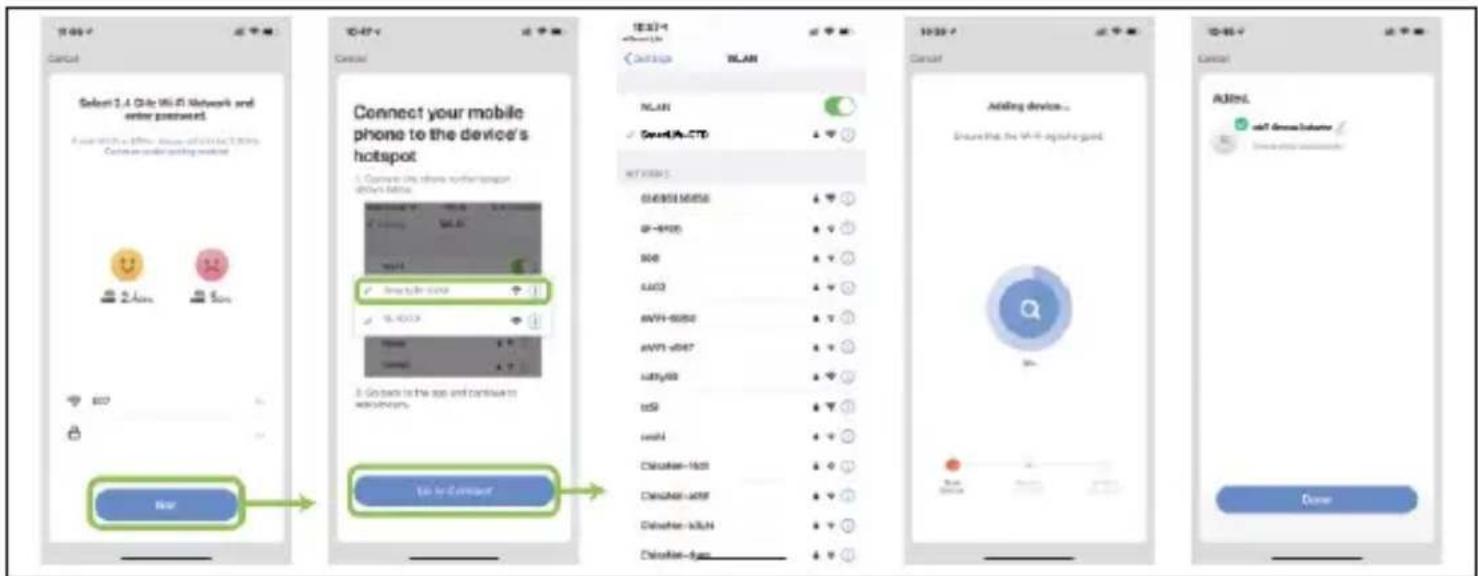
Copyright © Abacus Electric, s.r.o.
www.evolveo.com
www.facebook.com/EvolveoCZ
Dovozce / Výrobce
Abacus Electric, s.r.o.
natural_image
Line drawing of a room interior with ceiling-mounted fixture and storage compartments (no text or symbols)natural_image
Circular diagram with a central circle and four small oval shapes on its sides, labeled '4' at the top left (no text or symbols within the diagram itself)4) Montážna konzola
Tipy:
Copyright © Abacus Electric, s.r.o.
www.evolveo.com
www.facebook.com/EvolveoCZ
Dovozca / Výrobca
Abacus Electric, s.r.o.
This product is a photoelectric smoke detector (hereinafter referred to as detector), the product uses a unique structural design, and uses MCU for intelligent processing of optical signals, from design to ensure product stability. This product responds well to the smoke of smoldering and burning. This product is equipped with photoelectric smoke sensor, when the ambient smoke concentration reaches the alarm level, the detector will send out sound, light alarm signal and mobile phone alarm push from APP.
Application places
residence, shop, shopping mall, office building, library, bank, warehouse, ...
Features
• Using photoelectric smoke sensor, without any radiation
- Using ultra-low power design, can effectively extend the battery life
- With sound and light alarm, low power indicate
- With manual reset and self-test function
- WiFi reporting function
- Mute function
- After the network is connected with WiFi, under normal circumstances, the device will upload the heartbeat to update the device power within 7 days
Understanding of product Exterior
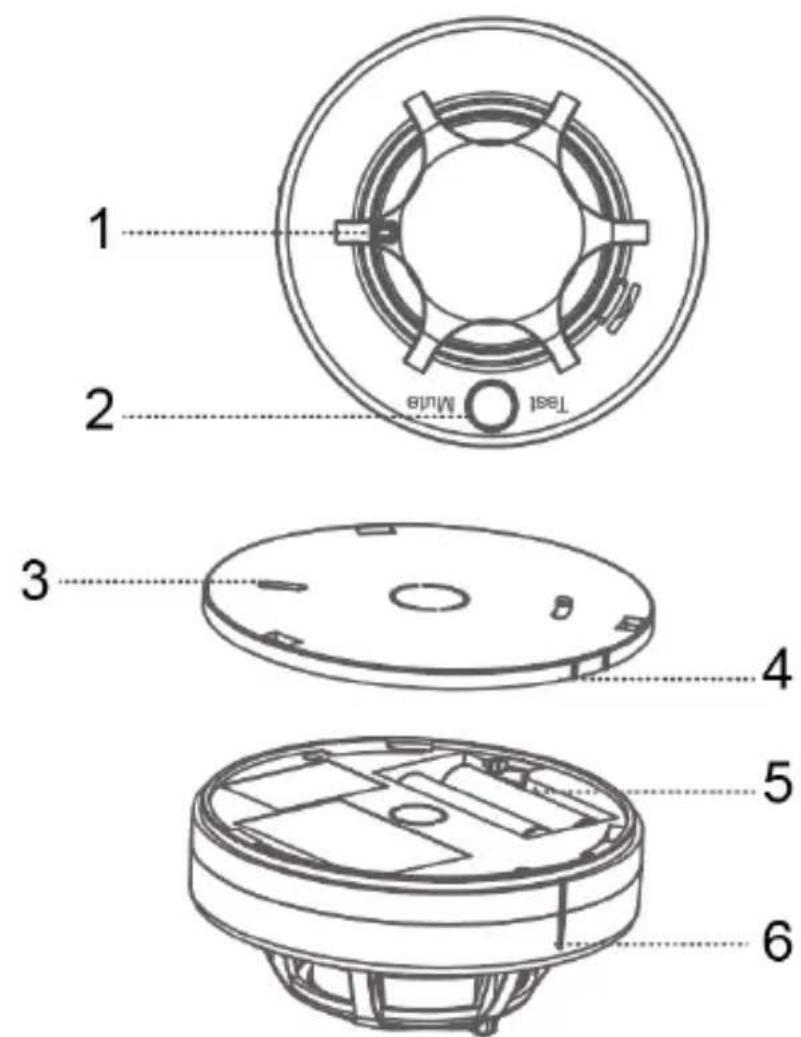
1) indicator light
4) alignment line
| 2) test / code key(alarm status, prees this key to mute)3) mounting bracket | 5) battery cap6) alignment line |
Note: When installing the bracket (please install the battery first), first align the alignment line and then rotate the detector, otherwise the detector cannot be installed.
Alarm status and indication
Voltage detection
< 2.7VDC (detect the voltage in every 40 seconds, when detected low voltage, the alarm automatically send a low voltage code, and the alarm light flash twice in every 40 seconds as a prompt):
The red status indicator of the detector flashes twice, the buzzer emits two drops at the same time, a sound pressure and an active connection to wifi to update the device's power (only the first time it is actively connected to the wifi to update the device's power);
Until the replacement of new batteries to exit this phenomenon. When this phenomenon occurs, it means that the product battery is out of power, please replace it with a new battery in time.
Alarm trigger
When the smoke concentration reaches the alarm threshold, the detector actively sends a wireless alarm signal, at the same time the status indicator flashes and the buzzer emits a sound pressure alarm, connect to WiFi (keep WiFi connected nonmally) to upload the smoke alarm status and update the device power.
Status Indicators
Normal monitoring status: The red status indicator flashes every 40 seconds (indicating lhal lhe detector is in normal monitoring status) twice every 40 seconds.
Test status: The status indicator is always on.
Battery failure status: The red status indicator flashes twice every 40 seconds.
Test status: The red status indicator flashes slowly 2 times and the green status flashes quickly to connect to the WiFi upload status.
Network upload status: green indicator flashes quickly Fast network status: green indicator flashes quickly
AP distribution network status: The green indicator flashes slowly
Test / mute button
Test: Short press this key (1.5s), the status indicator is always on and the buzzer sounds a sound pressure alarm, and connect to WiFi (already connected to the distribution network and keep the WiFi connected to the network oad the smoke alanm slatus And update Jhe device power, indicating that the praduct test is normal and can be used.
Network dribution: Open the mobile phone APP and follow the steps of the manual to configure the network.
Mute: When the detector is in the alarm state, press the test button, the detector can turn off the sound pressure alarm. 90 seconds later, continue the sound pressure alarm. Do this cycle until the smoke concentration is below the alarm threshold to exit the alarm state.
Instalation environment
The product is not suitable for use in the following places:
- place where smoke existed
- the place where is large dust, water mist, steam, oil mist pollution, corrosive gas
• the place where humidity is more than 95% - the place where ventilation speed is higher than 5m/s
Installation suggestion diagram:
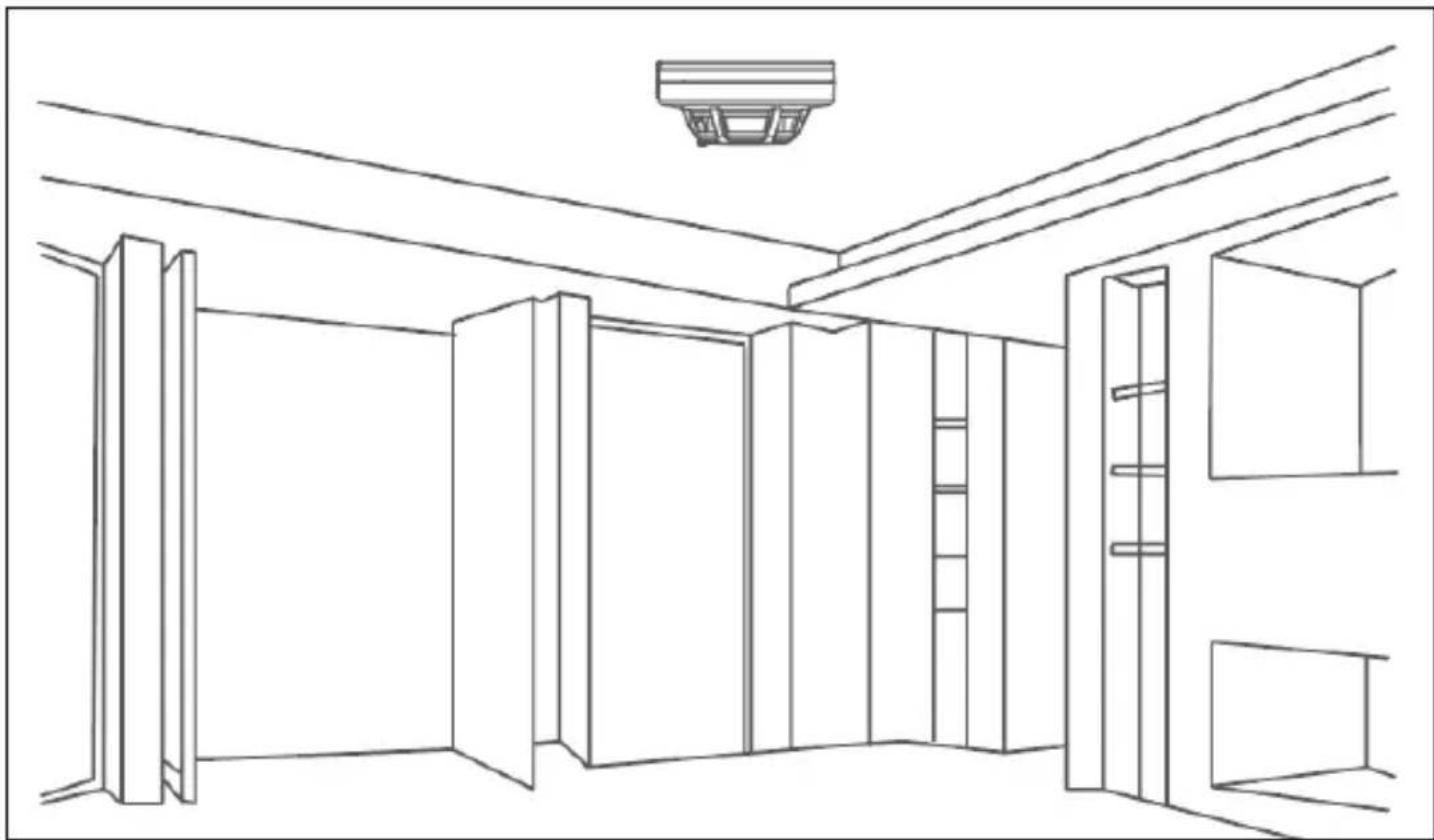
natural_image
Line drawing of a room interior with ceiling beams, walls, and storage compartments (no text or symbols)1) Insert the battery into the battery compartment as indicated by the positive and negative potarities.
2) Select the appropriate location, usually installed in the center of the detect on space on the ceiling, with the mounting screws to fix the detector base in the selected installation location.
Note: Before installation, please refer to the test function for testing.
| 1 2 3 | 4 |
| 1) Ceiling 2) Screws 3) Detector | 4) Mounting bracket |
Tips:
- Standard kit APP must be "Smart Life".
- To ensure the sensitivity of the product, to clean the surface of the detector with a soft brush every six months, must first disconnect the power during the cleaning.
- During the using, if the product is faulty, please contact the supplier in time, do not remove and repair without permission, in order to avoid accidents.
- If no need to use it for a long time, you must remove the detector, and remove the battery, put the detector into the box and stored in dry and ventilated place.
- Photoelectric smoke detectors can reduce the occurrence of disasters, but can not ensure total safety.
Fast setting
- Standalone use: After the device is installed, il can be used without any settings.
- Network use: the detector supports connection to WiFi.
STEP 1: APP Download
- In APP Stare ar Google Play search 'Smart Life' and download it, or scan the QR code as below:

- After downloading the APP, please register according to the interface and login. After opening the APP, click register to use your mobile phone number or email address for registering.
STEP 2: WiFi connection EZ mode connection
1) Make sure lhal your mobile phone already connected by WiFi (Only support 2.4GHz WiFi network).
2) Open the APP, click + on the top right comer, Choose [Security&Sensors]--[Smoke alarm (WiFi).
3) The smoke alarm sensor enters the fast mode of WiFi distribution network: long press the [test/mule key] for 7s, the green indicator light flashes quickly, and enters the fast networking mode;
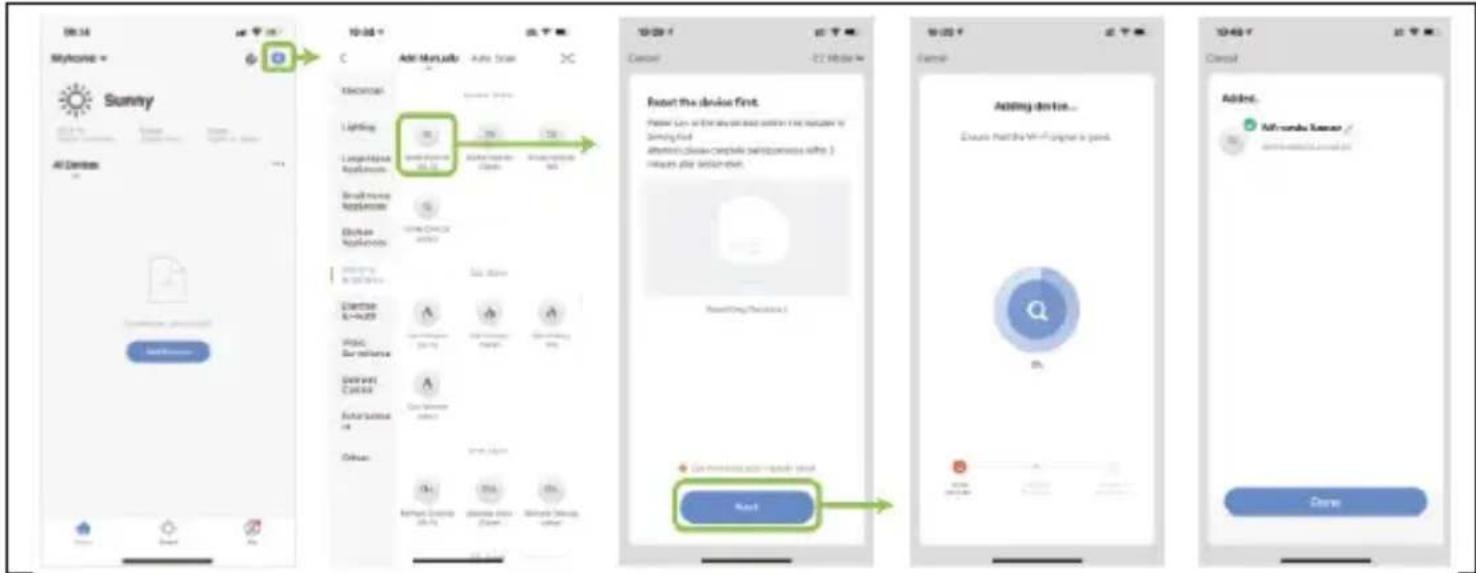
4) The smoke alarm sensor enters the WiFi configuration AP mode: long press the [test/mule key] for 7s, the green indicator light flashes quickly, release the [test/mule key] again and long press the [test/mule key) 7s, the green indicator light flashes slowly enter WiFi configuration AP mode; (Please refer to the following sequence for APP operation)
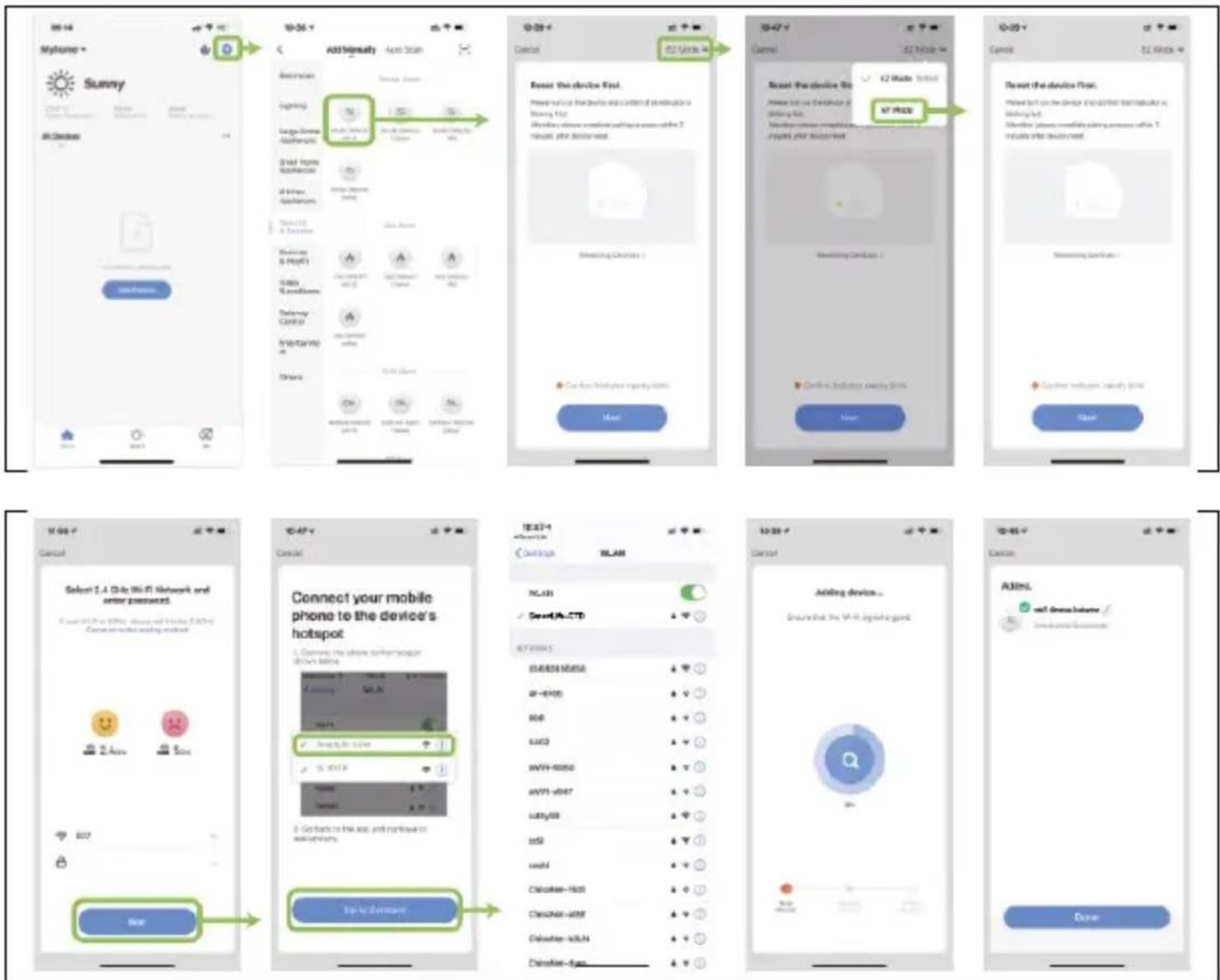
5) App interface prompts that the addition is successful and the WiFi configuration is completed; if the addition is not successful, repeat the above operation
Notes:
- After successful pairing, the detector will go into detection mode only and will be off-line in the mobile app. The detector will automatically establish a connection to the Wi-Fi network once it starts detecting a significant concentration of smoke and reaches the threshold.
- You can also test the functionality in off-line mode after pairing the detector by simply pressing the test button for 1.5 seconds and you will receive a notification in the mobile app.
- It is best to place it near a wireless router. WiFi 5Ghz band is not currently supported
Product parameters
| Operating voltage | DC 3V (2 AA batteries) |
| Standby current | ≤10uA |
| Alarm current | ≤140mA |
| Sensitivity | 0.16dB/m±0.02dB/m |
| Battery failure | ≤2.7V |
| Alarm sound pressure | ≥85dB (3m away) |
| WiFi frequency | 2.4GHz |
| Protected area | When the space height is 6-12 meters, the protected area is about 80 square meters; The height is less than 6 meters, and the protection a ea is about 60 square meters; Specific parameters should be based on the GB 20517-2006 code for the design of automatic fire alarm systems. |
| Working environment | Temperature -15°C ~ + 55°C, relative humidity<95% RH |
| Housing material | Flame retardant ABS |
| Dimensions | 110x52mm |
Technical support
If the "FAQ - Frequently Asked Questions" section did not help you, please contact EVOLVEO Technical Support: https://eshop.evolveo.com/helpdesk/
Disposal
The crossed-out container symbol on the product, in the literature or on the packaging means that in the EU all electrical and electronic equipment, batteries and accumulators must be placed in the separate waste stream at the end of their useful life. Do not dispose of these products in unsorted municipal waste.

Declaration of conformity
Abacus Electric, s.r.o. hereby declares that the EVOLVEO WiFi SMOKE complies with the requirements of the standards and regulations applicable to this type of device.
The full text of the Declaration of Conformity can be found at http://ftp.evolveo.com/CE/
Copyright © Abacus Electric, s.r.o., www.evolveo.com, www.facebook.com/EvolveoCZ
Importer / Manufacturer
Abacus Electric, s.r.o.
Planá 2, 370 01, Czech Republic
Made in P.R.C.
All rights reserved. Design and specifications are subject to change without notice.

- Abacus Electric, s.r.o.
- Tipy:
- Application places
- Features
- Alarm status and indication
- Voltage detection
- Alarm trigger
- Status Indicators
- Test / mute button
- Instalation environment
- Tips:
- Fast setting
- STEP 1: APP Download
- STEP 2: WiFi connection EZ mode connection
- Notes:
- Technical support
- Disposal
- Declaration of conformity
Brand : Evolveo
Model : WiFi SMOKE
Category : Detector