
TK-CB430 - Water filter PANASONIC - Free user manual and instructions
Find the device manual for free TK-CB430 PANASONIC in PDF.


| Product Type | Under-sink water filter with dedicated faucet |
| Brand | Panasonic |
| Model | TK-CB430 |
| Dimensions (W x D x H) | 395 mm x 125 mm x 360 mm |
| Weight (empty / full of water) | Approx. 4.2 kg / 7.7 kg |
| Main Unit Material | ABS resin, PP resin |
| Faucet Material | Stainless steel, POM resin |
| Connecting Tube Material | Polyethylene |
| Filter Media | Melt-blown polypropylene, hollow fiber membrane, compressed activated carbon |
| Filtration Flow Rate | 1.5 L/min |
| Operating Water Pressure (dynamic) | 100 kPa – 400 kPa |
| Water Temperature Range | 5 °C – 38 °C |
| Power Supply | 3 x AAA alkaline batteries (not included) |
| Battery Life (approx.) | 1 year with Panasonic alkaline batteries |
| Purification Capacity | 4,000 L for free residual chlorine, turbidity, trihalomethanes, etc. |
| Faucet Mounting Hole Diameter | 13 mm – 14 mm |
| Faucet Spout Type | Rotary type, turning radius 115 mm, height 261 mm |
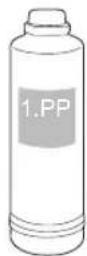
| Replacement PP Cartridge | Model TK-F4PP0-EX |
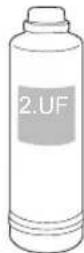
| Replacement UF Cartridge | Model TK-F4UF0-EX |
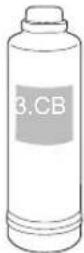
| Replacement CB Cartridge | Model TK-F4CB0-EX |
| Cartridge Replacement Interval | 12 months or 4,000 L (whichever comes first) |
| Maintenance | Wipe with damp soft cloth; do not use detergents or spray water |
| Safety Precautions | Do not disassemble; use only tap water; keep away from children; flush before use after 3 days idle |
| Included Accessories | Main unit, dedicated faucet, quick-connect valve, installation instructions |
Frequently Asked Questions - TK-CB430 PANASONIC
User questions about TK-CB430 PANASONIC
0 question about this device. Answer the ones you know or ask your own.
Ask a new question about this device
Download the instructions for your Water filter in PDF format for free! Find your manual TK-CB430 - PANASONIC and take your electronic device back in hand. On this page are published all the documents necessary for the use of your device. TK-CB430 by PANASONIC.
USER MANUAL TK-CB430 PANASONIC
Operating Instructions
Attached Installation Instructions
使用说明书
另附安装说明书
Water Purifier
For Household Use
净水机
家庭用
Model No. TK-CB430
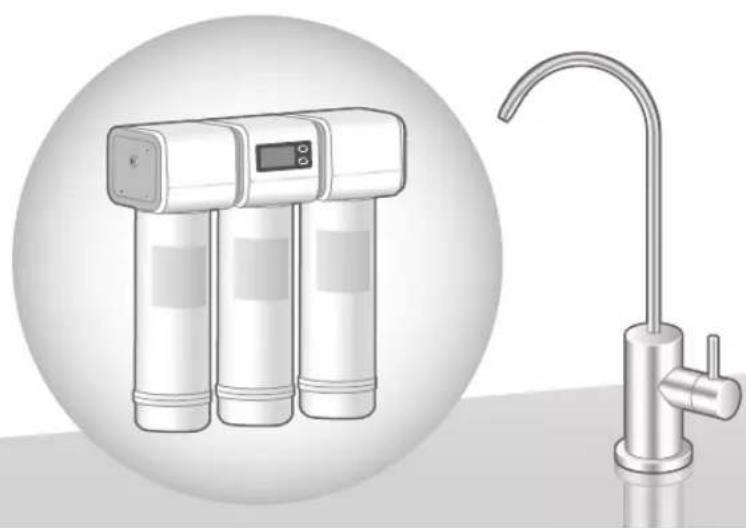
natural_image
Illustration of a waterless water dispenser with three cylindrical tanks and a curved faucet, shown in two views (no text or symbols)Thank you for purchasing this Panasonic product.
感谢您购买Panasonic的产品。
■ Please read these instructions carefully before using this product, and save this manual for future use.
■ Please carefully read the “Safety Precautions” (P. EN3 – EN5) of this manual before use.
■ Be required to present the purchase receipt for your free warranty service, failing which the company or its authorized service dealer reserves the right to decline any warranty claim.
■ Please keep in mind that the manufacturer of the product will not be responsible for any product malfunctioning or accidents resulting from the improper installation or operation of the product.
■ 请在使用本产品之前仔细阅读本说明书,并妥善保管以备日后使用。
■ 使用前请仔细阅读「安全注意事项」(P. SC3 \~ SC5)。
■ 必须出示购买单据才可享有免费保养服务,若无法出示,本公司或其授权服务代理商保留拒绝任何保养及索赔的权利。
■ 因错误安装或不正确使用,而造成产品故障或发生事故时,本公司概不负责。
Contents
Safety Precautions....EN3
Operating Precautions....EN6
Names and functions of the parts.....EN7
Steps to Take Before Operation ....EN8
Installation 1 Check the setup and accessories of the Water Purifier......EN8
Installation 2 Check after installation......EN9
Installation 3 Inspecting the Quick-connect valve......EN9
Use of the Water Purifier ....EN10
Adjustment of water pressure....EN10
Maintenance....EN11
Replacing the Batteries ....EN12
Replacing the Cartridge....EN14
About Flushing......EN20
When the water supply is cut off....EN21
When not using the product for a long period of time......EN21
Q&A......EN22
Troubleshooting......EN23
Optional Accessories......EN25
Specifications....EN26
Safety Precautions
Please make sure to follow these instructions
In order to prevent accidents to people or damage to property, always follow the instructions below.
■ The following is an explanation of danger and damage caused due to incorrect usage according to severity.

WARNING
Indicates serious injury or death.

CAUTION
Indicates risk of injury or property damage.
The symbols are classified and explained as follows. (The following are examples of symbols.)

This symbol indicates prohibition.

This symbol indicates requirements that must be followed.

WARNING
Water supply

- Use only water (such as tap water) which has been approved for consumption. (Failure to do so may cause health problems.)
- The Water Purifier cannot remove harmful substances other than those listed on P. EN26 or cannot sterilize water.

CAUTION
About batteries

- Do not dispose of batteries in fires, or short circuit or disassemble them. (Doing so may cause burns or injury.)

● Always adhere to the precautions shown on the battery. ● Do not use rechargeable battery instead of dry battery.
- Check the and of the battery, and insert them correctly. - Remove used up batteries as soon as possible.
- Use batteries that are within the specification's recommended expiry date. (Failure to do so may cause injury or accidents due to battery heat generation, explosion or fluid leakage.)
Disassembly prohibited

- Do not disassemble, repair or remodel the unit. (Doing so may cause of water leakage or malfunction.) → Please contact a dealer or subordinate service station of Panasonic for inspection or maintenance.

CAUTION
About accessories

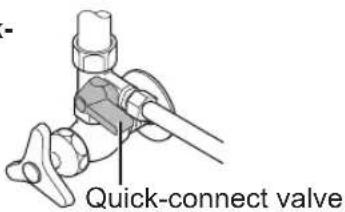
- Do not impose strong force or impact force to the Quick-connect valve.
( Doing so may cause water leakage due to the loosing of the piping connection part.)
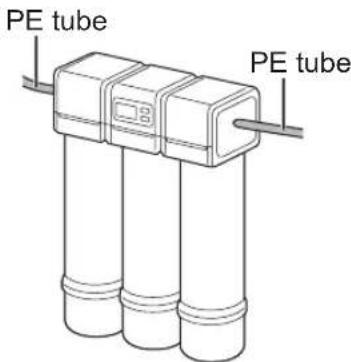
- Do not block the main spout or bend, twist, flatten, pull or clamp the PE tubes.
( Doing so may cause water to leak, prevent the output of water or cause other malfunctioning.)
- Do not connect other devices (such as hoses) to the end of the spout of the Special faucet for the Water Purifier.
( Doing so may cause water leakage or other malfunctions due to abnormal water pressure of the main unit.)

● The main unit should be used with the Special faucet for Water Purifier and installation accessories.
(Failure to do so may lead to water leakage.)
- Do not use the main unit and the Special faucet for Water Purifier without the installation accessories.
• Do not reuse old tubes.
- Contact a dealer or subordinate service station of Panasonic for the installation and removal of the Water Purifier.
(Incomplete installation and removal may lead to water leakage.)
Note for the user

● This appliance is not intended for use by persons (including children) with reduced physical, sensory or mental capabilities, or lack of experience and knowledge, unless they have been given supervision or instruction concerning use of the appliance by a person responsible for their safety.
(Risk of accident or injury.)
● Children should be supervised to ensure that they do not play with the appliance.
(Risk of accident or injury.)

CAUTION
Storing purified water

- Use purified water immediately after it is produced. When storing it for future consumption, pour into a clean sealed container, and consume it within 1 day if it is kept at room temperature or within 2 days if it is kept in the refrigerator.
( For chlorine (disinfectant) contained within tap water is removed, which result in general bacteria to increase more and cause health problems.)
Non-consumable purified water

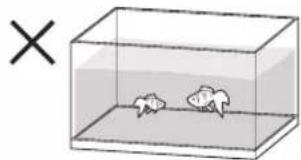
● Do not use purified water for the care of fish or other pets.
( The environment may change as a result, and the fish, etc. may die.)
natural_image
Simple line drawing of a fishbowl inside a transparent container with an 'X' symbol (no text or labels on the fishbowl itself)
- In order to avoid health problems, when starting to operate the Water Purifier, do not use the accumulated water inside the main unit for drinking use. Fully flush the water through and out, following the instructions below.
(Otherwise it may cause health problems.)
When starting use every day
Use after about 3 liters water flows out (about 2 minutes).
When the Water Purifier has not been used for 3 or more days after replacing the cartridge
Use after letting water drain for more than 10 minutes
Accidental ingestion

- Do not leave the supplied accessories within reach of infants or toddlers.
( Doing so may result in accessories being swallowed by mistake.)
- Consult a doctor immediately if you suspect that an accessory has been swallowed.
- Do not allow infants and children to play with packaging material.
(Doing so may cause suffocation.)
Operating Precautions
Water supply
- Do not drink water in case of the following conditions.
- Water which is very turbid, or containing a great deal of red rust
( Doing so may cause health problems.)
• Well water (Doing so may cause health problems.)
• Water that does not pass as drinking water (Doing so may cause health problems.)
Usage
- Do not hit the main unit or outlet pipe with heavy items like chopping boards, or subject them to strong impact.
(Doing so may cause malfunction.) - Do not put cook pot or other objects with high temperature close to the Special faucet for Water Purifier.
( Doing so may lead to deformation or malfunction.)
- Do not place the main unit or piping part in freezing condition.
( Doing so may lead to damage, water leakage, or malfunction.)
- The specification of this Water Purifier is not applicable for cold region.
- Do not let the movable part or door of a lifting cabinet touch the outlet pipe.
- Do not spray insecticide to the main unit, PE tube or other parts of the Water Purifier.
(Doing so may cause malfunction.)
In case of accidental spray, please wipe with wet cloth immediately.
- Stop using immediately and remove the batteries.
(Doing so may cause malfunction.)
• Abnormal sound during operation
- Abnormal heat or deformation of the Water Purifier
→ Contact a dealer or subordinate service station of Panasonic for inspection or maintenance.
- Do not splash water on the main unit or wash the body.
(Doing so may cause malfunction.)
Usage
● The Water Purifier usage temperature needs to be between 5 and 38°C, and exceeding 38°C may damage sealing materials and cause water leakage.
● Temperatures lower than 5^ C may result in freezing and ruptured piping, and cause water leakage.
- When the main unit or piping part of the unit is frozen, please close the water stop valve, and contact a dealer or subordinate service station of Panasonic for handling.
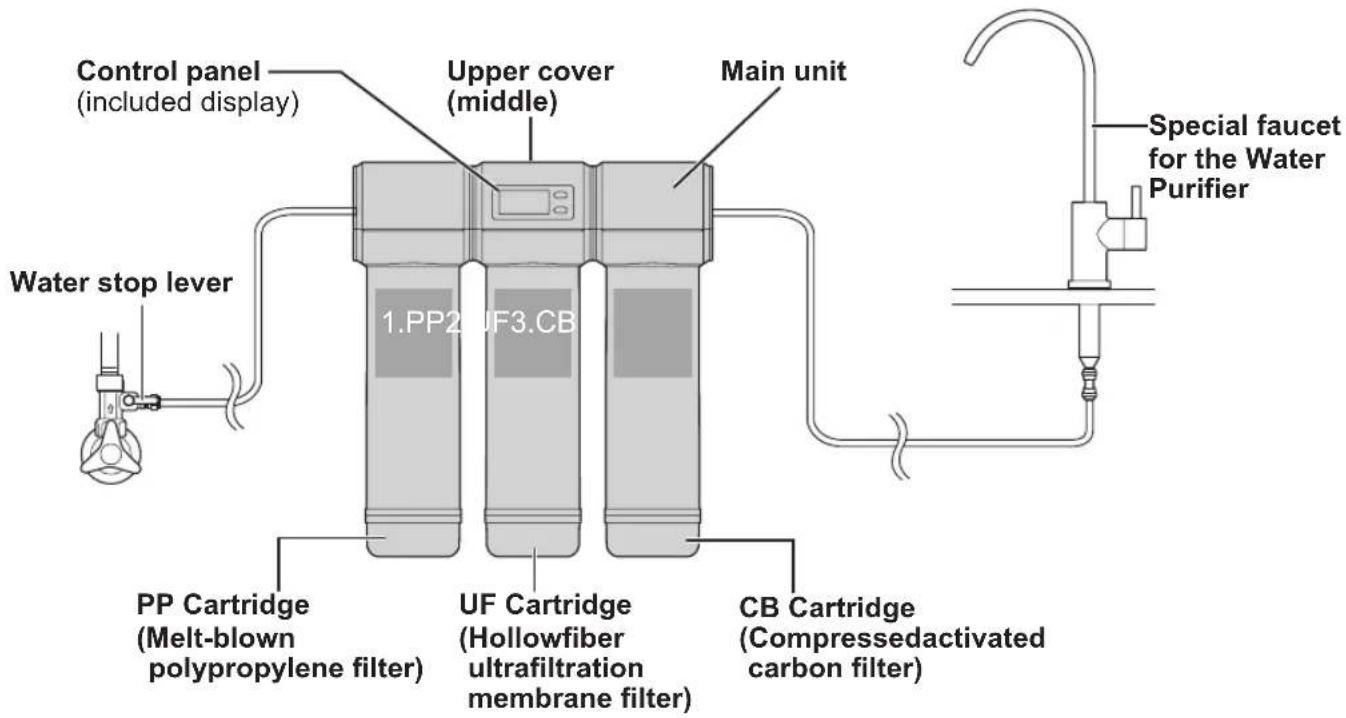
● The cartridge must be installed in the correct order to ensure full functionality. Make sure the installation order is correct.
Cartridge installation order
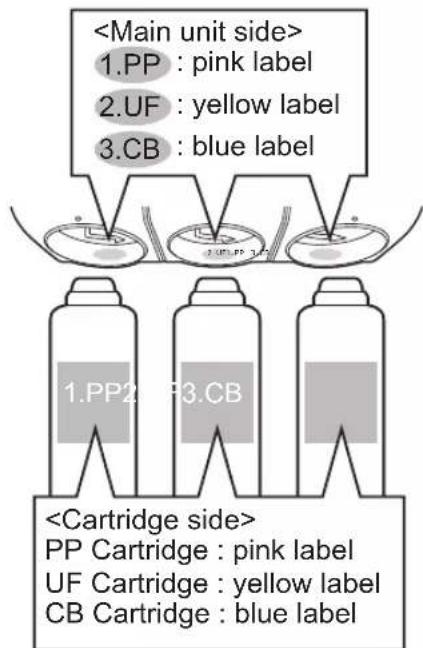
(1. PP cartridge→2. UF cartridge→3. CB cartridge)
- Do not install the product upside down.
(Doing so may cause malfunction.)
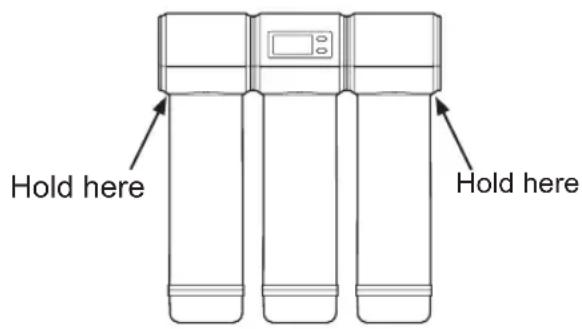
- When carrying the product, hold under both edges of the main unit.
(The upper cover can come off easily, and may fall off, causing damage.)
Names and functions of the parts
Overall figure
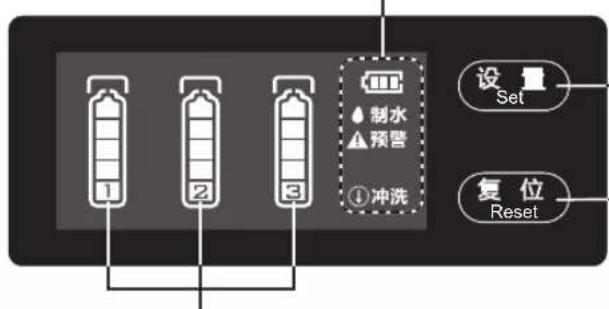
Control panel
Battery display "

● Flashes when the batteries require replacing. (P. EN12)
Water flow
● Flashes for 25 seconds when purified water is flowing.
Notice to replace

● Flashes that one remaining level of the cartridges has dropped to 1. Please replace the cartridge.
Flushing
- Flashes for approx. 10 minutes if either of the following occurs. (P. EN20) - No water has flowed for 3 days - After replacing the cartridges
flowchart
graph TD
    A["1"] --> B["2"]
    B --> C["3"]
    C --> D["制水预警"]
    D --> E["设置 Set"]
    D --> F["复位 Reset"]
Setup Button
- Select the replaced cartridge. (P. EN19)
Reset Button
- Press after replacing the cartridges (P. EN19)
1: PP cartridge life display 2: UF cartridge life display 3: CB cartridge life display
The cartridge life is shown in 5 levels. (P. EN15)
Steps to Take Before Operation
Installation 1
Check the setup and accessories of the Water Purifier
P. EN8
Installation 2
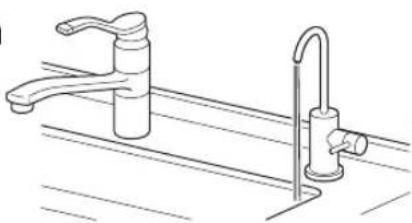
Check after installation
The air in the main unit is not completely exhausted, please drain the purified water for 10 minutes or longer.
natural_image
Line drawing of a kitchen sink and faucet with a curved handle (no text or symbols)P. EN9
Installation 3
Inspecting the Quick-connect valve
P. EN9
Installation 1
Check the setup and accessories of the Water Purifier
- In case of any deficiency, please notify your dealer or subordinate service station of Panasonic.
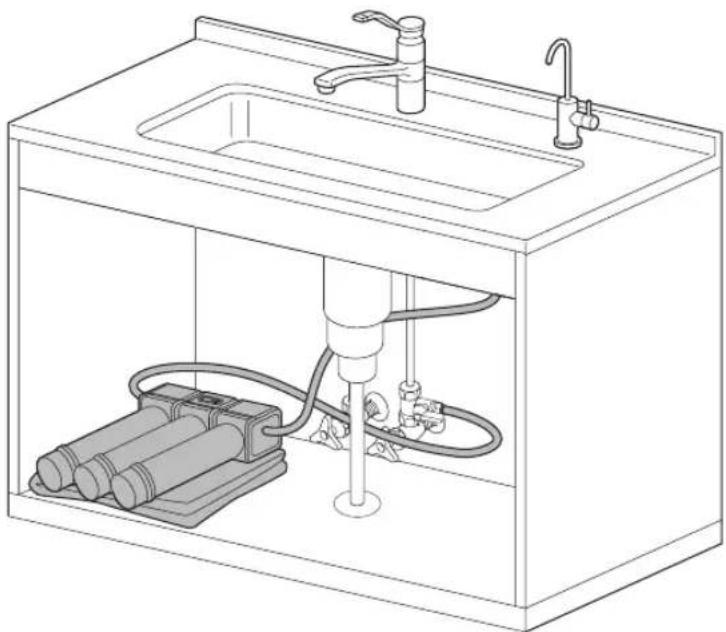
- The main unit shall be installed under the sink and connected with the Special faucet for Water Purifier. ( Please check the position where the Quick-connect valve and main unit are set.)
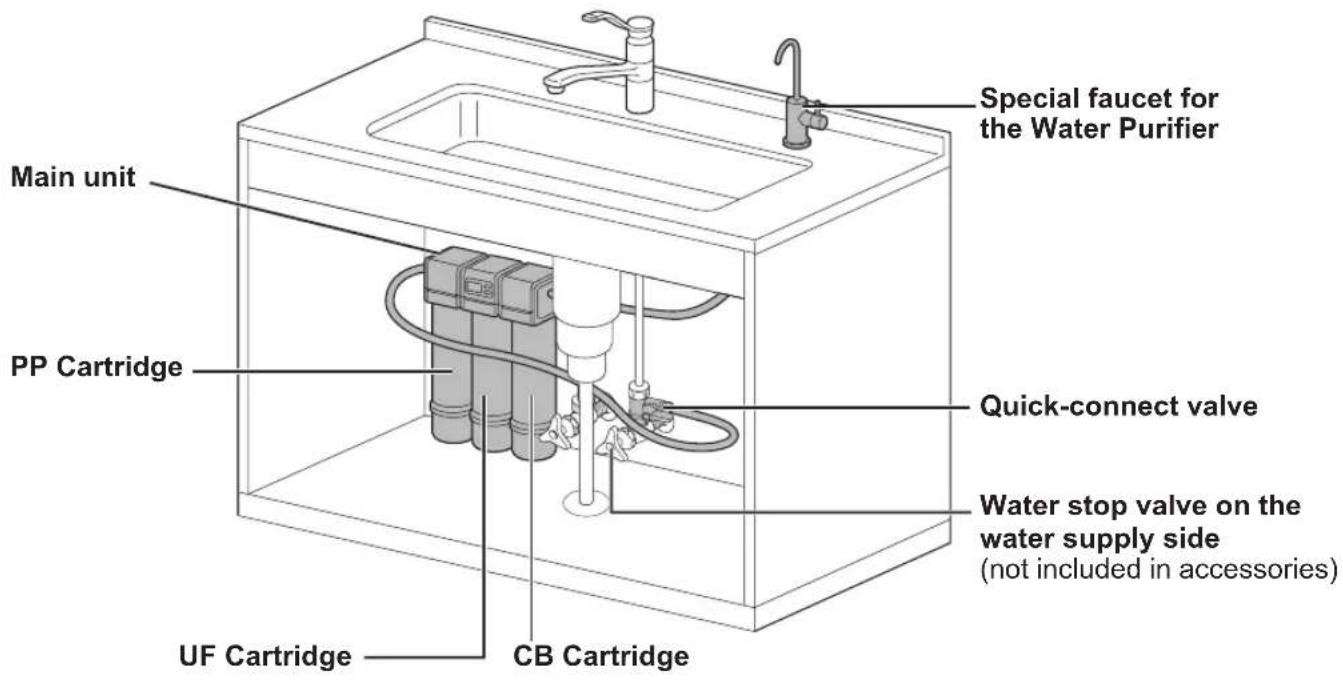
Supplied Accessories
□ Installation instructions
- Please check whether all the items in the final inspection confirmation table (P. EN27 in installation instructions) have been ticked (finished).
To exhaust the air in the main unit, the purified water shall be drained for 10 minutes or longer.
To use the Water Purifier (P. EN10)
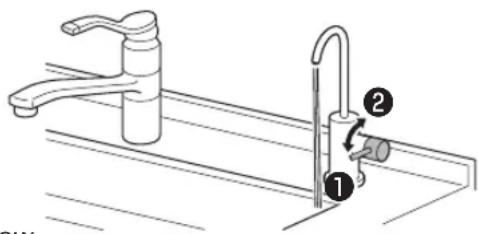
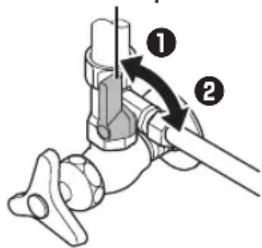
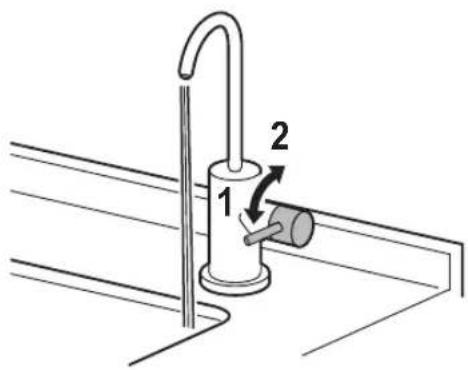
① Lower the lever (water is discharged)
② Raise the lever (water stops flowing)
- If the air in the main unit is not completely exhausted, the water flow will not be smooth.
- If there are still bubbles remaining in the purified water or it has an unpleasant smell or taste even after flushing for 10 minutes, please flush for an additional 10 minutes.
Installation 3
Inspecting the Quick-connect valve
① Close the Quick-connect valve (Raise the water stop lever)
- If the water stops flowing from the outlet pipe, the Quick-connect valve is operating correctly.
② Please open the Quick-connect valve to use. (Lower the water stop lever)
- For how to adjust Quick-connect valve, see “Adjustment of water pressure” (P. EN10).
- If other than above, the Quick-connect valve may have malfunctions, so please contact a dealer or subordinate service station of panasonic.
Water stop lever
Use of the Water Purifier
1 How to turn on water
● Lower the lever.
- If the water is splashing, please raise the water stop valve a little bit.
(For the water pressure is relatively high.)
(P. EN10)
The 制水” indicator turns off after flashing for approx. 25 seconds.
2 How to turn off water
- Raise the lever.
Note
● Regularly check for water leakages in the Water Purifier piping.
- If water is discharged when the batteries are flat, the water will be purified however water volume or usage time used as the reference for replacing the cartridge will not be counted, and the cartridge life will not be displayed correctly.
Please check the remaining level of the battery regularly. (See Replacing the Batteries on P. EN12)
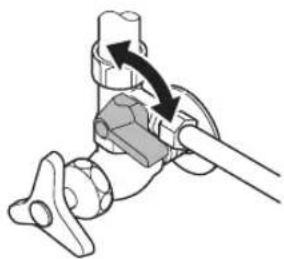
Adjustment of water pressure
- When the water pressure is relatively high
Adjust by raising the water stop lever gradually.
When the water pressure is relatively low
Adjust by lowering the water stop lever gradually.
natural_image
Mechanical assembly diagram showing a clamping mechanism with arrows indicating motion (no text or symbols)Daily maintenance
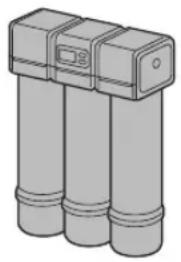
The main unit and the Special faucet for Water Purifier
Dip a soft cloth in water and wring it out to wipe the Water Purifier.
- Remove dirt on the Main spout using a cotton swab, etc.
( If the water for cleaning use is splashed and attached to the main spout, it may result in dirt or daily microbes.)
natural_image
Illustration of three cylindrical containers with a lid, no text or symbols present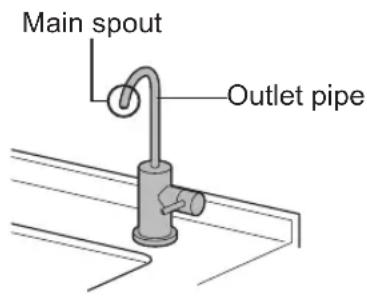
Important
- Do not use detergent, cleaning powder, diluting agent, volatile oil, ethyl alcohol or kerosene, etc. In case of accidental use, please wipe with wet cloth right away to remove the detergent, etc. on the surface.
( Detergent mixed into the water run through may lead to resin crack, electroplating damage, electroplating or coating spalling, discoloration or deformation.)
● Detergent may lead to unsmooth outflow in the outlet pipe and result in malfunction.
- Do not use metal brush or other apparatus. (Doing so may lead to damage.)
- Avoid bringing the main unit into contact with water by spraying it with water or washing. (Doing so may cause malfunction.)
● Tighten the Locking nut if the Special faucet is loose or spinning. (Installation Instructions P. EN15) (Doing so may cause of water leakage.)
Replacing the Batteries

is flashing, please replace with the new batteries.
● Prepare 3 AAA alkaline batteries.
Use of batteries not specified will significantly shorten the usage time.
1
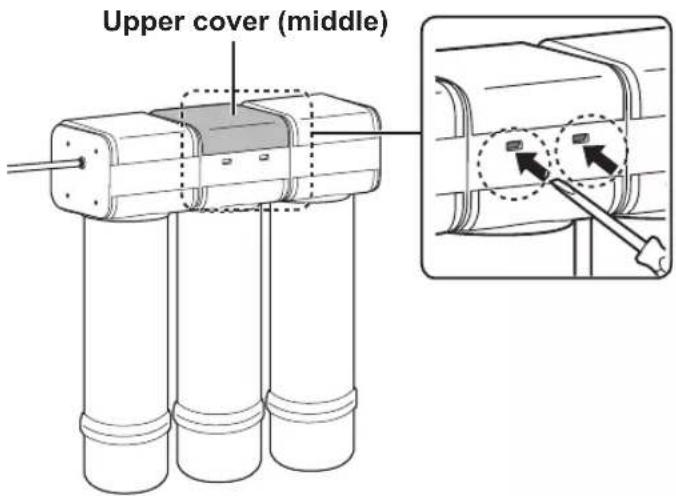
Remove the upper cover (middle).
① Push the fitting portions deep inside the holes using a flared screwdriver. (2 locations)
② Open the upper cover (middle) slowly.
The wiring are behind upper cover (middle) and there is a risk of disconnection.
2
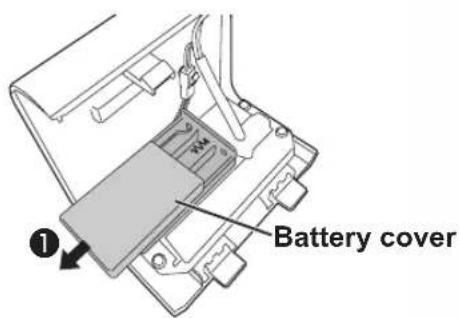
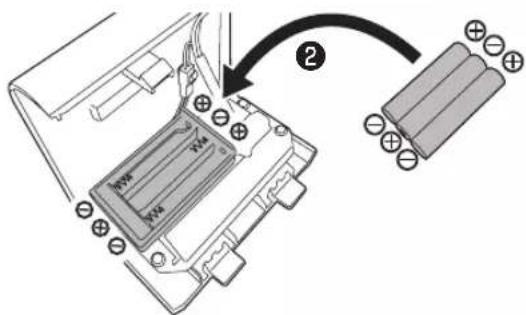
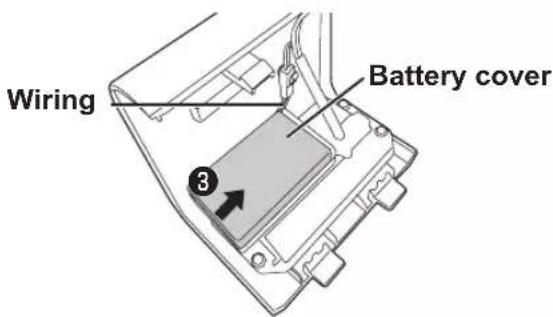
Remove the battery cover and replace the batteries.
① Slide in the direction of the arrow.

Check⊕ and ⊖, and insert the batteries all the way. (Beep will sound)
- Check that there is no foreign object on the battery and (terminals).
The display will light up for approximately 25 seconds and then turn off. Pressing the button after the display turns off will make it light up again.

Slide in the direction of the arrow until it clicks.
Take care not to pull the wiring.
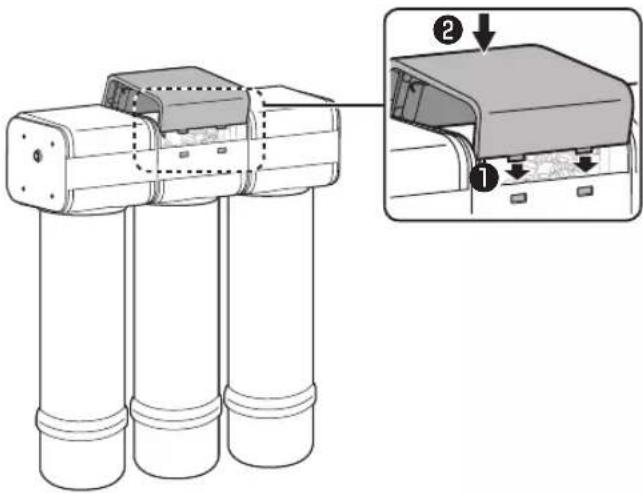
3 Install the upper cover (middle).
① Insert the claw structure in two holes from inside.
② Press the front upper part of the upper cover (middle).
Reference of battery usage time
● Three AAA Panasonic alkaline batteries would last for approximately 1 year. (Battery usage time may differ depending on the usage environment)
Note
- When inserting batteries, wipe the main unit so that no water droplets get inside.
● Always use 3 AAA alkaline batteries.
● Panasonic batteries are recommended.
Replacing the Cartridge
When the cartridge life is to be expired or the purified water ability is reduced, please replace the cartridge with a new one.
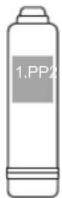
Replacement PP cartridge
Model: TK-F4PP0-EX
(P. EN25)

Replacement UF cartridge
Model: TK-F4UF0-EX
(P. EN25)

Replacement CB cartridge
Model: TK-F4CB0-EX
(P. EN25)
Cartridge replacement standard
There are 3 conditions to be used as a guide for replacement. Replace the cartridges if even one of the conditions is present.
“!”is displayed
(water volume or usage time has reached the cartridge life)
Sudden drop in water flow
When there is unpleasant smell or taste.
Please replace the cartridge that is flashing.
Please replace the UF cartridge.
Please replace the CB cartridge.
- If there is no improvement even after replacing the cartridge, please contact a dealer or subordinate service station of Panasonic for inspection or maintenance.
About the Cartridge Life Display
The cartridge level indicates the water volume or usage time.
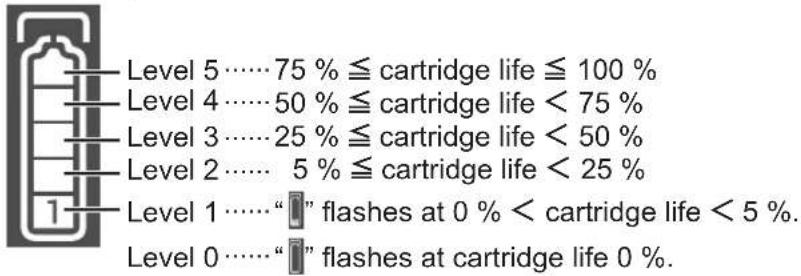
When the Cartridge Life level 2 is displayed
The replacement time is approaching. Please prepare a new cartridge.
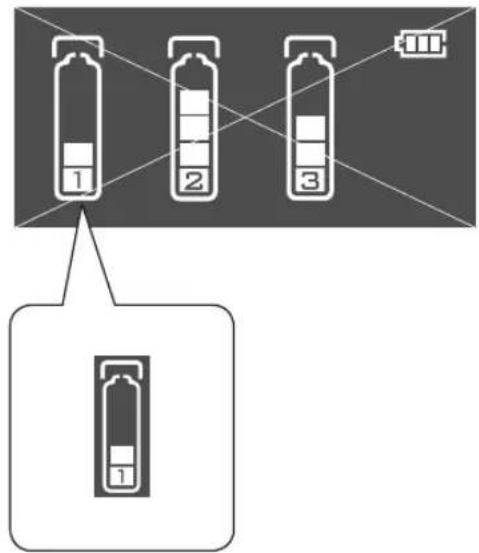
When the indicator of "Notice to replace" is flashing
Please replace.
- If there is unpleasant smell or taste, replace the cartridge even if the indicator of “预警” is not flashing.
(The purified water ability is reduced.)
- When the level of cartridge life is displayed as 1 or less (cartridge life is less than 5% ) while discharging purified water, the buzzer will sound once every 6 seconds to remind users to replace the cartridge.
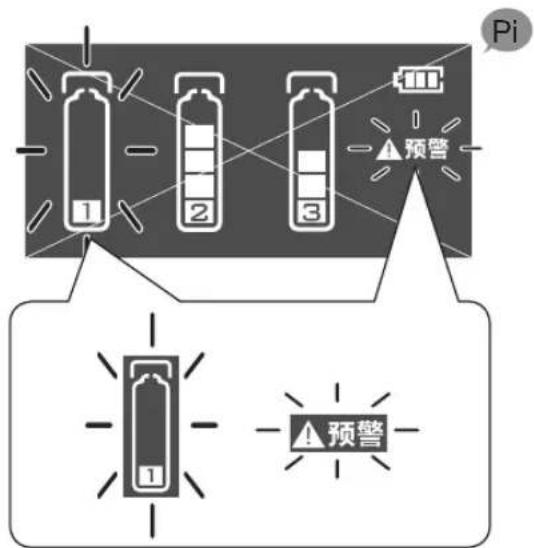
Flash
Replacing the Cartridge (continued)
Replacing method
- Do not discharge water with the cartridge removed.
(Or water will spill.)
- Dispose of the used cartridge in accordance with the applicable ordinances in the area concerned. (The material of the cartridge cover is PP. Refer to “Specifications” for the type of the filter materials (P. EN26).)
● Always perform steps 1 and 2, as they help to reduce water leakage when replacing the cartridges.
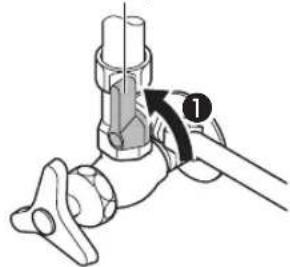
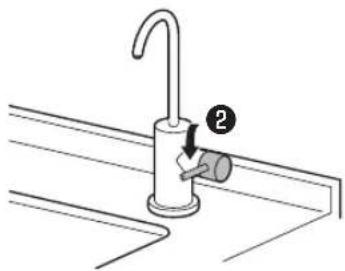
1 Drain the water from the product.
① Raise the Water stop lever.
Water stop lever
② Lower the Special faucet for Water Purifier lever.
natural_image
Line drawing of a faucet with a valve inserted, no text or symbols present2 Lay out a towel or similar object, and then lower the Water Purifier.
- Move any objects nearby, as there is the risk of water leakage when replacing the cartridges.
natural_image
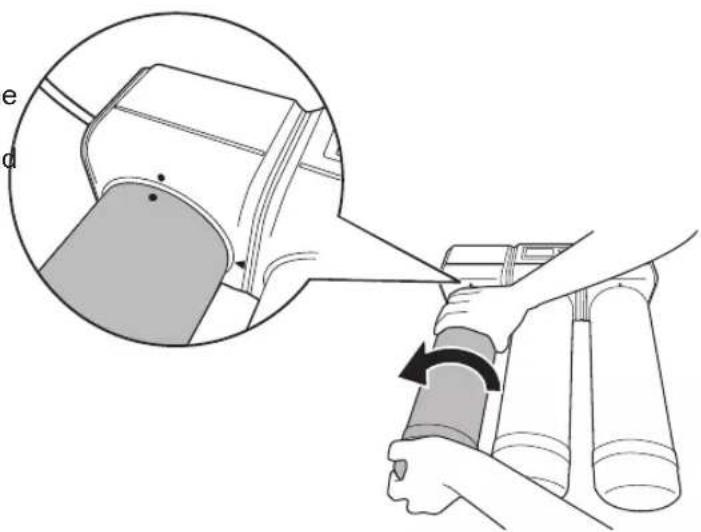
Line drawing of a kitchen sink with water pump and internal components (no text or symbols)3 Remove the cartridge. Rotate the cartridge 90° to the left.
Take care since water will drip from the cartridge.
- Check that the “●” on the main unit and the “●” on the Cartridge are aligned, then remove the cartridge.
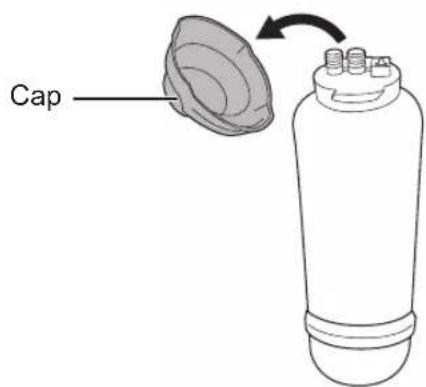
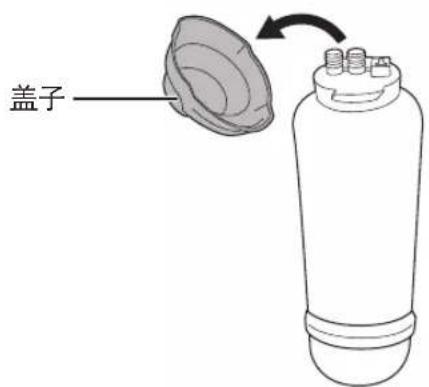
4 Remove the cap at the top of the new cartridge.
5 Check the installation position of the cartridges.
- Check that the label name and colour on the cartridges match the label name and colour on the main unit side.
Replacing the Cartridge (continued)
Replacing method
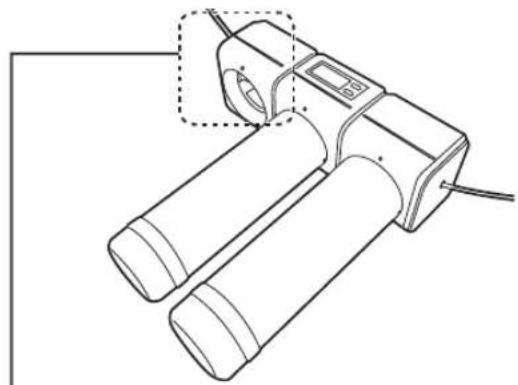
6 Install the cartridge to the main unit.
① Align the “•” of the main unit with the “•” of the cartridge, and insert the cartridge into the main unit.
2 Rotate the cartridge 90° to the right, and align the “▲” of the main unit with the “●” of the cartridge.
natural_image
Line drawing of a handheld electronic device with two cylindrical components and a digital display (no text or symbols)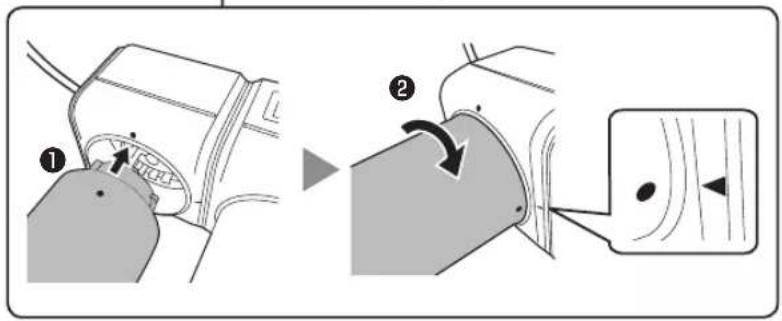
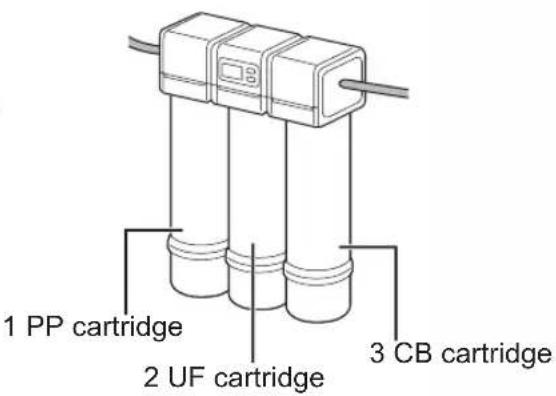
7 Check that the cartridges have been installed in the correct position.
● Installation order of cartridge is successively as follows:
From the front left side of the main unit, 1 PP cartridge - 2 UF cartridge - 3 CB cartridge
8 Raise up the Water Purifier.
9 Reset the cartridge life of the replaced cartridges.

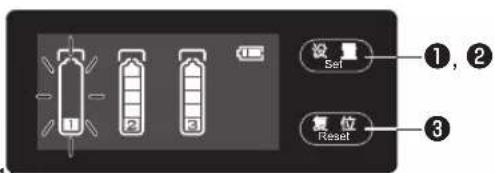
- Cartridge 1 is now selected (Cartridge 1 is flashing).


● The selected cartridge flashes for 10 seconds, and then lights up.
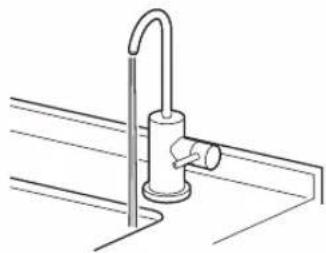
10 Discharge purified water until the water is clear. (Flush for 10 minutes or more)
冲洗flashes for about 10 minutes.
( For battery saving, display turns off after about 25 seconds.)
10 minutes after, push 设置 Set to check that "↓display is off.
natural_image
Line drawing of a faucet mounted on a surface, no text or symbols presentNote
● New cartridges contains air inside.
By flushing the air is exhausted.
● If discharging is not enough.
• Water drip from the main spaut after the lever is raised.
- Bubbles remain in the purified water.
- Unpleasant smell or taste ramains.
- If after flushing for 10 minutes the problems above are not improved, please flush for an additional 10 minutes.
● While water is running through the unit, check that water is not leaking from the area where the cartridge was installed.
● Purified water may contain some black powder (activated carbon).
The amount will decrease as more water flows, so continue checking the water condition for a while.
Important
- If the outflow has not been recovered after replacing the cartridge, please contact a dealer or subordinate service station of Panasonic.
About Flushing
The indicator of “↓” is displayed when flushing is required.
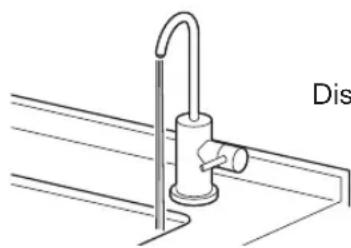
Lower the Water Purifier lever and flush water through it for 10 minutes or longer
Timing when the indicator of “flushing” is Displayed
Unit has not been used for 3 days After the cartridges have been replaced
natural_image
Technical line drawing of a pipe fitting with a handle and base, labeled 'Dis' (no other text or symbols)Discharging purified water...
Flushing (10 minutes or longer)
- 冲洗flashes for about 10 minutes.
(For battery saving, display turns off after about 25 seconds.)
10 minutes after, push 设置 Set to check that “冰消” is off.
● To remove the air or unpleasant smell or taste from the inside of the cartridge, flush the water for 10 minutes or longer. If there is no improvement, flush for an additional 10 minutes.
- Do not drink the water used for flushing.
The Display turns off after 25 seconds. Pre Set to turn it on.
Check that “↓冲洗” is turned off.
When “↓冲洗” flashing display → Flushing. Do not stop the water.
“↓冲洗” off → Flushing complete. Stop the water.
When the water supply is cut off
■ When the water supply is cut off
It is not available.
● After the water supply is recovered, please open the faucets except for the Special faucet for Water Purifier, so the tap water (raw water) flow can discharge the air or dregs in pipes. The Water Purifier can be subsequently used as usual. (The cartridge life may be greatly shortened if air or dregs enter the main unit.)
When not using the product for a long period of time
When not using the product for 3 days or longer
● Flush with water (for 10 minutes) (P. EN20)
When not using the product for 1 week or longer
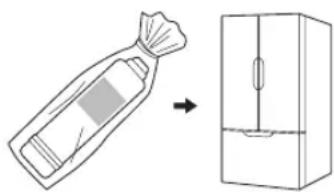
- Remove the cartridges and store them in the refrigerator.
① Close the Quick-connect valve by raising the water stop lever completely. (P. EN16)
② Remove the cartridges. (P. EN16 – EN19)
③ Place them in a sealed plastic bag and store them in the refrigerator.
④ Remove the batteries (when not using for approx. 1 month or longer).
natural_image
Simple line drawing of a bag and refrigerator with an arrow indicating transformation (no text or symbols)Note
Note that storing for long periods of time will cause the water inside the cartridges to deteriorate, even if stored in a refrigerator.
Replacing the cartridges is recommended.
- Resume using the product
① Install the cartridges. (P. EN16 – EN19)
② Insert the batteries (when not using for approx. 1 month or longer). (P. EN12 – EN13)
③ Flush with water (for 10 minutes). (P. EN20)
| Question Answer | ||
| Cartridge | I want to replace the cartridge. What type should I use? | PP cartridge is type TK-F4PP0-EX.UF cartridge is type TK-F4UF0-EX.CB cartridge is type TK-F4CB0-EX.(P. EN14) |
| Why is the indicator of “▲预警” is flashing before using 1 year? | The indicator is flashing based on both water volume and usage time, whichever comes first. | |
| Tap water/Well water | Can ground water or well water be used? | Ground water or well water cannot be used.Please use tap water, as the safety of ground water or well water cannot be adequately verified. |
| Purified water | How long does purified water last? | Purified water should be used within• 1 day at room temperature• 2 days in refrigerator (fill in a clean, sealed container)( For chlorine (disinfectant) contained within tap water is removed, which result in general bacteria to increase more and cause health problems.) |
| Other | What is the white powder that's deposited on the inside of the kettle and thermos flasks? | It is the calcium from the water.There is no problem if you drink the water, but if it bothers you, clean the containers concerned. If the white powder is not removed by cleaning, obtain some citric acid from a pharmacy, mix 50 g with 1 liter of water, leave to soak in the containers for 2 or 3 days, and then rinse the deposit off. |
| Can the batteries be removed when the product is not being used? | Do not remove the batteries, even when the product is not being used.Otherwise the cartridge life display becomes incorrect.( Water volume or usage time will not be counted if purified water is used with the batteries removed.)Note: If not using the product for 1 month or longer, remove the batteries. | |
Troubleshooting
In case of suspected malfunction, please check the following conditions before sending the Water Purifier for inspection.
In addition, if there is any abnormal condition, do not dismantle the Water Purifier by yourself. Please contact a dealer or subordinate service station of Panasonic for handling.
| Phenomenon Cause and solution | Pages for reference | ||
| Display | Nothing is displayed. | ● The display turns off automatically when not in use to prevent the batteries going flat.● Are the batteries flat?● Machine malfunction→ Contact a dealer or subordinate service station of Panasonic. | EN12EN12— |
| The indicator of▲预警 does not turn off even after replacing the cartridge. | ● Did you reset the cartridges after replacing them? EN19 | ||
| Water leakage | Cartridge mounting section. | ● Have the cartridges been firmly installed?→ Install them firmly. | EN16-EN19 |
| Spout | Water is still dripping even after closing the faucet. | ● It is not a malfunction. (Water remaining in the water outlet) | — |
| The water flow is reduced, or the water cannot flow out. | ● Is the Quick-connect valve (water stop lever) too tight?→ Please open the water stop lever.● Is the indicator of▲预警" flashing?→ Please replace the cartridge.● Has the cartridge been installed?→ Install them firmly.● Is the water stopped?→ Unitil water supply are recovered, please wait with patience.● Is the water pressure too low?→ Check for malfunctions such as insufficient flow rate, or kinked or squashed tubes.If the water flow is not restored even after checking, the cartridges may be blocked. Please replace them.If the water pressure does not recover even after replacing the cartridges, please contact a dealer or subordinate service station of Panasonic. | EN10EN16-EN19EN16-EN19— | |
| There is less water flowing out after replacing the cartridges. | ● Did you flush the water for 10 minutes or longer after replacing the cartridges?(This is required to exhaust air inside the cartridges.) | EN19 | |
| The water which flows out is warm. | ● The heat of the room temperature or the main unit will make the temperature of the water rising, therefore, the water flow is warm.→ This phenomenon is not a malfunction, please let the water flow out. | — | |
Troubleshooting (continued)
| Phenomenon Cause and solution | Pages for reference | ||
| Odor, taste, cloudiness, or discoloring | The unpleasant smell, taste or impurities cannot be removed. | ● The product has not been used for 3 days or longer.→ Flush with water for 10 minutes or longer.When not using the product for a long period of time, the water inside the cartridges will deteriorate, so replacing the cartridges is recommended.(P. EN16 - EN19)● The filter capacity of the cartridge has reduced.→ Please replace the cartridge. | EN21EN16 - EN19 |
| The purified water looks like it is sparkling. | ● This is caused by substances dissolved in the water (mainly minerals) being separated out. | — | |
| The water looks cloudy white, or contains bubbles. | ● These are air bubbles created during filtration.→ After replacing the cartridges, flush with water for 10 minutes or longer before use. | EN19 | |
| Water smells of plastic. | ● When using the product for the first time, there may be a slight smell.→ This decreases gradually as the product is used. | — | |
| Water contains black specks. | ● Activated carbon may be released when first using the product.→ This decreases gradually as the product is used. | — | |
| Others | There is condensed water in piping, let water drips from the pipe. | ● In humid places, many drips of water may condense.→ Please contact a dealer or subordinate service station of Panasonic to handle by covering the piping with heat isolation material. | — |
| Cannot install the cartridges. | ● When the cartridge is removed, the joint part might be positioned incorrectly.→ Check the position of T-shaped protruding.If not the same as the illustration, please move the protruding.Hold the protruding and the cylinder part by fingers.<Bottom of main unit>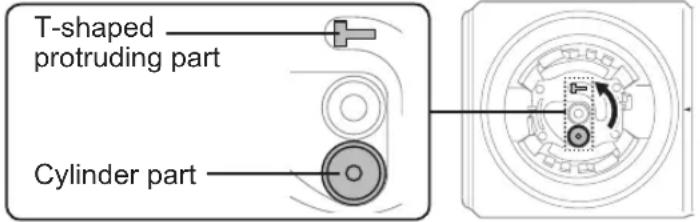 | — | |
Optional Accessories
Please purchase from a dealer or subordinate service station of Panasonic.
Consumables
Replacement PP cartridge Model: TK-F4PP0-EX
Replacement UF cartridge Model: TK-F4UF0-EX
Replacement CB cartridge Model: TK-F4CB0-EX
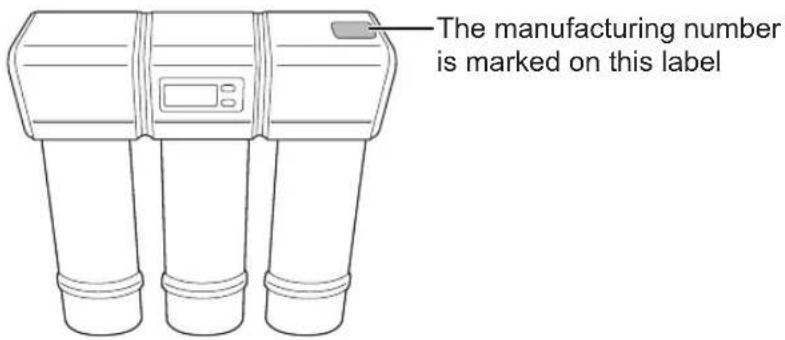
Mark position of the manufacturing number
Specifications
| Materials | Main unit ABS resin, PP resin | |
| Faucet Stainless steel, POM resin | ||
| Connecting tube Polyethylene | ||
| Filter material | Melt-blown polypropylene, hollow fiber membrane, compressed activated carbon | |
| Filtration flow volume 1.5 liters/minute | ||
| The lowest applicable dynamic water pressure 100 kPa | ||
| Pressure of water used by Water Purifier (dynamic pressure) | 100 kPa to 400 kPa | |
| Usable water service pressure (static pressure) 100 kPa to 400 kPa | ||
| Temperature of water used by Water Purifier 5 – 38 °C | ||
| Purification capacity | Free residual chlorine 4 000 L (Note 1) | |
| Turbidity 4 000 L (Note 2) | ||
| Total trihalomethane 4 000 L (Note 3) | ||
| Chloroform 4 000 L (Note 3) | ||
| Bromodichloromethane 4 000 L (Note 3) | ||
| Dibromochloromethane 4 000 L (Note 3) | ||
| Bromoform 4 000 L (Note 3) | ||
| Tetrachloroethylene | 4 000 L (Note 3) | |
| Trichloroethylene | 4 000 L (Note 3) | |
| cis-1,2-dichloroethylene and trans-1,2-dichloroethylene | 4 000 L (Note 3) | |
| Benzene | 4 000 L (Note 3) | |
| Substances other than above that can be removed | bacteria | Can be removed. (Note 4) |
| Components which cannot be filtered out | Iron dissolved in water, heavy metals (silver, copper, etc.), salt (seawater) | |
| Filter Usage Limit [Guide to Replacement] | PP cartridge: 12 months or 4 000 L (Note 5)UF cartridge: 12 months or 4 000 LCB cartridge: 12 months or 4 000 L | |
| Main unit | Dimensions (width × depth × height) | 395 mm (W) × 125 mm (D) × 360 mm (H) |
| Weight | Approx. 4.2 kg (approx. 7.7 kg when full of water) | |
| Faucet | Format | Attached faucet base: vertical type, single hole |
| Mounting hole | Diameter: 13 mm to 14 mm | |
| Main spout | Rotary type | |
| Dimensions (turning radius × height) | 115 mm × 261 mm (H) | |
Note 1: This value is for a removal rate of 80 % based on JIS S 3201:2019 tests.
Note 2: This value is for a filtration flow volume of 50 % based on JIS S 3201:2019 tests.
Note 3: This value is for a removal rate of 80 % based on Annex A, JIS S 3201:2019 tests.
Note 4: Tested in accordance with Annex B, JIS S 3201:2019 at the Japan Food Research Laboratories.
Note that the removal of bacteria are not stipulated as part of purification capacity.
Note 5: This time applies when 10 liters of water are used a day.
The actual cartridge life depends on local tap water quality and daily usage.
目录
安全注意事项.... SC3
使用注意事项 …… SC6
各部件的名称和功能 SC7
使用前要进行的步骤 ..... SC8
安装1 确认净水机的设置和配件 SC8
安装 2 安装后确认..... SC9
安装3 检查快接三通. SC9
净水机的使用 SC10
调整水压..... SC10
保养..... SC11
更换电池..... SC12
更换滤芯..... SC14
关于冲洗..... SC20
供水中断时 SC21
长时间不使用产品时 SC21
问题及解答..... SC22
故障排除..... SC23
可选配件..... SC25
规格..... SC26
安全注意事项
请确保遵循以下说明
natural_image
Simple line drawing of a transparent container with two small fish inside, no text or symbols present.
natural_image
Line drawing of a kitchen sink with faucet and faucet (no text or symbols)P. SC9
安装 3
检查快接三通
P. SC9
安装 1
确认净水机的设置和配件
安装 3 检查快接三通
① 关闭快接三通
(抬起止水杆)
注意
natural_image
Mechanical assembly diagram showing a clamping mechanism with arrows indicating motion (no text or symbols)日常保养
主机和净水机专用龙头
将软布浸入水中,拧干后擦拭净水机。
电池使用时间参考
natural_image
Line drawing of a faucet with a handle and labeled component (no text or symbols)natural_image
Line drawing of a kitchen sink with water pump and internal components (no text or symbols)3 拆除滤芯。
将滤芯向左旋转90°。
natural_image
Illustration of a person using a pressure monitor to lift a cylindrical device, with an inset showing the device's handle (no text or symbols present)4 取下新滤芯顶部的盖子
5 确认滤芯的安装位置
natural_image
Line drawing of a handheld electronic device with two cylindrical components and a digital display (no text or symbols)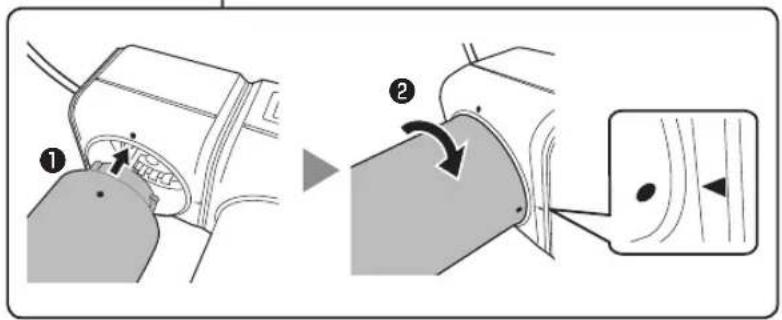
natural_image
Line drawing of a faucet with a valve inserted into a tank (no text or symbols)重要
natural_image
Simple line drawing of a bag and refrigerator with an arrow indicating transformation (no text or symbols)注意
- Operating Instructions
- Contents
- Safety Precautions....EN3
- Safety Precautions
- WARNING
- CAUTION
- Water supply
- About batteries
- Disassembly prohibited
- About accessories
- Note for the user
- Storing purified water
- Non-consumable purified water
- Accidental ingestion
- Operating Precautions
- Usage
- Names and functions of the parts
- Overall figure
- Control panel
- Battery display "
- Water flow
- Notice to replace
- Flushing
- Setup Button
- Reset Button
- 1: PP cartridge life display 2: UF cartridge life display 3: CB cartridge life display
- Steps to Take Before Operation
- Installation 1
- Check the setup and accessories of the Water Purifier
- Installation 2
- Check after installation
- Installation 3
- Inspecting the Quick-connect valve
- Supplied Accessories
- □ Installation instructions
- Use of the Water Purifier
- How to turn on water
- How to turn off water
- Note
- Adjustment of water pressure
- Daily maintenance
- The main unit and the Special faucet for Water Purifier
- Important
- Replacing the Batteries
- 1
- 2
- Install the upper cover (middle).
- Reference of battery usage time
- Replacing the Cartridge
- Cartridge replacement standard
- About the Cartridge Life Display
- When the Cartridge Life level 2 is displayed
- When the indicator of "Notice to replace" is flashing
- Please replace.
- Replacing the Cartridge (continued)
- Replacing method
- Drain the water from the product.
- Lay out a towel or similar object, and then lower the Water Purifier.
- Remove the cartridge. Rotate the cartridge 90° to the left.
- Remove the cap at the top of the new cartridge.
- Check the installation position of the cartridges.
- Install the cartridge to the main unit.
- Check that the cartridges have been installed in the correct position.
- Raise up the Water Purifier.
- Reset the cartridge life of the replaced cartridges.
- Discharge purified water until the water is clear. (Flush for 10 minutes or more)
- About Flushing
- Timing when the indicator of “flushing” is Displayed
- Flushing (10 minutes or longer)
- When the water supply is cut off
- ■ When the water supply is cut off
- When not using the product for a long period of time
- When not using the product for 3 days or longer
- When not using the product for 1 week or longer
- - Resume using the product
- Troubleshooting
- Troubleshooting (continued)
- Optional Accessories
- Consumables
- Mark position of the manufacturing number
- 目录
- 安全注意事项
- 安装 3
- 检查快接三通
- 安装 1
- 确认净水机的设置和配件
- 安装 3 检查快接三通
- 注意
- 日常保养
- 主机和净水机专用龙头
- 电池使用时间参考
- 拆除滤芯。
- 取下新滤芯顶部的盖子
- 确认滤芯的安装位置
- 重要
Brand : PANASONIC
Model : TK-CB430
Category : Water filter