HPA-600WIFI - Air purifier Heinner - Free user manual and instructions
Find the device manual for free HPA-600WIFI Heinner in PDF.


| Product Type | Air Purifier |
| Brand | Heinner |
| Model | HPA-600WIFI |
| Coverage Area | Up to 60 m² |
| CADR (Smoke/Dust/Pollen) | 300 m³/h |
| Filtration Stages | Pre-filter, HEPA H13, Activated Carbon |
| Fan Speeds | 3 speeds + Auto mode |
| Noise Level | 28 - 55 dB |
| Power Supply | 220-240V ~ 50/60Hz |
| Power Consumption | 50 W (max) |
| Dimensions (W x D x H) | 360 x 360 x 700 mm |
| Weight | 8.5 kg |
| Wi-Fi Connectivity | Yes (2.4 GHz) |
| App Control | Via Heinner Home app |
| Air Quality Sensor | PM2.5, VOC, Temperature, Humidity |
| Filter Replacement Indicator | Yes |
| Timer | 1-12 hours |
| Child Lock | Yes |
| Filter Type | HEPA H13 + Activated Carbon (replaceable) |
| Filter Life | 6-12 months (depending on usage) |
| Cleaning and Maintenance | Clean pre-filter every 2 weeks; replace HEPA/carbon filter every 6-12 months |
| Safety Features | Overheat protection, child lock, tip-over auto shut-off |
| Spare Parts Availability | Replacement filters available from Heinner or authorized dealers |
| User Manual Languages | EN, BG, HU, RO, and more (see manual) |
Frequently Asked Questions - HPA-600WIFI Heinner
User questions about HPA-600WIFI Heinner
0 question about this device. Answer the ones you know or ask your own.
Ask a new question about this device
Download the instructions for your Air purifier in PDF format for free! Find your manual HPA-600WIFI - Heinner and take your electronic device back in hand. On this page are published all the documents necessary for the use of your device. HPA-600WIFI by Heinner.
USER MANUAL HPA-600WIFI Heinner
natural_image
Exterior view of a modern air purifier unit with digital display (no text or symbols visible)- Purificator de aer
• CADR (flux de aer) 600 m³/h
• Arie de acoperire: 42\~72m²
natural_image
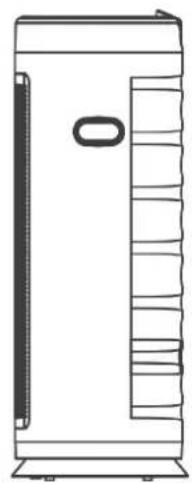
Line drawing of a rectangular container with horizontal wavy lines inside, no text or symbols presentCapac lateral
natural_image
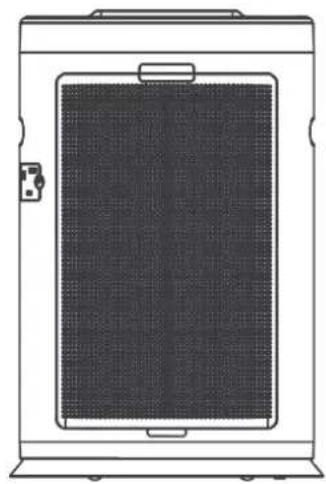
Line drawing of a vertical rectangular device with internal shelves and a handle (no text or symbols)Capac posterior
natural_image
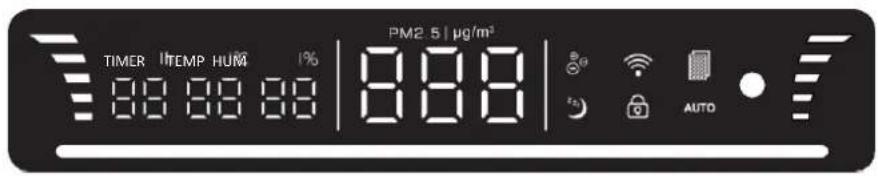
Line drawing of a rectangular device with a mesh panel and handle (no text or symbols)Panou de comandă

Panou de afişare
V. UTILIZAREA PRODUSULUI
AVERTISMENTE PRIVIND INSTALAREA
natural_image
Illustration of a hand holding a tool next to a vertical cylindrical device (no text or symbols visible)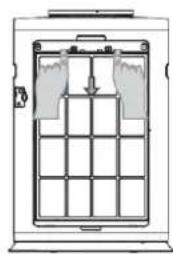
natural_image
Diagram of a mechanical or electrical enclosure with grid layout and directional arrows (no text or symbols)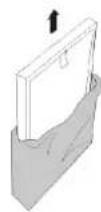
natural_image
Technical line drawing of a mechanical device with a circular component and an adjacent rectangular structure (no text or symbols)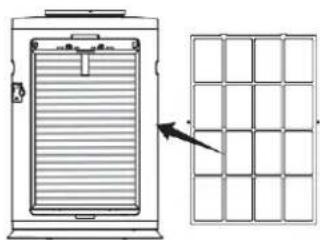
natural_image
Diagram showing a vertical panel with horizontal bars and an arrow pointing to a grid structure (no text or symbols)natural_image
Diagram of a hand holding a black cylindrical object next to a vertical panel, with no visible text or symbols.High speed smoke purification
natural_image
Exterior view of a modern air purifier unit with digital display (no text or symbols visible)- Air purifier
- CADR 600 ~m^3 / h
• Room space: 42\~72m²
Thank you for purchasing this product!
I. INTRODUCTION
Before using the appliance, please read carefully this instruction manual and keep it for future reference.
This instruction manual is designed to provide you with all required instructions related to the installation, use and maintenance of the appliance.
In order to operate the unit correctly and safety, please read this instruction manual carefully before installation and usage.
II. CONTENT OF YOUR PACKAGE

Air purifier
Filters
User manual
Remote control
Warranty card
ATTENTION! Remove the plastic bag before using the filter! Also, do not wash the filter, clean and maintain it according to the info from CLEANING AND MAINTENANCE chapter.
III. SAFETY MEASURES
-
Do not pick up or move the machine while it is running. When moving or storing, do not pull the power cord. This may cause a short circuit or do internal damage to the power cord. This may lead to a fire or electric shock.
-
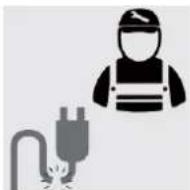
Do not damage power cord or outlet. Do not cut, excessively twist, pull, or bend the power cord. If the power cord is damaged, for your safety please call the manufacturer, service department, or a trained professional to replace it.
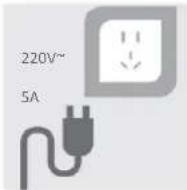
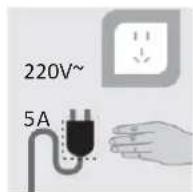
- Do not use power supplies, universal sockets, or connective devices that exceed the recommended power rating. Use only 220V\~5A AC power. Using a universal socket or connected power source that exceeds this rating may lead to overheating and cause a fire.
- Do not touch the plug with wet hands. This may result in electrical shock.
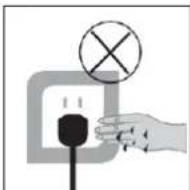
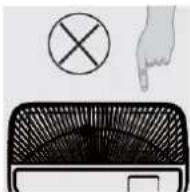
- Do not place your fingers or metal objects into the air vents. This may cause electrical shock or injury.
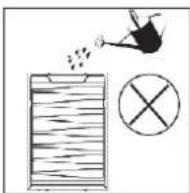
- To avoid electrical shock or fire, do not allow water, flammable cleaners, or other liquids enter the product.
- This product cannot replace normal ventilation equipment, vacuum cleaners, or kitchen fans.
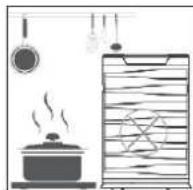
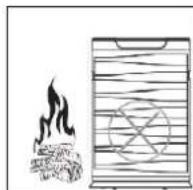
- Please do not use this product near gas appliances, heating appliances, or stoves.
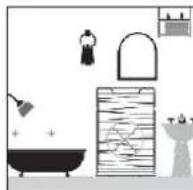
- Do not use this product in a humid or hot environment, such as the shower, restroom, or kitchen.
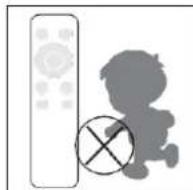
- Make sure the remote is placed somewhere children cannot reach to avoid unintended damage.
-
Do not place in the following locations:
-
Unstable places: this may cause the product to topple or fall down. This may lead to injury, electrical leakage, or fire.
- Hot or humid places, such as the shower: this may result in electrical shock or fire due to electrical leakage.
-
Places like the kitchen that emit fumes.
-
Do not use the air purifier in a room that is using an incense-type insect killer.
-
Chemical residue may accumulate in the machine and then be released, causing harm to physical health.
- After using insect killer or mosquito coils, allow the room to be fully ventilated before using the air purifier.
MANDATORY ITEMS
- Should any of the following conditions occur, turn off the machine immediately (electrical shock, sparks, or smoke may occur):
• Strange noises or vibrations during operation.
• Product is unusually hot, or has a burnt odor.
- Please clean the plug regularly
If there is dust or moisture on the plug it could damage it. This may result in a fire.
- Unplug the power cord, and wipe it with a dry cloth.
-
Unplug the power cord if the appliance is not used for a long period of time.
-
Before electrical maintenance, make sure to unplug the device.
• The product may suddenly turn on, leading to electrical shock or injury.
- Please plug the power cord securely into the power outlet. If the plug is not securely seated, this may cause overheating which may lead to electrical shock and even fire.
- Do not use a damaged plug or loose power outlet.
- Please unplug the cord using the plug insulator.
- Pulling the power cord to unplug it may cause damage to the power cord, electrical shock, short circuit, or fire.
-
Should any of the following circumstances arise, please turn off the machine power immediately and contact the service department:
-
A switch does not work.
• Power cord or plug is unusually hot.
• You detect an abnormal sound or vibration.
• Any other abnormalities or malfunctions. -
To prevent the hazard of electrical shock, only trained professionals should disassemble the machine.
IV. PRODUCT DESCRIPTION
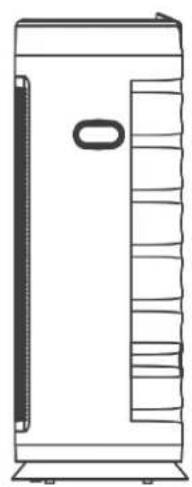
Front cover
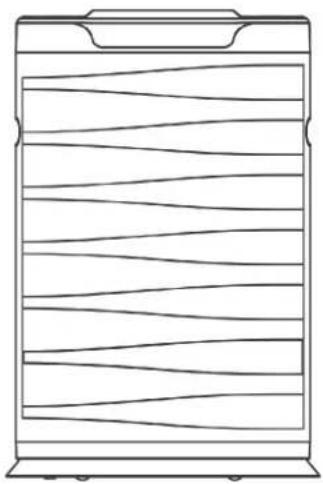
natural_image
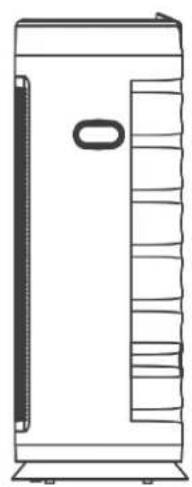
Line drawing of a rectangular container with horizontal wavy lines and a top handle (no text or symbols)Side cover
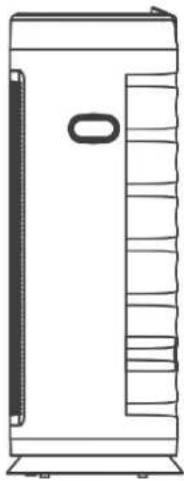
natural_image
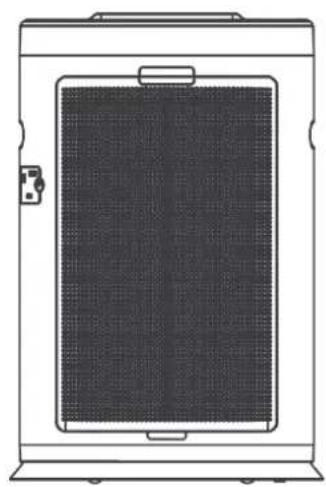
Line drawing of a rectangular industrial or storage unit with internal compartments and a central oval component (no text or symbols)Back cover
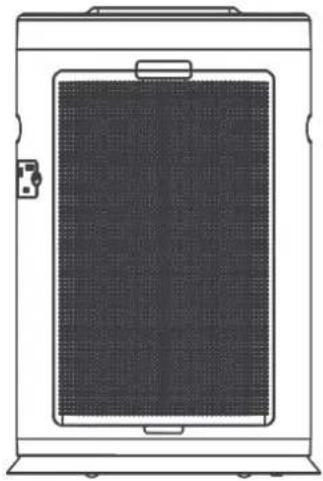
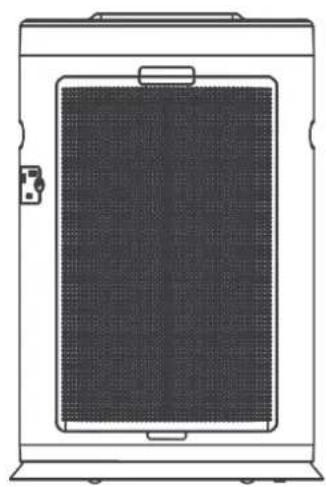
natural_image
Line drawing of a rectangular device with a mesh panel and handle, no text or symbols presentOperation panel

Display panel
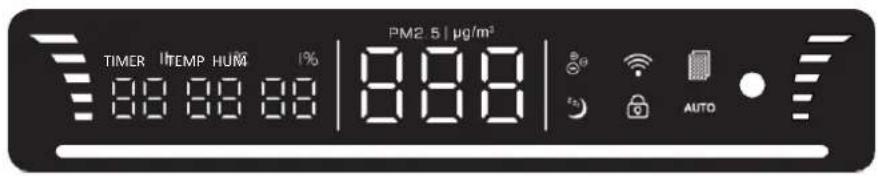
V. USING THE PRODUCT
INSTALLATION NOTICE
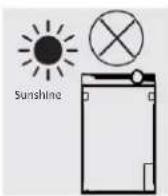
- Do not place in direct sunlight, facing air conditioner vents, or heated places. It may cause the unit to warp, deteriorate, discolor, or malfunction.
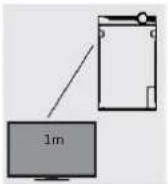
Do not place near TVs or radios. This may distort images or produce noise. Using the purifier remote may cause interference with your TV or radio. Please place at a distance of 1 m or more away from these devices. In addition, if you are sharing outlets with these devices, plugging in the purifier may distort images or produce noise. If this happens, please plug the purifier into a different outlet.
-
The product must be placed on the floor for pollen and other indoor dust. Since such particles easily fall near the floor, we recommend placing the product on a flat surface on the floor.
-
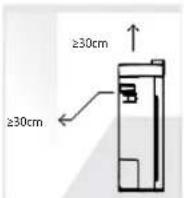
For effective room circulation, place the product approximately 30 cm or more away from walls or other objects. Please keep the backside at least 20 cm away from the wall to enable it to work more effectively.
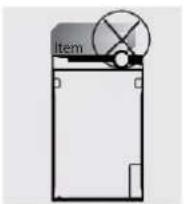
- Do not place items on the main unit or it may lead to malfunction. Be careful not to place magnets or any other metal items on here.
- Do not block the exhaust vent or supply vent. For example, do not place an object on top of the exhaust vent or in front of the supply vent.
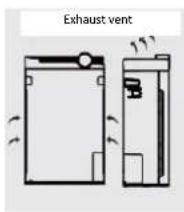
INSTALL FILTER
- Removing the filter from the plastic bag
- Remove the front cover
- Remove the filter
• Take the filter out of the packaging
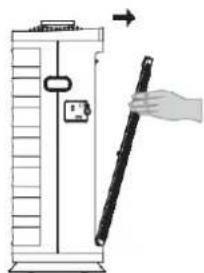
natural_image
Illustration of a hand holding a tool next to a vertical cylindrical device (no text or symbols visible)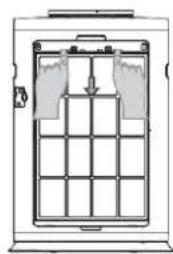
natural_image
Diagram of a door with grid layout and directional arrows indicating movement (no text or symbols)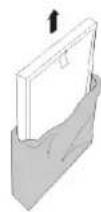
Make sure to remove plastic bag off the filter before use.
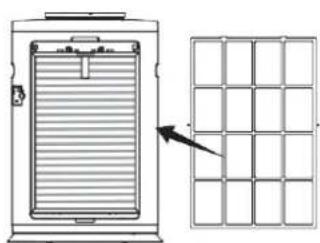
- Installing the filter and front cover
A. There are differences between the inside and the outside of the dust filter 1
B. There are differences between the inside and the outside of the front filter (Pre-filter).
(antibacterial cotton filter and HEPA filter).
Attention: The side with a handle should be placed outwards.
Attention: The side with a handle should be
placed outwards.
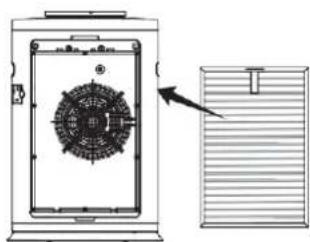
natural_image
Technical diagram of a mechanical device with internal components and an external panel (no text or symbols)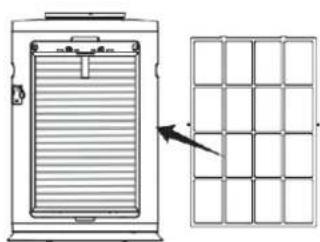
natural_image
Diagram showing a device with horizontal bars and an arrow pointing to a grid structure (no text or symbols)C. Install the front cover.
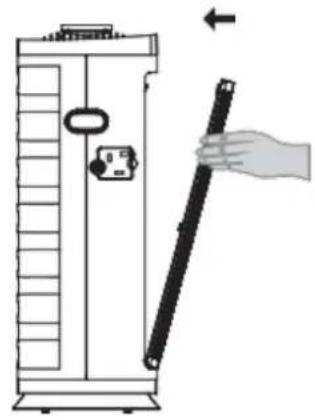
natural_image
Diagram of a hand holding a black tool next to a vertical panel, with no visible text or symbolsThe machine will not run if the front panel is uncovered.
PRODUCT FEATURES
Pre-filter
The primary filtration uses an aluminum alloy filter located in the pre-filter. It is mainly used for filtering dust larger than 5 microns, including large dust particles, dander, pollen, floating debris, and other pollutants. It can be washed many times and used repeatedly.
High Efficiency HEPA Filter
The effective HEPA filter filters airborne germs, smoke and dust particles 0.3 microns large at a rate of 99% or more. In combination with the multifunctional filter, the HEPA filter can filter out microscopic particles larger than 20 nanometers in diameter, including bacterial mold, dust, allergens, and some viruses, while filtering out smoke. According to the World Health Organization, the avian flu virus, influenza virus, and Legionella bacteria are greater than 20 nanometers. The HEPA filter can filter them out.
Anion Purifier
A large amount of anions are released into the air, which oxygen molecules then add to their outer shell to obtain a negative charge. It has an extraordinary ability to combine with positively charged floating dust, smoke, bacteria, and viruses indoors. This makes free floating debris fall, thus purifying the air and environment without harm to humans. These ultrafine particles are difficult to filter out with common mechanical equipment. Anions in the air have a special ability to capture these harmful substances. The smaller the size of the particle, the higher the capture rate. It is an effective way to eliminate these pollutants.
FUNCTION DESCRIPTIONS
1. Powering On

POWER
POWER When the machine is plugged in and on standby, "POWER" button works to turn on the machine. After this button being touched for the second time, the machine turns to standby state. (The icon is red when standby and green when on).
2. Selecting the Operating Mode

AUTO
AUTO When the machine is on, after "AUTO" button being touched, negative ion generator and germicidal lamp will start to work, and the gear will be changed according to sensor's data. (The icon will stay on when the machine operates in auto mode, otherwise it will be off.) Attention: If users change "wind speed" under auto mode, the machine will quit this mode automatically.

TIMER
TIMER When the machine is on, every touch of "TIMER" button will add 1 hour to the timing. When it accumulates to 12 hours, one more touch will turn it off.
(The icon will stay on when the machine operates in timing mode, otherwise it will be off.)

Negative Ion
When the machine is on, pressing "Negative ion" button will turn on negative ion mode, and pressing one more time will turn it off. (The icon will stay on when the machine operates in negative ion mode, otherwise it will be off.)

High speed smoke purification
In the open state, pressing speed smoke purification, the machine runs at the highest level (six At this time, the efficiency of purification is the greatest. Then press once more, will turn off the function (the icon of the key button is lit when the button is opened, and the icon is not bright when it is closed).
RESET
This machine has a filter timing reminding function, setting time for 1500 hours, when the machine runs to set time. the indicator light on the panel will light up, reminding the user to replace the filter. The reset function of the button at this time is effective, touch this button to reset the timing and reopen the timing.
In the open state, when the sleep function is opened, the machine screen closes and the whole light of the machine closes. The machine can only work in the sleep mode, not controlled by the sensor. If the timing function is opened. The machine will work until the set time. And then will go into the standby state.
(the icons of the button will light on when the sleep function opens, then the machine goes into sleep after a while, and the lights are all out.)
Note: in automatic mode, when the light of the environment is less than 5-10 lms and the duration is up to 3 minutes, the machine will automatically enter the sleep mode. When ambient light is greater than 10 lm and duration is 5 minutes, the machine is out of sleep mode working state.

When the machine is on, touch "Child-lock" button to lock all the buttons. At that time all the buttons have no reaction to any touch, while the machine still works how it is set before. Press "child-lock" button for 5 seconds and the machine will quit this mode. (The icon will stay on when the machine operates in child-lock mode, otherwise it will be off).

Wind speed When the machine is on, touch "+" or "-" to switch the gear and change the operating speed. After the gear being changed, the motor will work only at the setting level without being affected by the sensor. (Touch "wind speed" button, and the machine will quit auto mode).
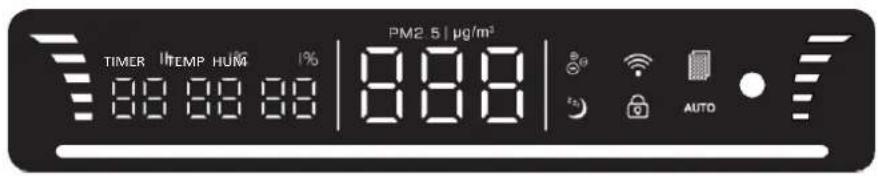
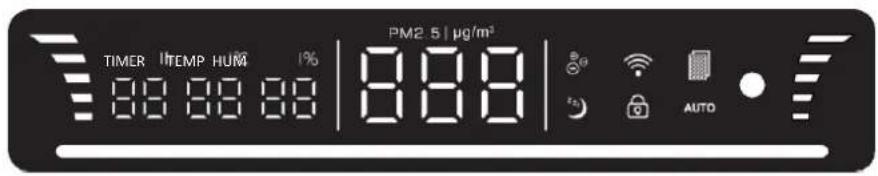
3. Display function description
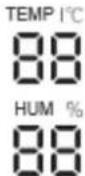
In the open state, the temperature and humidity sensor opens and does not need to be preheated to detect the temperature and humidity of the current environment. The temperature and humidity data of the current environment are shown.
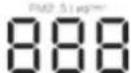
In the open state, the PM2.5 sensor needs to preheat 1 minutes to display the data, showing the data range of 1-500Ug/m3. When the value of PM 2.5 and its lower value, the PM 2.5 ug/m3 is on at the same time, which show PM2.5 value of the current environment.

When the timing function is turned on, this area displays the time unit in hours, and displays "00" when there is no timing function.

Wind speed Wind speed gear line corresponding to wind speed gear, from the bottom to up, each line represents a gear, the highest gear is five.

This icon is displayed as a WIFI connection state, long press speed key for 5 seconds in the standby state. This pattern enters the flicker state (flash for 1 second once), at this time, the mobile phone APP and machine will go into in the match state, press the mobile phone APP pair operation, after successful pairing this pattern light will be on continuously, when the machine is in the environment where there is no WIFI signal. At the time, this pattern is not bright.
Air quality operating lamp and wind speed gear
Green: very good quality: (wind speed gear one/wind speed gear two)
Blue: good quality: (wind speed gear three)
Yellow: general quality: (wind speed gear four)
Red: poor quality: (wind speed gear five/wind speed gear six)
4. Shutdown

POWER
In the open state, the "power" button on the touch panel is touched and the machine enters the standby state. Light red when in standby state) power supply.
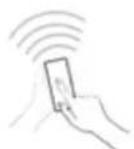
Remote control
This product is equipped with a remote control, and the button battery
(if the remote control is not used for a long time, please remove the battery).
Note: the buttons on the remote control correspond to the keys on the operation panel. The operation function and method are the same. (except for no long press function).
Note: when the remote control is first used, please take out the lid of the battery and take out the protective film on the battery.
Put back the battery cover, otherwise the remote control will not be electrized and no function.
HOW TO USE
- Auto mode. When the machine is plugged in, press "Power" button and "Auto" button in sequence, then it can operate under the control of intelligence. The motor's operating gear will adjust automatically to the PM2.5 data collected by the sensor. This mode is suitable for most situations.
- Compulsory mode. When the machine is plugged in, press "Power" button. Press "Wind speed" button to choose the gear, and then choose to turn on or off the negative ion generator. This mode is suitable for the situations where compulsory purification is needed. The machine cannot change the gear automatically in this mode.
- Night mode. In the two modes mentioned above, the machine will turn to work at the first gear as long as "Sleeping" button is touched, making sure there is no noise affecting your rest. (In auto mode, it will turn to sleeping mode when the environment becomes dark, sensed by the photosensitive sensor).
- Timing mode. In the three modes mentioned above, after "Timer" button being pressed and operating time being set, the machine will start to count down. The machine will stop working after the countdown is finished. (If you need to cancel the countdown, please press the button until the time displayed is accumulated to 12 hours, then one more touch will cancel this mode).
- Child-proof lock mode. In the four modes mentioned above, the machine will turn to childproof lock mode after "Child-proof lock" button is pressed. Any operation through the panel or the remote control will be invalid before quitting this mode. (It can be quitted by pressing "Child-proof lock" button for 5 seconds or the unlock button on the remote control.)
VI. CLEANING AND MAINTENANCE
FILTER CLEANING
- Pre-filter (approximately twice per month)
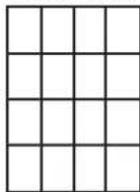
Clean the surface of the filter with a vacuum cleaner or wash with water. Allow to dry thoroughly.
- HEPA composite high efficiency filter (approximately once every two months
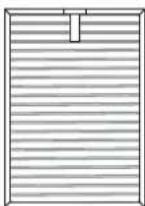
Clean the dust from the front of the filter with a vacuum cleaner.
Place the filter in a ventilated area, this will allow harmful gasses and germs to dissipate. Do not place under too much sun exposure.
The filter is delicate.
Do not press too hard on the filter while vacuuming.
Do not use water to clean this filter
Friendly Reminders:
- Before cleaning and maintenance, unplug the power cord.
- Do not operate the machine in absence of a filter. It will not be able to remove the dust. Dust taken into the machine may cause malfunction.
- When not using the machine for a long period of time, please unplug it. Power is also consumed while in standby mode.
- You may need to replace filters sooner depending on where and how you use the appliance (such as a household with a large smoking population or areas with higher air pollution). Replace the filter if filtration is not noticeable.
VII. TROUBLESHOOTING
Common malfunctions, error code description, and troubleshooting method.
| Problem | Solution |
| Cannot turn on power or pressing button has no Response. | 1. Is the Power cord plugged in? Plug in the power cord.2. Is the purifier covered? Close the front cover.3. Is the machine placed vertically on the ground? Place the machine on a flat surface.4. Is the machine in child-lock mode?When “Child-lock” appears on the display, hold the lock/reset button for 5 seconds to turn off the child-lock. |
| 1. The air is dirty, but the air pollution indicator says "green".2. The air pollution indicator remains "red" even when continuously running. | 1. Is the purifier in a place that cannot easily absorb the dirty air (dust)? Move it somewhere else.2. Is the particulate sensor dirty? Clean the particulate sensor. |
| The smell of the exhaust vent is Unpleasant. | 1. Is the filter dirty? Clean the filter.Has the filter been replaced in a long time? Replace the filter. |
| Do not automatically enter sleep mode at night. | Are the purifiers running in manual mode? Press the "auto" button on the operation panel to ensure that the purifier runs in automatic mode. |
| The purifier has been running for a long time but has had no significant improvement in air Quality. | 1. Was the plastic bag on the filter removed?Remove the plastic bag from the filter before using.2. Is the filter order incorrect? |
| The filter alarm lamp is on. | It indicates that the timing of the timing of the filter changes to the set value.When you replace the filter long press the reset button to reset. |
Environment friendly disposal
You can help protect the environment!
Please remember to respect the local regulations: hand in the non-working electrical equipment's to an appropriate waste disposal center.

HEINNER is a registered trademark of Network One Distribution SRL. Other brands and product names are trademarks or registered trademarks of their respective holders.
No part of the specifications may be reproduced in any form or by any means or used to make any derivative such as translation, transformation, or adaptation without permission from NETWORK ONE DISTRIBUTION.
Copyright © 2013 Network One Distribution. All rights reserved.
www.heinner.com, http://www.nod.ro
http://www.heinner.com, http://www.nod.ro
CE
This product is in conformity with norms and standards of European Community.
Importer: Network One Distribution
Str. Marcel Iancu, nr. 3-5, Bucuresti, Romania
Tel: +40 21 211 18 56, www.heinner.com, www.nod.ro
HEINNER
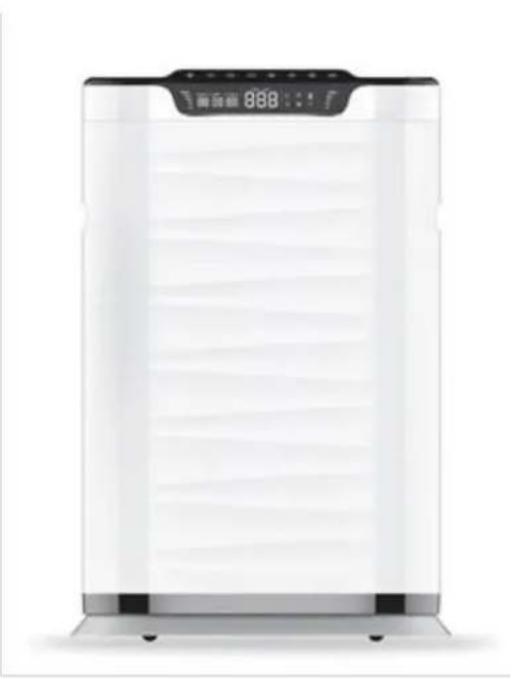
ПРЕЧИСТВАТЕЛ НА ВЪЗДУХ Модел: Forest Breeze Sense 600 Код: HPA-600WIFI
natural_image
Exterior view of a modern air purifier with digital display (no text or symbols visible)natural_image
Line drawing of a rectangular container with horizontal wavy lines and a top handle (no text or symbols)Страничен капак
natural_image
Line drawing of a vertical rectangular device with a side panel and a central oval element (no text or symbols)Заден капак
natural_image
Line drawing of a rectangular device with a mesh panel and handle, no text or symbols presentКонтролен панел

Цифров екран
V. ИЗПОЛЗВАНЕ НА ПРОДУКТА
natural_image
Diagram of a hand holding a long-handled tool next to a vertical cylindrical device (no text or symbols visible)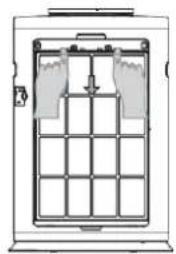
natural_image
Diagram of a vertical structure with internal grid and supports, no text or symbols present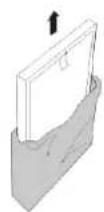
natural_image
Diagram showing a vertical panel with horizontal bars and an arrow pointing to a grid structure (no text or symbols)natural_image
Diagram of a hand holding a black cylindrical object next to a vertical panel, with no visible text or symbols.High speed smoke purification
natural_image
Exterior view of a modern air purifier unit with digital display (no text or symbols visible)natural_image
Line drawing of a rectangular container with horizontal wavy lines and a top handle (no text or symbols)Oldalsó borítólap
natural_image
Line drawing of a vertical rectangular device with a side panel and a small oval cutout (no text or symbols)Hátsó borítólap
natural_image
Line drawing of a rectangular device with a mesh panel and handle, no text or symbols presentVezérlőpult

Kijelzőpult
V. A TERMÉK HASZNÁLATA
A FELSZERELÉSRE VONATKOZÓ FIGYELMEZTETÉSEK
natural_image
Illustration of a hand holding a pen next to a vertical cylindrical device (no text or symbols visible)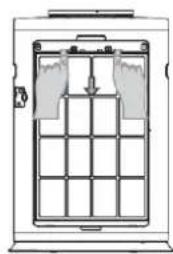
natural_image
Diagram of a door with grid layout and directional arrows indicating movement (no text or symbols)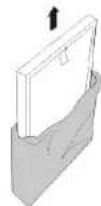
natural_image
Technical line drawing of a mechanical device with a circular component and an arrow pointing to it, next to a grid-patterned panel (no text or symbols)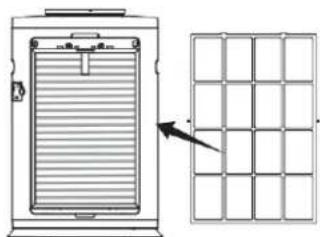
natural_image
Diagram showing a vertical panel with horizontal bars and an arrow pointing to a grid pattern (no text or symbols)natural_image
Diagram of a hand holding a black cylindrical object next to a vertical panel, with no visible text or symbols.High speed smoke purification

- UTILIZAREA PRODUSULUI
- AVERTISMENTE PRIVIND INSTALAREA
- High speed smoke purification
- Thank you for purchasing this product!
- INTRODUCTION
- CONTENT OF YOUR PACKAGE
- SAFETY MEASURES
- MANDATORY ITEMS
- PRODUCT DESCRIPTION
- USING THE PRODUCT
- INSTALLATION NOTICE
- INSTALL FILTER
- PRODUCT FEATURES
- Pre-filter
- High Efficiency HEPA Filter
- Anion Purifier
- FUNCTION DESCRIPTIONS
- Powering On
- POWER
- Selecting the Operating Mode
- AUTO
- TIMER
- Negative Ion
- RESET
- Display function description
- Shutdown
- Remote control
- HOW TO USE
- CLEANING AND MAINTENANCE
- FILTER CLEANING
- Friendly Reminders:
- TROUBLESHOOTING
- Environment friendly disposal
- HEINNER
- ИЗПОЛЗВАНЕ НА ПРОДУКТА
- A TERMÉK HASZNÁLATA
- A FELSZERELÉSRE VONATKOZÓ FIGYELMEZTETÉSEK
Brand : Heinner
Model : HPA-600WIFI
Category : Air purifier